Build efficient, productive dev teams with our practical insights & guides on engineering analytics, developer experience, and more - backed by the top tech leaders across the globe.
Software product metrics measure quality, performance, and user satisfaction, aligning with business goals to improve your software. This article explains essential metrics and their role in guiding development decisions.
Key Takeaways
Software product metrics are essential for evaluating quality, performance, and user satisfaction, guiding development decisions and continuous improvement.
Selecting the right metrics aligned with business objectives and evolving them throughout the product lifecycle is crucial for effective software development management.
Understanding Software Product Metrics
Software product metrics are quantifiable measurements that assess various characteristics and performance aspects of software products. These metrics are designed to align with business goals, add user value, and ensure the proper functioning of the product. Tracking these critical metrics ensures your software meets quality standards, performs reliably, and fulfills user expectations. User Satisfaction metrics include Net Promoter Score (NPS), Customer Satisfaction Score (CSAT), and Customer Effort Score (CES), which provide valuable insights into user experiences and satisfaction levels. User Engagement metrics include Active Users, Session Duration, and Feature Usage, which help teams understand how users interact with the product. Additionally, understanding software metric product metrics in software is essential for continuous improvement.
Evaluating quality, performance, and effectiveness, software metrics guide development decisions and align with user needs. They provide insights that influence development strategies, leading to enhanced product quality and improved developer experience and productivity. These metrics help teams identify areas for improvement, assess project progress, and make informed decisions to enhance product quality.
Quality software metrics reduce maintenance efforts, enabling teams to focus on developing new features and enhancing user satisfaction. Comprehensive insights into software health help teams detect issues early and guide improvements, ultimately leading to better software. These metrics serve as a compass, guiding your development team towards creating a robust and user-friendly product.
Key Software Quality Metrics
Software quality metrics are essential quantitative indicators that evaluate the quality, performance, maintainability, and complexity of software products. These quantifiable measures enable teams to monitor progress, identify challenges, and adjust strategies in the software development process. Additionally, metrics in software engineering play a crucial role in enhancing overall software product’s quality.
By measuring various aspects such as functionality, reliability, and usability, quality metrics ensure that software systems meet user expectations and performance standards. The following subsections delve into specific key metrics that play a pivotal role in maintaining high code quality and software reliability.
Defect Density
Defect density is a crucial metric that helps identify problematic areas in the codebase by measuring the number of defects per a specified amount of code. Typically measured in terms of Lines of Code (LOC), a high defect density indicates potential maintenance challenges and higher defect risks. Pinpointing areas with high defect density allows development teams to focus on improving those sections, leading to a more stable and reliable software product and enhancing defect removal efficiency.
Understanding and reducing defect density is essential for maintaining high code quality. It provides a clear picture of the software’s health and helps teams prioritize bug fixes and software defects. Consistent monitoring allows teams to proactively address issues, enhancing the overall quality and user satisfaction of the software product.
Code Coverage
Code coverage is a metric that assesses the percentage of code executed during testing, ensuring adequate test coverage and identifying untested parts. Static analysis tools like SonarQube, ESLint, and Checkstyle play a crucial role in maintaining high code quality by enforcing consistent coding practices and detecting potential vulnerabilities before runtime. These tools are integral to the software development process, helping teams adhere to code quality standards and reduce the likelihood of defects.
Maintaining high code quality through comprehensive code coverage leads to fewer defects and improved code maintainability. Software quality management platforms that facilitate code coverage analysis include:
SonarQube
Codacy
Coverity These platforms help improve the overall quality of the software product. Ensuring significant code coverage helps development teams deliver more reliable and robust software systems.
Maintainability Index
The Maintainability Index is a metric that provides insights into the software’s complexity, readability, and documentation, all of which influence how easily a software system can be modified or updated. Metrics such as cyclomatic complexity, which measures the number of linearly independent paths in code, are crucial for understanding the complexity of the software. High complexity typically suggests there may be maintenance challenges ahead. It also indicates a greater risk of defects.
Other metrics like the Length of Identifiers, which measures the average length of distinct identifiers in a program, and the Depth of Conditional Nesting, which measures the depth of nesting of if statements, also contribute to the Maintainability Index. These metrics help identify areas that may require refactoring or documentation improvements, ultimately enhancing the maintainability and longevity of the software product.
Performance and Reliability Metrics
Performance and reliability metrics are vital for understanding the software’s ability to perform under various conditions over time. These metrics provide insights into the software’s stability, helping teams gauge how well the software maintains its operational functions without interruption. By implementing rigorous software testing and code review practices, teams can proactively identify and fix defects, thereby improving the software’s performance and reliability.
The following subsections explore specific essential metrics that are critical for assessing performance and reliability, including key performance indicators and test metrics.
Mean Time Between Failures (MTBF)
Mean Time Between Failures (MTBF) is a key metric used to assess the reliability and stability of a system. It calculates the average time between failures, providing a clear indication of how often the system can be expected to fail. A higher MTBF indicates a more reliable system, as it means that failures occur less frequently.
Tracking MTBF helps teams understand the robustness of their software and identify potential areas for improvement. Analyzing this metric helps development teams implement strategies to enhance system reliability, ensuring consistent performance and meeting user expectations.
Mean Time to Repair (MTTR)
Mean Time to Repair (MTTR) reflects the average duration needed to resolve issues after system failures occur. This metric encompasses the total duration from system failure to restoration, including repair and testing times. A lower MTTR indicates that the system can be restored quickly, minimizing downtime and its impact on users. Additionally, Mean Time to Recovery (MTTR) is a critical metric for understanding how efficiently services can be restored after a failure, ensuring minimal disruption to users.
Understanding MTTR is crucial for evaluating the effectiveness of maintenance processes. It provides insights into how efficiently a development team can address and resolve issues, ultimately contributing to the overall reliability and user satisfaction of the software product.
Response Time
Response time measures the duration taken by a system to react to user commands, which is crucial for user experience. A shorter response time indicates a more responsive system, enhancing user satisfaction and engagement. Measuring response time helps teams identify performance bottlenecks that may negatively affect user experience.
Ensuring a quick response time is essential for maintaining high user satisfaction and retention rates. Performance monitoring tools can provide detailed insights into response times, helping teams optimize their software to deliver a seamless and efficient user experience.
User Engagement and Satisfaction Metrics
User engagement and satisfaction metrics are vital for assessing how users interact with a product and can significantly influence its success. These metrics provide critical insights into user behavior, preferences, and satisfaction levels, helping teams refine product features to enhance user engagement.
Tracking these metrics helps development teams identify areas for improvement and ensures the software meets user expectations. The following subsections explore specific metrics that are crucial for understanding user engagement and satisfaction.
Net Promoter Score (NPS)
Net Promoter Score (NPS) is a widely used gauge of customer loyalty, reflecting how likely customers are to recommend a product to others. It is calculated by subtracting the percentage of detractors from the percentage of promoters, providing a clear metric for customer loyalty. A higher NPS indicates that customers are more satisfied and likely to promote the product.
Tracking NPS helps teams understand customer satisfaction levels and identify areas for improvement. Focusing on increasing NPS helps development teams enhance user satisfaction and retention, leading to a more successful product.
Active Users
The number of active users reflects the software’s ability to retain user interest and engagement over time. Tracking daily, weekly, and monthly active users helps gauge the ongoing interest and engagement levels with the software. A higher number of active users indicates that the software is effectively meeting user needs and expectations.
Understanding and tracking active users is crucial for improving user retention strategies. Analyzing user engagement data helps teams enhance software features and ensure the product continues to deliver value.
Feature Usage
Tracking how frequently specific features are utilized can inform development priorities based on user needs and feedback. Analyzing feature usage reveals which features are most valued and frequently utilized by users, guiding targeted enhancements and prioritization of development resources.
Monitoring specific feature usage helps development teams gain insights into user preferences and behavior. This information helps identify areas for improvement and ensures that the software evolves in line with user expectations and demands.
Financial Metrics in Software Development
Financial metrics are essential for understanding the economic impact of software products and guiding business decisions effectively. These metrics help organizations evaluate the economic benefits and viability of their software products. Tracking financial metrics helps development teams make informed decisions that contribute to the financial health and sustainability of the software product. Tracking metrics such as MRR helps Agile teams understand their product's financial health and growth trajectory.
Customer Acquisition Cost (CAC) represents the total cost of acquiring a new customer, including marketing expenses and sales team salaries. It is calculated by dividing total sales and marketing costs by the number of new customers acquired. A high customer acquisition costs (CAC) shows that targeted marketing strategies are necessary. It also suggests that enhancements to the product’s value proposition may be needed.
Understanding CAC is crucial for optimizing marketing efforts and ensuring that the cost of acquiring new customers is sustainable. Reducing CAC helps organizations improve overall profitability and ensure the long-term success of their software products.
Customer Lifetime Value (CLV)
Customer lifetime value (CLV) quantifies the total revenue generated from a customer. This measurement accounts for the entire duration of their relationship with the product. It is calculated by multiplying the average purchase value by the purchase frequency and lifespan. A healthy ratio of CLV to CAC indicates long-term value and sustainable revenue.
Tracking CLV helps organizations assess the long-term value of customer relationships and make informed business decisions. Focusing on increasing CLV helps development teams enhance customer satisfaction and retention, contributing to the financial health of the software product.
Monthly Recurring Revenue (MRR)
Monthly recurring revenue (MRR) is predictable revenue from subscription services generated monthly. It is calculated by multiplying the total number of paying customers by the average revenue per customer. MRR serves as a key indicator of financial health, representing consistent monthly revenue from subscription-based services.
Tracking MRR allows businesses to forecast growth and make informed financial decisions. A steady or increasing MRR indicates a healthy subscription-based business, while fluctuations may signal the need for adjustments in pricing or service offerings.
Choosing the Right Metrics for Your Project
Selecting the right metrics for your project is crucial for ensuring that you focus on the most relevant aspects of your software development process. A systematic approach helps identify the most appropriate product metrics that can guide your development strategies and improve the overall quality of your software. Activation rate tracks the percentage of users who complete a specific set of actions consistent with experiencing a product's core value, making it a valuable metric for understanding user engagement.
The following subsections provide insights into key considerations for choosing the right metrics.
Align with Business Objectives
Metrics selected should directly support the overarching goals of the business to ensure actionable insights. By aligning metrics with business objectives, teams can make informed decisions that drive business growth and improve customer satisfaction. For example, if your business aims to enhance user engagement, tracking metrics like active users and feature usage will provide valuable insights.
A data-driven approach ensures that the metrics you track provide objective data that can guide your marketing strategy, product development, and overall business operations. Product managers play a crucial role in selecting metrics that align with business goals, ensuring that the development team stays focused on delivering value to users and stakeholders.
Balance Vanity and Actionable Metrics
Clear differentiation between vanity metrics and actionable metrics is essential for effective decision-making. Vanity metrics may look impressive but do not provide insights or drive improvements. In contrast, actionable metrics inform decisions and strategies to enhance software quality. Vanity Metrics should be avoided; instead, focus on actionable metrics tied to business outcomes to ensure meaningful progress and alignment with organizational goals.
Using the right metrics fosters a culture of accountability and continuous improvement within agile teams. By focusing on actionable metrics, development teams can track progress, identify areas for improvement, and implement changes that lead to better software products. This balance is crucial for maintaining a metrics focus that drives real value.
Evolve Metrics with the Product Lifecycle
As a product develops, the focus should shift to metrics that reflect user engagement and retention in line with our development efforts. Early in the product lifecycle, metrics like user acquisition and activation rates are crucial for understanding initial user interest and onboarding success.
As the product matures, metrics related to user satisfaction, feature usage, and retention become more critical. Metrics should evolve to reflect the changing priorities and challenges at each stage of the product lifecycle.
Continuous tracking and adjustment of metrics ensure that development teams remain focused on the most relevant aspects of project management in the software, leading to sustained tracking product metrics success.
Tools for Tracking and Visualizing Metrics
Having the right tools for tracking and visualizing metrics is essential for automatically collecting raw data and providing real-time insights. These tools act as diagnostics for maintaining system performance and making informed decisions.
The following subsections explore various tools that can help track software metrics and visualize process metrics and software metrics effectively.
Static Analysis Tools
Static analysis tools analyze code without executing it, allowing developers to identify potential bugs and vulnerabilities early in the development process. These tools help improve code quality and maintainability by providing insights into code structure, potential errors, and security vulnerabilities. Popular static analysis tools include Typo, SonarQube, which provides comprehensive code metrics, and ESLint, which detects problematic patterns in JavaScript code.
Using static analysis tools helps development teams enforce consistent coding practices and detect issues early, ensuring high code quality and reducing the likelihood of software failures.
Dynamic Analysis Tools
Dynamic analysis tools execute code to find runtime errors, significantly improving software quality. Examples of dynamic analysis tools include Valgrind and Google AddressSanitizer. These tools help identify issues that may not be apparent in static analysis, such as memory leaks, buffer overflows, and other runtime errors.
Incorporating dynamic analysis tools into the software engineering development process helps ensure reliable software performance in real-world conditions, enhancing user satisfaction and reducing the risk of defects.
Insights from performance monitoring tools help identify performance bottlenecks and ensure adherence to SLAs. By using these tools, development teams can optimize system performance, maintain high user engagement, and ensure the software meets user expectations, providing meaningful insights.
AI Coding Reviews
AI coding assistants do accelerate code creation, but they also introduce variability in style, complexity, and maintainability. The bottleneck has shifted from writing code to understanding, reviewing, and validating it.
Effective AI-era code reviews require three things:
Risk-Based Routing Not every PR should follow the same review path. Low-risk, AI-heavy refactors may be auto-reviewed with lightweight checks. High-risk business logic, security-sensitive changes, and complex flows require deeper human attention.
Metrics Beyond Speed Measuring “time to first review” and “time to merge” is not enough. Teams must evaluate:
Review depth
Addressed rate
Reopen or rollback frequency
Rework on AI-generated lines These metrics help separate stable long-term quality from short-term velocity.
AI-Assisted Reviewing, Not Blind Approval Tools like Typo can summarize PRs, flag anomalies in changed code, detect duplication, or highlight risky patterns. The reviewer’s job becomes verifying whether AI-origin code actually fits the system’s architecture, boundaries, and long-term maintainability expectations.
AI coding reviews are not “faster reviews.” They are smarter, risk-aligned reviews that help teams maintain quality without slowing down the flow of work.
Summary
Understanding and utilizing software product metrics is crucial for the success of any software development project. These metrics provide valuable insights into various aspects of the software, from code quality to user satisfaction. By tracking and analyzing these metrics, development teams can make informed decisions, enhance product quality, and ensure alignment with business objectives.
Incorporating the right metrics and using appropriate tools for tracking and visualization can significantly improve the software development process. By focusing on actionable metrics, aligning them with business goals, and evolving them throughout the product lifecycle, teams can create robust, user-friendly, and financially successful software products. Using tools to automatically collect data and create dashboards is essential for tracking and visualizing product metrics effectively, enabling real-time insights and informed decision-making. Embrace the power of software product metrics to drive continuous improvement and achieve long-term success.
Frequently Asked Questions
What are software product metrics?
Software product metrics are quantifiable measurements that evaluate the performance and characteristics of software products, aligning with business goals while adding value for users. They play a crucial role in ensuring the software functions effectively.
Why is defect density important in software development?
Defect density is crucial in software development as it highlights problematic areas within the code by quantifying defects per unit of code. This measurement enables teams to prioritize improvements, ultimately reducing maintenance challenges and mitigating defect risks.
How does code coverage improve software quality?
Code coverage significantly enhances software quality by ensuring that a high percentage of the code is tested, which helps identify untested areas and reduces defects. This thorough testing ultimately leads to improved code maintainability and reliability.
What is the significance of tracking active users?
Tracking active users is crucial as it measures ongoing interest and engagement, allowing you to refine user retention strategies effectively. This insight helps ensure the software remains relevant and valuable to its users. A low user retention rate might suggest a need to improve the onboarding experience or add new features.
How do AI coding reviews enhance the software development process?
AI coding reviews enhance the software development process by optimizing coding speed and maintaining high code quality, which reduces human error and streamlines workflows. This leads to improved efficiency and the ability to quickly identify and address bottlenecks.
Software product metrics measure quality, performance, and user satisfaction, aligning with business goals to improve your software. This article explains essential metrics and their role in guiding development decisions.
Key Takeaways
Software product metrics are essential for evaluating quality, performance, and user satisfaction, guiding development decisions and continuous improvement.
Selecting the right metrics aligned with business objectives and evolving them throughout the product lifecycle is crucial for effective software development management.
Understanding Software Product Metrics
Software product metrics are quantifiable measurements that assess various characteristics and performance aspects of software products. These metrics are designed to align with business goals, add user value, and ensure the proper functioning of the product. Tracking these critical metrics ensures your software meets quality standards, performs reliably, and fulfills user expectations. User Satisfaction metrics include Net Promoter Score (NPS), Customer Satisfaction Score (CSAT), and Customer Effort Score (CES), which provide valuable insights into user experiences and satisfaction levels. User Engagement metrics include Active Users, Session Duration, and Feature Usage, which help teams understand how users interact with the product. Additionally, understanding software metric product metrics in software is essential for continuous improvement.
Evaluating quality, performance, and effectiveness, software metrics guide development decisions and align with user needs. They provide insights that influence development strategies, leading to enhanced product quality and improved developer experience and productivity. These metrics help teams identify areas for improvement, assess project progress, and make informed decisions to enhance product quality.
Quality software metrics reduce maintenance efforts, enabling teams to focus on developing new features and enhancing user satisfaction. Comprehensive insights into software health help teams detect issues early and guide improvements, ultimately leading to better software. These metrics serve as a compass, guiding your development team towards creating a robust and user-friendly product.
Key Software Quality Metrics
Software quality metrics are essential quantitative indicators that evaluate the quality, performance, maintainability, and complexity of software products. These quantifiable measures enable teams to monitor progress, identify challenges, and adjust strategies in the software development process. Additionally, metrics in software engineering play a crucial role in enhancing overall software product’s quality.
By measuring various aspects such as functionality, reliability, and usability, quality metrics ensure that software systems meet user expectations and performance standards. The following subsections delve into specific key metrics that play a pivotal role in maintaining high code quality and software reliability.
Defect Density
Defect density is a crucial metric that helps identify problematic areas in the codebase by measuring the number of defects per a specified amount of code. Typically measured in terms of Lines of Code (LOC), a high defect density indicates potential maintenance challenges and higher defect risks. Pinpointing areas with high defect density allows development teams to focus on improving those sections, leading to a more stable and reliable software product and enhancing defect removal efficiency.
Understanding and reducing defect density is essential for maintaining high code quality. It provides a clear picture of the software’s health and helps teams prioritize bug fixes and software defects. Consistent monitoring allows teams to proactively address issues, enhancing the overall quality and user satisfaction of the software product.
Code Coverage
Code coverage is a metric that assesses the percentage of code executed during testing, ensuring adequate test coverage and identifying untested parts. Static analysis tools like SonarQube, ESLint, and Checkstyle play a crucial role in maintaining high code quality by enforcing consistent coding practices and detecting potential vulnerabilities before runtime. These tools are integral to the software development process, helping teams adhere to code quality standards and reduce the likelihood of defects.
Maintaining high code quality through comprehensive code coverage leads to fewer defects and improved code maintainability. Software quality management platforms that facilitate code coverage analysis include:
SonarQube
Codacy
Coverity These platforms help improve the overall quality of the software product. Ensuring significant code coverage helps development teams deliver more reliable and robust software systems.
Maintainability Index
The Maintainability Index is a metric that provides insights into the software’s complexity, readability, and documentation, all of which influence how easily a software system can be modified or updated. Metrics such as cyclomatic complexity, which measures the number of linearly independent paths in code, are crucial for understanding the complexity of the software. High complexity typically suggests there may be maintenance challenges ahead. It also indicates a greater risk of defects.
Other metrics like the Length of Identifiers, which measures the average length of distinct identifiers in a program, and the Depth of Conditional Nesting, which measures the depth of nesting of if statements, also contribute to the Maintainability Index. These metrics help identify areas that may require refactoring or documentation improvements, ultimately enhancing the maintainability and longevity of the software product.
Performance and Reliability Metrics
Performance and reliability metrics are vital for understanding the software’s ability to perform under various conditions over time. These metrics provide insights into the software’s stability, helping teams gauge how well the software maintains its operational functions without interruption. By implementing rigorous software testing and code review practices, teams can proactively identify and fix defects, thereby improving the software’s performance and reliability.
The following subsections explore specific essential metrics that are critical for assessing performance and reliability, including key performance indicators and test metrics.
Mean Time Between Failures (MTBF)
Mean Time Between Failures (MTBF) is a key metric used to assess the reliability and stability of a system. It calculates the average time between failures, providing a clear indication of how often the system can be expected to fail. A higher MTBF indicates a more reliable system, as it means that failures occur less frequently.
Tracking MTBF helps teams understand the robustness of their software and identify potential areas for improvement. Analyzing this metric helps development teams implement strategies to enhance system reliability, ensuring consistent performance and meeting user expectations.
Mean Time to Repair (MTTR)
Mean Time to Repair (MTTR) reflects the average duration needed to resolve issues after system failures occur. This metric encompasses the total duration from system failure to restoration, including repair and testing times. A lower MTTR indicates that the system can be restored quickly, minimizing downtime and its impact on users. Additionally, Mean Time to Recovery (MTTR) is a critical metric for understanding how efficiently services can be restored after a failure, ensuring minimal disruption to users.
Understanding MTTR is crucial for evaluating the effectiveness of maintenance processes. It provides insights into how efficiently a development team can address and resolve issues, ultimately contributing to the overall reliability and user satisfaction of the software product.
Response Time
Response time measures the duration taken by a system to react to user commands, which is crucial for user experience. A shorter response time indicates a more responsive system, enhancing user satisfaction and engagement. Measuring response time helps teams identify performance bottlenecks that may negatively affect user experience.
Ensuring a quick response time is essential for maintaining high user satisfaction and retention rates. Performance monitoring tools can provide detailed insights into response times, helping teams optimize their software to deliver a seamless and efficient user experience.
User Engagement and Satisfaction Metrics
User engagement and satisfaction metrics are vital for assessing how users interact with a product and can significantly influence its success. These metrics provide critical insights into user behavior, preferences, and satisfaction levels, helping teams refine product features to enhance user engagement.
Tracking these metrics helps development teams identify areas for improvement and ensures the software meets user expectations. The following subsections explore specific metrics that are crucial for understanding user engagement and satisfaction.
Net Promoter Score (NPS)
Net Promoter Score (NPS) is a widely used gauge of customer loyalty, reflecting how likely customers are to recommend a product to others. It is calculated by subtracting the percentage of detractors from the percentage of promoters, providing a clear metric for customer loyalty. A higher NPS indicates that customers are more satisfied and likely to promote the product.
Tracking NPS helps teams understand customer satisfaction levels and identify areas for improvement. Focusing on increasing NPS helps development teams enhance user satisfaction and retention, leading to a more successful product.
Active Users
The number of active users reflects the software’s ability to retain user interest and engagement over time. Tracking daily, weekly, and monthly active users helps gauge the ongoing interest and engagement levels with the software. A higher number of active users indicates that the software is effectively meeting user needs and expectations.
Understanding and tracking active users is crucial for improving user retention strategies. Analyzing user engagement data helps teams enhance software features and ensure the product continues to deliver value.
Feature Usage
Tracking how frequently specific features are utilized can inform development priorities based on user needs and feedback. Analyzing feature usage reveals which features are most valued and frequently utilized by users, guiding targeted enhancements and prioritization of development resources.
Monitoring specific feature usage helps development teams gain insights into user preferences and behavior. This information helps identify areas for improvement and ensures that the software evolves in line with user expectations and demands.
Financial Metrics in Software Development
Financial metrics are essential for understanding the economic impact of software products and guiding business decisions effectively. These metrics help organizations evaluate the economic benefits and viability of their software products. Tracking financial metrics helps development teams make informed decisions that contribute to the financial health and sustainability of the software product. Tracking metrics such as MRR helps Agile teams understand their product's financial health and growth trajectory.
Customer Acquisition Cost (CAC) represents the total cost of acquiring a new customer, including marketing expenses and sales team salaries. It is calculated by dividing total sales and marketing costs by the number of new customers acquired. A high customer acquisition costs (CAC) shows that targeted marketing strategies are necessary. It also suggests that enhancements to the product’s value proposition may be needed.
Understanding CAC is crucial for optimizing marketing efforts and ensuring that the cost of acquiring new customers is sustainable. Reducing CAC helps organizations improve overall profitability and ensure the long-term success of their software products.
Customer Lifetime Value (CLV)
Customer lifetime value (CLV) quantifies the total revenue generated from a customer. This measurement accounts for the entire duration of their relationship with the product. It is calculated by multiplying the average purchase value by the purchase frequency and lifespan. A healthy ratio of CLV to CAC indicates long-term value and sustainable revenue.
Tracking CLV helps organizations assess the long-term value of customer relationships and make informed business decisions. Focusing on increasing CLV helps development teams enhance customer satisfaction and retention, contributing to the financial health of the software product.
Monthly Recurring Revenue (MRR)
Monthly recurring revenue (MRR) is predictable revenue from subscription services generated monthly. It is calculated by multiplying the total number of paying customers by the average revenue per customer. MRR serves as a key indicator of financial health, representing consistent monthly revenue from subscription-based services.
Tracking MRR allows businesses to forecast growth and make informed financial decisions. A steady or increasing MRR indicates a healthy subscription-based business, while fluctuations may signal the need for adjustments in pricing or service offerings.
Choosing the Right Metrics for Your Project
Selecting the right metrics for your project is crucial for ensuring that you focus on the most relevant aspects of your software development process. A systematic approach helps identify the most appropriate product metrics that can guide your development strategies and improve the overall quality of your software. Activation rate tracks the percentage of users who complete a specific set of actions consistent with experiencing a product's core value, making it a valuable metric for understanding user engagement.
The following subsections provide insights into key considerations for choosing the right metrics.
Align with Business Objectives
Metrics selected should directly support the overarching goals of the business to ensure actionable insights. By aligning metrics with business objectives, teams can make informed decisions that drive business growth and improve customer satisfaction. For example, if your business aims to enhance user engagement, tracking metrics like active users and feature usage will provide valuable insights.
A data-driven approach ensures that the metrics you track provide objective data that can guide your marketing strategy, product development, and overall business operations. Product managers play a crucial role in selecting metrics that align with business goals, ensuring that the development team stays focused on delivering value to users and stakeholders.
Balance Vanity and Actionable Metrics
Clear differentiation between vanity metrics and actionable metrics is essential for effective decision-making. Vanity metrics may look impressive but do not provide insights or drive improvements. In contrast, actionable metrics inform decisions and strategies to enhance software quality. Vanity Metrics should be avoided; instead, focus on actionable metrics tied to business outcomes to ensure meaningful progress and alignment with organizational goals.
Using the right metrics fosters a culture of accountability and continuous improvement within agile teams. By focusing on actionable metrics, development teams can track progress, identify areas for improvement, and implement changes that lead to better software products. This balance is crucial for maintaining a metrics focus that drives real value.
Evolve Metrics with the Product Lifecycle
As a product develops, the focus should shift to metrics that reflect user engagement and retention in line with our development efforts. Early in the product lifecycle, metrics like user acquisition and activation rates are crucial for understanding initial user interest and onboarding success.
As the product matures, metrics related to user satisfaction, feature usage, and retention become more critical. Metrics should evolve to reflect the changing priorities and challenges at each stage of the product lifecycle.
Continuous tracking and adjustment of metrics ensure that development teams remain focused on the most relevant aspects of project management in the software, leading to sustained tracking product metrics success.
Tools for Tracking and Visualizing Metrics
Having the right tools for tracking and visualizing metrics is essential for automatically collecting raw data and providing real-time insights. These tools act as diagnostics for maintaining system performance and making informed decisions.
The following subsections explore various tools that can help track software metrics and visualize process metrics and software metrics effectively.
Static Analysis Tools
Static analysis tools analyze code without executing it, allowing developers to identify potential bugs and vulnerabilities early in the development process. These tools help improve code quality and maintainability by providing insights into code structure, potential errors, and security vulnerabilities. Popular static analysis tools include Typo, SonarQube, which provides comprehensive code metrics, and ESLint, which detects problematic patterns in JavaScript code.
Using static analysis tools helps development teams enforce consistent coding practices and detect issues early, ensuring high code quality and reducing the likelihood of software failures.
Dynamic Analysis Tools
Dynamic analysis tools execute code to find runtime errors, significantly improving software quality. Examples of dynamic analysis tools include Valgrind and Google AddressSanitizer. These tools help identify issues that may not be apparent in static analysis, such as memory leaks, buffer overflows, and other runtime errors.
Incorporating dynamic analysis tools into the software engineering development process helps ensure reliable software performance in real-world conditions, enhancing user satisfaction and reducing the risk of defects.
Insights from performance monitoring tools help identify performance bottlenecks and ensure adherence to SLAs. By using these tools, development teams can optimize system performance, maintain high user engagement, and ensure the software meets user expectations, providing meaningful insights.
AI Coding Reviews
AI coding assistants do accelerate code creation, but they also introduce variability in style, complexity, and maintainability. The bottleneck has shifted from writing code to understanding, reviewing, and validating it.
Effective AI-era code reviews require three things:
Risk-Based Routing Not every PR should follow the same review path. Low-risk, AI-heavy refactors may be auto-reviewed with lightweight checks. High-risk business logic, security-sensitive changes, and complex flows require deeper human attention.
Metrics Beyond Speed Measuring “time to first review” and “time to merge” is not enough. Teams must evaluate:
Review depth
Addressed rate
Reopen or rollback frequency
Rework on AI-generated lines These metrics help separate stable long-term quality from short-term velocity.
AI-Assisted Reviewing, Not Blind Approval Tools like Typo can summarize PRs, flag anomalies in changed code, detect duplication, or highlight risky patterns. The reviewer’s job becomes verifying whether AI-origin code actually fits the system’s architecture, boundaries, and long-term maintainability expectations.
AI coding reviews are not “faster reviews.” They are smarter, risk-aligned reviews that help teams maintain quality without slowing down the flow of work.
Summary
Understanding and utilizing software product metrics is crucial for the success of any software development project. These metrics provide valuable insights into various aspects of the software, from code quality to user satisfaction. By tracking and analyzing these metrics, development teams can make informed decisions, enhance product quality, and ensure alignment with business objectives.
Incorporating the right metrics and using appropriate tools for tracking and visualization can significantly improve the software development process. By focusing on actionable metrics, aligning them with business goals, and evolving them throughout the product lifecycle, teams can create robust, user-friendly, and financially successful software products. Using tools to automatically collect data and create dashboards is essential for tracking and visualizing product metrics effectively, enabling real-time insights and informed decision-making. Embrace the power of software product metrics to drive continuous improvement and achieve long-term success.
Frequently Asked Questions
What are software product metrics?
Software product metrics are quantifiable measurements that evaluate the performance and characteristics of software products, aligning with business goals while adding value for users. They play a crucial role in ensuring the software functions effectively.
Why is defect density important in software development?
Defect density is crucial in software development as it highlights problematic areas within the code by quantifying defects per unit of code. This measurement enables teams to prioritize improvements, ultimately reducing maintenance challenges and mitigating defect risks.
How does code coverage improve software quality?
Code coverage significantly enhances software quality by ensuring that a high percentage of the code is tested, which helps identify untested areas and reduces defects. This thorough testing ultimately leads to improved code maintainability and reliability.
What is the significance of tracking active users?
Tracking active users is crucial as it measures ongoing interest and engagement, allowing you to refine user retention strategies effectively. This insight helps ensure the software remains relevant and valuable to its users. A low user retention rate might suggest a need to improve the onboarding experience or add new features.
How do AI coding reviews enhance the software development process?
AI coding reviews enhance the software development process by optimizing coding speed and maintaining high code quality, which reduces human error and streamlines workflows. This leads to improved efficiency and the ability to quickly identify and address bottlenecks.
Developer Experience (DevEx) is now the backbone of engineering performance. AI coding assistants and multi-agent workflows increased raw output, but also increased cognitive load, review bottlenecks, rework cycles, code duplication, semantic drift, and burnout risk. Modern CTOs treat DevEx as a system design problem, not a cultural initiative. High-quality software comes from happy, satisfied developers, making their experience a critical factor in engineering success.
This long-form guide breaks down:
The modern definition of DevEx
Why DevEx matters more in 2026 than any previous era
The real AI failure modes degrading DevEx
Expanded DORA and SPACE metrics for AI-first engineering
The key features that define the best developer experience platforms
A CTO-evaluated list of the top developer experience tools in 2026, helping you identify the best developer tools for your team
A modern DevEx mental model: Flow, Clarity, Quality, Energy, Governance
Rollout guidance, governance, failure patterns, and team design
If you lead engineering in 2026, DevEx is your most powerful lever.Everything else depends on it.
Introduction
Software development in 2026 is unrecognizable compared to even 2022. Leading developer experience platforms in 2024/25 fall primarily into Internal Developer Platforms (IDPs)/Portals or specialized developer tools. Many developer experience platforms aim to reduce friction and siloed work while allowing developers to focus more on coding and less on pipeline or infrastructure management. These platforms help teams build software more efficiently and with higher quality. The best developer experience platforms enable developers by streamlining integration, improving security, and simplifying complex tasks. Top platforms prioritize seamless integration with existing tools, cloud providers, and CI/CD pipelines to unify the developer workflow. Qovery, a cloud deployment platform, simplifies the process of deploying and managing applications in cloud environments, further enhancing developer productivity.
AI coding assistants like Cursor, Windsurf, and Copilot turbocharge code creation. Each developer tool is designed to boost productivity by streamlining the development workflow, enhancing collaboration, and reducing onboarding time. GitHub Copilot, for instance, is an AI-powered code completion tool that helps developers write code faster and with fewer errors. Collaboration tools are now a key part of strategies to improve teamwork and communication within development teams, with collaborative features like preview environments and Git integrations playing a crucial role in improving workflow efficiency. These tools encourage collaboration and effective communication, helping to break down barriers and reduce isolated workflows. Tools like Cody enhance deep code search. Platforms like Sourcegraph help developers quickly search, analyze, and understand code across multiple repositories and languages, making it easier to comprehend complex codebases. CI/CD tools optimize themselves. Planning tools automate triage. Modern platforms also automate tedious tasks such as documentation, code analysis, and bug fixing, further streamlining developer workflows. Documentation tools write themselves. Testing tools generate tests, all contributing to a more efficient development workflow. Integrating new features into existing tools can further streamline development workflows and improve efficiency. These platforms also integrate seamlessly with existing workflows to optimize productivity and analysis within teams.
The rise of cloud-based dev environments that are reproducible, code-defined setups supports rapid onboarding and collaboration, making it easier for teams to start new projects or tasks quickly.
Platforms like Vercel are designed to support frontend developers by streamlining deployment, automation, performance optimization, and collaborative features that enhance the development workflow for web applications. A cloud platform is a specialized infrastructure for web and frontend development, offering deployment automation, scalability, integration with version control systems, and tools that improve developer workflows and collaboration. Cloud platforms enable teams to efficiently build, deploy, and manage web applications throughout their lifecycle. Amazon Web Services (AWS) complements these efforts by providing a vast suite of cloud services, including compute, storage, and databases, with a pay-as-you-go model, making it a versatile choice for developers.
AI coding assistants like Copilot also help developers learn and code in new programming languages by suggesting syntax and functions, accelerating development and reducing the learning curve. These tools are designed to increase developer productivity by enabling faster coding, reducing errors, and facilitating collaboration through AI-powered code suggestions.
Because production speed without system stability creates drag faster than teams can address it.
DevEx is the stabilizing force.It converts AI-era capability into predictable, sustainable engineering performance.
This article reframes DevEx for the AI-first era and lays out the top developer experience tools actually shaping engineering teams in 2026.
What Developer Experience Means in 2026
The old view of DevEx focused on:
tooling
onboarding
documentation
environments
culture
The productivity of software developers is heavily influenced by the tools they use.
tooling
onboarding
documentation
environments
culture
All still relevant, but DevEx now includes workload stability, cognitive clarity, AI-governance, review system quality, streamlined workflows, and modern development environments. Many modern developer tools automate repetitive tasks, simplifying complex processes, and providing resources for debugging and testing, including integrated debugging tools that offer real-time feedback and analytics to speed up issue resolution. Platforms that handle security, performance, and automation tasks help maintain developers focus on core development activities, reducing distractions from infrastructure or security management. Open-source platforms generally have a steeper learning curve due to the required setup and configuration, while commercial options provide a more intuitive user experience out-of-the-box. Humanitec, for instance, enables self-service infrastructure, allowing developers to define and deploy their own environments through a unified dashboard, further reducing operational overhead.
A good DevEx means not only having the right tools and culture, but also optimized developer workflows that enhance productivity and collaboration. The right development tools and a streamlined development process are essential for achieving these outcomes.
Modern Definition (2026)
Developer Experience is the quality, stability, and sustainability of a developer's daily workflow across:
flow time
cognitive load
review friction
AI-origin code complexity
toolchain integration cost
clarity of system behavior
psychological safety
long-term sustainability of work patterns
efficiency across the software development lifecycle
fostering a positive developer experience
Good DevEx = developers understand their system, trust their tools, can get work done without constant friction, and benefit from a positive developer experience. When developers can dedicate less time to navigating complex processes and more time to actual coding, there's a noticeable increase in overall productivity.
Bad DevEx compounds into:
slow reviews
high rework
poor morale
inconsistent quality
fragile delivery
burnout cycles
Failing to enhance developer productivity leads to these negative outcomes.
Why DevEx Matters in the AI Era
1. Onboarding now includes AI literacy
New hires must understand:
internal model guardrails
how to review AI-generated code
how to handle multi-agent suggestions
what patterns are acceptable or banned
how AI-origin code is tagged, traced, and governed
how to use self service capabilities in modern developer platforms to independently manage infrastructure, automate routine tasks, and maintain compliance
Without this, onboarding becomes chaotic and error-prone.
2. Cognitive load is now the primary bottleneck
Speed is no longer limited by typing. It's limited by understanding, context, and predictability
AI increases:
number of diffs
size of diffs
frequency of diffs
number of repetitive tasks that can contribute to cognitive load
which increases mental load.
3. Review pressure is the new burnout
In AI-native teams, PRs come faster. Reviewers spend longer inspecting them because:
logic may be subtly inconsistent
duplication may be hidden
generated tests may be brittle
large diffs hide embedded regressions
Good DevEx reduces review noise and increases clarity, and effective debugging tools can help streamline the review process.
4. Drift becomes the main quality risk
Semantic drift—not syntax errors—is the top source of failure in AI-generated codebases.
5. Flow fragmentation kills productivity
Notifications, meetings, Slack chatter, automated comments, and agent messages all cannibalize developer focus.
AI Failure Modes That Break DevEx
CTOs repeatedly see the same patterns:
Overfitting to training data
Lack of explainability
Data drift
Poor integration with existing systems
Ensuring seamless integrations between AI tools and existing systems is critical to reducing friction and preventing these failure modes, as outlined in the discussion of Developer Experience (DX) and the SPACE Framework. Compatibility with your existing tech stack is essential to ensure smooth adoption and minimal disruption to current workflows.
Automating repetitive tasks can help mitigate some of these issues by reducing human error, ensuring consistency, and freeing up time for teams to focus on higher-level problem solving. Effective feedback loops provide real-time input to developers, supporting continuous improvement and fostering efficient collaboration.
1. AI-generated review noise
AI reviewers produce repetitive, low-value comments. Signal-to-noise collapses. Learn more about efforts to improve engineering intelligence.
2. PR inflation
Developers ship larger diffs with machine-generated scaffolding.
3. Code duplication
Different assistants generate incompatible versions of the same logic.
4. Silent architectural drift
Subtle, unreviewed inconsistencies compound over quarters.
The right developer experience tools address these failure modes directly, significantly improving developer productivity.
Expanded DORA & SPACE for AI Teams
DORA (2026 Interpretation)
Lead Time: split into human vs AI-origin
Deployment Frequency: includes autonomous deploys
Change Failure Rate: attribute failures by origin
MTTR: fix pattern must identify downstream AI drift
SPACE (2026 Interpretation)
Satisfaction: trust in AI, clarity, noise levels
Performance: flow stability, not throughput
Activity: rework cycles and cognitive fragmentation
Communication: review signal quality and async load
Efficiency: comprehension cost of AI-origin code
Modern DevEx requires tooling that can instrument these.
Features of a Developer Experience Platform
A developer experience platform transforms how development teams approach the software development lifecycle, creating a unified environment where workflows become streamlined, automated, and remarkably efficient. These platforms dive deep into what developers truly need—the freedom to solve complex problems and craft exceptional software—by eliminating friction and automating those repetitive tasks that traditionally bog down the development process. CodeSandbox, for example, provides an online code editor and prototyping environment that allows developers to create, share, and collaborate on web applications directly in a browser, further enhancing productivity and collaboration.
Key features that shape modern developer experience platforms include:
Automation Capabilities & Workflow Automation: These platforms revolutionize developer productivity by automating tedious, repetitive tasks that consume valuable time. Workflow automation takes charge of complex processes—code reviews, testing, and deployment—handling them with precision while reducing manual intervention and eliminating human error risks. Development teams can now focus their energy on core innovation and problem-solving.
Integrated Debugging Tools & Code Intelligence: Built-in debugging capabilities and intelligent code analysis deliver real-time insights on code changes, empowering developers to swiftly identify and resolve issues. Platforms like Sourcegraph provide advanced search and analysis features that help developers quickly understand code across large, complex codebases, improving efficiency and reducing onboarding time. This acceleration doesn’t just speed up development workflows—it elevates code quality and systematically reduces technical debt accumulation over time.
Seamless Integration with Existing Tools: Effective developer experience platforms excel at connecting smoothly with existing tools, version control systems, and cloud infrastructure. Development teams can adopt powerful new capabilities without disrupting their established workflows, enabling fluid integration that supports continuous integration and deployment practices across the board.
Unified Platform for Project Management & Collaboration: By consolidating project management, API management, and collaboration features into a single, cohesive interface, these platforms streamline team communication and coordination. Features like pull requests, collaborative code reviews, and real-time feedback loops foster knowledge sharing while reducing developer frustration and enhancing team dynamics.
Support for Frontend Developers & Web Applications: Frontend developers benefit from cloud platforms specifically designed for building, deploying, and managing web applications efficiently. This approach reduces infrastructure management burden and enables businesses to deliver enterprise-grade applications quickly and reliably, regardless of programming language or technology stack preferences.
API Management & Automation: API management becomes streamlined through unified interfaces that empower developers to create, test, and monitor APIs with remarkable efficiency. Automation capabilities extend throughout API testing and deployment processes, ensuring robust and scalable integrations across the entire software development ecosystem.
Optimization of Processes & Reduction of Technical Debt: These platforms enable developers to automate routine tasks and optimize workflows systematically, helping software development teams maintain peak productivity while minimizing technical debt accumulation. Real-time feedback and comprehensive analytics support continuous improvement initiatives and promote sustainable development practices.
Code Editors: Visual Studio Code is a lightweight editor known for extensive extension support, making it ideal for a variety of programming languages.
Superior Documentation: Port, a unified developer portal, is known for quick onboarding and superior documentation, ensuring developers can access the resources they need efficiently.
Ultimately, a developer experience platform transcends being merely a collection of developer tools—it serves as an essential foundation that enables developers, empowers teams, and supports the complete software development lifecycle. By delivering a unified, automated, and collaborative environment, these platforms help organizations deliver exceptional software faster, streamline complex workflows, and cultivate positive developer experiences that drive innovation and ensure long-term success.
Below is the most detailed, experience-backed list available.
This list focuses on essential tools with core functionality that drive developer experience, ensuring efficiency and reliability in software development. The list includes a variety of code editors supporting multiple programming languages, such as Visual Studio Code, which is known for its versatility and productivity features.
Every tool is hyperlinked and selected based on real traction, not legacy popularity.
The gold standard for autonomous scheduling in engineering teams.
What it does: Reclaim rebuilds your calendar around focus, review time, meetings, and priority tasks. It dynamically self-adjusts as work evolves.
Why it matters for DevEx: Engineers lose hours each week to calendar chaos. Reclaim restores true flow time by algorithmically protecting deep work sessions based on your workload and habits, helping maximize developer effectiveness.
Key DevEx Benefits:
Automatic focus block creation
Auto-scheduled code review windows
Meeting load balancing
Org-wide fragmentation metrics
Predictive scheduling based on workload trends
Who should use it: Teams with high meeting overhead or inconsistent collaboration patterns.
Deterministic task prioritization for developers drowning in context switching.
What it does: Motion replans your day automatically every time new work arrives. For teams looking for flexible plans to improve engineering productivity, explore Typo's Plans & Pricing.
DevEx advantages:
Reduces prioritization fatigue
Ensures urgent work is slotted properly
Keeps developers grounded when priorities change rapidly
Ideal for: IC-heavy organizations with shifting work surfaces.
Sourcegraph Cody helps developers quickly search, analyze, and understand code across multiple repositories and languages, making it easier to comprehend complex codebases.
DevEx benefit:Developers spend far less time searching or inferring.
A flexible workspace that combines docs, tables, automations, and AI-powered workflows. Great for engineering orgs that want documents, specs, rituals, and team processes to live in one system.
Why it fits DevEx:
Keeps specs and decisions close to work
Reduces tool sprawl
Works as a living system-of-record
Highly automatable
Testing, QA & Quality Assurance
Testing and quality assurance are essential for delivering reliable software. Automated testing is a key component of modern engineering productivity, helping to improve code quality and detect issues early in the software development lifecycle. This section covers tools that assist teams in maintaining high standards throughout the development process.
Test generation + anomaly detection for complex logic.
Especially useful for understanding AI-generated code that feels opaque or for gaining insights into DevOps and Platform Engineering distinctions in modern software practices.
CI/CD, Build Systems & Deployment
These platforms help automate and manage CI/CD, build systems, and deployment. They also facilitate cloud deployment by enabling efficient application rollout across cloud environments, and streamline software delivery through automation and integration.
Effective knowledge management is crucial for any team, especially when it comes to documentation and organizational memory. Some platforms allow teams to integrate data from multiple sources into customizable dashboards, enhancing data accessibility and collaborative analysis. These tools also play a vital role in API development by streamlining the design, testing, and collaboration process for APIs, ensuring teams can efficiently build and maintain robust API solutions. Additionally, documentation and API development tools facilitate sending, managing, and analyzing API requests, which improves development efficiency and troubleshooting. Gitpod, a cloud-based IDE, provides automated, pre-configured development environments, further simplifying the setup process and enabling developers to focus on their core tasks.
Key DevEx benefit: Reduces onboarding time by making code readable.
Communication, Collaboration & Context Sharing
Effective communication and context sharing are crucial for successful project management. Engineering managers use collaboration tools to gather insights, improve team efficiency, and support human-centered software development. These tools not only streamline information flow but also facilitate team collaboration and efficient communication among team members, leading to improved project outcomes. Additionally, they enable developers to focus on core application features by streamlining communication and reducing friction.
This is where DevEx moves from intuition to intelligence, with tools designed for measuring developer productivity as a core capability. These tools also drive operational efficiency by providing actionable insights that help teams streamline processes and optimize workflows.
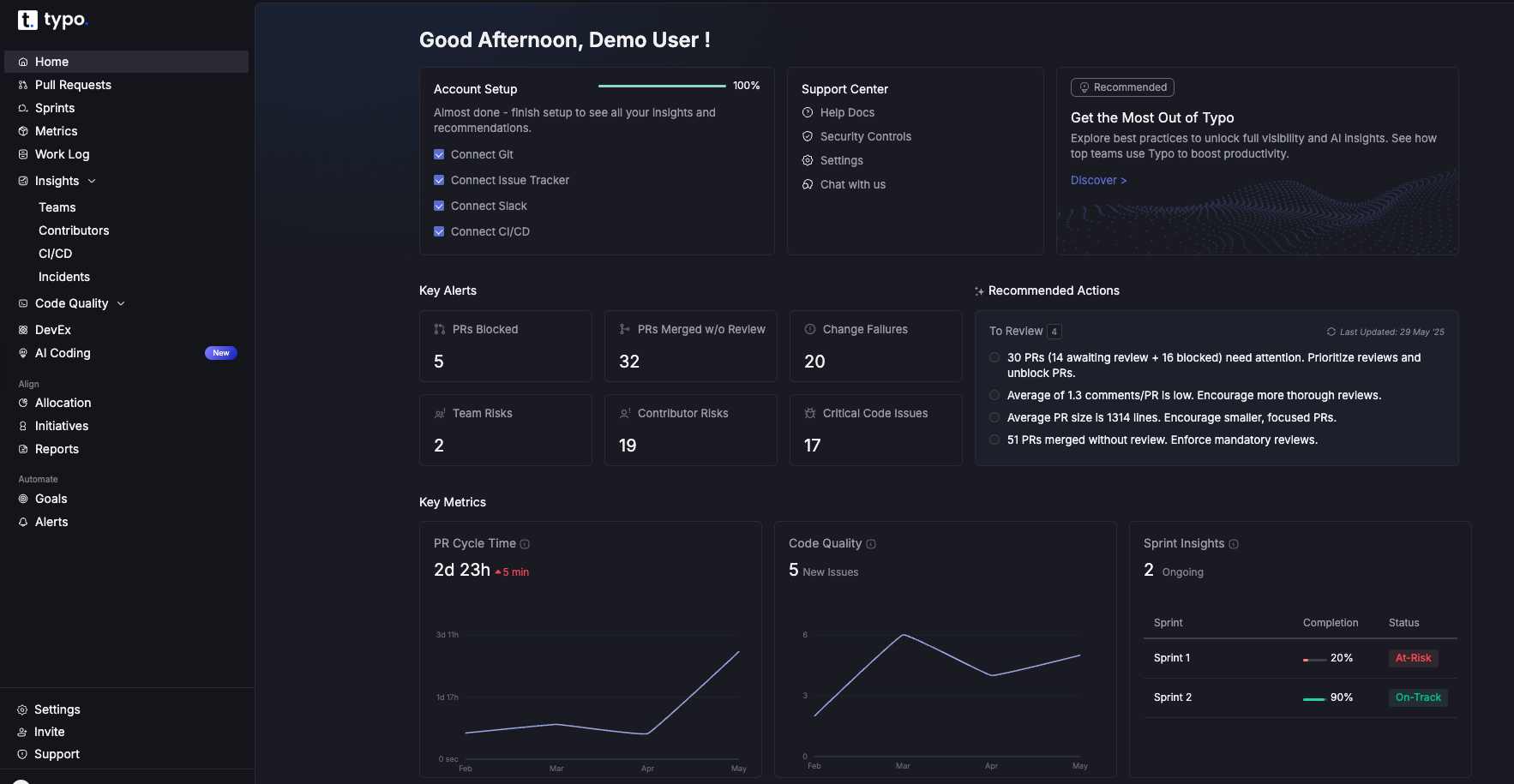
Typo is an engineering intelligence platform that helps teams understand how work actually flows through the system and how that affects developer experience. It combines delivery metrics, PR analytics, AI-impact signals, and sentiment data into a single DevEx view.
What Typo does for DevEx
Delivery & Flow Metrics Typo provides clear, configurable views across DORA and SPACE-aligned metrics, including cycle-time percentiles, review latency, deployment patterns, and quality signals. These help leaders understand where the system slows developers down.
PR & Review Analytics Deeper visibility into how pull requests move: idle time, review wait time, reviewer load, PR size patterns, and rework cycles. This highlights root causes of slow reviews and developer frustration.
AI-Origin Code & Rework Insights Typo surfaces where AI-generated code lands, how often it changes, and when AI-assisted work leads to downstream fixes or churn. This helps leaders measure AI's real impact rather than assuming benefit.
Burnout & Risk Indicators Typo does not “diagnose” burnout but surfaces early patterns—sustained out-of-hours activity, heavy review queues, repeated spillover—that often precede morale or performance dips.
Benchmarks & Team Comparisons Side-by-side team patterns show which practices reduce friction and which workflows repeatedly break DevEx.
Typo serves as the control system of modern engineering organizations. Leaders use Typo to understand how the team is actually working, not how they believe they're working.
28. GetDX
The research-backed DevEx measurement platform
GetDX provides:
High-quality DevEx surveys
Deep organizational breakdowns
Persona-based analysis
Benchmarking across 180,000+ samples
Actionable, statistically sound insights
Why CTOs use it: GetDX provides the qualitative foundation — Typo provides the system signals. Together, they give leaders a complete picture.
Internal Developer Experience
Internal Developer Experience (IDEx) serves as the cornerstone of engineering velocity and organizational efficiency for development teams across enterprises. In 2026, forward-thinking organizations recognize that empowering developers to achieve optimal performance extends far beyond mere repository access—it encompasses architecting comprehensive ecosystems where internal developers can concentrate on delivering high-quality software solutions without being encumbered by convoluted operational overhead or repetitive manual interventions that drain cognitive resources. OpsLevel, designed as a uniform interface for managing services and systems, offers extensive visibility and analytics, further enhancing the efficiency of internal developer platforms.
Contemporary internal developer platforms, sophisticated portals, and bespoke tooling infrastructures are meticulously engineered to streamline complex workflows, automate tedious and repetitive operational tasks, and deliver real-time feedback loops with unprecedented precision. Through seamless integration of disparate data sources and comprehensive API management via unified interfaces, these advanced systems enable developers to minimize time allocation toward manual configuration processes while maximizing focus on creative problem-solving and innovation. This paradigm shift not only amplifies developer productivity metrics but also significantly reduces developer frustration and cognitive burden, empowering engineering teams to innovate at accelerated velocities and deliver substantial business value with enhanced efficiency.
A meticulously architected internal developer experience enables organizations to optimize operational processes, foster cross-functional collaboration, and ensure development teams can effortlessly manage API ecosystems, integrate complex data pipelines, and automate routine operational tasks with machine-learning precision. The resultant outcome is a transformative developer experience that supports sustainable organizational growth, cultivates collaborative engineering cultures, and allows developers to concentrate on what matters most: building robust software solutions that align with strategic organizational objectives and drive competitive advantage. By strategically investing in IDEx infrastructure, companies empower their engineering talent, reduce operational complexity, and cultivate environments where high-quality software delivery becomes the standard operational paradigm rather than the exception.
Cursor: AI-native IDE that provides multi-file reasoning, high-quality refactors, and project-aware assistance for internal services and platform code.
Windsurf: AI-enabled IDE focused on large-scale transformations, automated migrations, and agent-assisted changes across complex internal codebases.
JetBrains AI: AI capabilities embedded into JetBrains IDEs that enhance navigation, refactoring, and code generation while staying aligned with existing project structures. JetBrains offers intelligent code completion, powerful debugging, and deep integration with various frameworks for languages like Java and Python.
API Development and Management
API development and management have emerged as foundational pillars within modern Software Development Life Cycle (SDLC) methodologies, particularly as enterprises embrace API-first architectural paradigms to accelerate deployment cycles and foster technological innovation. Modern API management platforms enable businesses to accept payments, manage transactions, and integrate payment solutions seamlessly into applications, supporting a wide range of business operations. Contemporary API development frameworks and sophisticated API gateway solutions empower development teams to architect, construct, validate, and deploy APIs with remarkable efficiency and precision, enabling engineers to concentrate on core algorithmic challenges rather than becoming encumbered by repetitive operational overhead or mundane administrative procedures.
These comprehensive platforms revolutionize the entire API lifecycle management through automated testing orchestration, stringent security protocol enforcement, and advanced analytics dashboards that deliver real-time performance metrics and behavioral insights. API management platforms often integrate with cloud platforms to provide deployment automation, scalability, and performance optimization. Automated testing suites integrated with continuous integration/continuous deployment (CI/CD) pipelines and seamless version control system synchronization ensure API robustness and reliability across distributed architectures, significantly reducing technical debt accumulation while supporting the delivery of enterprise-grade applications with enhanced scalability and maintainability. Through centralized management of API request routing, response handling, and comprehensive documentation generation within a unified dev environment, engineering teams can substantially enhance developer productivity metrics while maintaining exceptional software quality standards across complex microservices ecosystems and distributed computing environments.
API management platforms facilitate seamless integration with existing workflows and major cloud infrastructure providers, enabling cross-functional teams to collaborate more effectively and accelerate software delivery timelines through optimized deployment strategies. By supporting integration with existing workflows, these platforms improve efficiency and collaboration across teams. Featuring sophisticated capabilities that enable developers to orchestrate API lifecycles, automate routine operational tasks, and gain deep insights into code behavior patterns and performance characteristics, these advanced tools help organizations optimize development processes, minimize manual intervention requirements, and empower engineering teams to construct highly scalable, security-hardened, and maintainable API architectures. Ultimately, strategic investment in modern API development and management solutions represents a critical imperative for organizations seeking to empower development teams, streamline comprehensive software development workflows, and deliver exceptional software quality at enterprise scale.
Postman AI: AI-powered capabilities in Postman that help design, test, and automate APIs, including natural-language driven flows and agent-based automation across collections and environments.
Hoppscotch AI features: Experimental AI features in Hoppscotch that assist with renaming requests, generating structured payloads, and scripting pre-request logic and test cases to simplify API development workflows. +1
Insomnia AI: AI support in Insomnia that enhances spec-first API design, mocking, and testing workflows, including AI-assisted mock servers and collaboration for large-scale API programs.
Real Patterns Seen in AI-Era Engineering Teams
Across 150+ engineering orgs from 2024–2026, these patterns are universal:
Teams with fewer tools but clearer workflows outperform larger teams
DevEx emerges as the highest-leverage engineering investment
Good DevEx turns AI-era chaos into productive flow, enabling software development teams to benefit from improved workflows. This is essential for empowering developers, enabling developers, and ensuring that DevEx empowers developers to manage their workflows efficiently. Streamlined systems allow developers to focus on core development tasks and empower developers to deliver high-quality software.
Instrumentation & Architecture Requirements for DevEx
A CTO cannot run an AI-enabled engineering org without instrumentation across:
PR lifecycle transitions
Review wait times
Review quality
Rework and churn
AI-origin code hotspots
Notification floods
Flow fragmentation
Sentiment drift
Meeting load
WIP ceilings
Bottleneck transitions
System health over time
Automation capabilities for monitoring and managing workflows
The adoption of platform engineering practices and an internal developer platform to automate and streamline workflows, ensuring efficient software delivery.
Leveraging self service infrastructure to enable developers to independently provision and manage resources, increasing productivity and reducing operational bottlenecks.
Internal developer platforms provide a unified environment for managing infrastructure, infrastructure management, and providing self service capabilities to development teams. These platforms simplify the deployment, monitoring, and scaling of applications across cloud environments by integrating with cloud native services and cloud infrastructure. Internal Developer Platforms (IDPs) empower developers by providing self-service capabilities for tasks such as configuration, deployment, provisioning, and rollback. Many organizations use IDPs to allow developers to provision their own environments without delving into infrastructure's complexity. Backstage, an open-source platform, functions as a single pane of glass for managing services, infrastructure, and documentation, further enhancing the efficiency and visibility of development workflows.
It is essential to ensure that the platform aligns with organizational goals, security requirements, and scaling needs. Integration with major cloud providers further facilitates seamless deployment and management of applications. In 2024, leading developer experience platforms focus on providing a unified, self-service interface to abstract away operational complexity and boost productivity. By 2026, it is projected that 80% of software engineering organizations will establish platform teams to streamline application delivery.
A Modern DevEx Mental Model (2026)
Flow Can developers consistently get uninterrupted deep work? These platforms consolidate the tools and infrastructure developers need into a single, self-service interface, focusing on autonomy, efficiency, and governance.
Clarity Do developers understand the code, context, and system behavior quickly?
Quality Does the system resist drift or silently degrade?
Energy Are work patterns sustainable? Are developers burning out?
Governance Does AI behave safely, predictably, and traceably?
Establish clear AI coding and review policies.Define acceptable patterns.
Consolidate the toolchain.Eliminate redundant tools.
Streamline workflows to improve efficiency and automation. Optimize software development processes to remove complexity and increase efficiency, reducing manual effort and enhancing productivity.
Train tech leads on DevEx literacy.Leaders must understand system-level patterns.
Review DevEx monthly at the org level and weekly at the team level.
Developer Experience in 2026 determines the durability of engineering performance. AI enables more code, more speed, and more automation — but also more fragility.
The organizations that thrive are not the ones with the best AI models. They are the ones with the best engineering systems.
Strong DevEx ensures:
stable flow
predictable output
consistent architecture
reduced rework
sustainable work patterns
high morale
durable velocity
enables innovative solutions
The developer experience tools listed above — Cursor, Windsurf, Linear, Trunk, Notion AI, Reclaim, Height, Typo, GetDX — form the modern DevEx stack for engineering leaders in 2026.
If you treat DevEx as an engineering discipline, not a perk, your team's performance compounds.
Conclusion
As we analyze upcoming trends for 2026, it's evident that Developer Experience (DevEx) platforms have become mission-critical components for software engineering teams leveraging Software Development Life Cycle (SDLC) optimization to deliver enterprise-grade applications efficiently and at scale. By harnessing automated CI/CD pipelines, integrated debugging and profiling tools, and seamless API integrations with existing development environments, these platforms are fundamentally transforming software engineering workflows—enabling developers to focus on core objectives: architecting innovative solutions and maximizing Return on Investment (ROI) through accelerated development cycles.
The trajectory of DevEx platforms demonstrates exponential growth potential, with rapid advancements in AI-powered code completion engines, automated testing frameworks, and real-time feedback mechanisms through Machine Learning (ML) algorithms positioned to significantly enhance developer productivity metrics and minimize developer experience friction. The continued adoption of Internal Developer Platforms (IDPs) and low-code/no-code solutions will empower internal development teams to architect enterprise-grade applications with unprecedented velocity and microservices scalability, while maintaining optimal developer experience standards across the entire development lifecycle.
For organizations implementing digital transformation initiatives, the strategic approach involves optimizing the balance between automation orchestration, tool integration capabilities, and human-driven innovation processes. By investing in DevEx platforms that streamline CI/CD workflows, facilitate cross-functional collaboration, and provide comprehensive development toolchains for every phase of the SDLC methodology, enterprises can maximize the performance potential of their engineering teams and maintain competitive advantage in increasingly dynamic market conditions through Infrastructure as Code (IaC) and DevOps integration.
Ultimately, prioritizing developer experience optimization transcends basic developer enablement or organizational perks—it represents a strategic imperative that accelerates innovation velocity, reduces technical debt accumulation, and ensures consistent delivery of high-quality software through automated quality assurance and continuous integration practices. As the technological landscape continues evolving with AI-driven development tools and cloud-native architectures, organizations that embrace this strategic vision and invest in comprehensive DevEx platform ecosystems will be optimally positioned to spearhead the next generation of digital transformation initiatives, empowering their development teams to architect software solutions that define future industry standards.
FAQ
1. What's the strongest DevEx tool for 2026?
Cursor for coding productivity, Trunk for stability, Linear for clarity, Typo for measurement, and code review
2. How often should we measure DevEx?
Weekly signals + monthly deep reviews.
3. How do AI tools impact DevEx?
AI accelerates output but increases drift, review load, and noise. DevEx systems stabilize this.
4. What's the biggest DevEx mistake organizations make?
Thinking DevEx is about perks or happiness rather than system design.
5. Are more tools better for DevEx?
Almost always no. More tools = more noise. Integrated workflows outperform tool sprawl.
AI native software development is not about using LLMs in the workflow. It is a structural redefinition of how software is designed, reviewed, shipped, governed, and maintained. A CTO cannot bolt AI onto old habits. They need a new operating system for engineering that combines architecture, guardrails, telemetry, culture, and AI driven automation. This playbook explains how to run that transformation in a modern mid market or enterprise environment. It covers diagnostics, delivery model redesign, new metrics, team structure, agent orchestration, risk posture, and the role of platforms like Typo that provide the visibility needed to run an AI era engineering organization.
Introduction
Software development is entering its first true discontinuity in decades. For years, productivity improved in small increments through better tooling, new languages, and improved DevOps maturity. AI changed the slope. Code volume increased. Review loads shifted. Cognitive complexity rose quietly. Teams began to ship faster, but with a new class of risks that traditional engineering processes were never built to handle.
A newly appointed CTO inherits this environment. They cannot assume stability. They find fragmented AI usage patterns, partial automation, uneven code quality, noisy reviews, and a workforce split between early adopters and skeptics. In many companies, the architecture simply cannot absorb the speed of change. The metrics used to measure performance pre date LLMs and do not capture the impact or the risks. Senior leaders ask about ROI, efficiency, and predictability, but the organization lacks the telemetry to answer these questions.
The aim of this playbook is not to promote AI. It is to give a CTO a clear and grounded method to transition from legacy development to AI native development without losing reliability or trust. This is not a cosmetic shift. It is an operational and architectural redesign. The companies that get this right will ship more predictably, reduce rework, shorten review cycles, and maintain a stable system as code generation scales. The companies that treat AI as a local upgrade will accumulate invisible debt that compounds for years.
This playbook assumes the CTO is taking over an engineering function that is already using AI tools sporadically. The job is to unify, normalize, and operationalize the transformation so that engineering becomes more reliable, not less.
1. Modern Definition of AI Native Software Development
Many companies call themselves AI enabled because their teams use coding assistants. That is not AI native. AI native software development means the entire SDLC is designed around AI as an active participant in design, coding, testing, reviews, operations, and governance. The process is restructured to accommodate a higher velocity of changes, more contributors, more generated code, and new cognitive risks.
An AI native engineering organization shows four properties:
The architecture supports frequent change with low blast radius.
The tooling produces high quality telemetry that captures the origin, quality, and risk of AI generated changes.
Teams follow guardrails that maintain predictability even when code volume increases.
Leadership uses metrics that capture AI era tradeoffs rather than outdated pre AI dashboards.
This requires discipline. Adding LLMs into a legacy workflow without architectural adjustments leads to churn, duplication, brittle tests, inflated PR queues, and increased operational drag. AI native development avoids these pitfalls by design.
2. The Diagnostic: How a CTO Assesses the Current State
A CTO must begin with a diagnostic pass. Without this, any transformation plan will be based on intuition rather than evidence.
Key areas to map:
Codebase readiness. Large monolithic repos with unclear boundaries accumulate AI generated duplication quickly. A modular or service oriented codebase handles change better.
Process maturity. If PR queues already stall at human bottlenecks, AI will amplify the problem. If reviews are inconsistent, AI suggestions will flood reviewers without improving quality.
AI adoption pockets. Some teams will have high adoption, others very little. This creates uneven expectations and uneven output quality.
Telemetry quality. If cycle time, review time, and rework data are incomplete or unreliable, AI era decision making becomes guesswork.
Team topology. Teams with unclear ownership boundaries suffer more when AI accelerates delivery. Clear interfaces become critical.
Developer sentiment. Frustration, fear, or skepticism reduce adoption and degrade code quality. Sentiment is now a core operational signal, not a side metric.
This diagnostic should be evidence based. Leadership intuition is not enough.
3. Strategic North Star for AI Native Engineering
A CTO must define what success looks like. The north star should not be “more AI usage”. It should be predictable delivery at higher throughput with maintainability and controlled risk.
The north star combines:
Shorter cycle time without compromising readability.
Higher merge rates without rising defect density.
Review windows that shrink due to clarity, not pressure.
AI generated code that meets architectural constraints.
Reduced rework and churn.
Trustworthy telemetry that allows leaders to reason clearly.
This is the foundation upon which every other decision rests.
4. Architecture for the AI Era
Most architectures built before 2023 were not designed for high frequency AI generated changes. They cannot absorb the velocity without drifting.
A modern AI era architecture needs:
Stable contracts. Clear interfaces and strong boundaries reduce the risk of unintended side effects from generated code.
Low coupling. AI generated contributions create more integration points. Loose coupling limits breakage.
Readable patterns. Generated code often matches training set patterns, not local idioms. A consistent architectural style reduces variance.
Observability first. With more change volume, you need clear traces of what changed, why, and where risk is accumulating.
Dependency control. AI tends to add dependencies aggressively. Without constraints, dependency sprawl grows faster than teams can maintain.
A CTO cannot skip this step. If the architecture is not ready, nothing else will hold.
5. Tooling Stack and Integration Strategy
The AI era stack must produce clarity, not noise. The CTO needs a unified system across coding, reviews, CI, quality, and deployment.
Essential capabilities include:
Visibility into AI generated code at the PR level.
Guardrails integrated directly into reviews and CI.
Clear code quality signals tied to change scope.
Test automation with AI assisted generation and evaluation.
Environment automation that keeps integration smooth.
Observability platforms with change correlation.
The mistake many orgs make is adding AI tools without aligning them to a single telemetry layer. This repeats the tool sprawl problem of the DevOps era.
The CTO must enforce interoperability. Every tool must feed the same data spine. Otherwise, leadership has no coherent picture.
6. Guardrails and Governance for AI Usage
AI increases speed and risk simultaneously. Without guardrails, teams drift into a pattern where merges increase but maintainability collapses.
A CTO needs clear governance:
Standards for when AI can generate code vs when humans must write it.
Requirements for reviewing AI output with higher scrutiny.
Rules for dependency additions.
Requirements for documenting architectural intent.
Traceability of AI generated changes.
Audit logs that capture prompts, model versions, and risk signatures.
Governance is not bureaucracy. It is risk management. Poor governance leads to invisible degradation that surfaces months later.
7. Redesigning the Delivery Model
The traditional delivery model was built for human scale coding. The AI era requires a new model.
Branching strategy. Shorter branches reduce risk. Long living feature branches become more dangerous as AI accelerates parallel changes.
Review model. Reviews must optimize for clarity, not only correctness. Review noise must be controlled. PR queue depth must remain low.
Batching strategy. Small frequent changes reduce integration risk. AI makes this easier but only if teams commit to it.
Integration frequency. More frequent integration improves predictability when AI is involved.
Testing model. Tests must be stable, fast, and automatically regenerated when models drift.
Delivery is now a function of both engineering and AI model behavior. The CTO must manage both.
8. Product and Roadmap Adaptation
AI driven acceleration impacts product planning. Roadmaps need to become more fluid. The cost of iteration drops, which means product should experiment more. But this does not mean chaos. It means controlled variability.
The CTO must collaborate with product leaders on:
Specification clarity.
Risk scoring for features.
Technical debt planning that anticipates AI generated drift.
Shorter cycles with clear boundaries.
Fewer speculative features and more validated improvements.
The roadmap becomes a living document, not a quarterly artifact.
9. Expanded DORA and SPACE Metrics for the AI Era
Traditional DORA and SPACE metrics do not capture AI era dynamics. They need an expanded interpretation.
For DORA:
Deployment frequency must be correlated with readability risk.
Lead time must distinguish human written vs AI written vs hybrid code.
Change failure rate must incorporate AI origin correlation.
MTTR must include incidents triggered by model generated changes.
For SPACE:
Satisfaction must track AI adoption friction.
Performance must measure rework load and noise, not output volume.
Activity must include generated code volume and diff size distribution.
Communication must capture review signal quality.
Efficiency must account for context switching caused by AI suggestions.
Ignoring these extensions will cause misalignment between what leaders measure and what is happening on the ground.
10. New AI Era Metrics
The AI era introduces new telemetry that traditional engineering systems lack. This is where platforms like Typo become essential.
Key AI era metrics include:
AI origin code detection. Leaders need to know how much of the codebase is human written vs AI generated. Without this, risk assessments are incomplete.
Rework analysis. Generated code often requires more follow up fixes. Tracking rework clusters exposes reliability issues early.
Review noise. AI suggestions and large diffs create more noise in reviews. Noise slows teams even if merge speed seems fine.
PR flow analytics. AI accelerates code creation but does not reduce reviewer load. Leaders need visibility into waiting time, idle hotspots, and reviewer bottlenecks.
Developer experience telemetry. Sentiment, cognitive load, frustration patterns, and burnout signals matter. AI increases both speed and pressure.
DORA and SPACE extensions. Typo provides extended metrics tuned for AI workflows rather than traditional SDLC.
These metrics are not vanity measures. They help leaders decide when to slow down, when to refactor, when to intervene, and when to invest in platform changes.
11. Real World Case Patterns
Patterns from companies that transitioned successfully show consistent themes:
They invested in modular architecture early.
They built guardrails before scaling AI usage.
They enforced small PRs and stable integration.
They used AI for tests and refactors, not just feature code.
They measured AI impact with real metrics, not anecdotes.
They trained engineers in reasoning rather than output.
They avoided over automation until signals were reliable.
Teams that failed show the opposite patterns:
Generated large diffs with no review quality.
Grew dependency sprawl.
Neglected metrics.
Allowed inconsistent AI usage.
Let cognitive complexity climb unnoticed.
Used outdated delivery processes.
The gap between success and failure is consistency, not enthusiasm.
12. Instrumentation and Architecture Considerations
Instrumentation is the foundation of AI native engineering. Without high quality telemetry, leaders cannot reason about the system.
The CTO must ensure:
Every PR emits meaningful metadata.
Rework is tracked at line level.
Code complexity is measured on changed files.
Duplication and churn are analyzed continuously.
Incidents correlate with recent changes.
Tests emit stability signals.
AI prompts and responses are logged where appropriate.
Dependency changes are visible.
Instrumentation is not an afterthought. It is the nervous system of the organization.
13. Wrong vs Right Mindset for the AI Era
Leadership mindset determines success.
Wrong mindsets:
AI is a shortcut for weak teams.
Productivity equals more code.
Reviews are optional.
Architecture can wait.
Teams will pick it up naturally.
Metrics are surveillance.
Right mindsets:
AI improves good teams and overwhelms unprepared ones.
Productivity is predictability and maintainability.
Reviews are quality control and knowledge sharing.
Architecture is the foundation, not a cost center.
Training is required at every level.
Metrics are feedback loops for improvement.
This shift is non optional.
14. Team Design and Skill Shifts
AI native development changes the skill landscape.
Teams need:
Platform engineers who manage automation and guardrails.
AI enablement engineers who guide model usage.
Staff engineers who maintain architectural coherence.
Developers who focus on reasoning and design, not mechanical tasks.
Reviewers who can judge clarity and intent, not only correctness.
Career paths must evolve. Seniority must reflect judgment and architectural thinking, not output volume.
15. Automation, Agents, and Execution Boundaries
AI agents will handle larger parts of the SDLC by 2026. The CTO must design clear boundaries.
Safe automation areas include:
Test generation.
Refactors with strong constraints.
CI pipeline maintenance.
Documentation updates.
Dependency audit checks.
PR summarization.
High risk areas require human oversight:
Architectural design.
Business logic.
Security sensitive code.
Complex migrations.
Incident mitigation.
Agents need supervision, not blind trust. Automation must have reversible steps and clear audit trails.
16. Governance and Ethical Guardrails
AI native development introduces governance requirements:
Copyright risk mitigation.
Prompt hygiene.
Customer data isolation.
Model version control.
Decision auditability.
Explainability for changes.
Regulation will tighten. CTOs who ignore this will face downstream risk that cannot be undone.
17. Change Management and Rollout Strategy
AI transformation fails without disciplined rollout.
A CTO should follow a phased model:
Start with diagnostics.
Pick a pilot team with high readiness.
Build guardrails early.
Measure impact from day one.
Expand only when signals are stable.
Train leads before training developers.
Communicate clearly and repeatedly.
The transformation is cultural and technical, not one or the other.
18. Role of Typo AI in an AI Native Engineering Organization
Typo fits into this playbook as the system of record for engineering intelligence in the AI era. It is not another dashboard. It is the layer that reveals how AI is affecting your codebase, your team, and your delivery model.
Typo provides:
Detection of AI generated code at the PR level.
Rework and churn analysis for generated code.
Review noise signals that highlight friction points.
PR flow analytics that surface bottlenecks caused by AI accelerated work.
Extended DORA and SPACE metrics designed for AI workflows.
Developer experience telemetry and sentiment signals.
Guardrail readiness insights for teams adopting AI.
Typo does not solve AI engineering alone. It gives CTOs the visibility necessary to run a modern engineering organization intelligently and safely.
19. Unified Framework for CTOs: Clarity, Constraints, Cadence, Compounding
Constraints. Guardrails, governance, and boundaries for AI usage.
Cadence. Small PRs, frequent integration, stable delivery cycles.
Compounding. Data driven improvement loops that accumulate over time.
This model is simple, but not simplistic. It captures the essence of what creates durable engineering performance.
Conclusion
The rise of AI native software development is not a temporary trend. It is a structural shift in how software is built. A CTO who treats AI as a productivity booster will miss the deeper transformation. A CTO who redesigns architecture, delivery, culture, guardrails, and metrics will build an engineering organization that is faster, more predictable, and more resilient.
This playbook provides a practical path from legacy development to AI native development. It focuses on clarity, discipline, and evidence. It provides a framework for leaders to navigate the complexity without losing control. The companies that adopt this mindset will outperform. The ones that resist will struggle with drift, debt, and unpredictability.
The future of engineering belongs to organizations that treat AI as an integrated partner with rules, telemetry, and accountability. With the right architecture, metrics, governance, and leadership, AI becomes an amplifier of engineering excellence rather than a source of chaos.
FAQ
How should a CTO decide which teams adopt AI first? Pick teams with high ownership clarity and clean architecture. AI amplifies existing patterns. Starting with structurally weak teams makes the transformation harder.
How should leaders measure real AI impact? Track rework, review noise, complexity on changed files, churn on generated code, and PR flow stability. Output volume is not a meaningful indicator.
Will AI replace reviewers? Not in the near term. Reviewers shift from line by line checking to judgment, intent, and clarity assessment. Their role becomes more important, not less.
How does AI affect incident patterns? More generated code increases the chance of subtle regressions. Incidents need stronger correlation with recent change metadata and dependency patterns.
What happens to seniority models? Seniority shifts toward reasoning, architecture, and judgment. Raw coding speed becomes less relevant. Engineers who can supervise AI and maintain system integrity become more valuable.
Over the past two years, LLMs have moved from interesting experiments to everyday tools embedded deeply in the software development lifecycle. Developers use them to generate boilerplate, draft services, write tests, refactor code, explain logs, craft documentation, and debug tricky issues. These capabilities created a dramatic shift in how quickly individual contributors can produce code. Pull requests arrive faster. Cycle time shrinks. Story throughput rises. Teams that once struggled with backlog volume can now push changes at a pace that was previously unrealistic.
If you look only at traditional engineering dashboards, this appears to be a golden age of productivity. Nearly every surface metric suggests improvement. Yet many engineering leaders report a very different lived reality. Roadmaps are not accelerating at the pace the dashboards imply. Review queues feel heavier, not lighter. Senior engineers spend more time validating work rather than shaping the system. Incidents take longer to diagnose. And teams who felt energised by AI tools in the first few weeks begin reporting fatigue a few months later.
This mismatch is not anecdotal. It reflects a meaningful change in the nature of engineering work. Productivity did not get worse. It changed form. But most measurement models did not.
This blog unpacks what actually changed, why traditional metrics became misleading, and how engineering leaders can build a measurement approach that reflects the real dynamics of LLM-heavy development. It also explains how Typo provides the system-level signals leaders need to stay grounded as code generation accelerates and verification becomes the new bottleneck.
The Core Shift: Productivity Is No Longer About Writing Code Faster
For most of software engineering history, productivity tracked reasonably well to how efficiently humans could move code from idea to production. Developers designed, wrote, tested, and reviewed code themselves. Their reasoning was embedded in the changes they made. Their choices were visible in commit messages and comments. Their architectural decisions were anchored in shared team context.
When developers wrote the majority of the code, it made sense to measure activity:
how quickly tasks moved through the pipeline, how many PRs shipped, how often deployments occurred, and how frequently defects surfaced. The work was deterministic, so the metrics describing that work were stable and fairly reliable.
This changed the moment LLMs began contributing even 30 to 40 percent of the average diff. Now the output reflects a mixture of human intent and model-generated patterns. Developers produce code much faster than they can fully validate. Reasoning behind a change does not always originate from the person who submits the PR. Architectural coherence emerges only if the prompts used to generate code happen to align with the team’s collective philosophy. And complexity, duplication, and inconsistency accumulate in places that teams do not immediately see.
This shift does not mean that AI harms productivity. It means the system changed in ways the old metrics do not capture. The faster the code is generated, the more critical it becomes to understand the cost of verification, the quality of generated logic, and the long-term stability of the codebase.
Productivity is no longer about creation speed. It is about how all contributors, human and model, shape the system together.
How LLMs Actually Behave: The Patterns Leaders Need to Understand
To build an accurate measurement model, leaders need a grounded understanding of how LLMs behave inside real engineering workflows. These patterns are consistent across orgs that adopt AI deeply.
LLM output is probabilistic, not deterministic
Two developers can use the same prompt but receive different structural patterns depending on model version, context window, or subtle phrasing. This introduces divergence in style, naming, and architecture. Over time, these small inconsistencies accumulate and make the codebase harder to reason about. This decreases onboarding speed and lengthens incident recovery.
LLMs provide output, not intent
Human-written code usually reflects a developer’s mental model. AI-generated code reflects a statistical pattern. It does not come with reasoning, context, or justification.
Reviewers are forced to infer why a particular logic path was chosen or why certain tradeoffs were made. This increases the cognitive load of every review.
LLMs inflate complexity at the edges
When unsure, LLMs tend to hedge with extra validations, helper functions, or prematurely abstracted patterns. These choices look harmless in isolation because they show up as small diffs, but across many PRs they increase the complexity of the system. That complexity becomes visible during incident investigations, cross-service reasoning, or major refactoring efforts.
Duplication spreads quietly
LLMs replicate logic instead of factoring it out. They do not understand the true boundaries of a system, so they create near-duplicate code across files. Duplication multiplies maintenance cost and increases the amount of rework required later in the quarter.
Multiple agents introduce mismatched assumptions
Developers often use one model to generate code, another to refactor it, and yet another to write tests. Each agent draws from different training patterns and assumptions. The resulting PR may look cohesive but contain subtle inconsistencies in edge cases or error handling.
These behaviours are not failures. They are predictable outcomes of probabilistic models interacting with complex systems. The question for leaders is not whether these behaviours exist. It is how to measure and manage them.
The Three Surfaces of Productivity in an LLM-Heavy Team
Traditional metrics focus on throughput and activity. Modern metrics must capture the deeper layers of the work.
Below are the three surfaces engineering leaders must instrument.
1. The health of AI-origin code
A PR with a high ratio of AI-generated changes carries different risks than a heavily human-authored PR. Leaders need to evaluate:
complexity added to changed files
duplication created during generation
stability and predictability of generated logic
cross-file and cross-module coherence
clarity of intent in the PR description
consistency with architectural standards
This surface determines long-term engineering cost. Ignoring it leads to silent drift.
2. The verification load on humans
Developers now spend more time verifying and less time authoring. This shift is subtle but significant.
Verification includes:
reconstructing the reasoning behind AI-generated code
identifying missing edge cases
validating correctness
aligning naming and structure to existing patterns
resolving inconsistencies across files
reviewing test logic that may not match business intent
This work does not appear in cycle time. But it deeply affects morale, reviewer health, and delivery predictability.
3. The stability of the engineering workflow
A team can appear fast but become unstable under the hood. Stability shows up in:
widening gap between P50 and P95 cycle time
unpredictable review times
increasing rework rates
more rollback events
longer MTTR during incidents
inconsistent PR patterns across teams
Stability is the real indicator of productivity in the AI era. Stable teams ship predictably and learn quickly. Unstable teams slip quietly, even when dashboards look good.
Metrics That Actually Capture Productivity in 2026
Below are the signals that reflect how modern teams truly work.
AI-origin contribution ratio
Understanding what portion of the diff was generated by AI reveals how much verification work is required and how likely rework becomes.
Complexity delta on changed files
Measuring complexity on entire repositories hides important signals. Measuring complexity specifically on changed files shows the direct impact of each PR.
Duplication delta
Duplication increases future costs and is a common pattern in AI-generated diffs.
Verification overhead
This includes time spent reading generated logic, clarifying assumptions, and rewriting partial work. It is the dominant cost in LLM-heavy workflows.
Rework rate
If AI-origin code must be rewritten within two or three weeks, teams are gaining speed but losing quality.
Review noise
Noise reflects interruptions, irrelevant suggestions, and friction during review. It strongly correlates with burnout and delays.
Predictability drift
A widening cycle time tail signals instability even when median metrics improve.
These metrics create a reliable picture of productivity in a world where humans and AI co-create software.
What Engineering Leaders Are Observing in the Field
Companies adopting LLMs see similar patterns across teams and product lines.
Developers generate more code but strategic work slows down
Speed of creation increases. Speed of validation does not. This imbalance pulls senior engineers into verification loops and slows architectural decisions.
Senior engineers become overloaded
They carry the responsibility of reviewing AI-generated diffs and preventing architectural drift. The load is significant and often invisible in dashboards.
Architectural divergence becomes a quarterly issue
Small discrepancies from model-generated patterns compound. Teams begin raising concerns about inconsistent structure, uneven abstractions, or unclear boundary lines.
Escaped defects increase
Models can generate correct syntax with incorrect logic. Without clear reasoning, mistakes slip through more easily.
Roadmaps slip for reasons dashboards cannot explain
Surface metrics show improvement, but deeper signals reveal instability and hidden friction.
These patterns highlight why leaders need a richer understanding of productivity.
How Engineering Leaders Can Instrument Their Teams for the LLM Era
Instrumentation must evolve to reflect how code is produced and validated today.
Add PR-level instrumentation
Measure AI-origin ratio, complexity changes, duplication, review delays, merge delays, and rework loops. This is the earliest layer where drift appears.
Require reasoning notes for AI-origin changes
A brief explanation restores lost context and improves future debugging speed. This is especially helpful during incidents.
Log model behaviour
Track how prompt iterations, model versions, and output variability influence code quality and workflow stability.
Collect developer experience telemetry
Sentiment combined with workflow signals shows where AI improves flow and where it introduces friction.
Monitor reviewer choke points
Reviewers, not contributors, now determine the pace of delivery.
Instrumentation that reflects these realities helps leaders manage the system, not the symptoms.
The Leadership Mindset Needed for LLM-Driven Development
This shift is calm, intentional, and grounded in real practice.
Move from measuring speed to measuring stability
Fast code generation does not create fast teams unless the system stays coherent.
Treat AI as a probabilistic collaborator
Its behaviour changes with small variations in context, prompts, or model updates. Leadership must plan for this variability.
Prioritise maintainability during reviews
Correctness can be fixed later. Accumulating complexity cannot.
Measure the system, not individual activity
Developer performance cannot be inferred from PR counts or cycle time when AI produces much of the diff.
Address drift early
Complexity and duplication should be watched continuously. They compound silently.
Teams that embrace this mindset avoid long-tail instability. Teams that ignore it accumulate technical and organisational debt.
A Practical Framework for Operating an LLM-First Engineering Team
Below is a lightweight, realistic approach.
Annotate AI-origin diffs in PRs
This helps reviewers understand where deeper verification is needed.
Ask developers to include brief reasoning notes
This restores lost context that AI cannot provide.
Review for maintainability first
This reduces future rework and stabilises the system over time.
Track reviewer load and rebalance frequently
Verification is unevenly distributed. Managing this improves delivery pace and morale.
Run scheduled AI cleanup cycles
These cycles remove duplicated code, reduce complexity, and restore architectural alignment.
Create onboarding paths focused on AI-debugging skills
New team members need to understand how AI-generated code behaves, not just how the system works.
Introduce prompt governance
Version, audit, and consolidate prompts to maintain consistent patterns.
This framework supports sustainable delivery at scale.
How Typo Helps Engineering Leaders Operationalise This Model
Typo provides visibility into the signals that matter most in an LLM-heavy engineering organisation. It focuses on system-level health, not individual scoring.
AI-origin code intelligence
Typo identifies which parts of each PR were generated by AI and tracks how these sections relate to rework, defects, and review effort.
Review noise detection
Typo highlights irrelevant or low-value suggestions and interactions, helping leaders reduce cognitive overhead.
Complexity and duplication drift monitoring
Typo measures complexity and duplication at the file level, giving leaders early insight into architectural drift.
Rework and predictability analysis
Typo surfaces rework loops, shifts in cycle time distribution, reviewer bottlenecks, and slowdowns caused by verification overhead.
DevEx and sentiment correlation
Typo correlates developer sentiment with workflow data, helping leaders understand where friction originates and how to address it.
These capabilities help leaders measure what truly affects productivity in 2026 rather than relying on outdated metrics designed for a different era.
Conclusion: Stability, Not Speed, Defines Productivity in 2026
LLMs have transformed engineering work, but they have also created new challenges that teams cannot address with traditional metrics. Developers now play the role of validators and maintainers of probabilistic code. Reviewers spend more time reconstructing reasoning than evaluating syntax. Architectural drift accelerates. Teams generate more output yet experience more friction in converting that output into predictable delivery.
To understand productivity honestly, leaders must look beyond surface metrics and instrument the deeper drivers of system behaviour. This means tracking AI-origin code health, understanding verification load, and monitoring long-term stability.
Teams that adopt these measures early will gain clarity, predictability, and sustainable velocity. Teams that do not will appear productive in dashboards while drifting into slow, compounding drag.
In the LLM era, productivity is no longer defined by how fast code is written. It is defined by how well you control the system that produces it.
Project management can get messy. Missed deadlines, unclear tasks, and scattered updates make managing software projects challenging.
Communication gaps and lack of visibility can slow down progress.
And if a clear overview is not provided, teams are bound to struggle to meet deadlines and deliver quality work. That’s where Jira comes in.
In this blog, we discuss everything you need to know about Jira to make your project management more efficient.
What is Jira?
Jira is a project management tool developed by Atlassian, designed to help software teams plan, track, and manage their work. It’s widely used for agile project management, supporting methodologies like Scrum and Kanban.
With Jira, teams can create and assign tasks, track progress, manage bugs, and monitor project timelines in real time.
It comes with custom workflows and dashboards that ensure the tool is flexible enough to adapt to your project needs. Whether you’re a small startup or a large enterprise, Jira offers the structure and visibility needed to keep your projects on track.
REST API Integration Patterns
Jira’s REST API offers a robust solution for automating workflows and connecting with third-party tools. It enables seamless data exchange and process automation, making it an essential resource for enhancing productivity.
Here’s how you can leverage Jira’s API effectively.
1. Enabling Automation with Jira's REST API
Jira’s API supports task automation by allowing external systems to create, update, and manage issues programmatically. Common scenarios include automatically creating tickets from monitoring tools, syncing issue statuses with CI/CD pipelines, and sending notifications based on issue events. This reduces manual work and ensures processes run smoothly.
2. Integrating with CI/CD and External Tools
For DevOps teams, Jira’s API simplifies continuous integration and deployment. By connecting Jira with CI/CD tools like Jenkins or GitLab, teams can track build statuses, deploy updates, and log deployment-related issues directly within Jira. Other external platforms, such as monitoring systems or customer support applications, can also integrate to provide real-time updates.
3. Best Practices for API Authentication and Security
Follow these best practices to ensure secure and efficient use of Jira’s REST API:
Use API Tokens or OAuth: Choose API tokens for simple use cases and OAuth for more secure, controlled access.
Limit Permissions: Grant only the necessary permissions to API tokens or applications to minimize risk.
Secure Token Storage: Store API tokens securely using environment variables or secure vaults. Avoid hard-coding tokens.
Implement Token Rotation: Regularly rotate API tokens to reduce the risk of compromised credentials.
Enable IP Whitelisting: Restrict API access to specific IP addresses to prevent unauthorized access.
Monitor API Usage: Track API call logs for suspicious activity and ensure compliance with security policies.
Use Rate Limit Awareness: Implement error handling for rate limit responses by introducing retry logic with exponential backoff.
Custom Field Configuration & Advanced Issue Types
Custom fields in Jira enhance data tracking by allowing teams to capture project-specific information.
Unlike default fields, custom fields offer flexibility to store relevant data points like priority levels, estimated effort, or issue impact. This is particularly useful for agile teams managing complex workflows across different departments.
By tailoring fields to fit specific processes, teams can ensure that every task, bug, or feature request contains the necessary information.
Custom fields also provide detailed insights for JIRA reporting and analysis, enabling better decision-making.
Configuring Issue Types, Screens, and Field Behaviors
Jira supports a variety of issue types like stories, tasks, bugs, and epics. However, for specialized workflows, teams can create custom issue types.
Each issue type can be linked to specific screens and field configurations. Screens determine which fields are visible during issue creation, editing, and transitions.
Additionally, field behaviors can enforce data validation rules, ensure mandatory fields are completed, or trigger automated actions.
By customizing issue types and field behaviors, teams can streamline their project management processes while maintaining data consistency.
Leveraging Jira Query Language (JQL)
Jira Query Language (JQL) is a powerful tool for filtering and analyzing issues. It allows users to create complex queries using keywords, operators, and functions.
For example, teams can identify unresolved bugs in a specific sprint or track issues assigned to particular team members.
JQL also supports saved searches and custom dashboards, providing real-time visibility into project progress. Or explore Typo for that.
ScriptRunner & Automated Workflow Triggers
ScriptRunner is a powerful Jira add-on that enhances automation using Groovy-based scripting.
It allows teams to customize Jira workflows, automate complex tasks, and extend native functionality. From running custom scripts to making REST API calls, ScriptRunner provides limitless possibilities for automating routine actions.
Custom Scripts and REST API Calls
With ScriptRunner, teams can write Groovy scripts to execute custom business logic. For example, a script can automatically assign issues based on specific criteria, like issue type or priority.
It supports REST API calls, allowing teams to fetch external data, update issue fields, or integrate with third-party systems. A use case could involve syncing deployment details from a CI/CD pipeline directly into Jira issues.
Automating Issue Transitions and SLA Tracking
ScriptRunner can automate issue transitions based on defined conditions. When an issue meets specific criteria, such as a completed code review or passed testing, it can automatically move to the next workflow stage. Teams can also set up SLA tracking by monitoring issue durations and triggering escalations if deadlines are missed.
Workflow Automation with Event Listeners and Post Functions
Event listeners in ScriptRunner can capture Jira events, like issue creation or status updates, and trigger automated actions. Post functions allow teams to execute custom scripts at specific workflow stages, enhancing operational efficiency.
SQL-Based Reporting & Performance Optimization
Reporting and performance are critical in large-scale Jira deployments. Using SQL databases directly enables detailed custom reporting, surpassing built-in dashboards. SQL queries extract specific issue details, enabling customized analytics and insights.
Optimizing performance becomes essential as Jira instances scale to millions of issues. Efficient indexing dramatically improves query response times. Regular archiving of resolved or outdated issues reduces database load and enhances overall system responsiveness. Database tuning, including index optimization and query refinement, ensures consistent performance even under heavy usage.
Effective SQL-based reporting and strategic performance optimization ensure Jira remains responsive, efficient, and scalable.
Kubernetes Deployment Considerations
Deploying Jira on Kubernetes offers high availability, scalability, and streamlined management. Here are key considerations for a successful Kubernetes deployment:
Containerization: Package Jira into containers for consistent deployments across different environments.
Helm Charts: Use Helm charts to simplify deployments and manage configurations effectively.
Resource Optimization: Allocate CPU, memory, and storage resources efficiently to maintain performance.
Persistent Storage: Implement reliable storage solutions to ensure data integrity and resilience.
Backup Management: Regularly backup data to safeguard against data loss or corruption.
Monitoring and Logging: Set up comprehensive monitoring and logging to quickly detect and resolve issues.
Scalability and High Availability: Configure horizontal scaling and redundancy strategies to handle increased workloads and prevent downtime.
These practices ensure Jira runs optimally, maintaining performance and reliability in Kubernetes environments.
The Role of AI in Modern Project Management
AI is quietly reshaping how software projects are planned, tracked, and delivered. Traditional Jira workflows depend heavily on manual updates, issue triage, and static dashboards; AI now automates these layers, turning Jira into a living system that learns and predicts. Teams can use AI to prioritize tasks based on dependencies, flag risks before deadlines slip, and auto-summarize project updates for leadership. In AI-augmented SDLCs, project managers and engineering leaders can shift focus from reporting to decision-making—letting models handle routine updates, backlog grooming, or bug triage.
Practical adoption means embedding AI agents at critical touchpoints: an assistant that generates sprint retrospectives directly from Jira issues and commits, or one that predicts blockers using historical sprint velocity. By integrating AI into Jira’s REST APIs, teams can proactively manage workloads instead of reacting to delays. The key is governance—AI should accelerate clarity, not noise. When configured well, it ensures every update, risk, and dependency is surfaced contextually and in real time, giving leaders a far more adaptive project management rhythm.
How Typo Enhances Jira Workflows with AI
Typo extends Jira’s capabilities by turning static project data into actionable engineering intelligence. Instead of just tracking tickets, Typo analyzes Git commits, CI/CD runs, and PR reviews connected to those issues—revealing how code progress aligns with project milestones. Its AI-powered layer auto-generates summaries for Jira epics, highlights delivery risks, and correlates velocity trends with developer workload and review bottlenecks.
For teams using Jira as their source of truth, Typo provides the “why” behind the metrics. It doesn’t just tell you that a sprint is lagging—it identifies whether the delay comes from extended PR reviews, scope creep, or unbalanced reviewer load. Its automation modules can even trigger Jira updates when PRs are merged or builds complete, keeping boards in sync without manual effort.
By pairing Typo with Jira, organizations move from basic project visibility to true delivery intelligence. Managers gain contextual insight across the SDLC, developers spend less time updating tickets, and leadership gets a unified, AI-informed view of progress and predictability. In an era where efficiency and visibility are inseparable, Typo becomes the connective layer that helps Jira scale with intelligence, not just structure.
Conclusion
Jira transforms project management by streamlining workflows, enhancing reporting, and supporting scalability. It’s an indispensable tool for agile teams aiming for efficient, high-quality project delivery. Subscribe to our blog for more expert insights on improving your project management.
Are Lines of Code Misleading Your Developer Performance Metrics?
LOC (Lines of Code) has long been a go-to proxy to measure developer productivity.
Although easy to quantify, do more lines of code actually reflect the output?
In reality, LOC tells you nothing about the new features added, the effort spent, or the work quality.
In this post, we discuss how measuring LOC can mislead productivity and explore better alternatives.
Why LOC Is an Incomplete (and Sometimes Misleading) Metric
Measuring dev productivity by counting lines of code may seem straightforward, but this simplistic calculation can heavily impact code quality. For example, some lines of code such as comments and other non-executables lack context and should not be considered actual “code”.
Suppose LOC is your main performance metric. Developers may hesitate to improve existing code as it could reduce their line count, causing poor code quality.
Additionally, you can neglect to factor in major contributors, such as time spent on design, reviewing the code, debugging, and mentorship.
Cyclomatic Complexity vs. LOC: A Deeper Correlation Analysis
Cyclomatic Complexity (CC)
Cyclomatic complexity measures a piece of code’s complexity based on the number of independent paths within the code. Although more complex, these code logic paths are better at predicting maintainability than LOC.
A high LOC with a low CC indicates that the code is easy to test due to fewer branches and more linearity but may be redundant. Meanwhile, a low LOC with a high CC means the program is compact but harder to test and comprehend.
Aiming for the perfect balance between these metrics is best for code maintainability.
Python implementation using radon or lizard libraries
Example Python script using the radon library to compute CC across a repository:
Python libraries like Pandas, Seaborn, and Matplotlib can be used to further visualize the correlation between your LOC and CC.
Despite LOC’s limitations, it can still be a rough starting point for assessments, such as comparing projects within the same programming language or using similar coding practices.
Some major drawbacks of LOC is its misleading nature, as it factors in code length and ignores direct performance contributors like code readability, logical flow, and maintainability.
Git-Based Contribution Analysis: What the Commits Say
LOC fails to measure the how, what, and why behind code contributions. For example, how design changes were made, what functional impact the updates made, and why were they done.
That’s where Git-based contribution analysis helps.
Use Git metadata to track
Commit frequency and impact: Git metadata helps track the history of changes in a repo and provides context behind each commit. For example, a typical Git commit metadata has the total number of commits done, the author’s name behind each change, the date, and a commit message describing the change made.
File churn (frequent rewrites): File or Code churn is another popular Git metric that tells you the percentage of code rewritten, deleted, or modified shortly after being committed.
Ownership and review dynamics: Git metadata clarifies ownership, i.e., commit history and the person responsible for each change. You can also track who reviews what.
Python-based Git analysis tools
PyDriller and GitPython are Python frameworks and libraries that interact with Git repositories and help developers quickly extract data about commits, diffs, modified files, and source code.
Alternatively, the Gift Analytics platform can help teams visualize their code with its ability to transform raw data from repos and code reviews into actionable takeaways.
Sample script to analyze per-dev contribution patterns over 30/60/90-day periods
Use case: Identifying consistent contributors vs. “code dumpers.”
Metrics to track and identify consistent and actual contributors:
A stable commit frequency
Defect density
Code review participation
Deployment frequency
Metrics to track and identify code dumpers:
Code complexity and LOC
Code churn
High number of single commits
Code duplication
The Statistical Validity of Code-Based Performance Metrics
A sole focus on output quantity as a performance measure leads to developers compromising work quality, especially in a collaborative, non-linear setup. For instance, crucial non-code tasks like reviewing, debugging, or knowledge transfer may go unnoticed.
Statistical fallacies in performance measurement:
Simpson’s Paradox in Team Metrics - This anomaly appears when a pattern is observed in several data groups but disappears or reverses when the groups are combined.
Survivorship bias from commit data - Survivorship bias using commit data occurs when performance metrics are based only on committed code in a repo while ignoring reverted, deleted, or rejected code. This leads to incorrect estimation of developer productivity.
Variance analysis across teams and projects
Variance analysis identifies and analyzes deviations happening across teams and projects. For example, one team may show stable weekly commit patterns while another may have sudden spikes indicating code dumps.
Normalize metrics by role
Using generic metrics like the commit volume, LOC, deployment speed, etc., to indicate performance across roles is an incorrect measure.
For example, developers focus more on code contributions while architects are into design reviews and mentoring. Therefore, normalization is a must to evaluate role-wise efforts effectively.
Better Alternatives: Quality and Impact-Oriented Metrics
Three more impactful performance metrics that weigh in code quality and not just quantity are:
1. Defect Density
Defect density measures the total number of defects per line of code, ideally measured against KLOC (a thousand lines of code) over time.
It’s the perfect metric to track code stability instead of volume as a performance indicator. A lower defect density indicates greater stability and code quality.
To calculate, run a Python script using Git commit logs and big tracker labels like JIRA ticket tags or commit messages.
2. Change Failure Rate
The change failure rate is a DORA metric that tells you the percentage of deployments that require a rollback or hotfix in production.
To measure, combine Git and CI/CD pipeline logs to pull the total number of failed changes.
3. Time to Restore Service / Lead Time for Changes
This measures the average time to respond to a failure and how fast changes are deployed safely into production. It shows how quickly a team can adapt and deliver fixes.
How to Implement These Metrics in Your Engineering Workflow
Three ways you can implement the above metrics in real time:
1. Integrating GitHub/GitLab with Python dashboards
Integrating your custom Python dashboard with GitHub or GitLab enables interactive data visualizations for metric tracking. For example, you could pull real-time data on commits, lead time, and deployment rate and display them visually on your Python dashboard.
2. Using tools like Prometheus + Grafana for live metric tracking
If you want to forget the manual work, try tools like Prometheus - a monitoring system to analyze data and metrics across sources with Grafana - a data visualization tool to display your monitored data on customized dashboards.
3. CI/CD pipelines as data sources
CI/CD pipelines are valuable data sources to implement these metrics due to a variety of logs and events captured across each pipeline. For example, Jenkins logs to measure lead time for changes or GitHub Actions artifacts to oversee failure rates, slow-running jobs, etc.
Caution: Numbers alone don’tgive you the full picture. Metrics must be paired with context and qualitative insights for a more comprehensive understanding. For example, pair metrics with team retros to better understand your team’s stance and behavioral shifts.
Combine quantitative and qualitative data for a well-balanced and unbiased developer performance model.
For example, include CC and code review feedback for code quality, DORA metrics like bug density to track delivery stability, and qualitative measures within collaboration like PR reviews, pair programming, and documentation.
2. Avoid metric gaming by emphasizing trends, not one-off number
Metric gaming can invite negative outcomes like higher defect rates and unhealthy team culture. So, it’s best to look beyond numbers and assess genuine progress by emphasizing trends.
3. Focus on team-level success and knowledge sharing, not just individual heroics
Although individual achievements still hold value, an overemphasis can demotivate the rest of the team. Acknowledging team-level success and shared knowledge is the way forward to achieve outstanding performance as a unit.
Conclusion
Lines of code are a tempting but shallow metric. Real developer performance is about quality, collaboration, and consistency.
With the right tools and analysis, engineering leaders can build metrics that reflect the true impact, irrespective of the lines typed.
Use Typo’s AI-powered insights to track vital developer performance metrics and make smarter choices.
Not all parts of your codebase are created equal. Some functions are trivial; others are hard to reason about, even for experienced developers. Accidental complexity—avoidable complexity introduced by poor implementation choices like convoluted code or unnecessary dependencies—can make code unnecessarily difficult to manage. And this isn’t only about how complex the logic is, it’s also about how critical that logic is to your business. Your core domain logic carries more weight than utility functions or boilerplate code.
To make smart decisions about refactoring, reviewing, or isolating code, you need a way to measure how difficult it is to understand. Code understandability is a key factor in assessing code quality and maintainability. Using static analysis tools can help identify potentially complex functions and code smells that contribute to cognitive load.
That’s where cognitive complexity comes in. It helps quantify how mentally taxing a piece of code is to read and maintain.
In this blog, we’ll explore what cognitive complexity is and how you can use it to write more maintainable software.
What Is Cognitive Complexity (And How Is It Different From Cyclomatic Complexity?)
This idea of cognitive complexity was borrowed from psychology not too long ago. It measures how difficult code is to understand. The cognitive complexity metric is a tool used to measure the mental effort required to understand and work with code, helping evaluate code maintainability and readability.
Cognitive complexity reflects the mental effort required to read and reason about a function or module. The more nested loops, conditional statements, logical operators, or jumps in logic, like if-else, switch, or recursion, the higher the cognitive complexity.
Unlike cyclomatic complexity, which counts the number of independent execution paths through code, cognitive complexity focuses on readability and human understanding, not just logical branches. Cyclomatic complexity measures the number of independent execution paths, which is important for testing, debugging, and maintainability. Cyclomatic complexity offers advantages in evaluating code’s structural complexity, testing effort, and decision-making processes, improving code quality and maintainability. Cyclomatic complexity is important for estimating testing effort. Cyclomatic and cognitive complexity are complementary metrics that together help assess different aspects of code quality and maintainability. A control flow graph is often used to visualize these execution paths and analyze the code structure.
For example, deeply nested logic increases cognitive complexity but may not affect cyclomatic complexity as much.
How the Cognitive Complexity Algorithm Works
Cognitive complexity uses a clear, linear scoring model to evaluate how difficult code is to understand. The idea is simple: the deeper or more tangled the control structures, the higher the cognitive load and the higher the score.
Here’s how it works:
Nesting adds weight: Each time logic is nested, like an if inside a for loop, the score increases. Flat code is easier to read; deeply nested blocks are harder to follow. Using a well-structured code block and adhering to coding conventions can help reduce complexity and improve readability.
Flow-breaking constructs like break, continue, goto, and early return statements also add to the score.
Recursion and complex control structures like switch/case or chained ternaries contribute additional points, reflecting the extra mental effort needed to trace the logic.
For example, a simple “if” statement scores 1. Nest it inside a loop, and the score becomes 2. Add a switch with multiple cases, and it grows further. Identifying and refactoring complex methods is essential for keeping cognitive complexity manageable.
This method doesn’t punish code for being long, it focuses on how hard it is to mentally parse.
Static Code Analysis for Measuring Cognitive Complexity
Static code analysis tools help automate the measurement of cognitive complexity. They scan your code without executing it, flagging sections that are difficult to understand based on predefined scoring rules. These tools play a crucial role in addressing cognitive complexity by identifying areas in the codebase that need simplification or improvement.
Tools like SonarQube, ESLint (with plugins), and CodeClimate can show high-complexity functions, making it easier to prioritize refactoring and improve code maintainability. By highlighting problematic code, these tools help improve code quality and improve code readability, guiding developers to write clearer and more maintainable code.
Integrating static code analysis into your build pipeline is quite simple. Most tools support CI/CD platforms like GitHub Actions, GitLab CI, Jenkins, or CircleCI. You can configure them to run on every pull request or commit, ensuring complexity issues are caught early. Automating these checks can significantly boost developer productivity by streamlining the review process and reducing manual effort.
For example, with SonarQube, you can link your repository, run a scanner during your build, and view complexity scores in your dashboard or directly in your IDE. This promotes a culture of clean, understandable code before it ever reaches production. Additionally, these tools support refactoring code by making it easier to spot and address complex areas, further enhancing code quality and team collaboration.
Code Structure and Readability
In software development, code structure and readability serve as the cornerstone for dramatically reducing cognitive complexity and ensuring exceptional long-term code quality. When code is masterfully organized—with crystal-clear naming conventions, modular design, and streamlined dependencies—it transforms into an intuitive landscape that software developers can effortlessly understand, maintain, and extend. Conversely, cognitive complexity skyrockets in codebases plagued by deeply nested conditionals, multiple layers of abstraction, and inadequate naming practices. These critical issues don't just make code harder to follow—they exponentially increase the mental effort required to work with it, leading to overwhelming cognitive load and amplified potential for errors.
How Can Development Teams Address Cognitive Complexity?
To tackle cognitive complexity head-on in software, development teams must prioritize code readability and maintainability as fundamental pillars. Powerful refactoring techniques revolutionize code quality by: Following effective strategies like the SOLID principles helps reduce complexity by breaking code into independent modules.
Breaking down massive functions into manageable components
Flattening nested structures for enhanced clarity
Simplifying complex logic to reduce mental overhead
Code refactoring doesn't alter what the code accomplishes—it transforms the code into an easily understood and manageable asset, which proves essential for slashing technical debt and elevating code quality over time.
What Role Do Automated Tools Play?
Automated tools emerge as game-changers in this transformative process. By intelligently analyzing code complexity and pinpointing areas with elevated cognitive complexity scores, these sophisticated tools help teams identify complex code areas demanding immediate attention. This capability enables developers to measure code complexity objectively and strategically prioritize refactoring efforts where they'll deliver maximum impact.
How Does Cognitive Complexity Differ from Cyclomatic Complexity?
It's crucial to recognize the fundamental distinction between cyclomatic complexity and cognitive complexity. Cyclomatic complexity focuses on quantifying the number of linearly independent paths through a program's source code, delivering a mathematical measure of code complexity. However, cognitive complexity shifts the spotlight to human cognitive load—the actual mental effort required to comprehend the code's structure and logic. While high cyclomatic complexity often signals complex code that may also exhibit high cognitive complexity, these two metrics address distinctly different aspects of code maintainability. Both cognitive complexity and cyclomatic complexity have their limitations and should be used as part of a broader assessment strategy.
Why Is Measuring Cognitive Complexity Essential?
Measuring cognitive complexity proves indispensable for managing technical debt and achieving superior software engineering outcomes. Revolutionary metrics such as cognitive complexity scores, Halstead complexity measures, and code churn deliver valuable insights into how code evolves and where the most challenging areas emerge. By diligently tracking these metrics, development teams can make informed, strategic decisions about where to invest precious time in code refactoring and how to effectively manage cognitive complexity across expansive software projects.
How Can Teams Handle Complex Code Areas?
Complex code areas—particularly those involving intricate algorithms, legacy code, or high essential complexity—can present formidable maintenance challenges. However, by applying targeted refactoring techniques, enhancing code structure, and eliminating unnecessary complexities, developers can transform even the most daunting code into manageable, accessible assets. This approach doesn't just reduce cognitive load on individual developers—it dramatically improves overall team productivity and code maintainability.
What Impact Does Documentation Have on Cognitive Complexity?
Proper documentation emerges as another pivotal factor in mastering cognitive complexity management. Clear, comprehensive documentation provides essential context about system design, architecture, and programming decisions, making it significantly easier for developers to navigate complex codebases and efficiently onboard new team members. Additionally, gaining visibility into where teams invest their time—through advanced analytics platforms—helps organizations identify bottlenecks and champion superior software outcomes.
The Path Forward: Transforming Software Development
In summary, code structure and readability stand as fundamental pillars for reducing cognitive complexity in software development. By leveraging powerful refactoring techniques, cutting-edge automated tools, and comprehensive documentation, development teams can dramatically decrease the mental effort required to understand and maintain code. This strategic approach leads to enhanced code quality, reduced technical debt, and more successful software projects that drive organizational success.
Refactoring Patterns to Reduce Cognitive Complexity
No matter how hard you try, more cognitive complexity will always creep in as your projects grow. Be careful not to let your code become overly complex, as this can make it difficult to understand and maintain. Fortunately, you can reduce it with intentional refactoring. The goal isn’t to shorten code, it’s to make it easier to read, reason about, and maintain. Writing maintainable code is essential for long-term project success. Encouraging ongoing education and adaptation of new, more straightforward coding techniques or languages can contribute to a culture of simplicity and clarity.
Let’s look at effective techniques in both Java and JavaScript. Poor naming conventions can increase complexity, so addressing them should be a key part of your refactoring process. Using meaningful names for functions and variables makes your code more intuitive for you and your team.
1. Java Techniques
In Java, nested conditionals are a common source of complexity. A simple way to flatten them is by using guard clauses, early returns that eliminate the need for deep nesting. This helps readers focus on the main logic rather than the edge cases.
Another technique is to split long methods into smaller, well-named helper methods. Modularizing logic improves clarity and promotes reuse. When dealing with repetitive switch or if-else blocks, the strategy pattern can replace branching logic with polymorphism. This keeps decision-making localized and avoids long, hard-to-follow condition chains. Maintaining the same code, rather than repeatedly modifying or refactoring the same sections, promotes code stability and reduces unnecessary changes.
JavaScript projects often suffer from “callback hell” due to nested asynchronous logic. Refactoring these sections using async/await greatly simplifies the structure and makes intent more obvious. Different programming languages offer various features and patterns for managing complexity, which can influence how developers approach these challenges.
Early returns are just as valuable in JavaScript as in Java. They reduce nesting and make functions easier to follow.
For array processing, built-in methods like map, filter, and reduce are preferred over traditional loops. They communicate purpose more clearly and eliminate the need for manual state tracking. Tracking average code and average code changes in pull requests can help teams assess the impact of refactoring on code complexity and identify potential issues related to large or complex modifications.
// Beforelet total = 0;
for (let i = 0; i < items.length; i++) {
total += items[i].price;
}
// After (Lower Complexity)const total = items.reduce((sum, item) => sum + item.price, 0);
By applying these refactoring patterns, teams can reduce mental overhead and improve the maintainability of their codebases, without altering functionality.
Correlating Cognitive Complexity With Maintenance Metrics
You get the real insights to improve your workflows only by tracking the cognitive complexity over time. Visualization helps engineering teams spot hot zones in the codebase, identify regressions, and focus efforts where they matter most. Managing complexity in large software systems is crucial for long-term maintainability, as it directly impacts how easily teams can adapt and evolve their codebases.
Without it, complexity issues often go unnoticed until they cause real problems in maintenance or onboarding.
Engineering analytics platforms like Typo make this process seamless. They integrate with your repositories and CI/CD workflows to collect and visualize software quality metrics automatically. Analyzing the program's source code structure with these tools helps teams understand and manage complexity by highlighting areas with high cognitive or cyclomatic complexity.
With dashboards and trend graphs, teams can track improvements, set thresholds, and catch increases in complexity before they accumulate into technical debt.
There are also tools out there that can help you visualize:
Average Cognitive Complexity per Module: Reveals which parts of the codebase are consistently harder to maintain.
Top N Most Complex Functions: Highlights functions that may need immediate attention or refactoring.
You can also correlate cognitive complexity with critical software maintenance metrics. High-complexity code often leads to:
Longer Bug Resolution Times: Complex code is harder to debug, test, and fix.
More Production Incidents: Code that’s difficult to understand is more likely to contain hidden logic errors or introduce regressions.
Onboarding Challenges: New developers take longer to ramp up when key parts of the codebase are dense or opaque.
By visualizing these links, teams can justify technical investments, reduce long-term maintenance costs, and improve developer experience.
Automating Threshold Enforcement in the SDLC
Managing cognitive complexity at scale requires automated checks built into your development process.
By enforcing thresholds consistently across the SDLC, teams can catch high-complexity code before it merges and prevent technical debt from piling up.
The key is to make this process visible, actionable, and gradual so it supports, rather than disrupts, developer workflows.
Set Thresholds at Key Levels: Define cognitive complexity limits at the function, file, or PR level. This allows for targeted control and prioritization, especially in critical modules.
Integrate with CI Pipelines: Use tools like Typo to scan for violations during code reviews and builds. You can choose to fail builds or simply issue warnings, based on severity.
Enable Real-Time Notifications: Post alerts in Slack or Teams when a PR crosses the complexity threshold, keeping teams informed and responsive.
Roll Out Gradually: Start with soft thresholds on new code, then slowly expand enforcement. This reduces pushback and helps the team adjust without blocking progress.
Conclusion
As projects grow, it's natural for code complexity to increase. However, unchecked complexity can hurt productivity and maintainability. But this is not something that can't be mitigated.
Code review platforms like Typo simplify the process by ensuring developers don't introduce unnecessary logic and providing real-time feedback. Optimizing code reviews can help you track key metrics, like pull requests, code hotspots, and trends to prevent complexity from slowing down your team.
With Typo, you get complete visibility into your code quality, making it easier to keep complexity in check.
Ensuring software quality is non-negotiable. Every software project needs a dedicated quality assurance mechanism. Combining both quantitative and qualitative metrics is essential to gain a complete picture of software quality, developer experience, and engineering productivity. By integrating quantitative data with qualitative feedback, teams can achieve a well-rounded understanding of their experience and identify actionable insights for continuous improvement.
But measuring quality is not always so simple. Shorter lead times, for instance, indicate an efficient development process, allowing teams to respond quickly to market changes and user feedback.
There are numerous metrics available, each providing different insights. However, not all metrics need equal attention. Quantitative metrics offer measurable, data-driven insights into aspects like code reliability and performance, while qualitative metrics provide subjective assessments that capture code quality from reviews and static analysis. Both perspectives are valuable for a comprehensive evaluation of software quality.
The key is to track those that have a direct impact on software performance and user experience. Avoid focusing on vanity metrics, as these superficial measures can be misleading and do not accurately reflect true software quality or success.
Introduction to Software Metrics
Software metrics constitute the fundamental cornerstone for comprehensively evaluating software quality, reliability, and performance parameters throughout the intricate software development lifecycle, enabling development teams to harness unprecedented insights into the sophisticated methodologies through which their software products are architected, maintained, and systematically enhanced. Key metrics for software quality include defect density, Mean Time to Recovery (MTTR), deployment frequency, and lead time for changes. These comprehensive quality metrics facilitate software developers in identifying critical bottlenecks, monitoring developmental trajectories, and ensuring that the final deliverable aligns seamlessly with user expectations while meeting stringent quality benchmarks. By strategically tracking the optimal software metrics, development teams gain the capability to make data-driven decisions that transform workflows, optimize resource allocation patterns, and consistently deliver high-caliber software solutions. Tracking and improving these metrics directly contributes to a more reliable, secure, and maintainable software product, ensuring it fulfills both complex business objectives and evolving customer requirements through advanced analytical approaches and performance optimization strategies.
The Importance of Software Metrics
Software metrics serve as the fundamental framework for establishing a robust and data-driven software development ecosystem, providing comprehensive methodologies to systematically measure, analyze, and optimize software quality across all development phases. How do software quality metrics transform development workflows? By implementing strategic quality measurement frameworks, development teams gain unprecedented visibility into software performance benchmarks, enabling detailed analysis of how their applications perform against stringent user expectations and evolving industry standards. These sophisticated quality metrics empower software developers to conduct thorough assessments of codebase strengths and weaknesses, utilizing advanced analytics to ensure that every software release demonstrates measurable improvements in reliability, operational efficiency, and long-term maintainability compared to previous iterations.
What makes tracking the right software metrics essential for driving continuous improvement across development lifecycles? Strategic metric implementation empowers development teams to make data-driven decisions, systematically optimize development workflows, and proactively identify and address potential issues before they escalate into critical production problems. In today's rapidly evolving and highly competitive development environments, understanding the comprehensive importance of software metrics implementation becomes vital—not only for consistently delivering high-quality software products but also for effectively meeting dynamically evolving customer requirements while maintaining a strategic competitive advantage in the marketplace. Ultimately, comprehensive software quality metrics serve as the cornerstone for building exceptional software products that consistently exceed user expectations through measurable performance improvements, while simultaneously supporting sustainable long-term business growth and organizational success through data-driven development practices.
Types of Metrics
In software development, grasping the distinct types of software metrics transforms how teams gain comprehensive insights into project health and software quality. Product metrics dive deep into the software’s inherent attributes, analyzing code quality, defect density, and performance characteristics that directly shape how applications function and reveal optimization opportunities. These metrics empower teams to assess software functionality and pinpoint areas ripe for enhancement. Process metrics, on the other hand, revolutionize how teams evaluate development workflow effectiveness, examining test coverage, test execution patterns, and defect management strategies that streamline delivery pipelines. By monitoring these critical indicators, teams reshape their workflows and ensure efficient, predictable delivery cycles. Project metrics provide a broader lens, tracking customer satisfaction trends, user acceptance testing outcomes, and deployment stability patterns to measure overall project success and anticipate future challenges.
It is essential to select relevant metrics within each category to ensure a comprehensive and meaningful evaluation of software quality and project health. Together, these metrics enable teams to monitor every stage of the software development lifecycle and drive continuous improvement that adapts to evolving technological landscapes.
Metrics you must measure for software quality
Here are the numbers you need to keep a close watch on: Focusing on these critical metrics allows teams to track progress and ensure continuous improvement in software quality.
1. Code Quality
Code quality measures how well-written and maintainable a software codebase is. High quality code is well-structured, maintainable, efficient, and error-free, which is essential for scalability, reducing technical debt, and ensuring long-term reliability. Code complexity, often measured using automated tools, is a key factor in assessing code quality, as complex code is harder to understand, test, and maintain.
Poor code quality leads to increased technical debt, making future updates and debugging more difficult. It directly affects software performance and scalability.
Measuring code quality requires static code analysis, which helps detect vulnerabilities, code smells, and non-compliance with coding standards.
Platforms like Typo assist in evaluating factors such as complexity, duplication, and adherence to best practices.
Additionally, code reviews provide qualitative insights by assessing readability and overall structure. Maintaining high code quality is a core principle of software engineering, helping to reduce bugs and technical debt. Frequent defects in a specific module can help identify code quality issues that require attention.
2. Defect Density
Defect density determines the number of defects relative to the size of the codebase.
It is calculated by dividing the total number of defects by the total lines of code or function points. Tracking key metrics such as the number of defects fixed over time provides deeper insight into the effectiveness and efficiency of the defect resolution process. Monitoring defects fixed helps measure how quickly and effectively issues are addressed, which directly contributes to improved software reliability and stability.
A higher defect density indicates a higher likelihood of software failure, while a lower defect density suggests better software quality.
This metric is particularly useful when comparing different releases or modules within the same project.
3. Mean Time To Recovery (MTTR)
MTTR measures how quickly a system can recover from failures. It is crucial for assessing software resilience and minimizing downtime.
MTTR is calculated by dividing the total downtime caused by failures by the number of incidents.
A lower MTTR indicates that the team can identify, troubleshoot, and resolve issues efficiently. Efficient processes for fixing bugs play a key role in reducing MTTR and improving overall software stability. And it’s a problem if it’s high.
This metric measures the effectiveness of incident response processes and the ability of the system to return to operational status quickly.
Ideally, you should set up automated monitoring and well-defined recovery strategies to improve MTTR.
4. Mean Time Between Failures (MTBF)
MTBF measures the average time a system operates before running into a failure. It reflects software reliability and the likelihood of experiencing downtime.
MTBF is calculated by dividing the total operational time by the number of failures.
If it's high, you get better stability, while a lower MTBF indicates frequent failures that may require improvements on architectural level.
Tracking MTBF over time helps teams predict potential failures and implement preventive measures.
How to increase it? Invest in regular software updates, performance optimizations, and proactive monitoring.
5. Cyclomatic Complexity
Cyclomatic complexity measures the complexity of a codebase by analyzing the number of independent execution paths within a program.
High cyclomatic complexity increases the risk of defects and makes code harder to test and maintain.
This metric is determined by counting the number of decision points, such as loops and conditionals, in a function.
Lower complexity results in simpler, more maintainable code, while higher complexity suggests the need for refactoring.
6. Code Coverage
Code coverage measures the percentage of source code executed during automated testing.
A higher percentage means better test coverage, reducing the chances of undetected defects.
This metric is calculated by dividing the number of executed lines of code by the total lines of code. There are various methods and tools available to measure test coverage, such as statement, branch, and path coverage analyzers. These test coverage measures help ensure comprehensive validation of the software by evaluating the extent of testing and identifying untested areas.
While high coverage is desirable, it does not guarantee the absence of bugs, as it does not account for the effectiveness of test cases.
Note:Maintaining balanced coverage with meaningful test scenarios is essential for reliable software.
7. Test Coverage
Test coverage assesses how well test cases cover software functionality.
Unlike code coverage, which measures executed code, test coverage focuses on functional completeness by evaluating whether all critical paths, edge cases, and requirements are tested. This metric helps teams identify untested areas and improve test strategies.
Measuring test coverage requires you to track executed test cases against total planned test cases and ensure all requirements are validated. It is especially important to cover user requirements to ensure the software meets user needs and delivers expected quality. The higher the test coverage, the more you can rely on software.
8. Static Code Analysis Defects
Static code analysis identifies defects without executing the code. It detects vulnerabilities, security risks, and deviations from coding standards. Static code analysis helps identify security vulnerabilities early and maintain software integrity throughout the development process.
Automated tools like Typo can scan the codebase to flag issues like uninitialized variables, memory leaks, and syntax violations. The number of defects found per scan indicates code stability.
Frequent or recurring issues suggest poor coding practices or inadequate developer training.
9. Lead Time for Changes
Lead time for changes measures how long it takes for a code change to move from development to deployment.
A shorter lead time indicates an efficient development pipeline. Streamlining approval processes and optimizing each stage of the development cycle are crucial for achieving an efficient development process, enabling faster delivery of changes.
It is calculated from the moment a change request is made to when it is successfully deployed.
Continuous integration, automated testing, and streamlined workflows help reduce this metric, ensuring faster software improvements.
10. Response Time
Response time measures how quickly a system reacts to a user request. Slow response times degrade user experience and impact performance. Maintaining high system availability is also essential to ensure users can access the software reliably and without interruption.
It is measured in milliseconds or seconds, depending on the operation.
Web applications, APIs, and databases must maintain low response times for optimal performance.
Monitoring tools track response times, helping teams identify and resolve performance bottlenecks.
11. Resource Utilization
Resource utilization evaluates how efficiently a system uses CPU, memory, disk, and network resources.
High resource consumption without proportional performance gains indicates inefficiencies.
Engineering monitoring platforms measure resource usage over time, helping teams optimize software to prevent excessive load.
Optimized algorithms, caching mechanisms, and load balancing can help improve resource efficiency.
12. Crash Rate
Crash rate measures how often an application unexpectedly terminates. Frequent crashes means the software is not stable.
It is calculated by dividing the number of crashes by the total number of user sessions or active users.
Crash reports provide insights into root causes, allowing developers to fix issues before they impact a larger audience.
13. Customer-reported Bugs
Customer-reported bugs are the number of defects identified by users. If it’s high, it means the testing process is neither adequate nor effective. Defects reported by customers serve as a key metric for tracking quality issues that escape initial testing and for identifying areas where the QA process can be improved. Tracking customer-reported bugs helps assess software reliability from the end-user perspective and ensures that post-release issues are minimized.
These bugs are usually reported through support tickets, reviews, or feedback forms. Customer feedback is a critical source of information for identifying errors, bugs, and interface issues, helping teams prioritize updates and ensure user satisfaction. Tracking them helps assess software reliability from the end-user perspective.
A decrease in customer-reported bugs over time signals improvements in testing and quality assurance.
Proactive debugging, thorough testing, and quick issue resolution reduce reliance on user feedback for defect detection.
14. Release Frequency
Release frequency measures how often new software versions are deployed. Frequent releases suggest an agile and responsive development process. Delivering new features quickly through frequent releases demonstrates an agile development process and allows teams to respond rapidly to market needs. This metric is especially critical in DevOps and continuous delivery environments, where maintaining a high release frequency ensures that users receive updates and improvements promptly.
A high release frequency enables faster feature updates and bug fixes. Optimizing development cycles is key to maintaining a balance between speed and stability, ensuring that releases are both fast and reliable. However, too many releases without proper quality control can lead to instability.
When you balance speed and stability, you can rest assured there will be continuous improvements without compromising user experience.
15. Customer Satisfaction Score (CSAT)
CSAT measures user satisfaction with software performance, usability, and reliability. It is gathered through post-interaction surveys where users rate their experience. Net promoter score (NPS) and net promoter scores are also widely used user satisfaction measures that provide valuable insights into customer loyalty, likelihood to recommend the product, and overall user perceptions. Meeting customer expectations is essential for achieving high satisfaction scores and ensuring long-term software success.
A high CSAT indicates a positive user experience, while a low score suggests dissatisfaction with performance, bugs, or usability.
Defect Prevention and Reduction
Implementing a proactive approach to defect prevention and reduction serves as the cornerstone for achieving exceptional software quality outcomes in modern development environments. This comprehensive strategy involves closely monitoring defect density metrics across various components, which enables development teams to systematically pinpoint specific areas of the codebase that demonstrate higher susceptibility to errors and subsequently implement targeted interventions to prevent future issues from emerging. A robust QA process plays a crucial role in systematically identifying, tracking, and resolving defects, ensuring high product quality through comprehensive activities and metrics that improve testing effectiveness and overall quality assurance. The strategic utilization of advanced static code analysis tools, combined with the systematic implementation of regular code review processes, represents highly effective methodologies for the early detection and identification of potential problems before they manifest in production environments. These tools analyze code patterns, identify potential vulnerabilities, and ensure adherence to established coding standards throughout the development lifecycle. Establishing efficient and streamlined defect management processes ensures that identified defects are systematically tracked, properly categorized, and resolved with optimal speed and precision, thereby significantly minimizing the overall number of defects that ultimately reach end-users and impact their experience. This comprehensive approach not only substantially enhances customer satisfaction levels by delivering more reliable software products, but also strategically reduces long-term support costs and operational overhead, as fewer critical issues successfully navigate through to production environments where they would require costly emergency fixes and extensive remediation efforts.
Using Metrics to Inform Decision-Making
In the rapidly evolving landscape of modern software development, data-driven decision-making has fundamentally transformed how teams deliver high-caliber software products that resonate with users. Software quality metrics serve as powerful catalysts that reshape every stage of the development lifecycle, empowering teams to dive deep into emerging trends, strategically prioritize breakthrough improvements, and optimize resource allocation with unprecedented precision. By harnessing advanced analytics around code quality indicators, comprehensive test coverage patterns, and defect density trajectories, developers can strategically streamline their efforts toward initiatives that will fundamentally transform software quality outcomes and elevate user satisfaction to new heights.
Static code analysis platforms, such as SonarQube and CodeClimate, facilitate early detection of code smells and complexity bottlenecks throughout the development cycle, dramatically reducing the volume of defects that infiltrate production environments. User satisfaction intelligence, captured through sophisticated surveys and real-time feedback mechanisms, delivers direct insights into how effectively software solutions align with user expectations and market demands. Test coverage analytics ensure that mission-critical software functions undergo comprehensive validation processes, substantially mitigating risks associated with undetected vulnerabilities. By leveraging these transformative quality metrics, development teams can revolutionize their development workflows, systematically eliminate technical debt accumulation, and consistently deliver software products that demonstrate both robust architecture and user-centric design excellence.
Software Quality Metrics in Practice
Implementing software quality metrics throughout the development lifecycle transforms how teams build reliable, high-performance software systems. But how exactly do these metrics drive quality improvements across every stage of development?
Development teams leverage diverse metric frameworks to assess and enhance software quality—from initial design concepts through deployment and ongoing maintenance. Consider test coverage measures: these metrics ensure comprehensive testing of critical software functions, dramatically reducing the likelihood of overlooked defects that could compromise system reliability.
Performance metrics dive deep into software efficiency and responsiveness under real-world operational conditions, while customer satisfaction surveys capture direct user feedback regarding whether the software truly fulfills their expectations and requirements.
Key Quality Indicators That Drive Success:
Defect density metrics and average resolution timeframes provide invaluable insights into software reliability and maintainability, enabling teams to identify recurring patterns and streamline their development methodologies.
System availability metrics continuously monitor uptime and reliability benchmarks, ensuring users can depend on consistent software performance precisely when they need it most.
Net promoter scores deliver clear measurements of customer satisfaction and loyalty levels, pinpointing areas where the software demonstrates excellence and identifying opportunities requiring further enhancement.
How do these metrics create lasting impact? By consistently tracking and analyzing these software quality indicators, development teams deliver high-performance software that not only satisfies but surpasses user requirements, fostering enhanced customer satisfaction and sustainable long-term success across the organization.
Aligning Metrics with Business Goals
How do we maximize the impact of software quality metrics in today’s competitive landscape? The answer lies in strategically aligning these metrics with overarching business goals and organizational objectives. It is also crucial to align metrics with the unique objectives and success indicators of different team types, such as infrastructure, platform, and product teams, ensuring that each team measures what truly defines success in their specific domain. Let’s explore how this alignment transforms software development initiatives from mere technical exercises into powerful drivers of business value. By focusing on key metrics such as customer satisfaction scores, comprehensive user acceptance testing results, and deployment stability indicators, development teams can ensure that their software development efforts directly contribute to business objectives and exceed user expectations in measurable ways. These tools analyze historical performance data, user feedback patterns, and system reliability metrics to provide teams with actionable insights that matter most to stakeholders. Here’s how this strategic approach works: teams can prioritize improvements that deliver maximum business impact, systematically reduce technical debt that hampers long-term scalability, and streamline development processes through data-driven decision making. This comprehensive alignment ensures that software quality initiatives transcend traditional technical boundaries—they become strategic drivers of sustainable business value, enhanced customer success, and competitive advantage in the marketplace.
QA Metrics and Best Practices
Quality assurance (QA) metrics have fundamentally transformed how development teams evaluate and optimize the effectiveness of software testing processes across modern development workflows. By strategically analyzing comprehensive metrics such as test coverage ratios, test execution efficiency, and defect leakage patterns, development teams can systematically identify critical gaps in their testing strategies and significantly enhance the reliability and robustness of their software products. Advanced practices encompass leveraging cutting-edge automated testing frameworks, maintaining comprehensive test suites with extensive coverage, and implementing systematic review processes of test results to proactively identify and address issues during early development phases. Continuous monitoring of customer-reported defects and deployment stability metrics further ensures that software solutions consistently meet user expectations and deliver optimal performance in complex real-world production scenarios. The strategic adoption of these sophisticated QA metrics and proven best practices directly results in elevated customer satisfaction levels, substantially reduced support operational costs, and the consistent delivery of exceptionally high-quality software solutions that drive organizational success.
Conclusion
You must track essential software quality metrics to ensure the software is reliable and there are no performance gaps. Selecting the right software quality metrics and aligning metrics with business goals is essential to accurately reflect each team's objectives and ensure effective quality management.
However, simply measuring them is not enough—real-time insights and automation are crucial for continuous improvement. Measuring software quality is important for maintaining the integrity and reliability of software products and software systems throughout their lifecycle.
Platforms like Typo help teams monitor quality metrics and also velocity, DORA insights, and delivery performance, ensuring faster issue detection and resolution. The key benefits of data-driven quality management include improved visibility, streamlined tracking, and better decision-making for software quality initiatives.
AI-powered code analysis and auto-fixes further enhance software quality by identifying and addressing defects proactively. Comprehensive software quality management should also include protecting sensitive data to prevent breaches and ensure compliance.
With the right tools, teams can maintain high standards while accelerating development and deployment.
In today’s fast-paced software development landscape, optimizing engineering performance is crucial for staying competitive. Engineering leaders need a deep understanding of workflows, team velocity, and potential bottlenecks. Engineering intelligence platforms provide valuable insights into software development dynamics, helping to make data-driven decisions.
Swarmia alternatives are trusted by teams around the world and are suitable for organizations worldwide, making them a credible choice for global engineering teams. A good alternative to Swarmia should integrate effortlessly with version control systems like Git, project management tools such as Jira, and CI/CD pipelines.
While Swarmia is a well-known player, it has attracted significant attention in the engineering management space due to its interface and insights, but it might not be the perfect fit for every team. This article explores the top Swarmia alternatives, giving you the knowledge to choose the best platform for your organization’s needs. We’ll delve into features, the benefits of each alternative, and potential drawbacks to help you make an informed decision.
Understanding Swarmia's Strengths
Swarmia is an engineering intelligence platform designed to improve operational efficiency, developer productivity, and software delivery. It integrates with popular development tools and uses data analytics to provide actionable insights.
Workflow Optimization: Identifies inefficiencies in development cycles by analyzing task dependencies, code review bottlenecks, and other delays.
Performance Metrics & Visualization: Presents data through dashboards, offering insights into deployment frequency, cycle time, resource allocation, and other KPIs, with the ability to drill down into specific metrics or project details for deeper analysis.
Actionable Insights: Helps engineering leaders make data-driven decisions to improve workflows and team collaboration, providing particularly valuable insights for engineering managers seeking to optimize team performance.
Why Consider a Swarmia Alternative?
Despite its strengths, Swarmia might not be ideal for everyone. Here’s why you might want to explore alternatives:
Limited Customization: May not adapt well to highly specialized or unique workflows.
Complex Onboarding: Can have a steep learning curve, hindering quick adoption. Swarmia's steep learning curve has led some users to seek alternatives that are easier to adopt.
Pricing: Can be expensive for smaller teams or organizations with budget constraints.
User Interface: Some users find the UI challenging to navigate.
Rest assured, we have covered a range of solutions in this article to address these common challenges and help you find the right alternative.
Top 6 Swarmia Competitors: Features, Pros & Cons
Here is a list of the top six Swarmia alternatives, each with its own unique strengths.
The comparisons below are organized into different categories such as features, pros, and cons to help you evaluate which solution best fits your needs.
Typo is a comprehensive engineering intelligence platform providing end-to-end visibility into the entire SDLC. It focuses on actionable insights through integration with CI/CD pipelines and issue tracking tools. Typo delivers insights and analytics in multiple ways, including individual, team, and organizational perspectives, to enhance understanding and decision-making. Waydev focuses on implementing DORA and SPACE metrics, emphasizing management visibility and team wellness, unlike Swarmia.
Jellyfish is an advanced analytics platform that aligns engineering efforts with broader business goals. It gives real-time visibility into development workflows and team productivity, focusing on connecting engineering work to business outcomes. Jellyfish helps organizations scale their engineering processes to meet business objectives, supporting automation, security, and governance at the enterprise level. Jellyfish alternatives are often considered for their automated data collection and actionable recommendations.
Key Features:
Resource allocation analytics for optimizing engineering investments.
LinearB is a data-driven DevOps solution designed to improve software delivery efficiency and engineering team coordination. It focuses on data-driven insights, identifying bottlenecks, and optimizing workflows.
Key Features:
Workflow visualization for process optimization, including the ability to set goals for team performance and process improvement, as well as actions for continuous process improvement.
Risk assessment and early warning indicators.
Customizable dashboards for performance monitoring.
Tracks and analyzes tickets to provide insights into sprint performance and identify workflow bottlenecks.
Pros:
Extensive data aggregation capabilities.
Enhanced collaboration tools.
Comprehensive engineering metrics and insights, including analysis of tickets and the impact of setting process improvement goals.
Cons:
Can have a complex setup and learning curve.
High data volume may require careful filtering
G2 Reviews Summary:
G2 reviews generally praise LinearB’s core features, such as flow management and insightful analytics. However, some users have reported challenges with complexity and the learning curve.
Waydev is an engineering analytics solution with a focus on Agile methodologies. It provides in-depth visibility into development velocity, resource allocation, and delivery efficiency, and enables teams to analyze work patterns to improve productivity and identify bottlenecks.
Key Features:
Automated engineering performance insights.
Agile-based tracking of development velocity and bug resolution.
Budgeting reports for engineering investment analysis.
Identifies patterns of high performing teams to drive process improvements.
Analyzes work patterns to optimize team productivity and highlight bottlenecks.
Supports the creation and tracking of working agreements to enhance team collaboration.
Sleuth is a deployment intelligence platform specializing in tracking and improving DORA metrics. It provides detailed insights into deployment frequency and engineering efficiency, offering visibility into technical metrics such as deployment frequency and technical debt. Sleuth specializes in deployment tracking and change management with deep analytics on release quality and change impact.
Key Features:
Automated deployment tracking and performance benchmarking.
Real-time performance evaluation against efficiency targets.
Lightweight and adaptable architecture.
Pros:
Intuitive data visualization.
Seamless integration with existing toolchains.
Helps teams monitor and manage technical aspects like technical debt and infrastructure improvements.
Cons:
Pricing may be restrictive for some organizations.
G2 Reviews Summary:
G2 reviews for Sleuth are also limited, making it difficult to draw definitive conclusions about user satisfaction
6. Pluralsight Flow (formerly Git Prime)
Pluralsight Flow provides a detailed overview of the development process, helping identify friction and bottlenecks. Many engineering leaders use Pluralsight Flow to balance developer autonomy with advanced management insights. It aligns engineering efforts with strategic objectives by tracking DORA metrics, software development KPIs, and investment insights. It integrates with various manual and automated testing tools such as Azure DevOps and GitLab.
Key Features:
Offers insights into why trends occur and potential related issues.
Predicts value impact for project and process proposals.
Features DORA analytics and investment insights.
Tracks different kinds of engineering activities and metrics, distinguishing between value-generating and wasteful work.
Provides centralized insights and data visualization.
Allows different people in the organization to access insights and reports, supporting collaboration and secure access management.
Pros:
Strong core metrics tracking capabilities.
Process improvement features.
Data-driven insights generation.
Detailed metrics analysis tools.
Efficient work tracking system.
Cons:
Complex and challenging user interface.
Issues with metrics accuracy/reliability.
Steep learning curve for users.
Inefficiencies in tracking certain metrics.
Problems with tool integrations.
For advanced features or on-premise installation, read more in the detailed documentation.
G2 Reviews Summary -
The review numbers show moderate engagement (6-12 mentions for pros, 3-4 for cons), placing it between Waydev’s limited feedback and Jellyfish’s extensive reviews. The feedback suggests strong core functionality but notable usability challenges.Link to Pluralsight Flow’s G2 Reviews
Developer Productivity and Health
Developer productivity optimization and organizational health analytics comprise the foundational pillars of high-performing engineering ecosystems. For engineering leadership stakeholders, establishing equilibrium between output metrics and team well-being parameters becomes essential for achieving sustainable operational excellence. Comprehensive analytics platforms such as Swarmia and its enterprise alternatives, including Jellyfish and Haystack, are architected to deliver extensive insights into critical performance indicators such as code churn patterns, development velocity metrics, and workflow behavioral analytics. By systematically analyzing these data patterns, leadership teams can quantify productivity benchmarks, identify optimization opportunities, and establish objectives that facilitate both individual contributor advancement and cross-functional team development trajectories. The benefit of using these platforms is improved team performance, greater management visibility, and enhanced developer well-being.
Furthermore, these technological platforms facilitate transparency protocols and seamless communication channels among development team members, enabling enhanced detection of process bottlenecks and proactive challenge resolution mechanisms. Advanced features that monitor workflow patterns and code churn analytics assist leadership in understanding how development methodologies directly impact team health metrics and operational efficiency parameters. By leveraging these comprehensive insights, engineering organizations can implement targeted process enhancement strategies, elevate quality standards, and architect supportive environments where team members can achieve optimal performance outcomes. Ultimately, prioritizing developer productivity optimization and health analytics generates superior deliverable outcomes, enhanced operational efficiency, and establishes more resilient engineering team infrastructures.
Cycle Time and Efficiency
Cycle time represents a fundamental metric that directly influences the success of engineering organizations pursuing high-quality software delivery at unprecedented speed. This critical measurement captures the complete duration from the initial moment work commences on a feature or bug fix until its final completion and deployment to end-users, serving as a comprehensive indicator of workflow efficiency across development pipelines. For engineering leaders navigating complex software development landscapes, understanding and systematically optimizing cycle time becomes essential to identify specific areas where development processes can be streamlined, operational bottlenecks can be eliminated, and overall organizational productivity can be significantly enhanced through data-driven decision making.
Modern engineering intelligence platforms such as Jellyfish and LinearB provide comprehensive analytical insights into cycle time performance by systematically breaking down each individual stage of the development process into measurable components. These sophisticated tools enable leaders to measure, analyze, and compare cycle time metrics across different teams, projects, and development phases, making it significantly easier to identify inefficiencies, spot emerging patterns, and implement targeted improvements that address root causes rather than symptoms. Additionally, seamless integrations with established platforms including GitHub and Jira facilitate continuous, real-time tracking of cycle time data, ensuring that performance metrics remain consistently up to date, actionable, and aligned with current development activities across the entire software development lifecycle.
Sleuth further enhances this analytical process by delivering detailed, context-aware recommendations based on comprehensive cycle time analysis, helping development teams identify specific areas requiring immediate attention and improvement. By systematically leveraging these data-driven insights, engineering organizations can make informed strategic decisions that consistently lead to faster delivery cycles, higher software quality standards, and more efficient development workflows that scale with organizational growth. Ultimately, maintaining a focused approach on cycle time optimization and operational efficiency empowers development teams to achieve their strategic development objectives while sustaining a competitive advantage in rapidly evolving software markets.
The Power of Integration
Engineering management platforms become even more powerful when they integrate with your existing tools. Seamless integration with platforms like Jira, GitHub, CI/CD systems, and Slack offers several benefits:
Automation: Automates tasks like status updates and alerts.
Customization: Adapts to specific team needs and workflows.
Centralized Data: Enhances collaboration and reduces context switching.
By leveraging these integrations, software teams can significantly boost productivity and focus on building high-quality products.
Security and Compliance
Security frameworks and regulatory compliance constitute fundamental architectural pillars for contemporary engineering organizations, particularly those orchestrating sophisticated development workflows that encompass sensitive intellectual property assets and proprietary data ecosystems. Swarmia and its comprehensive ecosystem of leading alternatives—including Typo, LinearB, GitLab, Sleuth, and Code Climate Velocity—acknowledge this critical paradigm by implementing robust security infrastructures and multi-layered compliance architectures that span the entire development lifecycle. These sophisticated platforms typically integrate end-to-end cryptographic protocols, granular role-based access control mechanisms, and systematic security audit frameworks that collectively safeguard mission-critical information assets throughout complex development processes. This involves implementing advanced encryption algorithms that protect data both in transit and at rest, while simultaneously establishing fine-grained permission structures that ensure appropriate access levels across diverse organizational hierarchies and development teams.
For engineering leadership stakeholders, these comprehensive security capabilities deliver strategic confidence and operational assurance, enabling development teams to optimize for velocity metrics and quality benchmarks without introducing security vulnerabilities or compliance gaps into their workflows. Additionally, specialized tools like Sleuth and Code Climate Velocity extend these foundational security measures by incorporating advanced vulnerability scanning engines and real-time compliance monitoring systems that enable organizations to proactively identify, assess, and remediate potential security risks while maintaining adherence to evolving regulatory frameworks and industry standards. These tools analyze code repositories, deployment patterns, and infrastructure configurations to detect potential security exposures before they manifest in production environments. By strategically selecting solutions that demonstrate comprehensive security architectures and compliance capabilities, engineering organizations can effectively protect their valuable intellectual assets, maintain stakeholder trust and regulatory standing, and streamline operational processes while consistently meeting stringent industry standards and regulatory requirements across diverse compliance frameworks.
Implementation and Onboarding
The implementation of advanced engineering intelligence platforms represents a multifaceted technical undertaking that encompasses significant computational overhead and organizational adaptation requirements, yet the strategic selection of sophisticated analytical frameworks can fundamentally transform development optimization capabilities. Engineering intelligence solutions such as Swarmia, alongside competing platforms including Jellyfish and Haystack, are architected with streamlined initialization protocols and intuitive user experience (UX) patterns designed to accelerate time-to-value metrics for development organizations. These sophisticated platforms typically incorporate comprehensive Application Programming Interface (API) integrations with established development ecosystem tools including GitHub's distributed version control systems and Atlassian's Jira project management infrastructure, thereby enabling engineering leadership to establish seamless data pipeline connectivity while minimizing workflow disruption and maintaining operational continuity across existing development processes.
Furthermore, these advanced engineering analytics platforms provide extensive customization frameworks and comprehensive technical support ecosystems, facilitating organizational adaptation of the platform architecture to accommodate unique development methodologies and operational requirements specific to each engineering organization's technical stack. Through strategic prioritization of implementation efficiency and streamlined onboarding processes, engineering leadership can systematically reduce organizational change resistance, ensure optimal platform adoption trajectories, and enable development teams to concentrate computational resources on core software development activities rather than infrastructure configuration overhead. This optimized implementation methodology enables organizations to sustain development velocity metrics and achieve strategic technical objectives without introducing unnecessary deployment latency or operational bottlenecks.
Actionable Insights and Recommendations
Engineering teams striving to optimize productivity and revolutionize development workflows require comprehensive, data-driven insights and sophisticated recommendations that facilitate unprecedented operational excellence. Platforms such as Code Climate Velocity deliver transformative analytics capabilities by diving into critical engineering metrics including code churn patterns, velocity trajectories, and development cycle optimization. These sophisticated insights enable engineering managers to systematically identify performance bottlenecks, establish meaningful objectives aligned with organizational goals, and implement benchmarking frameworks that drive exponential efficiency gains and enhanced productivity outcomes.
Through leveraging real-time analytical capabilities and sophisticated dashboard interfaces, advanced tools such as Haystack and Waydev facilitate seamless monitoring of development trajectories while providing automated, intelligent recommendations specifically tailored to each team's unique operational workflows and technical requirements. These comprehensive platforms empower engineering managers to execute data-driven strategic decisions, systematically optimize development processes, and architect workflows that support continuous improvement methodologies and operational excellence. Advanced features comprising customizable metric frameworks and automated workflow intelligence ensure that development teams can rapidly identify performance bottlenecks, streamline complex development pipelines, and systematically achieve their strategic objectives through enhanced operational visibility.
With sophisticated, actionable insights at their disposal, engineering organizations can proactively address complex technical challenges, implement systematic process improvements, and cultivate an organizational culture centered on continuous learning, operational excellence, and enhanced efficiency metrics. This transformative approach not only optimizes team performance across all development phases but also facilitates superior software quality outcomes and accelerated delivery cycle optimization.
Best Alternatives for Specific Needs
Engineering organizations operate within distinct operational paradigms and strategic frameworks, each demanding specialized solutions for development workflow optimization and performance analytics. How do we navigate the comprehensive ecosystem of Swarmia alternatives? The landscape presents a sophisticated array of platforms engineered to address diverse organizational architectures, from agile startup environments requiring rapid iteration capabilities to enterprise-scale operations demanding robust process governance and comprehensive integration frameworks.
For startup environments prioritizing velocity optimization and scalable development workflows, LinearB and Jellyfish emerge as sophisticated solutions engineered for dynamic scaling scenarios. These platforms deliver comprehensive development lifecycle analytics through advanced data aggregation engines, enabling engineering leadership to establish transparent performance baselines and implement data-driven optimization strategies. What makes enterprise-level implementations distinct? Platforms such as GitLab and GitHub provide enterprise-grade collaboration infrastructures with deep integration capabilities, advanced workflow orchestration, and comprehensive process management frameworks specifically architected for complex multi-team development ecosystems requiring sophisticated governance and compliance mechanisms.
Engineering leadership increasingly demands alternatives that prioritize advanced analytics capabilities, team health optimization metrics, and continuous process improvement frameworks. How do modern platforms address these sophisticated requirements? Code Climate Velocity and Haystack differentiate themselves through intelligent dashboard architectures, real-time algorithmic recommendations, and advanced features supporting collaborative working agreements and systematic improvement methodologies. Additionally, specialized platforms like Sleuth and Waydev focus on comprehensive cycle time analytics and workflow optimization engines, leveraging machine learning algorithms to identify performance bottlenecks and implement systematic process streamlining initiatives.
High-performance engineering organizations focused on comprehensive engineering intelligence require sophisticated analytics platforms that deliver actionable insights and strategic recommendations. Platforms such as Pensero and Pluralsight Flow provide advanced analytics engines, comprehensive performance benchmarking capabilities, and algorithmic recommendation systems designed to drive systematic process improvements and achieve strategic organizational objectives. Through systematic evaluation of these sophisticated alternatives using comprehensive assessment frameworks, engineering leadership can implement optimal solutions tailored to their specific operational requirements, ultimately achieving enhanced operational efficiency, comprehensive transparency, and superior software development performance outcomes.
Key Considerations for Choosing an Alternative
When selecting a Swarmia alternative, keep these factors in mind:
Team Size and Budget: Look for solutions that fit your budget, considering freemium plans or tiered pricing.
Specific Needs: Identify your key requirements. Do you need advanced customization, DORA metrics tracking, or a focus on developer experience?
Ease of Use: Choose a platform with an intuitive interface to ensure smooth adoption.
Integrations: Ensure seamless integration with your current tool stack.
Customer Support: Evaluate the level of support offered by each vendor.
Conclusion and Future Outlook
The engineering management tools ecosystem undergoes rapid transformation, presenting sophisticated alternatives to Swarmia that address complex organizational requirements through advanced analytics and machine learning capabilities. How do engineering leaders navigate this evolving landscape? By analyzing historical performance data, deployment patterns, and team velocity metrics, these platforms deliver predictive insights that optimize resource allocation and identify potential bottlenecks before they impact development cycles. Modern alternatives leverage AI-driven algorithms to examine code quality patterns, automated testing coverage, and deployment success rates, enabling organizations to implement data-driven strategies that enhance developer productivity while maintaining robust security protocols and compliance standards.
Looking toward future developments, the market trajectory indicates accelerated innovation in intelligent automation, with emerging solutions integrating natural language processing for requirement analysis, machine learning models for predictive project planning, and AI-enhanced CI/CD pipeline optimization. How will these technological advancements reshape engineering management? By analyzing vast datasets from version control systems, incident response patterns, and team collaboration metrics, next-generation platforms will automatically generate actionable recommendations for workflow optimization and risk mitigation. Engineering organizations that embrace these AI-powered alternatives to Swarmia—featuring automated anomaly detection, intelligent resource scaling, and self-healing infrastructure monitoring—position themselves to achieve sustained competitive advantage through enhanced operational efficiency, reduced time-to-market, and improved software quality metrics in an increasingly complex technological landscape.
Conclusion
Choosing the right engineering analytics platform is a strategic decision. The alternatives discussed offer a range of capabilities, from workflow optimization and performance tracking to AI-powered insights. By carefully evaluating these solutions, engineering leaders can improve team efficiency, reduce bottlenecks, and drive better software development outcomes.
In today's fast-paced software development world, tracking progress and understanding project dynamics is crucial. GitHub Analytics transforms raw data from repositories into actionable intelligence, offering insights that enable teams to optimize workflows, enhance collaboration, and improve software delivery. This guide explores the core aspects of GitHub Analytics, from key metrics to best practices, helping you leverage data to drive informed decision-making.
Why GitHub Analytics Matters
GitHub Analytics provides invaluable insights into project activity, empowering developers and project managers to track performance, identify bottlenecks, and enhance productivity. Unlike generic analytics tools, GitHub Analytics focuses on software development-specific metrics such as commits, pull requests, issue tracking, and cycle time analysis. This targeted approach allows for a deeper understanding of development workflows and enables teams to make data-driven decisions that directly impact project success.
Understanding GitHub Analytics
GitHub Analytics encompasses a suite of metrics and tools that help developers assess repository activity and project health.
Key Components of GitHub Analytics:
Data and Process Hygiene: Establishing standardized workflows through consistent labeling, commit keywords, and issue tracking is paramount. This ensures data accuracy and facilitates meaningful analysis.
Real-World Example: A team standardizes issue labels (e.g., "bug," "feature," "enhancement," "documentation") to categorize issues effectively and track trends in different issue types.
Pulse and Contribution Tracking: Monitoring repository activity, including commit frequency, work distribution among team members, and overall activity trends.
Real-World Example: A team uses GitHub Analytics to identify periods of low activity, which might indicate potential roadblocks or demotivation, allowing them to proactively address the issue.
Team Performance Metrics: Analyzing key metrics like cycle time (the time taken to complete a piece of work), lead time for changes, and DORA metrics (Deployment Frequency, Change Failure Rate, Mean Time to Recovery, Lead Time for Changes) to identify inefficiencies and improve productivity.
Real-World Example: A team uses DORA metrics to track deployment frequency and identify areas for improvement in their continuous delivery pipeline, leading to faster releases and reduced time to market.
GitHub Analytics vs. Other Analytics Tools
While other analytics platforms focus on user behavior or application performance, GitHub Analytics specifically tracks code contributions, repository health, and team collaboration, making it an indispensable tool for software development teams. This focus on development-specific data provides unique insights that are not readily available from generic analytics platforms.
Role of GitHub Analytics in Project Management
Performance Monitoring: Analytics provide real-time visibility into how and when contributions are made, enabling project managers to track progress against milestones and identify potential delays.
Real-World Example: A project manager uses GitHub Analytics to track the progress of critical features and identify any potential bottlenecks that might impact the project timeline.
Resource Allocation: Data-driven insights from GitHub Analytics help optimize resource allocation, ensuring that team members are working on the most impactful tasks and that their skills are effectively utilized.
Real-World Example: A project manager analyzes team member contributions and identifies areas where specific skillsets are lacking, informing decisions on hiring or training.
Quality Assurance: Identifying recurring issues, analyzing code review comments, and tracking bug trends helps teams proactively refine processes, improve code quality, and reduce the number of defects.
Real-World Example: A team analyzes code review comments to identify common code quality issues and implement best practices to prevent them in the future.
Strategic Planning: Historical project data, including past performance metrics, successful strategies, and areas for improvement, informs future roadmaps, enabling teams to predict and mitigate potential risks.
Real-World Example: A team analyzes past project data to identify trends in development velocity and predict future project timelines more accurately.
Getting Started with GitHub Analytics
Accessing GitHub Analytics:
Connect Your GitHub Account: Integrate analytics tools via GitHub settings or utilize GitHub's built-in insights.
Use GitHub's Built-in Insights: Access repository insights to track contributions, trends, and identify areas for improvement.
Customize Your Dashboard: Set up personalized views with relevant KPIs (Key Performance Indicators) that are most important to your team and project goals.
Navigating GitHub Analytics:
Real-Time Dashboards: Monitor KPIs such as deployment frequency and failure rates in real-time to gain immediate insights into project health.
Filtering Data: Focus on relevant insights using custom filters based on time frames, contributors, issue labels, and other criteria.
Multi-Repository Monitoring: Track multiple projects from a single dashboard to gain a comprehensive overview of team performance across different initiatives.
Configuring GitHub Analytics for Efficiency:
Customize Dashboard Templates: Create and save custom dashboard templates for different projects or teams to streamline analysis and reporting.
Optimize Data Insights: Aggregate pull requests, issues, and commits to generate meaningful reports and identify trends.
Foster Collaboration: Share dashboards with the entire team to promote transparency, foster a data-driven culture, and encourage open discussion around project performance.
Key GitHub Analytics Metrics
Software Development Cycle Time Metrics:
Coding Time: Duration from the start of development to when the code is ready for review.
Review Time: Measures the efficiency of collaboration in code reviews, indicating potential bottlenecks or areas for improvement in the review process.
Merge Time: Time taken from the completion of the code review to the integration of the code into the main branch.
Software Delivery Speed Metrics:
Average Pull Request Size: Tracks the scope of merged pull requests, providing insights into the team's approach to code changes and identifying potential areas for improvement in code modularity.
Deployment Frequency: How often changes are deployed to production.
Change Failure Rate: Percentage of deployments that result in failures.
Lead Time for Changes: The time it takes to go from code commit to code in production.
Mean Time to Recovery: The average time it takes to restore service after a deployment failure.
Issue Queue Time: Measures how long issues remain unaddressed, highlighting potential delays in issue resolution and potential impacts on project progress.
Overdue Items: Tracks tasks that exceed their expected completion times, identifying potential bottlenecks and areas for improvement in project planning and execution.
Process Quality and Compliance Metrics:
Bug Lead Time for Changes (BLTC): Tracks the speed of bug resolution, providing insights into the team's responsiveness to and efficiency in addressing defects.
Raised Bugs Tracker (RBT): Monitors the frequency of bug identification, highlighting areas where improvements in code quality and testing can be made.
Pull Request Review Ratio (PRRR): Ensures adequate peer review coverage for all code changes, promoting code quality and knowledge sharing within the team.
Best Practices for Monitoring and Improving Performance
Regular Analytics Reviews:
Scheduled Checks: Conduct weekly or bi-weekly reviews of key metrics to track progress toward project goals and identify any emerging issues.
Sprint Planning Integration: Incorporate GitHub Analytics data into sprint planning meetings to refine sprint objectives, allocate resources effectively, and make data-driven decisions about scope and priorities.
CI/CD Monitoring: Track deployment success rates and identify areas for improvement in the continuous integration and continuous delivery pipeline.
Encouraging Team Engagement:
Open Data Access: Promote transparency by sharing analytics dashboards and reports with the entire team, fostering a shared understanding of project performance.
Training on Analytics: Provide training to team members on how to effectively interpret and utilize GitHub Analytics data to make informed decisions.
Recognition Based on Metrics: Acknowledge and reward team members and teams for achieving positive performance outcomes as measured by key metrics.
Unlocking the Potential of GitHub Analytics
GitHub Analytics tools like Typo are powerful tools for software teams, providing critical insights into development performance, collaboration, and project health. By embracing these analytics, teams can streamline workflows, enhance software quality, improve team communication, and make informed, data-driven decisions that ultimately lead to greater project success.
A toolset that provides insights into repository activity, collaboration, and project performance.
How does GitHub Analytics support project management?
It helps monitor team performance, allocate resources effectively, identify inefficiencies, and make data-driven decisions to improve project outcomes.
Can GitHub Analytics be customized?
Yes, users can tailor dashboards, select specific metrics, and configure reports to meet their unique needs and project requirements.
What key metrics are available?
Key metrics include development cycle time metrics, software delivery speed metrics (including DORA metrics), and process quality and compliance metrics.
Can analytics improve code quality?
Yes, by tracking bug reports, analyzing code review trends, and identifying recurring issues, teams can proactively address code quality concerns and implement strategies for improvement.
Can GitHub Analytics help manage technical debt?
Absolutely. By monitoring changes, identifying areas needing improvement, and tracking the impact of technical debt on development velocity, teams can strategically address technical debt and maintain a healthy codebase.
Achieving engineering excellence isn’t just about clean code or high velocity. It’s about how engineering drives business outcomes.
Every CTO and engineering department manager must know the importance of metrics like cycle time, deployment frequency, or mean time to recovery. These numbers are crucial for gauging team performance and delivery efficiency.
But here’s the challenge: converting these metrics into language that resonates in the boardroom.
In this blog, we’re going to share how you make these numbers more understandable.
What are Engineering Metrics?
Engineering metrics are quantifiable measures that assess various aspects of software development processes. They provide insights into team efficiency, software quality, and delivery speed.
Some believe that engineering productivity can be effectively measured through data. Others argue that metrics oversimplify the complexity of high-performing teams.
While the topic is controversial, the focus of metrics in the boardroom is different.
In the board meeting, these metrics are a means to show that the team is delivering value. The engineering operations are efficient. And the investments being made by the company are justified.
Challenges in Communicating Engineering Metrics to the Board
Communicating engineering metrics to the board isn’t always easy. Here are some common hurdles you might face:
1. The Language Barrier
Engineering metrics often rely on technical terms like “cycle time” or “MTTR” (mean time to recovery). To someone outside the tech domain, these might mean little.
For example, discussing “code coverage” without tying it to reduced defect rates and faster releases can leave board members disengaged.
The challenge is conveying these technical terms into business language—terms that resonate with growth, revenue, and strategic impact.
2. Data Overload
Engineering teams track countless metrics, from pull request volumes to production incidents. While this is valuable internally, presenting too much data in board meetings can overwhelm your board members.
A cluttered slide deck filled with metrics risks diluting your message. These granular-level operational details are for managers to take care of the team. The board members, however, care about the bigger picture.
3. Misalignment with Business Goals
Metrics without context can feel irrelevant. For example, sharing deployment frequency might seem insignificant unless you explain how it accelerates time-to-market.
Aligning metrics with business priorities, like reducing churn or scaling efficiently, ensures the board sees their true value.
Key Metrics CTOs Should Highlight in the Boardroom
Before we go on to solve the above-mentioned challenges, let’s talk about the five key categories of metrics one should be mapping:
R&D Spend as a Percentage of Revenue: Tracks how much is invested in engineering relative to the company's revenue. Demonstrates commitment to innovation.
CapEx vs. OpEx Ratio: This shows the balance between long-term investments (e.g., infrastructure) and ongoing operational costs.
Allocation by Initiative: Shows how engineering time and money are split between new product development, maintenance, and technical debt.
2. Deliverables
These metrics focus on the team’s output and alignment with business goals.
Feature Throughput: Tracks the number of features delivered within a timeframe. The higher it is, the happier the board.
Roadmap Completion Rate: Measures how much of the planned roadmap was delivered on time. Gives predictability to your fellow board members.
Time-to-Market: Tracks the duration from idea inception to product delivery. It has a huge impact on competitive advantage.
3. Quality
Metrics in this category emphasize the reliability and performance of engineering outputs.
Defect Density: Measures the number of defects per unit of code. Indicates code quality.
Customer-Reported Incidents: Tracks issues reported by customers. Board members use it to get an idea of the end-user experience.
Uptime/Availability: Monitors system reliability. Tied directly to customer satisfaction and trust.
4. Delivery & Operations
These metrics focus on engineering efficiency and operational stability.
Deployment Frequency: Tracks how often code is deployed. Reflects agility and responsiveness.
Mean Time to Recovery (MTTR): Measures how quickly issues are resolved. Impacts customer trust and operational stability.
5. People & Recruiting
These metrics highlight team growth, engagement, and retention.
Offer Acceptance Rate: Tracks how many job offers are accepted. Reflects employer appeal.
Attrition Rate: Measures employee turnover. High attrition signals team instability.
Employee Satisfaction (e.g., via surveys): Gauges team morale and engagement. Impacts productivity and retention.
By focusing on these categories, you can show the board how engineering contributes to your company's growth.
Tools for Tracking and Presenting Engineering Metrics
Here are three tools that can help CTOs streamline the process and ensure their message resonates in the boardroom:
1. Typo
Typo is an AI-powered platform designed to amplify engineering productivity. It unifies data from your software development lifecycle (SDLC) into a single platform, offering deep visibility and actionable insights.
Key Features:
Real-time SDLC visibility to identify blockers and predict sprint delays.
Automated code reviews to analyze pull requests, identify issues, and suggest fixes.
DORA and SDLC metrics dashboards for tracking deployment frequency, cycle time, and other critical metrics.
Developers experience insights to benchmark productivity and improve team morale.
For customizable data visualization, tools like Tableau or Looker are invaluable. They allow you to create dashboards that present engineering metrics in an easy-to-digest format. With these, you can highlight trends, focus on key metrics, and connect them to business outcomes effectively.
3. Slide Decks
Slide decks remain a classic tool for boardroom presentations. Summarize key takeaways, use simple visuals, and focus on the business impact of metrics. A clear, concise deck ensures your message stays sharp and engaging.
Best Practices and Tips for CTOs for Presenting Engineering Metrics to the Board
More than data, engineering metrics for the board is about delivering a narrative that connects engineering performance to business goals.
Here are some best practices to follow:
1. Educate the Board About Metrics
Start by offering a brief overview of key metrics like DORA metrics. Explain how these metrics—deployment frequency, MTTR, etc.—drive business outcomes such as faster product delivery or increased customer satisfaction. Always include trends and real-world examples. For example, show how improving cycle time has accelerated a recent product launch.
2. Align Metrics with Investment Decisions
Tie metrics directly to budgetary impact. For example, show how allocating additional funds for DevOps could reduce MTTR by 20%, which could lead to faster recoveries and an estimated Y% revenue boost. You must include context and recommendations so the board understands both the problem and the solution.
3. Highlight Actionable Insights
Data alone isn’t enough. Share actionable takeaways. For example: “To reduce MTTR by 20%, we recommend investing in observability tools and expanding on-call rotations.” Use concise slides with 5-7 metrics max, supported by simple and consistent visualizations.
4. Emphasize Strategic Value
Position engineering as a business enabler. You should show its role in driving innovation, increasing market share, and maintaining competitive advantage. For example, connect your team’s efforts in improving system uptime to better customer retention.
5. Tailor Your Communication Style
Understand your board member’s technical understanding and priorities. Begin with business impact, then dive into the technical details. Use clear charts (e.g., trend lines, bar graphs) and executive summaries to convey your message. Tell stories behind the numbers to make them relatable.
Conclusion
Engineering metrics are more than numbers—they’re a bridge between technical performance and business outcomes. Focus on metrics that resonate with the board and align them with strategic goals.
When done right, your metrics can show how engineering is at the core of value and growth.
In the second session of the 'Unlocking Engineering Productivity' webinar by Typo, host Kovid Batra engages engineering leaders Cesar Rodriguez and Ariel Pérez in a conversation about building high-performing development teams.
Cesar, VP of Engineering at StackGen, shares insights on ingraining curiosity and the significance of documentation and testing. Ariel, Head of Product and Technology at Tinybird, emphasizes the importance of clear communication, collaboration, and the role of AI in enhancing productivity. The panel discusses overcoming common productivity misconceptions, addressing burnout, and implementing effective metrics to drive team performance. Through practical examples and personal anecdotes, the session offers valuable strategies for fostering a productive engineering culture.
Timestamps
00:00 — Introduction
01:14—Childhood Stories and Personal Insights
04:22—Defining Engineering Productivity
10:27—High-Performing Teams and Data-Driven Decisions
16:03—Counterintuitive Lessons in Leadership
22:36—Navigating New Leadership Roles
31:47—Measuring Impact and Outcomes in Engineering
32:13—North Star Metrics and Customer Value
32:53—DORA Metrics and Engineering Efficiency
33:30—Learning from Customer Behavior and Feedback
35:19—Scaling Engineering Teams and Productivity
39:34—Implementing Metrics and Tools for Team Performance
41:01—Qualitative Feedback and Customer-Centric Metrics
46:37—Q&A Session: Addressing Audience Questions
58:47—Concluding Thoughts on Engineering Leadership
Kovid Batra: Hi everyone, welcome to the second webinar session of Unlocking Engineering Productivity by Typo. I’m your host, Kovid, excited to bring you all new webinar series, bringing passionate engineering leaders here to build impactful dev teams and unlocking success. For today’s panel, we have two special guests. Uh, one of them is our Typo champion customer. Uh, he’s VP of Engineering at StackGen. Welcome to the show, Cesar.
Cesar Rodriguez: Hey, Kovid. Thanks for having me.
Kovid Batra: And then we have Ariel, who is a longtime friend and the Head of Product and Technology at Tinybird. Welcome. Welcome to the show, Ariel.
Ariel Pérez: Hey, Kovid. Thank you for having me again. It’s great chatting with you one more time.
Kovid Batra: Same here. Pleasure. Alright, um, so, Cesar has been with us, uh, for almost more than a year now. And he’s a guy who’s passionate about spending quality time with kids, and he’s, uh, into cooking, barbecue, all that we know about him. But, uh, Cesar, there’s anything else that you would like to tell us about yourself so that, uh, the audience knows you a little more, something from your childhood, something from your teenage? This is kind of a ritual of our show.
Cesar Rodriguez: Yeah. So, uh, let me think about this. So one of, one of the things. So something from my childhood. So I had, um, I had the blessing of having my great grandmother alive when I was a kid. And, um, she always gave me all sorts of kinds of food to try. And something she always said to me is, “Hey, don’t say no to me when I’m offering you food.” And that stayed in my brain till.. Now that I’m a grown up, I’m always trying new things. If there’s an opportunity to try something new, I’m always, always want to try it out and see how it, how it is.
Kovid Batra: That’s, that’s really, really interesting. I think, Ariel, , uh, I’m sure you, you also have some something similar from your childhood or teenage which you would like to share that defines who you are today.
Ariel Pérez: Yeah, definitely. Um, you know, thankfully I was, um, I was all, you know, reminded me Cesar. I was also, uh, very lucky to have a great grandmother and a great grandfather, alive, alive and got to interact with them quite a bit. So, you know, I think we know very amazing experiences, remembering, speaking to them. Uh, so anyway, it was great that you mentioned that. Uh, but in terms of what I think about for me, the, the things that from my childhood that I think really, uh, impacted me and helped me think about the person I am today is, um, it was very important for my father who, uh, owned a small business in Washington Heights in New York City, uh, to very early on, um, give us the idea and then I know that in the sense that you’ve got to work, you’ve got to earn things, right? You’ve got to work for things and money just doesn’t suddenly appear. So at least, you know, a key thing there was that, you know, from the time I was 10 years old, I was working with my father on weekends. Um, and you know, obviously, you know, it’s been a few hours working and doing stuff and then like doing other things. But eventually, as I got older and older through my teenage years, I spent a lot more time working there and actually running my father’s business, which is great as a teenager. Um, so when you think about, you know, what that taught me for life. Obviously, there’s the power of like, look, you’ve got to work for things, like nothing’s given to you. But there’s also the value, you know, I learned very early on. Entrepreneurship, you know, how entrepreneurship is hard, why people go follow and go into entrepreneurship. It taught me skills around actual management, managing people, managing accounting, bookkeeping. But the most important thing that it taught me is dealing with people and working with people. It was a retail business, right? So I had to deal with customers day in and day out. So it was a very important piece of understanding customers needs, customers wants, customers problems, and how can I, in my position where I am in my business, serve them and help them and help them achieve their goals. So it was a very key thing, very important skill to learn all before I even went to college.
Kovid Batra: That’s really interesting. I think one, Cesar, uh, has learned some level of curiosity, has ingrained curiosity to try new things. And from your childhood, you got that feeling of building a business, serving customers; that is ingrained in you guys. So I think really, really interesting traits that you have got from your childhood. Uh, great, guys. Thank you so much for this quick sweet intro. Uh, so coming to today’s main section which is about talking, uh, about unlocking engineering productivity. And today’s, uh, specifically today’s theme is around building that data-driven mindset around unlocking this engineering productivity. So before we move on to, uh, and deep dive into experiences that you have had in your leadership journey. First of all, I would like to ask, uh, you guys, when we talk about engineering productivity or developer productivity, what exactly comes to your mind? Like, like, let’s start with a very basic, the fundamental thing. I think Ariel, would you like to take it first?
Ariel Pérez: Absolutely. Um, the first thing that comes to mind is unfortunate. It’s the negative connotation around developer productivity. And that’s primarily because for so long organizations have trying to figure out how do I measure the productivity of these software developers, software engineers, who are one of my most expensive resources, and I hate the word ‘resource’, we’re talking about people, because I need to justify my spend on them. And you know what, they, I don’t know what they do. I don’t understand what they do. And I got to figure out a way to measure them cause I measure everyone else. If you think about the history of doing this, like for a while, we were trying to measure lines of code, right? We know we don’t do that. We’re trying to open, you know, we’re trying to, you know, measure commits. No, we know we don’t do that either. So I think for me, unfortunately, in many ways, the term ‘developer productivity’ brings so many negative associations because of how wrong we’ve gotten it for so long. However, you know, I am not the, I am always the eternal optimist. And I also understand why businesses have been trying to measure this, right? All these things are inputs into the business and you build a business to, you know, deliver value and you want to understand how to optimize those inputs and you know, people and a particular skill set of people, you want to figure out how to best understand, retain the best people, manage the best people and get the most value out of those people. The thing is, we’ve gotten it wrong so many times trying to figure it out, I think, and you know, some of my peers who discuss with me regularly might, you know, bash me for this. I think DORA was one good step in that direction, even though there’s many things that it’s missing. I think it leans very heavily on efficiency, but I’ll stop, you know, I’ll leave that as is. But I believe in the people that are behind it and the people, the research and how they backed it. I think a next iteration SPACE and trying to go to SPACE, moved this closer and tried to figure it out, you know, there’s a lot of qualitative aspects that we need to care about and think about. Um, then McKinsey came and destroyed everything, uh, unfortunately with their one metric to rule it all. And it was, it’s been all hell broke loose. Um, but there’s a realization and a piece that look, we, as, as a, as a, as an industry, as a role, as a type of work that we do, we need to figure out how we define this so that we can, you know, not necessarily justify our existence, but think about, how do we add value to each business? How do we define and figure out a better way to continually measure? How do we add value to a business? So we can optimize for that and continually show that, hey, you actually can’t live without us and we’re actually the most important part of your business. Not to demean any other roles, right? But as software engineers in a world where software is eating the world and it has eaten the world, we are the most important people in the, in there. We’re gonna figure out how do we actually define that value that we deliver. So it’s a problem that we have to tackle. I don’t think we’re there yet. You know, at some point, I think, you know, in this conversation, we’ll talk about the latest, the latest iteration of this, which is the core 4, um, which is, you know, things being talked about now. I think there’s many positive aspects. I still think it’s missing pieces. I think we’re getting closer. But, uh, and it’s a problem we need to solve just not as a hammer or as, as a cudgel to push and drive individual developers to do more and, and do more activity. That’s the key piece that I think I will never accept as a, as a leader thinking about developer productivity.
Kovid Batra: Great, I think that that’s really a good overview of how things are when we talk about productivity. Cesar, do you have a take on that? Uh, what comes to your mind when we talk about engineering and developer productivity?
Cesar Rodriguez: I think, I think what Ariel mentioned resonates a lot with me because, um, I remember when we were first starting in the industry, everything was seen narrowly as how many lines of code can a developer write, how many tickets can they close. But true productivity is about enabling engineers to solve meaningful problems efficiently and ensuring that those problems have business impact. So, so from my perspective, and I like the way that you wrote the title for this talk, like developer (slash) engineering. So, so for me, developer, when I think about developer productivity, that that brings to my mind more like, how are your, what do your individual metrics look like? How efficiently can you write code? How can you resolve issues? How can you contribute to the product lifecycle? And then when you think about engineering metrics, that’s more of a broader view. It’s more about how is your team collaborating together? What are your processes for delivering? How is your system being resilient? Um, and how do you deliver, um, outcomes that are impactful to the business itself? So I think, I think I agree with Ariel. Everything has to be measured in what is the impact that you’re going to have for the business because if you can’t tie that together, then, then, well, I think what you’re measuring is, it’s completely wrong.
Kovid Batra: Yeah, totally. I, I, even I agree to that. And in fact, uh, when we, when we talk about engineering and developer productivity, both, I think engineering productivity encompasses everything. We never say it’s bad to look at individual productivity or developer productivity, but the way we need to look at it is as a wholesome thing and tie it with the impact, not just, uh, measuring specific lines of code or maybe metrics like that. Till that time, it definitely makes sense and it definitely helps measure the real impact, uh, real improvement areas, find out real improvement areas from those KPIs and those metrics that we are looking at. So I think, uh, very well said both of you. Uh, before I jump on to the next piece, uh, one thing that, uh, I’m sure about that you guys have worked with high-performing engineering teams, right? And Ariel, you had a view, like what people really think about it. And I really want to understand the best teams that you have worked with. What’s their perception of, uh, productivity and how they look at, uh, this data-driven approach, uh, while making decisions in the team, looking at productivity or prioritizing anything that comes their way, which, which would need improvement or how is it going? How, how exactly these, uh, high-performing teams operate, any, any experiences that you would like to share?
Ariel Pérez: Uh, Cesar, do you want to start?
Cesar Rodriguez: Sure. Um, so from my perspective, the first thing that I’ve observed on high-performing teams is that is there is great alignment with the individual goals to what the business is trying to achieve. Um, the interests align very well. So people are highly motivated. They’re having fun when they’re working and even on their outside hours, they’re just thinking about how are you going to solve the problem that they’re, they’re working on and, and having fun while doing it. So that’s, that’s one of the first things that I observed. The other thing is that, um, in terms of how do we use data to inform the decisions, um, high-performing teams, they always use, consistently use data to refine processes. Um, they identify blockers early and then they use that to prioritize effectively. So, so I think all ties back to the culture of the team itself. Um, so with high-performing teams, you have a culture that is open, that people are able to speak about issues, even from the lowest level engineer to the highest, most junior engineers, the most highest senior engineer, everyone is treated equally. And when people have that environment, still, where they can share their struggles, their issues and quickly collaborate to solve them, that, that for me is the biggest thing to be, to be high-performing as a team.
Kovid Batra: Makes sense.
Ariel Pérez: Awesome. Um, and, you know, to add to that, uh, you know, I 1000% agree with the things you just mentioned that, you know, a few things came to mind of that, like, you know, like the words that come to mind to describe some of the things that you just said. Uh, like one of them, for example, you know, you think about the, you know, what, what is a, what is special or what do you see in a high-performing team? One key piece is there’s a massive amount of intrinsic motivation going back to like Daniel Pink, right? Those teams feel autonomy. They get to drive decisions. They get to make decisions. They get to, in many ways own their destiny. Mastery is a critical thing. These folks are given the opportunity to improve their craft, become better and better engineers while they’re doing it. It’s not a fight between ‘should I fix this thing’ versus ‘should I build this feature’ since they have autonomy. And the, you know, guide their own and drive their own agenda and, and, and move themselves forward. They also know when to decide, I need to spend more time on building this skill together as a team or not, or we’re going to build this feature; they know how to find that balance between the two. They’re constantly becoming better craftsmen, better engineers, better developers across every dimension and better people who understand customer problems. That’s a critical piece. We often miss in an engineering team. So becoming better at how they are doing what they do. And purpose. They’re aligned with the mission of the company. They understand why we do what we do. They understand what problem we’re solving. They, they understand, um, what we sell, how we sell it, whose problems to solve, how we deliver value and they’re bought in. So all those key things you see in high-performing teams are the major things that make them high-performing.
The other thing sticking more to like data and hardcore data numbers. These are folks that generally are continually improving. They think about what’s not working, what’s working, what should we do more of, what should we do less of, you know, when I, I forgot who said this, but they know how to turn up the good. So whether you run retros, whether you just have a conversation every day, or you just chat about, hey, what was good today, what sucked; you know, they have continuous conversations about what’s working, what’s not working, and they continually refine and adjust. So that’s a key critical thing that I see in high-performing teams. And if I want to like, you know, um, uh, button it up and finish it at the end is high-performing teams collaborate. They don’t cooperate, they collaborate. And that’s a key thing we often miss, which is and the distinction between the two. They work together on their problems, which one of those key things that allows them to like each other, work well with each other, want to go and hang out and play games after work together because they depend on each other. These people are shoulder to shoulder every day, and they work on problems together. That helps them not only know that they can trust each other, they can trust each other, they can depend on each other, but they learn from each other day in and day out. And that’s part of what makes it a fun team to work on because they’re constantly challenging each other, pushing each other because of that collaboration. And to me, collaboration means, you know, two people, three people working on the same problem at the same time, synchronously. It’s not three people separating a problem and going off on their own and then coming back together. You know, basically team-based collaboration, working together in real time versus individual work and pulling it together; that’s another key aspect that I’ve often seen in high-performing teams. Not saying that the other ways, I have not seen them and cannot be in a high-performing team, but more likely and more often than not, I see this in high-performing teams.
Kovid Batra: Perfect. Perfect. Great, guys. And in your journeys, um, there have been, there must have been a lot of experiences, but any counterintuitive things that you have realized later on, maybe after making some mistakes or listening to other people doing something else, are there any things which, which are counterintuitive that you learned over the time about, um, improving your team’s productivity?
Ariel Pérez: Um, I’ll take this one first. Uh, I don’t know if this is counterintuitive, but it’s something you learn as you become a leader. You can’t tell people what to do, especially if they’re high-performing, you’re improving them, even if you know better, you can’t tell them what to do. So unfortunately, you cannot lead by edict. You can do that for a short period of time and get away with it for a short period of time. You know, there’s wartime versus peacetime. People talk about that. But in reality, in many ways, it needs to come from them. It needs to be intrinsic. They’re going to have to be the ones that want to improve in that world, you know, what do you do as a leader? And, you know, I’ve had every time I’ve told them, do this, go do this, and they hated me for it. Even if I was right at the end, then even if it took a while and then they eventually saw it, there was a lot of turmoil, a lot of fights, a lot of issues, and some attrition because of it. Um, even though eventually, like, yes, you were right, it was a bit more painful way, and it was, you know, me and the purpose for the desire, you know, let me go faster. We got to get this done. Um, it needs to come from the team. So I think I definitely learned that it might seem counterintuitive. You’re the boss. You get to tell people to do. It’s like, no, actually, no, that’s not how it works, right? You have to inspire them, guide them, drive them, give them the tools, give them the training, give them the education, give them the desire and need and want for how to get there, have them very involved in what should we do, how do we improve, and you can throw in things, but it needs to come from them. If there were anything else I’d throw into that, it was counterintuitive, as I think about improving engineering productivity was, to me, this idea of that off, you know, as we think about from an accounting perspective, there’s just no way in hell that two engineers working on one problem is better than one. There’s no way that’s more productive. You know, they’re going to get half the work done. That’s, that’s a counterintuitive notion. If you think about, if you think about it, engineers as just mere inputs and resources. But in reality, they’re people, and that software development is a team sport. As a matter of fact, if they work together in real time, two engineers at the same time, or god forbid, three, four, and five, if you’re ensemble programming, you actually find that you get more done. You get more done because things, like they need to get reworked less. Things are of higher quality. The team learns more, learns faster. So at the end of the day, while it might feel slow, slow is smooth and smooth is fast. And they get just get more over time. They get more throughput and more quality and get to deliver more things because they’re spending less time going back and fixing and reworking what they were doing. And the work always continues because no one person slows it down. So that’s the other counterintuitive thing I learned in terms of improving and increasing productivity. It’s like, you cannot look at just productivity, you need to look at productivity, efficiency, and effectiveness if you really want to move forward.
Kovid Batra: Makes sense. I think, uh, in the last few years, uh, being in this industry, I have also developed a liking towards pair programming, and that’s one of the things that align with, align with what you have just said. So I, I’m in for that. Yeah. Uh, great. Cesar, do you have, uh, any, any learnings which were counterintuitive or interesting that you would like to share?
Cesar Rodriguez: Oh, and this goes back to the developer versus engineering, uh, conversation, uh, and question. So productivity and then something that’s counterintuitive is that it doesn’t mean that you’re going to be busy. It doesn’t mean that you’re just going to write your code and finish tickets. It means that, and this is, if there are any developers here listening to this, they’re probably going to hate me. Um, you’re going to take your time to plan. You’re going to take your time to reflect and document and test. Um, and we, like, we’ve seen this even at StackGen last quarter, we focused our, our, our efforts on improving our automated tests. Um, in the beginning, we’re just trying to meet customer demands. We, unfortunately, they didn’t spend much time testing, but last quarter we made a concerted effort, hey, let’s test all of our happy paths, let’s have automated tests for all of that. Um, let’s make sure that we can build everything in our pipelines as best as possible. And our, um, deployment frequency metrics skyrocketed. Um, so those are some of the, uh, some of the counterintuitive things, um, maybe doing the boring stuff, it’s gonna be boring, but it’s gonna speed you up.
Ariel Pérez: Yeah, and I think, you know, if I can add one more thing on that, right, that’s critical that many people forget, you know, not only engineers, as we’re working on things and engineering leadership, but also your business peers; we forget that the cost of software, the initial piece of building it is just a tiny fraction of the cost. It’s that lifetime of iterating, maintaining it, managing, building upon it; that’s where all the cost is. So unfortunately, we often cut the things when we’re trying to cut corners that make that ongoing cost cheaper and you’re, you’re right, at, you know, investing in that testing upfront might seem painful, but it helps you maintain that actual, you know, uh, that reasonable burn for every new feature will cost a reasonable amount, cause if you don’t invest in that, every new feature is more expensive. So you’re actually a whole lot less productive over time if you don’t invest on these things at the beginning.
Cesar Rodriguez: And it, and it affects everything else. If you’re trying to onboard somebody new, it’ll take more time because you didn’t document, you didn’t test. Um, so your cost of onboarding new people is going to be more expensive. Your cost of adding new people, uh, new features is going to be more expensive. So yeah, a hundred percent.
Kovid Batra: Totally. I think, Cesar, documentation and testing, uh, people hate it, but that’s the truth for sure. Great, guys. I think, uh, there is more to learn on the journey and there are a lot more questions that I have and I’m sure audience would also have a lot of questions. So I would request the audience to put in their questions in the comment section right now, because at the end when we are having a Q&A, we’ll have all the questions sorted and we can take all of them one by one. Okay. Um, as I said, like a lot of learning and unlearning is going to happen, but let’s talk about some of, uh, your specific experiences, uh, learn some practical tips from there. So coming to you, Ariel. Uh, you have recently moved into this leadership role at Tinybird. Congratulations, first of all.
Ariel Pérez: Thank you.
Kovid Batra: And, uh, I’m sure this comes with a lot of responsibility when you enter into a new environment. It’s not just a new thing that you’re going to work upon, it’s a whole new set of people. I’m sure you have seen that in your career multiple times. But every time you step in and you’re a new person there, and of course, uh, you’re going as a leader, uh, it could be overwhelming, right? Uh, how do you manage that situation? How do you start off? How do you pull off so that you actually are able to lead, uh, and, and drive that impact which you really want?
Ariel Pérez: Got it. Um, so, uh, the first part is one of, this may sound like fluff, but it really helps, um, in many ways when you have a really big challenge ahead, you know, you have to avoid, you have to figure out how to avoid letting imposter syndrome freeze you. And even if you’ve had a career of success, you know, in many ways, imposter syndrome still creeps up, right? So how do I fight, how do I fight that? It’s one of those things like stand in front of the mirror and really deep breaths and talk about I got this job for a reason, right? I, you know, I, I, they, they’re trusting me for a reason. I got here. I earned this. Here’s my track record. I worked this. Like I deserve to be here. I’m supposed to be here. I think that’s a very critical piece for any new leader, especially if you’re a new leader in a new place, because you have so much novelty left and right. You have to prove yourself and that’s very daunting. So the first piece is you need to figure out how to get yourself out of your own head. And push yourself along and coach yourself, like I’m supposed to be here, right? Once you get that piece, you know down pat, it really helps in many ways helps change your own mindset your own framing. When you’re walking into conversations walking into rooms, there’s a big piece of how, how that confidence shines through. That confidence helps you speak and get your ideas and thoughts out without tripping all over yourself. That confidence helps you not worry about potentially ruffling some feathers and having hard conversations. When you’re in leadership, you have to have hard conversations. It’s really important to have that confidence, obviously without forgetting it, without saying, let me run over everybody, cause that’s not what it means, but it just means you got to get over the piece that freezes you and stops you. So that’s the first piece I think. The second piece is, especially when moving higher and higher into positions of leadership; it’s listening. Listening is the biggest thing you do. You might have a million ideas, hold them back, please hold them back. And that’s really hard for me. It’s so hard cause I’m like, “I see that I can fix that. I can fix that too. I’ve seen that before I can fix it too.” But, you know, you earn more respect by listening and observing. And actually you might learn a few things or two. I’m like, “Oh, that thing I wanted to fix, there’s a reason why it’s the way it is.” Because every place is different. Every place has a different history, a different context, a different culture, and all those things come into play as to why certain decisions were made that might seem contrary to what you would have done. And it helps you understand that context. That context is critical, not only to then figure out the appropriate solution to the problem, but also that time while you’re learning and listening and talking to people, you’re building relationships with people, you’re connecting to people, you’re understanding, you’re understanding the players, understanding who does well, who doesn’t do well, you’re understanding where all the bodies are buried, you’re understanding the strategy, you’re getting a big picture of all the things so that then when it comes time to say now time to implement change, you have a really good setup of who are the people that are gonna help me make the change, who are the people that are going to be challenging, how do I draw a plan to do change management, which is a big important thing. Change management is huge. It’s 90% people. So you need to understand the people and then understand, it also gives you enough time to understand the business strategy, the context, the big problem where you’re going to kind of be more effective at. Here’s why I got hired. Now I’m going to implement the things to help me execute on what I believe is the right strategy based on learning and listening and keeping my mouth shut for the time, right? Now, traditionally, you’ll hear this thing about 90 days. I think the 90 days is overly generous if you’re in a really big team, I think it leans and skews toward big places, slower moving places, um, and, and places that move. That’s it. Bigger places, slower places. When you join a startup environment, we join a smaller company. You need to be able to move faster. You don’t have 90 days to make decisions. You don’t have 90 days. You might have 30 days, right? You want to push that back as far as you can to get an appropriate context. But there’s a bias for action, reasonably so because you’re not guaranteed that the startup is going to be there tomorrow. So you don’t have 90 days, but you definitely don’t want to do it in two weeks and probably not start doing things in a month.
Kovid Batra: Makes sense. Makes sense. So, uh, a follow-up question on that. Uh, when you get into this position, if you are in a startup, let’s say you get 30 to 45 days, but then because of your bias towards action, you pick up initiatives that you would want to lead and create that impact. In your journey at Tinybird, have you picked up something, anything interesting, maybe related to AI or maybe working with different teams that you think would work on your existing code base to revamp it, anything that you have picked up and why?
Ariel Pérez: Yeah, a bunch of stuff. Um, I think when I first joined Tinybird, my first role was field CTO, which is a role that takes the, the, the responsibilities of the CTO and the external facing aspects of them. So I was focused primarily on the market, on customers, on prospects. And as part of that one, you know, one of the first initiatives I had was how do we, uh, operate within the, you know, sales engineering team, who was also reporting to me, and make that much more effective, much more efficient. So a few of the things that we were thinking of there were, um, AI-based solutions and GenAI-based solutions to help us find the information we need earlier, sooner, faster. So that was more like an optimization and efficiency thing in terms of helping us get the answers and clarify and understand and gather requirements from customers and very quickly figure out this is the right demo for you, these are the right features and capabilities for you, here’s what we can do, here’s what we can’t do, to get really effective and efficient at that. When moving into a product role though, and product and engineering role, in terms of the, the latest initiatives that I’ve picked up, like there, there, there, there are two big things in terms of themes. One of them is that Tinybird must always work, which sounds like, yeah, well, duh, obviously it must always work, but there’s a key piece underpinning that. Number one, obviously the, you know, stability and reliability are huge and required for trust from customers wanting to use you as a dev tool. You need to be able to depend on it, but there’s another piece is anything I must do and try to do on the platform, it must fail in a way that I understand and expect so that then I can self service it and fix it. So that idea of Tinybird always works that I’ve been picking up and working on projects is transparency, observability, and the ability for customers to self-service and resolve issues simply by saying, “I need more resources.” And that’s a, you know, it’s a very challenging thing because we’ve got to remove all the errors that have nothing to do with that, all the instability and all the reliability problems so that those are granted. And then remaining should only be issues that, hey, customer, you can solve this by managing your limits. Hey, customer, you can solve this by increasing the cores you’re using. You can solve this by adding more memory and that should be the only thing that remains. So working on a bunch of stuff there on predicting whether something will fail or not, predicting whether something is going to run out of resources or not, very quickly identifying if you’re running out of resources so there’s almost like an SRE monitoring observability aspect to this, but turning that back into a product solution. That’s one side of it. And then the other big pieces will be called a developer’s experience. And that’s something that my, you know, my, my, my peer is working internally on and leading is a lot more about how developers develop today. Developers develop today, well, they always develop locally. They prefer not depending on IO on a network, but developer, every developer, whether they tell you yes or no, is using an AI assistant; every developer, right? Or 99% of developers. So the idea is, how do we weave that into the experience without making it be, you know, a gimmick? How do we weave an AI Copilot into your development experience, your local development experience, your remote development experience, your UI development experience so that you have this expert at your disposal to help you accelerate your development, accelerate your ability to find problems before you ship? And even when you ship, help you find those problems there so you can accelerate those cycles, so you can shorten those lead time, so you can get to productivity and a productive solution faster with less errors and less issues. So that’s one major piece we’re working on there on the embedding AI; and not just AI and LLMs and GenAI, all you think about, even traditional. I say traditional like ML models on understanding and predicting whether something’s going to go wrong. So we’re working on a lot of that kind of stuff to really accelerate the developer, uh, accelerate developer productivity and engineering team productivity, get you to ship some value faster.
Kovid Batra: Makes sense. And I think, uh, when you’re doing this, is there any kind of framework, tooling or processes that you’re using to measure this impact, uh, over, over the journey?
Ariel Pérez: Yeah, um, for this kind of stuff, I lean a lot more toward the outcomes side of the equation, you know, this whole question of outputs versus outcomes. I do agree. John Cutler, very recently, I loved listening to John Cutler. He very recently published something like, look, we can’t just look at outcomes, because unfortunately, outcomes are lagging. We need some leading indicators and we need to look at not only outcomes, but also outputs. We need to look at what goes into here. We need to look at activity, but it can’t be the only thing we’ll look at. So the things I look at is number one, um, very recently I started working with my team to try to create our North Star metric. What is our North Star metric? How do we know that what we’re doing and what we’re solving for is delivering value for our customers? And is that linked to our strategy and our vision? And do we see a link to eventual revenue, right? So all those things, trying to figure out and come up with that, working with my teams, working, looking at our customers, understanding our data, we’ve come up with a North Star metric. We said, great, everything we do should move that number. If that moving, if that number is moving up into the right, we’re doing the right things. Now, looking at that alone is not enough, because especially as engineering teams, I got to work back and say, how efficient are we at trying to figure that out? So there’s, you know, a few of the things that I look at, I obviously look at the DORA metrics. I do look at them because they help us try to figure out sources of issues, right? What’s our lead time? What’s our cycle time? What’s our deployment frequency? What’s our, you know, what, you know, what, what’s our, uh, you know, change failure rate? What’s our mean time to recover? Those are very critical to understand. Are we running as a tip-top shop in terms of engineering? How good are we at shipping the next thing? Because it’s not just shipping things faster; it’s if there’s a problem, I need to fix it really fast. If I want to deliver value and learn, and this is the second piece is critical that many companies fail is, I need to put it out in the hands of customers sooner. That’s the efficiency piece. That’s the outputs. That’s the, you know, are we getting really good at putting it in front of customers, but the second piece that we must need independent of the North Star metric is ‘and what happened’, right? Did it actually improve things? Did it, did it make things worse. So it’s optimizing for that learning loop on what our customers are doing. Do we have.. I’m tracking behavioral analytics pieces where the friction points were funnels. Where are they dropping off? Where are they circling the wheels, right? We’re looking at heat maps. We’re looking at videos and screen shares of like, what did the customer do? Why aren’t they doing what they thought we thought they were going to do? So then now when we learn this, go back to that really awesome DORA numbers, ship again, and let’s see, let’s see, let’s fix on that. So, to me, it’s a comprehensive view on, are we getting really good at shipping? And are we getting really good at shipping the right thing? Mixing both those things driven by the North star metric. Overall, all the stuff we’re doing is the North star moving up into the right.
Kovid Batra: Makes sense. Great. Thanks, Ariel. Uh, this was really, really insightful. Like, from the point you enter as a leader, build that listening capability, have that confidence, uh, driving the initiatives which are right and impactful, and then looking at metrics to ensure that you’re moving in the right direction towards that North Star. I think to sum up, it was, it was really nice and interesting. Cesar, I think coming to your experience, uh, you have also had a good stint at, uh, at StackGen and, uh, you were mentioning about, uh, taking up this transition successfully, uh, which was multi-cloud infrastructure that expanded your engineering team. Uh, right? And I would want to like deep dive into that experience. Uh, you specifically mentioned that, uh, that, uh, transition was really successful, and at that time, you were able to keep the focus, keep the productivity in place. How things went for you, let’s deep dive into that experience of yours.
Cesar Rodriguez: Yeah. So, so from my perspective, the goals that you are going to have for your team are going to be specific to where the business is at, at that point in time. So, for example, StackGen, we started in 2023. Initially, we were a very small number of engineers just trying to solve the initial problem, um, which we’re trying to solve with Stackdn, which is infrastructure from code and easily deploying cloud architecture into, into the cloud environment. Um, so we focus on one cloud provider, one specific problem, with a handful of engineers. And once we started learning from customers, what was working, what was not working, um, and we started being pulled into different directions, we quickly learned that we needed to increase engineering capacity to support additional clouds, to deliver additional features faster. Um, our clients were trying to pull us in different directions. So that required, uh, two things. One is, um, hiring and scaling the team quickly. So now we are, at the moment we’re 22 engineers; so hiring and scaling the engineering team quickly and then enabling new team members to be as productive as possible in day zero. Um, and this is where, this is where the boring, the boring actions come into play. Um, uh, so first of all, making sure that you have enough documentation so somebody can get up and running on day one, um, and they can start doing pull requests on day one. Second of all, making sure that you have, um, clear expectations in terms of quality and what is your happy path, and how can you achieve that. And third, um, is making sure everyone knows what is expected from them in terms of the metrics that we’re looking for and, uh, the quality that we’re looking for in their outcomes. And this is something that we use Typo for. So, for example, we have an international team. We have people in India, Portugal, US East Coast, US West Coast. And one of the things that we were getting stuck early on was our pull requests were getting opened, but then it took a really long time for people to review them, merge them, and take action and get them deployed. So, um, we established a metric, and we did this using Typo, where we were measuring, hey, if you have a pull request open more than 12 hours, let’s create an alert, let’s alert somebody, so that somebody can be on top of that. We don’t want to get somebody stuck for more than a working day, waiting for somebody to review the pull request. And, and the other metric that we look at, which is deployment frequency, we see that an uptick of that. Now that people are not getting stuck, we’re able to have more frictionally, frictionless, um, deployments to our SDLC where people are getting less stuck. We’re seeing collaboration between the team members regardless of their time zone improving. So that’s something actionable that we’ve implemented.
Kovid Batra: So I think you’re doing the boring things well and keeping a good visibility on things, how they’re proceeding, really helped you drive this transition smoothly, and you were able to maintain that productivity in the team. That’s really interesting. But touching on the metrics part again, uh, you mentioned that you were using Typo. Uh, there, there are, uh, various toolings to help you, uh, plan, execute, automate, and reflect things when you are, when you are into a position where as a leader, uh, you have multiple stakeholders to manage. So my question to both of you, actually, uh, when we talk about such toolings, uh, that are there in the market, like Typo, how these tools help you exactly, uh, in each of these phases, or if you’re not using such tools, you must be using some level of metrics, uh, to actually, let’s say you’re planning an initiative, how do you look at numbers? If you’re automating something and executing something, how do you look at numbers and how does this whole tooling piece help you in that? Um, yeah.
Cesar Rodriguez: I think, I think for me, the biggest thing before, uh, using a tool like Typo was it was very hard to have a meaningful conversation on how the engineering team was performing, um, without having hard, hard data and raw data to back it up. So, um, the conversation, if you don’t, if you’re not measuring things, it’s more about feelings and more about anecdotal evidence. But when you have actual data that you can observe, then you can make improvements, and you can measure how, how, how that, how things are going well or going bad and take action on it. So, so that’s the biggest, uh, for me, that’s the biggest benefit for, from my perspective. Um, you have, you can have conversations within your team and then with the rest of the organization, um, and present that in a, in a way that makes sense for everyone.
Kovid Batra: Makes sense. I think that’s the execution part where you really take the advantage of the tool. You mentioned with one example that you had set a goal for your team that okay, if the review time is more than 12 hours, you would raise an alert. So, totally makes sense, that helps you in the execution, making it more smooth, giving you more, uh, action-driven, uh, insights so that you can actually make teams move faster. Uh, Ariel, for you, any, any experiences around that? How do you, uh, use metrics for planning, executing, reflecting?
Ariel Pérez: So I think, you know, one of the things I like doing is I like working from the outside in. By that I mean, first, let me look at the things that directly impact customers, that is visible. There’s so much there on, you know, in terms of trust to customers. There’s also someone’s there on like actual eventual impact. So I lay looking, for example, um, the, it may sound negative, but it’s one of those things you want to track very closely and manage and then learn from is, what’s our incident number? Like, how many incidents do we have? You know, how many P0s? How many P1s? That is a very important metric to trust because I will guarantee you this, if you don’t have that number as an engineering leader, your CEO is going to try to figure out, hey, why are we having so many problems? Why are so many customers angry calling me? So that’s a number you’re going to want to have a very strong pulse on: understand incidents. And then obviously, take that number and try to figure out what’s going on, right? There’s so much behind it. But the first part is understand the number and you want that number to go down over time. Um, obviously, like I said, there’s a North star metric. You’re tracking that. Um, I look at also, which, you know, I don’t lean heavily on these, but they’re still used a lot and they’re still valuable. Things like NPS and CSAT to help you understand how customers are feeling, how customers are thinking. And it allows me to get often when it’s paired with qualitative feedback, even more so because I want to understand the ‘why’ and I’ll dive more into the qualitative piece, how critical is it and how often we forget that piece when we’re chasing metrics and looking for numbers, especially we’re engineers, we want numbers. We need a story and the story, you can’t get the story just from the numbers. So I love the qualitative aspect. And then the third thing I look at is, um, SCIs or failed customer interactions, trying to find friction in the journeys. What are all the times a customer tries to do something and they fail? And you know, you can define that in so many kinds of ways, but capturing that is one of those things you try to figure out. Find failed customer interactions, find where customers are hitting friction points, and let’s figure out which of those are most important to attack. So these things help guide, at the minimum, what do we need to work on as a team? Right? What are the things we need to start focusing on to deliver and build? Like, how do I get initiatives? Obviously, that stuff alone doesn’t turn into initiatives. So the next thing I like ensuring and I drive to figure out what we work on is with all my leaders. And in our organization, we don’t have separate product managers. You know, engineering leaders are product managers. They have to build those product skills because we have such a technical product that we decided to make that decision, not only for efficiency’s sake and stop having two people in every conversation, but also to build up that skill set of ‘I’m building for engineers, and I need to know my engineering product very well, but now let me enable these folks with the frameworks and methodologies, the ideas and the things that help them make product decisions.’ So, when we look at these numbers, we try to look at what are some frameworks and ways to think about what am I going to build? Which of these is going to impact? How much do we think it’s going to impact it? What level of confidence do I have in that? Does that come from the gut? Does that come from several opinions that customers tell us that, is the data telling us that, are competitors doing it? Have we run an experiment? Did we do some UX research? So the different levels of, uh, confidence in I want to do this thing. Cause this thing’s going to move that number. We believe that number is important. The FCI is it through the roof. I want to attack them. This is going to move it. Okay. How sure are you? He’s going to move it. Now, how are we going to measure that? And indeed moved it. Then I worked, so that’s the outside of the onion. Then I work inward and say, great, how good are we at getting at those things? So, uh, there’s two combinations of measures. I pull measures and data from, from GitLab, from GitHub, I look at the deployments that we have. Thankfully, we run a database. We have an OLAP database, so I can run a bunch of metrics off of all this stuff. We collect all this data from all this telemetry from our services, from our deployments, from our providers for all of the systems we use, and then we have these dashboards we built internally to track aggregates, track metrics and track them in real time, because that’s what Tinybird does. So, we use Tinybird to Tinybird while we Tinybird, which is awesome. So I, we’ve built our own back dashboards and mechanisms to track a lot of these metrics and understand a lot of these things. However, there’s a key piece which I haven’t introduced yet, but I have a lot of conversations with a lot of people on, hey, why did this number move? What’s going on? I want to get to the place that we actually introduce surveys. Funny enough, when you talk about the beginning of DORA, even today, DORA says, surveys are the best way to do this. We try to get hard data, but surveys are the best way to get it. For me, surveys really help, um, forget for a second what the numbers are telling me, how do the engineers feel? Because then I get to figure out why do you feel that way? It allows me to dive in. So that’s why I believe the qualitative subjective piece is so important to then bolster the numbers I’m seeing, either A: explain the numbers, or the other way around, when I see a story, I’m like, do the numbers back up that story? The reality is somewhere in the middle, but I use both, both of those to really help me.
Kovid Batra: Makes sense. Makes sense. Great guys. I think, uh, thank you. Thank you so much for sharing such good insights. I’m sure our audience has some questions for us, uh, so we can break in for a minute and, uh, then start the QnA.
Kovid Batra: All right. I think, uh, we have a lot of questions there, but I’m sure we are going to pick a few of them. Let’s start with the first one. That’s from Vishal. Hi Ariel, how do you, how do I decide which metrics to focus while measuring teams productivity and individual metrics? So I think the question is simple, but please go ahead.
Ariel Pérez: Um, I would start with in terms of, I would measure the core four of DORA at the minimum across the team to help me pinpoint where I need to go. I would start with that to help me pinpoint. In terms of which team productivity metrics or individual productivity metrics, I’d be very wary of trying to measure individual productivity metrics, not because we shouldn’t hold individuals accountable for what they do, not because individuals don’t also need to understand, uh, how we think about performance, how we manage that performance, but for individuals, we have to be very careful, especially in software teams. Since it’s a team sport, there’s no individual that is successful on their own, and there’s no individual that fails on their own. So if I were to think, you know, if I were to measure and try to figure out how to identify how this individual is doing, I would, I would look for at least two things. Number one, actual peer feedback. How, how do their peers think about this person? Can they depend on this person? Is this person there when they need him? Is this person causing a lot of problems? Is this person fixing a lot of problems? But I’d also look at the things, to me, for the culture I want to build, I want to measure how often is this person reviewing other people’s PRs? How often is this person sitting with other people, helping unblock them? How often is this person not coding because they’re going and working with someone else to help unblock them? I actually see that as a positive. Most frameworks will ding that person for inactivity. So I try to find the things that don’t measure activity, but are measuring that they’re doing the right things, which is teamwork. They’re actually being effective at working in a team when it comes to individuals.
Kovid Batra: Great. Thanks, Ariel. Uh, next question. That’s for you, Cesar. How easy or hard is the adoption and implementation of SEI tools like Typo? Okay, so you can share your experience, how it worked out for you.
Cesar Rodriguez: So, so two things. So, so when I was evaluating tools, um, I prefer to work with startups like Typo because they’re extremely responsive. If you go to a big company, they’re not going to be as responsive and as helpful as a startup is. They change the product to meet your expectations and they work extremely fast. So that’s the first thing. Um, the hard part of it is not about the technology itself. The technology is easy. The hard part is the people aspect of it. So you have to, if you can implement it early, uh, when your company is growing, that’s better because they’ll, when new team members come in, they already know what are the expectations and what to expect. The other thing is, um, you need to communicate effectively to your team members why are you using this tool, and getting their buy-in for measuring. Some people may not like that you’re going to be measuring their commits, their pull requests, their quality, their activity, but if you have a conversation with, with those people to make them understand the ‘why’ and how can you connect their productivity to the business outcomes, I think that goes far along. And then once you’re, once you’re in place, just listening to your engineers feedback about the tool, working with the vendor to, to modify anything to fit your company’s need, um, a lot of these tools are very cookie cutter in their approach, um, and have a set of, set of capabilities, but teams are made of people and people have different needs. So, so make sure that you capture that feedback, give it to your vendor and work with them to make the tool work for your specific individual teams.
Kovid Batra: Makes sense. Next question. That’s from, uh, Mohd Helmy Ibrahim, uh, Hi Ariel, how to make my senior management and junior implement project management software in their work, tasking to be live update tracking status update?
Ariel Pérez: Um, I, that one, I’m of two minds cause only because I see a lot of organizations who can get really far without actual sophisticated project management tooling. Like they just use, you know, Linear and that’s it. That’s all enough. Other places can’t live without, you know, a super massive, complex Jira solution with all kinds of things and all kinds of bells and whistles and reports. Um, I think the key piece here that’s important and actually it was funny enough. I was literally just having this conversation with my leadership team, my engineering leadership team. It’s this, you know, when it comes to the folks involved is do you want to spend all day asking, answering questions about where is this thing, how is this thing doing, is this thing going to finish, when is it going to finish, or do you want to just get on with your work, right? If you want to just get on with your work and actually do the work rather than talk about the work to other people who don’t understand it, if you want to find out when you want to do it, you need some level of information radiator. Information reader, radiators are critical at the minimum so that other folks can get on the same page, but also if someone comes to you and says, Hey, where is this thing? Look at the information radiator. It’s right there. You, where’s the status on the, it’s on the information radiator. When’s this going to be done? Look at the information radiator, right? That’s the key piece for me is if you don’t want to constantly answer that question, then you will, because people care about the things you’re working on. They want to know when they can sell this thing or they want to know so they can manage their dependencies. You need to have some level, some minimum level of investment of marking status, marking when you think it’s going to be done and marking how it’s going. And that’s a regular piece. Write it down. It’s so much easier to write it down than to answer that question over and over again. And if you write it down in a place that other people can see it and visualize it, even better.
Kovid Batra: Totally makes sense. All right, moving on. Uh, the next question is for Cesar from Saloni. Uh, good to see you here. I have a question around burnout. How do you address burnout or disengagement while pushing for high productivity? Oh, very relevant question, actually.
Cesar Rodriguez: Yeah, so so for this one, I actually use Typo as well. Um, so Typo has this gauge to, um, that tells you based on the data that it’s collecting, whether somebody is working higher than expected or lower than expected. And it gives you an alert saying, hey, this person may be prone to burnout or this person is burning out. Um, so I use that gauge to detect how is the team doing and it’s always about having a conversation with the individual and seeing what’s going on with their lives. There may be, uh, work things that are impacting their productivity. There may be things that are outside of work that are impacting that individual’s productivity. So you have to work around that. Um, we are, uh, it’s all about people in the end, um, and working with them, setting the right expectations and at the same time being accommodating if they’re experiencing burnout.
Kovid Batra: Cool. I think, uh, more than myself, uh, you have promoted Typo a lot today. Great, but glad to know that the tool is really helping you and your team. Yeah. Next question. Uh, this one is again for you, Cesar from Nisha. Uh, how do you encourage accountability without micromanaging your team?
Cesar Rodriguez: I think, I think Ariel answered this question and I take this approach even with my kids. Um, it’s not about telling them what to do. It’s about listening and helping them learn and come to the same conclusion as you’re coming to without forcing your way into it. So, so yeah, you have to listen to everybody, listen to your stakeholders, listen to your team, and then help them and drive a conversation that can point them in the right direction without forcing them or giving them the answer which is, which requires a lot of tact.
Ariel Pérez: One more thing I’ll add to that, right, is, you know, so that folks don’t forget and think that, you know, we’re copping out and saying, hold on, what’s your job as a leader? What are you accountable for? Right? In that part, there’s also like, our job is let them know what’s important. It’s our job to tell them what is the most important thing, what is the most important thing now, what is the most important thing long term, and repeat that ad hominem until they make fun of you for it, but they need to understand what’s the most important, what’s the strategy, so you need to provide context, because there’s a piece of, it’s almost like, it’s unfair, and it’s actually, I think, very, um, it’s a very negative thing to say, go figure it out, without telling them, hold on, figure what out? So that’s a key piece there as well, right? It’s you, you’re accountable as the leader for telling them what’s important, letting them understand why this is important, providing context.
Kovid Batra: Totally. All right. Next one. This one’s for you, Cesar. According to you, what are the most common misconceptions about engineering productivity? How do you address them?
Cesar Rodriguez: So, so I think the, for me, the biggest thing is people try to come with all these new words, DORA, SPACE, uh, whatever latest and greatest thing is. Um, the biggest thing is that, uh, there’s not going to be a cookie cutter approach. You have to take what works from those frameworks to your specific team in your specific situation of your business right now. And then from there, you have to look at the data and adapt as your team and as your business is evolving. So that’s, that’s the biggest. misconception for me. Um, you can take, you can learn a lot from the things that are out there, but always keep in mind that, um, you have to put that into the context of your current situation.
Kovid Batra: I think, uh, Ariel, I would like to hear you on this one too.
Ariel Pérez: Yeah. Uh, definitely. Um, I think for me, one of the most common misconceptions about engineering productivity as a whole is this idea that engineering is like manufacturing. And for so long, we’ve applied so many ideas around, look, engineering is all about shipping more code because just like in a fan of factory, let’s get really good at shipping code and we’re going to be great. That’s how you measure productivity. Ship more code, just like ship more widgets. How many widgets can I ship per, per hour? That’s a great measure of engineering productivity in a factory. It’s a horrible measure of productivity in engineering. And that’s because many people, you know, don’t realize that engineering productivity and engineering in particular, and I’m gonna talk development, as a piece of development, is it’s more R&D than it is like doing things than it’s actual shipping things. Software development is 99% research and development, 1% actually coding the thing. And if they want any more proof of that is if you have an engineer working on something or a team working on something for three weeks and somehow it all disappears and they lose all of it, how long will it take them to recode the same thing? They’ll probably recode the same thing in about a day. So that tells you that most of those three weeks was figuring out the right thing, the right solution, the right piece, and then the last piece was just coding it. So I think for me, that’s the big misconception about engineering productivity, that it has anything to do with manufacturing. No, it has everything to do with R&D. So if we want to understand how to better measure engineering productivity, look at industries where R&D is a very, very heavy piece of what they do. How do they measure productivity? How did they think about productivity of their R&D efforts?
Kovid Batra: Cool. Interesting. All right. I think with that, uh, we come to the end of this session. Before we part, uh, I would like to thank both of you for making this session so interesting, so insightful for all of us. And thanks to the audience for bringing up such nice questions. Uh, so finally, before we part, uh, Ariel, Cesar, anything you would say as parting thoughts?
Ariel Pérez: Cesar, you wanna go first?
Cesar Rodriguez: No, no, um, no, no parting thoughts here. Feel free to, anyone that wants to chat more, feel free to hit me up on LinkedIn. Check out stackgen.com if you want to learn about what we do there.
Ariel Pérez: Awesome. Um, for me, uh, in terms of parting thoughts is; and this is just because how I’ve personally thought about this is, um, I think if you lean on the figuring out what makes people tick and figure, and you’re trying to take your job from the perspective of how do I improve people, how to enrich people’s lives, how do I make them better at what they do every day? If you take it from that perspective, I don’t think you can ever go wrong. If you make your people super happy and engaged and they want to be here and you’re constantly motivating them, building them and growing them, as a consequence, the productivity, the outputs, the outcomes, all that stuff will come. I firmly believe that. I’ve seen it. I firmly believe it. It really, it would be really hard to argue that with some folks, but I firmly believe it. So that’s my parting thoughts, focus on the people and what makes them tick and what makes them work, everything else will fall into place. And if I, you know, just like Cesar, I can’t walk away without plugging Tinybird. Tinybird is, you know, data infrastructure for software teams. You want to go faster, you want to be more productive, you want to ship solutions faster and for the customers, Tinybird is, is built for that. It helps engineering teams build solutions over analytical data faster than anyone else without adding more people. You can keep your team smaller for longer because Tinybird helps you get that efficiency, that productivity out there.
Kovid Batra: Great. Thank you so much guys and all the best for your ventures and for the efforts that you’re doing. Uh, we’ll see you soon again. Thank you.
Cesar Rodriguez: Thanks, Kovid.
Ariel Pérez: Thank you very much. Bye bye.
Cesar Rodriguez: Thank you. Bye!
Best Practices of CI/CD Optimization Using DORA Metrics
Every delay in your deployment could mean losing a customer. Speed and reliability are crucial, yet many teams struggle with slow deployment cycles, frustrating rollbacks, and poor visibility into performance metrics.
When you’ve worked hard on a feature, it is frustrating when a last-minute bug derails the deployment. Or you face a rollback that disrupts workflows and undermines team confidence. These familiar scenarios breed anxiety and inefficiency, impacting team dynamics and business outcomes.
Fortunately, DORA metrics offer a practical framework to address these challenges. The assessment team at Google developed the four key measurements, known as DORA metrics, to evaluate and improve DevOps performance. However, defining what constitutes a ‘deployment’ or a ‘failure’ can vary across different teams and systems, which can complicate their implementation. Establishing clear definitions is essential for consistent and meaningful analysis. Additionally, interpreting DORA metrics requires expertise to effectively contextualize and analyze the data to avoid misinterpretation or skewed results.
By leveraging these metrics, organizations can gain insights into their CI/CD practices, pinpoint areas for improvement, and cultivate a culture of accountability. Effective software delivery practices, as measured by DORA metrics, directly influence business outcomes and help align technology initiatives with strategic goals. By tracking DORA metrics, organizations can move beyond subjective opinions about process efficiency and instead rely on concrete measurements to guide improvement efforts. This blog will explore how to optimize CI/CD processes using DORA metrics, providing best practices and actionable strategies to help teams deliver quality software faster and more reliably.
The four key measurements form the foundation of the DORA framework, helping teams focus on both velocity and stability for continuous improvement. These two critical aspects—velocity and stability—are at the core of DORA metrics, providing a balanced view of software delivery performance.
Understanding the challenges in CI/CD optimization
Before we dive into solutions, it’s important to recognize the common challenges teams face in CI/CD optimization. By understanding these issues, we can better appreciate the strategies needed to overcome them.
Among the critical aspects of CI/CD optimization are velocity and stability, which are essential for measuring performance and reliability in software delivery. High deployment frequency, for instance, indicates agility and the ability to respond quickly to customer needs and market demands, making it a key metric for assessing team performance. DORA metrics also help evaluate the team's ability to quickly implement changes, resolve issues, and recover from failures, ensuring continuous delivery and improved reliability.
Slow deployment cycles
Development teams frequently experience slow deployment cycles due to a variety of factors, including complex code bases, inadequate testing, and manual processes. Each of these elements can create significant bottlenecks. A sluggish cycle not only hampers agility but also reduces responsiveness to customer needs and market changes. To address this, teams can adopt practices like:
Streamlining the pipeline: Evaluate each step in your deployment pipeline to identify redundancies or unnecessary manual interventions. Aim to automate where possible. Leveraging flow metrics can help teams identify bottlenecks and optimize the end-to-end flow of work in the deployment pipeline.
Using feature flags: Implement feature toggles to enable or disable features without deploying new code. This allows you to deploy more frequently while managing risk effectively.
Frequent rollbacks
Frequent rollbacks can significantly disrupt workflows and erode team confidence. They typically indicate issues such as inadequate testing, lack of integration processes, or insufficient quality assurance. To mitigate this:
Enhance testing practices: Invest in automated tests at all levels—unit, integration, and end-to-end testing—to enable fast feedback loops and early issue detection in CI/CD pipelines. This ensures that issues are caught early in the development process. Robust testing practices are essential for maintaining high software quality and reducing the likelihood of rollbacks.
Implement a staging environment: Conduct final tests before deployment, use a staging environment that mirrors production. This practice helps catch integration issues that might not appear in earlier testing phases.
Visibility gaps
A lack of visibility into your CI/CD pipeline can make it challenging to track performance and pinpoint areas for improvement. This opacity can lead to delays and hinder your ability to make data-driven decisions. To improve visibility:
Adopt dashboard tools: Use dashboards that visualize key metrics in real time, allowing teams to monitor the health of the CI/CD pipeline effectively. Effective data collection from multiple sources is crucial for accurate and comprehensive visibility into CI/CD performance.
Regularly review performance: Schedule consistent review meetings to discuss metrics, successes, and areas for improvement. This fosters a culture of transparency and accountability.
Cultural barriers
Cultural barriers between development and operations teams can lead to misunderstandings and inefficiencies. To foster a more collaborative environment:
Encourage cross-team collaboration: Hold regular meetings that bring developers and operations staff together to discuss challenges and share knowledge. A dedicated DevOps team can play a key role in bridging the gap between development and operations, ensuring smooth collaboration and communication. DevOps teams are responsible for deploying, testing, and maintaining software, and their performance metrics help drive improvements in software delivery speed and stability. Engaging the members responsible for specific areas is critical to getting buy-in and cooperation, which is essential for successful collaboration.
Cultivate a DevOps mindset: Promote the principles of DevOps across your organization to break down silos and encourage shared responsibility for software delivery.
We understand how these challenges can create stress and hinder your team’s well-being. Addressing them is crucial not just for project success but also for maintaining a positive and productive work environment.
Introduction to DORA metrics
DORA (DevOps Research and Assessment) metrics are key performance indicators that provide valuable insights into your software delivery performance. They help measure and improve the effectiveness of your CI/CD practices, making them crucial for software teams aiming for excellence. DORA metrics are a subset of DevOps metrics used to measure performance in software development, focusing on deployment frequency, lead time, change failure rate, and mean time to recovery. By implementing DORA metrics, teams can systematically measure and improve their software delivery performance, leading to more efficient and stable software development processes.
Overview of the four key metrics
Deployment frequency: This metric indicates how often teams deploy code to production. High deployment frequency shows a responsive and agile team.
Lead time for changes: This measures the time it takes for code to go from code commit to deployed in the production environment. Short lead times indicate efficient processes and quick feedback loops. A shorter lead time signifies faster delivery of features and enhancements, reducing bottlenecks and accelerating time to market.
Change failure rate: This tracks the percentage of deployments that lead to failures in production. A lower change failure rate reflects higher code quality and effective testing practices.
Mean time to recovery (MTTR): This metric assesses how quickly the team can restore services in the production environment after a failure. A shorter MTTR indicates a resilient system and effective incident management practices.
Implementing best practices is crucial for optimizing your CI/CD processes. Each practice provides actionable insights that can lead to substantial improvements.
Measure and analyze current performance
To effectively measure and analyze your current performance, start by utilizing the right tools to gather valuable data. This foundational step is essential for identifying areas that need improvement. Many teams struggle with the complexity of data collection, as these metrics require information from multiple systems. Ensuring seamless integration between tools is critical to overcoming this challenge and achieving accurate measurements.
Utilize tools: Use tools like GitLab, Jenkins, and Typo to collect and visualize data on your DORA metrics. It’s important to track DORA metrics across multiple systems to get a comprehensive view of performance. However, data collection from multiple systems can be challenging due to data fragmentation and inconsistent metrics, so integration between tools is crucial to ensure accurate measurement.
Conduct regular performance reviews: Regularly review performance to pinpoint bottlenecks and areas needing improvement. A data-driven approach can reveal insights that may not be immediately obvious.
Establish baseline metrics: Set baseline metrics to understand your current performance, allowing you to set realistic improvement targets. Compare your DORA metric KPIs to industry benchmarks to identify areas for improvement.
How Typo helps: Typo seamlessly integrates with your CI/CD tools, offering real-time insights into DORA metrics. This integration simplifies assessment and helps identify specific areas for enhancement.
Set specific, measurable goals
Clearly defined goals are crucial for driving performance. Establishing specific, measurable goals aligns your team’s efforts with broader organizational objectives.
Define SMART goals: Establish goals that are Specific, Measurable, Achievable, Relevant, and Time-bound (SMART) based on your DevOps team's performance as measured by DORA metrics. This approach provides a clear benchmark to assess speed, stability, and identify areas for improvement.
Communicate goals clearly: Ensure that these goals are communicated effectively to all team members. Utilize project management tools like ClickUp to track progress and maintain accountability. Be mindful of potential cultural resistance, as team members may worry that metrics will be used to evaluate individual performance rather than improve collective processes. Addressing these concerns transparently can foster trust and collaboration.
How Typo helps: Typo’s goal-setting and tracking capabilities promote accountability within your team, helping monitor progress toward targets and keeping everyone aligned and focused.
Implement incremental changes
Implementing gradual changes based on data insights can lead to more sustainable improvements. Focusing on small, manageable changes can often yield better results than sweeping overhauls.
Introduce gradual improvements: Focus on small, achievable changes based on insights from your DORA metrics. When evaluating the impact of these incremental changes, consider important DevOps metrics, including but not limited to DORA metrics, such as test coverage, code quality, deployment frequency, continuous integration effectiveness, customer satisfaction, and monitoring practices. Implementing practices such as trunk-based development, small batch work, and test automation can help improve DORA metrics. The goal of these improvement efforts is to achieve better software delivery performance by continuously improving DORA metrics.
Enhance automation and testing: Work on enhancing automation and testing processes to reduce lead times and failure rates. Continuous integration practices should include automated unit and integration tests.
Incorporate continuous testing: Implement a CI/CD pipeline that includes continuous testing. By catching issues early, teams can significantly reduce lead times and minimize the impact of failures.
How Typo helps: Typo provides actionable recommendations based on performance data, guiding teams through effective process changes that can be implemented incrementally.
Foster a culture of collaboration
A collaborative environment fosters innovation and efficiency. Encouraging open communication and shared responsibility can significantly enhance team dynamics.
Encourage open communication: Promote transparent communication among team members using tools like Slack or Microsoft Teams.
Utilize retrospectives: Regularly hold retrospectives to celebrate successes and learn collectively from setbacks. This practice can improve team dynamics and help identify areas for improvement.
Promote cross-functional collaboration: Foster collaboration between development and operations teams. Conduct joint planning sessions to ensure alignment on objectives and priorities. Aligning multiple teams is crucial for achieving shared goals in CI/CD optimization, as it ensures consistent practices and coordinated efforts across the organization.
How Typo helps: With features like shared dashboards and performance reports, Typo facilitates transparency and alignment, breaking down silos and ensuring everyone is on the same page.
Review and adapt regularly
Regular reviews are essential for maintaining momentum and ensuring alignment with goals. High performing teams regularly review their metrics and adapt their strategies to maintain excellence in software delivery. Establishing a routine for evaluation can help your team adapt to changes effectively.
Establish a routine: Create a routine for evaluating your DORA metrics and adjusting strategies accordingly. Regular check-ins help ensure that your team remains aligned with its goals.
Conduct retrospectives: Use retrospectives to gather insights and continuously improve processes. Cultivate a safe environment where team members can express concerns and suggest improvements.
Consider A/B testing: Implement A/B testing in your CI/CD process to measure effectiveness. Testing different approaches can help identify the most effective practices.
How Typo helps: Typo’s advanced analytics capabilities support in-depth reviews, making it easier to identify trends and adapt your strategies effectively. This ongoing evaluation is key to maintaining momentum and achieving long-term success.
Benefits of DORA Metrics
DORA metrics comprise a sophisticated analytical framework for measuring and optimizing software delivery performance trajectories across organizational ecosystems. By diving into the four core metrics—deployment frequency, lead time for changes, change failure rate, and time to restore service—development and operations teams gain comprehensive, data-driven visibility into their software delivery mechanisms. These fundamental performance indicators enable teams to transcend assumption-based approaches, facilitating evidence-driven decision-making processes that generate substantial operational enhancements and delivery optimization.
Let's explore how DORA metrics demonstrate exceptional capabilities in pinpointing critical bottlenecks within software delivery pipelines and infrastructure patterns. By analyzing deployment frequency patterns and lead time trajectories for changes, teams can swiftly identify where operational delays manifest and strategically concentrate their optimization efforts on streamlining those specific areas. Monitoring change failure rate metrics and time to restore service parameters assists teams in evaluating the reliability coefficients and resilience characteristics of their delivery performance, ensuring that incidents are addressed with optimal efficiency and systematic effectiveness across all deployment phases.
DORA metrics also cultivate an organizational culture of continuous improvement by generating actionable intelligence that drives collaborative synergy between development and operations teams. With shared understanding of delivery performance analytics, teams can collaborate to optimize development processes, minimize lead time variables, and enhance the overall quality parameters of software delivery operations. Ultimately, DORA metrics establish the foundational infrastructure for high-performing, agile organizational structures that consistently deliver optimized value streams to customers and business stakeholders through data-driven performance enhancement methodologies.
Code Quality and Testing
Code quality and robust testing have fundamentally reshaped the landscape of achieving unprecedented software delivery performance. In today's fast-paced world of modern software delivery, how can teams ensure that every code change delivers reliability and stability? The answer lies in streamlining automated testing approaches—such as unit tests and integration tests—that dive deep into catching defects early in the development process, facilitating a dramatic reduction in the risk of issues making their way to production environments.
But how do teams truly assess the effectiveness of their code quality and testing practices? The four DORA metrics provide an unprecedented lens through which development and operations teams can evaluate their approaches. A low change failure rate signals that automated testing and code reviews are reshaping development workflows effectively, while high deployment frequency demonstrates the team's ability to streamline updates with confidence and speed. Continuous integration and continuous delivery (CI/CD) practices, including automated testing and peer code reviews, facilitate the identification of bottlenecks in development processes and ensure that only exceptional code quality reaches deployment stages.
How can teams pinpoint areas where their software delivery process may be lagging? By closely monitoring code quality and testing metrics, teams dive into analyzing whether it's slow feedback from tests, gaps in test coverage, or recurring issues disrupting production environments. Addressing these bottlenecks doesn't just improve delivery performance—it facilitates a culture of continuous improvement that transforms development practices. Ultimately, investing in code quality and automated testing streamlines both development and operations teams' ability to deliver reliable software at unprecedented deployment frequencies, reshaping outcomes for the business and driving exceptional results for customers.
Benchmarking and Tracking Performance
Establishing comprehensive benchmarking protocols and implementing sophisticated performance tracking mechanisms constitute fundamental pillars in optimizing software delivery workflows and operational excellence. By strategically leveraging DORA (DevOps Research and Assessment) metrics frameworks, development teams acquire a standardized, research-backed methodology for quantifying and systematically comparing their software delivery capabilities against industry-established benchmarks, competitive standards, and internally-defined strategic objectives. Top performers on DORA metrics are twice as likely to meet or exceed organizational performance goals, highlighting the value of these metrics in driving success. This empirically-driven approach empowers organizations to establish realistic, data-informed targets while identifying emerging patterns and performance trajectories that directly inform continuous improvement initiatives, resource allocation decisions, and strategic technology investments across the entire software development lifecycle.
Critical performance indicators encompassing deployment frequency rates, lead time measurements for implementing changes, mean time to recovery protocols, and change failure rate analytics provide granular, actionable insights into the operational health, efficiency bottlenecks, and reliability characteristics of the complete software delivery pipeline infrastructure. In addition to the traditional four, other DORA metrics serve as key performance indicators that further enhance measurement of system reliability, availability, and service quality, especially within DevOps and SRE practices. Systematically tracking these sophisticated metrics through advanced monitoring platforms such as DataDog, New Relic, or Prometheus-based solutions, coupled with automated performance dashboards utilizing tools like Grafana or Kibana, enables development teams to rapidly identify deviations from established performance baselines, pinpoint specific bottlenecks within deployment workflows, diagnose infrastructure inefficiencies, and make informed, data-driven decisions that systematically enhance delivery performance while reducing operational risks and minimizing downtime incidents.
Implementing strategic benchmarking initiatives against industry-leading organizations, competitive peer teams, or established technology standards enables organizations to comprehensively understand their current market position, identify performance gaps, and determine necessary improvement areas to maintain competitive advantage in rapidly evolving technological landscapes. Automated performance tracking systems utilizing machine learning algorithms and predictive analytics ensure that development teams can respond dynamically to environmental changes, adapt their operational processes based on real-time performance data, and consistently maintain elevated standards of software delivery excellence. By establishing benchmarking and comprehensive performance tracking as integral, routine components of the software delivery lifecycle, organizations systematically foster a culture of continuous improvement, data-driven decision making, and ensure that their delivery methodologies evolve strategically to meet dynamic business requirements, market demands, and technological advancement opportunities.
Flow Metrics and Optimization
Flow metrics constitute comprehensive analytical frameworks that are instrumental for optimizing the software delivery lifecycle, providing unprecedented visibility and deep insights into the entire development workflow ecosystem. By systematically tracking and analyzing flow velocity (the rate at which work items progress through the development pipeline), flow time (the total duration required for work items to traverse from initiation to completion), flow efficiency (the ratio of value-adding activities to non-value-adding time such as waiting, delays, or rework), and flow load (the amount of work in progress across different stages), development teams can identify critical trends, patterns, and performance indicators that significantly impact software delivery performance metrics. These sophisticated measurement tools enable teams to comprehensively understand how work items move through complex development processes, making it substantially easier to spot inefficiencies, workflow bottlenecks, and strategic areas for process enhancement and optimization.
The optimization of flow metrics empowers development teams to systematically reduce lead time, substantially increase deployment frequency, and enhance overall delivery performance across the entire software development lifecycle. For instance, continuous monitoring of flow time reveals comprehensive insights into how long work items require to move from initial conception to final completion, while flow efficiency analysis highlights the precise proportion of time dedicated to value-adding development activities versus non-productive waiting periods or rework cycles. Through systematic analysis of these performance metrics, teams can identify critical bottlenecks within the development process infrastructure and implement targeted strategic changes that drive meaningful, measurable results in software delivery performance and operational efficiency.
Utilizing flow metrics in conjunction with DevOps Research and Assessment (DORA) metrics creates a powerful synergy that empowers development teams to make data-driven, informed decisions regarding resource allocation strategies, process improvement initiatives, and comprehensive workflow adjustments. This holistic, integrated approach to monitoring the development flow ecosystem ensures that teams can continuously optimize their software delivery pipeline infrastructure, respond swiftly and effectively to changing business demands and market requirements, and deliver high-quality, scalable software solutions that meet organizational objectives and performance standards.
Customer Satisfaction and Delivery
Customer satisfaction serves as the ultimate performance indicator for software delivery processes across modern development environments. Delivering robust, high-quality software that precisely aligns with user requirements establishes the foundation for building sustained trust relationships and accelerating business growth trajectories. The four DORA metrics provide comprehensive analytical insights into how effectively development teams achieve these strategic objectives, illuminating specific areas where delivery performance enhancements directly correlate with elevated customer satisfaction levels.
High deployment frequency coupled with reduced lead time for changes demonstrates that development teams can respond with exceptional agility to customer feedback loops and dynamically evolving requirements, while maintaining low change failure rates reflects the inherent reliability and operational stability of the software being delivered to production environments. These tools leverage continuous delivery practices, including automated testing frameworks and streamlined deployment pipelines, to significantly enhance the team's capability to deliver measurable value with both speed and consistency. Machine learning algorithms analyze deployment patterns to optimize resource allocation and predict potential bottlenecks before they impact delivery schedules.
Organizations monitor customer satisfaction metrics—including support ticket volume analytics, application uptime percentages, and comprehensive user feedback data—alongside DORA performance indicators to identify emerging trends and implement meaningful improvements to their software delivery methodologies. These tools dive into historical performance data, analyzing team velocity and deployment success rates to facilitate data-driven decision making processes. Implementation of DORA metrics and regular performance tracking enables development teams to proactively address operational issues, optimize their delivery processes, and consistently deliver superior user experiences. They also help in facilitating communication among stakeholders by automating performance reporting, summarizing deployment outcomes, and generating actionable insights for continuous improvement initiatives. This comprehensive approach to customer satisfaction, supported by data-driven insights derived from DORA metrics analysis, ultimately leads to enhanced organizational performance and sustainable long-term business success.
Tools for Tracking Metrics
The strategic implementation of DORA metrics and flow metrics tracking has fundamentally reshaped how organizations approach software delivery performance measurement, requiring sophisticated toolsets that dive deep into multi-system data collection, analysis, and visualization capabilities. Advanced monitoring platforms like New Relic and Splunk have revolutionized real-time insights into software delivery performance, empowering teams to anticipate future trends and proactively identify bottlenecks that could impact the entire software delivery pipeline. These transformative platforms enable development and operations teams to shift from reactive troubleshooting to predictive performance optimization, addressing potential issues before they cascade into delivery performance degradation.
Version control systems like Git serve as the foundational backbone for tracking code evolution and facilitating unprecedented collaboration among distributed development teams. Continuous integration powerhouses such as Jenkins and CircleCI have automated and streamlined testing and deployment workflows, ensuring that every code commit undergoes rigorous validation and seamlessly integrates into the main branch architecture. By leveraging these intelligent automation tools, teams can dramatically reduce manual intervention, eliminate resource-intensive bottlenecks, and maintain consistently high standards of code quality that drive sustained delivery excellence.
Specialized solutions like Typo further amplify the capability to track DORA metrics, delivering actionable intelligence and forward-looking recommendations that shape continuous improvement initiatives. Typo's sophisticated integrations with CI/CD and monitoring ecosystems facilitate a truly data-driven approach to software delivery optimization, making it substantially easier for teams to collaborate effectively, identify emerging trends, and implement transformative improvement strategies. With these powerful tools strategically positioned throughout the delivery pipeline, organizations can achieve unprecedented optimization of their software delivery workflows, make informed decisions based on comprehensive performance analytics, and sustain long-term delivery performance excellence that drives competitive advantage.
Additional strategies for faster deployments
To enhance your CI/CD process and achieve faster deployments, consider implementing the following strategies. Optimizing deployment processes is crucial for achieving faster and more reliable deployments, as it streamlines workflows, increases efficiency, and reduces the risk of failures.
Automation
Automate various aspects of the development lifecycle to improve efficiency. For build automation, utilize tools like Jenkins, GitLab CI/CD, or CircleCI to streamline the process of building applications from source code. This reduces errors and increases speed. Implementing automated unit, integration, and regression tests allows teams to catch defects early in the development process, significantly reducing the time spent on manual testing and enhancing code quality.
Additionally, automate the deployment of applications to different environments (development, staging, production) using tools like Ansible, Puppet, or Chef to ensure consistency and minimize the risk of human error during deployments.
Version Control
Employ a version control system like Git to effectively track changes to your codebase and facilitate collaboration among developers. Implementing effective branching strategies such as Gitflow or GitHub Flow helps manage different versions of your code and isolate development work, allowing multiple team members to work on features simultaneously without conflicts.
Continuous Integration
Encourage developers to commit their code changes frequently to the main branch. This practice helps reduce integration issues and allows conflicts to be identified early. Set up automated builds and tests that run whenever new code is committed to the main branch.
This ensures that issues are caught immediately, allowing for quicker resolutions. Providing developers with immediate feedback on the success or failure of their builds and tests fosters a culture of accountability and promotes continuous improvement.
Continuous Delivery
Automate the deployment of applications to various environments, which reduces manual effort and minimizes the potential for errors. Ensure consistency between different environments to minimize deployment risks; utilizing containers or virtualization can help achieve this.
Additionally, consider implementing canary releases, where new features are gradually rolled out to a small subset of users before a full deployment. This allows teams to monitor performance and address any issues before they impact the entire user base.
Infrastructure as Code (IaC)
Use tools like Terraform or CloudFormation to manage infrastructure resources (e.g., servers, networks, storage) as code. This approach simplifies infrastructure management and enhances consistency across environments. Store infrastructure code in a version control system to track changes and facilitate collaboration.
This practice enables teams to maintain a history of infrastructure changes and revert if necessary. Ensuring consistent infrastructure across different environments through IaC reduces discrepancies that can lead to deployment failures.
Monitoring and Feedback
Implement monitoring tools to track the performance and health of your applications in production. Continuous monitoring allows teams to proactively identify and resolve issues before they escalate. Set up automated alerts to notify teams of critical issues or performance degradation.
Quick alerts enable faster responses to potential problems. Use feedback from monitoring and alerting systems to identify and address problems proactively, helping teams learn from past deployments and improve future processes. Continuous feedback also enhances the team's ability to quickly identify and resolve issues in the deployment pipeline.
Final thoughts
By implementing these best practices, you will improve your deployment speed and reliability while also boosting team satisfaction and delivering better experiences to your customers. Remember, you're not alone on this journey—resources and communities are available to support you every step of the way.
Mobile development comes with a unique set of challenges: rapid release cycles, stringent user expectations, and the complexities of maintaining quality across diverse devices and operating systems. Engineering teams need robust frameworks to measure their performance and optimize their development processes effectively.
DORA metrics—Deployment Frequency, Lead Time for Changes, Mean Time to Recovery (MTTR), and Change Failure Rate—are key indicators that provide valuable insights into a team’s DevOps performance. Leveraging these metrics can empower mobile development teams to make data-driven improvements that boost efficiency and enhance user satisfaction.
Importance of DORA Metrics in Mobile Development
DORA metrics, rooted in research from the DevOps Research and Assessment (DORA) group, help teams measure key aspects of software delivery performance.
Here's why they matter for mobile development:
Deployment Frequency: Mobile teams need to keep up with the fast pace of updates required to satisfy user demand. Frequent, smooth deployments signal a team’s ability to deliver features, fixes, and updates consistently.
Lead Time for Changes: This metric tracks the time between code commit and deployment. For mobile teams, shorter lead times mean a streamlined process, allowing quicker responses to user feedback and faster feature rollouts.
MTTR: Downtime in mobile apps can result in frustrated users and poor reviews. By tracking MTTR, teams can assess and improve their incident response processes, minimizing the time an app remains in a broken state.
Change Failure Rate: A high change failure rate can indicate inadequate testing or rushed releases. Monitoring this helps mobile teams enhance their quality assurance practices and prevent issues from reaching production.
Deep Dive into Practical Solutions for Tracking DORA Metrics
Tracking DORA metrics in mobile app development involves a range of technical strategies. Here, we explore practical approaches to implement effective measurement and visualization of these metrics.
Implementing a Measurement Framework
Integrating DORA metrics into existing workflows requires more than a simple add-on; it demands technical adjustments and robust toolchains that support continuous data collection and analysis.
Automated Data Collection
Automating the collection of DORA metrics starts with choosing the right CI/CD platforms and tools that align with mobile development. Popular options include:
Jenkins Pipelines: Set up custom pipeline scripts that log deployment events and timestamps, capturing deployment frequency and lead times. Use plugins like the Pipeline Stage View for visual insights.
GitLab CI/CD: With GitLab's built-in analytics, teams can monitor deployment frequency and lead time for changes directly within their CI/CD pipeline.
GitHub Actions: Utilize workflows that trigger on commits and deployments. Custom actions can be developed to log data and push it to external observability platforms for visualization.
Technical setup: For accurate deployment tracking, implement triggers in your CI/CD pipelines that capture key timestamps at each stage (e.g., start and end of builds, start of deployment). This can be done using shell scripts that append timestamps to a database or monitoring tool.
Real-Time Monitoring and Visualization
To make sense of the collected data, teams need a robust visualization strategy. Here’s a deeper look at setting up effective dashboards:
Prometheus with Grafana: Integrate Prometheus to scrape data from CI/CD pipelines, and use Grafana to create dashboards with deployment trends and lead time breakdowns.
Elastic Stack (ELK): Ship logs from your CI/CD process to Elasticsearch and build visualizations in Kibana. This setup provides detailed logs alongside high-level metrics.
Technical Implementation Tips:
Use Prometheus exporters or custom scripts that expose metric data as HTTP endpoints.
Design Grafana dashboards to show current and historical trends for DORA metrics, using panels that highlight anomalies or spikes in lead time or failure rates.
Comprehensive Testing Pipelines
Testing is integral to maintaining a low change failure rate. To align with this, engineering teams should develop thorough, automated testing strategies:
Unit Testing: Implement unit tests with frameworks like JUnit for Android or XCTest for iOS. Ensure these are part of every build to catch low-level issues early.
Integration Testing: Use tools such as Espresso and UIAutomator for Android and XCUITest for iOS to validate complex user interactions and integrations.
End-to-End Testing: Integrate Appium or Selenium to automate tests across different devices and OS versions. End-to-end testing helps simulate real-world usage and ensures new deployments don't break critical app flows.
Pipeline Integration:
Set up your CI/CD pipeline to trigger these tests automatically post-build. Configure your pipeline to fail early if a test doesn’t pass, preventing faulty code from being deployed.
Incident Response and MTTR Management
Reducing MTTR requires visibility into incidents and the ability to act swiftly. Engineering teams should:
Implement Monitoring Tools: Use tools like Firebase Crashlytics for crash reporting and monitoring. Integrate with third-party tools like Sentry for comprehensive error tracking.
Set Up Automated Alerts: Configure alerts for critical failures using observability tools like Grafana Loki, Prometheus Alertmanager, or PagerDuty. This ensures that the team is notified as soon as an issue arises.
Strategies for Quick Recovery:
Implement automatic rollback procedures using feature flags and deployment strategies such as blue-green deployments or canary releases.
Use scripts or custom CI/CD logic to switch between versions if a critical incident is detected.
Weaving Typo into Your Workflow
After implementing these technical solutions, teams can leverage Typo for seamless DORA metrics integration. Typo can help consolidate data and make metric tracking more efficient and less time-consuming.
For teams looking to streamline the integration of DORA metrics tracking, Typo offers a solution that is both powerful and easy to adopt. Typo provides:
Automated Deployment Tracking: By integrating with existing CI/CD tools, Typo collects deployment data and visualizes trends, simplifying the tracking of deployment frequency.
Detailed Lead Time Analysis: Typo’s analytics engine breaks down lead times by stages in your pipeline, helping teams pinpoint delays in specific steps, such as code review or testing.
Real-Time Incident Response Support: Typo includes incident monitoring capabilities that assist in tracking MTTR and offering insights into incident trends, facilitating better response strategies.
Seamless Integration: Typo connects effortlessly with platforms like Jenkins, GitLab, GitHub, and Jira, centralizing DORA metrics in one place without disrupting existing workflows.
Typo’s integration capabilities mean engineering teams don’t need to build custom scripts or additional data pipelines. With Typo, developers can focus on analyzing data rather than collecting it, ultimately accelerating their journey toward continuous improvement.
Establishing a Continuous Improvement Cycle
To fully leverage DORA metrics, teams must establish a feedback loop that drives continuous improvement. This section outlines how to create a process that ensures long-term optimization and alignment with development goals.
Regular Data Reviews: Conduct data-driven retrospectives to analyze trends and set goals for improvements.
Iterative Process Enhancements: Use findings to adjust coding practices, enhance automated testing coverage, or refine build processes.
Team Collaboration and Learning: Share knowledge across teams to spread best practices and avoid repeating mistakes.
Empowering Your Mobile Development Process
DORA metrics provide mobile engineering teams with the tools needed to measure and optimize their development processes, enhancing their ability to release high-quality apps efficiently. By integrating DORA metrics tracking through automated data collection, real-time monitoring, comprehensive testing pipelines, and advanced incident response practices, teams can achieve continuous improvement.
Tools like Typo make these practices even more effective by offering seamless integration and real-time insights, allowing developers to focus on innovation and delivering exceptional user experiences.
Software product metrics measure quality, performance, and user satisfaction, aligning with business goals to improve your software. This article explains essential metrics and their role in guiding development decisions.
Key Takeaways
Software product metrics are essential for evaluating quality, performance, and user satisfaction, guiding development decisions and continuous improvement.
Selecting the right metrics aligned with business objectives and evolving them throughout the product lifecycle is crucial for effective software development management.
Understanding Software Product Metrics
Software product metrics are quantifiable measurements that assess various characteristics and performance aspects of software products. These metrics are designed to align with business goals, add user value, and ensure the proper functioning of the product. Tracking these critical metrics ensures your software meets quality standards, performs reliably, and fulfills user expectations. User Satisfaction metrics include Net Promoter Score (NPS), Customer Satisfaction Score (CSAT), and Customer Effort Score (CES), which provide valuable insights into user experiences and satisfaction levels. User Engagement metrics include Active Users, Session Duration, and Feature Usage, which help teams understand how users interact with the product. Additionally, understanding software metric product metrics in software is essential for continuous improvement.
Evaluating quality, performance, and effectiveness, software metrics guide development decisions and align with user needs. They provide insights that influence development strategies, leading to enhanced product quality and improved developer experience and productivity. These metrics help teams identify areas for improvement, assess project progress, and make informed decisions to enhance product quality.
Quality software metrics reduce maintenance efforts, enabling teams to focus on developing new features and enhancing user satisfaction. Comprehensive insights into software health help teams detect issues early and guide improvements, ultimately leading to better software. These metrics serve as a compass, guiding your development team towards creating a robust and user-friendly product.
Key Software Quality Metrics
Software quality metrics are essential quantitative indicators that evaluate the quality, performance, maintainability, and complexity of software products. These quantifiable measures enable teams to monitor progress, identify challenges, and adjust strategies in the software development process. Additionally, metrics in software engineering play a crucial role in enhancing overall software product’s quality.
By measuring various aspects such as functionality, reliability, and usability, quality metrics ensure that software systems meet user expectations and performance standards. The following subsections delve into specific key metrics that play a pivotal role in maintaining high code quality and software reliability.
Defect Density
Defect density is a crucial metric that helps identify problematic areas in the codebase by measuring the number of defects per a specified amount of code. Typically measured in terms of Lines of Code (LOC), a high defect density indicates potential maintenance challenges and higher defect risks. Pinpointing areas with high defect density allows development teams to focus on improving those sections, leading to a more stable and reliable software product and enhancing defect removal efficiency.
Understanding and reducing defect density is essential for maintaining high code quality. It provides a clear picture of the software’s health and helps teams prioritize bug fixes and software defects. Consistent monitoring allows teams to proactively address issues, enhancing the overall quality and user satisfaction of the software product.
Code Coverage
Code coverage is a metric that assesses the percentage of code executed during testing, ensuring adequate test coverage and identifying untested parts. Static analysis tools like SonarQube, ESLint, and Checkstyle play a crucial role in maintaining high code quality by enforcing consistent coding practices and detecting potential vulnerabilities before runtime. These tools are integral to the software development process, helping teams adhere to code quality standards and reduce the likelihood of defects.
Maintaining high code quality through comprehensive code coverage leads to fewer defects and improved code maintainability. Software quality management platforms that facilitate code coverage analysis include:
SonarQube
Codacy
Coverity These platforms help improve the overall quality of the software product. Ensuring significant code coverage helps development teams deliver more reliable and robust software systems.
Maintainability Index
The Maintainability Index is a metric that provides insights into the software’s complexity, readability, and documentation, all of which influence how easily a software system can be modified or updated. Metrics such as cyclomatic complexity, which measures the number of linearly independent paths in code, are crucial for understanding the complexity of the software. High complexity typically suggests there may be maintenance challenges ahead. It also indicates a greater risk of defects.
Other metrics like the Length of Identifiers, which measures the average length of distinct identifiers in a program, and the Depth of Conditional Nesting, which measures the depth of nesting of if statements, also contribute to the Maintainability Index. These metrics help identify areas that may require refactoring or documentation improvements, ultimately enhancing the maintainability and longevity of the software product.
Performance and Reliability Metrics
Performance and reliability metrics are vital for understanding the software’s ability to perform under various conditions over time. These metrics provide insights into the software’s stability, helping teams gauge how well the software maintains its operational functions without interruption. By implementing rigorous software testing and code review practices, teams can proactively identify and fix defects, thereby improving the software’s performance and reliability.
The following subsections explore specific essential metrics that are critical for assessing performance and reliability, including key performance indicators and test metrics.
Mean Time Between Failures (MTBF)
Mean Time Between Failures (MTBF) is a key metric used to assess the reliability and stability of a system. It calculates the average time between failures, providing a clear indication of how often the system can be expected to fail. A higher MTBF indicates a more reliable system, as it means that failures occur less frequently.
Tracking MTBF helps teams understand the robustness of their software and identify potential areas for improvement. Analyzing this metric helps development teams implement strategies to enhance system reliability, ensuring consistent performance and meeting user expectations.
Mean Time to Repair (MTTR)
Mean Time to Repair (MTTR) reflects the average duration needed to resolve issues after system failures occur. This metric encompasses the total duration from system failure to restoration, including repair and testing times. A lower MTTR indicates that the system can be restored quickly, minimizing downtime and its impact on users. Additionally, Mean Time to Recovery (MTTR) is a critical metric for understanding how efficiently services can be restored after a failure, ensuring minimal disruption to users.
Understanding MTTR is crucial for evaluating the effectiveness of maintenance processes. It provides insights into how efficiently a development team can address and resolve issues, ultimately contributing to the overall reliability and user satisfaction of the software product.
Response Time
Response time measures the duration taken by a system to react to user commands, which is crucial for user experience. A shorter response time indicates a more responsive system, enhancing user satisfaction and engagement. Measuring response time helps teams identify performance bottlenecks that may negatively affect user experience.
Ensuring a quick response time is essential for maintaining high user satisfaction and retention rates. Performance monitoring tools can provide detailed insights into response times, helping teams optimize their software to deliver a seamless and efficient user experience.
User Engagement and Satisfaction Metrics
User engagement and satisfaction metrics are vital for assessing how users interact with a product and can significantly influence its success. These metrics provide critical insights into user behavior, preferences, and satisfaction levels, helping teams refine product features to enhance user engagement.
Tracking these metrics helps development teams identify areas for improvement and ensures the software meets user expectations. The following subsections explore specific metrics that are crucial for understanding user engagement and satisfaction.
Net Promoter Score (NPS)
Net Promoter Score (NPS) is a widely used gauge of customer loyalty, reflecting how likely customers are to recommend a product to others. It is calculated by subtracting the percentage of detractors from the percentage of promoters, providing a clear metric for customer loyalty. A higher NPS indicates that customers are more satisfied and likely to promote the product.
Tracking NPS helps teams understand customer satisfaction levels and identify areas for improvement. Focusing on increasing NPS helps development teams enhance user satisfaction and retention, leading to a more successful product.
Active Users
The number of active users reflects the software’s ability to retain user interest and engagement over time. Tracking daily, weekly, and monthly active users helps gauge the ongoing interest and engagement levels with the software. A higher number of active users indicates that the software is effectively meeting user needs and expectations.
Understanding and tracking active users is crucial for improving user retention strategies. Analyzing user engagement data helps teams enhance software features and ensure the product continues to deliver value.
Feature Usage
Tracking how frequently specific features are utilized can inform development priorities based on user needs and feedback. Analyzing feature usage reveals which features are most valued and frequently utilized by users, guiding targeted enhancements and prioritization of development resources.
Monitoring specific feature usage helps development teams gain insights into user preferences and behavior. This information helps identify areas for improvement and ensures that the software evolves in line with user expectations and demands.
Financial Metrics in Software Development
Financial metrics are essential for understanding the economic impact of software products and guiding business decisions effectively. These metrics help organizations evaluate the economic benefits and viability of their software products. Tracking financial metrics helps development teams make informed decisions that contribute to the financial health and sustainability of the software product. Tracking metrics such as MRR helps Agile teams understand their product's financial health and growth trajectory.
Customer Acquisition Cost (CAC) represents the total cost of acquiring a new customer, including marketing expenses and sales team salaries. It is calculated by dividing total sales and marketing costs by the number of new customers acquired. A high customer acquisition costs (CAC) shows that targeted marketing strategies are necessary. It also suggests that enhancements to the product’s value proposition may be needed.
Understanding CAC is crucial for optimizing marketing efforts and ensuring that the cost of acquiring new customers is sustainable. Reducing CAC helps organizations improve overall profitability and ensure the long-term success of their software products.
Customer Lifetime Value (CLV)
Customer lifetime value (CLV) quantifies the total revenue generated from a customer. This measurement accounts for the entire duration of their relationship with the product. It is calculated by multiplying the average purchase value by the purchase frequency and lifespan. A healthy ratio of CLV to CAC indicates long-term value and sustainable revenue.
Tracking CLV helps organizations assess the long-term value of customer relationships and make informed business decisions. Focusing on increasing CLV helps development teams enhance customer satisfaction and retention, contributing to the financial health of the software product.
Monthly Recurring Revenue (MRR)
Monthly recurring revenue (MRR) is predictable revenue from subscription services generated monthly. It is calculated by multiplying the total number of paying customers by the average revenue per customer. MRR serves as a key indicator of financial health, representing consistent monthly revenue from subscription-based services.
Tracking MRR allows businesses to forecast growth and make informed financial decisions. A steady or increasing MRR indicates a healthy subscription-based business, while fluctuations may signal the need for adjustments in pricing or service offerings.
Choosing the Right Metrics for Your Project
Selecting the right metrics for your project is crucial for ensuring that you focus on the most relevant aspects of your software development process. A systematic approach helps identify the most appropriate product metrics that can guide your development strategies and improve the overall quality of your software. Activation rate tracks the percentage of users who complete a specific set of actions consistent with experiencing a product's core value, making it a valuable metric for understanding user engagement.
The following subsections provide insights into key considerations for choosing the right metrics.
Align with Business Objectives
Metrics selected should directly support the overarching goals of the business to ensure actionable insights. By aligning metrics with business objectives, teams can make informed decisions that drive business growth and improve customer satisfaction. For example, if your business aims to enhance user engagement, tracking metrics like active users and feature usage will provide valuable insights.
A data-driven approach ensures that the metrics you track provide objective data that can guide your marketing strategy, product development, and overall business operations. Product managers play a crucial role in selecting metrics that align with business goals, ensuring that the development team stays focused on delivering value to users and stakeholders.
Balance Vanity and Actionable Metrics
Clear differentiation between vanity metrics and actionable metrics is essential for effective decision-making. Vanity metrics may look impressive but do not provide insights or drive improvements. In contrast, actionable metrics inform decisions and strategies to enhance software quality. Vanity Metrics should be avoided; instead, focus on actionable metrics tied to business outcomes to ensure meaningful progress and alignment with organizational goals.
Using the right metrics fosters a culture of accountability and continuous improvement within agile teams. By focusing on actionable metrics, development teams can track progress, identify areas for improvement, and implement changes that lead to better software products. This balance is crucial for maintaining a metrics focus that drives real value.
Evolve Metrics with the Product Lifecycle
As a product develops, the focus should shift to metrics that reflect user engagement and retention in line with our development efforts. Early in the product lifecycle, metrics like user acquisition and activation rates are crucial for understanding initial user interest and onboarding success.
As the product matures, metrics related to user satisfaction, feature usage, and retention become more critical. Metrics should evolve to reflect the changing priorities and challenges at each stage of the product lifecycle.
Continuous tracking and adjustment of metrics ensure that development teams remain focused on the most relevant aspects of project management in the software, leading to sustained tracking product metrics success.
Tools for Tracking and Visualizing Metrics
Having the right tools for tracking and visualizing metrics is essential for automatically collecting raw data and providing real-time insights. These tools act as diagnostics for maintaining system performance and making informed decisions.
The following subsections explore various tools that can help track software metrics and visualize process metrics and software metrics effectively.
Static Analysis Tools
Static analysis tools analyze code without executing it, allowing developers to identify potential bugs and vulnerabilities early in the development process. These tools help improve code quality and maintainability by providing insights into code structure, potential errors, and security vulnerabilities. Popular static analysis tools include Typo, SonarQube, which provides comprehensive code metrics, and ESLint, which detects problematic patterns in JavaScript code.
Using static analysis tools helps development teams enforce consistent coding practices and detect issues early, ensuring high code quality and reducing the likelihood of software failures.
Dynamic Analysis Tools
Dynamic analysis tools execute code to find runtime errors, significantly improving software quality. Examples of dynamic analysis tools include Valgrind and Google AddressSanitizer. These tools help identify issues that may not be apparent in static analysis, such as memory leaks, buffer overflows, and other runtime errors.
Incorporating dynamic analysis tools into the software engineering development process helps ensure reliable software performance in real-world conditions, enhancing user satisfaction and reducing the risk of defects.
Insights from performance monitoring tools help identify performance bottlenecks and ensure adherence to SLAs. By using these tools, development teams can optimize system performance, maintain high user engagement, and ensure the software meets user expectations, providing meaningful insights.
AI Coding Reviews
AI coding assistants do accelerate code creation, but they also introduce variability in style, complexity, and maintainability. The bottleneck has shifted from writing code to understanding, reviewing, and validating it.
Effective AI-era code reviews require three things:
Risk-Based Routing Not every PR should follow the same review path. Low-risk, AI-heavy refactors may be auto-reviewed with lightweight checks. High-risk business logic, security-sensitive changes, and complex flows require deeper human attention.
Metrics Beyond Speed Measuring “time to first review” and “time to merge” is not enough. Teams must evaluate:
Review depth
Addressed rate
Reopen or rollback frequency
Rework on AI-generated lines These metrics help separate stable long-term quality from short-term velocity.
AI-Assisted Reviewing, Not Blind Approval Tools like Typo can summarize PRs, flag anomalies in changed code, detect duplication, or highlight risky patterns. The reviewer’s job becomes verifying whether AI-origin code actually fits the system’s architecture, boundaries, and long-term maintainability expectations.
AI coding reviews are not “faster reviews.” They are smarter, risk-aligned reviews that help teams maintain quality without slowing down the flow of work.
Summary
Understanding and utilizing software product metrics is crucial for the success of any software development project. These metrics provide valuable insights into various aspects of the software, from code quality to user satisfaction. By tracking and analyzing these metrics, development teams can make informed decisions, enhance product quality, and ensure alignment with business objectives.
Incorporating the right metrics and using appropriate tools for tracking and visualization can significantly improve the software development process. By focusing on actionable metrics, aligning them with business goals, and evolving them throughout the product lifecycle, teams can create robust, user-friendly, and financially successful software products. Using tools to automatically collect data and create dashboards is essential for tracking and visualizing product metrics effectively, enabling real-time insights and informed decision-making. Embrace the power of software product metrics to drive continuous improvement and achieve long-term success.
Frequently Asked Questions
What are software product metrics?
Software product metrics are quantifiable measurements that evaluate the performance and characteristics of software products, aligning with business goals while adding value for users. They play a crucial role in ensuring the software functions effectively.
Why is defect density important in software development?
Defect density is crucial in software development as it highlights problematic areas within the code by quantifying defects per unit of code. This measurement enables teams to prioritize improvements, ultimately reducing maintenance challenges and mitigating defect risks.
How does code coverage improve software quality?
Code coverage significantly enhances software quality by ensuring that a high percentage of the code is tested, which helps identify untested areas and reduces defects. This thorough testing ultimately leads to improved code maintainability and reliability.
What is the significance of tracking active users?
Tracking active users is crucial as it measures ongoing interest and engagement, allowing you to refine user retention strategies effectively. This insight helps ensure the software remains relevant and valuable to its users. A low user retention rate might suggest a need to improve the onboarding experience or add new features.
How do AI coding reviews enhance the software development process?
AI coding reviews enhance the software development process by optimizing coding speed and maintaining high code quality, which reduces human error and streamlines workflows. This leads to improved efficiency and the ability to quickly identify and address bottlenecks.
What is a RACI Chart and How Can It Optimize Team Responsibilities?
Miscommunication and unclear responsibilities are some of the biggest reasons projects stall, especially for engineering, product, and cross-functional teams.
A survey by PMI found that 37% of project failures are caused by a lack of clearly defined roles and responsibilities. When no one knows who owns what, deadlines slip, there’s no accountability, and team trust takes a hit.
A RACI chart can change that. By clearly mapping out who is Responsible, Accountable, Consulted, and Informed, RACI charts bring structure, clarity, and speed to team workflows.
But beyond the basics, we can use automation, graph models, and analytics to build smarter RACI systems that scale. Let’s dive into how.
What Is a RACI Chart?
A RACI chart is a project management tool that clearly outlines roles and responsibilities across a team. It defines four key roles:
Responsible: The person who actually does the work. (Engineers coding features for a product launch.)
Accountable: The person who owns the final outcome. (A product manager ensuring the product launch is successful.)
Consulted: People who provide input and expertise. (Security specialists consulted during an incident response.)
Informed: Stakeholders who are kept updated on progress. (Leadership teams receiving updates during sprint planning.)
RACI charts can be used in many scenarios from coordinating a product launch to handling a critical incident to organizing sprint planning meetings.
Benefits of Using a RACI Chart
Reduces ambiguity: Everyone knows exactly what role they play, cutting down on miscommunication and duplicated efforts.
Improves accountability: There’s a single person accountable for each task or decision, preventing important items from falling through the cracks.
Boosts collaboration: By clarifying who needs to be consulted or informed, teams engage the right people at the right time, making collaboration faster and more effective.
Modeling RACI Using Graph Databases
While traditional relational databases can model RACI charts, graph databases are a much better fit. Graphs naturally represent complex relationships without rigid table structures, making them ideal for dynamic team environments. In a graph model:
Nodes represent roles, individuals, or tasks.
Edges define the R (Responsible), A (Accountable), C (Consulted), or I (Informed) relationships between them.
Using a graph database like Neo4j or Amazon Neptune, teams can quickly spot patterns. For example, you can easily find individuals who are assigned too many "Responsible" tasks, indicating a risk of overload.
You can also detect tasks that are missing an "Accountable" person, helping you catch potential gaps in ownership before they cause delays.
Graphs make it far easier to deal with complex team structures and keep projects running smoothly. And as organizations and projects grow, so does the need for it.
Responsibility Allocation Algorithms
Once you model RACI relationships, you can apply simple algorithms to detect imbalances in how work is distributed. For example, you can spot tasks missing "Consulted" or "Informed" connections, which can cause blind spots or miscommunication.
By building scoring models, you can measure responsibility density, i.e., how many tasks each person is involved in, and then flag potential issues like redundancy. If two people are marked as "Accountable" for the same task, it could cause confusion over ownership.
Using tools like Python with libraries such as Pandas and NetworkX, teams can create matrix-style breakdowns of roles versus tasks. This makes it easy to visualize overlaps, gaps, and overloaded roles, helping managers balance team workloads more effectively and ensure smoother project execution.
Workflow Automation Using RACI Logic
After clearly mapping the RACI roles, teams can automate workflows to move even faster. Assignments can be auto-filled based on project type or templates, reducing manual setup.
You can also trigger smart notifications, like sending a Slack or email alert, when a "Responsible" task has no "Consulted" input, or when a task is completed without informing stakeholders.
Tools like Zapier or Make help you automate workflows. And one of the most common use cases for this is automatically assigning a QA lead when a bug is filed or pinging a Product Manager when a feature pull request (PR) is merged.
Integrating with Project Management Tools via API
To make full use of RACI models, you can integrate directly with popular project management tools via their APIs. Platforms like Jira, Asana, Trello, etc., allow you to extract task and assignee data in real time.
For example, a Jira API call can pull a list of stories missing an "Accountable" owner, helping project managers address gaps quickly. In Asana, webhooks can automatically trigger role reassignment if a project’s scope or timeline changes.
These integrations make it easier to keep RACI charts accurate and up to date, allowing teams to respond dynamically as projects evolve, without the need for constant manual checks or updates.
Visualizing Role-to-Responsibility Mapping
Visualizing RACI data makes it easier to spot patterns and drive better decisions. Clear visual maps surface bottlenecks like overloaded team members and make onboarding faster by showing new hires exactly where they fit. Visualization also enables smoother cross-functional reviews, helping teams quickly understand who is responsible for what across departments.
Popular libraries like D3.js, Mermaid.js, Graphviz, and Plotly can bring RACI relationships to life. Force-directed graphs are especially useful, as they visually highlight overloaded individuals or missing roles at a glance.
There could be a dashboard that dynamically pulls data from project management tools via API, updating an interactive org-task-role graph in real time. Teams could immediately see when responsibilities are unbalanced or when critical gaps emerge, making RACI a living system that actively guides better collaboration.
Quantitative Analysis of Workload Distribution
Collecting RACI data over time gives teams a much clearer picture of how work is actually distributed. Because at the start it might be one things and as the project evolves it becomes entirely different.
Regularly analyzing RACI data helps spot patterns early, make better staffing decisions, and ensure responsibilities stay fair and clear.
Metrics to Track
Several simple metrics can give you powerful insights. Track the average number of tasks assigned as "Responsible" or "Accountable" per person. Measure how often different teams are being consulted on projects; too little or too much could signal issues. Also, monitor the percentage of tasks that are missing a complete RACI setup, which could expose gaps in planning.
Building a Simple Internal Dashboard
You don’t need a big budget to start. Using Python with Dash or Streamlit, you can quickly create a basic internal dashboard to track these metrics. If your company already uses Looker or Tableau, you can integrate RACI data using simple SQL queries. A clear dashboard makes it easy for managers to keep workloads balanced and projects on track.
How to Enforce RACI Consistency Across Teams
Keeping RACI charts consistent across teams requires a mix of planning, automation, and gradual culture change. Here are some simple ways to enforce it:
Create templates: Pre-define RACI roles for common project types like feature launches or incident responses, so teams don’t start from scratch.
Enforce through pull request checks or workflow rules: Set up automated checks to ensure every task or PR has clear RACI assignments before it’s approved.
Use Slack bots or GitHub Actions to flag issues: Automate reminders for missing "Accountable" roles or duplicate "Responsible" assignments.
Roll out gradually: Start by reviewing RACI data, notifying teams about issues, and only enforcing rules once everyone understands.
Train managers and project leads: Teach key team members how to set up and monitor RACI properly.
Celebrate good RACI practices: Appreciate teams that maintain strong role clarity to encourage adoption across the company.
Conclusion
RACI charts are one of those parts of management theory that actually drive results when combined with data, automation, and visualization. By clearly defining who is Responsible, Accountable, Consulted, and Informed, teams avoid confusion, reduce delays, and improve collaboration.
Integrating RACI into workflows, dashboards, and project tools makes it easier to spot gaps, balance workloads, and keep projects moving smoothly. With the right systems in place, organizations can work faster, smarter, and with far less friction across every team.
What Exactly is PaaS and Why Does Your Business Need It?
Developers want to write code, not spend time managing infrastructure. But modern software development requires agility.
Frequent releases, faster deployments, and scaling challenges are the norm. If you get stuck in maintaining servers and managing complex deployments, you’ll be slow.
This is where Platform-as-a-Service (PaaS) comes in. It provides a ready-made environment for building, deploying, and scaling applications.
In this post, we’ll explore how PaaS streamlines processes with containerization, orchestration, API gateways, and much more.
What is PaaS?
Platform-as-a-Service (PaaS) is a cloud computing model that abstracts infrastructure management. It provides a complete environment for developers to build, deploy, and manage applications without worrying about servers, storage, or networking.
For example, instead of configuring databases or managing Kubernetes clusters, developers can focus on coding. Popular PaaS options like AWS Elastic Beanstalk, Google App Engine, and Heroku handle the heavy lifting.
These solutions offer built-in tools for scaling, monitoring, and deployment - making development faster and more efficient.
Why Does Your Business Need PaaS
PaaS simplifies software development by removing infrastructure complexities. It accelerates the application lifecycle, from coding to deployment.
Businesses can focus on innovation without worrying about server management or system maintenance.
Whether you’re a startup with a goal to launch quickly or an enterprise managing large-scale applications, PaaS offers all the flexibility and scalability you need.
Here’s why your business can benefit from PaaS:
Faster Development & Deployment: Pre-configured environments streamline coding, testing, and deployment.
Cost Efficiency: Pay-as-you-go pricing reduces infrastructure and maintenance costs.
Scalability & Performance Optimization: Auto-scaling and load balancing ensure seamless traffic handling.
Built-in Security & Compliance: Enterprise-grade security and compliance ensure data protection.
Seamless Integration with Other Services: Easily connects with databases, APIs, and AI/ML models.
Supports Modern Development Practices: Enables CI/CD, Infrastructure-as-Code (IaC), and microservices adoption.
Multi-Cloud & Hybrid Flexibility: Deploy across multiple cloud providers for resilience and vendor independence.
Irrespective of the size of the business, these are the benefits that no one wants to leave on the table. This makes PaaS an easy choice for most businesses.
What Are the Key Components of PaaS?
PaaS platforms offer a suite of components that helps teams achieve effective software delivery. From application management to scaling, these tools simplify complex tasks.
Understanding these components helps businesses build reliable, high-performance applications.
Let’s explore the key components that power PaaS environments:
A. Containerization & Microservices
Containerization tools like Docker and orchestration platforms like Kubernetes enable developers to build modular, scalable applications using microservices.
Containers package applications with their dependencies, ensuring consistent behavior across development, testing, and production.
In a PaaS setup, containerized workloads are deployed seamlessly.
For example, a video streaming service could run separate containers for user authentication, content management, and recommendations, making updates and scaling easier.
B. Orchestration Layers
PaaS platforms often include robust orchestration tools such as Kubernetes, OpenShift, and Cloud Foundry.
These manage multi-container applications by automating deployment, scaling, and maintenance.
Features like auto-scaling, self-healing, and service discovery ensure resilience and high availability.
For the same video streaming service that we discussed above, Kubernetes can automatically scale viewer-facing services during peak hours while maintaining stable performance.
C. API Gateway Implementations
API gateways like Kong, Apigee, and AWS API Gateway act as entry points for managing external requests. They provide essential services like rate limiting, authentication, and request routing.
In a microservices-based PaaS environment, the API gateway ensures secure, reliable communication between services.
It can help manage traffic to ensure premium users receive prioritized access during high-demand events.
Deployment Pipelines & Infrastructure as Code
Deployment pipelines are the backbone of modern software development. In a PaaS environment, they automate the process of building, testing, and deploying applications.
This helps reduce manual work and accelerates time-to-market. With efficient pipelines, developers can release new features quickly and maintain application stability.
CI/CD automates the movement of code from development to production. Platforms like Typo, GitHub Actions, Jenkins, and GitLab CI ensure every code change is tested and deployed efficiently.
Benefits of CI/CD in PaaS:
Faster release cycles with automated testing and deployment
Reduced human errors through consistent processes
Continuous feedback for early bug detection
Improved collaboration between development and operations teams
B. Infrastructure-as-Code (IaC) Patterns
IaC tools like Terraform, AWS CloudFormation, and Pulumi allow developers to define infrastructure using code. Instead of manual provisioning, infrastructure resources are declared, versioned, and deployed consistently.
Advantages of IaC in PaaS:
Predictable and repeatable environments across development, staging, and production
Simplified resource management with automated updates
Enhanced collaboration using code-based infrastructure definitions
Faster disaster recovery with easy infrastructure recreation
Together, CI/CD and IaC ensure smoother deployments, greater agility, and operational efficiency.
Scaling Mechanisms in PaaS
PaaS offers flexible scaling to manage application demand.
Horizontal Scaling adds more instances of an application to handle traffic spikes
Vertical Scaling increases resources like CPU or memory within existing instances
Tools like Kubernetes, AWS Elastic Beanstalk, and Azure App Services provide auto-scaling, automatically adjusting resources based on traffic.
Additionally, load balancers distribute incoming requests across instances, preventing overload and ensuring consistent performance.
For example, during a flash sale, PaaS can scale horizontally and balance traffic, maintaining a seamless user experience.
Performance Benchmarking for PaaS Workloads
Performance benchmarking is essential to ensure your PaaS workloads run efficiently. It involves measuring how well applications respond under different conditions.
By tracking key performance indicators (KPIs), businesses can optimize applications for speed, reliability, and scalability.
Key Performance Indicators (KPIs) to Monitor:
Response Time: Measures how quickly your application reacts to user requests
Latency: Tracks delays between request initiation and response delivery
Throughput: Evaluates how many requests your application can handle per second
Resource Utilization: Monitors CPU, memory, and network usage to ensure efficient resource allocation
To benchmark and monitor performance, tools like JMeter and k6 simulate real-world traffic. For continuous monitoring, Prometheus gathers metrics from PaaS environments, while Grafana provides real-time visualizations for analysis.
For deeper insights into engineering performance, platforms like Typo can analyze application behavior and identify inefficiencies.
By combining infrastructure monitoring with detailed engineering analytics, teams can optimize resource utilization and resolve performance bottlenecks faster.
Conclusion
PaaS simplifies software development by handling infrastructure management, automating deployments, and optimizing scalability.
It allows developers to focus on building innovative applications without the burden of server management.
With features like CI/CD pipelines, container orchestration, and API gateways, PaaS ensures faster releases and seamless scaling.
To maintain peak performance, continuous benchmarking and monitoring are essential. Platforms like Typo provide in-depth engineering analytics, helping teams identify and resolve issues quickly.
Start leveraging PaaS and tools like Typoapp.io to accelerate development, enhance performance, and scale with confidence.
The software engineering industry is diverse and spans a variety of job titles that can vary from company to company. Moreover, this industry is continuously evolving, which makes it difficult to clearly understand what each title actually means and how to advance in these positions.
Given below is the breakdown of common engineering job titles, their responsibilities, and ways to climb the career ladder.
Introduction to Software Engineering
Software engineering represents a comprehensive and dynamic discipline that leverages engineering methodologies to architect, develop, and maintain sophisticated software systems. At its foundation, software engineering encompasses far more than code generation—it integrates the complete software development lifecycle, spanning initial system architecture and design through rigorous testing protocols, strategic deployment, and continuous maintenance optimization. Software engineers serve as the cornerstone of this ecosystem, utilizing their technical expertise to analyze complex challenges and deliver scalable, high-performance solutions that drive technological advancement.
Within this evolving landscape, diverse software engineer classifications emerge, each reflecting distinct experience trajectories and operational responsibilities. Junior software engineers typically focus on mastering foundational competencies while supporting cross-functional development teams, whereas senior software engineers and principal engineers tackle sophisticated architectural challenges and mentor emerging talent. Positions such as software engineer II represent intermediate-level roles where professionals are expected to contribute autonomously and resolve increasingly complex technical problems. As market demand for skilled software engineers continues to accelerate, understanding these software engineering classifications and their strategic contributions proves essential for professionals seeking to optimize their career trajectory or organizations aiming to build robust engineering teams.
Common Software Engineer Job Titles
Chief Technical Officer
Chief Technology Officer (CTO) is the highest attainable post in software engineering. The Chief Technology Officer is a key member of the executive team, responsible for shaping the company's technology strategy and working closely with other executives to ensure alignment with business goals. They are multi-faceted and require a diverse skill set. Any decision of theirs can either make or break the company. While their specific responsibilities depend on the company’s size and makeup, a few common ones are listed below:
Oversee the company’s technical vision and direction.
Lead and mentor engineering teams.
Land large partnerships and drive business development.
Guide strategic technical decisions and innovation.
Collaborate with other C-suite executives to align technology with business objectives.
In startups or early-stage companies, the Chief Technology Officer may also serve as a technical co-founder or technical co, deeply involved in selecting technology stacks, designing system integrations, and collaborating with other executive leaders to set the company’s technical direction.
In facing challenges, the CTO must work closely with stakeholders, board members, and the executive team to align technology initiatives with overall business goals.
Responsibilities of CTO
CTO develops and executes the company's technical strategy and oversees this aspect of product development.
They create a vision for the company's technical architecture.
They participate in business development meetings and help to get large partners and sales.
They communicate with other C-level executives, board members, and investors regarding technical plans and performance.
Key Performance Indicators (KPIs)
Technology Innovation Impact: Influence of new technologies on product or service offerings.
Strategic Initiative Success: Execution and performance of long-term technology goals.
Market Competitiveness: Ability to stay ahead in tech trends relative to competitors
Technology Risk Profile: Effective management and reduction of security or operational risks
Return on Technology Investment: Efficiency and profitability of tech expenditures
Commonly Used Tools
Strategic planning platforms such as Monday and ClickUp
Market analysis tools, including Gartner and Statista
Executive presentation tools such as Google Slides with narrative dashboards and Canva
Innovation tracking platforms, including IdeaScale and Hype
Challenges they face:
Managing expectations of the board and executive stakeholders.
Making bold strategic technology bets in uncertain markets.
Deciding when to build in-house vs. buy third-party solutions.
Mitigating technology-related risks while maintaining innovation speed.
Balancing innovation with business demands.
VP of Engineering
Vice President of Engineering (VP of Engineering) is one of the high-level executives who reports directly to the CTO. As a vice president, this senior executive is responsible for overseeing the entire engineering department, shaping technical strategy, and managing large, cross-functional teams within the organizational hierarchy. The Vice President of Engineering also actively monitors the team's progress to ensure continuous improvement in performance, workflow, and collaboration. They have at least 10 years of experience in leadership. They bridge the gap between technical execution and strategic leadership and ensure product development aligns with the business goals.
Responsibilities of the VP of Engineering
The VP of Engineering's primary responsibility is to manage the engineering department and ensure the successful execution of projects.
They develop and strategize to guide engineers in the product development process.
They foster a culture of innovation, professional growth, and collaboration within the engineering department.
They act as a bridge between technical teams and non-technical stakeholders.
Organizational Health Metrics: Employee engagement, team morale, and collaboration quality
Talent Retention: Ability to attract and retain high-performing engineers
Innovation Metrics: Rate of new features, technical improvements, or patents
Cost Efficiency: Delivery of technical output within budget and resource limits
Commonly Used Tools
Strategic planning tools such as Airtable and Profit.co
Organisation design tools such as ChartHop and Agentnoon
Business Intelligence tools like Power BI and Tableau
Executive dashboards for tracking OKRs and KPIs, such as Typo
Communication platforms, including Slack and Microsoft Teams
Challenges They Face
Scaling engineering processes and standardization.
Driving strategic technical decisions that align with business objectives.
Navigating the business aspects of technology, such as budgets, timelines, and stakeholder expectations.
Director of Engineering
Not every company includes a Director of Engineering. Usually, the VP or CTO takes their place and handles both responsibilities. This role requires a combination of technical depth, leadership, communication, and operational excellence. They translate strategic goals into day-to-day operations and delivery.
Responsibilities of the Director of Engineering
The Director of Engineering ensures the tasks align with company policies and goals.
They allocate resources and budgets effectively.
They oversee the timeline and progress of projects.
They keep updated with technical advancements to identify opportunities and address challenges.
Budget tracking tools such as QuickBooks and Fudget
Challenges They Face
Coordinating work across multiple engineering teams.
Resolving conflicts around limited resources.
Delivering complex projects on time.
Ensuring consistent engineering practices across departments.
Additional Challenges
Scaling processes without slowing down innovation.
Maintaining product quality while managing technical debt.
Developing and mentoring engineering managers.
Engineering Manager
Software Engineering Managers are mid-level leaders who manage both people and technical know-how. As software engineering managers, they are responsible for leading teams, making key decisions, and overseeing software development projects. They have a broad understanding of all aspects of designing, innovation, and development of software products and solutions.
Project Delivery Timelines: On-time delivery of project milestones
Team Happiness: Engagement, morale, and satisfaction levels
Individual Growth: Career progression, learning opportunities, and mentorship success
Commonly Used Tools
Project tracking tools such as Jira and Linear
Version control systems like Git and Bitbucket
Communication platforms, including Slack and Microsoft Teams
1:1 meeting management tools such as Fellow and Zoom
Engineering analytics platforms like Typo and Code Climate
Challenges They Face
Constant context switching between ‘Maker' and ‘Manager' schedules.
Ensuring the on-time delivery of work regularly.
Managing interruptions for ad hoc problem-solving and unblocking.
Finding time for deep, focused work amidst operational demands.
Additional Challenges
Balancing team capacity and burnout during heavy project cycles.
Navigating the trade-off between fixing technical debt and building new features.
Handling interpersonal conflicts.
Principal Engineer
Principal Software Engineers are responsible for strategic technical decisions at a company’s level. They may not always manage people directly, but lead by influence. Principal software engineers may also serve as chief architects, responsible for designing large-scale computing systems and selecting technology stacks to ensure the technology infrastructure aligns with organizational strategy. They drive tech vision, strategy, and execution of complex engineering projects within an organization.
Responsibilities of a Principal Engineer
Principal Engineer ensures that engineering strategies and designs meet the customers, the company, and regulatory requirements.
They participate in the hiring process for staff software engineers and software engineers.
They set organizational standards in terms of software engineering best practices.
They conduct risk assessment, troubleshoot complex issues, and strategize to mitigate risks.
Key Performance Indicators (KPIs)
Architecture Maintainability: Long-term scalability and cleanliness of core architecture
Cross-Team Technical Alignment: Ensure consistency in standards across multiple teams
Strategic Technical Influence: Drive key architectural decisions that shape company direction
Mentorship Impact: Coach senior engineers and contribute to talent growth
Innovation Leadership: Introduce impactful technologies and patterns
Commonly Used Tools
Architecture documentation tools such as SonarQube and Notion
Code quality platforms like SonarQube and Code Climate
Technical strategy & roadmap tools like Confluence and Jira Advanced Roadmaps
Communication tools, including Slack and Loom
Design review platforms such as GitHub and GitLab
Challenges They Face
Driving consensus on complex architectural decisions.
Influencing across teams without formal authority.
Balancing hands-on contributions with high-level thinking.
Keeping technical vision aligned with business needs.
Navigating between legacy systems vs. modern tech adoption.
Staff Software Engineer
Staff Software Engineers, often referred to more generally as staff engineers, tackle open-ended problems, find solutions, and support team and organizational goals. They are recognized for their extensive, advanced technical skills and ability to solve complex problems.
Staff engineers may progress to senior staff engineer roles, taking on even greater leadership and strategic responsibilities within the organization. Both staff engineers and senior staff engineers are often responsible for leading large projects, mentoring engineering teams, and contributing to long-term technology strategy. These roles play a key part in risk assessment and cross-functional communication, ensuring that critical projects are delivered successfully and align with organizational objectives.
Responsibilities of a Staff Software Engineer
Staff Software Engineer communicates with people outside the company and meets with key customers and stakeholders.
They provide constructive feedback and guide software engineers.
They present progress reports and technical updates to senior leadership.
They speak at conferences on tech topics as well as their company's products.
Key Performance Indicators (KPIs)
Initiative Ownership: Drive and own long-term technical initiatives
Developer Satisfaction and Productivity: Regular surveys or feedback to gauge morale and perceived effectiveness
Stakeholder Communication: Frequency and quality of updates to leadership and external stakeholders
Technical Depth and Influence: Solving high-complexity problems that others escalate
Business Impact: Alignment of technical work with business outcomes
Commonly Used Tools
Project management tools such as Jira and Asana
Monitoring tools like Grafana and Datadog
CI/CD and Deployment like Jenkins and CircleCI
Documentation platforms, including Confluence and Notion
Version Control Systems such as Git and Azure DevOps
Challenge They Face
Solving high-impact technical problems at scale.
Keeping up with rapid technological change.
Being a bridge between engineering and business needs.
Addressing increasing concerns around software security and compliance.
Handling high expectations, tight deadlines, and potential burnout.
Senior Software Engineer
A Senior Software Engineer, often referred to as a senior engineer, assists software engineers with daily tasks and troubleshooting problems. Senior engineers typically progress from a mid level engineer role and may take on leadership positions such as team lead or tech lead as part of their career path. They have a strong grasp of both foundation concepts and practical implementation.
Leadership skills are essential for senior engineers, especially when mentoring junior team members or managing projects. Senior engineers, team leads, and tech leads are also responsible for debugging code and ensuring technical standards are maintained within the team. The career path for engineers often includes progression from mid level engineer to senior engineer, then to leadership positions such as team lead, tech lead, or engineering manager. In project management, team leads and tech leads play a key role in guiding teams and implementing new technologies.
Responsibilities of a Senior Software Engineer
A Senior Software Engineer solves technical problems that demand more knowledge and skills.
They are responsible for identification, prioritization, and executing tasks in the SDLC.
They collaborate with external vendors and internal teams to repair and improve the product.
They document software progress with flowcharts, layouts, diagrams, and other documents.
Key Performance Indicators (KPIs)
Mentorship and Support: Mentorship and support provided to junior software engineers
Feature Delivery Efficiency: Shipping well-tested, scalable features promptly.
Collaboration: Participation in code reviews, pair programming, and cross-team communication
Code quality and Reliability: Low defect rates and adherence to clean code practices.
System Uptime: Contribution to system stability and performance improvements
Commonly Used Tools
IDE tools, including VS Code and IntelliJ
Project management tools like ClickUp and JIRA
Collaboration tools such as Slack and Zoom
Documentation platforms, including Confluence and Notion
Version Control Systems such as Git and Azure DevOps
Challenge They Face
Keeping up with evolving technologies, frameworks, and best practices.
Supporting junior engineers while balancing their workload and responsibilities.
Managing scope and ambiguity in feature development.
Managing competing deadlines and urgent bug fixes simultaneously.
Coaching without micromanaging software engineers.
Software Engineer
A Software Engineer, also known as a software development engineer, writes and tests code. Entry-level roles such as junior software engineer and junior engineer focus on foundational skills, including testing code and writing test code to ensure software quality. They are early in their careers and focus mainly on learning, supporting, and contributing to the software development process under the guidance of senior engineers. Software Engineer III is a more advanced title, representing a higher level of responsibility and expertise within the software engineering career path.
Responsibilities of a Software Engineer
Software Engineer maintains features and solutions once the product goes live.
They participate in testing software and conduct development tests.
They apply updates and enhance the product based on user feedback or business requirements.
They write a report on the state of software under development and document code or processes as needed.
Key Performance Indicators (KPIs)
Documentation Quality: Completeness and clarity of code and technical documentation
Code Correctness and Quality: Writing readable, testable code with minimal rework
Collaboration: Timely updates, responsiveness, and openness to feedback
Feature Delivery: Number of features or user stories completed within a sprint or release cycle
Task and Ticket Completion: Delivering assigned work with accuracy and speed.
Commonly Used Tools
Testing tools such as Selenium and Cypress
Task management tools like Trello and JIRA
Collaboration tools such as Slack and Zoom
Learning resources like Stack Overflow and GitHub
Version Control Systems such as Git and Azure DevOps
Challenge They Face
Adapting to team workflows and engineering culture.
Balancing learning with delivery expectations.
Keeping up with new programming languages, frameworks, and tools.
Ensuring technical documentation is clear, accurate, and up-to-date.
Understanding the “why” behind technical choices.
Specialized Roles in Software Engineering
Beyond the fundamental development positions, software engineering comprises an extensive spectrum of specialized roles that address distinct technical requirements and operational challenges within modern organizations. Software architects, for instance, are tasked with designing comprehensive structural frameworks and system blueprints for complex software ecosystems, ensuring optimal scalability, maintainability, and strategic alignment with overarching business objectives. Their deep expertise in architectural patterns and system design principles proves instrumental in facilitating technical guidance across development teams while establishing robust coding standards and best practices.
As technological advancements continue to reshape the industry landscape, unprecedented specialized roles have emerged to address evolving market demands. Machine learning engineers concentrate on architecting intelligent systems capable of autonomous learning from vast datasets, playing a pivotal role in developing sophisticated AI-driven applications and predictive analytics platforms. Site reliability engineers (SREs) ensure that software ecosystems remain robust, scalable, and maintain high availability metrics, effectively bridging software engineering methodologies with comprehensive IT operations management. DevOps engineers streamline and optimize the entire development lifecycle and deployment pipeline, fostering enhanced collaboration between development and operations teams to accelerate delivery timelines while improving overall system reliability and performance metrics.
These specialized roles comprise essential components for organizations aiming to maintain competitive advantages and drive technological innovation within their respective markets. By thoroughly understanding the unique operational responsibilities and technical skill sets required for each specialized position, companies can strategically assemble well-rounded software engineering teams capable of addressing diverse technical challenges and facilitating scalable solutions across complex development environments.
Industry Variations and Trends
The comprehensive landscape of software engineering undergoes continuous transformation driven by AI-driven technological paradigms and dynamic industry requirements analysis. In recent operational cycles, transformative methodologies such as cloud-native architectures, artificial intelligence frameworks, and machine learning algorithms have fundamentally reshaped how software engineers approach complex problem-solving scenarios and streamline development workflows. The accelerating emphasis on cybersecurity protocols and data privacy compliance has simultaneously introduced sophisticated challenges and strategic opportunities for software engineering professionals seeking to optimize their technical capabilities.
Industry-specific variations demonstrate significant impact on defining operational responsibilities and performance expectations for software engineers across diverse sectors. For instance, technology-focused organizations typically prioritize rapid innovation cycles, deployment velocity, and adoption of cutting-edge technological stacks, while traditional enterprise environments often emphasize seamless integration of software solutions into established business process workflows. These fundamental differences influence comprehensive project scopes, from the types of development initiatives engineers execute to the specific technology architectures and deployment methodologies they implement for optimal performance.
Maintaining comprehensive awareness of industry trend patterns and understanding how various sectors approach software engineering optimization proves crucial for professionals seeking to advance their technical career trajectories. This strategic knowledge also enables organizations to adapt their development methodologies, attract top-tier technical talent, and construct resilient, future-ready engineering teams capable of delivering scalable, high-performance solutions that align with evolving market demands and technological advancement cycles.
Salary Potential and Benefits
Software engineers leverage some of the most optimized compensation architectures in the contemporary job market ecosystem, reflecting the exponential demand trajectory for their specialized technical competencies and domain expertise. Compensation algorithms vary based on multifaceted parameters including geographical data points, industry verticals, experience matrices, and specific role taxonomies. For instance, entry-level software engineers typically initialize with robust baseline compensation packages, while senior software engineers, principal architects, and those occupying specialized technical niches can command substantially enhanced remuneration structures, frequently surpassing $200,000 annually within leading technological innovation hubs and high-performance computing environments.
Beyond foundational salary frameworks, numerous organizations deploy comprehensive benefit optimization strategies to attract and retain top-tier software engineering talent pools. These sophisticated packages may encompass equity participation mechanisms, performance-driven bonus algorithms, flexible work arrangement protocols, and enterprise-grade health insurance infrastructures. Select companies additionally provision professional development acceleration programs, wellness optimization initiatives, and generous paid time-off allocation systems that enhance overall talent retention metrics and employee satisfaction indices.
Understanding the compensation optimization potential and benefit architecture frameworks associated with diverse software engineering role classifications empowers technical professionals to execute data-driven career trajectory decisions and enables organizations to maintain competitive positioning in attracting skilled engineering resources. This strategic comprehension facilitates optimal resource allocation and ensures sustainable talent acquisition pipelines within the rapidly evolving technological landscape.
Company Culture and Values
How do organizational frameworks and cultural architectures impact software engineering talent acquisition and retention strategies? Establishing robust company culture and clearly defined organizational values represents critical infrastructure components in attracting and retaining high-caliber software engineering professionals. Organizations that architect environments fostering innovation ecosystems, collaborative workflows, and continuous learning frameworks demonstrate significantly higher success rates in building high-performing software engineering teams. When software engineers experience comprehensive support systems, value recognition protocols, and empowerment mechanisms to contribute strategic ideas, they exhibit enhanced engagement metrics and demonstrate elevated motivation levels to drive measurable results across development lifecycles.
What role do diversity, equity, and inclusion frameworks play in modern software engineering organizations? Diversity, equity, and inclusion (DEI) initiatives have evolved into fundamental pillars within the software engineering landscape, representing not merely compliance requirements but strategic advantages for organizational excellence. Companies that prioritize and systematically implement these values through structured methodologies attract broader candidate pools while simultaneously leveraging diverse perspectives that fuel enhanced creativity algorithms and sophisticated problem-solving capabilities. Transparent communication protocols, achievement recognition systems, and structured professional growth pathways further optimize employee satisfaction metrics and retention analytics, creating sustainable talent management ecosystems.
How can organizations leverage cultural intelligence to create optimal software engineering environments? By comprehensively understanding and strategically implementing company culture frameworks and organizational value systems, enterprises can architect environments where software engineers demonstrate peak performance capabilities, resulting in accelerated innovation cycles, enhanced productivity metrics, and sustainable long-term organizational success. These cultural optimization strategies create symbiotic relationships between individual professional development and organizational objectives, establishing foundations for continuous improvement and scalable growth patterns across software engineering operations.
How to Advance in Your Software Engineering Career?
Upskilling Should Be Your Top Priority
Constant learning is the key. In the AI era, one needs to upskill continuously. Prioritize both technical aspects and AI-driven areas, including machine learning, natural language processing, and AI tools like GitHub Copilot. You can also pursue certification, attend a workshop, or enroll in an online course. This will enhance your development process and broaden your expertise.
Ask For Feedback And Track Your Achievements
Constructive feedback is the most powerful tool in software engineering. Receiving feedback from peers and managers helps to identify strengths and areas for growth. You can also leverage AI-powered tools to analyze coding habits and performance objectively. This provides a clear path for continuous improvement and development.
Stay Updated With Current Trends
Technology evolves quickly, especially with the rise of Generative AI. Read industry blogs, participate in webinars, and attend conferences to stay up to date with established practices and latest trends in AI and ML. This helps to make informed decisions about which skills to prioritize and which tools to adopt.
Seek Leadership and Collaboration opportunities
Leadership isn't only about managing people. It is also about understanding new methods and tools to enhance productivity. Collaborate with cross-functional teams, leverage AI tools for better communication and workflow management. Take initiative in projects, mentor and guide others towards innovative solutions.
Understand Career Ladder
Understanding the career ladder involves mastering different layers and taking on more responsibilities. You should be aware of both traditional roles and emerging opportunities in AI and ML. Moreover, soft skills, including communication, mentorship, and decision making, are as critical as the above-mentioned skills. This will help to prepare you to climb the ladder with purpose and clarity.
Conclusion
With the constantly evolving software engineering landscape, it is crucial to understand the responsibilities of each role clearly. By upskilling continuously and staying updated with the current trends, you can advance confidently in your career. The journey might be challenging, but with the right strategy and mindset, you can do it. All the best!
Starting a startup is like setting off on an adventure without a full map. You can’t plan every detail, instead you need to move fast, learn quickly, and adapt on the go. Traditional Software Development Life Cycle (SDLC) methods, like Waterfall, are too rigid for this kind of journey.
That’s why many startups turn to Lean Development: A faster, more flexible approach that focuses on delivering real value with fewer resources.
In this blog, we’ll explore what Lean Development is, how it compares to other methods, and the key practices startups use to build smarter and grow faster.
What is Lean Development?
The lean model focuses on reducing waste and maximizing value to create high-quality software. Adopting lean development practices within the SDLC helps minimize risks, reduce costs, and accelerate time to market.
Lean development is especially effective for startups because it enables them to bring their product to market quickly, even with limited resources. This model emphasizes adaptability, customer feedback, and iterative processes.
Benefits of Lean Development:
Faster time to market: This model emphasizes the development and release of an MVP in early processes. This enables startups to launch products quickly and gain a competitive edge.
Cost efficiency: Lean development eliminates unnecessary features and processes and prioritizes essential features. This allows startups to reduce development costs.
Reduces risk: This methodology emphasizes continuous testing and customer feedback during development, which reduces the risk of the product failing after launch.
Improves resource management: Lean methodology prioritizes features that add value while eliminating the redundant efforts. This helps in scale operations sustainably while maintaining quality.
Continuous improvement: It encourages iteration development cycle where each iteration incorporates lessons learned from the past. Thereby, fostering innovation for startups for long-term growth.
Lean Development vs. Other Methods
In Traditional models like Waterfall, the requirements are locked in at the beginning. Agile development shares some similarities, but Lean places an even greater emphasis on minimizing waste and continuous learning.
Feature
Waterfall
Agile
Lean
Flexibility
Low
High
Very High
Focus
Process Completion
Iterative Delivery
Customer Value & Waste Reduction
Speed
Slow
Fast
Fastest (with focus on essentials)
Common Lean Principles for Startups
Elimination of Waste
The first principle of Lean methodology is to identify and eliminate non-value-adding activities such as inefficient processes, excessive documentation, or redundant meetings. Instead, the methodology prioritizes tasks that directly add value to products or the customer experience. This allows the development team to optimize their efforts, deliver value to customers effectively, and avoid multitasking, which can dilute focus.
Improve Quality
Lean development focuses on creating value and reducing waste. Software that has bugs and errors reduces the customer base, which can further impact quality. The second principle states that software issues must be solved immediately, not after the product is launched in the market. Methodologies such as pair programming and test-driven development help increase product quality and maintain a continuous feedback loop.
Decide as Late as Possible
The market environment is constantly changing, and customers' expectations are growing. This principle prioritizes learning as much as possible before committing to serious, irreversible decisions. It helps avoid teams getting trapped by decisions made early in the development process, encouraging them to commit only at the last responsible moment. Prepare a decision-making model that outlines the necessary steps and gather relevant data to enable fast product delivery and continuous learning.
Deliver as Fast as Possible
One of the key principles of lean development is to deliver quickly. In other words, build a simple solution, bring it to market, and enhance it incrementally based on customer feedback. Speed to market is a competitive advantage in the software industry, allowing teams to test assumptions early. It also enables better adjustment of the product to current customer needs in subsequent iterations, saving money and making the development process more result-oriented.
Empower your Team
This principle states that people are the most valuable asset in an organization. When working together, it is important to respect each other despite differences. Lean development focuses on identifying gaps in the work process that might lead to challenges and conflicts. A few ways to minimize these gaps include encouraging open communication, valuing diverse perspectives, and creating a productive, innovative environment by respecting and nurturing talent.
Create Knowledge
Learning usually takes place in one of three areas: new technologies, new skills, or a better understanding of users’ wants and needs. This lean principle focuses on amplifying learning by creating and retaining knowledge. This is achieved by providing the necessary infrastructure to properly document and preserve valuable insights. Various methods for creating and retaining knowledge include user story development, pair programming, knowledge-sharing sessions, and thoroughly commented code.
Optimize the Whole
This principle emphasizes optimizing the entire value stream rather than focusing on individual processes. It highlights the importance of viewing software delivery as an interconnected system, where improving one part in isolation can create bottlenecks elsewhere. Techniques to optimize the whole include value stream mapping, enhancing cross-functional collaboration, reducing handoff delays, and ensuring smooth integration between teams.
Conclusion
For startups, Lean Development offers a smarter way to build software. It promotes agility, customer focus, and efficiency that are critical ingredients for success. By embracing the top seven principles, startups can bring better products to market faster, with fewer resources and more certainty.
Agile Velocity vs. Capacity: Key Differences and Best Practices
Many Agile teams confuse velocity with capacity. Both measure work, but they serve different purposes. Understanding the difference is key to better planning and execution. The primary focus of these metrics is not just tracking work, but ensuring the delivery of business value.
Agile’s rise in popularity is no surprise—it helps teams deliver on time. Velocity tracks completed work over time, guiding future estimates. Capacity measures available resources, ensuring realistic commitments.
Misusing these metrics can lead to missed deadlines and inefficiencies. High velocity alone does not guarantee business value, so the primary focus should remain on outcomes rather than just numbers. Used correctly, they boost productivity and streamline workflows.
In this blog, we’ll break down velocity vs. capacity, highlight their differences, and share best practices to ensure agile success for you.
Introduction to Agile Metrics
Leveraging advanced metrics in agile project management frameworks has fundamentally transformed how software development teams measure progress and optimize performance outcomes. Modern agile methodologies rely on sophisticated measurement systems that enable development teams to analyze productivity patterns, identify bottlenecks, and implement data-driven improvements across sprint cycles. Among these critical performance indicators, vital metrics for monitoring team throughput and orchestrating strategic resource allocation in software development environments.
Velocity tracking and capacity management serve as the cornerstone metrics for sophisticated project orchestration in agile development ecosystems. Velocity analytics measure the quantifiable work units that development teams successfully deliver during defined sprint iterations, utilizing story points, task hours, or feature completions as measurement standards. Capacity planning algorithms analyze team bandwidth by evaluating developer availability, skill sets, technical constraints, and historical performance data to establish realistic delivery expectations. Through continuous monitoring of these interconnected metrics, agile practitioners can execute predictive planning, establish achievable sprint commitments, and maintain consistent delivery cadences that align with stakeholder expectations and business objectives.
Mastering the intricate relationship between velocity analytics and capacity optimization proves indispensable for development teams pursuing maximum productivity efficiency and sustainable value delivery in complex software development initiatives. Machine learning algorithms increasingly assist teams in analyzing velocity trends, predicting capacity fluctuations based on team composition changes, and identifying optimization opportunities through historical sprint data analysis. In the comprehensive sections that follow, we'll examine the technical foundations of these measurement frameworks, explore advanced calculation methodologies including weighted story point systems and capacity utilization algorithms, and demonstrate why these metrics remain absolutely critical for achieving consistent success in agile software development and strategic project management execution.
What is Agile Velocity?
Agile velocity measures the amount of work a team completes in a sprint, typically using story points. The team's velocity is calculated by summing the story points completed in each sprint, and scrum velocity is a key metric for sprint planning. It reflects a team’s actual output over time. By tracking velocity, teams can predict future sprint capacity and set realistic goals.
Velocity is not fixed—it evolves as teams improve. Story point estimation and assigning story points are fundamental to measuring velocity, and relative estimation is used to compare task complexity. New teams may start with lower velocity, which grows as they refine their processes. However, it is not a direct measure of efficiency. High velocity does not always mean better performance.
Understanding velocity helps teams make data-driven decisions. Teams measure velocity by tracking the number of story points completed over multiple sprints, and team velocity provides a basis for forecasting future work. It ensures sprint planning aligns with past performance, reducing the risk of overcommitment.
Story points are a unit of measure for effort, and accurate story point estimation is essential for reliable velocity metrics.
How to Calculate Agile Velocity?
Velocity is calculated by averaging the total story points completed over multiple sprints; this is known as the basic velocity calculation method.
Example:
Sprint 1: Team completes 30 story points
Sprint 2: Team completes 25 story points
Sprint 3: Team completes 35 story points
Average velocity = (30 + 25 + 35) ÷ 3 = 30 story points per sprint
Each sprint's completed story points is a data point used to calculate velocity. The average number of story points delivered in past sprints helps teams calculate velocity for future planning.
What is Agile Capacity?
Agile capacity is the total available working hours for a team in a sprint. Agile capacity planning is the process of estimating and managing the resources, effort, and team availability required to complete tasks within an agile project, making resource allocation a key factor for project success. It factors in team size, holidays, and non-project work. Unlike velocity, which shows actual output, capacity focuses on potential workload.
Capacity planning helps teams set realistic expectations. Measuring capacity involves assessing each team member's availability and individual capacity to ensure accurate planning and workload management. It prevents burnout by ensuring workload matches availability. Additionally, cable capacity planning informs sprint planning by showing feasible workloads and preventing overcommitment.
Capacity fluctuates based on external factors. Team availability and team member availability directly impact capacity, and considering future availability is essential for accurate planning and forecasting. A fully staffed sprint has more capacity than one with multiple absences. Tracking it ensures smoother sprint execution and better resource management.
To calculate agile capacity, teams must evaluate individual capacities and each team member's contribution, ensuring effective resource allocation and reliable sprint planning.
How to calculated agile capacity?
Capacity is based on available working hours in a sprint. It factors in team size, work hours per day, and non-project time.
Example:
Team of 5 members
Each works 8 hours per day
Sprint length: 10 working days
Total capacity: 5 × 8 × 10 = 400 hours
If one member is on leave for 2 days, the adjusted capacity is: (4 × 8 × 10) + (1 × 8 × 8) = 384 hours
A focus factor can be applied to this calculation to account for interruptions or non-project work, making the capacity estimate more realistic. Capacity calculations are especially important for a two week sprint, as workload must be balanced across the sprint duration.
Velocity shows past output, while capacity shows available effort. Both help teams plan sprints effectively and provide a basis for estimating work in the next sprint.
Differences Between Agile Velocity and Capacity
While both velocity and capacity deal with workload, they serve different roles. The confusion arises when teams assume high capacity means high velocity. Both measure work, but they serve different purposes. Capacity agile velocity refers to using both metrics together for more effective sprint planning and project management.
But velocity depends on factors beyond available hours—such as efficiency, experience, and blockers. A team's capacity is the total potential workload they can take on, while the team's output is the actual work delivered during a sprint.
Here’s a deeper look at their key differences:
1. Measurement Units
Velocity is measured in story points, reflecting completed work. It captures complexity and effort rather than just time. Accurate story point estimations are critical for reliable velocity metrics, as inconsistencies in estimation can lead to misleading sprint planning and capacity forecasts. Capacity, on the other hand, is measured in hours or workdays. It represents the total time available, not the work accomplished.
For example, a team with a capacity of 400 hours may complete only 30 story points. The work done depends on efficiency, not just available hours.
2. Predictability vs. Availability
Velocity helps predict future output based on historical data. By analyzing velocity trends, teams can forecast their performance in future sprints and estimate future performance, which aids in more accurate sprint planning and resource allocation. It evolves with team performance. Capacity only shows available effort in a sprint. It does not indicate how much work will actually be completed.
A team may have 500 hours of capacity but deliver only 35 story points. Predictability relies on velocity, while availability depends on capacity.
3. Influence of Team Experience and Efficiency
Velocity changes as teams gain experience and refine processes. A team working together for months will likely have a higher velocity than a newly formed team. However, changes in team composition, such as onboarding new team members, can impact velocity and estimation consistency, especially during the initial phases. Team dynamics, including collaboration and individual skills, also influence a team's ability to complete work efficiently. A low or fluctuating velocity can signal issues that need to be addressed in a retrospective. Capacity remains fixed unless team size or sprint duration changes.
For example, two teams with the same capacity (400 hours) may have different velocities—one completing 40 story points, another only 25. Experience and engineering efficiency are the reasons behind this gap.
4. Impact of External Factors
Capacity is affected by leaves, training, and holidays. To avoid misallocation, capacity planning must also consider the specific availability and skills of individual team members, as overlooking these can lead to inefficiencies. Velocity is influenced by dependencies, technical debt, and workflow efficiency. However, capacity planning can be limited by static measurements in a dynamic Agile environment, leading to potential misallocations.
Example:
A team with 10 members and 800 capacity hours may lose 100 hours due to vacations.
However, velocity might drop due to unexpected blockers, not just reduced capacity.
External factors impact both, but their effects differ. Capacity loss is predictable, while velocity fluctuations are harder to forecast.
5. Use in Sprint Planning
Capacity helps determine how much work the team could take on. Velocity helps decide how much work the team should take on based on past performance.
Clear sprint goals help align the planned work with both the team's capacity and their past velocity, ensuring that objectives are realistic and achievable within the sprint.
If a team has a velocity of 30 story points but a capacity of 500 hours, taking on 50 story points will likely lead to failure. Sprint planning should balance both, prioritizing past velocity over raw capacity.
6. Adjustments Over Time
Velocity is dynamic. It shifts due to process improvements, team changes, and work complexity. Capacity remains relatively stable unless the team structure changes.
For example, a team with a velocity of 25 story points may improve to 35 story points after optimizing workflows. Capacity (e.g., 400 hours) remains the same unless sprint length or team size changes.
Velocity improves with Agile maturity, while capacity remains a logistical factor. Tracking these changes enables teams to plan for future iterations and supports continuous improvement by monitoring Lead Time for Changes.
7. Risk of Misinterpretation
Using capacity as a performance metric can mislead teams. A high capacity does not mean a team should take on more work. Similarly, a drop in velocity does not always indicate lower performance—it may mean more complex work was tackled.
Example:
A team’s velocity drops from 40 to 30 story points. Instead of assuming inefficiency, check if the complexity of tasks increased.
A team with 600 capacity hours should not assume they can complete 60 story points if past velocity suggests 45 is realistic.
Misinterpreting these metrics can lead to overloading, burnout, and poor sprint outcomes. Focusing solely on maximizing velocity can undermine a sustainable pace and negatively impact team well-being. It is important to use metrics effectively to measure the team's productivity and team's performance, ensuring they are used to enhance productivity and support sustainable growth, rather than causing burnout.
Best Practices to Follow for Agile Velocity and Capacity
Here are some best practices to follow to strike the right balance between agile velocity and capacity:
Track Velocity Over Multiple Sprints: Use an average to get a reliable estimate rather than relying on a single sprint’s data.
Don’t Overcommit Based on Capacity: Always plan work based on past velocity, not just available hours.
Account for Non-Project Time: Factor in meetings, training, and unforeseen blockers when calculating capacity.
Adjust for Team Changes: Both will fluctuate if team members join or leave, so recalibrate expectations accordingly.
Use Capacity for Workload Balancing: Ensure tasks are evenly distributed to prevent burnout.
Avoid Comparing Teams’ Velocities: Each team has different workflows and efficiencies; velocity isn’t a competition.
Monitor Trends, Not Just Numbers: Look for patterns in velocity and capacity changes to improve forecasting.
Use Both Metrics Together: Velocity ensures realistic commitments, while capacity prevents overloading.
Reassess Regularly: Review both metrics after each sprint to refine planning.
Communicate Changes Transparently: Keep stakeholders informed when capacity or velocity shifts impact delivery.
Leverage the Scrum Master: The scrum master plays a key role in facilitating velocity and capacity tracking, and ensures best practices are followed within the team.
Conclusion
Understanding the difference between velocity and capacity is key to Agile success.
Companies can enhance agility by integrating AI into their engineering process with Typo. It enables AI-powered engineering analytics that tracks both metrics, identifies bottlenecks, and optimizes sprint planning. Automated fixes and intelligent recommendations help teams improve velocity without overloading capacity.
By leveraging AI-driven insights, businesses can make smarter decisions and accelerate delivery.
Many confuse engineering management with project management. The overlap makes it easy to see why.
Both involve leadership, planning, and execution. Both drive projects to completion. But their goals, focus areas, and responsibilities differ significantly.
This confusion can lead to hiring mistakes and inefficient workflows.
A project manager ensures a project is delivered on time and within scope. Project management generally refers to managing a singular project. An engineering manager looks beyond a single project, focusing on team growth, technical strategy, and long-term impact.
Strong communication skills and soft skills are essential for both roles, as they help coordinate tasks, clarify priorities, and ensure team understanding—key factors for project success and effective collaboration. Both engineering and project management roles require excellent communication skills.
Understanding these differences is crucial for businesses and employees alike.
Let’s break down the key differences.
What is Engineering Management?
Engineering management focuses on leading engineering teams and driving technical success. It involves decisions related to engineering resource allocation, team growth, and process optimization, as well as addressing the challenges facing engineering managers. Most engineering managers have an engineering background, which is essential for technical leadership and effective decision-making.
In a software company, an engineering manager oversees multiple teams building a new AI feature. The engineering manager leads the engineering team, providing technical leadership and guiding them through complex problems. Providing technical leadership and guidance includes making architectural judgment calls in engineering management.
Their role extends beyond individual projects. They also have to mentor engineers and help them adjust to workflows. Mentoring, coaching, and developing engineers is a responsibility of engineering management. Technological problem solving ability and strong problem solving skills are crucial for addressing technical challenges and optimizing processes.
What is Engineering Project Management?
Engineering project management focuses on delivering specific projects on time and within scope. Project planning and developing a detailed project plan are crucial initial steps, enabling project managers to outline objectives, allocate resources, and establish timelines for successful execution.
For the same AI feature, the project manager coordinates deadlines, assigns tasks, and tracks progress. Project management involves coordinating resources, managing risks, and overseeing the project lifecycle from initiation to closure. Project managers oversee the entire process from planning to completion across multiple departments. They manage dependencies, remove roadblocks, and ensure developers have what they need.
Defining project scope, setting clear project goals, and leading a dedicated project team are essential to ensure the project finishes successfully. A project management professional is often required to manage complex engineering projects, ensuring effective risk management and successful project delivery.
Difference b/w Engineering Management and Project Management
Both engineering management and engineering project management fall under classical project management.
However, their roles differ based on the organization's structure.
In Engineering, Procurement, and Construction (EPC) organizations, project managers play a central role, while engineering managers operate within project constraints.
In contrast, in pure engineering firms, the difference fades, and project managers often assume engineering management responsibilities.
1. Scope of Responsibility
Engineering management focuses on the broader development of engineering teams and processes. It is not tied to a single project but instead ensures long-term success by improving technical strategy.
On the other hand, engineering project management is centered on delivering a specific project within defined constraints. The project manager ensures clear goals, proper task delegation, and timely execution. Once the project is completed, their role shifts to the next initiative.
2. Temporal Orientation
The core lies in time and continuity. Engineering managers operate on an ongoing basis without a defined endpoint. Their role is to ensure that engineering teams continuously improve and adapt to evolving technologies.
Even when individual projects end, their responsibilities persist as they focus on optimizing workflows.
Engineering project managers, in contrast, work within fixed project timelines. Their focus is to ensure that specific engineering initiatives are delivered on time and under budget.
Each software project has a lifecycle, typically consisting of phases such as — initiation, planning, execution, monitoring, and closure.
For example, if a company is building a recommendation engine, the engineering manager ensures the team is well-trained and the technical process are set up for accuracy and efficiency. Meanwhile, the project manager tracks the AI model's development timeline, coordinates testing, and ensures deployment deadlines are met.
Once the recommendation engine is live, the project manager moves on to the next project, while the engineering manager continues refining the system and supporting the team.
3. Resource Governance Models
Engineering managers allocate resources based on long-term strategy. They focus on team stability, ensuring individual engineers work on projects that align with their expertise.
Project managers, however, use temporary resource allocation models. They often rely on tools like RACI matrices and effort-based planning to distribute workload efficiently.
If a company is launching a new mobile app, the project manager might pull engineers from different teams temporarily, ensuring the right expertise is available without long-term restructuring.
4. Knowledge Management Approaches
Engineering management establishes structured frameworks like communities of practice, where engineers collaborate, share expertise, and refine best practices.
Technical mentorship programs ensure that senior engineers pass down insights to junior team members, strengthening the organization's technical depth. Additionally, capability models help map out engineering competencies.
In contrast, engineering project management prioritizes short-term knowledge capture for specific projects.
Project managers implement processes to document key artifacts, such as technical specifications, decision logs, and handover materials. These artifacts ensure smooth project transitions and prevent knowledge loss when team members move to new initiatives.
5. Decision Framework Complexity
Engineering managers operate within highly complex decision environments, balancing competing priorities like architectural governance, technical debt, scalability, and engineering culture.
They must ensure long-term sustainability while managing trade-offs between innovation, cost, and maintainability. Decisions often involve cross-functional collaboration, requiring alignment with product teams, executive leadership, and engineering specialists.
Engineering project management, however, works within defined decision constraints. Their focus is on scope, cost, and time. Project managers are in charge of achieving as much balance as possible among the three constraints.
They use structured frameworks like critical path analysis and earned value management to optimize project execution.
While they have some influence over technical decisions, their primary concern is delivering within set parameters rather than shaping the technical direction.
Engineering project management, on the other hand, relies on quantifiable delivery metrics.
Project manager's success is determined by on-time milestone completion, adherence to budget, risk mitigation effectiveness, and variance analysis against project baselines. Engineering metrics like cycle times, defect rates, and stakeholder satisfaction scores ensure that projects remain aligned with business objectives.
Their work leads to long-term competitive advantages, ensuring that engineering teams remain adaptable and technically strong.
Engineering project managers create value by delivering projects predictably and efficiently. Their role ensures that cross-functional teams work in sync and delivery remains structured.
By implementing agile workflows, dependency mapping, and phased execution models, they ensure business goals are met without unnecessary delays.
8. Organizational Interfacing Patterns
Engineering management requires deep engagement with leadership, product teams, and functional stakeholders.
Engineering managers participate in long-term planning discussions, ensuring that engineering priorities align with broader business goals. They also establish feedback loops with teams, improving alignment between technical execution and market needs.
Engineering project management, however, relies on temporary, tactical stakeholder interactions.
Project managers coordinate status updates, cross-functional meetings, and expectation management efforts. Their primary interfaces are delivery teams, sponsors, and key decision-makers involved in a specific initiative.
Unlike engineering managers, who shape organizational direction, project managers ensure smooth execution within predefined constraints. Engineering managers typically provide technical guidance to project managers, ensuring alignment with broader technical strategies.
Continuous Improvement in Engineering Management
Continuous improvement serves as the cornerstone of effective engineering management in today's rapidly evolving technological landscape. Engineering teams must relentlessly optimize their processes, enhance their technical capabilities, and adapt to emerging challenges to deliver high-quality software solutions efficiently. Engineering managers function as catalysts in cultivating environments where continuous improvement isn't merely encouraged—it's embedded into the organizational DNA. This strategic mindset empowers engineering teams to maintain their competitive edge, drive innovation, and align with dynamic business objectives that shape market trajectories.
To accelerate continuous improvement initiatives, engineering management leverages several transformative strategies:
Regular feedback and assessment: Engineering managers should systematically collect and analyze feedback from engineers, stakeholders, and end-users to identify optimization opportunities across the development lifecycle.
Advanced feedback collection mechanisms utilize automated surveys, performance analytics dashboards, and real-time collaboration tools to gather comprehensive insights from multiple touchpoints.
AI-driven assessment tools analyze team performance metrics, project delivery timelines, and workflow bottlenecks to generate actionable intelligence for process optimization.
These systems examine historical performance data to predict potential roadblocks and recommend proactive interventions that enhance both technical execution and operational efficiency.
Root cause analysis: When engineering challenges surface, effective managers dive deep beyond symptomatic fixes to uncover fundamental issues that impact system reliability and performance.
Machine learning algorithms analyze failure patterns, code repositories, and incident reports to identify recurring issues and their underlying causes across distributed systems.
Advanced diagnostic tools trace dependencies, examine configuration drift, and map service interactions to pinpoint root causes in complex microservices architectures.
This comprehensive approach ensures that improvement initiatives address foundational problems rather than surface-level symptoms, resulting in more resilient and scalable solutions.
Experimentation and testing: Engineering teams flourish when empowered to experiment with cutting-edge tools, methodologies, and frameworks that can revolutionize project outcomes and technical excellence.
A/B testing frameworks enable controlled experimentation with different architectural patterns, deployment strategies, and development workflows to measure impact on key performance indicators.
Feature flagging systems allow teams to test innovative solutions in production environments while minimizing risk exposure through gradual rollouts and instant rollback capabilities.
Continuous experimentation platforms analyze experiment results, identify successful patterns, and automatically scale winning approaches across multiple teams and projects.
Knowledge sharing and collaboration:Continuous improvement thrives in ecosystems where technical expertise flows seamlessly across organizational boundaries and team structures.
AI-powered knowledge management systems capture tribal knowledge, index technical documentation, and surface relevant insights based on current project contexts and historical patterns.
Cross-functional collaboration platforms facilitate real-time code reviews, architectural discussions, and best practice sharing through integrated communication channels and automated workflow triggers.
These tools reduce knowledge silos, accelerate onboarding processes, and leverage collective intelligence to solve complex engineering challenges more efficiently.
Training and development: Strategic investment in engineer skill development ensures technical excellence and organizational readiness for emerging technological paradigms.
Personalized learning platforms analyze individual skill gaps, project requirements, and industry trends to recommend targeted training paths that align with both career growth and business objectives.
Hands-on workshops, certification programs, and mentorship initiatives keep engineering teams current with evolving technologies, architectural patterns, and industry best practices.
Continuous learning analytics track skill acquisition progress, measure training effectiveness, and correlate learning outcomes with project success metrics to optimize development investments.
By implementing these advanced strategies, engineering managers establish cultures of continuous improvement that drive systematic refinement of technical processes, skill development, and project delivery capabilities. This holistic approach not only enables engineering teams to achieve tactical objectives but also strengthens organizational capacity to exceed business goals and deliver exceptional value to customers through innovative solutions.
Continuous improvement also represents a critical convergence point for project management excellence. Project managers and engineering managers should collaborate intensively to identify areas where project execution can be enhanced, risks can be predicted and mitigated, and project requirements can be more precisely met through data-driven insights. By embracing a continuous improvement philosophy, project teams can respond more dynamically to changing requirements, prevent scope creep through predictive analytics, and ensure successful delivery of complex engineering initiatives.
When examining engineering management versus project management, continuous improvement emerges as a fundamental area of strategic alignment. While project management concentrates on tactical delivery of individual initiatives, engineering management encompasses strategic optimization of technical resources, architectural decisions, and cross-functional processes spanning multiple teams and projects. By applying continuous improvement principles across both disciplines, organizations can achieve unprecedented levels of efficiency, innovation velocity, and business objective alignment.
Ultimately, continuous improvement is indispensable for engineering project management, enabling teams to deliver solutions that exceed defined constraints, technical specifications, and business requirements. By fostering cultures of perpetual learning and adaptive optimization, engineering project managers and engineering managers ensure their teams remain prepared for next-generation challenges while positioning the organization for sustained competitive advantage and long-term market leadership.
Conclusion
Visibility is key to effective engineering and project management. Without clear insights, inefficiencies go unnoticed, risks escalate, and productivity suffers. Engineering analytics bridge this gap by providing real-time data on team performance, code quality, and project health.
Typo enhances this further with AI-powered code analysis and auto-fixes, improving efficiency and reducing technical debt. It also offers developer experience visibility, helping teams identify bottlenecks and streamline workflows.
With better visibility, teams can make informed decisions, optimize resources, and accelerate delivery.
In the ever-changing world of software development, tracking progress and gaining insights into your projects is crucial. Software development teams rely on project management tools like Jira to organize and track their work. While GitHub Analytics provides developers and teams with valuable data-driven intelligence, relying solely on GitHub data may not provide the full picture needed for making informed decisions. Integrating tools from the Atlassian Marketplace can help save time and reduce context switching by streamlining workflows and automating updates. Integrating Jira and GitHub reduces context switching for development teams by minimizing the need to move between different tools, allowing them to focus more on coding and less on manual updates.
By integrating GitHub Analytics with JIRA, engineering teams can gain a more comprehensive view of their development workflows, enabling them to take more meaningful actions within one platform for a unified workflow.
Introduction to GitHub & JIRA Integration
The strategic convergence of GitHub and JIRA repositories establishes a comprehensive ecosystem that leverages the combined capabilities of two fundamental development platforms within modern software engineering workflows. Through systematic integration of version control systems with project management infrastructure, development teams architect a unified operational framework that optimizes process efficiency and facilitates enhanced cross-functional collaboration throughout organizational hierarchies. This technological synthesis enables teams to establish direct traceability matrices between code modifications and project deliverables, thereby streamlining progress monitoring, issue resolution protocols, and stakeholder alignment mechanisms. Machine learning-enhanced project visibility ensures that development teams can minimize cognitive load associated with context switching, maintain sustained focus on core development activities, and significantly amplify productivity metrics across sprint cycles. Whether orchestrating multi-repository architectures or coordinating complex project dependencies, the GitHub-JIRA integration paradigm ensures that development workflows achieve optimal efficiency parameters, collaborative processes maintain seamless operational continuity, and engineering teams consistently deliver enterprise-grade code solutions with measurable quality assurance.
Why GitHub Analytics Alone is Insufficient
GitHub Analytics offers valuable insights into:
Repository Activity: Tracking commits, pull requests and contributor activity within repositories, as well as monitoring overall git activity.
Collaboration Effectiveness: Evaluating how effectively teams collaborate on code reviews and issue resolution.
Workflow Identification: Identifying potential bottlenecks and inefficiencies within the development process.
Project Management Support: Providing data-backed insights for improving project management decisions, especially when integrated with other tools for enhanced workflow management.
However, GitHub Analytics primarily focuses on repository activity and code contributions. It lacks visibility into broader project management aspects such as sprint progress, backlog prioritization, and cross-team dependencies. While GitHub has some built-in analytics, it often requires syncing with other tools to get a complete view of git activity and ensure seamless collaboration across platforms. This limited perspective can hinder a team’s ability to understand the complete picture of their development workflow and make informed decisions.
The Power of GitHub & JIRA Integration
JIRA is a widely used platform for issue tracking, sprint planning, and agile project management. When combined with GitHub Analytics, it creates a powerful ecosystem that integrates multiple tools into one platform, acting as one tool for managing both code and project tasks, and:
Connects Code Changes with Project Tasks and Business Objectives: By linking GitHub commits and pull requests to specific JIRA issues (like user stories, bugs, and epics), teams can understand how their code changes contribute to overall project goals. Smart commits and commit messages can be used to automate actions in Jira, such as transitioning issues or logging time, without leaving Jira.
Real-World Example: A developer fixes a bug in a specific feature. By linking the GitHub pull request to the corresponding JIRA bug ticket, the team can track the resolution of the issue and its impact on the overall product. A connected repository enables seamless integration and tracking between GitHub and Jira, and this integration can be customized to fit the team's workflow for maximum efficiency.
Provides Deeper Insights into Development Velocity, Bottlenecks, and Blockers: Analyzing data from both GitHub and JIRA allows teams to identify bottlenecks in the development process that might not be apparent when looking at GitHub data alone.
Real-World Example: If a team observes a sudden drop in commit frequency, they can investigate JIRA issues to determine if it’s caused by unresolved dependencies, unclear requirements, or other blockers.
Enhances Collaboration Between Engineering and Product Management Teams: By providing a shared view of project progress, GitHub and JIRA integration fosters better communication and collaboration between engineering and product management teams. The Jira app and other apps from the Atlassian Marketplace integrate Jira with GitHub, helping project managers stay informed.
Real-World Example: Product managers can gain insights into the engineering team’s progress on specific features by tracking the progress of related JIRA issues and linked GitHub pull requests, which integrates more context for project managers and developers.
Ensures Traceability from Feature Requests to Code Deployments: By linking JIRA issues to GitHub pull requests and ultimately to production deployments, teams can establish clear traceability from initial feature requests to their implementation and release. Connected repositories and the ability to create branches or a new branch directly from Jira streamline the team’s workflow.
Real-World Example: A team can track the journey of a feature from its initial conception in JIRA to its final deployment to production by analyzing the linked GitHub commits, pull requests, and deployment information.
Built-in Integration Tools
JIRA delivers comprehensive, enterprise-grade integration capabilities engineered to seamlessly orchestrate your GitHub repositories within sophisticated project management ecosystems. The GitHub for JIRA application revolutionizes collaborative workflows by establishing intelligent linkages between GitHub commits, branch structures, and pull request lifecycles to designated JIRA issue tracking entities, thereby furnishing project stakeholders and development teams with unprecedented visibility into end-to-end development operations and deployment pipelines.
Through advanced smart commit functionality, development practitioners can dynamically update JIRA issue states directly from GitHub commit message protocols, facilitating automated status transitions and temporal tracking mechanisms without disrupting their integrated development environments or coding workflows. Furthermore, this robust integration architecture empowers cross-functional teams to instantiate branch creation processes and initialize pull request workflows directly from JIRA issue contexts, ensuring comprehensive work item traceability from initial planning phases through production deployment cycles. These sophisticated built-in integration tools enable organizations to optimize development workflow orchestration, maintain repository governance standards, and establish transparent communication channels across all project stakeholders while enhancing overall development lifecycle efficiency.
Third-Party Integration Apps
Beyond JIRA's built-in capabilities, which serve as foundational elements for basic project management and issue tracking, a comprehensive ecosystem of sophisticated third-party integration applications emerges to dramatically transform and enhance the intricate connection between GitHub and JIRA platforms, establishing unprecedented levels of workflow automation and collaborative efficiency. These advanced integration solutions, including powerful tools such as Unito and Git Integration for JIRA, represent cutting-edge developments in the realm of development operations, offering an extensive array of sophisticated features like bi-directional synchronization capabilities that ensure seamless data flow between platforms, intelligent automated workflow updates that respond dynamically to repository changes and issue status modifications, comprehensive reporting mechanisms that provide detailed analytics and insights into development progress, commit tracking systems that maintain complete visibility over code changes and their relationship to project requirements, and branch management features that enable developers to monitor and coordinate distributed development efforts across multiple feature branches and release cycles.
Through the implementation of these sophisticated integration tools, project managers and development teams can achieve unprecedented levels of commit and branch tracking effectiveness, enabling them to maintain comprehensive oversight of code evolution while simultaneously automating traditionally repetitive and time-consuming tasks such as status updates, issue transitions, and progress reporting, all while customizing their development workflows to precisely fit the unique operational requirements, team dynamics, and project complexities that characterize their specific organizational environments. Furthermore, these third-party applications provide significantly enhanced collaboration features that encompass real-time communication capabilities, automated notification systems, and integrated review processes, making it substantially easier for distributed teams to maintain alignment across different time zones and geographical locations while enabling project managers to exercise comprehensive oversight and maintain strategic visibility across multiple concurrent projects, ensuring that development initiatives remain coordinated and aligned with broader organizational objectives. By strategically leveraging these sophisticated integration capabilities, development teams can maximize the combined value proposition of both JIRA's project management strengths and GitHub's source code management capabilities, creating a unified development ecosystem that ensures their software development processes and project management workflows remain perpetually synchronized, optimized, and aligned with industry best practices for modern software delivery.
More Examples of How JIRA + GitHub Analytics Brings More Insights
Tracking Work from Planning to Deployment:
Without JIRA: GitHub Analytics shows PR activity and commit frequency but doesn’t provide context on whether work is aligned with business goals.
With JIRA: Teams can link git commits and PRs to specific JIRA tickets, tracking the progress of user stories and epics from the backlog to release, ensuring that development efforts are aligned with business priorities. Including the issue key in commit messages is essential for seamless tracking, as it allows Jira to automatically associate commits with the relevant work items. Referencing the Jira issue key in branch names and pull requests ensures accurate synchronization between code changes and Jira work items, further improving traceability. By including issue keys and commands in the commit message, teams can associate git commits with Jira work items, automate workflow actions, and streamline workflows across the git repository.
Identifying Bottlenecks in the Development Process:
Without JIRA: GitHub Analytics highlights cycle time, but it doesn’t explain why a delay is happening.
With JIRA: Teams can analyze blockers within JIRA issues—whether due to unresolved dependencies, pending stakeholder approvals, unclear requirements, or other factors—to pinpoint the root cause of delays and address them effectively. Git integration with Jira enables better tracking of issues across the git repository and GitHub repos, improving visibility into where bottlenecks occur.
Enhanced Sprint Planning & Resource Allocation:
Without JIRA: Engineering teams rely on GitHub metrics to gauge performance but may struggle to connect them with workload distribution.
With JIRA: Managers can assess how many tasks remain open versus completed, analyze team workloads, and adjust priorities in real-time to ensure efficient resource allocation and maximize team productivity.
Connecting Engineering Efforts to Business Goals:
Without JIRA: GitHub Analytics tracks technical contributions but doesn’t show their impact on business priorities.
With JIRA: Product owners can track how engineering efforts align with strategic objectives by analyzing the progress of JIRA issues linked to key business goals, ensuring that the team is working on the most impactful tasks.
Automation and Workflow
Automation serves as the foundational architecture driving sophisticated GitHub and JIRA integration ecosystems. Through the implementation of intelligent automated rule engines and webhook-driven workflows, development teams can establish real-time synchronization mechanisms that dynamically update JIRA issue tracking based on comprehensive GitHub repository activities, including pull request merge operations, commit push events, and branch management actions. This automation framework eliminates the necessity for manual data entry processes and context switching overhead, enabling software engineers to maintain focused development cycles while simultaneously providing project stakeholders and Scrum masters with instantaneous visibility into sprint progress and delivery pipeline status. Advanced automation orchestration not only reduces cognitive load and operational friction but also ensures data integrity, cross-platform consistency, and audit trail compliance across integrated development environments. Through sophisticated automated workflow configurations, engineering organizations can optimize their DevOps processes, implement comprehensive code change tracking with full traceability matrices, and maintain continuous project velocity with enhanced operational efficiency and reduced time-to-market cycles.
Getting Started with GitHub & JIRA Analytics Integration
Start leveraging the power of integrated analytics with tools like Typo, a dynamic platform designed to optimize your GitHub and JIRA experience. To connect Jira with external platforms, you typically need to follow a setup process that involves installation, configuration, and granting the necessary permissions. As part of this process, you may be required to link your GitHub account to authorize and enable the integration between your repositories and Jira. Typo and similar apps support integration with platforms like GitHub Enterprise Server and Azure DevOps, as well as compatibility with both Jira Cloud and Jira Server, ensuring seamless integration regardless of your Jira deployment. These integrations often do not require you to write code, simplifying the setup process for teams. Whether you’re working on a startup project or managing an enterprise-scale development team, such tools can offer powerful analytics tools tailored to your specific needs.
How to Integrate GitHub & JIRA with Typo:
Connect Your GitHub and JIRA Accounts: Visit Typo’s platform and seamlessly link both tools to establish a unified view of your development data. Set up a connected repository between GitHub and Jira to enable direct integration and tracking of development work. When creating a new branch from Jira, it is recommended to specify a clear branch name that references the related Jira issue for easier tracking and management.
Configure Dashboards: Build custom analytics dashboards that track both code contributions (from GitHub) and issue progress (from JIRA) in a single, integrated view. The app enables real-time sync of data between the two platforms, ensuring updates and changes are automatically reflected across both systems. You can also track the status of each GitHub branch linked to Jira issues, providing better visibility into development progress.
Analyze Insights Together: Gain deeper insights by analyzing GitHub commit trends alongside JIRA sprint performance, identifying correlations and uncovering hidden patterns within your development workflow.
Common Mistakes to Avoid
While orchestrating the sophisticated integration between GitHub and JIRA repositories can fundamentally transform and streamline your development team's operational workflows, there are prevalent implementation pitfalls that can significantly impede your organizational success and operational efficiency. One particularly critical challenge involves inadequate configuration protocols of the integration architecture, which can result in fragmented or compromised data synchronization mechanisms between these collaborative platforms, thereby undermining the integrity of your development ecosystem. Another substantial obstacle comprises neglecting to leverage intelligent commit functionalities, which consequently diminishes the capability to dynamically update JIRA issue tracking directly from GitHub commit messaging protocols and severely compromises valuable project traceability and audit mechanisms. Development teams should also meticulously avoid circumventing the establishment of comprehensive automation rule frameworks, as this oversight can precipitate unnecessary manual intervention requirements and substantially reduce overall productivity optimization. By ensuring your integration architecture is comprehensively configured with precision, maximizing utilization of intelligent commit strategies, and implementing robust automated update protocols, your development organization can maintain optimal data integrity standards, foster enhanced cross-functional collaboration paradigms, and achieve maximum operational value from your GitHub and JIRA integration ecosystem.
While GitHub Analytics is a valuable tool for tracking repository activity, integrating it with JIRA unlocks deeper engineering insights, allowing teams to make smarter, data-driven decisions. By bridging the gap between code contributions and project management, teams can improve efficiency, enhance collaboration, and ensure that engineering efforts align with business goals.
Try Typo’s GitHub & JIRA Intelligence with AI
Whether you aim to enhance software delivery, improve team collaboration, or refine project workflows, Typo provides a flexible, data-driven platform to meet your needs.
Software teams relentlessly pursue rapid, consistent value delivery. Yet, without proper metrics, this pursuit becomes directionless.
While engineering productivity is a combination of multiple dimensions, issue cycle time acts as a critical indicator of team efficiency.
Simply put, this metric reveals how quickly engineering teams convert requirements into deployable solutions.
By understanding and optimizing issue cycle time, teams can accelerate delivery and enhance the predictability of their development practices.
In this guide, we discuss cycle time's significance and provide actionable frameworks for measurement and improvement.
What is the Issue Cycle Time?
Issue cycle time measures the duration between when work actively begins on a task and its completion.
This metric specifically tracks the time developers spend actively working on an issue, excluding external delays or waiting periods.
Unlike lead time, which includes all elapsed time from issue creation, cycle time focuses purely on active development effort.
Core Components of Issue Cycle Time
Work Start Time: When a developer transitions the issue to "in progress" and begins active development
Development Duration: Time spent writing, testing, and refining code
Review Period: Time in code review and iteration based on feedback
Testing Phase: Duration of QA verification and bug fixes
Work Completion: Final approval and merge of changes into the main codebase
Understanding these components allows teams to identify bottlenecks and optimize their development workflow effectively.
Why Does Issue Cycle Time Matter?
Here’s why you must track issue cycle time:
Impact on Productivity
Issue cycle time directly correlates with team output capacity. Shorter cycle times allows teams to complete more work within fixed timeframes. So resource utilization is at peak. This accelerated delivery cadence compounds over time, allowing teams to tackle more strategic initiatives rather than getting bogged down in prolonged development cycles.
Identifying Bottlenecks
By tracking cycle time metrics, teams can pinpoint specific stages where work stalls. This reveals process inefficiencies, resource constraints, or communication gaps that break flow. Data-driven bottleneck identification allows targeted process improvements rather than speculative changes.
Enhanced Collaboration
Rapid cycle times help build tighter feedback loops between developers, reviewers, and stakeholders. When issues move quickly through development stages, teams maintain context and momentum. When collaboration is streamlined, handoff friction is reduced. And there’s no knowledge loss between stages, either.
Better Predictability
Consistent cycle times help in reliable sprint planning and release forecasting. Teams can confidently estimate delivery dates based on historical completion patterns. This predictability helps align engineering efforts with business goals and improves cross-functional planning.
Customer Satisfaction
Quick issue resolution directly impacts user experience. When teams maintain efficient cycle times, they can respond quickly to customer feedback and deliver improvements more frequently. This responsiveness builds trust and strengthens customer relationships.
3 Phases of Issue Cycle Time
The development process is a journey that can be summed up in three phases. Let’s break these phases down:
Phase 1: Ticket Creation to Work Start
The initial phase includes critical pre-development activities that significantly impact
overall cycle time. This period begins when a ticket enters the backlog and ends when active development starts.
Teams often face delays in ticket assignment due to unclear prioritization frameworks or manual routing processes. One of the reasons behind this is resource allocation, which frequently occurs when assignment procedures lack automation.
Implementing automated ticket routing and standardized prioritization matrices can substantially reduce initial delays.
Phase 2: Active Work Period
The core development phase represents the most resource-intensive segment of the cycle. Development time varies based on complexity, dependencies, and developer expertise.
Success in this phase demands precise requirement documentation and proactive dependency management. One should also establish escalation paths. Teams should maintain living documentation and implement pair programming for complex tasks.
Phase 3: Resolution to Closure
The final phase covers all post-development activities required for production deployment.
This stage often becomes a significant bottleneck due to:
Sequential review processes
Manual quality assurance procedures
Multiple approval requirements
Environment-specific deployment constraints
How can this be optimized? By:
Implementing parallel review tracks
Automating test execution
Establishing service-level agreements for reviews
Creating self-service deployment capabilities
Each phase comes with many optimization opportunities. Teams should measure phase-specific metrics to identify the highest-impact improvement areas. Regular analysis of phase durations allows targeted process refinement, which is critical to maintaining software engineering efficiency.
How to Measure and Analyse Issue Cycle Time
Effective cycle time measurement requires the right tools and systematic analysis approaches. Businesses must establish clear frameworks for data collection, benchmarking, and continuous monitoring to derive actionable insights.
Here’s how you can measure issue cycle time:
Metrics and Tools
Modern development platforms offer integrated cycle time tracking capabilities. Tools like Typo automatically capture timing data across workflow states.
These platforms provide comprehensive dashboards displaying velocity trends, bottleneck indicators, and predictability metrics.
Integration with version control systems enables correlation between code changes and cycle time patterns. Advanced analytics features support custom reporting and team-specific performance views.
Establishing Benchmarks
Benchmark definition requires contextual analysis of team composition, project complexity, and delivery requirements.
Start by calculating your team's current average cycle time across different issue types. Factor in:
Team size and experience levels
Technical complexity categories
Historical performance patterns
Industry standards for similar work
The right approach is to define acceptable ranges rather than fixed targets. Consider setting graduated improvement goals: 10% reduction in the first quarter, 25% by year-end.
Using Visualizations
Data visualization converts raw metrics into actionable insights. Cycle time scatter plots show completion patterns and outliers. Cumulative flow diagrams can also be used to show work in progress limitations and flow efficiency. Control charts track stability and process improvements over time.
Ideally businesses should implement:
Weekly trend analysis
Percentile distribution charts
Work-type segmentation views
Team comparison dashboards
By implementing these visualizations, businesses can identify bottlenecks and optimize workflows for greater engineering productivity.
Regular Reviews
Establish structured review cycles at multiple organizational levels. These could be:
Weekly team retrospectives should examine cycle time trends and identify immediate optimization opportunities.
Monthly department reviews analyze cross-team patterns and resource allocation impacts.
Quarterly organizational assessments evaluate systemic issues and strategic improvements.
These reviews should be templatized and consistent. The idea to focus on:
Trend analysis
Bottleneck identification
Process modification results
Team feedback integration
Best Practices to Optimize Issue Cycle Time
Focus on the following proven strategies to enhance workflow efficiency while maintaining output quality:
Automate Repetitive Tasks: Use automation for code testing, deployment, and issue tracking. Implement CI/CD pipelines and automated code review tools to eliminate manual handoffs.
Adopt Agile Methodologies: Implement Scrum or Kanban frameworks with clear sprint cycles or workflow stages. Maintain structured ceremonies and consistent delivery cadences.
Limit Work-in-Progress (WIP): Set strict WIP limits per development stage to reduce context switching and prevent resource overallocation. Monitor queue lengths to maintain steady progress.
Conduct Daily Standups: Hold focused standup meetings to identify blockers early, track issue age, and enable immediate escalation for unresolved tasks.
Ensure Comprehensive Documentation: Maintain up-to-date technical specifications and acceptance criteria to reduce miscommunication and streamline issue resolution.
Cross-Train Team Members: Build versatile skill sets within the team to minimize dependencies on single individuals and allow flexible resource allocation.
Streamline Review Processes: Implement parallel review tracks, set clear review time SLAs, and automate style and quality checks to accelerate approvals.
Leverage Collaboration Tools: Use integrated development platforms and real-time communication channels to ensure seamless coordination and centralized knowledge sharing.
Track and Analyze Key Metrics: Monitor performance indicators daily with automated reports to identify trends, spot inefficiencies, and take corrective action.
Host Regular Retrospectives: Conduct structured reviews to analyze cycle time patterns, gather feedback, and implement continuous process improvements.
By consistently applying these best practices, engineering teams can reduce delays and optimise issue cycle time for sustained success.
Real-life Example of Optimizing
A mid-sized fintech company with 40 engineers faced persistent delivery delays despite having talented developers. Their average issue cycle time had grown to 14 days, creating mounting pressure from stakeholders and frustration within the team.
After analyzing their workflow data, they identified three critical bottlenecks:
Code Review Congestion: Senior developers were becoming bottlenecks with 20+ reviews in their queue, causing delays of 3-4 days for each ticket.
Environment Stability Issues: Inconsistent test environments led to frequent deployment failures, adding an average of 2 days to cycle time.
Unclear Requirements: Developers spent approximately 30% of their time seeking clarification on ambiguous tickets.
The team implemented a structured optimization approach:
Phase 1: Baseline Establishment (2 weeks)
Documented current workflow states and transition times
Calculated baseline metrics for each cycle time component
Surveyed team members to identify perceived pain points
Phase 2: Targeted Interventions (8 weeks)
Implemented a "review buddy" system that paired developers and established a maximum 24-hour review SLA
Standardized development environments using containerization
Created a requirement template with mandatory fields for acceptance criteria
Set WIP limits of 3 items per developer to reduce context switching
Phase 3: Measurement and Refinement (Ongoing)
Established weekly cycle time reviews in team meetings
Created dashboards showing real-time metrics for each workflow stage
Implemented a continuous improvement process where any team member could propose optimization experiments
Results After 90 Days:
Overall cycle time reduced from 14 days to 5.5 days (60% improvement)
Code review turnaround decreased from 72 hours to 16 hours
Deployment success rate improved from 65% to 94%
Developer satisfaction scores increased by 40%
On-time delivery rate rose from 60% to 87%
The most significant insight came from breaking down the cycle time improvements by phase: while the initial automation efforts produced quick wins, the team culture changes around WIP limits and requirement clarity delivered the most substantial long-term benefits.
This example demonstrates that effective cycle time optimization requires both technical solutions and process refinements. The fintech company continues to monitor its metrics, making incremental improvements that maintain their enhanced velocity without sacrificing quality or team wellbeing.
Conclusion
Issue cycle time directly impacts development velocity and team productivity. By tracking and optimizing this metric, teams can deliver value faster.
Typo's real-time issue tracking combined with AI-powered insights automates improvement detection and suggests targeted optimizations. Our platform allows teams to maintain optimal cycle times while reducing manual overhead.
The Software Development Life Cycle (SDLC) methodologies provide a structured framework for guiding software development and maintenance.
Development teams need to select the right approach for their project based on its needs and requirements. We have curated the top 8 SDLC methodologies that you can consider. Choose the one that best aligns with your project. Let’s get started:
8 Software Development Life Cycle Methodologies
Waterfall Model
The waterfall model is the oldest surviving SDLC methodology that follows a linear, sequential approach. In this approach, the development team completes each phase before moving on to the next. The five phases include Requirements, Design, Implementation, Verification, and Maintenance.
However, in today’s world, this model is not ideal for large and complex projects, as it does not allow teams to revisit previous phases. That said, the Waterfall Model serves as the foundation for all subsequent SDLC models, which were designed to address its limitations.
Iterative Model
This software development approach embraces repetition. In other words, the Iterative model builds a system incrementally through repeated cycles. The development team revisits previous phases, allowing for modifications based on feedback and changing requirements. This approach builds software piece by piece while identifying additional needs as they go along. Each new phase produces a more refined version of the software.
In this model, only the major requirements are defined from the beginning. One well-known iterative model is the Rational Unified Process (RUP), developed by IBM, which aims to enhance team productivity across various project types.
Incremental Model
This methodology is similar to the iterative model but differs in its focus. In the incremental model, the product is developed and delivered in small, functional increments through multiple cycles. It prioritizes critical features first and then adapts additional functionalities as requirements evolve throughout the project.
Simply put, the product is not held back until it is fully completed. Instead, it is released in stages, with each increment providing a usable version. This allows for easy incorporation of changes in later increments. However, this approach requires thorough planning and design and may require more resources and effort.
Agile Model
The Agile model is a flexible and iterative approach to software development. Developed in 2001, it combines iterative and incremental models aiming to increase collaboration, gather feedback, and rapid product delivery. It is based on the theory “Fail Fast and Early” which emphasizes quick testing and learning from failures early to minimize risks, save resources, and drive rapid improvement.
The software product is divided into small incremental parts that pass through some or all the SDLC phases. Each new version is tested and feedback is gathered from stakeholders throughout their process. This allows for catching issues early before they grow into major ones. A few of its sub-models include Extreme Programming (XP), Rapid Application Development (RAD), Scrum, and Kanban.
Spiral Model
A flexible SDLC approach in which the project cycles through four phases: Planning, Risk Analysis, Engineering, and Evaluation, repeatedly in a figurative spiral until completion. This methodology is widely used by leading software companies, as it emphasizes risk analysis, ensuring that each iteration focuses on identifying and mitigating potential risks.
This model also prioritizes customer feedback and incorporates prototypes throughout the development process. It is particularly suitable for large and complex projects with high-risk factors and a need for early user input. However, for smaller projects with minimal risks, this model may not be ideal due to its high cost.
Lean Model
Derived from Lean Manufacturing principles, the Lean Model focuses on maximizing user value by minimizing waste and optimizing processes. It aligns well with the Agile methodology by eliminating multitasking and encouraging teams to prioritize essential tasks in the present moment.
The Lean Model is often associated with the concept of a Minimum Viable Product (MVP), a basic version of the product launched to gather user feedback, understand preferences, and iterate for improvements. Key tools and techniques supporting the Lean model include value stream mapping, Kanban boards, the 5S method, and Kaizen events.
V-Model
An extension to the waterfall model, the V-model is also known as the verification and validation model. It is categorized by its V-shaped structure that emphasizes a systematic and disciplined approach to software development. In this approach, the verification phase ensures that the product is being built correctly and the validation phase focuses on the correct product is being built. These two phases are linked together by implementation (or coding phase).
This model is best suited for projects with clear and stable requirements and is particularly useful in industries where quality and reliability are critical. However, its inflexibility makes it less suitable for projects with evolving or uncertain requirements.
DevOps Model
The DevOps model is a hybrid of Agile and Lean methodologies. It brings Dev and Ops teams together to improve collaboration and aims to automate processes, integrate CI/CD, and accelerate the delivery of high-quality software.It focuses on small but frequent updates, allowing continuous feedback and process improvements. This enables teams to learn from failures, iterate on processes, and encourage experimentation and innovation to enhance efficiency and quality.
DevOps is widely adopted in modern software development to support rapid innovation and scalability. However, it may introduce more security risks as it prioritizes speed over security.
How Does Typo Help in Improving SDLC Visibility?
Typo is an intelligent engineering management platform. It is used for gaining visibility, removing blockers, and maximizing developer effectiveness. Through SDLC metrics, you can ensure alignment with business goals and prevent developer burnout. This tool can be integrated with the tech stack to deliver real-time insights. Git, Slack, Calendars, and CI/CD to name a few.
Apart from the Software Development Life Cycle (SDLC) methodologies mentioned above, there are others you can take note of. Each methodology follows a different approach to creating high-quality software, depending on factors such as project goals, complexity, team dynamics, and flexibility.
Be sure to conduct your own research to determine the optimal approach for producing high-quality software that efficiently meets user needs.
FAQs
What is the Software Development Life Cycle (SDLC)?
Planning: Identifying project scope, objectives, and feasibility.
Requirement Analysis: Gathering and documenting user and business requirements.
Design: Creating system architecture, database structure, and UI/UX design.
Implementation (Coding): Writing and developing the actual software.
Testing: Identifying and fixing bugs to ensure software quality.
Deployment: Releasing the software for users.
Maintenance: Providing updates, fixing issues, and improving the system over time.
What is the purpose of SDLC?
The purpose of SDLC is to provide a systematic approach to software development. This ensures that the final product meets user requirements, stays within budget, and is delivered on time. It helps teams manage risks, improve collaboration, and maintain software quality throughout its lifecycle.
Can SDLC be applied to all types of software projects?
Yes, SDLC can be applied to various software projects, including web applications, mobile apps, enterprise software, and embedded systems. However, the choice of SDLC methodology depends on factors like project complexity, team size, budget, and flexibility needs.
LOC (Lines of Code) has long been a go-to proxy to measure developer productivity.
Although easy to quantify, do more lines of code actually reflect the output?
In reality, LOC tells you nothing about the new features added, the effort spent, or the work quality.
In this post, we discuss how measuring LOC can mislead productivity and explore better alternatives.
Why LOC Is an Incomplete (and Sometimes Misleading) Metric
Measuring dev productivity by counting lines of code may seem straightforward, but this simplistic calculation can heavily impact code quality. For example, some lines of code such as comments and other non-executables lack context and should not be considered actual “code”.
Suppose LOC is your main performance metric. Developers may hesitate to improve existing code as it could reduce their line count, causing poor code quality.
Additionally, you can neglect to factor in major contributors, such as time spent on design, reviewing the code, debugging, and mentorship.
🚫 Example of Inflated LOC:
# A verbose approachdefadd(a, b): result = a + b
return result
# A more efficient alternativedefadd(a, b):return a + b
Cyclomatic Complexity vs. LOC: A Deeper Correlation Analysis
Cyclomatic Complexity (CC)
Cyclomatic complexity measures a piece of code’s complexity based on the number of independent paths within the code. Although more complex, these code logic paths are better at predicting maintainability than LOC.
A high LOC with a low CC indicates that the code is easy to test due to fewer branches and more linearity but may be redundant. Meanwhile, a low LOC with a high CC means the program is compact but harder to test and comprehend.
Aiming for the perfect balance between these metrics is best for code maintainability.
Python implementation using radon
Example Python script using the radon library to compute CC across a repository:
from radon.complexity import cc_visit
from radon.metrics import mi_visit
from radon.raw import analyze
import os
defanalyze_python_file(file_path):withopen(file_path, 'r') as f:
source_code = f.read()
print("Cyclomatic Complexity:", cc_visit(source_code))
print("Maintainability Index:", mi_visit(source_code))
print("Raw Metrics:", analyze(source_code))
analyze_python_file('sample.py')
Python libraries like Pandas, Seaborn, and Matplotlib can be used to further visualize the correlation between your LOC and CC.
Despite LOC’s limitations, it can still be a rough starting point for assessments, such as comparing projects within the same programming language or using similar coding practices.
Some major drawbacks of LOC is its misleading nature, as it factors in code length and ignores direct performance contributors like code readability, logical flow, and maintainability.
Git-Based Contribution Analysis: What the Commits Say
LOC fails to measure the how, what, and why behind code contributions. For example, how design changes were made, what functional impact the updates made, and why were they done.
That’s where Git-based contribution analysis helps.
Use Git metadata to track
Commit frequency and impact: Git metadata helps track the history of changes in a repo and provides context behind each commit. For example, a typical Git commit metadata has the total number of commits done, the author’s name behind each change, the date, and a commit message describing the change made.
File churn (frequent rewrites): File or Code churn is another popular Git metric that tells you the percentage of code rewritten, deleted, or modified shortly after being committed.
Ownership and review dynamics: Git metadata clarifies ownership, i.e., commit history and the person responsible for each change. You can also track who reviews what.
Python-based Git analysis tools
PyDriller and GitPython are Python frameworks and libraries that interact with Git repositories and help developers quickly extract data about commits, diffs, modified files, and source code.
Sample script to analyze per-dev contribution patterns over 30/60/90-day periods
from git import Repo
repo = Repo("/path/to/repo")
for commit in repo.iter_commits('main', max_count=5):
print(f"Commit: {commit.hexsha}")
print(f"Author: {commit.author.name}")
print(f"Date: {commit.committed_datetime}")
print(f"Message: {commit.message}")
Use case: Identifying consistent contributors vs. “code dumpers.”
Metrics to track and identify consistent and actual contributors:
A stable commit frequency
Defect density
Code review participation
Deployment frequency
Metrics to track and identify code dumpers:
Code complexity and LOC
Code churn
High number of single commits
Code duplication
The Statistical Validity of Code-Based Performance Metrics
A sole focus on output quantity as a performance measure leads to developers compromising work quality, especially in a collaborative, non-linear setup. For instance, crucial non-code tasks like reviewing, debugging, or knowledge transfer may go unnoticed.
Statistical fallacies in performance measurement:
Simpson’s Paradox in Team Metrics - This anomaly appears when a pattern is observed in several data groups but disappears or reverses when the groups are combined.
Survivorship bias from commit data - Survivorship bias using commit data occurs when performance metrics are based only on committed code in a repo while ignoring reverted, deleted, or rejected code. This leads to incorrect estimation of developer productivity.
Variance analysis across teams and projects
Variance analysis identifies and analyzes deviations happening across teams and projects. For example, one team may show stable weekly commit patterns while another may have sudden spikes indicating code dumps.
Using generic metrics like the commit volume, LOC, deployment speed, etc., to indicate performance across roles is an incorrect measure.
For example, developers focus more on code contributions while architects are into design reviews and mentoring. Therefore, normalization is a must to evaluate role-wise efforts effectively.
Better Alternatives: Quality and Impact-Oriented Metrics
Three more impactful performance metrics that weigh in code quality and not just quantity are:
1. Defect Density
Defect density measures the total number of defects per line of code, ideally measured against KLOC (a thousand lines of code) over time.
It’s the perfect metric to track code stability instead of volume as a performance indicator. A lower defect density indicates greater stability and code quality.
To calculate, run a Python script using Git commit logs and big tracker labels like JIRA ticket tags or commit messages.
# Defects per 1,000 lines of codedefdefect_density(defects, kloc):return defects / kloc
Used with commit references + issue labels.
2. Change Failure Rate
The change failure rate is a DORA metric that tells you the percentage of deployments that require a rollback or hotfix in production.
To measure, combine Git and CI/CD pipeline logs to pull the total number of failed changes.
grep "deployment failed" jenkins.log | wc -l
3. Time to Restore Service / Lead Time for Changes
This measures the average time to respond to a failure and how fast changes are deployed safely into production. It shows how quickly a team can adapt and deliver fixes.
How to Implement These Metrics in Your Engineering Workflow
Three ways you can implement the above metrics in real time:
1. Integrating GitHub/GitLab with Python dashboards
Integrating your custom Python dashboard with GitHub or GitLab enables interactive data visualizations for metric tracking. For example, you could pull real-time data on commits, lead time, and deployment rate and display them visually on your Python dashboard.
2. Using tools like Prometheus + Grafana for live metric tracking
If you want to forget the manual work, try tools like Prometheus - a monitoring system to analyze data and metrics across sources with Grafana - a data visualization tool to display your monitored data on customized dashboards.
3. CI/CD pipelines as data sources
CI/CD pipelines are valuable data sources to implement these metrics due to a variety of logs and events captured across each pipeline. For example, Jenkins logs to measure lead time for changes or GitHub Actions artifacts to oversee failure rates, slow-running jobs, etc.
Caution: Numbers alone don’tgive you the full picture. Metrics must be paired with context and qualitative insights for a more comprehensive understanding. For example, pair metrics with team retros to better understand your team’s stance and behavioral shifts.
Combine quantitative and qualitative data for a well-balanced and unbiased developer performance model.
For example, include CC and code review feedback for code quality, DORA metrics like bug density to track delivery stability, and qualitative measures within collaboration like PR reviews, pair programming, and documentation.
2. Avoid metric gaming by emphasizing trends, not one-off number
Metric gaming can invite negative outcomes like higher defect rates and unhealthy team culture. So, it’s best to look beyond numbers and assess genuine progress by emphasizing trends.
3. Focus on team-level success and knowledge sharing, not just individual heroics
Although individual achievements still hold value, an overemphasis can demotivate the rest of the team. Acknowledging team-level success and shared knowledge is the way forward to achieve outstanding performance as a unit.
Conclusion
Lines of code are a tempting but shallow metric. Real developer performance is about quality, collaboration, and consistency.
With the right tools and analysis, engineering leaders can build metrics that reflect the true impact, irrespective of the lines typed.
Use Typo’s AI-powered insights to track vital developer performance metrics and make smarter choices.
Developer Experience (DevEx) is essential for boosting productivity, collaboration, and overall efficiency in software development. The right DevEx tools streamline workflows, provide actionable insights, and enhance code quality. New tools and new features are continually introduced to address evolving developer needs and improve the developer experience.
Understanding the developer journey is crucial—DevEx tools support developers at every stage, helping to identify and reduce friction points for a smoother experience. Integrating with existing workflows is important to ensure seamless adoption and minimal disruption.
We’ve explored the 10 best Developer Experience tools in 2025, highlighting their key features and limitations to help you choose the best fit for your team. Following best practices is vital to optimize developer experience and productivity. Satisfied developers are more productive and contribute to higher quality software.
These DevEx tools are also essential for streamlining api development, in addition to other software development processes.
Introduction to DevEx
Developer Experience (DevEx) constitutes the foundational infrastructure that orchestrates the comprehensive software development ecosystem, fundamentally transforming how development teams architect, implement, and deploy high-quality software solutions. An optimized developer experience framework not only enables developers to concentrate on complex algorithmic challenges and innovative feature development, but also drives exponential productivity gains through intelligent automation, workflow optimization, and friction elimination across the entire development lifecycle infrastructure. DevEx tools are specifically designed to improve the way developers work by reducing friction and streamlining daily tasks, making it easier for teams to focus on delivering value.
When organizations strategically invest in sophisticated DevEx platforms and intelligent toolchains, they empower their development teams to leverage advanced automation capabilities, streamline resource-intensive processes, and optimize existing development workflows through data-driven insights and predictive analytics. This comprehensive approach results in accelerated development cycles, enhanced cross-functional collaboration frameworks, and significantly improved developer satisfaction metrics, enabling teams to allocate substantially more resources toward core coding activities while minimizing operational overhead and routine task management. From seamless environment provisioning and comprehensive API documentation to intelligent integration capabilities with existing development infrastructure, every component of the DevEx ecosystem contributes to a more efficient, scalable, and resilient software development lifecycle. These tools allow developers to design, test, and integrate APIs efficiently, facilitating easier development workflows and collaboration.
Throughout this comprehensive analysis, we’ll examine the critical importance of DevEx optimization, explore the fundamental characteristics that define exceptional developer experience frameworks, and demonstrate how strategically implemented DevEx solutions can enable development teams and organizations to achieve ambitious technical objectives and business outcomes. Whether your focus involves enhancing developer productivity metrics, optimizing your software development processes through intelligent automation, or establishing a more collaborative and efficient environment for your development teams, understanding and systematically optimizing DevEx represents a crucial strategic imperative for modern software organizations.
Importance of DevEx for Engineering Leaders
For engineering leaders, optimizing developer experience (DevEx) comprises a critical architectural decision that directly impacts software development lifecycle (SDLC) efficiency and team performance metrics. A streamlined DevEx enables developers to dive into complex algorithmic challenges and innovative solutions rather than wrestling with inefficient toolchains or fragmented workflows that compromise productivity baselines. By leveraging integrated development environments (IDEs) that offer advanced debugging capabilities, robust version control systems like Git, and automated CI/CD pipeline integration, engineering leaders facilitate development teams in automating repetitive deployment tasks and streamlining code review processes.
These AI-driven development tools not only enhance developer throughput but also foster enhanced code quality standards and sustained team engagement across distributed development environments. Ultimately, when engineering leaders invest in comprehensive DevEx optimization strategies, they empower their development teams to deliver production-ready software with improved velocity, implement data-driven decision-making throughout the entire SDLC, and continuously optimize development workflows through infrastructure as code (IaC) practices for superior project deliverables. Facilitating developers through sophisticated tooling ecosystems and architectural patterns serves as the foundation for building resilient, high-performing development teams and achieving scalable organizational objectives.
Key Features to Look For in DevEx Tools
Integrated Development Environment (IDE) Plugins
The DevEx tool must contain IDE plugins that enhance coding environments with syntax highlighting, code completion, and error detection features. They must also allow integration with external tools directly from the IDE and support multiple programming languages for versatility.
By providing these features, IDE plugins help reduce friction in the development process and enable developers to spend more time writing code.
Collaboration Features
The tools must promote teamwork through seamless collaboration, such as shared workspaces, real-time editing capabilities, and in-context discussions. These features facilitate better communication among teams and improve project outcomes.
Collaboration features empower developers by increasing their confidence, productivity, and autonomy, while also enabling developers to work more efficiently together and focus on innovation.
Developer Insights and Analytics
The Developer Experience tool could also offer insights into developer performance through qualitative metrics including deployment frequency and planning accuracy. A dx platform provides valuable insights for engineering managers by combining quantitative and qualitative data to optimize developer productivity and workflow. This helps engineering leaders understand the developer experience holistically. Analytics from such platforms help identify areas for process and productivity improvements.
Feedback Loops
For a smooth workflow, developers need timely feedback for an efficient software process. Hence, ensure that the tools and processes empower teams to exchange feedback such as real-time feedback mechanisms, code quality analysis, or live updates to get the view of changes immediately.
Effective feedback loops can increase developer productivity by enabling faster iteration and improvement.
Impact on Productivity
Evaluate how the tool affects workflow efficiency and developers’ productivity. The right DevEx tools improve productivity and help developers achieve better outcomes. Assess it based on whether it reduces time spent on repetitive tasks or facilitates easier collaboration. Analyzing these factors can help gauge the tool’s potential impact on productivity.
DevEx Tool Evaluation Criteria
Identifying optimal DevEx tools necessitates a comprehensive evaluation framework that encompasses multiple critical dimensions and strategic considerations. Initially, the solution must facilitate seamless integration capabilities with your organization's existing technological infrastructure and established operational workflows, thereby ensuring that development teams can leverage these tools without disrupting their proven methodological approaches and productivity patterns.
Automation functionalities constitute another fundamental pillar—prioritize solutions that demonstrate the capacity to systematically automate repetitive operational tasks and minimize manual intervention requirements, consequently enabling developers to redirect their cognitive resources toward more innovative and high-impact initiatives. Real-time analytical insights coupled with instantaneous preview capabilities represent invaluable architectural features, as they empower development teams to rapidly identify, diagnose, and remediate issues throughout the development lifecycle, thereby optimizing overall process efficiency and reducing time-to-resolution metrics.
Furthermore, the selected tool should embody a developer-centric design philosophy that prioritizes the comprehensive developer journey experience, providing an enriched and empowering environment that facilitates the production of superior software deliverables. Scalability characteristics, robust security frameworks, and extensive documentation ecosystems also comprise essential evaluation criteria, as these elements ensure the solution can dynamically adapt and grow alongside your organizational expansion, safeguard your intellectual property and sensitive data assets, and accelerate developer onboarding and proficiency acquisition timelines. Through systematic consideration of these multifaceted criteria, organizations can strategically select DevEx tools that genuinely enhance developer productivity and align with overarching software development objectives and business outcomes.
Best Practices for DevEx
Optimizing developer experience necessitates implementing strategic methodologies that streamline workflows and enhance productivity across development teams. Organizations should prioritize intelligent automation frameworks—deploying sophisticated tools and platforms that systematically eliminate repetitive tasks and minimize manual interventions, enabling developers to allocate resources toward core coding activities and innovative solution architecture.
Comprehensive documentation ecosystems serve as critical infrastructure components, facilitating rapid developer onboarding, efficient troubleshooting protocols, and autonomous issue resolution capabilities. Establishing continuous feedback mechanisms proves essential for organizational optimization; by systematically capturing developer insights regarding software development processes, teams can iteratively refine operational workflows and systematically address performance bottlenecks. Implementing unified development platforms that seamlessly integrate multiple tools and services creates cohesive development environments, substantially reducing context-switching overhead and workflow friction.
Security frameworks must maintain paramount importance, with robust tools and methodologies deployed to safeguard development pipelines and ensure code integrity throughout the software development lifecycle. Through strategic adoption of these optimization practices, organizations can cultivate enhanced developer experiences that drive high-performance software delivery and accelerate business value realization.
Application Security in DevEx
Integrating application security throughout the Software Development Life Cycle (SDLC) fundamentally transforms the developer experience (DevEx) and establishes the foundation for building trustworthy, resilient software architectures. Modern DevEx platforms leverage AI-driven security tools that embed comprehensive security analysis throughout every phase of the development workflow, enabling developers to identify, analyze, and remediate vulnerabilities with unprecedented efficiency and accuracy.
Automated testing frameworks and real-time security scanning capabilities serve as essential components of this integrated approach, allowing development teams to detect potential security threats, code vulnerabilities, and compliance violations before they propagate to production environments. Machine learning algorithms provide continuous, real-time insights and intelligent feedback mechanisms that empower developers to make data-driven decisions about code security posture, ensuring that industry best practices and security standards are consistently followed at every stage of the development lifecycle.
By prioritizing application security integration within comprehensive DevEx toolchains, organizations not only establish robust protection for their software assets and sensitive data repositories but also enable development teams to maintain focus on delivering high-quality, scalable software solutions without compromising security requirements or operational efficiency. This proactive, AI-enhanced approach to security integration helps maintain stakeholder trust and regulatory compliance while supporting streamlined, automated development processes that accelerate time-to-market and reduce technical debt.
Project Management with DevEx Tools
DevEx tools have become increasingly critical components for optimizing project management workflows within modern software development lifecycles, fundamentally transforming how development teams coordinate, execute, and deliver software projects. By providing a comprehensive integrated platform for project management orchestration, these sophisticated tools enable developers to systematically prioritize development tasks, implement robust progress tracking mechanisms, and facilitate seamless cross-functional collaboration with distributed team members across various stages of the development process.
Real-time analytics and feedback loops generated through these platforms empower project managers to execute data-driven decision-making processes regarding optimal resource allocation strategies, timeline optimization, and budget management protocols, ensuring that software projects maintain adherence to predefined delivery schedules and performance benchmarks.
Intelligent automation of routine administrative tasks and workflow orchestration allows development teams to redirect their focus toward more complex problem-solving activities and creative software architecture design, significantly enhancing overall productivity metrics and reducing operational overhead costs throughout the development lifecycle. Additionally, these AI-enhanced DevEx platforms help project managers systematically identify process bottlenecks, performance optimization opportunities, and workflow inefficiencies, ultimately leading to higher quality software deliverables and superior project outcomes that align with business objectives.
By strategically leveraging DevEx tool ecosystems for comprehensive project management, organizations can enable development teams to operate with enhanced efficiency, achieve strategic development goals, and deliver substantial business value through optimized software delivery processes.
Typo is an advanced engineering management platform that combines engineering intelligence with developer experience optimization to enhance team productivity and well-being. By capturing comprehensive, real-time data on developer workflows, work patterns, and team dynamics, Typo provides engineering leaders with actionable insights to identify blockers, monitor developer health, and improve overall software delivery processes.
Its pulse check-ins and automated alerts help detect early signs of burnout, enabling proactive interventions that foster a positive developer experience. Typo seamlessly integrates with popular tools such as Git, Slack, calendars, and CI/CD pipelines, creating a unified platform that streamlines workflows and reduces manual overhead. By automating routine tasks and providing visibility across the software development lifecycle, Typo empowers developers to focus on high-impact coding and innovation, while engineering managers gain the intelligence needed to optimize team performance and drive efficient, high-quality software development.
DX is a comprehensive insights platform founded by researchers behind the DORA and SPACE framework. It offers both qualitative and quantitative measures to give a holistic view of the organization. GetDX breaks down results based on personas and streamlines developer onboarding with real-time insights.
By providing actionable insights, GetDX enables data-driven decision-making, allowing developers to focus on building and deploying applications rather than managing complex deployment details.
Key Features
Provides a suite of tools that capture data from surveys and systems in real time.
Supports high performance by delivering real-time, actionable insights that help teams optimize speed and efficiency.
Contextualizes performance with 180,000+ industry benchmark samples.
Uses advanced statistical analysis to identify the top opportunities.
Limitations
GetDX's frequent updates and features can disrupt user experience and confuse teams.
New managers often face a steep learning curve.
Users managing multiple teams face configuration and managing team data difficulties.
Jellyfish is a developer experience platform that combines developer-reported insights with system metrics. It also includes features for application security, embedding security testing and vulnerability management into the software development lifecycle. It captures qualitative and quantitative data to provide a complete picture of the development ecosystem and identify bottlenecks. Jellyfish can be seamlessly integrated with survey tools or use sentiment analysis to gather direct feedback from developers. Additionally, Jellyfish is compatible with a wide range of tech stack components, ensuring smooth integration with existing tools and technologies.
Key Features
Enables continuous feedback loops and rapid response to developer needs.
Allows teams to track effort without time tracking.
LinearB provides engineering teams with data-driven insights and automation capabilities. This software delivery intelligence platform provides teams with full visibility and control over developer experience and productivity. LinearB also helps them focus on the most important aspects of coding to speed up project delivery. For those interested in exploring other options, see our guide to LinearB alternative and LinearB alternatives.
By automating routine tasks and integrating with existing tools, LinearB significantly reduces manual work for engineering teams.
Key Features
Automates routine tasks and processes to reduce manual effort and cognitive load.
Offers visibility into team workload and capacity.
Github Copilot was developed by GitHub in collaboration with open AI. It supports open source projects by helping developers identify, manage, and secure open-source packages, which is essential for preventing vulnerabilities and ensuring compliance. It uses an open AI codex for writing code, test cases and code comments quickly. Github Copilot helps developers by providing AI-powered code suggestions, accelerating programming tasks, and aiding in writing higher-quality code more efficiently. It draws context from the code and suggests whole lines or complete functions that developers can accept, modify, or reject. Github Copilot can generate code in multiple languages including Typescript, Javascript and C++. Copilot is also designed to empower developers by increasing their confidence, productivity, and autonomy in coding.
Key Features
Creates predictive lines of code from comments and existing patterns in the code.
Seamlessly integrates with popular editors such as Neovim, JetBrains IDEs, and Visual Studio.
Helps increase developer productivity by providing intelligent code suggestions, enabling faster coding and reducing errors.
Create dictionaries of lookup data.
Limitations
Struggles to fully grasp the context of complex coding tasks or specific project requirements.
Less experienced developers may become overly reliant on Copilot for coding task.
Postman is a widely used automation testing tool for API. It is also widely used for API development, offering features that simplify designing, building, and collaborating on APIs throughout their lifecycle. It provides a streamlined process for standardizing API testing and monitoring it for usage and trend insights. This tool provides a collaborative environment for designing APIs using specifications like OpenAPI and a robust testing framework for ensuring API functionality and reliability.
Key Features
Enables users to mimic real-world scenarios and assess API behavior under various conditions.
Creates mock servers, and facilitates realistic simulations and comprehensive testing.
Supports the creation and testing of serverless functions, allowing developers to deploy code that runs on-demand without managing servers, which is essential for scalable and efficient web application development.
Auto-generates documentation to make APIs easily understandable and accessible.
Limitations
User interface non friendly for beginners.
Heavy reliance on Postman may create challenges when migrating workflows to other tools or platforms.
More suitable for manual testing rather than automated testing.
Claude Code is an AI-powered coding assistant designed to help developers write, understand, and debug code more efficiently. Leveraging advanced natural language processing, it can interpret developer queries in plain English and generate relevant code snippets, explanations, or suggestions to streamline the software development process.
Claude Code enhances the developer experience by integrating seamlessly into existing workflows, reducing friction, and enabling developers to focus on higher-value tasks.
Key Features
Provides natural language code generation and explanation across multiple programming languages.
Assists in debugging by identifying potential errors and offering fixes or improvements.
Supports collaborative coding by facilitating clear communication and code sharing.
Integrates with popular IDEs and platforms to enable smooth adoption without disrupting existing tech stacks.
Helps automate tedious tasks, freeing developers to spend more time writing quality code.
Limitations
May occasionally produce inaccurate or incomplete code suggestions requiring manual review.
Performance can vary depending on the complexity of the codebase and query specificity.
Some advanced features may require a subscription or access through specific platforms.
Cursor is an AI-powered coding assistant designed to enhance developer productivity by providing intelligent code completions, debugging support, and seamless integration with popular IDEs. It helps developers focus on writing high-quality code by automating repetitive tasks and offering instant previews of code changes.
Key Features
Integrates smoothly with popular IDEs such as VS Code and JetBrains, enabling developers to stay within their preferred development environment.
Provides AI-driven code completions that adapt to the context, reducing the time spent writing boilerplate or repetitive code.
Vercel is a cloud platform that gives frontend developers space to focus on coding and innovation. Vercel is known for enabling high performance in web applications by leveraging optimized deployment processes and a global edge network. It simplifies the entire lifecycle of web applications by automating the entire deployment pipeline. Vercel has collaborative features such as preview environments to help iterate quickly while maintaining high code quality. Vercel also supports serverless functions, allowing developers to deploy code that runs on-demand without managing servers.
Key Features
Applications can be deployed directly from their Git repositories.
Includes pre-built templates to jumpstart the app development process.
Allows to create APIs without managing traditional backend infrastructure.
Automation features help reduce manual work in deployment and scaling, streamlining workflows and improving efficiency.
A cloud deployment platform to simplify the deployment and management of applications. Quovery simplifies managing infrastructure, making it easier for teams to deploy and scale their applications.
It automates essential tasks such as server setup, scaling, and configuration management that allows developers to prioritize faster time to market instead of handling infrastructure. Quovery automates deployment tasks, allowing developers to focus on building applications.
Key Features
Supports the creation of ephemeral environments for testing and development.
Scales applications automatically on demand.
Helps teams optimize processes by automating deployment and scaling, streamlining workflows for greater efficiency.
Includes built-in security measures such as multi-factor authentication and fine-grained access controls.
We've curated the best Developer Experience tools for you in 2025. Feel free to explore other options as well. Make sure to do your own research and choose what fits best for you.
As a CTO, you often face a dilemma: should you prioritize efficiency or effectiveness? It’s a tough call.
To achieve optimal results, organizations must focus on both productivity and efficiency, ensuring that neither is sacrificed for the other.
Engineering efficiency ensures your team delivers quickly and with fewer resources. On the other hand, effectiveness ensures those efforts create real business impact. Software development efficiency, distinct from productivity, is about maximizing output while maintaining quality—doing the right things properly within a given timeframe. Efficiency in software engineering means the effort put into the work was the best bang for your buck.
So choosing one over the other is definitely not the solution. Quantitative metrics can help evaluate and maximize output in software engineering by providing measurable insights into team performance and process efficiency.
That’s why we came up with this guide to software engineering efficiency.
Defining Software Engineering Efficiency
Software engineering efficiency is the intersection of speed, quality, and cost. It’s not just about how quickly code ships or how flawless it is; it’s about delivering value to the business while optimizing resources through the use of engineering metrics that help measure efficiency. Efficient engineering translates into quicker delivery of high-quality products, ensuring customer satisfaction.
True efficiency is when engineering outputs directly contribute to achieving strategic business goals—without overextending timelines, compromising quality, or overspending. Engineering leadership plays a crucial role in ensuring that these outputs are aligned with desired business outcomes.
A holistic approach to efficiency means addressing every layer of the engineering process. It starts with streamlining workflows to minimize bottlenecks, adopting tools that enhance productivity, and setting clear KPIs for code quality and delivery timelines, using engineering metrics to measure efficiency and generate meaningful insights that drive continuous improvement. Minimizing work in progress (WIP) helps prevent context switching and improves productivity.
As a CTO, to architect this balance, you need to foster collaboration between cross-functional teams, defining clear metrics for efficiency and ensuring that resource allocation prioritizes high-impact initiatives. Engineering leadership leverages these metrics to align engineering efforts with business outcomes, ensuring that measuring engineering efficiency translates into real organizational value. A highly capable engineering team can accelerate the time-to-market for new features, giving the business a competitive edge.
Understanding Development Process
The software development process represents a sophisticated orchestration of interconnected phases that transforms abstract concepts into robust, production-ready applications. How do CTOs and engineering leaders navigate this complex landscape to achieve exceptional software engineering efficiency? The development lifecycle encompasses critical stages including requirement analysis and gathering, architectural design, implementation with modern frameworks, comprehensive testing strategies, deployment automation, and continuous maintenance protocols. Each phase presents unique technical challenges and strategic opportunities for performance optimization, from leveraging natural language processing for requirement classification to implementing AI-driven code analysis for quality assurance.
What does optimizing the software development process truly entail in today's rapidly evolving technological landscape? It involves systematically identifying and eliminating pipeline bottlenecks, streamlining handoffs between cross-functional teams through automated workflows, and ensuring that each development phase delivers quantifiable business value. By focusing on engineering efficiency at every step—from microservices architecture decisions to CI/CD pipeline configurations—organizations can dramatically accelerate delivery velocity without compromising software quality or inflating operational costs. Modern optimization strategies leverage machine learning algorithms to predict resource allocation needs, automate routine development tasks, and provide intelligent insights for architectural decisions.
Measuring software engineering efficiency within the development process relies on comprehensive tracking of key performance indicators (KPIs) such as deployment frequency, lead time for changes, mean time to recovery, and change failure rates. These metrics provide engineering leaders with actionable intelligence into how rapidly and reliably new features, bug fixes, and system enhancements reach production environments. By continuously analyzing these KPIs through advanced monitoring tools and data visualization platforms, leaders can pinpoint inefficiencies in their development workflows, prioritize high-impact improvements, and implement data-driven changes that foster continuous progress. Ultimately, this analytical approach to the development process empowers engineering teams to deliver superior software products with greater velocity and stronger alignment to strategic business objectives.
Establishing Tech Governance
Tech governance refers to the framework of policies, processes, and standards that guide how technology is used, managed, and maintained within an organization. A robust measurement process is a key part of effective governance, enabling organizations to systematically evaluate engineering quality and team performance.
For CTOs, it’s the backbone of engineering efficiency, ensuring consistency, security, and scalability across teams and projects.
Here’s why tech governance is so important:
Standardization: Promotes uniformity in tools, processes, and coding practices.
Risk Mitigation: Reduces vulnerabilities by enforcing compliance with security protocols.
Operational Efficiency: Streamlines workflows by minimizing ad-hoc decisions and redundant efforts.
Scalability: Prepares systems and teams to handle growth without compromising performance.
Transparency: Provides clarity into processes, enabling better decision-making and accountability.
Continuous Improvement: Involves an assessment team to ensure compliance, benchmark performance, and drive ongoing optimization.
For engineering efficiency, tech governance should focus on three core categories:
1. Configuration Management
Configuration management is foundational to maintaining consistency across systems and software, ensuring predictable performance and behavior.
It involves rigorously tracking changes to code, dependencies, and environments to eliminate discrepancies that often cause deployment failures or bugs.
Using tools like Git for version control, Terraform for infrastructure configurations, or Ansible for automation ensures that configurations are standardized and baselines are consistently enforced.
This approach not only minimizes errors during rollouts but also reduces the time required to identify and resolve issues, thereby enhancing overall system reliability and deployment efficiency.
Strong configuration management practices also contribute to cost reduction by minimizing errors and reducing maintenance overhead, leading to greater operational efficiency.
2. Infrastructure Management
Infrastructure management focuses on effectively provisioning and maintaining the physical and cloud-based resources that support software engineering operations.
The adoption of Infrastructure as Code (IaC) practices allows teams to automate resource provisioning, scaling, and configuration updates, ensuring infrastructure remains agile and cost-effective. These practices also help optimize resource allocation by providing better visibility into planning metrics and engineering workloads, which improves efficiency and project forecasting.
Advanced monitoring tools like Typo provide real-time SDLC insights, enabling proactive issue resolution and resource optimization.
By automating repetitive tasks, infrastructure management frees engineering teams to concentrate on innovation rather than maintenance, driving operational efficiency at scale.
3. Frameworks for Deployment
Frameworks for deployment establish the structured processes and tools required to release code into production environments seamlessly. Within the broader software development life cycle, deployment frameworks play a crucial role in ensuring efficient transitions between development, testing, and production stages.
A well-designed CI/CD pipeline automates the stages of building, testing, and deploying code, ensuring that releases are both fast and reliable.
Additionally, rollback mechanisms safeguard against potential issues during deployment, allowing for quick restoration of stable environments. This streamlined approach reduces downtime, accelerates time-to-market, and fosters a collaborative engineering culture.
Together, these deployment frameworks enhance software delivery and also ensure that the systems remain resilient under changing business demands.
By focusing on these tech governance categories, CTOs can build a governance model that maximizes efficiency while aligning engineering operations with strategic objectives.
Engineering Organization and Leadership
Leveraging high-performing engineering organizations requires establishing robust leadership frameworks and maintaining strategic focus on engineering efficiency optimization. Engineering leaders are responsible for architecting comprehensive visions, aligning cross-functional teams with business objectives, and ensuring that development processes operate seamlessly across all operational phases. Effective leaders facilitate open communication channels, encourage collaborative workflows across departments, and create environments where teams are systematically working toward shared strategic objectives that drive organizational success. Continuous learning and providing training opportunities keep the team's skills current with new technologies and best practices.
To measure engineering performance metrics and drive continuous improvement initiatives, leaders must leverage key performance indicators such as cycle time optimization, deployment frequency analysis, and comprehensive code quality assessments. By tracking these critical indicators through automated monitoring systems, engineering leaders can make informed, data-driven decisions that optimize development processes and maximize team performance across all project phases. Regularly reviewing these metrics through systematic analysis helps identify specific areas where efficiency can be enhanced, whether through process automation adjustments, strategic resource allocation optimization, or targeted skill development programs.
Continuous improvement methodologies and knowledge sharing frameworks are essential for achieving engineering excellence across development lifecycles. Leaders should promote organizational cultures where teams are systematically encouraged to learn from both successful implementations and failure scenarios, share best practices through documented processes, and experiment with innovative tools or advanced methodologies. This commitment to ongoing organizational growth enables engineering teams to consistently deliver high-quality software solutions, adapt to evolving business requirements, and contribute to long-term strategic business success through optimized development workflows.
Balancing Business Impact and Engineering Productivity
If your engineering team’s efforts don’t align with key objectives like revenue growth, customer satisfaction, or market positioning, you’re not doing justice to your organization.
It’s crucial for development teams to align their efforts with key business outcomes to maximize impact and ensure their work delivers real value.
To ensure alignment, focus on building features that solve real problems, not just “cool” additions.
1. Chase value addition, not cool features
Rather than developing flashy tools that don’t address user needs, prioritize features that improve user experience or address pain points. Focusing on producing quality code ensures that these value-added features remain maintainable and reliable over time. This prevents your engineering team from being consumed by tasks that don’t add value and keeps their efforts laser-focused on meeting demand.
2. Decision-making is a crucial factor
You need to know when to prioritize speed over quality or vice versa. For example, during a high-stakes product launch, speed might be crucial to seize market opportunities. However, if a feature underpins critical infrastructure, you’d prioritize quality and scalability to avoid long-term failures. Balancing these decisions requires clear communication and understanding of business priorities. Understanding the team's ability to balance speed and quality is crucial for making effective decisions.
3. Balance innovation and engineering efficiency
Encourage your team to explore new ideas, but within a framework that ensures tangible outcomes. Fostering engineering team efficiency enables teams to innovate without sacrificing productivity, ensuring that creative solutions are delivered effectively. Innovation should drive value, not just technical novelty. This approach ensures every project contributes meaningfully to the organization’s success.
Implementing DevOps Practices
Adopting DevOps practices represents a transformative strategy for maximizing engineering efficiency and accelerating business success across modern software organizations. By seamlessly integrating development and operations teams, DevOps methodologies streamline the entire development lifecycle, enabling engineering teams to deliver software applications faster and with significantly enhanced reliability. Key DevOps practices—including continuous integration (CI), continuous deployment (CD), and automated testing frameworks—fundamentally reduce manual intervention, minimize human-induced errors, and dramatically increase deployment frequency while maintaining code quality standards.
Engineering organizations can strategically leverage integrated development environments (IDEs) like Visual Studio Code with DevOps extensions, alongside agile methodologies and Infrastructure as Code (IaC) tools such as Terraform and Ansible to substantially enhance their DevOps initiatives. These cutting-edge tools and methodologies support rapid iteration cycles, improve cross-functional collaboration between development and operations teams, and significantly simplify the management of complex multi-environment workflows. By automating repetitive deployment tasks and standardizing CI/CD pipeline processes through platforms like Jenkins, GitLab CI, or Azure DevOps, engineering teams can redirect their focus toward high-value innovation activities that directly drive customer satisfaction and competitive differentiation.
Tracking critical performance metrics such as deployment frequency, lead time for changes, mean time to recovery (MTTR), and change failure rate proves essential for accurately measuring the tangible impact of DevOps implementation across engineering organizations. These key performance indicators (KPIs) provide invaluable insights into automation effectiveness, delivery velocity optimization, and team responsiveness to production incidents. By continuously monitoring and iteratively refining their DevOps processes through data-driven approaches, engineering organizations can systematically reduce technical debt accumulation, enhance overall software quality standards, and establish a sustainable competitive advantage within the rapidly evolving software industry landscape. Ultimately, implementing comprehensive DevOps practices empowers cross-functional teams to consistently deliver high-quality software products with exceptional efficiency, supporting both immediate operational business needs and strategic long-term organizational growth objectives.
Communicating Efficiency to the CEO and Board
If you’re at a company where the CEO doesn’t come from a technical background — you will face some communication challenges. There will always be questions about why new features are not being shipped despite having a good number of software engineers.
It is crucial to tailor efficiency reports to the senior executive level, ensuring that the information aligns with organizational priorities and provides leadership with the right metrics to assess engineering performance.
What you should focus on is giving the stakeholders insights into how the engineering headcount is being utilized.
1. Reporting Software Engineering Efficiency
Instead of presenting granular task lists, focus on providing a high-level summary of accomplishments tied to business objectives. For example, show the percentage of technical debt reduced, the cycle time improvements, or the new features delivered and their impact on customer satisfaction or revenue.
Include visualizations like charts or dashboards to offer a clear, data-driven view of progress. These tools help track progress toward engineering goals by making it easy to monitor project advancements and measure performance against key metrics. Highlight key milestones, ongoing priorities, and how resources are being allocated to align with organizational goals.
2. Translating Technical Metrics into Business Language
Board members and CEOs may not resonate with terms like “code churn” or “defect density,” but they understand business KPIs like revenue growth, customer retention, and market expansion.
For instance, instead of saying, “We reduced bug rate by 15%,” explain, “Our improvements in code quality have resulted in a 10% reduction in downtime, enhancing user experience and supporting retention.”
3. Building Trust Through Transparency
Trust is built when you are upfront about trade-offs, challenges, and achievements.
For example, if you chose to delay a feature release to improve scalability, explain the rationale: “While this slowed our time-to-market, it prevents future bottlenecks, ensuring long-term reliability.”
4. Framing Discussions Around ROI and Risk Management
Frame engineering decisions in terms of ROI, risk mitigation, and long-term impact. For example, explain how automating infrastructure saves costs in the long run or how adopting robust CI/CD practices reduces deployment risks. Linking these outcomes to strategic goals ensures the board sees technology investments as valuable, forward-thinking decisions that drive sustained business growth.
Build vs. Buy Decisions
Deciding whether to build a solution in-house or purchase off-the-shelf technology is crucial for maintaining software engineering efficiency. The build vs. buy decision is a complex process involving multiple factors that must be carefully evaluated. Here’s what to take into account:
1. Cost Considerations
From an engineering efficiency standpoint, building in-house often requires significant engineering hours that could be spent on higher-value projects. The direct costs include developer time, testing, and ongoing maintenance. Hidden costs like delays or knowledge silos can also reduce operational efficiency.
Conversely, buying off-the-shelf technology allows immediate deployment and support, freeing the engineering team to focus on core business challenges.
However, it's crucial to evaluate licensing and customization costs to ensure they don't create inefficiencies later.
2. Strategic Alignment
For software engineering efficiency, the choice must align with broader business goals. Building in-house may be more efficient if it allows your team to streamline unique workflows or gain a competitive edge.
However, if the solution is not central to your business's differentiation, buying ensures the engineering team isn't bogged down by unnecessary development tasks, maintaining their focus on high-impact initiatives.
3. Scalability, Flexibility, and Integration
An efficient engineering process requires solutions that scale with the business, integrate seamlessly into existing systems, and adapt to future needs.
While in-house builds offer customization, they can overburden teams if integration or scaling challenges arise.
Off-the-shelf solutions, though less flexible, often come with pre-tested scalability and integrations, reducing friction and enabling smoother operations.
Key Metrics CTOs Should Measure for Software Engineering Efficiency
While the CTO’s role is rooted in shaping the company’s vision and direction, it also requires ensuring that software engineering teams maintain high productivity.
However, relying solely on traditional metrics—such as lines of code, story points, commit counts, or even DORA metrics—can be limiting, as these may not fully capture real developer performance or the nuances of modern workflows. Google's DevOps research, particularly the work of the DORA team, has been instrumental in identifying key engineering metrics like deployment frequency, lead time, and reliability, which help organizations assess and improve their software delivery performance. Additionally, the rise of generative AI tools, such as Copilot X and ChatGPT, is transforming how productivity and efficiency are measured, as these tools enable developers to complete tasks significantly faster and require new approaches to tracking impact.
Here are some of the metrics you should keep an eye on:
1. Cycle Time
Cycle time measures how long it takes to move a feature or task from development to deployment. A shorter cycle time means faster iterations, enabling quicker feedback loops and faster value delivery. Monitoring this helps identify bottlenecks and improve development workflows.
2. Lead Time
Lead time tracks the duration from ideation to delivery. It encompasses planning, design, development, and deployment phases. A long lead time might indicate inefficiencies in prioritization or resource allocation. By optimizing this, CTOs ensure that the team delivers what matters most to the business in a timely manner.
3. Velocity
Velocity measures how much work a team completes in a sprint or milestone. This metric reflects team productivity and helps forecast delivery timelines. Tracking story points at the team level enables engineering leadership to monitor planned versus completed work, providing insights into development velocity and helping identify areas for improvement. Consistent or improving velocity is a strong indicator of operational efficiency and team stability.
4. Bug Rate and Defect Density
Bug rate and defect density assess the quality and reliability of the codebase. High values indicate a need for better testing or development practices. Incorporating code reviews into the development process helps maintain code quality and reduces the number of defects by catching issues early and promoting consistency. Implementing a clear code review process maintains code quality and facilitates knowledge sharing. Tracking these ensures that speed doesn’t come at the expense of quality, which can lead to technical debt.
5. Code Churn
Code churn tracks how often code changes after the initial commit. Excessive churn may signal unclear requirements or poor initial implementation. If not managed properly, high code churn can also contribute to increased tech debt, making it important to track and address to maintain workflow efficiency. Keeping this in check ensures efficiency and reduces rework.
By selecting and monitoring these metrics, you can align engineering outcomes with strategic objectives while building a culture of accountability and continuous improvement.
Conclusion
The CTO plays a crucial role in driving software engineering efficiency, balancing technical execution with business goals.
By focusing on key metrics, establishing strong governance, and ensuring that engineering efforts align with broader company objectives, CTOs help maximize productivity while minimizing waste.
A balanced approach to decision-making—whether prioritizing speed or quality—ensures both immediate impact and long-term scalability.
Effective CTOs deliver efficiency through clear communication, data-driven insights, and the ability to guide engineering teams toward solutions that support the company’s strategic vision. CTOs should continually seek ways to improve efficiency through strategic decision-making and the adoption of best practices.
Your engineering team is the biggest asset of your organization. They work tirelessly on software projects, despite the tight deadlines.
However, there could be times when bottlenecks arise unexpectedly, and you struggle to get a clear picture of how resources are being utilized. Businesses that utilize project management software experience fewer delays and reduced project failure rates, resulting in a 2.5 times higher success rate on average. Companies using project management practices report a 92% success rate in meeting project objectives.
This is where an Engineering Management Platform (EMP) comes into play. EMPs are used by agile teams, development teams, and software development teams to manage workflows and enhance collaboration. They are designed to handle complex projects and can manage the intricacies of a complex system.
An EMP acts as a central hub for engineering teams. It transforms chaos into clarity by offering actionable insights and aligning engineering efforts with broader business goals.
EMPs are particularly valuable for engineering firms and professional services firms due to their industry-specific needs.
In this blog, we’ll discuss the essentials of EMPs and how to choose the best one for your team.
What are Engineering Management Platforms?
Engineering Management Platforms (EMPs) are comprehensive tools and project management platform that enhance the visibility and efficiency of engineering teams. They serve as a bridge between engineering processes and project management, enabling teams to optimize workflows, manage project schedules and team capacity, track how they allocate their time and resources, perform task tracking, track performance metrics, assess progress on key deliverables, and make informed decisions based on data-driven insights. The right engineering management software should provide actionable insights based on the performance metrics of your team. This further helps in identifying bottlenecks, streamlining processes, and improving the developer experience (DX). Businesses that utilize engineering management software experience fewer delays and reduced project failure rates, so they're 2.5 times more successful on average.
Core Functionalities
Actionable Insights
One main functionality of EMP is transforming raw data into actionable insights, serving as a software engineering intelligence tool that provides data-driven insights into team productivity and performance. This is done by analyzing performance metrics to identify trends, inefficiencies, and potential bottlenecks in the software delivery process.
Risk Management
The Engineering Management Platform helps risk management by identifying potential vulnerabilities in the codebase, monitoring technical debt, and assessing the impact of changes in real time.
These platforms foster collaboration between cross-functional teams (Developers, testers, product managers, etc). They can be integrated with team collaboration tools like Slack, JIRA, and MS Teams. EMPs can also facilitate client management by streamlining communication and workflows with clients, ensuring that contracts and operational processes are efficiently handled within the project lifecycle. It promotes knowledge sharing and reduces silos through shared insights and transparent reporting. Communication tools in an engineering management platform should include features like discussion threads and integrations with messaging apps for seamless communication.
Performance Management
EMPs provide metrics to track performance against predefined benchmarks and allow organizations to assess development process effectiveness. By measuring KPIs, engineering leaders can identify areas of improvement and optimize workflows for better efficiency. Additionally, EMPs help monitor and enhance project performance by offering detailed metrics and analysis, enabling teams to track progress, allocate resources effectively, and improve overall project outcomes.
Essential Elements of an Engineering Management Platform
Developer Experience
Developer Experience refers to how easily developers can perform their tasks. When the right tools are available, the process is streamlined and DX leads to an increase in productivity and job satisfaction. Engineering Management Platforms (EMPs) are specifically designed to improve developer productivity by providing the right tools and insights that help teams work more efficiently.
Key aspects include:
Streamlined workflows such as seamless integration with IDEs, CI/CD pipelines, and VCS.
Metrics such as WIP and Merge Frequency to identify areas for improvement.
Key features to look for in an engineering management platform are a visual timeline, the ability to link tasks and set dependencies, and tools for tracking time and expenses.
Streamlined workflows such as seamless integration with IDEs, CI/CD pipelines, and VCS.
Metrics such as WIP and Merge Frequency to identify areas for improvement.
Engineering Velocity
Engineering Velocity can be defined as the team's speed and efficiency during software delivery. To track it, the engineering leader must have a bird's-eye view of the team's performance and areas of bottlenecks.
Key aspects include:
Monitor DORA metrics to track the team's performance
Provide resources and tools to track progress toward goals
Business Alignment
Engineering Management Software must align with broader business goals to help move in the right direction. This alignment is necessary for maximizing the impact of engineering work on organizational goals.
Key aspects include:
Track where engineering resources (Time and People) are being allocated.
Improved project forecasting and sprint planning to meet deadlines and commitments.
Benefits of Engineering Management Platform
Enhances Team Collaboration
The engineering management platform offers end-to-end visibility into developer workload, processes, and potential bottlenecks. It provides centralized tools for the software engineering team to communicate and coordinate seamlessly by integrating with platforms like Slack or MS Teams. It also allows engineering leaders and developers to have data-driven and sufficient context around 1:1.
Increases Visibility
Engineering software offers 360-degree visibility into engineering workflows to understand project statuses, deadlines, and risks for all stakeholders. This helps identify blockers and monitor progress in real-time. It also provides engineering managers with actionable data to guide and supervise engineering teams.
Facilitates Continuous Improvement
EMPs allow developers to adapt quickly to changes based on project demands or market conditions. They foster post-mortems and continuous learning and enable team members to retrospectively learn from successes and failures.
Improves Developer Well-being
EMPs provide real-time visibility into developers' workloads that allow engineering managers to understand where team members' time is being invested. This allows them to know their developers' schedule and maintain a flow state, hence, reducing developer burnout and workload management.
Fosters Data-driven Decision-Making
Engineering project management software provides actionable insights into a team's performance and complex engineering projects. It further allows the development team to prioritize tasks effectively and engage in strategic discussions with stakeholders.
How to Choose an Engineering Management Platform for Your Team?
Understanding Your Team's Needs
The first and foremost point is to assess your team's pain points. Identify the current challenges such as tracking progress, communication gaps, or workload management. Also, consider Team Size and Structure such as whether your team is small or large, distributed or co-located, as this will influence the type of platform you need.
Be clear about what you want the platform to achieve, for example: improving efficiency, streamlining processes, or enhancing collaboration.
Evaluate Key Categories
When choosing the right EMP for your team, consider assessing the following categories: features, scalability, integration capabilities, user experience, pricing, and security. Additionally, having a responsive support team is crucial for timely assistance and effective implementation, ensuring your team can address issues quickly and make the most of the software. Consider the user experience when selecting engineering management software to ensure it is intuitive for all team members.
AI Coding Impact
Most teams are adopting AI coding tools faster than they’re measuring their effects. That gap is where engineering management platforms matter. The useful ones don’t just show “how much AI was used.” They track acceptance rates, review rework, time-to-merge shifts, and whether AI-generated code actually improves throughput without dragging maintainability. Adoption without this level of measurement is guesswork. With it, you can see where AI is helping, where it’s creating silent complexity, and how it’s reshaping the real cost and pace of delivery.
Processes and Team Health
A good EMP must evaluate how well the platform supports efficient workflows and provides a multidimensional picture of team health including team well-being, collaboration, and productivity.
User Experience and Customization
The Engineering Management Platform must have an intuitive and user-friendly interface for both tech and non-tech users. It should also include customization of dashboards, repositories, and metrics that cater to specific needs and workflow.
Allocation and Business Value
The right platform helps in assessing resource allocation across various projects and tasks such as time spent on different activities, identifying over or under-utilization of resources, and quantifying the value delivered by the engineering team. Resource management software should help managers allocate personnel and equipment effectively and track utilization rates.
Integration Capabilities
Strong integrations centralize the workflow, reduce fragmentation, and improve efficiency. These platforms must integrate seamlessly with existing tools, such as project management software, communication platforms, and CRMs. Robust security measures and compliance with industry standards are crucial features of an engineering management platform due to the sensitive nature of engineering data.
Customer Support
The platform must offer reliable customer support through multiple channels such as chat, email, or phone. You can also take note of extensive self-help resources like FAQs, tutorials, and forums.
Research and Compare Options
Research various EMPs available in the market. Now based on your key needs, narrow down platforms that fit your requirements. Use resources like reviews, comparisons, and recommendations from industry peers to understand real-world experiences. You can also schedule demos with shortlisted providers to know the features and usability in detail.
Conduct a Trial Run
Opt for a free trial or pilot phase to test the platform with a small group of users to get a hands-on feel. Afterward, Gather feedback from your team to evaluate how well the tool fits into their workflows.
Select your Best Fit
Finally, choose the EMP that best meets your requirements based on the above-mentioned categories and feedback provided by the team members.
Typo: An Engineering Management Platform
Typo is an effective engineering management platform that offers SDLC visibility, developer insights, and workflow automation to build better programs faster. It can seamlessly integrate into tech tool stacks such as GIT versioning, issue tracker, and CI/CD tools.
It also offers comprehensive insights into the deployment process through key metrics such as change failure rate, time to build, and deployment frequency. Moreover, its automated code tool helps identify issues in the code and auto-fixes them before you merge to master.
Typo has an effective sprint analysis feature that tracks and analyzes the team's progress throughout a sprint. Besides this, It also provides 360 views of the developer experience i.e. captures qualitative insights and provides an in-depth view of the real issues.
Implementation and Onboarding
Successfully deploying an engineering management platform begins with comprehensive analysis of your engineering team's existing workflows and the technological stack already integrated within your development ecosystem. Engineering leaders should dive into mapping current toolchains and processes to identify API integration points and leverage optimization opportunities across the software development lifecycle. Automated workflow transitions help reduce lead time in software development. Engaging key stakeholders—including project managers, software engineers, and cross-functional team members—early in the deployment process ensures that diverse requirements and technical constraints are addressed from the initial phase.
A phased implementation strategy leverages iterative deployment methodologies, enabling engineering teams to gradually adapt to the new management platform without disrupting ongoing development sprints and project delivery pipelines. This approach also facilitates continuous feedback loops and real-time adjustments, ensuring seamless integration across distributed teams and microservices architectures. Comprehensive onboarding sessions and continuous support mechanisms are critical for accelerating user adoption and maximizing the platform's transformative capabilities.
By strategically orchestrating the deployment process and providing necessary technical resources, organizations can rapidly enhance resource optimization, streamline cross-team collaboration, and gain unprecedented visibility into project velocity and delivery metrics. This data-driven approach not only minimizes change resistance but also accelerates time-to-value realization from the new management infrastructure.
Best Practices for Engineering Management
Advanced engineering management algorithms serve as the foundational framework for orchestrating complex engineering project ecosystems that align with strategic business objectives. Engineering managers and technical leaders must implement comprehensive project planning architectures that systematically define deliverables, establish milestone checkpoints, and map inter-dependencies across development workflows. Implementing data-driven timeline optimization algorithms and ensuring precision resource allocation through machine learning-powered capacity planning are critical components for maintaining project trajectory alignment and budget constraint adherence.
Deploying sophisticated task management platforms—including Gantt chart visualization systems, agile board orchestration tools, and Kanban workflow engines—enables development teams to monitor real-time progress metrics, optimize workload distribution algorithms, and proactively identify potential bottleneck scenarios through predictive analytics. Continuously analyzing performance indicators through automated monitoring systems—encompassing developer productivity coefficients, technical debt accumulation patterns, and project profitability optimization models—empowers engineering management frameworks to execute data-driven decision algorithms and implement automated corrective action protocols.
Establishing continuous improvement architectures through cultural transformation algorithms proves equally critical for organizational optimization. Implementing feedback collection mechanisms, deploying achievement recognition frameworks, and supporting professional development pathways through machine learning-driven career progression models contribute to enhanced job satisfaction metrics among software engineering personnel. Through adopting these algorithmic best practices and leveraging integrated engineering management platforms, organizations can amplify operational efficiency coefficients, support strategic initiative execution, and ensure successful delivery optimization across multiple project pipelines. This comprehensive systematic approach not only enhances project outcome metrics but also strengthens team health indicators and long-term business performance optimization.
Conclusion
An Engineering Management Platform (EMP) not only streamlines workflow but transforms the way teams operate. These platforms foster collaboration, reduce bottlenecks, and provide real-time visibility into progress and performance.
You are driving a high-performance car, but the controls are clunky, the dashboard is confusing, and the engine constantly overheats.
Frustrating, right?
When developers work in a similar environment, dealing with inefficient tools, unclear processes, and a lack of collaboration, it leads to decreased morale and productivity.
Just as a smooth, responsive driving experience makes all the difference on the road, a seamless Developer Experience (DX) is essential for developer teams.
DX isn't just a buzzword; it's a key factor in how developers interact with their work environments and produce innovative solutions. In this blog, let’s explore what Developer Experience truly means and why it is crucial for developers.
What is Developer Experience?
Developer Experience, commonly known as DX, is the overall quality of developers’ interactions with their work environment. It encompasses tools, processes, and organizational culture. It aims to create an environment where developers are working efficiently, focused, and producing high-quality code with minimal friction.
Why Does Developer Experience Matter?
Developer Experience is a critical factor in enhancing organizational performance and innovation. It matters because:
Boosts Developer Productivity
When developers have access to intuitive tools, clear documentation, and streamlined workflow, it allows them to complete the tasks quicker and focus on core activities. This leads to a faster development cycle and improved efficiency as developers can connect emotionally with their work.
As per Gartner's Report, Developer Experience is the key indicator of Developer Productivity
High Product Quality
Positive developer experience leads to improved code quality, resulting in high-quality work. This leads to customer satisfaction and a decrease in defects in software products. DX also leads to effective communication and collaboration which reduces cognitive load among developers and can thoroughly implement best practices.
Talent Attraction and Retention
A positive work environment appeals to skilled developers and retains top talents. When the organization supports developers’ creativity and innovation, it significantly reduces turnover rates. Moreover, when they feel psychologically safe to express ideas and take risks, they would want to be associated with an organization for the long run.
Enhances Developer Morale
When developers feel empowered and supported at their workplace, they are more likely to be engaged with their work. This further leads to high morale and job satisfaction. When organizations minimize common pain points, developers encounter fewer obstacles, allowing them to focus more on productive tasks rather than tedious ones.
Competitive Advantage
Organizations with positive developer experiences often gain a competitive edge in the market. Enabling faster development cycles and higher-quality software delivery allows companies to respond more swiftly to market demands and customer needs. This agility improves customer satisfaction and positions the organization favorably against competitors.
What is Flow State and Why Consider it as a Core Goal of a Great DX?
In simple words, flow state means ‘Being in the zone’. Also known as deep work, it refers to the mental state characterized by complete immersion and focused engagement in an activity. Achieving flow can significantly result in a sense of engagement, enjoyment, and productivity.
Flow state is considered a core goal of a great DX because this allows developers to work with remarkable efficiency. Hence, allowing them to complete tasks faster and with higher quality. It enables developers to generate innovative solutions and ideas when they are deeply engaged in their work, leading to better problem-solving outcomes.
Also, flow isn’t limited to individual work, it can also be experienced collectively within teams. When development teams achieve flow together, they operate with synchronized efficiency which enhances collaboration and communication.
What Developer Experience is not?
Developer Experience is Not Just a Good Tooling
Tools like IDEs, frameworks, and libraries play a vital role in a positive developer experience, but, it is not the sole component. Good tooling is merely a part of the overall experience. It helps to streamline workflows and reduce friction, but DX encompasses much more, such as documentation, support, learning resources, and the community. Tools alone cannot address issues like poor communication, lack of feedback, or insufficient documentation, and without a holistic approach, these tools can still hinder developer satisfaction and productivity.
Developer Experience is Not a Quick Fix
Improving DX isn’t a one-off task that can be patched quickly. It requires a long-term commitment and a deep understanding of developer needs, consistent feedback loops, and iterative improvements. Great developer experience involves ongoing evaluation and adaptation of processes, tools, and team dynamics to create an environment where developers can thrive over time.
Developer Experience isn’t About Pampering Developers or Using AI tools to Cut Costs
One common myth about DX is that it focuses solely on pampering developers or uses AI tools as cost-cutting measures. True DX aims to create an environment where developers can work efficiently and effectively. In other words, it is about empowering developers with the right resources, autonomy, and opportunities for growth. While AI tools help in simplifying tasks, without considering the broader context of developer needs may lead to dissatisfaction if those tools do not genuinely enhance their work experience.
Developer Experience is Not User Experience
DX and UX look alike, however, they target different audiences and goals. User Experience is about how end-users interact with a product, while Developer Experience concerns the experience of developers who build, test, and deploy products. Improving DX involves understanding developers' unique challenges and needs rather than only applying UX principles meant for end-users.
Developer Experience is Not Same as Developer Productivity
Developer Experience and Developer Productivity are interrelated yet not identical. While a positive developer experience can lead to increased productivity, productivity metrics alone don’t reflect the quality of the developer experience. These metrics often focus on output (like lines of code or hours worked), which can be misleading. True DX encompasses emotional satisfaction, engagement levels, and the overall environment in which developers work. Positive developer experience further creates conditions that naturally lead to higher productivity rather than measuring it directly through traditional metrics
How does Typo Help to Improve DevEx?
Typo is a valuable tool for software development teams that captures 360 views of developer experience. It helps with early indicators of their well-being and actionable insights on the areas that need attention through signals from work patterns and continuous AI-driven pulse check-ins.
Key features
Research-backed framework that captures parameters and uncovers real issues.
In-depth insights are published on the dashboard.
Combines data-driven insights with proactive monitoring and strategic intervention.
Identifies the key priority areas affecting developer productivity and well-being.
Sends automated alerts to identify burnout signs in developers at an early stage.
Developer Experience empowers developers to focus on building exceptional solutions. A great DX fosters innovation, enhances productivity, and creates an environment where developers can thrive individually and collaboratively.
Implementing developer tools empowers organizations to enhance DX and enable teams to prevent burnout and reach their full potential.
What if we told you that writing more code could be making you less productive?
While equating productivity with output is tempting, developer efficiency is far more complex. The real challenge often lies in processes, collaboration, and well-being. Without addressing these, inefficiencies and burnout will inevitably follow.
You may spend hours coding, only to feel your work isn’t making an impact—projects get delayed, bug fixes drag on, and constant context switching drains your focus. The key isn’t to work harder but smarter by solving the root causes of these issues.
The SPACE framework addresses this by focusing on five dimensions: Satisfaction, Performance, Activity, Communication, and Efficiency. It helps teams improve how much they do and how effectively they work, reducing workflow friction, improving collaboration, and supporting well-being to boost long-term productivity.
Understanding the SPACE Framework
The space framework addresses five key dimensions of developer productivity: satisfaction and well-being, performance, activity, collaboration and communication, and efficiency and flow. Together, these dimensions provide a comprehensive view of how developers work and where improvements can be made, beyond just measuring output.
By taking these factors into account, teams can better support developers, helping them not only produce better work but also maintain their motivation and well-being. Let’s take a closer look at each part of the framework and how it can help your team achieve a balance between productivity and a healthy work environment.
Common Developer Challenges that SPACE Addresses
In fast-paced, tech-driven environments, developers face several roadblocks to productivity:
Constant interruptions: Developers often deal with frequent context switching, from bug fixes to feature development to emergency support, making it hard to stay focused.
Cross-team collaboration: Working with multiple teams, such as DevOps, QA, and product management, can lead to miscommunication and misaligned priorities.
Lack of real-time feedback: Without timely feedback, developers may unknowingly veer off course or miss performance issues until much later in the development cycle.
Technical debt: Legacy systems and inconsistent coding practices create overhead and slow down development cycles, making it harder to move quickly on new features.
The space framework helps identify and address these challenges by focusing on improving both the technical processes and the developer experience.
How SPACE can help: A Deep Dive into Each Dimension
Let’s explore how each aspect of the space framework can directly impact technical teams:
Satisfaction and well-being
Developers are more productive when they feel engaged and valued. It's important to create an environment where developers are recognized for their contributions and have a healthy work-life balance. This can include feedback mechanisms, peer recognition, or even mental health initiatives. Automated tools that reduce repetitive tasks can also contribute to overall well-being.
Performance
Measuring performance should go beyond tracking the number of commits or pull requests. It’s about understanding the impact of the work being done. High-performing teams focus on delivering high-quality code and minimizing technical debt. Integrating automated testing and static code analysis tools into your CI/CD pipeline ensures code quality is maintained without manual intervention.
Activity
Focusing on meaningful developer activity, such as code reviews, tests written, and pull requests merged, helps align efforts with goals. Tools that track and visualize developer activities provide insight into how time is spent. For example, tracking code review completion times or how often changes are being pushed can reveal bottlenecks or opportunities for improving workflows.
Collaboration and communication
Effective communication across teams reduces friction in the development process. By integrating communication tools directly into the workflow, such as through Git or CI/CD notifications, teams can stay aligned on project goals. Automating feedback loops within the development process, such as notifications when builds succeed or fail, helps teams respond faster to issues.
Efficiency and flow
Developers enter a “flow state” when they can work on a task without distractions. One way to foster this is by reducing manual tasks and interruptions. Implementing CI/CD tools that automate repetitive tasks—like build testing or deployments—frees up developers to focus on writing code. It’s also important to create dedicated time blocks where developers can work without interruptions, helping them enter and maintain that flow.
Practical Strategies for Applying the SPACE Framework
To make the space framework actionable, here are some practical strategies your team can implement:
Automate repetitive tasks to enhance focus
A large portion of developer time is spent on tasks that can easily be automated, such as code formatting, linting, and testing. By introducing tools that handle these tasks automatically, developers can focus on the more meaningful aspects of their work, like writing new features or fixing bugs. This is where tools like Typo can make a difference. Typo integrates seamlessly into your development process, ensuring that code adheres to best practices by automating code quality checks and providing real-time feedback. Automating these reviews reduces the time developers spend on manual reviews and ensures consistency across the codebase.
Track meaningful metrics
Instead of focusing on superficial metrics like lines of code written or hours logged, focus on tracking activities that lead to tangible progress. Typo, for example, helps track key metrics like the number of pull requests merged, the percentage of code coverage, or the speed at which developers address code reviews. These insights give team leads a clearer picture of where bottlenecks are occurring and help teams prioritize tasks that move the project forward.
Improve communication and collaboration through integrated tools
Miscommunication between developers, product managers, and QA teams can cause delays and frustration. Integrating feedback systems that provide automatic notifications when tests fail or builds succeed can significantly improve collaboration. Typo plays a role here by streamlining communication between teams. By automatically reporting code review statuses or deployment readiness, Typo ensures that everyone stays informed without the need for constant manual updates or status meetings.
Protect flow time and eliminate disruptions
Protecting developer flow is essential to maintaining efficiency. Schedule dedicated “flow” periods where meetings are minimized, and developers can focus solely on their tasks. Typo enhances this by minimizing the need for developers to leave their coding environment to check on build statuses or review feedback. With automated reports, developers can stay updated without disrupting their focus. This helps ensure that developers can spend more time in their flow state and less time on administrative tasks.
Identify bottlenecks in your workflow
Using metrics from tools like Typo, you can gain visibility into where delays are happening in your development process—whether it's slow code review cycles, inefficient testing processes, or unclear requirements. With this insight, you can make targeted improvements, such as adjusting team structures, automating manual testing processes, or dedicating more resources to code reviews to ensure smoother project progression.
How Typo supports the SPACE framework
By using Typo as part of your workflow, you can naturally align with many of the principles of the space framework:
Automated code quality: Typo ensures code quality through automated reviews and real-time feedback, reducing the manual effort required during code review processes.
Tracking developer metrics: Typo tracks key activities that are directly related to developer efficiency, helping teams stay on track with performance goals.
Seamless communication: With automatic notifications and updates, Typo ensures that developers and other team members stay in sync without manual reporting, which helps maintain flow and improve collaboration.
Supporting flow: Typo’s integrations provide updates within the development environment, reducing the need for developers to context switch between tasks.
Bringing it all together: Maximizing Developer Productivity with SPACE
The space framework offers a well-rounded approach to improving developer productivity and well-being. By focusing on automating repetitive tasks, improving collaboration, and fostering uninterrupted flow time, your team can achieve more without sacrificing quality or developer satisfaction. Tools like Typo naturally fit into this process, helping teams streamline workflows, enhance communication, and maintain high code quality.
If you’re looking to implement the space framework, start by automating repetitive tasks and protecting your developers' flow time. Gradually introduce improvements in collaboration and tracking meaningful activity. Over time, you’ll notice improvements in both productivity and the overall well-being of your development team.
What challenges are you facing in your development workflow?
Share your experiences and let us know how tools like Typo could help your team implement the space framework to improve productivity and collaboration!
Developer productivity is the new buzzword across the industry. Suddenly, measuring developer productivity has started going mainstream after the remote work culture, and companies like McKinsey are publishing articles titled - ”Yes, you can measure software developer productivity” causing a stir in the software development community, So we thought we should share our take on- Developer Productivity.
We will be covering the following Whats, Whys & Hows about Developer Productivity in this piece-
What is developer productivity?
Why do we need to measure developer productivity?
How do we measure it at the Team and individual level? & Why is it more complicated to measure developer productivity than Sales or Hiring productivity?
Challenges & Dangers of measuring developer productivity & What not to measure.
What is the impact of measuring developer productivity on engineering culture?
What is Developer Productivity?
Developer productivity refers to the effectiveness and efficiency with which software developers create high-quality software that meets business goals. It encompasses various dimensions, including code quality, development speed, team collaboration, and adherence to best practices. For engineering managers and leaders, understanding developer productivity is essential for driving continuous improvement and achieving successful project outcomes.
Key Aspects of Developer Productivity
Quality of Output: Developer productivity is not just about the quantity of code or code changes produced; it also involves the quality of that code. High-quality code is maintainable, readable, and free of significant bugs, which ultimately contributes to the overall success of a project.
Development Speed: This aspect measures how quickly developers (usually referred as developer velocity) can deliver features, fixes, and updates. While developer velocity is important, it should not come at the expense of code quality. Effective engineering teams strike a balance between delivering quickly and maintaining high standards.
Collaboration and Team Dynamics: Successful software development relies heavily on effective teamwork. Collaboration tools and practices that foster communication and knowledge sharing can significantly enhance developer productivity. Engineering managers should prioritize creating a collaborative environment that encourages teamwork.
Adherence to Best Practices for Outcomes: Following coding standards, conducting code review, and implementing testing protocols are essential for maintaining development productivity. These practices ensure that developers produce high-quality work consistently, which can lead to improved project outcomes.
We all know that no love to be measured but the CEOs & CFOs have an undying love for measuring the ROI of their teams, which we can't ignore. The more the development productivity, the more the RoI. However, measuring developer productivity is essential for engineering managers and leaders too who want to optimize their teams' performance- We can't improve something that we don't measure.
Understanding how effectively developers work can lead to improved project outcomes, better resource allocation, and enhanced team morale. In this section, we will explore the key reasons why measuring developer productivity is crucial for engineering management.
Enhancing Team Performance
Measuring developer productivity allows engineering managers to identify strengths and weaknesses within their teams. By analyzing developer productivity metrics, leaders can pinpoint areas where new developer excel and where they may need additional support or resources. This insight enables managers to tailor training programs, allocate tasks more effectively, and foster a culture of continuous improvement.
Team's insights in Typo
Driving Business Outcomes
Developer productivity is directly linked to business success. By measuring development team productivity, managers can assess how effectively their teams deliver features, fix bugs, and contribute to overall project goals. Understanding productivity levels helps align development efforts with business objectives, ensuring that the team is focused on delivering value that meets customer needs.
Improving Resource Allocation
Effective measurement of developer productivity enables better resource allocation. By understanding how much time and effort are required for various tasks, managers can make informed decisions about staffing, project timelines, and budget allocation. This ensures that resources are utilized efficiently, minimizing waste and maximizing output.
Fostering a Positive Work Environment
Measuring developer productivity can also contribute to a positive work environment. By recognizing high-performing teams and individuals, managers can boost morale and motivation. Additionally, understanding productivity trends can help identify burnout or dissatisfaction, allowing leaders to address issues proactively and create a healthier workplace culture.
Developer surveys insights in Typo
Facilitating Data-Driven Decisions
In today’s fast-paced software development landscape, data-driven decision-making is essential. Measuring developer productivity provides concrete data that can inform strategic decisions. Whether it's choosing new tools, adopting agile methodologies, or implementing process changes, having reliable developer productivity metrics allows managers to make informed choices that enhance team performance.
Investment distribution in Typo
Encouraging Collaboration and Communication
Regularly measuring productivity can highlight the importance of collaboration and communication within teams. By assessing metrics related to teamwork, such as code reviews and pair programming sessions, managers can encourage practices that foster collaboration. This not only improves productivity but overall developer experience by strengthening team dynamics and knowledge sharing.
Ultimately, understanding developer experience and measuring developer productivity leads to better outcomes for both the team and the organization as a whole.
How do we measure Developer Productivity?
Measuring developer productivity is essential for engineering managers and leaders who want to optimize their teams' performance.
Strategies for Measuring Productivity
Focus on Outcomes, Not Outputs: Shift the emphasis from measuring outputs like lines of code to focusing on outcomes that align with business objectives. This encourages developers to think more strategically about the impact of their work.
Measure at the Team Level: Assess productivity at the team level rather than at the individual level. This fosters team collaboration, knowledge sharing, and a focus on collective goals rather than individual competition.
Incorporate Qualitative Feedback: Balance quantitative metrics with qualitative feedback from developers through surveys, interviews, and regular check-ins. This provides valuable context and helps identify areas for improvement.
Encourage Continuous Improvement: Position productivity measurement as a tool for continuous improvement rather than a means of evaluation. Encourage developers to use metrics to identify areas for growth and work together to optimize workflows and development processes.
Lead by Example: As engineering managers and leaders, model the behavior you want to see in your team & team members. Prioritize work-life balance, encourage risk-taking and innovation, and create an environment where developers feel supported and empowered.
Measuring Dev productivity involves assessing both team and individual contributions to understand how effectively developers are delivering value through their development processes. Here’s how to approach measuring productivity at both levels:
Team-Level Developer Productivity
Measuring productivity at the team level provides a more comprehensive view of how collaborative efforts contribute to project success. Here are some effective metrics:
DORA Metrics
The DevOps Research and Assessment (DORA) metrics are widely recognized for evaluating team performance. Key metrics include:
Deployment Frequency: How often the software engineering team releases code to production.
Lead Time for Changes: The time taken for committed code to reach production.
Change Failure Rate: The percentage of deployments that result in failures.
Time to Restore Service: The time taken to recover from a failure.
Issue Cycle Time
This metric measures the time taken from the start of work on a task to its completion, providing insights into the efficiency of the software development process.
Team Satisfaction and Engagement
Surveys and feedback mechanisms can gauge team morale and satisfaction, which are critical for long-term productivity.
Collaboration Metrics
Assessing the frequency and quality of code reviews, pair programming sessions, and communication can provide insights into how well the software engineering team collaborates.
While team-level metrics are crucial, individual developer productivity also matters, particularly for performance evaluations and personal development. Here are some metrics to consider:
Pull Requests and Code Reviews: Tracking the number of pull requests submitted and the quality of code reviews can provide insights into an individual developer's engagement and effectiveness.
Commit Frequency: Measuring how often a developer commits code can indicate their active participation in projects, though it should be interpreted with caution to avoid incentivizing quantity over quality.
Personal Goals and Outcomes: Setting individual objectives related to project deliverables and tracking their completion can help assess individual productivity in a meaningful way.
Skill Development: Encouraging developers to pursue training and certifications can enhance their skills, contributing to overall productivity.
Measuring developer productivity metrics presents unique challenges compared to more straightforward metrics used in sales or hiring. Here are some reasons why:
Complexity of Work: Software development involves intricate problem-solving, creativity, and collaboration, making it difficult to quantify contributions accurately. Unlike sales, where metrics like revenue generated are clear-cut, developer productivity encompasses various qualitative aspects that are harder to measure for project management.
Collaborative Nature: Development work is highly collaborative. Team members often intertwine with team efforts, making it challenging to isolate the impact of one developer's work. In sales, individual performance is typically more straightforward to assess based on personal sales figures.
Inadequate Traditional Metrics: Traditional metrics such as Lines of Code (LOC) and commit frequency often fail to capture the true essence of developer productivity of a pragmatic engineer. These metrics can incentivize quantity over quality, leading developers to produce more code without necessarily improving the software's functionality or maintainability. This focus on superficial metrics can distort the understanding of a developer's actual contributions.
Varied Work Activities: Developers engage in various activities beyond coding, including debugging, code reviews, and meetings. These essential tasks are often overlooked in productivity measurements, whereas sales roles typically have more consistent and quantifiable activities.
Productivity Tools and Software development Process: The developer productivity tools and methodologies used in software development are constantly changing, making it difficult to establish consistent metrics. In contrast, sales processes tend to be more stable, allowing for easier benchmarking and comparison.
By employing a balanced approach that considers both quantitative and qualitative factors, with a few developer productivity tools, engineering leaders can gain valuable insights into their teams' productivity and foster an environment of continuous improvement & better developer experience.
Challenges of measuring Developer Productivity - What not to Measure?
Measuring developer productivity is a critical task for engineering managers and leaders, yet it comes with its own set of challenges and potential pitfalls. Understanding these challenges is essential to avoid the dangers of misinterpretation and to ensure that developer productivity metrics genuinely reflect the contributions of developers. In this section, we will explore the challenges of measuring developer productivity and highlight what not to measure.
Challenges of Measuring Developer Productivity
Complexity of Software Development: Software development is inherently complex, involving creativity, problem-solving, and collaboration. Unlike more straightforward fields like sales, where performance can be quantified through clear metrics (e.g., sales volume), developer productivity is multifaceted and includes various non-tangible elements. This complexity makes it difficult to establish a one-size-fits-all metric.
Inadequate Traditional Metrics: Traditional metrics such as Lines of Code (LOC) and commit frequency often fail to capture the true essence of developer productivity. These metrics can incentivize quantity over quality, leading developers to produce more code without necessarily improving the software's functionality or maintainability. This focus on superficial metrics can distort the understanding of a developer's actual contributions.
Team Dynamics and Collaboration: Measuring individual productivity can overlook the collaborative nature of software development. Developers often work in teams where their contributions are interdependent. Focusing solely on individual metrics may ignore the synergistic effects of collaboration, mentorship, and knowledge sharing, which are crucial for a team's overall success.
Context Ignorance: Developer productivity metrics often fail to consider the context in which developers work. Factors such as project complexity, team dynamics, and external dependencies can significantly impact productivity but are often overlooked in traditional assessments. This lack of context can lead to misleading conclusions about a developer's performance.
Potential for Misguided Incentives: Relying heavily on specific metrics can create perverse incentives. For example, if developers are rewarded based on the number of commits, they may prioritize frequent small commits over meaningful contributions. This can lead to a culture of "gaming the system" rather than fostering genuine productivity and innovation.
What Not to Measure
Lines of Code (LOC): While LOC can provide some insight into coding activity, it is not a reliable measure of productivity. More code does not necessarily equate to better software. Instead, focus on the quality and impact of the code produced.
Commit Frequency: Tracking how often developers commit code can give a false sense of productivity. Frequent commits do not always indicate meaningful progress and can encourage developers to break down their work into smaller, less significant pieces.
Bug Counts: Focusing on the number of bugs reported or fixed can create a negative environment where developers feel pressured to avoid complex tasks that may introduce bugs. This can stifle innovation and lead to a culture of risk aversion.
Time Spent on Tasks: Measuring how long developers spend on specific tasks can be misleading. Developers may take longer on complex problems that require deep thinking and creativity, which are essential for high-quality software development.
Measuring developer productivity is fraught with challenges and dangers that engineering managers must navigate carefully. By understanding these complexities and avoiding outdated or superficial metrics, leaders can foster a more accurate and supportive environment for their development team productivity.
What is the impact of measuring Dev productivity on engineering culture?
Developer productivity improvements are a critical factor in the success of software development projects. As engineering managers or technology leaders, measuring and optimizing developer productivity is essential for driving development team productivity and delivering successful outcomes. However, measuring development productivity can have a significant impact on engineering culture & software engineering talent, which must be carefully navigated. Let's talk about measuring developer productivity while maintaining a healthy and productive engineering culture.
Measuring developer productivity presents unique challenges compared to other fields. The complexity of software development, inadequate traditional metrics, team dynamics, and lack of context can all lead to misguided incentives and decreased morale. It's crucial for engineering managers to understand these challenges to avoid the pitfalls of misinterpretation and ensure that developer productivity metrics genuinely reflect the contributions of developers.
Remember, the goal is not to maximize metrics but to create a development environment where software engineers can thrive and deliver maximum value to the organization.
Development teams using Typo experience a 30% improvement in Developer Productivity. Want to Try Typo?
Code review is all about improving the code quality. However, it can be a nightmare for developers when not done correctly. They may experience several code review challenges and slow down the entire development process. This further reduces their morale and efficiency and results in developer burnout.
Hence, optimizing the code review process is crucial for both code reviewers and developers. In this blog post, we have shared a few tips on optimizing code reviews to boost developer productivity.
Importance of Code Reviews
The Code review process is an essential stage in the software development life cycle. It has been a defining principle in agile methodologies. It ensures high-quality code and identifies potential issues or bugs before they are deployed into production.
Another notable benefit of code reviews is that it helps to maintain a continuous integration and delivery pipeline to ensure code changes are aligned with project requirements. It also ensures that the product meets the quality standards, contributing to the overall success of sprint or iteration.
With a consistent code review process, the development team can limit the risks of unnoticed mistakes and prevent a significant amount of tech debt.
They also make sure that the code meets the set acceptance criteria, and functional specifications and whether the code base follows consistent coding styles across the codebase.
Lastly, it provides an opportunity for developers to learn from each other and improve their coding skills which further helps in fostering continuous growth and helps raise the overall code quality.
How do Ineffective Code Reviews Decrease Developer Productivity?
Unclear Standards and Inconsistencies
When the code reviews lack clear guidelines or consistent criteria for evaluation, the developers may feel uncertain of what is expected from their end. This leads to ambiguity due to varied interpretations of code quality and style. It also takes a lot of their time to fix issues on different reviewers’ subjective opinions. This leads to frustration and decreased morale among developers.
Increase in Bottlenecks and Delays
When developers wait for feedback for an extended period, it prevents them from progressing. This slows down the entire software development lifecycle, resulting in missed deadlines and decreased morale. Hence, negatively affecting the deployment timeline, customer satisfaction, and overall business outcomes.
Low Quality and Delayed Feedback
When reviewers communicate vague, unclear, and delayed feedback, they usually miss out on critical information. This leads to context-switching for developers which makes them lose focus on their current tasks. Moreover, they need to refamiliarize themselves with the code when the review is completed. Hence, resulting in developers losing their productivity.
Increase Cognitive Load
Frequent switching between writing and reviewing code requires a lot of mental effort. This makes it harder for developers to be focused and productive. Poorly structured, conflicting, or unclear feedback also confuses developers on which of them to prioritize first and understand the rationale behind suggested changes. This slows down the progress, leading to decision fatigue and reducing the quality of work.
Knowledge Gaps and Lack of Context
Knowledge gaps usually arise when reviewers lack the necessary domain knowledge or context about specific parts of the codebase. This results in a lack of context which further misguides developers who may overlook important issues. They may also need extra time to justify their decision and educate reviewers.
How to Optimize Code Review Process to Improve Developer Productivity?
Set Clear Goals and Standards
Establish clear objectives, coding standards, and expectations for code reviews. Communicate in advance with developers such as how long reviews should take and who will review the code. This allows both reviewers and developers to focus their efforts on relevant issues and prevent their time being wasted on insignificant matters.
Use a Code Review Checklist
Code review checklists include a predetermined set of questions and rules that the team will follow during the code review process. A few of the necessary quality checks include:
Readability and maintainability: This is the first criterion and cannot be overstated enough.
Uniform formatting: Whether the code with consistent indentation, spacing, and naming convention easy to understand?
Testing and quality assurance: Whether it have meticulous testing and quality assurance processes?
Boundary testing: Are we exploring extreme scenarios and boundary conditions to identify hidden problems?
Security and performance: Are we ensuring security and performance in our source code?
Architectural integrity: Whether the code is scalable, sustainable, and has a solid architectural design?
Prioritize High-Impact Issues
The issues must be prioritized based on their severity and impact. Not every issue in the code review process is equally important. Take up those issues first which affect system performance, security, or major features. Review them more thoroughly rather than the ones that have smaller and less impactful changes. It helps in allocating time and resources effectively.
Encourage Constructive Feedback
Always share specific, honest, and actionable feedback with the developers. The feedback must point in the right direction and must explain the ‘why’ behind it. It will reduce follow-ups and give necessary context to the developers. This also helps the engineering team to improve their skills and produce better code which further results in a high-quality codebase.
Automate Wherever Possible
Use automation tools such as style check, syntax check, and static code analysis tools to speed up the review process. This allows for routine checks for style, syntax errors, potential bugs, and performance issues and reduces the manual effort needed on such tasks. Automation allows developers to focus on more complex issues and allocate time more effectively.
Keep Reviews Small and Focused
Break down code into smaller, manageable chunks. This will be less overwhelming and time-consuming. The code reviewers can concentrate on details, adhere to the style guide and coding standards, and identify potential bugs. This will allow them to provide meaningful feedback more effectively. This helps in a deeper understanding of the code’s impact on the overall project.
Recognize and Reward Good Work
Acknowledge and celebrate developers who consistently produce high-quality code. This enables developers to feel valued for their contributions, leading to increased engagement, job satisfaction, and a sense of ownership in the project’s success. They are also more likely to continue producing high-quality code and actively participate in the review process.
Encourage Pair Programming or Pre-Review
Encourage pair programming or pre-review sessions to by enabling real-time feedback, reducing review time, and improving code quality. This fosters collaboration, enhances knowledge sharing, and helps catch issues early. Hence, leading to smoother and more effective reviews. It also promotes team bonding, streamlines communication, and cultivates a culture of continuous learning and improvement.
Use a Software Engineering Analytics Platform
Using an Engineering analytics platform in an organization is a powerful way to optimize the code review process and improve developer productivity. It provides comprehensive insights into the code quality, technical debt, and bug frequency which allow teams to proactively identify bottlenecks and address issues in real time before they escalate. It also allow teams to monitor their practices continuously and make adjustments as needed.
Typo — Automated Code Review Tool
Typo’s automated code review tool identifies issues in your code and auto-fixes them before you merge to master. This means less time reviewing and more time for important tasks. It keeps your code error-free, making the whole process faster and smoother.
Key Features
Supports top 8 languages including C++ and C#.
Understands the context of the code and fixes issues accurately.
Optimizes code efficiently.
Provides automated debugging with detailed explanations.
Standardizes code and reduces the risk of a security breach
If you prioritize the code review process, follow the above-mentioned tips. It will help in maximizing code quality, improve developer productivity, and streamline the development process.
Platform engineering is a relatively new and evolving field in the tech industry. While some tech giants have popularized the 'move fast and break things' mentality, this approach is not always suitable for platform engineering, especially in regulated or complex environments. However, like any evolving field, it comes with its share of challenges. Common mistakes in platform engineering include a lack of a product mindset, over-engineering, and a failure to involve developers and gather feedback. If overlooked, these issues can limit its effectiveness.
In this blog post, we dive deep into these common missteps and provide actionable insights to overcome them, so that your platform engineering efforts are both successful and sustainable.
What is Platform Engineering?
Platform Engineering refers to providing foundational tools and services to the development team that allow them to quickly and safely deliver their applications. The need for platform engineering and how it is implemented can differ significantly based on the size and structure of the company. This aims to increase developer productivity by providing a unified technical platform to streamline the process which helps reduce errors and enhance reliability.
Core Components of Platform Engineering
Internal Developer Platform (IDPs)
The core component of Platform Engineering is IDP, i.e. centralized collections of tools, services, and automated workflows that enable developers to self-serve resources needed for building, testing, and deploying applications. By enabling developer self service, IDPs empower developers to deliver faster by reducing reliance on other teams, automating repetitive tasks, reducing the risk of errors, and ensuring every application adheres to organizational standards. Additionally, IDPs often support cloud native technologies such as Kubernetes and microservices, enabling scalable and flexible development environments.
Platform Team
The platform engineering team consists of platform engineers who are responsible for building, maintaining, and configuring the IDP. Internal Developer Platforms (IDPs) are centralized collections of tools, services, and automated workflows that enable developers to self-serve resources needed for building, testing, and deploying applications. The platform engineering team standardizes workflows, automates repetitive tasks, and ensures that developers have access to the necessary tools and resources. The aim is to create a seamless experience for developers. Hence, allowing them to focus on building applications rather than managing infrastructure.
Automation and Standardization
Platform engineering focuses on the importance of standardizing processes and automating infrastructure management. This includes creating paved roads for common development tasks such as deployment scripts, testing, and scaling to simplify workflows and reduce friction for developers. While automation and standardization streamline many tasks, infrastructure teams continue to play a crucial role in managing complex systems and troubleshooting issues that require specialized expertise. Curating a catalog of resources, following predefined templates, and establishing best practices ensure that every deployment follows the same standards, thus enhancing consistency across development efforts while allowing flexibility for individual preferences.
Continuous Improvement
Many organizations have found success by adopting continuous improvement practices in their platform engineering efforts.
Platform engineering is an iterative process, requiring ongoing assessment and enhancement based on developer feedback and changing business needs. Gathering user feedback helps platform engineers discover the needs of all stakeholders. This results in continuous improvement that ensures the platform evolves to meet the demands of its users and incorporates new technologies and practices as they emerge.
Security and Compliance
Security is a key component of platform engineering. Integrating security best practices into the platform such as automated vulnerability scanning, encryption, and compliance monitoring is the best way to protect against vulnerabilities and ensure compliance with relevant regulations. This proactive approach is integrated into all stages of the platform helps mitigate risks associated with software delivery and fosters a secure development environment.
Focusing Solely on Dashboards
One of the common mistakes platform engineers make is focusing solely on dashboards without addressing the underlying issues that need solving. While dashboards provide a good overview, they can lead to a superficial understanding of problems instead of encouraging genuine process improvements. Dashboards should be used as tools to help solve real developer pain points, not just to present data.
To avoid this, teams must combine dashboards with automated alerts, tracing, and log analysis to get actionable insights and a more comprehensive observability strategy for faster incident detection and resolution.
Building without Understanding the Developers' Needs
Developing a platform based on assumptions ends up not addressing real problems and does not meet the developers’s needs. Platforms should be designed with the needs of most developers in mind to ensure broad adoption and satisfaction. The platform may lack important features for developers leading to dissatisfaction and low adoption.
Hence, establishing clear objectives and success criteria vital for guiding development efforts. Engage with developers now and then. Conduct surveys, interviews, or workshops to gather insights into their pain points and needs before building the platform.
Overengineering the Platform
Building an overlay complex platform hinders rather than helps development efforts. Introducing a new platform can sometimes lead to overengineering if not carefully managed, resulting in unnecessary complexity and features that aren’t needed or used by developers. This leads to increased maintenance costs and confusion among developers that further hampers their productivity.
The goal must be finding the right balance between functionality and simplicity. Hence, ensuring the platform effectively meets the needs of developers without unnecessary complications and iterating it based on actual usage and feedback.
Encouraging One-Size-Fits-All Solution
The belief that a single platform caters to all development teams and uses cases uniformly is a fallacy. Different teams and applications have varying needs, workflows, and technology stacks, necessitating tailored solutions rather than a uniform approach. As a result, the platform may end up being too rigid for some teams and overly complex for some resulting in low adoption and inefficiencies.
For example, a company implemented a one-size-fits-all platform that failed to support both their frontend and backend teams, leading to frustration and poor platform adoption.
Hence, design a flexible and customizable platform that adapts to diverse requirements. This allows teams to tailor the platform to their specific workflows while maintaining shared standards and governance.
Overplanning and under-executing
Spending excessive time in the planning phase leads to delays in implementation, missed opportunities, and not fully meeting the evolving needs of end-users. When the teams focus on perfecting every detail before implementation it results in the platform remaining theoretical instead of delivering real value.
An effective way is to create a balance between planning and executing by adopting an iterative approach. In other words, focus on delivering a minimum viable product (MVP) quickly and continuously improving it based on real user feedback. This allows the platform to evolve in alignment with actual developer needs which ensures better adoption and more effective outcomes.
Failing to Prioritize Security
Building the platform without incorporating security measures from the beginning can create opportunities for cyber threats and attacks. This also exposes the organization to compliance risks, vulnerabilities, and potential breaches that could be costly to resolve.
Implementing automated security tools, such as identity and access management (IAM), encrypted communications, and code analysis tools helps continuously monitor for security issues and ensure compliance with best practices. Besides this, provide ongoing security training that covers common vulnerabilities, secure coding practices, and awareness of evolving threats.
Platform as a Product: Adopting a Product Mindset in Platform Engineering
In contemporary software engineering ecosystems, implementing your internal developer platform (IDP) as a product-centric solution—rather than merely a collection of disparate tools or shared services—constitutes a fundamental requirement for constructing a robust platform that genuinely empowers engineering teams across the organization. Adopting a product-oriented methodology in platform engineering involves strategically positioning the developer experience at the core of every architectural decision, ensuring that platform teams maintain laser focus on resolving authentic pain points, optimizing development workflows, and delivering measurable business value through systematic implementation.
A platform-as-product approach initiates with comprehensive understanding that diverse developer personas and product teams maintain distinct operational requirements and constraints. Most enterprises operate with heterogeneous user bases, and monolithic one-size-fits-all solutions frequently result in suboptimal adoption rates, resource wastage, and elevated cognitive load for development practitioners. Instead, platform engineering teams should establish continuous feedback mechanisms—systematically gathering developer insights through structured interviews, comprehensive surveys, and detailed usage analytics—to identify the most critical pain points and prioritize feature development that delivers substantial value propositions.
One of the most effective methodologies for reducing cognitive overhead and enhancing developer productivity involves providing golden paths: pre-configured, best-practice workflows and toolchains that guide developers through standardized task execution patterns. Golden paths facilitate automation of repetitive operational tasks, ensure compliance security adherence, and enable developers to concentrate on core code development rather than grappling with infrastructure complexities or operational overhead. By delivering self-service capabilities—such as automated infrastructure provisioning through Terraform modules or streamlined deployment orchestration utilizing Helm charts—platform teams can enable accelerated delivery cycles with reduced human resource dependencies.
A product-centric mindset necessitates treating the platform as a continuously evolving solution architecture. The platform engineering journey represents an iterative process that requires ongoing refinement to accommodate emerging technologies, shifting business requirements, and the dynamic needs of engineering teams. Successful platform engineering initiatives prioritize continuous improvement methodologies, leveraging developer feedback data and metrics from developer portals or CI systems to refine workflows, integrate essential tooling, and deprecate features that no longer serve the target user base effectively.
Many platform teams encounter common implementation pitfalls, including developing features based on unvalidated assumptions, excessive engineering complexity, or implementing top-down approaches that exclude end-user participation in the design process. By transitioning to a product-oriented mindset, platform engineering teams can circumvent these architectural mistakes and instead concentrate on delivering seamless developer experiences that drive adoption metrics and productivity improvements. This methodology also ensures that compliance and security frameworks are architected into the platform foundation from initial implementation, rather than being integrated as post-deployment additions.
Ultimately, adopting a product mindset in platform engineering focuses on creating adaptive platform architectures that evolve symbiotically with organizational growth, address authentic developer requirements, and support enterprise business objectives through systematic enablement. A successful platform should improve time to market, reduce costs, and increase innovation. By emphasizing self-service automation capabilities and continuous feedback integration, platform teams can construct internal developer platforms that streamline development processes, optimize operational efficiency, and empower development practitioners to innovate effectively—transforming the platform into a comprehensive engine for software delivery optimization and organizational success metrics.
Benefits of Platform Engineering
When used correctly, platform engineering offers many benefits:
Platform engineering improves developer experience by offering self-service capabilities and standardized tools. It allows the team to focus on building features and deliver products more efficiently and effectively.
It increases the reliability and security of applications by providing a stable foundation and centralized infrastructure management.
Engineering teams can deploy applications and updates faster with a robust and automated platform that accelerates the time-to-market for new features and products.
Focusing on scalable solutions allows Platform engineering to enable the underlying systems to handle increased demand without compromising performance and grow their applications and services efficiently.
A solid platform foundation allows teams to experiment with new technologies and methodologies. Hence, supporting innovation and the adoption of modern practices.
Typo - An Effective Platform Engineering Tool
Typo is an effective platform engineering tool that offers SDLC visibility, developer insights, and workflow automation to build better programs faster. It can seamlessly integrate into tech tool stacks such as GIT versioning, issue tracker, and CI/CD tools.
Platform engineering has immense potential to streamline development and improve efficiency, but avoiding common pitfalls is key. Showcasing success stories can build confidence and encourage wider adoption of the platform. By focusing on the pitfalls mentioned above, you can create a platform that drives productivity and innovation.
Platform Engineering is becoming increasingly crucial. According to the 2024 State of DevOps Report: The Evolution of Platform Engineering, 43% of organizations have had platform teams for 3-5 years. The field offers numerous benefits, such as faster time-to-market, enhanced developer happiness, and the elimination of team silos. Key benefits of platform engineering include improved productivity, software quality, deployment speed, and system stability. Increased productivity is a direct result of adopting platform engineering practices.
However, there is one critical piece of advice that Platform Engineers often overlook: treat your platform as an internal product and consider your wider teams as your customers. Platform adoption within organizations can be challenging, making it essential to track progress and foster cooperation across teams to ensure successful adoption.
So, how can they do this effectively? It’s important to measure what’s working and what isn’t using consistent indicators of success.
In this blog, we’ve curated the top platform engineering KPIs that software teams must monitor:
What is Platform Engineering?
Platform Engineering, an emerging technology approach, enables the software engineering team with all the required resources. This is to help them perform end-to-end operations of software development lifecycle automation. The goal is to reduce overall cognitive load, enhance operational efficiency, and remove process bottlenecks by providing a reliable and scalable platform for building, deploying, and managing applications. Platform engineering also simplifies complex infrastructure deployments, making it easier for developers to work efficiently and streamlining the software delivery process. Additionally, it optimizes the development process to enable faster and more reliable software delivery. These efforts are critical within the platform engineering domain, where aligning metrics and practices with platform stability and reliability is essential.
Importance of Tracking Platform Engineering KPIs
Helps in Performance Monitoring and Optimization
Platform Engineering KPIs offer insights into how well the platform performs under various conditions. Monitoring delivery health provides real-time visibility into the efficiency and effectiveness of project delivery, helping teams stay aligned and proactive. Tracking cycle time as a key metric allows teams to measure the speed and efficiency of the software delivery process, enabling continuous improvement. They also help to identify loopholes and areas that need optimization to ensure the platform runs efficiently.
Ensures Scalability and Capacity Planning
These metrics guide decisions on how to scale resources. It also ensures the capacity planning i.e. the platform can handle growth and increased load without performance degradation.
Quality Assurance
Tracking KPIs ensure that the platform remains robust and maintainable, while monitoring code quality helps ensure the software codebase meets organizational standards. Assessing software quality through KPIs such as change failure rate and mean time to restore provides valuable indicators of stability and deployment success. Using numerous metrics offers insights into codebase standards and developer effectiveness. In addition to the main KPIs, considering other metrics—like incident resolution rates, open incident counts, and deployment frequency—gives a more comprehensive view of platform reliability and team productivity. This further helps to reduce technical debt and improve the platform’s overall quality.
Increases Productivity and Collaboration
They provide in-depth insights into how effectively the engineering team operates and help to identify areas for improvement in team dynamics and processes. Measuring developer satisfaction through regular surveys and feedback mechanisms is essential for boosting team morale and productivity. Platform engineering practices enable product engineers by providing reliable infrastructure and automation, empowering them to focus on delivering value. High performing teams are characterized by frequent deployments and strong collaboration, reflecting their agility and efficiency.
Fosters a Culture of Continuous Improvement
Regularly tracking and analyzing KPIs fosters a culture of continuous improvement. Hence, encouraging proactive problem-solving and innovation among platform engineers.
Deployment Frequency
Deployment Frequency measures how often code is deployed into production per week. It takes into account everything from bug fixes and capability improvements to new features. Continuous integration and continuous delivery practices enable rapid, reliable deployments by automating the build, test, and release process, making frequent releases possible. Deployment frequency is also a key indicator of the team's ability to ship features quickly and efficiently to end-users. It is a key metric for understanding the agility and efficiency of development and operational processes and highlights the team’s ability to deliver updates and new features.
The higher frequency with minimal issues reflects mature CI/CD processes and how platform engineering teams can quickly adapt to changes. Regularly tracking and adapting Deployment Frequency helps in continuous improvement as it reduces the risk of large, disruptive changes and delivers value to end-users effectively.
Lead Time for Changes
Lead Time is the duration between a code change being committed and its successful deployment to end-users. It is correlated with both the speed and quality of the platform engineering team. Higher lead time gives a clear sign of roadblocks in processes and the platform needs attention.
Low lead time indicates that the teams quickly adapt to feedback and deliver products timely. It also gives teams the ability to make rapid changes, allowing them to adapt to evolving user needs and market conditions. Tracking it regularly helps in streamlining workflows and reducing bottlenecks.
Change Failure Rate
Change Failure Rate refers to the proportion or percentage of deployments that result in failure or errors. It indicates the rate at which changes negatively impact the stability or functionality of the system. CFR also provides a clear view of the platform’s quality and stability eg: how much effort goes into addressing problems and releasing code.
Delivering changes rapidly is only half the job; ensuring system stability and availability is equally important to maintain platform reliability.
Lower CFR indicates that deployments are reliable, changes are thoroughly tested, and less likely to cause issues in production. Moreover, it also reflects a well-functioning development and deployment processes, boosting team confidence and morale.
Mean Time to Restore
Mean Time to RestoreMean Time to Recover (MTTR) represents the average time taken to resolve a production failure/incident and restore normal system functionality each week. Low MTTR indicates that the platform is resilient, quickly recovers from issues, and efficiency of incident response.
Faster recovery time minimizes the impact on users, increasing their satisfaction and trust in service. Moreover, it contributes to higher system uptime and availability and enhances your platform's reputation, giving you a competitive edge.
Resource Utilization
This KPI tracks the usage of system resources. It is a critical metric that optimizes resource allocation and cost efficiency. Resource Utilization balances several objectives with a fixed amount of resources.
It allows platform engineers to distribute limited resources evenly and efficiently and understand where exactly to spend. Resource Utilization also aids in capacity planning and helps in avoiding potential bottlenecks.
Error Rates
Error Rates measure the number of errors encountered in the platform. It identifies the stability, reliability, and user experience of the platform. High Error Rates indicate underlying problems that need immediate attention which can otherwise, degrade user experience, leading to frustration and potential loss of users.
Monitoring Error Rates helps in the early detection of issues, enabling proactive response, and preventing minor issues from escalating into major outages. It also provides valuable insights into system performance and creates a feedback loop that informs continuous improvement efforts.
Team Velocity
Team Velocity is a critical metric that measures the amount of work completed in a given iteration (e.g., sprint). It highlights the developer productivity and efficiency as well as in planning and prioritizing future tasks.
Tracking team velocity also helps measure how reliably the team delivers on its commitments and planned work, providing insight into delivery predictability and consistency.
It helps to forecast the completion dates of larger projects or features, aiding in long-term planning and setting stakeholder expectations. Team Velocity also helps to understand the platform teams’ capacity to evenly distribute tasks and prevent overloading team members.
Cloud Costs and Resource Management
Cloud costs have emerged as a critical determinant of success for modern engineering teams, particularly as organizations scale their infrastructure and embrace increasingly sophisticated cloud resources across multiple providers and services. For platform engineering teams operating in today's complex technological landscape, maintaining vigilant oversight of cloud costs and resource utilization becomes an essential practice that ensures every dollar invested generates maximum value and measurable outcomes. By systematically tracking comprehensive metrics such as granular cloud resource usage patterns, cost per initiative breakdowns, and detailed return on investment (ROI) calculations for cloud-based projects and deployments, engineering leaders can analyze historical spending data to identify recurring patterns of waste, pinpoint optimization opportunities, and establish predictive models for future resource allocation decisions.
Effective resource allocation strategies and advanced resource efficiency methodologies form the foundational pillars of successful platform engineering operations in cloud-native environments. Leveraging sophisticated cloud cost management tools such as AWS Cost Explorer, Azure Cost Management, Google Cloud's Cost Management suite, and third-party solutions like CloudHealth and Spot.io, while simultaneously implementing industry-proven best practices for resource utilization optimization, enables platform engineering teams to strategically optimize their cloud expenditure, eliminate costly over-provisioning scenarios, and ensure that computational resources are intelligently allocated to initiatives where they generate the most significant business impact and measurable value. This comprehensive data-driven approach not only facilitates seamless alignment between technical teams and broader organizational objectives but also empowers engineering leaders to make informed, evidence-based decisions that drive sustainable business growth while systematically minimizing unnecessary operational expenses and reducing total cost of ownership.
By establishing cloud costs and resource management as fundamental key performance indicators within their operational framework, platform engineering teams can effectively support sustainable scaling initiatives, enhance overall system performance metrics, and make substantial contributions to the broader organizational objectives of cost efficiency optimization and operational excellence achievement. These methodologies enable teams to predict future resource requirements, implement automated cost controls, and establish governance frameworks that ensure long-term financial sustainability while maintaining high-performance standards and supporting business growth trajectories.
Aligning Teams and Stakeholders
Achieving comprehensive alignment between platform engineering teams, application development teams, and organizational stakeholders represents a critical success factor for delivering enterprise-grade software solutions and maximizing business impact across the entire Software Development Life Cycle (SDLC). Engineering leaders function as orchestrators in this complex ecosystem, ensuring that cross-functional teams maintain synchronized focus on shared business priorities while establishing clear visibility into how individual contributions aggregate into organizational success metrics. This alignment methodology transforms disparate engineering efforts into cohesive value streams that directly support strategic business objectives and accelerate time-to-market for critical software deliverables.
Establishing robust communication frameworks and implementing comprehensive Key Performance Indicator (KPI) taxonomies constitute foundational architectural components within this alignment strategy. Through systematic tracking and analysis of these performance metrics, platform engineering teams can ensure complete transparency in their operational effectiveness while maintaining measurable accountability across all stakeholder interfaces. Advanced monitoring capabilities enable real-time identification of optimization opportunities and facilitate data-driven celebration of milestone achievements. Regular synchronization protocols, including cross-functional sprint reviews, collaborative architectural planning sessions, and stakeholder alignment workshops, systematically eliminate organizational silos while fostering a culture of continuous improvement and iterative optimization. These practices leverage Infrastructure as Code (IaC) principles and DevOps methodologies to create sustainable feedback loops that enhance both technical delivery and business value realization.
Stakeholder satisfaction metrics should be systematically captured through comprehensive survey instruments and Net Promoter Score (NPS) analytics, generating actionable intelligence that illuminates the platform engineering team's effectiveness in serving internal customer requirements across the development ecosystem. This closed-loop feedback mechanism empowers engineering organizations to implement rapid adaptation strategies, proactively address emerging concerns, and maintain strategic alignment with evolving business impact objectives. The integration of machine learning algorithms for predictive analytics and automated anomaly detection within these feedback systems enables platform teams to anticipate stakeholder needs and optimize service delivery before issues manifest. Ultimately, this comprehensive alignment framework ensures that platform engineering initiatives consistently deliver quantifiable business value while supporting the organization's broader digital transformation objectives and competitive positioning in the marketplace.
Customer Satisfaction and Business Impact
Customer satisfaction stands as a fundamental metric that reveals the authentic value generated by platform engineering teams across modern software organizations. High-performing engineering teams recognize that their platform's effectiveness extends far beyond technical milestones—it encompasses the satisfaction and loyalty of their user base, whether those users represent internal product engineers or external customers who interact with the platform's capabilities.
Implementing customer satisfaction tracking through comprehensive metrics like net promoter score (NPS) delivers direct insights into how effectively the platform engineering team addresses user requirements and pain points. Furthermore, monitoring critical business impact KPIs including time to market acceleration, average time to recovery optimization, deployment frequency enhancement, cost reduction achievements, and revenue growth trajectory enables engineering leaders to evaluate broader organizational objectives and fine-tune their strategic approach for maximum organizational impact.
Through this dual focus on customer satisfaction excellence and measurable business impact, platform engineering teams can establish a significant competitive advantage, boost developer productivity metrics, and guarantee that their technical initiatives align seamlessly with core business priorities. Consistently analyzing these essential metrics facilitates continuous improvement cycles, strengthens resource allocation decision-making processes, and empowers the entire organization to monitor advancement toward strategic goals. This comprehensive methodology ensures that platform engineering investments transform into measurable business outcomes and sustained organizational growth.
How to Develop a Platform Engineering KPI Plan?
Define Objectives
Firstly, ensure that the KPIs support the organization's broader objectives. A few of them include improving system reliability, enhancing user experience, or increasing development efficiency. Always focus on metrics that reflect the unique aspects of platform engineering.
Identify Key Performance Indicators
Select KPIs that provide a comprehensive view of platform engineering performance. We’ve shared some critical KPIs above. Choose those KPIs that fit your objectives and other considered factors. Consider including project timelines as a KPI to assess planning accuracy and how well your engineering projects adhere to scheduled deadlines.
Establish Baseline and Targets
Assess current performance levels of software engineers to establish baselines. Set targets and ensure they are realistic and achievable for each KPI. They must be based on historical data, industry benchmarks, and business objectives.
Analyze and Interpret Data
Regularly analyze trends in the data to identify patterns, anomalies, and areas for improvement. Set up alerts for critical KPIs that require immediate attention. Don't forget to conduct root cause analysis for any deviations from expected performance to understand underlying issues.
Review and Refine KPIs
Lastly, review the relevance and effectiveness of the KPIs periodically to ensure they align with business objectives and provide value. Adjust targets based on changes in business goals, market conditions, or team capacity.
Typo - An Effective Platform Engineering Tool
Typo is an effective platform engineering tool that offers SDLC visibility, developer insights, and workflow automation to build better programs faster. It can seamlessly integrate into tech tool stacks such as GIT versioning, issue tracker, and CI/CD tools.
Typo also provides platform engineering KPI dashboards, giving platform teams transparency and observability into key performance indicators. It offers comprehensive insights into the deployment process through key metrics such as change failure rate, time to build, and deployment frequency. Moreover, its automated code tool helps identify issues in the code and auto-fixes them before you merge to master.
Typo has an effective sprint analysis feature that tracks and analyzes the team’s progress throughout a sprint. Besides this, It also provides 360 views of the developer experience i.e. captures qualitative insights and provides an in-depth view of the real issues.
Monitoring the right KPIs is essential for successful platform teams. Collaboration with product teams is also crucial to achieve shared objectives and maximize the impact of platform engineering KPIs. By treating your platform as an internal product and your teams as customers, you can focus on delivering value and driving continuous improvement. The KPIs discussed above provide a comprehensive view of your platform’s performance and areas for enhancement.
There are other KPIs available as well that we have not mentioned. Do your research and consider those that best suit your team and objectives.
DORA Insights with Mario Mechoulam & Joan Capell | Typo Webinar
June 6, 2025
•
0 min read
In this episode of the ‘How and Whats of DORA’ webinar, host Kovid Batra brings back Mario Viktorov Mechoulam, newly promoted to Director of Engineering at ContentSquare, and Joan Díaz Capell, an Engineering Manager at New Relic. Following up on their previous discussion, they delve into the Monte Carlo method, exploring how it can bring predictability to software development projects. They discuss the importance of understanding engineering metrics, team dynamics, and project predictability, offering actionable tips on data collection and interpretation.
The panel also addresses questions from the audience, focusing on the practical applications and challenges of implementing these metrics in real-world scenarios.
What You’ll Learn in This Episode:
🔁 How Monte Carlo Forecasting Drives Predictability Discover how engineering teams use Monte Carlo simulations to predict delivery timelines and reduce uncertainty.
📐 Engineering Metrics That Matter Learn how to track and interpret metrics like throughput and work item consistency for better planning and performance.
🔍 Reducing Team Friction with Better Data Explore how transparent metrics help align teams, reduce confusion, and improve collaboration across functions.
📊 Avoiding the Pitfalls of Overestimation Understand why overestimating team capacity hurts delivery — and how data can help you course-correct.
🎯 Using Metrics in Real-World Scenarios Hear how leaders at New Relic and ContentSquare apply these metrics practically (and what challenges they face).
💬 Actionable Tips from Engineering Leaders Get hands-on advice from Mario and Joan on integrating metrics into your team rituals like retros and planning.
Timestamps
00:00 — Let’s begin!
00:51 — Meet the Experts: Mario and Joan (Engineering Leaders)
02:20 — Why Engineering Metrics Matter & How to Reduce Team Friction
12:06 — Intro to Monte Carlo Forecasting in Engineering
13:04 — How Monte Carlo Methodology Improves Predictability
32:51 — Realities of Data-Driven Software Forecasting
33:12 — Common Pitfalls: Overestimating Team Capacity
33:31 — Transparency in Engineering Data: Why It Matters
36:08 — Measuring Throughput: What to Track
38:25 — The Role of Consistent Work Item Sizes in Forecasting
44:21 — Q&A: Using Metrics to Drive Engineering Team Performance
Kovid Batra: Hi everyone. This is Kovid, back with another episode, another session of the How and Whats of DORA. Uh, last time we had set the stage with Mario and Joan talking about how to implement engineering metrics with some real practical examples that we brought in. We are gonna take that momentum further with them today. Uh, let me just quickly recap a little bit of the last session. So we, we ended our session talking about how to bring more predictability to the projects and Mario and Joan were really excited to talk about their approach, which is Monte Carlo. Uh, but we couldn’t cover a lot last time, so this time we thought like, dedicate a session to that and bring more predictability to your software development projects. Uh, I am thrilled to welcome again, Mario and Joan. Uh, Mario, congratulations. Last time when we met you were a senior engineering manager and you have been promoted, uh, to Director of Engineering at ContentSquare. So, many congratulations. And then we have Joan, uh, uh, who is engineering manager at New Relic. So, welcome both of you. Uh, I’ll give you a moment to say hi to the audience once again. Go ahead Mario.
Mario Viktorov Mechoulam: Hello. Hello everybody. I’m super happy to be here for the fourth time. I hope that the, the stories and experiences that we, uh, that we share today are, are to your liking. And feel free to drop comments, uh, to leave questions in the chat so that we can, uh, address them during this session or, or the next one.
Kovid Batra: Thank you Mario. Thank you. And thank you for mentioning to drop in the QnA because I usually forget to tell the audience. So, great. I mean, since the last two sessions we are together. You’re almost there. Taking up my position also.
Mario Viktorov Mechoulam: Promotion.
Kovid Batra: Great. Thank you. Thank you. Alright. Joan, over to you.
Joan Diaz Capell: Uh, no. Well thank you, uh, to having us again here Kovid, so we can continue with our conversation that we had last time. It’s my second time here and happy to be here again. Um, I think it is that the first time it was interesting, but we’re saying I hope that the second time it’s also keeping interesting. I hope.
Kovid Batra: Yeah, definitely, definitely. Uh, before we jump onto to, uh, Monte Carlo and talk more about how to bring, uh, predictability with these engineering metrics, uh, there was one thing, uh, that I wanted to share with the audience and with you guys. Uh, so I was talking, uh, to a few, few engineering managers on Reddit and, uh, I, I asked them like, what topics should we cover on this webinar? We are doing this kind of a webinar where we, uh, talk about practical applications of engineering metrics. So, uh, there was one good, interesting comment. I mean, a lot of people give their suggestions. I’ve added that to today’s episode, like today after Monte Carlo, if we are able to cover a few topics, I’ve added those. But one thing that uh, really striked out in those comments was one of the person mentioned that why to bring these engineering metrics? Why to bring that over micromanagement where we really don’t need anything? It’s pretty simple. Uh, sprints are there. Uh, we are able to look at a few metrics by ourselves. Then why, why to overemphasize on it? Why to really bring it on? And it’s not the first time I have encountered this, to be honest, but I really wanted to understand your perspective, both of your perspective on this. Like when you guys went out implementing certain things, was there similar kind of friction in the team, uh, from the management and how did you go about it and what’s your opinion about this thought?
Mario Viktorov Mechoulam: You wanna go first, Joan?
Joan Diaz Capell: Uh, well come, I can, I can be first. And I think one of the first things that you have to take into account is not being hijacked right, by, by the metrics. So like you are blindly focusing on improving a set of metrics because, because they are a trend right now. I think this is kind of the more complex, more complex thing. And if people, usually, from my point of view of my experience is when people are complaining about a set of things that you think, uh, is for the best of the team and are gonna help the team to be a, a, a better team; if people are complaining about that, is there’s this kind of friction is because people usually are against, uh, bringing change, not, not the change per, per se. I mean, if you are pushing a change and you, you are not explaining them why you do, do your thing or they are not part of this decision, for me is when there is this kind of, um, friction, um, because you’re trying to push for something that is nonsense for them because maybe you take the lead without taking into account their decision or their point of view. So I think this is kind of sometimes because we are focusing too much on metrics, um, and we’re not taking too much into account, um, why we are doing that, the team, uh, situation, if the metrics that we have already good enough why we’re adding more things, maybe we’re adding too much, too many things. So for me.
Yeah, usually this is kind of thing, the rational behind this kind of of complaints. Complaints or situation tensions because it’s different in different situations. Totally agree. Yeah. And I think what you mean is like, deep down you also believe that this is a good thing to do, but there is a balance that we need to strike.
It should be done in the right way. Uh, right. Things should be brought in and the team should be aligned on those particular things that we are measuring, that we are doing. And yes, I think that that’s a fundamental truth. That change is not comfortable for people. So until, unless you tie motivation and incentivization with those changes and what they could achieve as outcome, after that change comes in, uh, people would be more aligned.
I, I totally agree with that. I guess that we, we are already, I mean, you are changing all the time, but if people is pushing for the change, uh, then sometimes could be uncomfortable. Yeah, yeah. Yeah. Makes sense. It has to be a purpose. Indeed. Yeah. All right. Mario, what’s, what’s your pick? Yes, I, I like what John said.
I, I agree with it as well. Would like to expand a bit on something that we also covered in the, in the very first sessions that we covered together. Um, I, I think we have to get people to agree that some of these metrics can be very good indicators of perception, uh, from the point of view of the customer, right?
So we have, we have, we have to agree that, uh, and there’s, there’s different ways to do it. Uh, we went on, on detail during the first podcast, but once we do that, once we agree that, for example, customers interested in how quickly can we ship something to them, or whether they experience, uh, uh, incidents in production that, uh, increases their frustration, the next step to do is to ask the, the team that is, um, well, um, the team to which we are, uh, inviting to start using metrics.
Uh, what are the indicators that, uh, they think represent the work that they do and why, if, if they think otherwise, are these not metrics that they should be responsible for? Um, and uh, to me this is the, this is, um, the key to starting the conversation that they agree that cycle time, for example, is, is something that is directly perceived by the customer.
And we as the way we work, are responsible for longer or shorter cycle times. Like we’re responsible for quality and, and many other things. And then if we are responsible, it might be smart to measure it, it might be smart to, um, add some observation that, again, is within boundaries so that we have more information to make better decisions and to understand really, are we doing well as we think we are or are we not?
Yeah. Mm. Makes sense. I think, uh, what you just said brought in more clarity on what John mentioned. I think the purpose, the purpose has to be associated and that purpose has to be explained. The example which you gave about cycle time, let’s say for example, uh, should be known to the developers, to the team.
That why it is important for them to measure and how they’re accountable for it. So that totally makes sense. One thing that came to my mind, uh, when I was reading the, the comment, uh, so this guy is basically, I think a senior engineering manager or a director, uh, who, who said this and, uh, I felt somewhere is there a fear?
Uh, like engineering for business folks, uh, runs like a little bit of a black box because people are not aware of technicalities, the complexity, the code, how architecture works, what goes into it. So. Do you think, is this also a reason, uh, like the fear of making things transparent, like metrics would bring, uh, reality, uh, in front of the business execs or the leaders, and that that can create a little bit of a problem and people hesitate to bring it in?
Can, can that be also a reason? It could be, but it would very wrong. It would be very wrong if that is a reason, uh, which we used to shield ourselves with, right? I, I, I, I can understand the fear as soon as you start looking into, I think it was called the black box, right? There was a pause from John Cutler, right?
Uh, you, you see all these things and suddenly you, uh, you might understand that not everything that occurs is sorely the team’s responsibility. And, and by the way, when you, when you introduce this to the team, of course the team is directly responsible, but there are many things that happen in the organization that are indirectly responsible for this.
So teams don’t live in a vacuum as, as John likes to say, team is a, it’s a complex system and, uh, companies, organizations are a complex system of complex systems. And, uh, optimizing for a, for a local optimum is not, uh, it’s only gonna only gonna take you so far. So it’s important that people see this, even if it, it makes people feel uncomfortable or within and outside the team so that we can take action together because only the actions that are transverse, so for the whole organization can really have, uh, long lasting effects and, and larger impacts.
Makes sense. John? And do, do you have anything to say here? Uh, I, I agree with Mario. What, what, with what Mario was saying. Um, I don’t think, I mean, maybe is this the case that maybe people don’t want to show? And they, their, their data. It could be, but I don’t think that make any sense, to be honest, because, uh, it’s a complex process, all this software development.
I understand, but I mean, the more that I see, uh, or the more I dive into the data of each of the teams, as Mari was saying, I mean, at the end, we are all connected with different parts of the company, and engineering is one of the parts. There’s a lot of other things. So it’s complex. There’s a lot of data, but I don’t know.
There’s, there’s more things to improve also in different parts of the company. And showing your data is the best thing that you can do because you can, yeah, you can share how good you are in, in one part, and you can also share, uh, share how bad you are in one part so you can improve. Meaning that all the company can get advantage of that if you improve that.
I don’t know totally. It, it could be, but uh, from my point of view, transparency is key in this kind of situation. So showing my data for me, it. Is the best that I can do. Yeah. Let, let’s just say that, uh, it’s very easy to show great data and be transparent when the data is something that makes you feel proud.
It is, it’s way harder to do it when it, when it’s, it shows that it’s improve. It’s true. Alright. I think, uh, with that, I feel, uh, there needs to be a purpose, uh, to do things. And of course, if people remain transparent, we can bring that culture of having the right balance of metrics, empathy, understanding, and then actually move towards progress.
Having said that, uh, I think bringing an approach to bring more predictability, everyone wants like, forget for a while, uh, metrics, but every project manager, every engineering manager, uh, can relate to the situation where they are trying to give the timelines and almost every time. Failing to meet those deadlines, what they give.
So it’s, it’s a, it’s a repeated problem. Heard a lot. And today I think we have a new approach. Not exactly a new approach, but coming from people. Uh, we are gonna talk about it on this webinar, which is Monte Carlo. So Mario, I think, uh, would you like to take the lead and talk more about, give some introduction about this approach, how it helps engineering teams bring more predictability to their work?
Oh, yes. With pleasure. This is one of my favorite topics. Yeah. I think, I think you were just waiting for it. Yes, yes, yes, yes. Perfect. You go ahead. So what, what, what this, uh, method does is it tries to forecast the future based on the historical data. And the beauty of it is that everybody has, uh, has this available.
Uh, unlike other methodologies that perhaps require a specific investment of time, this is something that you have, uh, have already historical data to build up with. And if you think about it, it’s that simple. Doesn’t even require any mathematical complex, uh, uh, calculations. So let’s imagine that you, uh, you are tracking all the, um, all the throughputs, all the things that you deliver day by day or week by week.
And you can see that, uh, some days you ship one or two things, so other days you ship zero, some days you ship five, et cetera, et cetera. Um, so with, with this window of information, which we can say it’s, uh, I dunno, you can start with two weeks. Uh, a any data is better than no data. But let’s say you have two to four weeks of data.
And if you aggregate that, you can, you can see it in two ways. First, what, what, how much stuff you ship every day, or you can see, um, um, you, you can see how, um. Uh, the frequency in which we, you ship 1, 2, 3, 4, 5 items. And normally that will follow some time of long, uh, long tail distribution. Um, so yeah, imagine that.
Somebody asks you, okay, you have been shipping for two to four weeks. When are you gonna ship the next thing? And you have this information, what would everybody of us do? So you, you, you have a few choices. Um, you can sample randomly from your throughput from the previous weeks and it would not, uh, be super accurate.
But, uh, also it’s unlikely to be extremely wrong. Uh, you can also look at the long tail distribution and you can say, okay, so the highest frequency of items delivered in all these, uh, in all these weeks is one. So, I dunno, prob probability wise, you can say one and you’ll be more accurate, more likely to be accurate than to be wrong.
So this is how this works. Basically, uh, looking at the past, uh, and knowing how much work you have to do, you sample your previous throughput and uh, you sample large amount of times and you overlap all these times to get an idea of when can things be done. And the beauty of it is that, uh, not only you have the historical data is that it’s data based.
Uh, it costs absolutely zero and it’s better than other forms of forecasting because it doesn’t give you a single number. Doesn’t say, oh, by this date I will have it, or it’s gonna take two weeks, it’s gonna take three weeks. You actually see the whole spectrum of probabilities, right? Because when you overlap all these, all these multiple sampling, you see something like a bell shaped curve and you can see, oh, how likely am I going to ship this by the next week?
Very unlikely, maybe 10%, 20% based on the historical data. How likely am I going? Am I to ship this in two weeks from now or maybe it goes to 50%. So you can, you can take it, uh, all the, um, as further as you need to depending on the, uh, how, how much confidence do you want to have that, that you’re shipping by that date, right?
It’s all based on probabilities. Um, so this is how it works. So maybe I went a bit much in detail, but basically you, you sample historical data and you assume you try to predict, uh, with the same sampling. What, uh, how likely are you gonna delete x amount of number of tickets, but day of, uh, of work? And, and with that you can, uh, you can have a pretty accurate forecast.
So far, so good. Great. Yeah, so far, so good. But I, I have a few questions running in my mind. Uh, alright. Uh, do you want to add something or shall I ask my question? No, no, shoot. COVID. Okay. So, uh, Mario, you mentioned about first thing, uh, looking at the throughput of, let’s say last four weeks of data. So when you say throughput, I just want, uh, a more specific thing.
Uh, like, uh, should I look at, uh, issues that we closed or should we look at, uh, the deployment frequency, or should we look at, uh, maybe just prs getting much? What should I look at? Because what I feel, uh, when we need to give some estimations, sometimes as the engineer manager, uh, asking a team lead that, okay, can you do this piece of work in so and so time or not?
And then team lead is going back, checking what needs to be done and then giving an estimate. So what is that, uh, particular metric when we are analyzing last data in terms of throughput that we should be looking at? Okay. Very, very good question. Yeah. So if I had a team starting new with this, I would take all data, right?
So you, you can do this at multiple levels, your bottom level. So the, the more granular level is at the team level, and we are looking at tasks, bags, stories, uh, issues. You, you can call it whatever, but it’s quite granular. Uh, you can also take it a step further and, and look at features at epics. Uh, you can take it all the way further to strategic initiatives that take, uh, uh, quarters or years.
Uh, so let’s, let’s, let’s focus with the team that is starting with you. So get, get all the data that you can, because at the beginning, you, you actually want, want to have a bit more critical mass of data. So it helps to, to look at everything. When we talk about throughput, what we’re talking about is. Any piece of work that was completed, completed is something that the team should define.
Uh, but do note that, uh, the, the type of work, the nature of work a team does can be different. So not all the work is coding work. Not all coding work ends up in production. Well, a, b, s, um, but you do all the type of work, right? So you do bug fixing, you do support, you answer questions. Uh, you have some, uh, some conceptions to do.
Um, right? So there is a lot of work also that is not strictly coding work. And, and this forms part of the, the bunch of things, uh, of, of, of topics that a team spends time in. So why, I’m, why I’m saying take everything because. This is the reality today, or this has been the reality for, uh, for the last four weeks.
So if your team has dedicated 20% of their time, uh, to addressing, um, questions, um, support, uh, to the customers, if a, if a team has dedicated another 30% to the conception, to the discovery, to think about how they can, uh, tackle complex problems or how to take, uh, a part of the platform to the, um, to next gen.
Uh, all this is unlikely to change from timeframe to timeframe. It’s, uh, this is one, one of the first, um, issues that, uh, people who, um, try to adopt this, uh, this Monte Carlo forecast bring gap. So they say, oh, but. I cannot guarantee that my future work is gonna be the same as my password. And they’re Right.
But what doesn’t change, so maybe the specific work changes, but what doesn’t change is the nature of the work and the distribution of the work. Right. When does the nature of the distribution or the work or, or, or the type of work change, uh, when you grab one team and you lift them, you shift them to a completely new scope and domain.
Right? Right. But how frequently does this occur or when you completely disband the team and bring three people and then take out two people? This, this can also change the nature of the work or, or, or, or invalidate a bit the throughput that you have. But even if this happens once, it’s not gonna happen every, every month or every two weeks.
Right? Right. So after, after a while, you can say, my past distribution of probabilities is trustworthy. And even if it’s not 100% trustworthy, it’s better than anything else I have because anything else is not based on data. Yeah, makes sense. Makes sense. Uh, one more thing that, um, just came as a thought while you were explaining the bell curve and talking about the probability.
How is this model exactly, uh, eradicating the fact of recency? So just to give you an example, uh, in the last one week there were more of planning, documentation, things like that were happening. People were discussing, brainstorming on how it needs to be built. And then there was one week where we had only coding, right?
So when, when we are looking at data, we just need to make sure like all the aspects are covered, right? Mm-hmm. Because when I’m gonna predict something, I need to know that in the next, let’s say four weeks or six weeks, when I’m giving the timeline, is the same event gonna come into the picture or not?
Like if planning would come into the picture or not. And it would change how the timelines are being given. If next six weeks I’m just coding, coding, coding, then the scenario would be different in terms of delivery. So I just wanted to like clarify, uh, would four weeks of data be sufficient to predict something or, I mean, how this model would eradicate that recency bias?
Yes, you can experiment. You can experiment. I, I don’t think there is, uh, uh, one way to do it. Uh, but if I was starting with a new team, I would take as much data as I could initially. Um, okay. Then you, you could a, after a while, let’s say that you start, things start to change in a team. For example, you have periods where you have more plannings, more conceptions, more discoveries and, and periods that you have more, uh, more, more percentage of, of the time.
Uh, implementing you, you can choose to take a period which encompasses everything. Uh, as long as you think that future periods would be, would be similar. I, I think there is no reason to believe otherwise because a healthy team, I think it should be doing a bit of everything unless you have some, uh, dysfunctions inside.
Uh, that, that when you look at the, at a, the black box, right, and you’re trying to, uh, surface them, they, they will come up and then you have to, uh, maybe you have to take specific actions for that. But, but normally you’ll want to take a, a larger period, uh, that encompasses everything. But, um, but the sampling works anyway.
So you, you could take even a week if, uh, I don’t know, there’s teams that do, uh, sprints, uh, that take one week. Uh, that should be perfectly, uh, valuable. Now, um, before taking it a step further, because there is, uh, after you start with a team measuring this, there’s many other things that you can do. You can try.
There is, there is one more thing that is important, uh, and that is, um, we, we talk about work of different natures like planning, uh, conception, et cetera. But, um, when you start looking at this, they should not really matter, right? So, uh, unless all the conceptions that you do to put an example, take always above two weeks and all the implementation and development work, take around one or two days.
Um. If that is your case, perhaps you want to look at that first because it is strange, uh, that, that, uh, we are in a situation where coding work is sliced in a way and pushed, uh, in a way that it flows through the system very fast and conception work. Again, just to put an example, but it could be support, it could be any other thing.
It, it does not flow through the system or it’s not sliced in a way that allows it to move faster. So this is the first thing I would look like. Why? Again, just to have more, um, higher resolution because I have more data, uh, to use Monte Cargo. Then after we are pa does this make sense so far? Yeah, yeah.
Totally, totally makes sense. Okay, John, I see like, you want to, you want to mention? No, I think, no, no, I can just expand. What on what you were saying, Mario? Um. I think it’s a very valid question. What COVID said, and as Mario was saying, is kind of, uh, if you are starting with that, maybe you need a small sample of data that’s, that’s fine to, to start.
The only thing that, uh, it matters here is maybe it’s the accuracy. The accuracy. Maybe it’s not, uh, very high, but maybe it’s good enough for now as a beginning, you don’t have a lot of data, but you are starting. So you are, you have to enjoy the process as well. You don’t have to suffer it because if you start collecting a lot of data, you may be get a bit overwhelmed of all this data and at the beginning collecting just four weeks, uh, of your data a month, uh, two months, something like that.
You can already have a lot of, of data. You can already have, uh, triggered a lot of discussions and. Maria was saying this kind of, uh, probabilistic, uh, forecast, you might start seeing things like, oh, it seems that we’re taking longer than before. How is it that’s, that’s interesting. But what you said, COVID also the part of the, you’re at the beginning, maybe you are not sure about the nature of your, of your work.
Yeah. But as a, as a, as a thing that we, when, when Mari we were working together, I remember that we were also taking into account summer because there’s a lot of holidays there. So we usually, it’s like, um, don’t take the, the sample on on summer for this prediction because there’s not summer here. But maybe when we were clo close, um, um, close to to August and all this stuff that more people were on holidays.
We were like, okay, take into account that, that we will. Get, uh, uh, less, less throughput than, than, than before. True. And even we, we went even farther with that because we were, uh, we have kind of a different, uh, stories, uh, or tickets or items related with, with, um, product and other ones more on the technical roadmap.
So at some point we weren’t just, um, using one forecast for one and another forecast for the other one because we know that the capacity was different. So little by little we were, as I said, improving the, the methodology being more, um, comfortable with the nature of our work. So we increased the accuracy, but that’s the only thing that changed, that we increased the accuracy when we were knowing more and more of our, uh, processes.
Makes sense. Makes sense. Totally. I think that’s, that’s pretty good. A any other specific tip like this? Like, uh, any data that we should consider? Any data point we should not consider, uh, while evaluating, uh, for, let’s say timelines, any, anything like you just bring up the summer example. Anything that comes to your mind.
I mean, summer holidays, I mean, I said summer, but, uh, it will depends on different countries and culture, et cetera. But when you know that there’s a lot of, um, holidays or you know, that, um, you will decrease the, the throughput, take that into account because there’s something, as you said, maybe the planning moment.
But be careful with that because if the planning, it’s something that it’s happening maybe, uh, one week every month, just put it because it’s kind of an integrative thing that you have to take into account. Makes sense. Um, and I do, sorry. Yeah. No, I was gonna say that also depends. Also, you can also, uh, take that for, um, bags.
Maybe, maybe you can take bags out or because maybe they have another process, uh, the stories related to product. Maybe in one part, maybe the more expedite things coming from very urgent. I think this is kind of a nice tips to have into account when you are doing that, that stuff, when you want to improve it or iterate it makes sense.
Yeah. Um, yeah. Mario, please go ahead. Yeah, I think this is where it gets, uh, it gets more complicated. So I think the basics is some, something everybody can start with and it should already give you enough information, but there, there are ways to tune it, as John was saying. So one of them is being mindful of the period in, in my experience, and I think this is, this is applicable to most teams, um, periods of where all the team is off.
Like, uh, I don’t know, Christmas season, uh, of over a week, they do matter and we should include them periods of less than a week or where all, uh, not all the team itself normally, uh, don’t end up matter that much. So for example, I would, um, when when you have a a, a team that’s composed of five people, for example, and you have somebody that’s going a on a, a paid time off for one month, then you definitely want to, uh, take that into account.
If you have your whole team off for one week and you, your, your window for forecast is, for example, one month, you definitely want to time, uh, take that off. Uh, if you have people on and off, different people on the team during, during this month normally does not, uh, it’s not that relevant. Um, if you have people permanently leaving or joining the team, that’s also where you might want to adjust.
So most of the tools, they have a scaling factor that can account for this. So if your team. Is 100, uh, six, five people. Uh, you get a new joiner, perhaps you want to increase that from 100% to a bit more, so you don’t want to add 20% more because this new person will take a, uh, a few days, maybe a week, uh, to be, uh, fully operational and to ramp up in the scope.
Uh, so you, you can play with that value. The second thing that we can do, and that is, uh, what John was mentioning, it’s um, it’s that. Pure throughput only tells you amount of work delivered. But we are not telling anybody what, what is this work, right? So, um, and, and we use, by the way, use the forecast for two things.
The first thing, uh, is uh, actually I start with the first thing I started with was forecasting of when is work gonna be delivered. Uh, but, uh, what John was explaining right now and what I was mentioning about, uh, team, uh, people joining the team, leaving the team, uh, holiday season that is normally around capacity, right?
John was mentioning throughput. So if you want to think, uh, to, to, to have an idea of how much work and this still pool, uh, this team pool in, um, in a month or in a quarter, you can use this. And it gives you an idea, again, of raw throughput, of raw work done. And the same, same thing happens when you, uh, when you try to forecast, you have raw, uh, amount of work that you could, could do, uh, and you have an idea of when is that work, uh, likely to be done.
But here is where it gets interesting and what you were mentioning at the beginning, COVID, um, the type of work that you do, a team that is mostly focused on the roadmap. They have very little bags, almost no questions, no needs for support from the customers. Uh, the conceptions and the, uh, and the, yeah, all this work happens regularly and it just one small part of their, uh, of, uh, the throughput for that team.
Um, you will have a forecast that tells one story for a team that is, uh, buried into support, into incidents, into a lot of questions, into members of the team shifting. You’ll have a completely different, uh, story from the same forecast. So here is where you can start, uh, removing and adding filtering in and out, different work types.
One of the basic things that I, I like to do is when we talk with stakeholders about projects delivered, um, uh, we look at all the throughput, right? And the first thing, uh, uh, we do with John is we remove all the throughput that is back. That is support, that is, um, production incidents. So anything that does not equal to work delivered towards the roadmap.
Why? Because it’s not fair. We cannot say, oh, we’re, we’re pushing, uh, 20, uh, work items per, per week. But it turns out that only five of those were roadmap. All the others are all the staff, right? So when you do this forecast, uh, they look bad. So absolutely every team with which I’ve done this, you look at that the first day, and I think we told this story the other time.
Uh, you say, what, three months to do this? That’s, that’s not possible. I don’t trust this tool. But this tool is just telling, being honest with you. Just looking at your, your, your past and telling you, unless you have a magic wand and you’ve done drastic changes in the team, chances are that you’re gonna face exactly the same, uh, same thing in the following months, and you’re gonna be frustrated and you’re frustrating other people in, in the way.
True, true. Makes sense. So you can take that as, as far and as deep as you want to, but normally, uh, I recommend don’t go too deep, right? Because then you start playing a Yeah, that would be a numbers game. And maybe for an accuracy of five, 10%, you end up spending more time. And, uh, you’re, you’re not guaranteed to get this, uh, this accuracy either.
The, the real benefit here is that this is not no longer opinionated or based on gut feeling or pressure. This is. Based on data, purely based on data. Data doesn’t lie. And if you don’t like the data, okay, do something about the data. So the new data comes better. Uh, but again, this is continuous improvement in the team.
Don’t fake the data, uh, like you, we do with, uh, for example, estimations. Uh, it takes zero, zero effort, right? So one of the things that regularly happen when you do all the types of forecasts, like estimation, I mean always comparing to that because it’s fairly common in teams using, uh, most of the current methodologies is that you asked for an estimation while you are having the idea.
You asked for an estimation. When you start preparing the project, you ask for an estimation. When you found out all the dependencies, you ask for an estimation. Once you’re one week into the project, you’re asking estimation the first time you missed the deadline, right? So, uh, you have to take, okay, how, how much do they do?
How much left? But is there any new? So how many times does the team sit together? Right, because you, you are five points. Yeah. Three weeks from now, they’re no longer valid. They’re no longer five points or whatever. Right? They were never five points to begin with. But that’s a different story, right? So all this costs time.
So every time the team meets to do this, um, it costs money to the company and it brings zero value. The customer doesn’t care about this. So you can say, oh, no, we, we actually spent, uh, three time, three hours, uh, this week because we, we sat together to do estimations and the customer’s like, why you tell me this?
This does not add value to me. I don’t care. You can do whatever you want to do. You, I’m not paying for that. Yeah. Right? So, let’s do something that is zero effort, zero cost. So we have database, zero cost, and the final one is it’s much richer information. Your estimation of a single date, whew. Chances are you’re gonna miss that.
Look at how many five point tickets, uh, took in cycle time. And you’ll be surprised, you’ll see a, a, a probability distribution that doesn’t look, uh, equal at all. Yes. So you are giving to the customers and to the stakeholder much more transparency so that the people building roadmaps at the higher level, at the company level can really understand what are the trade-offs and what are the risks of having multiple teams working towards common, uh, objectives based on all this spectrum of information and this you don’t get with anything else.
I think this makes it much more convincing for me, at least at this point, that things would be more predictable. Uh, things would be more in shape. Of course, we can’t be a hundred percent correct, but this would be one of the most efficient ways to look at predicting, estimating your projects. One thing that I want to, uh, dive deeper and, uh, ask you so that our audience really take away some actionable tips also from here.
Um. How to collect those throughput metrics. Like if we are talking about issues, if you’re talking about, um, let’s say deployments, anything and everything that you end up collecting as data that you can think of, what would be the sources, how to collect them? Just, uh, a little bit on that part so that they find it easy.
Uh, on, on the execution front as well,
uh, by sources, again, that any, any whatever. Actually I started, uh, as a, as a, as an example, I started with collecting PostIts on the wall long time ago. Right? Okay. When I said this kind of stuff, I’m getting all, um, but, uh, for me the first thing is to collect the things that you’ve done, whatever tool that you’re using.
Okay. Um, and also, uh, if you want to increase. Accuracy, as we were saying, maybe you can start having kind of a categorization for it. Different types, types of work, because then you can, uh, understand that and also the date when you are finishing the things because you know the date. Also, you can put this seasonality on the, on the stuff that you’re finishing as well.
With this, I mean, you have more than enough to start to be honest with these three things, and most of the pointers that you’re talking about can be like pulled in from tools like Jira. Indeed. Okay. That could be, that could be. I mean, and, and it’s kind of easy to take it from, from them. Any, uh, app like that that collects the inform, the kind of information you can, you can take it for from it.
Sure. Yeah. You have that in typo, right? Uh, yeah. We do like, we, we actually go beyond Jira. We collect data from the CI CD pipelines. We collect data from your incidents. Uh, so yeah, gate, JIRA, CICD, all that collected. So I was just trying to understand like if there are multiple sources and people are pulling data from different sources, that’s where I think Typo could also be, uh, help helping them to collect that data and use that data to model for Monte column.
So that’s, that’s also one interesting point that you said that this, all this data that you can take, for me, it’s important in a second iteration, uh, of, of the Monte Carlo, because that’s a topic that maybe we won’t have time to talk because it’s kind of used as well, it’s the right size, but we, this is the elephant in the room.
We haven’t talked about the size of a Oh yeah. Of a, of a, um, item let’s say. But, um, if you have this different, different data, you, I mean, one of the parts that I like of this kind of forecasting is that you create a model and to be this model accurate, you also have to be in a good shape. Meaning that your system is predictable as well.
So all this, that data that you were saying, it’s good to know in a, in good shape you are, are you in a good shape or not? I mean, you are. They, you are CIC CDs for a reason. They are, uh, are your bottleneck. They are for whatever you are struggling with, uh, some BTS or something like that, or the prs are not working.
So with all these points, you can understand also if your system is not good shape, the best shape they have, the more accurate it will be your, your forecast. Makes sense? Makes sense. Yeah. And I think we, we really need to touch this, this point, John. Uh, we do it quickly because that’s, that’s the second biggest, uh, issue that people bring up when we, uh, yeah, when we, we in our experience, we have, uh, we have invited people to use Multicar and that is, oh, but then all tickets have to be the same size or all work items collect have to be the same.
That that’s not true. That’s not true. Uh, John has a amazing example, uh, for that. Uh, you can tell your, your, uh, your track story, John, but I, in essence, um, I, if today you have some pieces of work that are bigger, uh, other that are medium sized or that smaller and just making these, uh, sizing, uh, up from my head again, the nature of your work is unlikely to change drastically.
So chances are in the future you’re gonna have similar sized work, but even more you can have, uh, some pieces of work taking hours to a few days. So one day, and you can take, have others taking one to two weeks. In the end, all this is very likely to even out, right? So you have your bell curve and you have the extremes.
You should not worry that much about the extremes. So the extremes can even out. And, and with all the work that you’re doing about continuous improvement, about uh, um, things that, even if. I’m saying do not focus on having all the work, uh, having the same size. The thing is that we do in continuous improvement on, on focusing on cycle time, on slicing, on having single acceptance criteria of having more pairing and teaming on, on work, on eliminating bottlenecks, wait times, et cetera.
That narrows your bell curve. Therefore, it leads to having, uh, more accuracy and indirectly to things, uh, to work that is, uh, more equally high or at least, uh, more bounded. But even if you have some extreme, you should not be, uh, worrying about them because their probability is low. Uh, it won’t change. The nature of the world won’t change in future iterations, and they can even out with others that are smaller in size.
Makes sense. Alright. I think, uh, with this, uh, I think we have got a lot more clarity. Uh, one last thing, just I, I wanted to, uh, understand. Like how better your approach to predicting has become. I mean, not approach, uh, how better your results are. Now when you predict, uh, projects in your teams, like earlier maybe you were, uh, following some, uh, basic approach and when you brought this into picture, how much improvement did you see?
And I, I’m asking this question just so that the audience also understands that what’s the impact of putting in effort on this kind of an, uh, interesting model? I, I would say very accurate. Very accurate. Um, I have to confess that right now I’m not using it, but only because we have done all the other work around cycle time that already leads to that result.
So we are in a point perhaps where stakeholders are not really that interested of when are you gonna deliver something? They know that if they prioritize the right way, work is coming up, work is coming out. So they, they already, uh, have what they need to do. I know other teams that have adopted it is they, they’ve shared feedback, uh, last few weeks.
Uh, accuracy is, is, um, scary. Scary, right. Um, okay. And, um, and yeah, I, I think the way the days, so the, the seasons that I’ve used it the most, it has been to prevent risk or to prevent missing key, uh, deadlines. Yeah. And for those, it was very easy to see way ahead of time that we were not gonna hit the target.
So last year, uh, we had some very challenging projects with a lot of work in, in, in one of these recent teams that I work with. And, um, so there was a lot of word that was identified, word that was identified and already, um, let’s, let’s say, uh, more, more granular. So more actionable. And there was word that was not identified.
So we had an idea, rough idea, but it was very, very, very far away to start working and, and caring about that. So as soon as we realized that, hey, looking at the current pace, at the current throughput and imagining that we have a similar amount of work ahead of us, we’re not gonna hit the target. So that helped other teams jump in, uh, a way of, uh, outsourcing internally and hit the deadline in the end.
But, uh, what we are trying to avoid with this method is also, uh, what we see many times, right? So everything is going all right, everything is gonna right. No risk, no risk. We’re gonna hit the date here, the date, and then last week before that, oh, no panic, everything is red, we’re not gonna hit it. Right? So people are naturally, uh, hesitant, uh, reluctant to like to, to show the bad metrics, right?
Uh, and they normally try to say, no, everything is going all right, but in the end it’s not. Um, these type of models can help us see out ahead of time and take action to prevent it. Perfect. Perfect. Guys. Uh, we have only 15 minutes left. Uh, we have q and a to, uh, go ahead with, there are a few questions that I already see.
Uh. I think we can, we like go to the q and a now and maybe take the next session for the topics, uh, related to how map engineering metrics to business KPIs and how to improve processes with data. We’ll, we’ll cover those topics in the next session. I am hoping you both are not running away. Ah, uh, we, we’ll, we’ll be, uh, coming again in the next month also, uh, talking about these.
Uh, so let’s go back to the q and a, uh, because we have some questions here. Are we good? Yes. Okay. Perfect guys. Thank you. So we’ll take a minute break and uh, then we’ll start with the q and a.
Uh, so we’ll start with the q and a. Uh, first question is from Aloni. Uh, so that’s for you John. Uh, how do you make sure metrics aren’t just numbers for leadership, but actually help engineers improve their workflow? Uh, yeah, that’s a good one. I think that this is related to what we were saying, um, before.
Um, metrics should be not, they are not the end. They’re kind of the mean, right? How we are moving to an improvement. So from my point of view is, um, they have to, they have to know. I mean, you have, you have to have this conversation with the team, uh, regarding what they would like to improve first. So then connect their motivations, they purpose.
Uh, we were saying with that metrics, if there’s no disconnection, uh, they will be numbers as we said. So numbers without any kind of, uh, feeling or meaning for them. So you have to create this connection, otherwise complicated.
All right. Uh, uh, Mario, you wanna add something here? Uh, no. No. I think that’s, that’s the core metrics should feel, should help the team feel proud. Great. Thank you John? Uh, I think I just wanted to add one more thing here. Like when, but I have seen while talking to our customers also. The leadership who is motivated towards looking at engineering metrics and numbers, they are usually motivated because they actually see how the business goals and these metrics can align.
So I’m just adding to your point, John here, that if the teams know that, uh, this is the metric which defines what work they’re impacting, which metric they’re impacting, and if that can be tied to the business goals. And let’s say EMS or let’s say the director of engineering are actually going and explaining those things, that X team improved Y metric.
And that ties to the business, KPI of let’s say increasing revenue or, uh, reducing cost, right? So automatically things form, uh, uh, great binding there and intrinsic motivation drives into the overall culture. So that’s what I have seen Jo. So no need to answer your question. I think what John said, I just added to it, uh, from my example.
I agree. I agree. Hundred percent. I mean, at the end is what we are saying, I think some purpose and some feelings there in that Yes. In the numbers. Totally. I think, uh, we can, we can move on to the next question then. Uh,
this is from Nisha. Uh, what’s one metric outside of Dora that you personally swear by for understanding team performance And, uh, she hasn’t mentioned the name, so, uh, Mario, maybe you can take this one. Um, I have a couple, but, uh, I’m gonna say one for another question. Um, I, I think one that we can, um, rely on is to see what is the percentage of time that work spends blocked or waiting.
So if we track that, we can quickly understand from what we are handing out to the customer, how much of the, of the time to wait for it is a waste, and that we should address. Remember, a customer doesn’t care if there is a dependency and for us it’s very important they don’t pay for that. So we should eliminate all these things.
Perfect. I think, um, John, any, any thoughts? I was gonna say, uh, age of the tasks that have been, uh, in progress. So this is also related more or less what Mario was saying. So understand how much time thinks that, that, that the are connected what we were saying before, the shape if you’re in a good shape or not.
For me it’s a good indicator. Makes sense. Alright, uh, moving on. Uh, this question is from Vishal.
What’s the most common mistake you’ve seen New engineering managers, uh, when they introduce metrics to their teams. Interesting. Yeah. Uh, that’s a good one. If you wanna can start? Yeah. What please. I guess, I guess it’s also related to what we were saying that, uh, introducing a metric because it’s trendy because everybody’s using, uh, let’s put this metrics because people say that they’re very useful.
Let’s follow this, this. This thing, this is tricky. Again, why? Because there’s not a why, uh, after that and there’s no purpose what you’re trying to improve. Um, for me, this is one reason. And the other one is adding too much or too many, sorry, too many metrics at the same time because it’s could be overwhelming, uh, increase the cognitive load, a lot of metrics to pay attention.
Somebody can say, Hey, this is too much for me. I will continue doing what I’m doing for me was successful. So I’m not, I don’t care of metrics. For me, this, this is the two things that I’m, that I’m seeing. Great. Yeah. Mario? Great examples. One more, uh, I can add is, uh, don’t do them yourself. This is also connected to what John said earlier.
Uh, you need to help the team see the value. Uh, if you do it just yourself, it’s gonna be just reinforcing, um, the misconception. It’s management metrics. And disconnect the team from them. Perfect. Um, then we have a question from, uh, when a Dora metric, like change failure rate starts to go up, uh, where do you typically start your investigation, team process, testing or something else?
So, uh, yeah, I think very relevant. Uh, these metrics are the means to understand if something is going wrong, uh, what’s underlying, uh, what’s the root cause, that is something which we yet need to identify. So, change failure rate, uh, your deployments are failing. So in that case, what would you go about searching for first?
Mario, you should, uh, okay. Okay. Um, so the. The, the, the cheapest, uh, moment. Um, so the, the moment at defect is the cheapest, is the, uh, the earliest we take it. Uh, we, we find it, right? So that can happen during, during the coding phase. Um, so if something has slipped through coding, through reviews, through qa, through UAT, through pipelines, through all the things that we have, and, uh, it, it has blown up in production, we might start in looking at any of these.
I think it makes more sense to look at the, uh, to start from the, uh, from the end of it. So to try to understand how these thing, uh, so what, uh, what was missing? What gate let, um, uh, yeah, these, these, uh, changes, uh, slip into production and, and start there. But of course, we should not stop there. So just because they stop sleeping doesn’t mean that they, uh, they’re not caught at the moment where they are more expensive to fix.
So we should follow this process all the way, all the way until the, uh, until the coding phase. And I would also take one step in the other direction. Uh, let’s see how many customers were impacted by this, uh, and how many customers discovered this because there’s only one thing that is even more expensive than, uh, uh, failure in production.
That is failure in production that this the customer discovers before you. Yeah, makes sense. Totally makes sense. I think. Perfect answer there. Uh, John, you want to add something? Uh, I think that was clear, Mario. I mean, now, so we said that this is kind of a complex, complex, uh, problem. So there’s not a complex, there’s not a simple answer for that.
But, uh, I agree with, uh, what Mario said. I mean, starting looking at that point and little by little, maybe we, one thing if you want something concrete besides what we mentioned is, uh, do double check that projects or, uh, features do have a directly responsible individual, some, somebody that is owning them or driving them start to end.
And if you don’t have this, this role, or if this is not part of how the team behaves with the work they do, um, this is another thing that can be, uh, can be, uh, worked on transversally.
Cool. Thank you. And, uh, one last question that we’ll take now. Uh. This is from Neth. Yeah. As an engineering leader, I want to know how is my team doing? What metrics should I look at? I think we have already covered this, uh, in a way, so I, I’ll jump onto the next one. Uh, this is from an unknown user anyway.
Uh, if a developer would like to understand where they are excelling and the areas for continued growth, what matrix should they focus on? Okay. Um, I think Mario, uh, we, we have kind of, uh, little bit covered it earlier also in the previous session, but, uh, if you want to take this, uh, sure. Um, so my advice to this developer is do not look at individual metrics.
So metrics for individual. Look at the metrics for teams and look at the metrics for teams that the team is struggling with and think about what are. What are the actions that I can take and how can foster the team to do better on those metrics? So that’s, um, so yeah, sorry, I, I, I focused on the growth part, but I see now that, uh, they are asking, um, they like to understand where they are excelling.
Um, so we can turn this the other way around. So the areas of the teams and the metrics of the team where they have contributed the most to see, uh, to these, to see this positive impact. Yeah. But again, I would advise against looking at individual metrics. Individual. Yeah. Yeah. Okay. John, do you have a different opinion or you want to add some thoughts?
Uh, no, I mean, uh, Kai, I’ll agree with what Mari was saying. I mean, that’s, uh, again, with metrics, there’s different metrics that you can take, but, uh, how you can help the, the team to improve, I think this is the, the best. So knowing which are the things that you can impact them, impact and improve. So they’re kind of related of things that he or she can, can continue growing and improving.
If there’s any other things, particular, particular things that they are not related with how the team is working. That could be tricky at some time because maybe you can start fighting for different goals than others. But yeah, however, I think, uh, I think this is, uh, my, my personal opinion about this thing.
If I’m part of the team, uh, I, I know that we are working towards improving, let’s say, our cycle time. Okay. How I have contributed to it, uh, would really matter to me. Like I would want to see how much contribution have I made. If, let’s say we are trying to improve the code review time, and I’m one of those senior developers who look at the, uh, uh, like PRS for review, I, I would definitely want to see how much I have contributed in, uh, improving that review time.
The PRS that came to me, did I complete them in those benchmark timeframes which were assigned for the team as goals. So don’t you think, uh, it can actually work in a very positive way for someone to have that clarity? Uh, I mean, I, I’m sorry to differ here, but, uh, what, what do you think I. I think it depends, right?
Um, because maybe you are trying to improve, I mean we are part of a whole, right? So if you are trying to improve the time, the prs and you improve that, but then uh, you are deploying more bags, what is the trade off, right? Maybe. I mean, I think that you should, we are part of a whole also. Um, the part that we are not having the prs, we have to improve how we are doing these reviews, but we are in a good shape on, on bugs.
Then what I’m trying to say is, uh, it’s, I’m okay with what you’re saying, but you have to define social guard rights, guard rights. Like if you are doing that thing, you cannot change these other ones. They have to stay how they are. So I can try to improve this, be more fast in the pr. So I’m doing my reviews, but they have to keep an eye on that.
Okay. They’re staying in the same, in the same situation than before. I’m improving now. We are having better, uh, faster pr. But we are having problems with the deployment. Hmm. Makes sense. Okay. Let’s, let’s have this one. Mm-hmm. Yeah. I think there is very few metrics that are, that actually matter and that are close to having a direct impact for the customer.
And those are all team metrics, right? Like how, how quickly can we ship working software in the customer’s hands? That is, so if, if you, if so, the thing is, if we, if that is not working well, that’s when you might want to say, let’s dive deeper. Let’s see what happens here and what happens here, what happens here?
And then let’s look transversely. Then maybe you see all review time is high, but, uh, I, I don’t think we should focus on review time, lowering review time, because that might not be your bottleneck. Uh, may maybe your review time compared to the time in progress and every, everything else just, it just makes sense, right?
And, and, and the cycle time in 20 is still, uh, very, very reasonable for the customer. So that. Lowering that further. Uh, I don’t know. It might make people feel better, but it has no actual impact for the customer. And, um, yeah, I had some, some other top point based on what John said, but it slipped my mind.
Okay, perfect. Great. Uh, thank you so much, both of you, uh, for your time sharing your experience, talking about Monte Carlo. This was really, really an, uh, interesting deep dive into something that I always wanted to, and, uh, I’m happy that we did it together. Uh, there are a few topics that I had, uh, aligned for the session, but, uh, we’ll take it in the next one.
And, uh, thank you once again for taking our time today and sharing your thoughts. Thank you, Johan. Thank you, Mario. Thank you. Thank you. We, we didn’t even go into the. Pitfall of Monte car, so that, that is a whole topic on its own. I have I a note of that. We’ll, we’ll definitely cover that in the next session.
In this session of ‘The Hows and Whats of DORA’ Webinar, powered by Typo and hosted by Kovid Batra, panelists Mario Viktorov Mechoulam, Senior Engineering Manager at ContentSquare, and Joan Díaz Capell, Engineering Manager at New Relic, share their expertise on DORA metrics and their real-world application to enhance engineering outcomes.
They discuss how to effectively use DORA metrics to track and improve dev team performance, and explore advanced topics like Monte Carlo forecasting and using qualitative data to track team health. The session emphasizes the importance of aligning engineering metrics with business goals and product success, avoiding vanity metrics, and leveraging data to improve collaboration and team well-being.
The panel also responds to audience questions, sharing insights on overcoming resistance to metrics adoption, managing cross-team dependencies, limiting work in progress, and balancing speed with stability.
What You’ll Learn in This Episode:
🚀 How to Use DORA Metrics Effectively: Unlock actionable insights to improve engineering performance and delivery speed.
🔍 Monte Carlo Forecasting: Predict delivery timelines and reduce uncertainty by applying data-driven forecasting techniques.
📊 Aligning Metrics with Business Goals: Understand how engineering metrics correlate with product success and business impact.
⚡ Avoiding Vanity Metrics: Focus on metrics that drive real impact rather than those that just look good on dashboards.
🏆 Leveraging Qualitative Data for Team Health: Use qualitative insights to improve collaboration, well-being, and team culture.
💡 Managing WIP and Cross-Team Dependencies: Practical tips on limiting work in progress for better flow and reducing bottlenecks.
Kovid Batra: Hi, everyone. Thanks for joining in for the DORA Metrics webinar ‘The Hows and Whats of DORA’, powered by Typo. This is Kovid, your host, and with me today, we have two amazing speakers who are some of the front runners of bringing data-driven engineering to the engineering world, making dev teams even more impactful. Please welcome the metrics expert tonight, Mario and Joan. Thank you, Mario. Thank you, Joan, for joining in. Uh, so guys, both of them, uh, come with real and deep experience of educating and implementing engineering intelligence in various dev teams. Uh, Mario, who has had like 15 plus years of experience, uh, he, he is coming to this webinar for the second time and we will see him more frequently coming in. Uh, he, he’s a Senior EM at Contentsquare. Uh, hi Mario.
Mario Viktorov Mechoulam: Hi, Kovid. Hi, Joan. Very happy to be in the live panel again. Thank you for having me.
Kovid Batra: Pleasure. Pleasure. Uh, then we have Joan, uh, who, who comes with, again, 18 plus years of experience in Agile coaching, and he’s an EM at New Relic. So he is managing dev teams at a great company. Uh, I, I, I can assure the audience that the door’s fully packed with insights to share with us today and help us navigate the landscape of engineering metrics. And, uh, this time, uh, this session is really special. Uh, why it is special, because today the insights that, uh, the audience is gonna learn, uh, you guys are gonna, uh, speak about are coming directly from the engineering leaders who have been associated with Typo, who have encountered so many use cases that they’ve come to Typo for understanding how to leverage those engineering metrics and tooling like Typo to actually bring that data driven approach and drive efficiency. So it is gonna be a real, real insight from the real world. Uh, but before we dive into these, uh, practical applications of DORA and engineering metrics, uh, I wanted to do some ice breaking with, uh, Mario and Joan. Uh, so basically, uh, we, we start with, uh, usually we start with some different kind of questions about your personal life, about your hobbies and things. So I, I have come up with something. Um, I would say, uh, you, you would like to talk about, and that way we would also, uh, get to learn more about you. If you don’t like the question, you don’t have any option, you have to answer it. Alright. Uh, so are, are you guys ready?
Joan Díaz Capell: Ready.
Mario Viktorov Mechoulam: Let’s do it.
Kovid Batra: Alright. Alright. So I think, uh, we can, we can start with Joan. Uh, Mario, I’ll give you the second seat because you are here for the second time. Let the audience know, uh, Joan more now.
Joan Díaz Capell: I like that.
Kovid Batra: Okay. Okay. Uh, uh, so I think, uh, Joan, the first thing that we do, uh, to start with is, um, we usually want to know, uh, what are your hobbies? But this time I have thought about something which usually everyone wants to do in this world, but I don’t know if people really want to talk about it. Uh, it’s more about the financial freedom. So everyone is working, making money, and of course that’s, that’s something that we need to live on, but everyone needs that financial freedom and that has been a term quite, uh, like heard quite often a lot. Uh, so what do you think, what is your stage of financial freedom? And let’s say you achieve it. Uh, what would you do at that point and why? Of course.
Joan Díaz Capell: I’m not at that point to be honest, but, um, if I, if I was able to get to that point, what I would like to do.. Um, first I think that, I mean, I would, I would spend most of my time on, on the hobbies that I like, right? So I really like doing sports. So I will be very focused on, on, on sports. But on the other side, I also like this, um, uh, also, I like reading also books about philosophy, something like that. So that’s kind of a part of my side, that side that if I have all this freedom, maybe I will just take my time to just observe, rest, relax, and, and enjoying the, uh, doing, I’m not gonna say doing nothing, because I will just meditating and thinking, uh, more introspective. So I think I will try to just chill, slow down, uh, enjoy my, my, my, my hobbies that, I mean, usually is everything related with the sport to be, to be honest. Like surfing, skiing and going to the gym, et cetera. And apart from that, reading and just, and relax and chill, I think that I will enjoy that.
Kovid Batra: That’s great. Uh, but I won’t stop bugging you here. I would love to know like, why would you want to do surfing? Why would you want to do skiing? What does it bring to you?
Joan Díaz Capell: Ah, wow. Uh, I think it’s this kind of challenge, this kind of mastering the, the, the technique, the, the environment, trying to fight in order to improve and be better with your, yourself actually. So trying to be your, your, your best day after day. And it kinda is nice some of this sports because sometimes it’s like, wow, I’m think I’m doing very, very, very bad this, this time. But then it’s, oh, I do it very, very good. So I think that you also have to live with this situation that there’s good days, you have good days because bad days exist as well. So you have to also to, to, to find that balance.
Kovid Batra: That’s interesting. Thank you. Thank you so much. Uh, Mario, the same question goes for you. Yeah.
Mario Viktorov Mechoulam: Yeah, yeah. I think, uh. I think if as first to, to do that, I’m also far away. We have to, we have to leave Spain, Joan. I think financial freedom is not gonna happen. Uh, jokes aside, I think I would be, I would be writing. I, I love writing. People at work that have had the, have been unfortunate enough to, to suffer me and suffer my, my walls of text, they know I, I like writing. So since I was a kid, I like reading and, and writing stories. So I think I would dedicate, uh, a good chunk of time to that, hopefully in some, uh, on some Caribbean beach. And, uh, if, if I achieve financial freedom at a point in my career where I’ve, I have amassed enough, uh, experience also, I would love to share, I would love to help people, um, with some coaching, with some, um, yeah, I dunno, some, some experience and some lessons that I’ve learned so that, uh, it can help them as well.
Kovid Batra: Perfect. Uh, is there anything specific that writing brings to you? As I asked Joan also, like, why exactly would you want to do that? How does it help you? And what kind of writing specifically if you have to talk about?
Mario Viktorov Mechoulam: Uh, I would say between science fictions but also mystery. I think writing, well you can, you can write your own book, your own story and then, uh, being able to communicate to people, being able to let them experience something that unique, I think it, uh, it means a lot to me.
Kovid Batra: That’s really nice. Great, guys. I think both of you have something deep inside, uh, and that’s really encouraging, uh, and good hobbies to have for sure. Uh, alright. I think on that note, we can definitely get started and tell the audience what we have to offer here. So, uh, before we jump onto the main section where we start talking about the engineering metrics and the use cases, uh, the first thing, uh, I would like to understand from both of you, uh, you both have been like flag bearers of engineering metrics in your teams. Uh, we definitely talked about it, but why do you think it is important? And I mean, there is an obvious answer to it, probably to both of you, but there are a lot of people out there who are seeking that motivation, seeking that understanding of how it can actually impact their teams, their careers. So, uh, Joan again, uh, would you like to go first and tell us why is it important?
Joan Díaz Capell: Sure, sure. I mean, for me it’s, um, the sense of also, uh, of improvement as well. I mean, it seems that we want to be better sometimes and we want to be, uh, better, better at what, what we are doing because we are professionals, right? Um, how do you know that you’re, you’re, you’re working better every time and you’re improving? Sometimes for me, it’s like if I don’t have some kind of metrics, um, I have the feeling that I’m quite blind. Right. So, um. How can I put some light? How can I enlight also the, the progression or what, what the challenge that we are doing if I were, we’re doing in a better way or not? So this helps me also to understand a little bit our improvement also, and also can try to get also some information about the environment that is surrounding us. Like, uh, it’s kind of a complex problem, so we are dealing with different metrics, so they are correlated or not, uh, we are trying to push in the same direction or not. I mean, it gives me some, some light some way also to, to see if we’re improving or not. So it’s kind of, um, it gives me some peace, I would say.
Kovid Batra: Perfect. But, uh, don’t you think, Joan, almost all the engineering leaders, engineering managers out there have some way of measuring what teams are doing? Uh, why we are here today is to explicitly highlight the importance of bringing in a more sophisticated structure, uh, when we talk about engineering metrics. So what would you tell, uh, a person who is doing some level of measurement? Maybe they’re just looking at their sprint activities and understanding how many story points they completed, or they’re doing first level understanding of how their, uh, developers are, uh, completing the committed stories. But is that enough? Like, is that sophistication required in this structure? Uh, and how it is important if it is required?
Joan Díaz Capell: Uh, I would say from my point of view, that it’s never enough. I mean, I usually like to challenge the status quo. So I would say to those people, to, to these people, like, be curious. Try to understand if there’s more things or. Don’t trust, don’t blindly trust what you used to do before or what you hear that all the trends that people are doing. Try to understand also if what is your environment, if there’s any other things that you can incorporate, which are the things that you’re more curious to know about, uh, try to get more information about this because I’m pretty sure that there’s plenty of more metrics that you can use and you can get a lot of advantage of them.
Kovid Batra: Makes sense. Um, Mario, do you have anything to add here?
Mario Viktorov Mechoulam: Um, I think, no, I think Joan’s answer was very spot on. Uh, we also had, uh, a few months back, Clint here, who used to say, ‘I cannot fly blind.’ And that describes it pretty well. So to avoid repeating myself, I think, uh, I, I I like to quote Peter Drucker, like, ‘what gets measured gets managed.’ And in this case, I think if we want to do, to do better and understand what we are doing, and if we are improving, we need to, we need to measure.
Kovid Batra: Makes sense. Joan, back to you. Uh, anything specific, uh, any framework, any set of metrics that you would always recommend to engineering teams, teams who are getting started? Uh, any kind of tip on that part?
Joan Díaz Capell: Uh, framework, framework per se, I’m not a big fan of, uh, uh, and a box that you can just take it and, and use it because that, you know, there’s this quote, uh, never remember the name of that guy that said that, ‘for every complex problem, there’s, uh, an answer that is simple, clean, but wrong.’ Right? So, um, I would say, uh, it depends on, on, I mean, I usually start with a subset of things that I like to have to, to keep in mind, but then I can start adding more things like, uh, I mean the basic ones like throughput, uh, cycle time. Um, WIP, in order to understand how is the, the, the system at that, at that point with a very small set of things. And then I start adding things if I think that they make sense or not, or maybe I add one and then remove. But I don’t have any particular, um, framework to be, to be honest, uh, Kovid, I just start to start small.
Kovid Batra: Makes sense. No, it totally makes sense. I think, uh, every situation, every problem has its own, uh, nuances, which needs to be understood and based on that, one can actually apply something. It could be a part of some framework. It could not be. We need to decide on the basis of the situation and the problem that you’re dealing with. Totally makes sense. Mario, you have any, any opinion on that part?
Mario Viktorov Mechoulam: Uh, very similar. You can see how we used to work together. I learned a great deal from Joan. I think less is more when you start, but there is, there is a, I would say a small set of metrics that you cannot go wrong with. I mean, they have, they, they stood the past of time, so I, I love cycle time. I love WIP. Uh, I love throughput. Just with those, there is so much depth once you start digging that you can already understand, uh, a great deal. And after that, it depends on the context and it depends on what you’re pursuing. So if you are interested in some, uh, X event, X outcome, perhaps you can, uh, look to understand which are the metrics that would be, uh, key indicators, lagging indicators to that, and see, um, what is the team comfortable with measuring, uh, around that, that can give us information.
Kovid Batra: Makes sense. Alright, guys, I think, uh, that’s, that’s a decent start to, uh, handling engineering metrics and using them, leveraging them to bring more efficiency. Uh, today I have jotted down a few, uh, use cases as I, as I told you in the beginning, that there have been, uh, things that we have been discussing with our users in Typo who come with different, uh, scenarios where they want to measure certain things to improve, uh, XYZ in their engineering teams. So, uh, let’s see how many we can cover today. I, I have a lot, of course, we can take it to the next session also, but to start with, the most prominent case is, uh, that we are dealing with is understanding the impact of improvement. So that’s the first use case I, uh, wanted to discuss with you both and, uh, impact of improvements, I, I’ll detail out a scenario and, uh, maybe then you can get a better understanding of what, what I want to discuss and what the, our users wanted to understand. So, let’s say there is a senior engineering leader, uh, who wants to show the executives that the organization is more efficient at releasing software now than the, than organization was two years ago. How the, that efficiency, uh, has translated into lower cost, how that leader could actually use certain set of metrics, uh, to showcase that, that impact of improvements that have happened in the last two years. So what is your outlook on this situation? Which metrics should be used? Is what I wanted to discuss with you.
Joan Díaz Capell: Mario, shoot.
Mario Viktorov Mechoulam: Okay. Um, alright. I think what, when, when I hear this, we’re talking about yeah, efficiency and this is, this is a word that gets thrown around, uh, a lot lately. Um, but before we delve into that, I think we need to define what, what is efficiency, right? So is it, uh, is it, um, I dunno, shortening the cycle time? Is it, uh, reducing the number of, of bugs? Is it, uh, doing, uh, more, uh, more features with the same team that you have today? So we have to, we have to define that. And, and once we do, and we can go in detail into what for me is, are some indicators of efficiency and then hear from, from Joan as well. Uh, and after that we have to, we have to compare, right? We have to measure and we have to compare because if we’re talking about a two year period, um, I would like to think that we are not, we’re not in a situation where we have worked on a system to improve efficiency for two years and then bang, we release that and we try to measure and compare with what we had two years ago. So many things change in the organization that you cannot really do that. So you, I suppose we’re seeing incremental changes, maybe, uh, some bigger jumps here and there, uh, when we change things, when we learn information. But yeah, so the two things would be ‘let’s define what is efficiency’ and, and then, ‘let’s measure’. Um, very quickly, and then I, I’ll, I’ll share, I’ll give you, uh, Joan the, the opportunity to, uh, to complete. Uh, for me, efficiency, I, I like to take the, uh, the, the lean approach, which is do, do more with less. So it’s, uh, more deployments, um, do more, have more throughput. Um, so more of, of the business impact that we want to see with less waste, right? So less handovers, less waiting times, less blockers, less defects, less of all the things that slow us down and reduce or subtract from the value that we are, we’re delivering to customers.
Kovid Batra: Makes sense. Joan, uh, over to you.
Joan Díaz Capell: Yeah. I mean. I like the beginning that what Mario said. I mean, I think that the first thing to, to do here is, uh, define what is, uh, efficiency for you as well, what are the.. Because I’ve been there in different companies that we said we will be more efficient, but what does it mean? Right? Somebody put some kind of metrics there, here and there, but, and we align it on that, are we clear with what is definition for, for, from, from all of us? Because there’s different, there could be different people who sit in different ways because they have different lives inside the company. So I would say that the first thing is to, to have this definition of, of efficiency, right? To see which are the, the, your pain points, right? And then try to see which are these pain points and then trying to, to attack them one after the other one. These kind of leverage points that people usually say that in the system thinking, um, because once you have this, then you can try to, to work around them. Um, and I think it’s also clear what, what Mario said, this kind of benchmarking, trying to compare you with, uh, with you. And this is something that we were discussing with Mario as well, another chat that we had, as I used to work for a company that we were doing software for hospitals and we were doing, we were creating some benchmark for different hospitals because we were not, I’m saying that because we used to compare with all these benchmarks that I think accelerate people also, uh, share with all of us. Like, this is how Meta, Amazon and other companies are working. And I see some companies that they’re trying to compare with them, but are you at that level? Are you sharing the same pains of Amazon, Meta and et cetera? I mean, could be, but it’s not, not every time. Usually, usually not. It’s not the situation. So try to find which is the best benchmarks also. Try to find it better. You can, you can easily compare from your side, from your past year, so it’s kind of easy for you if you know which are the metrics that you want to, to measure. So I will say that start with that. Try to compare with yourself, try to see if you’re better. So you are then moving us what you define as efficiency, so you can, we can see then, uh, um, an improvement.
Kovid Batra: Totally makes sense. Do you have any example to share? Like, Mario just touched on that surface, like it could be more deployments that have started happening. There could be less defects, uh, less of handovers, time-based stage, all those things, right? So similarly, if there is an example in your mind where you would apply certain metrics. Can you share that with us?
Mario Viktorov Mechoulam: Yes, yes. I feel I, I’m always going to the same, which is cycle time, but I think this is one of the best metrics that we have. Um.
Kovid Batra: Okay.
Mario Viktorov Mechoulam: So, so being able to reduce the cycle time, especially the higher quantiles, higher percentiles means a lot, uh, means that we as a team are able to focus on everything that we have committed to do. Uh, every time we put something or we start working on something, there is, there is a commitment. So it’s not, not fair to say after a while, ‘oh, this is no longer important because there is something more important.’ And leave it, we leave it hanging out there. Or, ‘this is blocked because, oh, we have to, a dependency with this team and they cannot collaborate right now, so we don’t care.’ No, that, that’s not the correct, or maybe ‘this person is off, so nobody’s picking up the work.’ It’s teamwork, right? So cycle time is team cycle time. So when I see cycle time going down, especially higher, higher percentiles, it means that we’re getting better at focusing on, on our commitments and we are also becoming a bit more predictable, uh, for the work we’re doing. And I, I, I’ll always remember this fun story. It didn’t happen so long ago, but we are looking at the board, right? And you could see, uh, your typical columns, uh, in progress, waiting for review, review, waiting for validation, and validation pipeline, et cetera, et cetera. And, and we were looking at some tickets that were over there, some pieces of work, and, uh, they were stuck. Uh, they were stuck for different reasons. So I asked the question like, who, uh, who’s, who’s responsible of this ticket? Oh, that, that guy that’s assigned to it. Who’s responsible of this one? Oh, this other guy. Uh, no, it’s, it’s the team. So you need team effort, um, to move the work forward, uh, to prevent these, uh, leakages, this waste. So you’re optimizing the system. And, and there are certain statuses, especially the waste statuses that should be tending to zero. The statuses that you can automate, you should be tending to zero. Um, so yeah, when, when, when you look at all those, you can say with certain frequency, may, maybe we are doing, maybe we, um, whether we are delivering more or less value, that, that remains to be seen because, uh, it’s one thing to be efficient. It’s very different to be effective. So you could be very efficient at doing a lot of very good stuff, but then nobody cares about, so you’re, you’re not making any, um, you’re not making any money out of it. But, uh, the first thing that we need to, to make sure is we optimize that, we reduce waste, and we are seeing work, workflow. Um, and then you, then you start getting to these, these times that, uh, these cycle times that are really, really surprising. Um, and by the way, I fully agree with what Joan said. So we don’t have to go to these benchmarks and trust them blindly. There’s, uh, there’s so many, even, even in hospitals, what you would say, like all hospitals would scale in a pretty similar way. Uh, even then, uh, Joan, Johnny, his, his company, they, they did different benchmarks tailored to the size and the context. So we should be doing that for software companies as well. So the one benchmark that you can always do, or that you can always use to compare is, is with yourself. So first step is always am I, am I getting better with my former, uh, self or my former, uh, my, my team one, one month ago?
Kovid Batra: One important thing that I noticed in this use case, uh, the user actually specifically talked about the metrics that, uh, which the engineering team itself should be looking at. Like we talked about cycle time, deployment frequency, handoff times, and uh, reducing these stages. But also, uh, the user mentions about telling it to the executives who might not exactly relate to some of these metrics and would not be able to actually make sense of, of it in terms of the business. So do you think in that situation there would be, uh, specific things that you would like to explain to the executives and show specific metrics? Like, one example comes to my mind is like, instead of telling cycle time particularly or any phase of the cycle time, like the review time has gotten better or the merge time has gotten better, can we just like talk about the overall epic cycle time? Or maybe the lead cycle time for one story to another on an average, how it has improved. So is there any thought on that part? What it, what we should be communicating to the executives?
Mario Viktorov Mechoulam: Definitely, definitely. When, when we talk about cycle time, uh, maybe the only exec that is interested in that might be the CTO, uh, but, uh, for the rest of the execs, we, we need metrics that are bit more tailored to them. Uh, so sorry, metrics are the same, but, uh, let’s say, uh, the granularity at which we, uh, we share with them, uh, share them with them is a bit different. So, as you said, for execs it might be much more interesting to see, uh, how, what’s a cycle time for a, for a feature, right? Um, how, how many features can, can we ship? How likely are we to ship something that we said we are, uh, we are starting today? Uh, so if we can tell them, we can put something in the hands of the customer, uh, with a 95% confidence in one week or one day, that, that’s big, that, that’s very big.
Kovid Batra: Makes sense. Uh, Joan, uh, do you have anything to add on that point?
Joan Díaz Capell: No, indeed. I mean, I 100% agree with, with, with, with Mario. I mean, um, and what you’re saying also, Kovid, because I, from my experience, what I see is that usually engineering teams really focus on their improvements, time to be every time better and better. Um, and we are part of a whole, right? So, uh, at some point are we improving something that is already working fine? I, I don’t know because we don’t see the rest. So for me, makes totally sense that maybe improving on the engineering, we are part of the, of, of a suboptimal, suboptimal optimization. So if you increase a little bit more review, you start also considering collecting and being, as I said before, kind of curious about what’s happening on the epic or feature level, whatever you want to call it. And maybe you get, you get more information about all the whole process because maybe you are, slower than, you are slower because, um, there’s some issues on product or on design or, uh, another stakeholders or some communication that it’s making a, slowing you down. So if you realize about all this process and you understand that there’s kind of a bottleneck, that it’s outside of the, uh, that the regular, um, metrics that you are taking, like, um, how fast you are deploying or something like that, maybe you improve all the, all the, all the, all the flow on the epic or feature level. So you are able to, to reduce some waste. You are able to be more focused on this feature and at the end maybe you have happy customers.
Kovid Batra: Yeah. Makes sense. I think that’s, that would be one right way to explain also to the executives. Great. Uh, guys, I think, uh, this, this point was pretty, uh, well explained by both of you. Uh, in association to this, I think there is one more use case, uh, that we have encountered, which is around the cost benefit analysis. Somehow it relates to the impact of improvements, but this is specifically talking about the cost benefit analysis. I’ll, I’ll explain the use case and I think then you guys can comment on it. Uh, yeah. If an, if an executive, uh, would like to understand the cost benefit of an infrastructure development initiative, like anything that you have done at the infrastructure level and continue to monitor it as it is being developed and rolled out. The initiative is either supposed to reduce the development cost for new products or provide more bandwidth for engineers to take on more projects. So, uh, which metrics could provide such a capability to, to this executive? And like, I would like to understand that part in detail. Uh, I hope the question is clear. Uh, do, do you guys want me to repeat it?
Mario Viktorov Mechoulam: No, it, it is clear.
Kovid Batra: Okay. Okay.
Joan Díaz Capell: Mario, go ahead there. You’re the senior here so you can start the conversation always and I’ll follow you.
Mario Viktorov Mechoulam: Okay. Okay.
Kovid Batra: Uh, alright. Alright. Like, let’s go ahead with Mario then. Yeah.
Mario Viktorov Mechoulam: Thank you, Joan. Um, so, so when I hear this, uh, to me, um, so reducing costs or freeing more time to do all the stuff is two sides of the same coin, right? Did, did I get this part right in the question? Yeah. Okay, so what, um, so what the use case is, people want to understand how, whether this, this cost reduction or this, uh, saving of time is being materialized or not. So yeah, here, that, that’s why I think it’s very useful to have people in, in the company that, that, that can help around and, and ask the right questions when these initiatives are started because, um, so if somebody came to me with this question, uh, my, I, I would, so my first question to them would be, alright, so you’re doing something, let’s call it ABC. Uh, because probably you’re expecting to see something, so this something you, you should have defined and then you might be right that you’re gonna see that or, or wrong, uh, and you might see additional things. So, uh, for example, if somebody is talking about infrastructure improvements, this is what, uh, this, this is what this customer was asking about, right? So infrastructure improvements can be many things. But let’s say that we are investing in, uh, I don’t know, uh, moving out of our old CI/CD system, uh, introducing, embracing some more competitive solutions out there so that we can, we reduce the gap between the, uh, the moment where the code is, uh, pushed to the, to the master branch and when it’s in production. So putting in, in, in the customer’s hands earlier. Um, I think that, uh, this is one way which we can see has these, um, cost reduction being, being materialized, uh, economical cost. I won’t go there because I think it’s very straightforward. So if you’re replacing technology A for technology B, you’re doing some optimizations here and there and you expect to see some cost reduction, that, that’s very easy. You can see that in the, in the finance, uh, financial, um, sheet. Um, what, what else? Um, so we, we might look at other things like, uh, can we do more? Uh, so how do we free the engineer’s time? So now that, uh, so that now we are doing more and maybe we want to measure that with deployment frequency, uh, however with deployment frequency, it’s, uh, it’s always a bit tricky, right? Because, um, first you need to know whether, whether you have a bottleneck. And, uh, there is an engineer I, who wrote an article I love, a public writer, uh, from, from Hotjar. Um, he, he, he explained how they, they improve the, um, the value of flow at back at Hotjar because they had a bottleneck in their, uh, deployment pipeline, right? And, and they could see that because, uh, the article is out there, it’s very, very, very, uh, recommended. You could see that because they were hitting this bottleneck, so they could see some consistent number of deployments per day and acute. Right. But, um, perhaps when you change the technology and you have introduced these optimizations, uh, you can do much more deployments per day. Perhaps you have a spike. So one day you have 20 deployments, but maybe the, the second day you have two. So you have to keep this into account if you, uh, you really need to have, to have something to deploy. Um, so in, in this case, I would look for, um, maximums. So maximum number of deployments in a given period, daily deployments in a given period to understand if you have removed the, uh, a constraint that, that existed or not. Uh, and that’s enough. So you don’t have to see that every day, this deployment frequency, because at the end of the day, unless you are like the high performant elite team in some benchmarks, you won’t be having, uh, uh, 20 deployments per day. Maybe you do some days, maybe you don’t others.
Kovid Batra: Totally, totally. Joan, do you, do you have an example to share, uh, where any kind of infra improvement impacts the cost and defines the benefit of doing that?
Joan Díaz Capell: Um, not a particular one, but when Mario was talking, I was relating it, uh, again, with the, the topic that we were discussing at the, at the beginning, right? So you have, you should have to be clear about what are the things that you would like to improve at the beginning. So we are talking again, maybe as, as efficiency thing, again, because you want to reduce something or, or increase, I mean, increase the revenue or reduce the cost. Uh, you can try to do both of them or at the same time, you should know first what, what are the things that you would like to do, why you are doing that. You are not doing that because there is a new technology, right? So you have kind of, first of all, you have to be clear with, I would say that you have to be very clear with, um, what you want to improve. And then if you are, you have this hypothesis, then you can check later on if this is happening. Um, or not. So you can then, as Mario was saying, also free up some time then that maybe people can, can use in order to investigate new things, et cetera. But again, I think that it’s kind of understanding what are your problems, that you are doing in order to be more efficient as well, more than, more than solving an issue because you think that it’s the, the way to go.
Kovid Batra: Makes sense. Uh, there, there is one example that I could remember from this discussion. Uh, somebody on LinkedIn had posted about it. Uh, so they said if you are doing some level of improvements, if you’re getting rid of your tech debt, then one good metric to look at would be, uh, the first line of code, uh, that your new developers comes and pushes it. So the time taken, uh, for a developer to commit the first PR should reduce. Basically, that’s how you can gauge, uh, that whether you have improved something or not. Of course, that was very situational and specific to one scenario, but I think this is also one place where we can see how fast people are able to push the code to production. If you have gotten rid of some level of, uh, tech debt or you have done some improvement, automatically those PRs would be getting pushed faster. So yeah, I think that example just, uh, striked me. So I just wanted to mention it.
Mario Viktorov Mechoulam: Yeah, this is a very good example. And I, and I would tend to agree that most of the cases you, it’s, it’s a good predictor. So it can tell you how, how big a repository is, uh, how coupled is the coding site, how complicated, uh, are long, are the, the, the methods, uh, and the different files. It can tell you how, how good is documentation, whether there is shared knowledge between your senior and non-senior engineers in that team or in other teams, uh, your pipeline for deploying data production, quality gates, anything that you could have that can give a quick onboarding and one of these to ship the software with confidence. It’s, uh, all those, uh, yeah, would be, would be great things to, to look for.
Joan Díaz Capell: And also, on top of that, something that, that we usually like to say is that every single line of code that you do, that any user executes, it’s waste till somebody executes it on production. So, so taking a little bit of the lean, uh, mindset here is, uh, are you producing a lot of waste or, or, or not? So the, the less waste that you create, meaning that the more lines that you are doing are there in production and being executed by a user, the better as well, so.
Kovid Batra: Yeah, totally, totally. Perfect. Perfect, guys. Uh, I think we can move on to the next, uh, use case. And I think this is a big, big, big pain point, uh, for engineering managers, for product managers. But let’s, let’s just stay specific to the engineering teams right now. And the pain is, uh, telling, uh, the executive, telling the product team, the business team, when exactly are we gonna deliver? What’s the feature delivery time? Predicting that. And honestly, uh, in my career, I haven’t seen, uh, a robust way, a very predictive way, uh, that would be very accurate. But still, there is something that I came across recently after talking to Mario, and I thought it would be great to bring up this point. So I’ll highlight the use case. I’ll explain it so that the audience also relates to the use case, and then you guys can continue on that point. So it’s the case where the team needs to be more robust. Uh, they need a more robust way to predict the feature delivery time, uh, considering the inherent uncertainties, uh, in individual tasks, uh, there is no accurate way to do it, and a single point of estimate is likely to be very inaccurate. Uh, so a broad range of, uh, broad range might be, might not be helpful for planning. So anything that you guys think would be helpful here? Any methodology, any framework that would be helpful here. Let’s talk about that.
Mario Viktorov Mechoulam: Good. You want me to start again, Joan?
Joan Díaz Capell: No, I think I can start because come on, come for me. I can, I can just now. No, I think that this is a never ending, uh, story, because, uh, we use, I mean, I like to say that, um, by definition estimation isn’t accurate, right? Because otherwise it’s not an estimation. So sometimes we try to, to, to spend a lot of time and trying to understand the, the problem, the issue so we can do a better estimation. And what does a better estimation mean? Uh, spending more time and not to understand better. So sometimes we end up in, I have the feeling that in my experience, we end up in a situation that I’m not sure if we’re investing or wasting time in order to give a better planning. So, um, one of the things that we, I mean, I think that we already started working with Mario, I think it was like six years ago, something like that. It was with, with this Monte Carlo, um, uh, model that, uh, I think that the name, what was the name? The name is coming from, from this random nesting. They in the casinos.
Mario Viktorov Mechoulam: Yeah.
Joan Díaz Capell: Um, but we will talk about Montecarlo maybe later on, in, in, in order to go deep, uh, on it. But we, what we were trying is, uh, moving out of this more deterministic estimation, like you said, okay, we’re gonna deliver this particular day. We’re trying to move more to a, more probabilistic forecasting way, like, uh, understanding our current situation, we have, uh, 80% probability that we will deliver this thing, I don’t know, in two months or before. So then you can, more, you can also manage the risk there because it’s like, okay, it’s 80% probability, but a 7% probability is what? Well maybe, uh, half months. So we can have this discussion also with, with, uh, different stakeholders. And also, um, because usually when we give estimations, we are very optimistic. And to be honest, from my experience, when you say an estimation, you are giving the average because it’s more or less, I think that the worst scenario, it’s 4. Better scenarios, 2. So I don’t know, 3 plus, 3 days, something like that. So we usually work on estimations and an average, sorry. And you know, that average rates are 50% of the time wrong. So it’s, um, it’s a lot of, um, putting a lot of pressure to, to an, to a, an estimation. So, um, for that point, we, this is when we started trying to, to, to move to the, this probabilistic, um, estimation that maybe, I don’t know, Mario, if you want to go deep on, on, on that experiment, uh, we did and we continue running in our companies that we work for.
Kovid Batra: But before, before we go, uh, deeper into that part, uh, you mentioned Monte Carlo. Uh, where is this name coming from? Uh, what is it about?
Joan Díaz Capell: Um, I think it comes from, from casino and these kind of randomness things because, uh, at the end it’s like, I mean, you collect all the data that you have and you dice, uh, uh, you roll the dice, sorry, you roll the dice like, uh, thousand of times and you collect all this information. So based on not all this information, for instance, you can do it on the story points, you can do in number of stories finished, on lead time, all this stuff, we will live on that. So, um, at the end you build a model based on your past data so you can understand which are the probabilities that are based on the behavior that you had, if they’re going to be repeated or not.
Kovid Batra: I think Mario also has done some research on that. Uh, do you, do you have something on, on the Monte Carlo thing? Yeah.
Mario Viktorov Mechoulam: Yeah. You want on the name or on the, on the method?
Joan Díaz Capell: Both.
Mario Viktorov Mechoulam: I, uh, actually, so yeah, I, I think, I think the, the creator of the, or the, yeah, the, the person that first documented this, uh, Monte Carlo probability forecasting, he had an uncle that had some gambling issues. Uh, Stanisław Ulam, I think it was. And, uh, and that’s why he, he ended up choosing, uh, choosing the name. But, uh, but I, I like how, um, I like much more, uh, not the, the gossip or the trivia, but, uh, the explanation Joan, Joan gave, I think it’s much more accurate to, um, yeah, to think about this, uh, probabilistic model because of the randomness in, in the dice rolls. Um, I, I, I love how Joan introduced this, by the way, uh, moving from deterministic to, uh, to probabilistic. Uh, also, so one, one thing he mentioned is that we normally give, um, a scenario which is the, the average when we give estimates. I would adventure to say we usually give the optimistic scenario, not, not even the average. And you can make this example. So you can ask the team about an estimation and are you sure? Yes. And then after a while, ask them, okay, so if everything goes super smooth and super well, what’s your estimation? It’ll be the same. It’ll be, it’ll have a 5% rate. So that’s when you realize that there is at least 10 or 12 variables that you do know, you’re aware of, that can each of them go wrong and each of them can have an impact on others. And there’s probably hundreds that you don’t, are not even aware of that, that can happen. Um, there was this, uh, from a pro-Kanban site, uh, I think it was the, uh, planned likelihood, likelihood. They had this simple, uh, estimator on the website. Now I think you have to register to see it, but you could simply add each of these variables, uh, that could have an impact in a, in a, in an estimation. And the likelihood of these, uh, happening or not happening, uh, you could see once you started out three, four things, like somebody going on a on a, I dunno, breaking a leg, uh, somebody leaving the company, uh, a new urgent thing coming up, you could see how your, your plan suddenly fell into pieces and didn’t make, uh, any, any sense anymore. So I, I love Monte Carlo forecasts, uh, because of that, because they, they take a real scenario and just give you a window, a spectrum of opportunity, a spectrum of, sorry, of delivery dates and likelihoods. And then with that information, I think stakeholders can get a much better understanding of first, what is a team going through? What’s hidden between the day-to-day world, the context which, the technical debt, uh, the people issues that there might exist. And then how, when, when can I realistically wait for something that’s important for me to be done? And that also forces you to do some, uh, to make some decisions, right? Because if 10 things are important to you and you, you start 10 things in a team and you see when, when you’re gonna receive that, uh, well, you won’t like it. Uh, but then you realize that if you choose one single thing, uh, maybe the plan looks much more optimistic now. So forces also stakeholders to make decisions on, um, on priorities. Um, what else? Um, there, there, there is a pitfall here, I think, uh, that we, we did with Joan, uh, in our early days using that. Uh, so we, we loved it so much and it turned out to be so accurate, and we can go afterwards to explain why this is accurate and why more and more teams should adopt it and, and stop wasting time on estimations and another, um, other promises. Um, but the mistake, the mistake we made at that point was, um, we, we started to trust it and like it, so at some point somebody handed us a project that was very urgent, very important, and we took, took, we, uh, Joan introduced the numbers and we said, okay, three weeks. And we said, uh, I don’t know, to the CEO of the company, it’s gonna be three weeks. And with no, no, no explanation, right? So just, just the, uh, I think we gave the 85, uh, percent of likelihood for this being done. Um, so what happened, our, our, our manager came to us and told us, like how is this possible? Sorry, what, what the hell guys? This is very important. Why, why you have to say three weeks? So we sat down and explained like, like, look, there is this, we have to do this work and then A, B, C, and then one to three, and there is this problem and there is this person that’s away, and if you look at our, our throughput, uh, this, this is the most likely date. And then it was like, oh, wow! Of course, it makes sense, but you should explain that, right? If you don’t explain that to the, to the stakeholder, it is gonna be very awkward because it’s gonna generate mistrust.
Kovid Batra: Makes sense. Makes sense. Would you like to add something?
Joan Díaz Capell: No, I would like to add, to add something on, on, on top of that, uh, before, um, before, I mean, because maybe using Monte Carto at the beginning, people can be very frustrated because it’s like, okay, a new framework, I have to learn something, et cetera. I would like just to encourage people like, uh, with this probabilistic um, mindset, um, you can do a lot of things yet without Monte Carlo. Still, I mean, as the very beginning, as I said at the beginning, as a baby steps, I mean, I’m gonna share also some examples that I use with most of the teams that I work with is like, if you have a good structure that we talk already with your features or, uh, epics and you know how you’re delivering them, there’s a very easy, I mean, um, I was taking the throughput of the feature that we were delivering per queue. And it turns out that in one queue we, uh, we released two features. Another one, three features and another one five features. So with this information, I already know that it’s very unlikely that we deliver less than two features, and it’s also very unlikely that we deliver more than five. So we, with all the, this simple information, I already have something that it’s very likely that they will deliver something between two and five. I know that the size matters and we can, in this case, it’s something that we can discuss also, which is the right sizing, which is the expectation of the, the size. But only with doing this thing and not going very deep into Monte Carlo, that it’s kind of a next level, with only this information, you can already start planning and you can give a lot of information there.
Kovid Batra: Makes sense. And I think that’s a very good advice because it’s true, uh, when you’re involved with so many other things on the delivery and like getting things done, uh, introducing a new framework that brings in another level of complexity to find out what it’s gonna get on time or not, might be a little, uh, inhibiting. So it’s good that we start with a very simple probabilistic model as you just explained. And then probably with better and more scaled projects, with more scaling of teams, we can bring in the complete Monte Carlo in place. Great, guys. I think, uh, that, that really helps, uh, at least bring and throw some light on how people should be approaching towards, uh, probabilistic, uh, timelines and not just being deterministic about it. Uh, there is another use case that I want to cover today, but it seems that we are already running, uh, short on time that way. So I would request like we, we start with the QnA, and I’m sure someone is gonna ask about that use case within the questions. And if not, I’ll ask it as a question.
Mario Viktorov Mechoulam: Alright. Okay.
Kovid Batra: So, uh, the audience is waiting. Uh, I’ll just take two minutes of break, uh, for, to have water and then, uh, we’ll start with the QnA.
Mario Viktorov Mechoulam: Okay. Uh, Kovid, I think we also, because this use case is very connected to Monte Carlo and we just started scratching the software, perhaps we can dedicate a session just to talk about it and all the, all the things that we can do.
Kovid Batra: Yeah, totally.
Mario Viktorov Mechoulam: To help this.
Kovid Batra: We can do that. Definitely we can do that. Alright, uh, let’s break for the QnA, uh, two minutes break and then, uh, we’ll join in.
Alright, we are back and we have a few questions already coming in. Uh, oh, by the way, Clint says hi, uh, Mario.
Mario Viktorov Mechoulam: I saw that. Yeah.
Kovid Batra: Perfect. Okay, let’s start with the first question. Uh, that’s come, that’s coming from Saloni. Uh, what are the most important metrics to track if we want to control tech debt? Okay, interesting question. Uh, like if we are looking at tech debt and we want to keep it under control, what metrics should be focused on? Uh, and what metrics we should be working on? Uh, is the question. Mario, would you like to take it?
Mario Viktorov Mechoulam: Sure, sure. I, I think there’s a few metrics that, uh, that people regularly track. Um, and that is, um, the, the, the size of the pull request, for example. So, um, if you have a lot of technical debt in the code, your code might be more convoluted and force you to, to do bigger pull requests, uh, then the defect, uh, rate as well. Uh, because more complicated code, uh, with more technical debt can, uh, inadvertently force you to introduce more bugs, et cetera, et cetera. So there, there is a bunch of those that people have traditionally used. Uh, not long ago I saw something that I loved and I’ve been trying to introduce to my team with not a lot of success yet. So it is there, nobody has pushed back, but it just, it hasn’t had enough traction yet, but it is, uh, tracking the days, uh, since the last time you worked on technical debt or technical health, right? So if you see that consistently at zero, uh, so, or like, sorry, uh, increasing ’cause we’re tracking amount of days since the last time you did that, you have a problem. So you want to make sure that you are, uh, consistently dealing with, with technical debt and you make sure that that is part of the, the way you work. Um, if you see yourself also, uh, planning time for technical debt, uh, you can do better. So you should be able to do that as part of your feature development, as part of your day-to-day work. You should be able to do boy scouting role. So I see this, I know I have, this is important. I’m gonna go and fix it, and things should be able to wait.
Kovid Batra: Totally. I think, uh, we didn’t touch upon that topic of capacity allocation, but there is one, uh, thing that I also have seen is that within your capacity allocation, the work that the teams are picking up, if the technical debt seems to be like normally between 15–20% of every sprint, or every month or every quarter, whichever timeframe you’re looking at, then also we can keep things under control. So in general, uh, a good number, a good benchmark would be your 15–20% of time effort allocation should be towards tech debt, we should be continually improving on that. So just adding to what, uh, Mario, you said, Saloni, to answer your question, uh, this could be a good metric to look at. Have a look at a broader picture of the capacity allocation, and then within that 15–20% should be on the tech debt. Uh, Joan, do, do you have any opinion on that? Any thoughts, any metrics that you think we should be looking at?
Joan Díaz Capell: No, uh, actually I like pretty much what you said, Kovid. I mean also, yeah, in terms of, I think that tech debt is very important. You have to, to keep them in a good shape. Uh, so you have to pay your debt. So, this means that, this means that, uh, and I like that you said this capacity allocation, because we usually, with Mario, when we say capacity allocation is, uh, pieces of work, not people, uh, not people at all. So, I think that having this kind of service dedicated to that, I think it’s, um, the best that you can do also, that you are in your debts day after day and you’re working on it so you don’t forget about it. It’s completely..
Kovid Batra: Totally, totally. I think what I, I really liked what Mario also mentioned about the size of the pull request. Of course that can, uh, tell a lot of other things as well, but size of pull request in general, if it’s large, definitely there is something going on. Uh, and it could be related to technical debt also. Great. Uh, great question, Saloni. Thank you so much. Uh, I hope we answered it for you. Uh, next question, guys. Uh, this comes from Madhurima. Uh, hey, Mario. I have a question. Uh, what kind of qualitative data should, we should collect alongside metrics to ensure better visibility and planning for engineering? Uh, I think a very interesting question. Uh, like we always look at the objective things, the numbers and everything. Uh, but along with that, what qualitative data would help engineering teams, engineering managers, uh, to make better decisions when they’re planning for their teams?
Mario Viktorov Mechoulam: Mm-hmm.
Kovid Batra: I think, uh, Mario, uh, this has come to you specifically, so you can start.
Mario Viktorov Mechoulam: Yeah. Interesting. It’s like if they, they knew me. Um, it’s a very good question and I’m not sure I have a well prepared answer for that, but, um, I would like to connect this to tracking some form of wellbeing. And I wouldn’t do that just for, uh, visibility and planning. Uh, that definitely can have an impact. I would do it for everything. But if you have your team consistently being unsatisfied with the type of work they’re doing, uh, feeling burnout, uh, working over time, not feeling that they have the time to do their best, forced to introduce technical debt, et cetera, et cetera, so this will, of course you have metrics for this, uh, that are quantitative, but this would, would reflect in their wellbeing, in their engagement, in their motivation, in, in if, uh, in if, if they have the opportunity to work on things they love, that they can put their strengths and motivation in. So I think you should track that because otherwise many things that might otherwise look like, oh, it’s the perfect plan with the perfect delivery date with the, uh, I don’t know, um, might, might suddenly fall into pieces. Uh, not, not because, uh, the, the way you, you, you use for building the plan and forecasting and, and dealing with the day-to-day of the team is wrong, but because of simply their wellbeing.
Kovid Batra: Makes sense. Makes sense. Uh, Joan, would you like to add?
Joan Díaz Capell: On the qualitative realm, maybe, uh, maybe I will try to ask something like, um, are the goals clear for you? Maybe, um, do you have any pain during the planning? Um, I don’t know, what else? Um, do you think that what you’re delivering makes an impact? Something like that. But these are not the questions, I mean, don’t take the, that question for granted. Like these are the questions that you have to take, to do, uh, or to ask. Um, I’m taking these questions because I think that, that some company that I work, they were kind of the pain points that some people were complaining, so I would say that when we talk about qualitative data, I would say listen to people, try to understand what are the pain points that they have related to that particular topic and bring it into your data, you know, to see how they are improving. So they were taking back the benchmarking thing again.
Kovid Batra: Makes sense. Uh, the next question, uh, this comes from Aksh. Uh, hey Joan. Uh, my question is that we are dealing with delays in and out. Most of the time it’s because of cross team dependencies and handovers. Uh, how can we track this and optimize for it?
Joan Díaz Capell: Well, what’s in front of a complex problem? So there’s not a simple solution for that. Um, so again, um, when there’s this kind of, how do, what do you do with these kind of dependencies? Do you manage dependencies or do you break dependencies? So I will go first to go deep on that, to understand why do you have these dependencies? Because if you are managing dependencies, you will always have delays, to be honest. So first of all, I will try to see if you can break these dependencies. Breaking dependencies, there’s a lot of things. I mean, I don’t know. I’m gonna make it up. Okay? Maybe they are silly or not, but maybe you have a front end, a backend team and doing these things, things together. Maybe you can mix them and have a functional team or not. Maybe you have a team that is more focused on a particular product and another, another product, and there are dependencies. They have dependencies, but maybe they, you can do the other team that is this product that they’re working or they are sharing some kind of technology. I would go first, first with that. If you cannot do this or this is not possible, I would say that, um, with all the things that we were saying, all these models like understanding the right size in your epic level, um, forecasting, et cetera. This is something that you can visually see. And this is these kind of models that, um, forecast your delivery. Something that with just one click, you can execute. So this is something that you can day after day track and manage it, and you can improve a little bit the, the, the, the pains that you’re having on the, on the, the dependency level.
Kovid Batra: Makes sense. Makes sense. Uh, Mario, uh, would you like to add?
Mario Viktorov Mechoulam: Just one thing. Uh, I think Joan’s answer was spot on, but, um, he once told me something that I think is, is perfect for this situation. Not, not if you just want to track it. So if you want to track it, you have ways to track, uh, waiting, handover, blocked time, review, whatever. Um, but if you, if you want to, to improve it, to fix it, to prevent it, as he said, breaking the dependencies. Uh, I, I would, if you are, if you have the power or if you, at least if you have the influence, I would move those teams closer together. Because if you have teams that are part of a bit of a wider group that share OKRs, then suddenly, yes, you have dependencies. But these dependencies will more likely be collaborations. You’re both working towards the same goal at the same time, because normally your OKRs have, uh, like these windows, three to six months, uh, maybe even a bit less depending on how you, how you do them, right? So by moving the teams closer, um, you have them working on the same OKRs and you probably have much more opportunities for touch points and synchronizations just naturally, right? Just, just as part of how the group works together or, or this part of the organization.
Kovid Batra: Makes sense. Perfect, guys. I think, uh, one last question we will take, uh, that’s from Nisha. How do we make sure that there are not too many work in progress items for the developers? Okay. That that’s..
Mario Viktorov Mechoulam: That’s always the way.
Kovid Batra: Yeah, that’s always the problem. But yes, uh, let’s, let’s answer it to our best, how, how we can, uh, get rid of that or improve upon that.
Joan Díaz Capell: One. One of the things that, uh, I used to, I mean, I tried to, this is the best ever thing, but one of the things that, uh, I tried to do is we were discussing about high level, uh, pieces of work, like more epics and features. So what I’m trying to do with most of the teams is that at the very beginning is we are working in one feature, so just lot of focus on this feature. Just the, the thing that we are limiting the WIP on a feature level, you are already impacting on the WIP that developers get, because if you start working in 10 features, that’s even more complex to jungle around, trying to play some, play some tetris, et cetera. So I would say that at the beginning, start putting your focus on limiting the WIP on the epic and feature level. And then you will see, you can add more. But first, limiting this, I would say.
Kovid Batra: Makes sense, Mario.
Mario Viktorov Mechoulam: Great, great. Um, I think this is the way to go. Uh, if anything, I would add some, some, so if you want to put some numbers on it, there is, uh, an experiment, uh, we’ve been running, uh, for a while, and that is, uh, you probably want to have less items in progress. And not talking about feature, but just the, the database, small tasks or whatever.
Kovid Batra: Yeah, yeah.
Mario Viktorov Mechoulam: Uh, less, less than number of people in the team. Number of engineers. Why? Why? Because if you already have some number of tasks that are, that is higher than the amount of people in the team, people are context switching, people are multitasking, things are waiting, you’re generating waste. You’re doing badly. But if you have the same size of, uh, the same amount of tickets and size of the team, it means that nobody’s collaborating or collaborations are very, um, unfrequent and maybe just happens through pull requests. But you, you would want people to be, uh, helping each other, to be doing pair programming, to be, uh, having brainstorming sessions on how to do this change in the architecture, uh, what happens with the design. So you probably want to keep that number always lower than the number of engineers.
Kovid Batra: Makes sense. I think that’s, that’s the magic trick here. Uh, like if we look at that metric, it would definitely make sense and always the work in progress would be not too many, it would be limited and people will be able to collaborate, get time for it. Makes sense. Makes sense. Alright. Uh, see guys, uh, we planned for more things to talk about, but unfortunately we’re not gonna do that today. Fortunately, if Mario and Joan are available sometime this month again, we’ll bring them back on this webinar and talk about, in depth about Monte Carlo, talk about capacity utilization and few more things that are already in the pipeline. So for today, uh, and that’s our time, that’s our time. Uh, but we’ll definitely join in for the next session. Uh, one thing before we leave, uh, we always, always want you guys to share some parting advice with our audience. So again, I will go with Joan first. Uh, Joan, uh, any parting advice for the engineering managers and the engineering leaders listening out here?
Joan Díaz Capell: You always, I think that I, I can finish with what I, uh, with what I start at the beginning, like, uh, curiosity. I mean, be very curious. Um, I like to say this kind of be like a beginner’s mind, so put everything in, uh, into a question and try to understand why all these things are happening. Don’t take anything for granted. I mean, just be very, very open and, and be, I don’t know, question everything.
Kovid Batra: Good piece of advice I think. That’s, that’s the first step towards making any kind of progress, because only when you explore, you understand what’s out there to improve upon and do things. So totally makes sense. Mario?
Mario Viktorov Mechoulam: To expand on that and to connect with the drainpipe with the initial questions on framework, um, uh, there’s a lot of things out there. Um, so don’t, don’t jump on the first thing that somebody, uh, sells to you in terms of framework. Um, you, it’ll take you some time to feel comfortable with what you see and to become an expert, and you’ll do that by, by experimenting as Joan said. So, start small and build up from there.
Kovid Batra: Totally. Great, guys. Thank you so much for your time today. It was really nice talking to you. Uh, we would love to have you guys back to talk more about such things. Uh, but today it’s goodbye. See you again. Thank you.
Mario Viktorov Mechoulam: See you soon. Thank you.
Joan Díaz Capell: See you. Bye.
Engineering Management in the GenAI Era – Suresh Bysani
April 4, 2025
•
0 min read
How do engineering leaders stay relevant in the age of Generative AI?
With the rise of GenAI, engineering teams are rethinking productivity, prototyping, and scalability. But AI is only as powerful as the engineering practices behind it.
In this episode of the groCTO by Typo Podcast, host Kovid Batra speaks with Suresh Bysani, Director of Engineering at Eightfold, about the real-world impact of AI on engineering leadership. From writing boilerplate code to scaling enterprise platforms, Suresh shares practical insights and hard-earned lessons from the frontlines of tech.
What You’ll Learn in This Episode:
✅ AI Meets Engineering: How GenAI is transforming productivity, prototyping & software workflows.
✅ Platform vs. Product Teams: Why technical expectations differ — and how to lead both effectively.
✅ Engineering Practices Still Matter: Why GenAI can’t replace fundamental principles like scalability, testing, and reliability.
✅ Avoiding AI Pitfalls: Common mistakes in adopting AI for internal tooling & how to avoid them.
✅ Upskilling for the Future: Why managers & engineers need to build AI fluency now.
✅ A Leader’s Journey: Suresh shares personal stories that shaped his perspective as a people-first tech leader.
Closing Insight: AI isn’t a silver bullet, but a powerful tool. The best engineering leaders combine AI innovation with strong fundamentals, people-centric leadership, and a long-term view.
Kovid Batra: Hi everyone. This is Kovid, back with another episode of groCTO by Typo. Today with us, we have a very special guest who is an expert in AI and machine learning. So we are gonna talk a lot about Gen AI, engineering management with them, but let me quickly introduce Suresh to all of you. Hi, Suresh.
Suresh Bysani: Hello.
Kovid Batra: So, Suresh is an Engineering, uh, Director at Eightfold and he holds a postgraduate degree in AI and machine learning from USC, and he has almost 10 to 12 years of experience in engineering and leadership. So today, uh, Suresh, we are, we are grateful to have you here. And before we get started with the main section, which is engineering management in the age of GenAI, we would love to know a little bit more about you, maybe your hobbies, something inspiring from your life that defines who you are today. So if you could just take the stage and tell us something about yourself that your LinkedIn profile doesn’t there.
Suresh Bysani: Okay. So, thanks Kovid for having me. Hello everybody. Um, yeah, so if I have to recall a few incidents, I’ll probably recall one or two, right? So right from my childhood, um, I was not an outstanding student, let me put it that way. I have a record of, uh, you know, failing every subject until 10th grade, right? So I’m a totally different person. I feel sometimes, you know, uh, that gave me a lot of confidence in life because, uh, at a very early age, I was, you know, uh, exposed to what failure means, or how does being in failure for a very long time mean, right. That kind of gave me a lot of, you know, mental stability or courage to face failures, right? I’ve seen a lot of friends who were, you know, outstanding students right from the beginning and they get shaken aback when they see a setback or a failure in life. Right? So I feel that defined my personality to take aggressive decisions and moves in my life. That’s, that’s one thing.
Kovid Batra: That’s interesting.
Suresh Bysani: Yeah. And the second thing is, uh, during undergrad we went to a program called Net Tech. So it’s organized by, um, a very famous person in India. It’s most of, mostly an educational thing, right, around, uh, cybersecurity and ethical hacking. So I kind of met the country’s brightest minds in this program. All people from all sorts of background came to this program. Mostly, mostly the good ones, right? So it kind of helped me calibrate where I am across the country’s talent and gave me a fresh perspective of looking beyond my current institution, et cetera. Right. So these are two life defining moments for me in terms of my career growth.
Kovid Batra: Perfect. Perfect. I think you become more resilient, uh, when you’ve seen failures, and I think the openness to learn and exposure definitely gives you a perspective that takes you, uh, in your career, not linearly, but it gives you a geometric progression probably, or exponential progression in your life. So totally relate to that and great start to this. Uh, so Suresh, I think today, now we can jump onto the main section and, uh, talk more about, uh, AI, implementation of AI, Agent ai. But again, that is something that I would like to touch upon, uh, little later. First, I would want to understand from your journey, you are an engineering director, uh, and you have spent good enough time in this management and moving from management to the senior management or a leadership position, I would say. Uh, what’s your perspective of engineering management in today’s world? How is it evolving? What are the things that you see, uh, are kind of set and set as ideals in, um, in engineering management, but might not be very right? So just throw some light on your journey of engineering management and how you see it today evolving.
Suresh Bysani: Yep. Um, before we talk about the evolution, I will just share my thoughts about what does being an engineering manager or a leader means in general, and how is it very different from an IC. I get, I get asked this question quite a lot. A lot of people, a lot of, you know, very strong ICs come to me, uh, with this question of, I want to become a manager or can I become a manager? Right. And this happens quite a lot in, in Bay Area as well as Bangalore.
Kovid Batra: Yeah.
Suresh Bysani: So the first question I ask them is, why do you want to become a manager? Right? What are your reasons for it? I, I hear all great sorts of answers, right? Some folks generally come and say, I like execution. I like to drive from front. I’m responsible. I mean, I want to be the team leader sort of thing, right? I mean, all great answers, right? But if you think about it, execution, project management, JIRA management, or leading from the front; these are all characteristics of any technical leader, not just engineering manager. Even if you’re a staff engineer or an architect or a principal engineer, uh, you are responsible for a reasonable degree of execution, project management, planning, mentorship, getting things done, et cetera. After all, we are all evaluated by execution. So that is not a satisfactory answer for me. The main answer that I’m looking for is I like to grow people. I can, I want to see success in people who are around me. So as an engineering manager, it’s quite a tricky role because most of the time you are only as good as your team. You are evaluated by your team’s progress, team’s success, team’s delivery. Until that point, most ICs are only responsible for their work, right? I mean, they’re doing a project.
Kovid Batra: Yeah.
Suresh Bysani: They do amazing work in their project, and most of the time they get fantastic ratings and materialistic benefits. But all of a sudden when you become an engineering manager or leader, you are spending probably more number of hours to get things done because you have to coordinate the rest of the team, but they don’t necessarily translate to your, you know, growth or materialistic benefits because you are only as good as an average person in your team. So the first thing people have to evaluate is, am I or do I get happiness in growing others? If the answer is yes, if that’s your P0, you are going to be a great engineering leader. Everything else will follow. Now to the second question that you asked. This has been, this remained constant across the years from last 25 years. This is the number one characteristic of an engineering leader. Now, the evolution part. As the technology evolves, what I see as challenge is, uh, in a, an engineering manager should typically understand or go to a reasonable depth into people’s work. Technically, I mean. So as the technologies evolves, most of the engineering managers are typically 10 years, 15 years, 20 years experienced as ICs, right?
Kovid Batra: Yeah.
Suresh Bysani: Now, uh, most of these new engineering managers or seasoned engineering managers, they don’t understand what new technology evolution is. For example, all the recent advancements that we are seeing in AI, GenAI, you know, the engineering managers have no clue about it. If the, most of the time when there is bottom up innovation, how are engineering managers going to look at all of this and evaluate all of this from a technical standpoint? What this means is that there is a constant need for upskilling, and we’ll talk about that, uh, you know, in your questions.
Kovid Batra: Sure. Yeah. But I think, uh, I, I would just like to, uh, ask one question here. I mean, I have been working with a lot of engineering managers in my career as well, and, uh, I’ve been talking to a lot of them. There is always a debate around how much technical an engineering manager should be.
Suresh Bysani: Yeah.
Kovid Batra: And I think that lies in a little more detail and probably you could tell with some of your examples. Uh, an engineering manager who is working more on the product team and product side, uh, and an engineering manager who is probably involved in a platform team or maybe infrastructure team, I think things change a little bit. What’s, what’s your thought on that part?
Suresh Bysani: Yeah, so I think, uh, good question by the way. Uh, my general guidance to most engineering manager’s is they have to be reasonably technical. I mean, it is just that they are given a different responsibility in the company, but that’s it. Right? The, it is not an excuse for them, not for not being technical. Yes, they don’t have to code a 100% of the time that’s given. Right. It, it, so how much time they should be spending coding or doing the technical design? It totally depends on the company, project, situation, et cetera. Right? But they have to be technical. But you have a very interesting question around product teams versus platform teams, right?
Kovid Batra: Yeah.
Suresh Bysani: Engineering manager for product teams generally, you know, deals with a lot of stakeholders, whether it is PMs or customers or you know, uh, uh, the, the potential people and the potential new customers that are going to the company. So their time, uh, is mostly spent there. They hardly have enough time to, you know, go deep within the product. That’s the nature of their job. But at the same time, they do, uh, they are also expected to be, uh, reasonably technical, but not as technical as engineering leaders of platform teams or infrastructure teams. The plat for the platform teams and infrastructure teams, yes. They also engage with stakeholders, but their stakeholders are mostly internal and other engineering managers. That’s, That’s the general setup.
Kovid Batra: Yeah. Yeah.
Suresh Bysani: And, you know, uh, just like how engineering managers are able to guide how the product should look like, platform managers and infrastructure managers should, you know, uh, go deep into what platform or infrastructure we should provide to the rest of the company. And obviously, as the problem statement sounds, that requires a lot more technical depth, focus than, than the rest of the engineering leaders. So yes, engineering managers for platform and infrastructure are required to be reasonably technically stronger than the rest of the leaders.
Kovid Batra: Totally. I think that’s, that’s the key here. And the balance is something that one needs to identify based on their situation, project, how much of things they need to take care of in their teams. So totally agree to it. Uh, moving on. Uh, I think the most burning piece, uh, I think everyone is talking about it, which is AI, Agent AI, implementing, uh, AI into the most core legacy services in, in a team, in a company. But I think things need to be highlighted, uh, in a way where people need to understand what needs to be done, why it needs to be done, and, uh, while we were talking a few days back, uh, you mentioned about mentoring a few startups and technical founders who are actually doing it at this point of time, and you’re guiding them and you have seen certain patterns where you feel that there is a guidance required in the industry now.
Suresh Bysani: Yeah.
Kovid Batra: So while we have you here, my next question to you is like, what should an engineering manager do in this age of GenAI to, let’s say, stay technically equipped and take the right decisions moving forward?
Suresh Bysani: Yeah. I, I’ll start with this. The first thing is upskilling, right? As we were talking about in our previous, uh, question, uh, most engineering managers have not coded in the GenAI era, right? Because it’s just started.
Kovid Batra: Yeah.
Suresh Bysani: So, but all the new ideas or the new projects, uh, there is a GenAI or an AI flavor to it. That’s where the world is moving towards. I mean, uh, let’s be honest, right? If we don’t upskill ourselves in AI right now, we will be termed legacy. So when there is bottom up innovation happening within the team, how is the engineering manager supposed to, you know, uh, technically calibrate the project/design/code that is happening in the team? So that is why I say there is a need for upskilling. At Eightfold, uh, what we did is one of our leader, uh, he said, uh, all the engineering managers, let’s not do anything for a week. Let’s create something with GenAI that is useful for the company and all of you code it, right? I really loved the idea because periodically engineering managers are supposed to step back like this, whether it is in the form of hackathons or ideas or whatever it is, right? They should get their hands dirty in this new tech to get some perspective. And once I did that, it gave me a totally new perspective and I started seeing every idea with this new lens of GenAI, right? And I started asking fundamental questions like why can’t we write an agent to do this? Why can’t we do this? Should we spend a lot of time writing business logic for this, right? That is important for every engineering leader. How do you periodically step back and get your hands dirty and go to the roots? Sometimes it’s not easy because of the commitments that you have. So you have to spend your weekends or, you know, or after time to go read about some of this, read some papers, write some code, or it could, it doesn’t have to be something outside. It can be, you know, uh, part of your projects too. Go pick up like five to 10% of your code in one of the projects. Get your hands dirty. So you’ll start being relevant and the amount of confidence that you will get will automatically improve. And the kind of questions that you’ll start asking for your, you know, uh, immediate reportees will also change and they will start seeing this too. They’ll start feeling that my leader is reasonably technical and I can go and talk to him about anything. So this aspect is very, very important.
Now coming to your second question which is, uh, what are the common mistakes people are doing with this, you know, GenAI or this advancements of technologies? See, um, GenAI is great in terms of, you know, um, writing a lot of code on behalf of an engineer, right? Writing a lot of monotonic code on behalf of an engineer. But it is an evolving technology. It’ll have limitations. The fundamental mistake that I’m seeing a lot of people are making is they’re assuming that GenAI or the LLMs can replace a lot of strong engineers; maybe in the future, but that’s not the case right now. They’re great for prototyping. They’re great for writing agents. They’re great for, you know, automating some routine mundane tasks, right, and make your product agentic too. That’s all great. They’re moving with great velocity. But the thing is, there’s a lot of difference, uh, between showing this initial prototype and productionizing this. Let’s face it, enterprise customers have a very high bar. They don’t want, you know, something that breaks at scalability or reliability in production, right? Which means while LLM and Agentic worlds offer a lot of fancy ways of doing things, you still need solid engineering design practices around all of this to make sure that your product does not break in production. So that is where I spend a lot of time advising these new founders or, you know, people in large companies who are trying to adopt AI into their SDLC, that this is not going to be a, you know, magical replacement for everything that you guys are doing. It is, think of it as a friend who is going to assist you or you know, improve your productivity by 10x, but everything around a solid engineering design or an organization, it’s not a replacement for that or at least not yet.
Kovid Batra: Makes sense. I think I’d like to deep dive a little bit more on this piece itself, where if you could give us some examples of how, so first of all, where you have seen these problems occurring, like people just going out and implementing AI or agents, uh, without even thinking whether it is gonna make some sense or not, and if you need to do it in the right way..
Suresh Bysani: Yeah.
Kovid Batra: Can you give us some examples? Like, okay, if this is a case, this is how one should proceed step by step. And I think I, I don’t mind if you get a little more technical here explaining what exactly needs to be done.
Suresh Bysani: Yeah. So let’s take a very basic product, right, which, uh, any SaaS application which has all the layers from infrastructure to authentication to product, to, you know, some workflow that SaaS application is supposed to do. So in the non-agentic/AI world, we are all familiar with how to do this, right? We probably do some microservices, we deploy them in Kubernetes or any other compute infrastructure that people are comfortable with. And you know, we write tons and tons of business logic saying, if this is the request, do this. If this is the request, do this. That’s, that is the programming style we are used to, and that’s still very popular. In the world of agents, agents can be thought of, you know, uh, an LLM abstraction where instead of writing a lot of business logic yourself, you have a set of tools that you author, typically the functions or utils that you call, you, you have in your microservices. And agents kind of decide what are the right set of tools to execute in order to get things done. The claim is there’s a lot of time people spend in writing business logic and not the utils itself. So you write this utils/tools one time and let agents do the business logic. That’s okay. That’s a very beautiful claim, right? But where it’ll fail is if I, if you think about enterprise customers, yes, we’ll talk about consumer applications, but let’s talk about enterprise because that’s where most of the immediate money is, right? Enterprise customers allow determinism. So for example, let’s take an application like Jira or you know, Asana, or whatever application you want to think about, right? They expect a lot of determinism. So let’s say you move a Jira ticket from ‘in-progress’ to say ‘completed’, I mean, I, I’m taking Jira as an example because this is a common enterprise product everybody is familiar with, so they expect it to work deterministically. Agents, as we know, are just wrappers around LLM and they are still hallucinating models, right? Uh, so, determinism is a question mark, right? Yes, we, we, there are a lot of techniques and tools people are using to improve the determinism factor, but if the determinism is a 100%, it’s as good as AI can do everything, right? It’s never going to be the case. So we have to carefully pick and choose the parts of the product, which are okay to be non-deterministic. We’ll talk about what they can be. And we have, we obviously know the parts of the product which cannot be non-deterministic. For example, all the permission boundaries, right? One of the common mistakes I see early startups making is they just code permission boundaries with agents. So let’s say given a logged in user, what are the permissions this person is supposed to have? We can’t let agents guess that. It has to be deterministic because what if there is a mistake and you start seeing your boss’s salary, right? It’s not acceptable. Uh, so similarly, permission boundaries, authentications, authorizations, any, anything in this layer, definitely no agents. Uh, anything that has a strong deterministic workflow requirements, basically moving the state missions and moving from one state to another in a very deterministic way, definitely no agents, but there’s, a lot of parts of the product where we can get away with not having deterministic code. It’s okay to take one path versus the other, for example, you know, uh, uh, how, how do I, how do I say it? Uh, let’s say you have an agent, you know, which is trying to, uh, act as a, as a, um, as a, as a persona, let me put it that way. So one of the common example I can take is, let’s say you are trying to use Jira, uh, and somebody’s trying to generate some reports with Jira, right? So think of it as offline reporting. So whether you do report number 1, 2, 3, or whether you do report number 3, 2, 1 in different order, it’s okay. Nobody’s going to, you know, uh, nobody’s going to make a big deal about it. So you get the idea, right? So anywhere there is acceptability in terms of non-determinism, it’s okay to code agents, so that you will reduce on the time you’re spending on the business logic. But any, anywhere you need determinism, you definitely have to have solid code which obeys, you know, the rules of determinism.
Kovid Batra: Yeah, totally. I think that’s a very good example to explain where things can be implemented and where you need to be a little cautious. I think one more thing that comes to my mind is that every time you’re implementing something, uh, talking in terms of AI, uh, you also need to show the results.
Suresh Bysani: Yeah.
Kovid Batra: Right? Let’s say if I implement GitHub Copilot in my team, I need to make sure, uh, the coding standards are improving, or at least the speed of writing the code is improving. There are lesser performance issues. There are lesser, let’s say, vulnerability or security issues. So similarly, I think, uh, at Eightfold or at any other startup where you are an advisor, do you see these implementations happening and people consciously measuring whether, uh, things are improving or not, or they’re just going by, uh, the thing that, okay, if it’s the age of AI, let’s implement and do it, and everything is all positive? They’re not looking at results. They’re not measuring. And if they are, how are they measuring? Can you again, give an example and help us understand?
Suresh Bysani: Yeah. So I think I’ve seen both styles. Uh, the answer to this largely relies on the, you know, influence of, uh, founders and technical leaders within the team. For example, Eightfold is an AI company. Most of the leaders at Eightfold are from strong AI backgrounds. So even before GenAI, they knew how to evaluate a, a model and how to make sure that AI is doing its job. So that goodness will continue even in the GenAI world, right? Typically people do this with Evals frameworks, right? They log everything that is done by AI. And, you know, they kind of understand if, uh, what percentage of it is accurate, right? I mean, they can start with something simple and we can take it all the way fancy. But yes, there are many companies where founders or technical leaders have not worked or they don’t understand AI a lot, right? I mean, there’s, they’re still upskilling, just like all of us.
Kovid Batra: Yeah.
Suresh Bysani: And they don’t know how to really evaluate how good of a job AI is doing. Right? I mean, they are just checking their box saying that yes, I have agents. Yes, I’m using AI. Yes, I’m using LLMs, and whatnot, right? So that’s where the danger is. And, and that’s where I spend a lot of time advising them that you should have a solid framework around observability to understand, you know, how much of these decisions are accurate. You know, what part, how much of your productivity is getting a boost, right? Uh, totally. Right. I think people are now upskilling. That’s where I spend a lot of time educating these new age founders, especially the ones who do not have the AI background, uh, to help them understand that you need to have strong Evals frameworks to understand accuracy and use of this AI for everything that you are, that you’re doing. And, and I see a huge, you know, improvement in, in, in their understanding over time.
Kovid Batra: Perfect. Anything specific that you would like to mention here in terms of your evaluation frameworks for AI, uh, that could really help the larger audience to maybe approach things fundamentally?
Suresh Bysani: Oh, I mean, so there are tons of Evals frameworks on the internet, right? I mean, pick a basic one. Nothing fancy. Especially, I mean, obviously it depends on the size of your project and the impact of your AI model. Things can change significantly. But for most of the agents that people are developing in-house, pick a very simple Evals framework. I mean, if you, I, I see a lot of people are using LangGraph and LangSmith nowadays, right? I mean, I’m not married to a framework. People can, are free to use any framework, but. LangSmith is a good example of what observability in the GenAI world should look like, right? So they’ll, they’re, they’re nicely logging all the conversations that we are having with, with LLM, and you can start looking at the impact of each of these conversations. And over time, you will start understanding whether to tweak your prompt or start providing more context or, you know, maybe build a RAG around it. The whole idea is to understand your interactions with AI because these are all headless agents, right? These are not GPT-like conversations where a user is trying to enter this conversation. Your product is doing this on behalf of you, so which means you are not actually seeing what is happening in terms of interactions with this LLM. So having these Evals frameworks will, you know, kind of nicely log everything that we are doing with LLM and we can start observing what to do in order to improve the accuracy and, you know, get, get better results. That’s, that’s the first idea. So I, I would, I would start with LangSmith and people can get a lot of ideas from LangSmith, and yes, we can go all fancy from there.
Kovid Batra: Great. I think before we, uh, uh, complete this discussion and, uh, say goodbye to you, I think one important thing that comes to my mind is that implementing AI in any tech organization, there could be various areas, various dimensions where you can take it to, but anything that you think is kind of proven already where people should invest, engineering managers should invest, like blindly, okay, this is something that we can pick and like, see the impact and improve the overall engineering efficiency?
Suresh Bysani: Yes. I, I generally recommend people to start with internal productivity because it is not customer-facing AI. So you’re okay to do experiments and fail, and it’ll give a nice headway for people within the company to upskill for Agentic worlds. There are tons of problems, right? Whether it is, I mean, I have a simple goal. 10% of my PRs that are generated within the company should be AI-generated. It looks like a very big number, but if you think about it, you can, all the unit tests can be written by AI, all the, you know, uh, PagerDuty problems can be, can, can be taken at first shot by agents and write simple PRs, right? There are tons of internal things that we can just do with agents. Now, agents are becoming very good at code writing and, you know, code generation. Obviously there are still limitations, but for simple things like unit test, bugs, failures, agents can definitely take a first shot at it. That’s one. And second thing is if we think about all these retro documents, internal confluence documents, or bunch of non-productive things that a lot of engineering people do, right? Uh, agents can do it without getting any boredom, right? I mean, think about it. You don’t need to pay any salaries for agents, right? They can continuously work for you. They’ll automate and do all the repetitive and mundane tasks. But in this process, as we’re talking about it, we should start learning the several frameworks and improve the accuracy of these internal agents, and thereby, because internal agents are easy to measure, right? 10% of my PRs. My bugs have reduced this much by a month or 1 month. Bugs as in, the overall bugs will not reduce. The number of bugs that a developer had to fix versus an agent had to fix, that will reduce, uh, over time, right? So these are very simple metrics to measure and learn, and improve on the agent’s accuracy. Once you have this solid understanding, engineers are the best people. They have fantastic product context, so they will start looking at gaps. Oh, I can put an agent here. I can put an agent here. Maybe I can do an agent for this part in the product. That’s the natural evolution I recommend people. I don’t recommend people to start agents in the product direction.
Kovid Batra: Makes sense. Great. I think Suresh, this was a really interesting session. We got some very practical advice around implementing AI and avoiding the pitfalls. Uh, anything else that you would like to say to our audience, uh, as parting advice?
Suresh Bysani: Yeah, so, uh, I’m sure there is a lot of technical audience that are going to see this. Uh, upskill yourself in agents or AI in general. Uh, I think five years ago it was probably not seen as a requirement, uh, with, there was a group of people who were doing AI and generating models, and majority of the world was just doing backend/full stack engineering. But right now, the definition of a full stack engineer has changed completely. Right? So a full stack engineer is now writing agents, right? So it doesn’t have to be fine tuning your models or going into the depth of models, right? That is still models experts’ job, you know? Uh, but at least learning to write programs using agents and incorporating agents as a first class citizen in your projects; definitely spend a lot of time on that.
Kovid Batra: Great. Thank you so much. That’s our time for today. Pleasure having you.
Suresh Bysani: Thank you. Bye-bye.
DORA Explained: Webinar with Mario Mechoulam & Kshitij Mohan
March 29, 2025
•
0 min read
Are your engineering metrics actually driving impact? 🚀 Many teams struggle with slow cycle times, high work-in-progress, and unclear efficiency benchmarks. The right DORA metrics can change that — but only when used effectively.
In this session of ‘The Hows & Whats of DORA’ webinar powered by Typo, host Kovid Batra is joined by: 🎙️ Mario Viktorov Mechoulam — Senior Engineering Manager at Contentsquare & metrics expert 🎙️ Kshitij Mohan — Co-Founder & CEO of Typo
Together, they break down the science of engineering metrics, how they’ve evolved, and their direct impact on team performance, shipping velocity, and business outcomes.
What You’ll Learn in This Episode:
✅ Why DORA Metrics Matter — The role of cycle time, deployment frequency & work in progress
✅ Optimizing Engineering Efficiency — How to balance speed, stability & delivery quality
✅ Avoiding Common Pitfalls — The biggest mistakes teams make with metrics
✅ Connecting Metrics to Business Outcomes — How they influence revenue & customer satisfaction
✅ Getting Leadership Buy-In — Strategies to align executives on the value of engineering metrics
✅ Live Q&A — Addressing audience questions on industry benchmarks, emerging trends & best practices
Timestamps
00:00 — Let’s begin!
00:58 — Meet the Speakers
03:00 — Personal Inspirations
04:52 — Importance of Engineering Metrics
10:00 — Challenges in Implementing Metrics
18:20 — Starting with Metrics
28:03 — Identifying Patterns and Taking Actions
29:15 — Choosing the Right Metrics: Averages vs. Deviations
30:57 — Qualitative Analysis in Metrics
34:31 — Pitfalls in Using Engineering Metrics
42:30 — Q&A Session
47:59 — Balancing Speed and Stability in DORA Metrics
Kovid Batra: Hi everyone. Thanks for joining in for the DORA Metrics Webinar ‘The Hows and Whats of DORA’, powered by Typo. This is Kovid, your host, and with me today we have two amazing speakers who are the front runners, uh, the promoters of bringing data-driven engineering to the engineering world and making dev teams even more impactful. Please welcome the metrics expert tonight, Mario.
Mario Viktorov Mechoulam: Hello. Hello everybody. I’m very happy to be here again, uh, with you Kovid, and meeting you, Mohan.
Kshitij Mohan: Yup. Same, same here, Mario. Glad to be here, uh, with you and Kovid. So yeah, thanks. Thanks for joining in.
Kovid Batra: Thank you, Mario. Thank you for joining in. And the second guy on the screen, uh, he’s the co-founder and CEO of Typo, Kshitij Mohan. Uh, I’ll be talking more about Kshitij in the coming few seconds and minutes, but, uh, before we get started, I’d like to tell you something. Uh, so my idea of bringing these two people, uh, on this, on this, uh, episode, on this session was to basically bring two of the best guys who I have known in the past few years, uh, Mario and I met recently, but both of them, uh, have very deep knowledge, very deep understanding of how the engineering world works, how engineering metrics particularly work. Uh, Mario has been there to help us out in the last one month for any kind of webinar or podcast and then, he has been there in the industry from the last 15 years, uh, a true metrics enthusiast working with his team at ContentSquare, implementing those metrics, tackling things at the ground level, all the hurdles. And with Kshitij, uh, uh, we, we have, uh, spent almost, uh, three to four years now, uh, uh, and I’ve seen him doing the hard work building Typo, uh, talking to multiple engineering teams, understanding their problems, shaping Typo to where it is today, and, uh, honestly, helping and enabling those teams to, to get more success. So with that, I introduce both of my guests, Mario, and Kshitij to the, to the show. Uh, welcome to the show once again, guys.
Kshitij Mohan: Thank you. Thank you. Thank you so much, Kovid. I think you’ve already said too much about us, so really humbled to, to hear what you are, what you have been saying. But yeah, thanks. Thanks for having us here, man. Yeah.
Kovid Batra: Great guys. So I think, um, Mario, uh, you are going to be, uh, our, our key speaker today, uh, with, of course, but we are looking at a lot of learnings today coming from your end. But before we jump onto that section, I think, uh, I would love to know something about you, the audience would love to know something about you. Uh, tell us something about your hobbies or people, uh, who inspire you, uh, whom you look up to, and what, what exactly what trait in them, what quality in them inspires you.
Mario Viktorov Mechoulam: Right. Uh, I have to go here with my wife, not because she’s listening, uh, but because I’ve never seen anybody so determined and so hardworking. I think for her, nothing is impossible and, uh, I, yeah, I can’t stop admiring her since the day we met and I want to be more like her.
Kovid Batra: Perfect. Perfect.
Kshitij Mohan: You already chose the best answer, Mario. I don’t think we have anything else left to say.
Kovid Batra: Uh, same question to you, uh, Kshitij, uh, who, uh, who inspires you? What quality in them inspire you?
Kshitij Mohan: Sure. I think other than my wife, right? So who is definitely the most hardworking person, the, the bread earner of our house, because you know, how a startup work functions, it runs. So I think I deeply admire Roger Federer, so he’s one of my, my heroes, core to my heart. So I, I am, I’m a, like, deep, uh, sports enthusiast and definitely Federer has been a symbol for me of hard work, persistence, of flawlessness, uh, the, the elegance that he brought to the game. I think this is all what I have been trying to learn and, and implicate all those learnings into what we are building today. So, yeah, I would say that’s, that’s something that I really admire about him.
Kovid Batra: Interesting. No, a really interesting choice. Even I admire him a lot. And, uh, um, the hard work that, I mean, the, the game he has, I think I, I love him more, more for, for that actually. But yeah. Great, great inspiration for you. Uh, perfect, guys. Thank you so much. Uh, I think we jump onto the main section now where we talk about engineering metrics, DORA, beyond, like implementing them, the challenges that you have seen implementing them in the teams. So we’ll start with the first, very basic question. Uh, and the question to you, uh, is, is to you, Mario, uh, why do you think these metrics are important? Of course, you are an enthusiast. You, you do know how it is, uh, to have a team with or without metrics. So why do you think these metrics are important? Why these teams should implement it, and how things are evolving in this space? Like we are talking about DORA, but things have moved beyond it because DORA alone would not be sufficient to suffice, uh, measuring the, uh, engineering efficiency or productivity. So what are your thoughts on that?
Mario Viktorov Mechoulam: Absolutely. Thanks for the question. I think they’re important because, uh, they can be a stepping stone to, to doing better. Um, we are, we are looking into business impact and business results, and I think we can all agree that there might be some metrics that are good proxy indicators on what can go well or what can be improved. So if, if we agree on that, I think we can also agree that it’s smart to measure them. Once we measure them, we, we become accountable of them. So, summarizing a bit, uh, all this loop, um, we need to make space for the team so that they can, um, discuss and analyze what is going on. We need to make sure that there is, if there is any knowledge gap, this knowledge gap is covered so that we can, um, we, we can really, uh, understand what impact there could be in changing something that we have. And of course, we have to prevent the metrics of being misused because otherwise we lose all the trust. And in the end, what we want, want to, to make sure is that we, we have quality data that we, we can base our decisions on. So if we manage to do that, um, that’s already, uh, a big milestone. I think DORA, DORA is great. DORA is one of the best things that we have in the industry. It’s, uh, if I’m not mistaken, the only peer reviewed, um, metrics that we have that has, that they have stood the test of time and scrutiny, which is, which is good. So by all means, um, if you don’t know where to start, DORA, DORA can be a good place. Um, now I think that as with any metrics, just, uh, using. DORA as a target can be, uh, can be, uh, can be wrong. Um, also having, you using specific metric values as a target can also be wrong. Um, so if, if I look a bit, uh, broader, what do I see? I see that many teams nowadays are no longer caught up in these, um, old-fashioned ways, uh, ways of, of doing things. Uh, we, we tried to bring manufacturing, uh, into engineering, and, and that went, uh, very wrong. We, we all remember the, the Gantt charts, uh, multi, multi-year programs that never met the deadlines, these type of things. So to, today, if you want to start with DORA, uh, you might often find that your team is already high-performant. What do I mean with that? If we talk about, uh, lead time for change, uh, if we know that we can already ship in a few hours up to a few days. Uh, if I look at, um, um, the deployment frequency, we know we can ship as many times per day as we need. Uh, we are probably already high performing teams, so what do we do for there? Uh, I think we have to, um, we, we have to look further. And, um, one of the, uh, one of the ways to do that is to, to, to stop putting the focus only on engineering, right? So, um, DORA might be great if you want to, if you already feel that you have a big issue inside your, your coding or your pipeline, uh, areas. Uh, they can also be great if you want to optimize that final 2–5%, but they often cannot change a lot in the grand scheme of things. Right? When we talk about engineering, we are often talking about 10–30% time of the lead time since the moment we a customer requests something, or the moment we, we have an idea that we have to deliver, uh, we want to deliver to our customers, and if we, from this 10–30%, we want to narrow it down further to just the coding part, that’s maybe 10% or less per the 10% of the, of the total time. So we, we are missing a lot. And also by doing that, we are sending a message that this is just engineering. This is not product, this is not design, this is focused on just the team or not looking broader. So what I would do is start expanding with all the metrics. We have customer metrics, we have well-being metrics, we have cycle time, lead time metrics that start taking into consideration much more. We have operational metrics that, uh, for example, um, can, uh, can help us identify how frustrated the customer is. So these, these type of things.
Kovid Batra: Makes sense. I mean, uh, a lot of times I have also seen while talking to the clients while understanding what they’re exactly looking for in these metrics, and I found out they, they started with DORA. They, they were good with cycle time. They were good with deployment frequency to look at and the first go. But as they evolved, they started looking at the bigger picture. As you said, they wanted more metrics, more visibility, not just metrics, but more visibility that DORA was not able to provide. So, I mean, uh, if, if I have to ask you like, at, at, uh, ContentSquare, or, or companies where you have worked previously, how, how did you start and, uh, how it evolved? Can you just share one example so that we, we can more relate to how things evolve when someone starts with DORA and then move to some other metrics that help them help understand a better picture?
Mario Viktorov Mechoulam: Of course. I have to confess that I have never started with DORA. Um, I think that, um, that can be a great place to start if you, if you don’t know where to start. But, uh, if you already are aiming high, then there’s no reason to start with that. So to me, there are two metrics that if we look at, uh, the efficiency, uh, domain of things. So doing the things right, um, might, might be key, key metrics. So one of them is cycle time. So from the moment we start working on something until the moment it, we put it in the customer hands. So this would include not only, um, co, um, uh, pull request, review time and deployment time. We’re including the coding time, we’re including the design time, the conception time, these type of things. Uh, the other one, and, and this is the lagging indicator, right? So by the time we have some actionable, uh, actionable data on this metric, it might be already too late, but we, we, we are still on time to make changes in the future. So I, I, we can talk about that in, in detail. This is one of the, I think, most important things that the team should, should, uh, sit, sit down and do together. The other, which is not a lagging indicator, is work in progress. There is no better indicator for you to realize if you’re being efficient and focused than to look at work in progress. Uh, I mentioned it the last time, but if you have 30 work, uh, 30 things ongoing with a team of five, there is something deeply wrong in, in the way you, you are working with your team.
Kovid Batra: Great. I think that that’s a good example. Great.
Kshitij Mohan: Sorry. Sorry. That’s a great point, Mario. And I think this is where I would like to add few things and talk more around that front as well, right. So, uh, what we have seen personally across our journey as well, right. So, uh, the first question that always comes is that why do we need metrics? So that has been, I think, the first starting point for each and every engineering leader today, which is pretty surprising to us, because like at a fundamental way, as you mentioned, right? So engineering should be run with clarity and not with chaos. I think this is where the core mission statement is what we started off with. And every other critical function in any organization has some indicators, has some metrics, has some goals to follow on which they are tracking and they are moving somewhere or the other, and, and tech being such a, a, I think, uh, so much effort, so much cost, everything being put in, this is really surprising one why still we need to think on, hey, whether should be there any core set of metrics system or not, because there should be. However, I think the biggest challenge that always comes across is, and this is what we have heard most of the folks say at a very first upfront way is that, hey, uh, metrics could be gamed, right? And I think this is what we have been constantly trying to solve in some way or the other end, like trying to figure out, say, do all those discussions that hey, we know, right? So yes, if you put out very, uh, I would say rudimentary metrics, and if you start making people accountable for those metrics on a one-on-one way, then yes, they’re gonna not feel driven by it, but more around by, pushed by them, and that’s where the real, like the gaming of the system starts happening. So hence it also becomes really important that how do you design and define your metrics. I think this is what I think I would love to talk more around and would hear, love to hear your experiences as well that you, okay, there’s a first thought that yes, let’s identify or let’s go and implement this metric system in place, but right, how do you go and decide and define what could be those right areas, uh, we should be starting off with? So I think if you have any thoughts or if you have done that some way or the other, I think that would be really great for everyone to kind of just know what those starting points could look like.
Mario Viktorov Mechoulam: Right. Um, first of all, I think, I think you’re right. Um, there is always the risk that metrics, uh, get gamed. Yeah. Um, that’s why the metric itself should not be the target, nor, nor the value the metric should be additional data that we can use to, to make better decisions. I have, I have evolved what I’ve, I, I do over, over the years, and I don’t think that what I do today is, is perfect. Far, far from it. I think, uh, it’ll continue to evolve a lot, uh, in the, in the coming years. But I think that at least we need, um, two, two main areas or two main domains when we design our metrics. Um, and by the way, one way is to do them alone, to invite the team to do something, but the other is to, uh, to make them part of this, of this decision and this discussion. Sometimes this is easier, sometimes you have more time to do it. Other times, uh, the team asks you, just give me a jumpstart so you know about it. So recommend me something and then we can move from there on. So the two main areas that I think should exist are, um, areas targeting efficiency. So doing the things right. And areas targeting, targeting, uh, effectiveness. So doing the right things, right. We, because we want to be correlating the, the output, uh, of what we do with the, with the impact that we want to see, right? Yeah. And then, uh, be able to adopt there. Uh, with time, I, I realized how important it’s also to, to, um, to have more, um, self-reported metrics, well-being metrics. So two that I think are staple and I think some of the frameworks like SPACE I recommend, um, are, are the well-being and, and the satisfaction of the work you do. And, and the other, for me, it’s very important is the focus time. So in the end, um, I, I don’t think this will come as a surprise to anybody. There was a, a new paper published, I think by, by, uh, one of, well, at least one of the outsources, but the same, uh, for DORA, Nicole, um, I forgot what’s her name.
Kovid Batra: Nicole Forsgren.
Mario Viktorov Mechoulam: Yeah. Um, and, and, and answer, unsurprisingly, they, even though it was a small one, they saw a correlation between, uh, time available to do coding and work being delivered faster and with less defects. Uh, now that study, I, I mean, I, I’ve not, uh, read it, uh, all through yet, but, uh, it was focusing on individual contributors. I think it’s much more important, uh, to focus on teams. Uh, teams are already a local, optimal, right? So let’s not make that even, even more local, uh, with another one. So I think it’s important to, to measure this as a, at a team level. And, and finally, I think we should not forget, especially with the advent of DevOps, that, uh, you own what you ship, and it’s really important that your, your ownership and accountability doesn’t end when you put something in production, right? So I, I like to, to here to track, um, how many defects, uh, end up appearing on production. So this means that potentially there is quality gates that are not good enough, and we might then decide, uh, does it make sense to do a further investment based on the defects that end up in production? But there is only one thing that’s worse than having defects in production, and that is the customer discovering these defects before you. Right? So, if this happens, then you should definitely track these, it means that not only your quality gates are faulty or can be improved. It also means that your monitors and alerts, uh, uh, are lacking because the, yeah, you want to, uh, you want to prevent this frustration.
Kovid Batra: True, I think, uh, in some great insights here, but, uh. Just mentioned is one of the problems that we see. Uh, and then circling back to the hurdles that teams, uh, actually face while implementing these metrics. So gaming of these metrics is one of the problems, but along with that, there comes many more challenges, right? And I think, uh, these are the next things that we want to discuss with you, Mario, uh, with your experience. I think, uh, first thing is people hesitate to start, right? Like even take up these initiatives and think of getting a buy-in from, let’s say the executives, uh, there is push from, uh, peer teams whether it is required or not. So there are many such reasons why people don’t even start. So how do you recommend exactly this initiative should start within teams? Because it’s not about how to implement certain metrics for certain use cases. Of course, that is the next layer of problem that we will need to solve when these metrics are getting implemented. But before that, there is, uh, uh, a lot more to be known on how to take up these initiatives, how these initiatives shape up in a team in the best way possible. So I’m sure you have experiences on that as well. Uh, would you like to throw some light and tell us how, how this works out and how one should start?
Mario Viktorov Mechoulam: Yes. With, with pleasure. Um, so the, the best moment to start is now. Not now. After, after the webinar, of course. There you want, you won’t have find the perfect moment in which, uh, your team will align with the way, uh, that you think your executive will align, uh, with the way you think. That, that’s not gonna happen, magical new budget is not gonna appear. So the best thing that you can do is start right away. There is also free material that can be very helpful. One, one, one book that I always recommend is the ‘Flow Metrics for Scrum Teams’. It’s a free book from the ProKanban organization. I think that that’s great. At least, at least the first chapters, um, help you understand the concept of flow. And after that you have to, uh, you have to crunch some of the metrics. Um, unfortunately, most, most of the popular software that we have, uh, we, we use, like Jara is notoriously bad for anything that, that is not, uh, scrum. So it might be a bit complex. You can also do this manually, but I advise against that. So that leaves us with, uh, the option of, uh, choosing a tool, choosing a tool. Uh, we are lucky to live in a, in a moment where, um, there is, uh, a competing market. So there is, there is plenty of tools to choose from and many of those tools also are nice enough to offer free trials and to onboard you and your teams. So why is this important? Because it is much more important to, um, to get, uh, support from, from, from execs and support from your team if you already have some data to show from it. Yeah. Uh, don’t get me wrong, there is one part which is you still have to sell it and sometimes you have to, uh, maybe over-promise and sometimes you have to, um, shorten all these, all these links and notes that go between starting to implement metric, implement metrics and seeing some results. Sometimes you have to say, oh, we’ll, we move faster, right? Or we’ll be more predictable. That’s not really the end goal. That might be a byproduct. Uh, the end goal is to, to change a bit the culture, to change the way people think to, um, to, to help them see data in the same way they see code reviews or pair programming or test-driven design or, uh, CI uh, CD pipeline, these type of things.
Kovid Batra: Perfect. I think, um, one thing you just mentioned about, um, around the adoption part where you go out, try something, do a POC, and then with that POC, you, you go back to the teams and executives saying what exactly worked out, what could, what could not exactly work out with these kind of tools. So when, when somebody’s into that situation, uh, how do you exactly recommend that one should go about, uh, picking up certain metrics? Can we take an example here and, uh, maybe from your experience that how exactly one should go about picking few metrics, working on those, showing those numbers to the executives, and then moving on to the next step for the wider teams and, uh, the whole organization?
Mario Viktorov Mechoulam: Yes, engineering organization. Of course.
Kshitij Mohan: Also, I think just, just to add one more thing here. So, uh, what we have realized is, and I I’m, I’m pretty sure you might have some experiences around that front as well, that, uh, it’s never possible, uh, to show any change, let’s say in the first 14 days or in within a month or, or, or one and a half months or so, right? So that’s, and the challenge that, hey, so what we usually recommend is that, hey, you need to spend actively, at least the first three months where you build the processes, start, identify, measure, execute, right? But that also becomes one of the core challenging aspects because firstly, if there are no dedicated folks who are working on that front, and then they start slacking. And then the other part is if there are no results, then everything has to be blamed on the, on whatever methodology or whatever the tool that that team is incorporating. So how do you balance that front as well?
Mario Viktorov Mechoulam: Definitely, yeah. Lots of very good points. Uh. So, so yes, you’ll end up having to spend some of your own money possibly, and that is a good thing. It means that you believe in it and it’ll give you more time to, to, to show some results. Uh, second, very important, not to mention any mythology with capital M, any, any framework so that people don’t link that, uh, to something that they can blame afterwards. Yeah, link it to, to outcomes and to information that they can use. Um, and finally, it, it is true that, um, it might be hard to see results quickly. That is why initially I recommend not to go all in and try, uh, 10, 20, 30 metrics. Go with one or two and, and, and one or two, that that can be combined and have, um, have synergies with each other. And so for me, that would definitely be the cycle time and the work in progress. Um, so I, I can tell you what we do, uh, what do we like, what, what do I like doing with cycle time. Um, I, I like to track from start to end, and I think this is a staple for anything because you cannot apply it at team level. But the beauty of it is that then you can apply it at, at group level, and then you can apply that at line level and you can apply it at organizational level. And in each of these flight levels, you can measure something different. For a team, maybe it’s important tasks because you’re seeing how, how, how quickly can we get into flow with the right priorities and sequencing. But then at line level, line level, maybe it’s important because you have a strategic initiative for the year that you really want to see delivered, and that helps you see when it is moving and when it is being blocked, because maybe not all teams are aligned around the same OKRs. So with, with cycle time, what I like doing is every, every two weeks or so, we sit together and we identify everything that has been shipped in this period, and we, and we check the cycle time. And, and you can see, what you can see is the, the, um, bell shape, shape distribution, right? So not, not every, uh, task stays the same time. You, you go from a few hours, up to a few days, maybe a week, sometimes two weeks, or there is more complicated work that sometimes, uh, because of, of its nature, of its, uh, conditions can take even longer. Um, and then this bell-shaped Q curve can also be binomial. So it could have two heads or more heads. Uh, it could have a long, long tail distribution. If you see something uniform, you’re doing it wrong, you’re definitely doing something wrong, right? Uh, but what, where I’m going with this is that in the end, this gives you a spectrum of probability. You know that after a certain time, um, unless, unless the nature of the work that you have to do changes drastically, and that’s unlikely for teams, except for the yearly re-org maybe that, uh, we all do.
Kovid Batra: Yeah, yeah.
Mario Viktorov Mechoulam: Um, or except if the team’s composition changes drastically, this same probability distribution is gonna be maintained. And, and, and after two, three weeks, you already, we will have some degree of confidence of this, of this being maintained. Um, and, and that means that you can use that maybe to forecast a bit the future, to understand what is your base of delivery, what, what’s your attack time. Okay, but what, what do we do? So maybe we see something which is binomial. It has a long, uh, a thin tail distribution. We want to be better. Um, so to be better, what we have to do is we have to narrow this bell, bell shape, right? So we have to reduce the standard deviation, and we have to understand what are the things that occur that are not adding value, that are waste; waiting time, handover, et cetera. So what, what I like doing is we, we look at, at the period and we grab the outliers. So the thing is that had the, the highest cycle time, and we analyze them as a team. No blaming, but we have to go through the events and conditions that made this thing take for example, four weeks or five weeks or whatever. And oftentimes, we have the same culprits. So we are not, uh, we’re not gonna publish a paper by, by doing this. We’re not doing rocket science. You have, um, the slices of work are much larger than what they should. You have scope creep. Uh, you have ill definition. So you had to do something, but it was not clear, we did something else. You have defects, you have waiting time, you have handovers. You have so many things. Uh, you have process issues, you have infrastructure issues, uh, so, so many things that, uh, they’re always the same. So when you analyze two or three of those, it can take you all from half an hour to an hour. But this is, uh, this is the quality, qualitative analysis that is, that is useful. You can already identify some patterns. For me, uh, at one point it was the pipeline was not automated. We could not release every day. Um, some of the times it was, there is a lot of dependencies on this work with other teams. We didn’t identify them earlier. Um, we, you identify these patterns and then this offers you ground to take actions, right? So as a team, you can agree, say, oh, this happened. We know what, what causes it, what actions do we take to prevent that? And over time, you’ll see that the goal is that this, these outliers in the cycle time, they disappear because if they disappear or move or have a lower cycle time, not only, uh, your average, uh, cycle time looks better, but the, the whole standard deviation gets narrower and narrower. Yeah. So at some point, if you can say, oh, my quantile 85 or 95 is below a week, or around a week or below two weeks, that’s already great. And people can decide to gain that or not gain that. But that gives you already an idea of how good are we at sequencing and having a, a cadence of delivery.
Kovid Batra: Yeah, makes sense. Totally makes sense. Very good example there. But, uh, I, I have, uh, one, one doubt here. Uh, but, uh, Kshitij, do you have something to add here or do you have a question?
Kshitij Mohan: No, no, I think that’s fair enough. Uh, but I think one more, uh, just a point to it. So there is also a question, uh, when we are looking at some metrics and maybe could be cycle time or some review times, and also, uh, what some folks have come back and asked us as well that, hey, should we look at the averages, the medians, or should we be looking at, uh, the, the deviations on, on how to act on? So any, any thoughts around that as well, Mario?
Mario Viktorov Mechoulam: Um, I think it depends, but this is one of the lowest hanging fruits in terms of conversation that you have openly with your team. Maybe for which specific metrics should we start with, uh, the team prefers your advice, but this is already something that, uh, but just by looking at the numbers you can have normally for a cycle time, I like taking a look at the 85 quantile because I mean, averages sometimes are too good and we are not doing metrics to tap ourselves on the back or as just a vanity thing, right? So what we, one of the purposes we use the cycle time is to maybe to be able to understand how likely are we to deliver something on time or what’s the cadence, right? So it doesn’t help if we use the quantile, uh, if you use the average, right? Because, um, yeah, so half of the time you’ll, you’ll deliver in, in this amount of time, but then what about the rest? And the rest could go close to the infinite, right? And, and you’re not interested in that. You’re interested in, in doing this. So you can generate some trust with your stakeholders. At some point, when you see, when, when, when, when your stakeholders and, and the exec see that you deliver as long as you’re allowed to put the focus on one thing and have the time, that’s it. Then you, you stop getting the question of when is something gonna be delivered, because they know it’s a matter of letting you do the work.
Kshitij Mohan: Yeah, right.
Kovid Batra: Um, but I think one thing, uh, Kshitij would also be able to relate to this, uh, a lot of teams have come back to us, uh, where they just say that these metrics don’t tell the real picture and we need to understand the context behind it. And you already raised the point around it that the qualitative analysis of these metrics is also very important. So when we say qualitative analysis, in, in my understanding, we are talking about understanding the context around that particular problem in the engineering team for which we are looking at the metrics, and how do we go about it?
Mario Viktorov Mechoulam: Okay. So if I understood the question, um, how do we make sure that when we discuss metrics, we include things that are, um, directly impacting the, the, the metric that we see, right?
Kovid Batra: Yes, yes.
Mario Viktorov Mechoulam: Yes. Uh, this is a bit more complicated. Um, and it’s, uh, so it, it’s unrelated, but you definitely need it. And this is one of the first things that you should do with your teams, and that is generating trust. You, you want to make sure that when you sit together, um, people feel comfortable enough that they tell you the truth without fear of being blamed. Uh, right? So if, if somebody has a perception that this is a problem or this is going wrong, or this is not good, or we lack, lack something, you want to know about it. Yeah. You want, because when you know, when you know about it, you can try to measure it. You can try to do something and see if, uh, the result is moving the needle in the direction that you want to or, or not.
Kovid Batra: Perfect.
Kshitij Mohan: Yeah, I think just to add on to that. So there could be some qualitative data also that could be looked at in a way. So for example, uh, and, and this is something that, that we are also trying to make more robust as well, is that if you can start comparing some qualitative with the quantitative part. So for example, let’s say, if you look at for example PR size of the review time as one of the metrics, right? So that could be definitely one of the ways, uh, where if you are looking at it, then that’s definitely one good indicator. But if you can start correlating it, for example, uh, on the data based directly coming from developer surveys on developer flow. So that becomes a good way to look at a complete picture as well because one way you are trying to look at how exactly at a transactional level, how the pull requests are flowing, for example, and on top of it, let’s say if the developers are coming back and sharing this feedback that, hey, our flow is mostly blocked because of X, Y, Z reasons, then, then this becomes a, a good picture to see at an overall level, hey, this is the real, uh, context that we might need to solve because unless and until we don’t solve this, the review times are always gonna be, uh, spread across, uh, the spectrum. So maybe that could be a few of the ways to add on to the picture as well.
Mario Viktorov Mechoulam: Yeah, definitely.
Kovid Batra: Yeah. I think, uh, to sum up the point, uh, from where we started that what exactly one should take up initially to do that POC and probably go back to the team and the execs to make sure that things are moving and then getting a bigger buy-in for the wider adoption, uh, is looking at one or two important metrics, understanding the quantitative as well as the qualitative part along with it so that it makes complete understanding of what strategies, what action points need to be taken. And then when you have results, you go back to the team and the execs to make sure that, yeah, this is something that we should go ahead with and adopt in the team. So, great guys, I think this, this is one interesting piece that I really wanted to discuss. Uh, other than that, I think a lot of people do it, but they don’t do it the right way. Uh, there are pitfalls to how you, uh, use these engineering metrics or how you implement these engineering metrics. So any examples, uh, that you would like to share, Mario, uh, that you have seen are how not to use the metrics basically?
Mario Viktorov Mechoulam: Uh, yes. Um, yeah, so, so there is three areas that normally you have to take care of when you, when you start using metrics, uh, that is covering the knowledge gap, preventing the metrics from, uh, from being, uh, misused and, um, and right now, I forgot the third one, but, uh, it’ll come up to mind afterwards. Um, one, one of the, one of the key things that we need to do when, uh, we start implementing metrics, uh, is to avoid falling into the pitfall of, uh, keeping everybody busy, 100% utilization. And I understand the context right now is, um, is, is delicate. Um, many companies are looking to optimize the cost to make sure that, um, the, the, the people, the resources are invested in, in what’s best. So this might be translated into are people working on something or are they idle? And, and best is, uh, it’s debatable here. So I, I would like to, to to, um, to start with a question on that, that you can also use for, to ask, uh, to ask your team, uh, which is, I think it comes from Tai Chiana. I could not find the quote, uh, when I looked for it, but, uh, but I think it was him that at least I remember somebody telling me about that. And it is, uh, what, what do you find more bothersome, uh, when you walk into a workplace? Uh, is it, uh, seeing people or resources idle or seeing everybody busy? And if you’re watching this now, you’ll have some time to think. If you’re watching the recording, you can pause and think about the question and think about why. And I, I think most of us, um, even though being ideal sounds, sounds strange, there is a hunch. Our gut feeling is, is is to, to say, no, no, I think seeing everybody busy is, is more bothersome. And, and to help with the answer, I think we have another question, which is, would you go, would you want to go into a hospital that has everybody 100% of the time busy? No, of course. Especially if it’s a life or death situation. Um, so, so keeping, keeping people busy just for the sake of it, um, can be very dangerous and it might slow everything down. Why, why you don’t see it? One, one exercise I like doing with my teams is to try, uh, to, to, to invite them to design what would be, um, what would be the way to determine, uh, our, our system through something that is closer to them, like technology. In this case, I usually use Kafka, uh, producers, consumers, and, and, and the first question I ask them, okay, if you, if you were to design producers and consumers with Kafka in between, uh, would you like that given, you know, what is your, your output, you have an input that is higher than the output, so you’re not able to process in time all the traffic. So what happens then? And naturally, everybody knows that what happens then is that if you have a queue, this queue becomes larger and larger. So the, the service time, uh, tends to influence. Yeah. So, so this is the first lesson. If you, if you have, if you, if you have a system, you want this system to be stable, uh, but you can go further. Um, I don’t think any of us would design, uh, a system with, uh, producers, consumers, and Kafka in between, uh, where you match exactly the input capacity, uh, that you have, right to the, to the processing power. That’s, that’s extremely risky. Yeah, so I think the same thing happens, um, the same thing happens when you, when you work with teams. Uh, you want to have some leave some space for, for maintenance, for downtime, for reflection, for improving, for this type of thing. So that, that’s the second learning. Uh, then we can take it a step further and we can start thinking about where are bottlenecks. So you don’t have a single system, you have multiple, you have a chain of them. Uh, your speed, your delivery, uh, will be as good as the slowest link. That’s right. And, and here we’ve seen this reflected in the teams many time. So who is responsible of the conception, technical design documents? Everybody. Who’s responsible for coding? Everybody. Who is doing pull, pull request review, code review? Everybody. Who’s doing QA? Oh, that poor guy over there. Who’s doing, uh, product validation, UAT? Oh, that, that other person, right? So this is wrong, I think here. Uh, we have to design our system in a way where everybody’s responsible for every, everything, so that we don’t have bottlenecks. There is also the, the forced learning that we can apply through this exercise is, uh, you have to, it’s not about designing the system and living it there. You have to be able to adapt to, to the demands and adjust to demands, right? So sometimes we know there’s gonna be an event and the capacity that we have is not good enough. Um, the, the same thing happened the other way around. So sometimes I’m idle and I feel bad. So instead of going with somebody to do some pair programming, I say, I’m gonna start this thing. What happens next is that the priority, the focus shifts and we have not adjusted, uh, uh, the, the capacity to the demand and that thing, uh, stay, stays for, for weeks or months, uh, and, and contributes to be an outlier eventually. Um, so I think all, all, all these things can, this, this type of exercise that is very close to engineering can help teams understand how these same principles can be applied to teams. In the end, what we want to make sure is that engineers have time to think, product managers have time to think, designers have time to think, teams have time to think; quality time. So being idle, so thinking is not being idle, and this is something very important that we have to, um, that we have to, uh, communicate. And, um, some of the changes we did in our team and, and, and I, I started talking about pitfalls because it’s very easy when you start a team and metrics to try to optimize the metrics by making people busy and, and you normally get the opposite effect. Uh, some of the changes we did was limiting work in progress. Um, you don’t want to have five people in a team, everybody working on a project alone. That’s, uh, that might, might with a, uh, big quotes here give you a boost in, in, in, in speed, or however you want to call it in the short term, but in the long term it’s, it’s, it’s bad. So all this knowledge is gonna be lost when people have to, to, to leave or have to whatever, uh, projects are gonna get sold. So the second thing we did is we favored, uh, pair programming, even more programming. Yeah. Um, so all, all these, all these changes contributed in the end to, um, by, yeah, by do, doing less and achieving more. And sometimes the best thing to go fast is not to, not to start new work.
Kovid Batra: Makes sense. Great.
Kshitij Mohan: ‘Going faster is not necessarily the fastest way to go’ is basically what you wanna say.
Mario Viktorov Mechoulam: Say again?
Kshitij Mohan: Going fast is not always the fastest way to go.
Mario Viktorov Mechoulam: Exactly, exactly.
Kovid Batra: Great, guys. I think, uh, we break for a minute. Uh, we have now the QA session for 15 minutes, so there would be some questions that our audience would like to ask. Uh, so I request the audience to put in all the questions that they have in the next two minutes, uh, so that we can take it up till that time. Uh, you have some music to hear.
Mario Viktorov Mechoulam: Okay.
Kovid Batra: All right. Uh, we have a few questions here now. Uh, I think we can, we are good to go. Uh, I’ll just highlight the first one. This comes from Daniel. How do you handle the continuous nature of the cycle? For example, there might not be one moment of prioritization or there might be a break because of other business priorities taking over between prioritization and engineering started. Interesting question. I think we touched a little bit on this, but Mario, uh, please take this up.
Mario Viktorov Mechoulam: Yes, very good question. Uh, to me, this, this is, uh, very much connected with, uh, how many companies do roadmap and delivery plans. I think we’re often planning way too much ahead and in doing so, we are, um, investing into, into effort and time that is then never capitalized on. So one, one way to, to break this, uh, is to, to do less things. Um, and this applies, uh, both. So I’m, I’m, I’m not against roadmap. I think roadmaps are great. The problem is, is when you start treating your roadmap as a delivery plan or as a strategy, and as you have a, uh, deadlines that are fixed. Um, so one way to do that is do, do less things. What this means is that, uh, if we try to put it to perspective where many teams work together, uh, there is always a chance that something new comes up that, uh, changes the plan that you have so far. So what is the least amount of work that you can start so that you have the minimal risk of being blocked, interrupted and having to switch to something else? And that’s normally one project, maybe two projects. If you, if you have a big team, uh, the same thing can be applied within the team. Uh, I think this connects a bit to one of the points I was making about adjusting, um, capacity to demand. Uh, it’s, uh, there is, if you, if you use Kanban for example, but I’m sure that other, uh, methodologies have different ways. There’s this replenishment meaning, so putting something on the board means that there is a commitment to see it through all the way to the end. So if we are not sure about the priority that something is gonna, uh, is having today, or if we cannot be confident enough that this thing is gonna maintain the, the same priority throughout its cycle, the safety thing might be not to start it to work on something else with somebody else, uh, within your team.
Kovid Batra: And I think I would just like to add here on this question, Daniel, uh, probably if you want to, like, there are unavoidable situations also, we know that, and you need to jump onto other tasks. Uh, then at least, uh, if you’re looking at it from the metrics perspective, that it is gonna, um, like change the complete picture of your cycle time because one of the tasks is lying there and taking too much time. Uh, we can actually go ahead and build a system that either exclude those PRs that are going high in time in the cycle time, or in fact there can be a system to probably reduce the number of hours that just went in vain where there was no activity. So if, if that was something that you were also trying to understand or ask here, uh, that was my take on this question. Yeah.
Mario Viktorov Mechoulam: One, one comment on my end from this, I think, uh, you, you can definitely do that. Uh, there is one, one side effect of doing this though, and which is you won’t be able to communicate, um, to, to the business or to the, uh, people making this decision what is the impact it has on the team. So sometimes it’s, I think it’s better that if we look at metrics, we feel bad, we feel uncomfortable because that’s the trigger to try to do, uh, to try to do something about it. Uh, but while you were talking, Kovid, I, um, I think you, you mentioned something, uh, something important that, that resonated with me and, and gave me another idea, which is, uh, if you work small, um, I think we, yeah, if we manage to work in around, uh, one to three days, uh, task, uh, we can afford to delay something no matter how urgent it is or almost no matter how urgent it is, for a few, uh, for a couple days, uh, to make sure that this is..
Kovid Batra: So, that’s also a good solution here actually, breaking your work into batches, small batches. I think that would be great. Uh, creating small batch of work would really help there. Yeah. Perfect. Uh, moving on to the next question that’s from Nisha. Uh, how do you recommend balancing speed and stability when optimizing DORA metrics? Yeah, I think, uh, uh, yeah, go ahead. Please go ahead.
Mario Viktorov Mechoulam: Okay. Uh, so my, my, my first reflection on this is that speed and stability are the same thing. At least they should be. You want stability to have speed. So, uh, I am of the opinion that unless you’re a startup and you’re at the point where it, it really depends on a few weeks, whether you’re running out of budget or not, or you sign up these, these critical clients, uh, normally stability is gonna have the long term pros, uh, better effects on, on speed. So for me, if you, if you, um, if we are realizing that we are not fast enough to deploy a fix, that to fix and deploy a resolution, uh, that, that’s the first point that we should start addressing.
Kshitij Mohan: Sure. I think, uh, I’ll also just add to it, uh, one, one critical point to what we realized is also depends on the nature of your work or the market that you are in. So what we have realized is, so there are some kinds of users to whom you cannot ship unstable things, you cannot ship unstable features. Uh, whereas when you are going on for maybe some kind of a novelty or just a tryout or a beta thing, then definitely, uh, speed matters because it’s okay if, if it breaks out as well. Uh, but I think that’s also a call that you would have to take on what exactly the situation is and where you have the leeway of prioritizing what, but yeah, that, that’s, that’s the call that, that also comes into play.
Mario Viktorov Mechoulam: Yeah. Very good point.
Kovid Batra: Okay. Uh, I think, uh, we have a question from Narendra. There are different, uh, formula available to calculate metrics. Example, lead time for change is calculated by the time taken for the master branch on production. Uh, on some other sites it says it should be time when the task was taken in into development till the deployment. What is the idle way for this? Okay. Uh, Mario, you wanna take it or Kshitij I think you, you are equally excited to take this up?
Kshitij Mohan: No, I think, uh, fair question, Narendra. So I think it’s a funny take as well, uh, because everyone has their own ways of suggesting what it is, but it, it matters on what you want to actually measure. So basically, if you want to measure your lead time to change and let’s say if you’re in a situation where you would want to understand the time it takes from the inception of when we thought about this work to getting started to actually finally moving into production, you go by, uh, what, what you find a firm, you what, what you found a formula of calculating it from the inception time. But let’s say if you are in a regular, uh, scrum-based approach or you are looking at more on a continuous, uh, CI/CD type of a ecosystem, where you are at, then you might want to look at just the point where you started the work and the time it finally got merged into any of your branches that you would consider. So the way we recommend is, is actually, it should be configurable in a way on what it suits for different teams and different businesses. But yeah, uh, there is no one defined, uh, I would say formula for, for seeing this. You need to look at it at a broader perspective on what exactly translates into your, uh, basically engineering ecosystem. So that’s, that’s what my take would be. But yeah, Mario, if you have anything to add, please, please feel free.
Mario Viktorov Mechoulam: Perfect answer. You, you read my mind.
Kovid Batra: Great. I think we can move on to the next one then. Uh, it’s from Priya. Are there any new or emerging metrics that you believe will become industry standards soon?
Mario Viktorov Mechoulam: Um, good, good question. I don’t know. Uh, I think we are far away from industry standards for, for many things. And, and when there have been some industry standards, often they have been wrong or let’s say miss, things are being mismeasured. Um, what do you think, Mohan? Is there anything?
Kshitij Mohan: Yeah, I think that’s.. Yeah, I think, uh, firstly it’s a very good question to think about that how, uh, this current ecosystem is changing. And I think with the advent of new frameworks coming in, like SPACE, DevEx, DORA, and, and a lot more now coming into, so it’s, it’s, I think it’s a pretty, uh, interesting inflection point is what we see this entirely, uh, I would say the whole metric defining pieces. So, as you mentioned, we are not sure what becomes the norm, uh, but what I feel is they’re not going to be any, uh, one specific way to measure things because what we are seeing is every team, every, uh, organization, every stage that your company’s at, there are so many different nuances that everyone wants to track and understand. Uh, so I believe, I don’t think so there is gonna be, uh, one specific metric, but there are definitely going to be a lot more frameworks coming in, uh, over the next few years that’s gonna help us maybe identify and define the metrics in a better way.
Kovid Batra: Perfect. Uh, moving on. Uh, I think this is the last one we can take. Uh, this is from Vishal. Uh, how do DORA Metrics correlate with business outcomes like revenue growth or customer satisfaction in your experience? Uh, very relevant question I think. Uh, Mario, would you like to take this up?
Kshitij Mohan: Yup.
Mario Viktorov Mechoulam: Yes, sure. Um, so there is, there is not a direct link, right? So your, your metrics, uh, are information that you can use to improve how you ship things. How you ship things, uh, is able, allows you to create business impact, which might not always be direct to the customer. So maybe your business impact is our pipelines are now better, more stable, they’re faster. And by having this type of business impact, we can easily unlock business value. Um, to make sure that the business value is the outcome that we want, we need to also measure. So this is what, when I, when I was talking about, uh, effectiveness metrics, these are normally the business or the product metrics. Uh, so we have to, uh, of course, have everything before that, uh, including a very fast pipeline so we can correlate the, the changes that we ship with the, with the changes and the outcomes that we see.
Kovid Batra: Totally. I think, yeah, uh, so there is no direct impact, but there is definitely, uh, a goal related impact that we can see and there are a few examples that I would like to share here. Uh, like change failure rate, uh, for, for that matter, could be something that you might find very close to, uh, not revenue, but at least customer satisfaction because if the failure rate is higher, then the customer satisfaction will definitely drop down. So you can easily find a correlation there with at least that metric. But metrics like, uh, cycle time, for example, you might not necessarily find a direct impact, but if it’s better, it is really gonna help you ship more features faster, and that ultimately could help you maybe at what stage you are finding a PMF or maybe having more revenue through the next feature that you just released. So, yeah, that, that’s my answer to Vishal’s question.
Kshitij Mohan: And definitely, and I think just to add one last thing to it. So fundamentally we, uh, talk a lot about DORA, uh, but I think somehow this is something that I find very less talked about is that fundamentally DORA is trying to capture, uh, simplistically the velocity, quality, throughput of your systems. And these could be translated into multiple ways and into multiple forms. But if used in the right effective way, there would be some ways that you can start impacting and understanding the overall outcomes. But yeah, they have to be now correlated with what makes, what metrics make more sense to you. So if you already have some key metrics, if you start fitting them around the DORA ecosystem, then that really works well is what we have seen. But yeah, uh, it kind of, uh, depends on your use case as well.
Kovid Batra: Great, Kshitij. Thank you so much. Uh, I think guys, uh, we are, uh, that’s our time, actually. Uh, but before we just go, uh, both of you, uh, it was really great talking to you, uh, learning from you both. Uh, any parting thoughts that you would like to share? Uh, I think we’ll go with Mario first. Uh, Mario, any, any parting thoughts for the audience?
Mario Viktorov Mechoulam: Yes. Um, I hope I’m not repeating myself, but, uh, when we talk about the pitfall of 100% utilization, um, we have to take that into, into the whole business, uh, domain. So oftentimes we are hearing people need to innovate. People need to automate. People need to improve. People need to this. People need to that. It, it’s a zero sum game, right? So if we want people to do that, that type of things, there needs to be a change in culture that accompanies the, the words we talk. And when we do that, we have to be mindful of this, of, of Kafka, right, of the stability of the system if we want people to invest there. And as leaders, as managers, it’s our responsibility to, to enable that.
Kshitij Mohan: Totally. Perfect. I think just to add on to what Mario said. So, exactly. So it should not be a zero sum game. It should be a positive sum game. I think this is all how we should be defining everything for, for the entire ecosystem out there.
Kovid Batra: Alright, thank you. Thank you guys. Uh, it was a pleasure having you both here and there are many more such sessions to come. And Mario, we’ll keep bugging you, uh, to share your insights on those. Till then, uh, this is our time guys. Thank you so much.
Mario Viktorov Mechoulam: Thank you.
Kshitij Mohan: Thank you. Thanks, Mario. Thank you so much.
Data-Driven Engineering Culture with Mario Viktorov Mechoulam | Contentsquare
March 14, 2025
•
0 min read
How do you build a culture of engineering metrics that drives real impact? Engineering teams often struggle with inefficiencies — high work-in-progress, unpredictable cycle times, and slow shipping. But what if the right metrics could change that?
In this episode of the groCTO by Typo Podcast, host Kovid Batra speaks with Mario Viktorov Mechoulam, Senior Engineering Manager at Contentsquare, about how to establish a data-driven engineering culture using effective metrics. From overcoming cultural resistance to getting executive buy-in, Mario shares his insights on making metrics work for your team.
What You’ll Learn in This Episode:
✅ Why Metrics Matter:How the lack of metrics creates inefficiencies & frustrations in tech teams.
✅ Building a Metrics-Driven Culture:The five key steps — observability, accountability, understanding, discussions, and agreements.
✅ Overcoming Resistance: How to tackle biases, cultural pushback, and skepticism around metrics.
✅ Practical Tips for Engineering Managers: Early success indicators like reduced work-in-progress & improved predictability.
✅ Getting Executive Buy-In:How to align leadership on the value of engineering metrics.
✅ A Musician’s Path to Engineering Metrics:Mario’s unique journey from music to Lean & Toyota Production System-inspired engineering.
Timestamps
00:00 — Let’s begin!
00:47 — Meet the Guest: Mario
01:48 — Mario’s Journey into Engineering Metrics
03:22 — Building a Metrics-Driven Engineering Culture
06:49 — Challenges & Solutions in Metrics Adoption
07:37 — Why Observability & Accountability Matter
11:12 — Driving Cultural Change for Long-Term Success
Kovid Batra: Hi, everyone. Welcome to the all new episode of groCTO by Typo. This is Kovid, your host. Today with us, we have a very special guest whom I found after stalking a lot of people on LinkedIn, but found him in my nearest circle. Uh, welcome, welcome to the show, Mario. Uh, Mario is a Senior Engineering Manager at Contentsquare and, uh, he is an engineering metrics enthusiast, and that’s where we connected. We talked a lot about it and I was sure that he’s the guy we should have on the podcast to talk about it. And that’s why we thought today’s topic should be something that is very close to Mario, which is setting metrics culture in the engineering teams. So once again, welcome, welcome to the show, Mario. It’s great to have you here.
Mario Viktorov Mechoulam: Thank you, Kovid. Pleasure is mine. I’m very happy to join this series.
Kovid Batra: Great. So Mario, I think before we get started, one quick question, so that we know you a little bit more. Uh, this is kind of a ritual we always have, so don’t get surprised by it. Uh, tell us something about yourself from your childhood or from your teenage that defines who you are today.
Mario Viktorov Mechoulam: Right. I think my, my, both of my parents are musicians and I played violin for a few years, um, also in the junior orchestra. I think this contact with music and with the orchestra in particular, uh, was very important to define who I am today because of teamwork and synchronicity. So, orchestras need to work together and need to have very, very good collaboration. So, this part stuck somewhere on the back of my brain. And teamwork and collaboration is something that defines me today and I value a lot in others as well.
Kovid Batra: That’s really interesting. That is one unique thing that I got to learn today. And I’m sure orchestra must have been fun.
Mario Viktorov Mechoulam: Yes.
Kovid Batra: Do you do that, uh, even today?
Mario Viktorov Mechoulam: Uh, no, no, unfortunately I’m, I’m like the black sheep of my family because I, once I discovered computers and switched to that, um, I have not looked back. Uh, some days I regret it a bit, uh, but this new adventure, this journey that I’m going through, um, I don’t think it’s, it’s irreplaceable. So I’m, I’m happy with what I’m doing.
Kovid Batra: Great! Thank you for sharing this. Uh, moving on, uh, to our main section, which is setting a culture of metrics in engineering teams. I think a very known topic, a very difficult to do thing, but I think we’ll address the elephant in the room today because we have an expert here with us today. So Mario, I think I’ll, I’ll start with this. Uh, sorry to say this, but, uh, this looks like a boring topic to a lot of engineering teams, right? People are not immediately aligned towards having metrics and measurement and people looking at what they’re doing. And of course, there are biases around it. It’s a good practice. It’s an ideal practice to have in high performing engineering teams. But what made you, uh, go behind this, uh, what excited you to go behind this?
Mario Viktorov Mechoulam: A very good question. And I agree that, uh, it’s not an easy topic. I think that, uh, what’s behind the metrics is around us, whether we like it or not. Efficiency, effectiveness, optimization, productivity. It’s, it’s in everything we do in the world. So, for example, even if you, if you go to the airport and you stay in a queue for your baggage check in, um, I’m sure there’s some metrics there, whether they track it or not, I don’t know. And, um, and I discovered in my, my university years, I had, uh, first contact with, uh, Toyota production system with Lean, how we call it in the West, and I discovered how there were, there were things that looked like, like magic that you could simply by observing and applying use to transform the landscape of organizations and the landscape systems. And I was very lucky to be in touch with this, uh, with this one professor who is, uh, uh, the Director of the Lean Institute in Spain. Um, and I was surprised to see how no matter how big the corporation, how powerful the people, how much money they have, there were inefficiencies everywhere. And in my eyes, it looks like a magic wand. Uh, you just, uh, weave it around and then you magically solve stuff that could not be solved, uh, no matter how much money you put on them. And this was, yeah, this stuck with me for quite some time, but I never realized until a few years into the industry that, that was not just for manufacturing, but, uh, lean and metrics, they’re around us and it’s our responsibility to seize it and to make them, to put them to good use.
Kovid Batra: Interesting. Interesting. So I think from here, I would love to know some of the things that you have encountered in your journey, um, as an engineering leader. Uh, when you start implementing or bringing this thought at first point in the teams, what’s their reaction? How do you deal with it? I know it’s an obvious question to ask because I have been dealing with a lot of teams, uh, while working at Typo, but I want to hear it from you firsthand. What’s the experience like? How do you bring it in? How do you motivate those people to actually come on board? So maybe if you have an example, if you have a story to tell us from there, please go ahead.
Mario Viktorov Mechoulam: Of course, of course. It’s not easy and I’ve made a lot of mistakes and one thing that I learned is that there is no fast track. It doesn’t matter if you know, if you know how to do it. If you’ve done it a hundred times, there’s no fast track. Most of the times it’s a slow grind and requires walking the path with people. I like to follow the, these steps. We start with observability, then accountability, then understanding, then discussions and finally agreements. Um, but of course, we cannot, we cannot, uh, uh, drop everything at, at, at, at once at the team because as you said, there are people who are generally wary of, of this, uh, because of, um, bad, bad practices, because of, um, unmet expectations, frustrations in the past. So indeed, um, I have, I have had to be very, very careful about it. So to me, the first thing is starting with observability, you need to be transparent with your intentions. And I think one, one key sentence that has helped me there is that trying to understand what are the things that people care about. Do you care about your customers? Do you care about how much focus time, how much quality focus time do you have? Do you care about the quality of what you ship? Do you care about the impact of what you ship? So if the answer to these questions is yes, and for the majority of engineers, and not only engineers, it’s, it’s yes, uh, then if you care about something, it might be smart to measure it. So that’s a, that’s a good first start. Um, then by asking questions about what are the pains or generating curiosity, like for example, where do you think we spend the most time when we are working to ship something? You can, uh, you can get to a point where the team agrees to have some observability, some metrics in place. So that’s the first step.
Uh, the second step is to generate accountability. And that is arguably harder. Why so? Because in my career, I’ve seen sometimes people, um, who think that these are management metrics. Um, and they are, so don’t get me wrong. I think management can put these metrics to good use, um, but this sends a message in that nobody else is responsible for them, and I disagree with this. I think that everybody is responsible. Of course, I’m ultimately responsible. So, what I do here is I try to help teams understand how they are accountable of this. So if it was me, then I get to decide how it really works, how they do the work, what tools they use, what process they use. This is boring. It’s boring for me, but it’s also boring and frustrating for the people. People might see this as micromanagement. I think it’s, uh, it’s much more intellectually interesting if you get to decide how you do the work. And this is how I connect the accountability so that we can get teams to accept that okay, these metrics that we see, they are a result of how we have decided to work together. The things, the practices, the habits that we do. And we can, we can influence them.
Kovid Batra: Totally. But the thing is, uh, when you say that everyone should be onboarded with this thought that it is not just for the management, for the engineering, what exactly, uh, are those action items that you plan that get this into the team as a culture? Because I, I feel, uh, I’ll touch this topic again when we move ahead, but when we talk about culture, it comes with a lot of aspects that you can, you can not just define, uh, in two days or three days or five days of time. There is a mindset that already exists and everything that you add on top of it comes only or fits only if it aligns with that because changing culture is a hard thing, right? So when you say that people usually feel that these are management metrics, somehow I feel that this is part of the culture. But when you bring it, when you bring it in a way that everyone is accountable, bringing that change into the mindset is, is, is a little hard, I feel. So what exactly do you do there is what I want to understand from you.
Mario Viktorov Mechoulam: Sure. Um, so just, just to be, to be clear, at the point where you introduce this observability and accountability, it’s not, it’s not part of the culture yet. I think this is the, like, putting the foot on the door, uh, to get people to start, um, to start looking at these, using these and eventually they become a culture, but way, way later down the line.
Kovid Batra: Got it, got it. Yeah.
Mario Viktorov Mechoulam: Another thing is that culture takes, takes a lot of time. It’s, uh, um, how can we say? Um, organic adoption is very slow. And after organic adoption, you eventually get a shifting culture. Um, so I was talking to somebody a few weeks back, and they were telling me a senior leader for one of another company, and they were telling me that it took a good 3–4 years to roll out metrics in a company. And even then, they did not have all the levels of adoption, all the cultural changes everywhere in all the layers that they wanted to. Um, so, so this, there’s no fast track. This, this takes time. And when you say that, uh, people are wary about metrics or people think that manage, this is management metrics when they, when, when you say this is part of culture, it’s true. And it comes maybe from a place where people have been kept out of it, or where they have seen that metrics have been misused to do precisely micromanagement, right?
Kovid Batra: Right.
Mario Viktorov Mechoulam: So, yeah, people feel like, oh, with this, my work is going to be scrutinized. Perhaps I’m going to have to cut corners. I’m going to be forced to cut corners. I will have less satisfaction in the work we do. So, so we need to break that, um, to change the culture. We need to break the existing culture and that, that takes time. Um, so for me, this is just the first step. Uh, just the first step to, um, to make people feel responsible, because at the end of the day, um, every, every team costs some, some, some budget, right, to the company. So for an average sized team, we might be talking $1 million, depending on where you’re located, of course. But $1 million per year. So, of course, this, each of these teams, they need to make $1 million in, uh, in impact to at least break even, but we need more. Um, how do we do that? So two things. First, you need, you need to track the impact of the work you do. So that already tells you that if we care about this, there is a metric that we have to incorporate. We have to track the impact, the effect that the work we ship has in the product. But then the second, second thing is to be able to correlate this, um, to correlate what we ship with the impact that we see. And, and there is a very, very, uh, narrow window to do that. You cannot start working on something and then ship it three years later and say, Oh, I had this impact. No, in three years, landscape changed a lot, right? So we need to be quicker in shipping and we need to be tracking what we ship. Therefore, um, measuring lead time, for example, or cycle time becomes one of the highest expressions of being agile, for example.
Kovid Batra: Got it.
Mario Viktorov Mechoulam: So it’s, it’s through these, uh, constant repetition and helping people see how the way they do work, how, whether they track or not, and can improve or not, um, has repercussions in the customer. Um, it’s, it’s the way to start, uh, introducing this, this, uh, this metric concept and eventually helping shift the culture.
Kovid Batra: So is, let’s say cycle time for, for that matter, uh, is, is a metric that is generally applicable in every situation and we can start introducing it at, at the first step and then maybe explore more and, uh, go for some specifics or cycle time is specific to a situation in itself?
Mario Viktorov Mechoulam: I think cycle time is one of these beautiful metrics that you can apply everywhere. Uh, normally you see it applied on the teams. To do, doing, done. But, uh, what I like is that you can apply it, um, everywhere. So you can apply it, um, across teams, you can apply, apply it at line level, you can even apply it at company level. Um, which is not done often. And I think this is, this is a problem. But applying it outside of teams, it’s definitely part of the cultural change. Um, I’ve seen that the focus is often on teams. There’s a lot of focus in optimizing teams, but when you look at the whole picture, um, there are many other places that present opportunities for optimization, and one way to do that is to start, to start measuring.
Kovid Batra: Mario, did you get a chance where you could see, uh, or compare basically, uh, teams or organizations where people are using engineering metrics, and let’s say, a team which doesn’t use engineering metrics? How does the value delivery in these systems, uh, vary, and to what extent, basically?
Mario Viktorov Mechoulam: Let me preface that. Um, metrics are just a cornerstone, but they don’t guarantee that you’d do better or worse than the teams that don’t apply them. However, it’s, it’s very hard, uh, sometimes to know whether you’re doing good or bad if you don’t have something measurable, um, to, to do that. What I’ve seen is much more frustration generally in teams that do not have metrics. But because not having them, uh, forces them into some bad habits. One of the typical things that I, that I see when I join a team or do a Gemba Walk, uh, on some of the teams that are not using engineering metrics, is high work in progress. We’re talking 30+ things are ongoing for a team of five engineers. This means that on average, everybody’s doing 5–6 things at the same time. A lot of context switching, a lot of multitasking, a lot of frustration and leading to things taking months to ship instead of days. Of course, as I said, we can have teams that are doing great without this, but, um, if you’re already doing this, I think just adding the metric to validate it is a very small price to pay. And even if you’re doing great, this can start to change in any moment because of changes in the team composition, changes in the domain, changes in the company, changes in the process that is top-down. So it’s, uh, normally it’s, it’s, it’s very safe to have the metrics to be able to identify this type of drift, this type of degradation as soon as they happen. What I’ve seen also with teams that do have metric adoption is first this eventual cultural change, but then in general, uh, one thing that they do is that they keep, um, they keep the pieces of work small, they limit the work in progress and they are very, very much on top of the results on a regular basis and discussing these results. Um, so this is where we can continue with the, uh, cultural change.
Uh, so after we have, uh, accountability, uh, the next thing, step is understanding. So helping people through documentation, but also through coaching, understand how the choices that we make, the decisions, the events, produce the results that we see for which we’re responsible. And after that, fostering discussion for which you need to have trust, because here we don’t want blaming. We don’t want comparing teams. We want to understand what happened, what led to this. And then, with these discussions, see what can we do to prevent these things. Um, which leads to agreement. So doing this circle, closing the circle, doing it constantly, creates habits. Habits create continuous improvement, continuous learning. And at a certain point, you have the feeling that the team already understands the concepts and is able to work autonomously on this. And this is the moment where you delegate responsibility, um, of this and of the execution as well. And you have created, you have changed a bit the culture in one team.
Kovid Batra: Makes sense. What else does it take, uh, to actually bring in this culture? What else do you think is, uh, missing in this recipe yet?
Mario Viktorov Mechoulam: Yes. Um, I think working with teams is one thing. It’s a small and controlled environment. But the next thing is that you need executive sponsorship. You need to work at the organization level. And that is, that is a bit harder. Let’s say just a bit harder. Um, why is it hard?
Kovid Batra: I see some personal pain coming in there, right?
Mario Viktorov Mechoulam: Um, well, no, it depends. I think it can be harder or it can be easier. So, for example, uh, my experience with startups is that in general, getting executive sponsorship there, the buy-in, is way easier. Um, at the same time, the, because it’s flatter, so you’re in contact day to day with the people who, who need to give you this buy-in. At the same time, very interestingly, engineers in these organizations often are, often need these metrics much less at that point. Why? Because when we talk about startups, we’re talking about much less meetings, much less process. A lot of times, a lot of, um, people usually wear multiple hats, boundaries between roles are not clear. So there’s a lot of collaboration. People usually sit in the very same room. Um, so, so these are engineers that don’t need it, but it’s also a good moment to plant the seed because when these companies grow, uh, you’ll be thankful for that later. Uh, where it’s harder to get it, it’s in bigger corporations. But it’s in these places where I think that it’s most needed because the amount of process, the amount of bureaucracy, the amount of meetings, is very, very draining to the teams in those places. And usually you see all these just piles up. It seldom gets removed. Um, that, maybe it’s a topic for a different discussion. But I think people are very afraid of removing something and then be responsible of the result that removal brings. But yeah, I have, I have had, um, we can say fairly, a fair success of also getting the executive sponsorship, uh, in, in organizations to, to support this and I have learned a few things also along the way.
Kovid Batra: Would you like to share some of the examples? Not specifically from, let’s say, uh, getting sponsorship from the executives, I would be interested because you say it’s a little hard in places. So what things do you think, uh, can work out when you are in that room where you need to get a buy-in on this? What exactly drives that?
Mario Viktorov Mechoulam: Yes. The first point is the same, both for grassroots movements with teams and executive sponsorship, and that is to be transparent. Transparent with what, what do you want to do? What’s your intent and why do you think this is important? Uh, now here, and I’m embarrassed to say this, um, we, we want to change the culture, right? So we should focus on talking about habits, um, right? About culture, about people, et cetera. Not that much about, um, magic to say that, but I, but I’m guilty of using that because, um, people, people like how this sounds, people like to see, to, to, to hear, oh, we’ll introduce metrics and they will be faster and we’ll be more efficient. Um, so it’s not a direct relationship. As I said, it’s a stepping stone that can help you get there. Um, but, but it’s not, it’s not a one month journey or a one year journey. It can take slightly longer, but sometimes to get, to get the attention, you have to have a pitch which focuses more on efficiency, which focuses more on predictability and these type of things. So that’s definitely one, one learning. Um, second learning is that it’s very important, no matter who you are, but it’s even more important when you are, uh, not at the top of the, uh, of the management, uh, uh, pyramid to get, um, by, uh, so to get coaching from your, your direct manager. So if you have somebody that, uh, makes your goals, your objectives, their own, uh, it’s great because they have more experience, uh, they can help you navigate these and present the cases, uh, in a much better and structured way for the, for the intent that you have. And I was very lucky there as well to count on people that were supportive, uh, that were coaching me along the way. Um, yes.
So, first step is the same. First step is to be transparent and, uh, with your intent and share something that you have done already. Uh, here we are often in a situation where you have to put your money where your mouth is, and sometimes you have to invest from your own pocket if you want, for example, um, to use a specific tool. So to me, tools don’t really matter. So what’s important is start with some, something and then build up on top of it, change the culture, and then you’ll find the perfect tool that serves your purpose. Um, exactly. So sometimes you have to, you have to initiate this if you want to have some, some, some metrics. Of course, you can always do this manually. I’ve done it in the past, but I definitely don’t recommend it because it’s a lot of work. In an era where most of these tools are commodities, so we’re lucky enough to be able to gather this metric, this information. Yeah, so usually after this PoC, this experiment for three to six months with the team, you should have some results that you can present, um, to, um, to get executive sponsorship. Something that’s important here that I learned is that you need to present the results very, very precisely. Uh, so what was the problem? What are the actions we did? What’s the result? And that’s not always easy because when you, when you work with metrics for a while, you quickly start to see that there are a lot of synergies. There’s overlapping. There are things that impact other things, right? So sometimes you see a change in the trend, you see an improvement somewhere, uh, you see the cultural impact also happening, but you’re not able to define exactly what’s one thing that we need or two things that we, that we need to change that. Um, so, so that part, I think is very important, but it’s not always easy. So it has to be prepared clearly. Um, the second part is that unfortunately, I discovered that not many people are familiar with the topics. So when introducing it to get the exact sponsorship, you need to, you need to be able to explain them in a very simple, uh, and an easy way and also be mindful of the time because most of the people are very busy. Um, so you don’t want to go in a full, uh, full blown explanation of several hours.
Kovid Batra: I think those people should watch these kinds of podcasts.
Mario Viktorov Mechoulam: Yeah. Um, but, but, yeah, so it’s, it’s, it’s the experiment, it’s the results, it’s the actions, but also it’s a bit of background of why is this important and, um, yeah, and, and how did it influence what we did.
Kovid Batra: Yeah, I mean, there’s always, uh, different, uh, levels where people are in this journey. Let’s, let’s call this a journey where you are super aware, you know what needs to be done. And then there is a place where you’re not aware of the problem itself. So when you go through this funnel, there are people whom you need to onboard in your team, who need to first understand what we are talking about what does it mean, how it’s going to impact, and what exactly it is, in very simple layman language. So I totally understand that point and realize that how easy as well as difficult it is to get these things in place, bring that culture of metrics, engineering metrics in the engineering teams.
Well, I think this was something really, really interesting. Uh, one last piece that I want to touch upon is when you put in all these efforts into onboarding the teams, fostering that culture, getting buy-in from the executives, doing your PoCs and then presenting it, getting in sync with the team, there must be some specific indicators, right, that you start seeing in the teams. I know you have just covered it, but I want to again highlight that point that what exactly someone who is, let’s say an engineering manager and trying to implement it in the team should be looking for early on, or let’s say maybe one month, two months down the line when they started doing that PoC in their teams.
Mario Viktorov Mechoulam: I think, um, how comfortable the people in the team get in discussing and explaining the concepts during analysis of the metrics, this quality analysis is key. Um, and this is probably where most of the effort goes in the first months. We need to make sure that people do understand the metrics, what they represent, how the work we do has an impact on those. And, um, when we reached that point, um, one, one cue for me was the people in my teams, uh, telling me, I want to run this. This meant to me that we had closed the circle and we were close to having a habit and people were, uh, were ready to have this responsibility delegated to them to execute this. So it put people in a place where, um, they had to drive a conversation and they had to think about okay, what am I seeing? What happened? But what could it mean? But then what actions do we want to take? But this is something that we saw in the past already, and we tried to address, and then maybe we made it worse. And then you should also see, um, a change in the trend of metrics. For example, work in progress, getting from 30+ down to something close to the team size. Uh, it could be even better because even then it means that people are working independently and maybe you want them to collaborate. Um, some of the metrics change drastically. Uh, we can, we can talk about it another time, but the standard deviation of the cycle time, you can see how it squeezes, which means that, uh, it, it doesn’t, uh, feel random anymore. When, when I’m going to ship something, but now right now we can make a very, um, a very accurate guess of when, when it’s going to happen. So these types of things to me, mark, uh, good, good changes and that you’re on the right path.
Kovid Batra: Uh, honestly, Mario, very insightful, very practical tips that I have heard today about the implementation piece, and I’m sure this doesn’t end here. Uh, we are going to have more such discussions on this topic, and I want to deep dive into what exact metrics, how to use them, what suits which situation, talking about things like standard deviation from your cycle time would start changing, and that is in itself an interesting thing to talk about. So probably we’ll cover that in the next podcast that we have with you. For today, uh, this is our time. Any parting advice that you would like to share with the audience? Let’s say, there is an Engineering Manager. Let’s say, Mario five years back, who is thinking to go in this direction, what piece of advice would you give that person to get on this journey and what’s the incentive for that person?
Mario Viktorov Mechoulam: Yes. Okay. Clear. In, in general, you, you’ll, you’ll hear that people and teams are too busy to improve. We all know that. So I think as a manager who wants to start introducing these, uh, these concepts and these metrics, your, one of your responsibilities is to make room, to make space for the team, so that they can sit down and have a quality, quality time for this type of conversation. Without it, it’s not, uh, it’s not going to happen.
Kovid Batra: Okay, perfect. Great, Mario. It was great having you here. And I’m sure, uh, we are recording a few more sessions on this topic because this is close to us as well. But for today, this is our time. Thank you so much. See you once again.
Mario Viktorov Mechoulam: Thank you, Kovid. Pleasure is mine. Bye-bye!
Kovid Batra: Bye.
Webinar: Unlocking Engineering Productivity with Clint Calleja & Rens Methratta
February 28, 2025
•
0 min read
In the third session of 'Unlocking Engineering Productivity' webinar by Typo, host Kovid Batra converses with engineering leaders Clint Calleja and Rens Methratta about strategies for enhancing team productivity.
Clint, Senior Director of Engineering at Contentsquare, and Rens, CTO at Prendio, share their perspectives on the importance of psychological safety, clear communication, and the integration of AI tools to boost productivity. The panel emphasizes balancing short-term deliverables with long-term technical debt, and the vital role of culture and clear goals in aligning teams. Through discussions on personal experiences, challenges, and learnings, the session provides actionable insights for engineering managers to improve developer experience and foster a collaborative working environment.
Kovid Batra: All right. Welcome to the third session of Unlocking Engineering Productivity. This is Kovid, your host and with me today we have two amazing, passionate engineering leaders, Clint and Rens. So I’ll introduce them one by one. Let’s go ahead. Uh, Clint, uh, he’s the senior Director of engineering at Contentsquare, ex-Hotjar, uh, a long time friend and a mentor. Uh, welcome, welcome to the show, Clint. It is great to have you here.
Clint Calleja: Thank you. Thank you, Kovid. It’s, uh, it’s uh, it’s very exciting to be here. Thank you for the invite.
Kovid Batra: Alright. Uh, so Clint, uh, I think we were talking about your hobbies last time and I was really, uh, fascinated by the fact. So guys, uh, Clint is actually training in martial arts. Uh, he’s very, very, uh, well trained professional martial arts player and he’s particularly, uh, more interested in karate. Is it right, Clint?
Clint Calleja: Yes. Yes indeed. It’s, uh, I wouldn’t say professionally, you know, we’ve been at it for two years, me and the kids. But yes, it’s, uh, it’s grown on me. I enjoy it.
Kovid Batra: Perfect. What else do you like? Uh, would you like to share something about your hobbies and passions?
Clint Calleja: Yeah, I’m, I’m pretty much into, um, on the, you know, more movement side. Uh, I’m, I’m, I’m into sports in general, like fit training, and I enjoy a game of squash here and there. And then on the commerce side, I need my, you know, daily dose of reading. It, it varies. Sometimes it’s, uh, around leadership, sometimes psychology. Uh, lately it’s a bit more also into stoicism and the art of controlling, you know, thinking about what we can control. Uh, yeah, that’s, that’s me basically.
Kovid Batra: That’s great. Really interesting. Um, the, another guest that we have today, uh, we have Rens with us. Uh, Rens is CTO of Prendio. Uh, he is also a typo product user and a product champion. He has been guiding us throughout, uh, on building the product so far. Welcome to the show, Rens.
Rens Methratta: Hi, Kovid. Uh, you know, it’s good to be here. Uh, Clint, it’s really good to meet you. Uh, very excited to participate and, uh, uh, it’s always really good to, uh, talk shop. Uh, enjoy it.
Kovid Batra: Thank you so much. Thank you so much. Uh, all right, uh, Rens, would you like to tell us something about your hobbies? How do you unwind your day? What do you do outside of work?
Rens Methratta: Yeah, no, um, it’s funny, I don’t have many, I don’t think I have many hobbies anymore. I mean, I have two young kids now, um, and they are, uh, they take up, their hobbies are my hobbies. So, uh, um, so gymnastics, soccer, um, we have, uh, other, you know, a lot of different sports things and piano. So I, I’ve, I’ve learning, I’m learning piano with my daughter. I guess that’s a hobby. Um, that’s, uh, not far asleep, but I’m, I’m enjoying it. But I think a lot of their things that they do become stuff that, um, I get involved in and I really try to, um, I try to enjoy it with them as well. It makes, it makes it more fun.
Kovid Batra: No, I can totally understand that, because having two kids and, uh, being in a CTO position, uh, I think all your time would be consumed outside of work by the kids. Uh, that’s, that’s totally fine. And if your hobbies are aligned with what your kids are doing, that’s, that’s good for them and good for you.
Rens Methratta: Yeah, no, I, I, I think, I think it’s, I, I, I, I love it. I enjoy it. I, it keeps me, you know, I always say, you know, I think there’s a, I remember learning a long time ago, someone said that, you know, how you, uh, the, when you get older, you know, life, life goes by faster. ’cause you kept on doing the same stuff every day and your mind just samples less, right? So, like, they kind of keep me young. I get to do new stuff, um, with, through them. So it’s, it’s been good.
Kovid Batra: Perfect. Perfect. Um, thanks for the, for the introduction. Uh, we got to know you a little more, but that doesn’t stop here. Uh, Clint, you were talking about psychology reading those books. Uh, there is one small ritual, uh, on, on this show, uh, that is again, driven from my, uh, love for psychology, understanding human behavior and everything. So, uh, the ritual is basically that you have to tell something about yourself, uh, from your childhood, from your teenage, uh, that defines you who you are today.
Clint Calleja: Very interesting question. It reminds me of, uh, of a previous manager I used to have used to like, okay, asking this question as well. I think, um, there was a recent one which we just mentioned. Uh, you know, we’re mentioning kids, Rens, you got me to it. The fact that I actually started training martial arts because of the kids, I took them and I ended up doing it myself. Uh, so it was one of those. But I think the biggest one that comes to mind was, um, in 2005, at the age of 22, um, in Malta, you know, we’re a very tightly-knit culture. Um, uh, people, you know, stay living with their parents long, where a small island, everyone is close by. So I wanted to see what’s out there. So I went to live for a year in Germany. Um, and it was, I think this was the most defining moment because for two France. On one side it was the, um, a career opportunity where whilst I was still studying. So for software engineering part-time, um, there was this company that offered to take me on as an intern, but trained me for a whole year in their offices in Germany. So that was a good, uh, step in the right direction career wise, but, uh, outside, you know, of the profession, just on a personal life basis, it was such an eye-opener. It was, uh, this was the year where I realized, um, how many things were, was I taking for granted? You know, like, uh, family and friends. Yeah. Close by when you need them. Um, even simple things like, you know, the sunny weather in Malta, so the sea close by, like, I think this was the year where I became much more aware of all of this and, uh, could be, could reflect a bit deeper.
Kovid Batra: I totally relate to this actually. Uh, for you it happened, uh, I would say a little late because probably you moved out during your, uh, job or, uh, later in the college. For me, it happened in early teenage, I moved out for schooling for host, hostel and there were same realizations that I had and it got me thinking a lot about what I was taking for granted. So I totally relate and, and, and that actually defined me, who am I today. I’m much more grateful towards my parents and, uh, family that I have with me. Yeah.
Rens Methratta: Yeah. I, I, yeah. I’m, I’m glad, um, I, thinking through this, it was, it was an interesting question. Um, I think, you know, I, I, I’d say me growing up, I grew up on a, with my grandparents, right. And, and we, we had a farm, and I think growing up with them, obviously them being a bit older, I, I think they had a, you know, that there’s, I think you get older, you get a little bit more sense of maturity, kind of, you know, thinking of the world and seeing that at a young age, I think was really good for me because, you know, they were, you know, in farming there’s lots of things that sometimes go wrong. There’s floods, there’s, uh, disease, there’s, yeah, lots of stuff. But you know how they kind of approach things like, you know, they’re, you know, they were, they were never about, you know, let’s, let’s blame anyone, let’s do this, let’s, you know, really focus on, hey, let’s stay calm. Let’s focus on solving the problem. Let’s figure it out. Kind of staying positive. And, and I think that was really helpful for me. I think in setting an example, and really the biggest thing they taught me was like, you know, there are certain things you just can’t control. You know, just focus on things you can control and worry about those. And, you know, and, and, and, and that’s it. Really be positive in a lot of ways. Yeah. And I, I carry that with me a lot. And I think there’s, you know, there’s a lot of stuff you can stress out about, but there’s only so many things you can control and you kinda let go of everything else. So, so totally. That’s kind of, keep that with me.
Kovid Batra: Totally makes sense. I mean, uh, people like you coming from humble backgrounds are more fighter in nature. Uh, they’re more positive in lives, they’re more optimistic towards such situations. And I’ve seen that in a lot of, a lot of folks around me. Uh, people who are privileged do not really, um, get to be that anti-fragile, uh, when situations come, they break down easily. So I think that defines who you are. I totally relate to that. Perfect. Great. Thank you. Thank you for sharing this. Uh, alright guys. Uh, I think now we will move on to the main section, uh, whatever this particular unlocking engineering productivity is about. Uh, uh, today’s theme is around, uh, developer experience and of course the experience is that you have, you both have gathered over your engineering leadership journey. So I’ll start with a very fundamental thing and I think, uh, we’ll, we’ll go with Rens first. Uh, so let, let’s say, Rens, we, we’ll start. Uh, what according to you is engineering productivity? I mean, that’s the very fundamental question that I ask on this episode, but I want to hear out, the audience would want to understand what is the perspective of engineering leaders of such high performing teams when they talk about productivity?
Rens Methratta: Yeah, I think, you know, a lot of ways I, there there’s, are the, obviously the simple things, metrics you like, um, you know, velocity, things like that. Those are always good. Those are good to have. But from my perspective, um, and the way that I, I think really good teams function is, uh, making sure the teams are aligned with business objectives, right? So what we’re trying to accomplish, common goals, um, regardless of, you know, how big an organization is, I think if, um, and it gets harder when you get bigger, obviously, right? It’s like identifying, uh, the layers between your impact and then maybe the business is higher. Maybe it’s easier for smaller teams. Um, but, but regardless, I think that’s, that’s always been what I’ve seen that the outcome, a linking to the outcomes that makes the most sense, and understanding productivity. So like, hey, these are, this is, this is what their goals are. You know, I think OKRs work really well in terms of structuring that as a, as a framework. Right. But realistically I’m saying, Hey, here’s, here’s what we as a team are trying to accomplish. Uh, you know, here’s how we’re gonna measure it based on some sort of, you know, whatever the business metric is or the key outcome is. And then let’s work on fi, let’s work on figuring it out. And then, then, then, then basically how we, how we do that is okay. We, uh, I think my approach has always been, um, this is what we want to do. This is what we think we need to do to do, uh, do it. And then what are we gonna commit to? Like, when do we think, what are we gonna commit to? When are we gonna get it done, right? And how well do we do to that? Right? So I think that’s how we tie it all together. Um, so basically just yeah, uh, you know, getting us all line aligned on objectives, right? And making sure the objectives have meaning to the team. Like I, I, it’s always hard when people feel like why am I doing this, right? And, and that’s always the worst, right? But if it’s clear that, hey, we, we know how this is gonna make an impact on our customers or the business, and they can see it. Um, and then, but then aligning to, okay, we see it, we see the problem, here’s a solution, we think it’s gonna work. Uh, here’s what we’re committing to, to fix it. And then, then, then it’s really measuring, you know, how well did we meet on committing, getting to that? You know, did we re, did we deliver what we said we’re gonna deliver? Did we deliver it on time? Those are things that we kind of look at.
Kovid Batra: Got it. Got it. What, what do you have to say, Clint? Uh.
Clint Calleja: It’s, uh, it, it’s, uh, my, my definition is very much aligned. Like, uh, from a, a higher perspective. To me, it all boils down. And, um, how well are we, uh, and how well and quickly are we delivering the right value to the user? Right? And, uh, this kind of, uh, if we drill down to this, um, this means like how quickly are we able to experiment and learn from that as our architecture is allowing us to do that as quickly as we want. How well are we planning and executing on those plans, uh, with least disruptions possible, like being proactive rather than be reactive to disruption. So there’s, you know, there’s a whole, uh, sphere of accountability that we, we, we need to take into consideration.
Kovid Batra: Makes sense. I think both of you, uh, are pointing towards the same thing. Fundamentally, if I see it, it’s about more about delivering value to the customer, delivering more value, which aligns with the business goals, and that totally makes sense. But what, what do you guys think, uh, when it comes to, uh, other peers, uh, other engineering leaders, do you see the same perspective, uh, about engineering productivity, uh, Rens?
Rens Methratta: Um, I think in general, yes. I think, I think you end up and I, and I think sometimes you end up getting caught in. Um, I, you know, sometimes you get caught up in just hitting, trying to hit a metric, right? And then losing track of, you know, are we working on the right things? Is this, is this worthwhile? I think that’s when it’s, it could be, uh, you know, maybe problematic, right? So I, you know, I even in my early in my career at this, if they, where I’ve, I’ve done that, like, hey, you know, let’s, let’s be really as efficient as possible in terms of building a metrics organization, right? We’ll do kind of, everything’s our small projects, right? And we’ll get these things in really quickly. And, you know, I I, I think that, you know, what I learned is in that situation, like, yeah, we’re, we’re doing stuff, but then the team’s not as motivated. The, you know, we’re not, it’s not as collaborative, the outcome isn’t gonna be, um, as good. Like I think if we have, I think the really key thing is from my perspective, is keeping having a, a team that’s engaged, right? And being part of the process and proactive. Right. And obviously measuring to what the outcomes are, but, um, that’s side of my, where I feel it’s great when we, when we go to a, like a, a, uh, or a retrospective or a sprint planning where we’re like, Hey, teams are like, I don’t think this works. Like I, I, the worst part is when you get like crickets from people, like, okay, this is what we wanna do. Like, and no, no real feedback. Right? I think I really look for, you know, how engaged teams are, you know, how in terms of solving the problem, right? Um, and that’s, and I think that a lot of that cross collaboration, right? And how, um, and building a, a kind of environment where people feel empowered to kind of ask those questions, be collaborative, ask tough questions too, right? Like, I, I love it when an engineer says this, this is not gonna work, right? And it’s great. I’m like, yeah, let’s tell me why. Right? So I, I think if we can build cultures that way, that, that, that’s, that’s ideal.
Kovid Batra: Makes sense. Perfect. Uh, Clint, for you, uh, do you see the same perspective and how, how things get prioritized in that way?
Clint Calleja: I, I particularly love the focus and the tension on the culture, the cultural aspect. I think there’s, there’s more to it that we can unpack there, but yes, in general, um, I think actually when, when I heard this question, it reminded me of when I realized the needs of data points, not just for the sake of data points, of KPIs, but what I started to see as the company started to grow is that without sitting down and agreeing on what good looks like, what are the data points that we’re looking at, I started to see, um, a close definition, but not, not exact definition, which still left, you know, openness to interpretation. And there were cases as we grew, uh, bigger and bigger where, for example, I felt we were performing well, whereas someone else felt differently. And then you sit down and you realize, okay, this is the crux of the problem, so we need that. That was the eureka moment where like, okay, so this is where we need data points on team performance, on system performance, on product performance in general.
Kovid Batra: Yeah. Makes sense. I think both of, both of you have brought in some really good points and I would like to deep dive into those as we move forward. Uh, but before, like we move on to some specific experiences around those pointers, uh, Clint, uh, in your journey, uh, over the last so many years, there must have been some counterintuitive things that I would have that you would’ve realized now, uh, uh, that are not aligned with what you used to think earlier, how productivity is driven in teams. Are there any, anythings? Is, is that thing ringing a bell?
Clint Calleja: Uh, well, if you ask me about learnings on, uh, you know, things that I used to think are good for productivity and now I think they’re not, and I evolve them, I think I keep having these one and one out, right? Um, but again, like, uh, the alignment on piece, key set of indicators rather than just a few was one of those big changes in my, in my leadership career, because I went from using sprint, um, as the only data points to then extending to understanding why the DORA metrics better, why actually SPACE matters even more because they’re the, um, the, the wellbeing factor and how engaged people are. So, uh, I realized that I needed to form a bigger picture of data points in order to be able, able, able to understand all the picture. And again, not just the data points, the quantitative data points, I also needed to fill in the gaps with the qualitative parts.
Kovid Batra: Sure. I think, yeah, that goes hand in hand, uh, alone, either of those is not sufficient to actually look at what’s going on and how to improve on those factors. Perfect. Makes sense. Rens, for you, uh, there must have been some learnings over the years and, uh, anything that you find was intuitive earlier, but now it’s counterintuitive? Yeah.
Rens Methratta: Yeah, no, I think I, learnings every day. Um, but I, I, yeah, in general, maybe what Clint said, right? So you, I did end up at some point overindexing on like some of the quantitative stuff, right? And it’s like, and, and you lose track of what are you trying to do, right? So, hey, I did, we did really well. We, um, you know, we’re doing, um, in terms of, uh, you know, we, we got through our sprints, we got, we were getting to the, uh, we’re doing planning where, hey, our meeting times are low, right? Or these, these are so many things you can, there’s so many things you can look at, and then you lose pic, then lose track of the greater picture, right? So I, I do think of, you know, identifying those north stars, right? And these was referencing, right? Those what we think are important, saying, Hey, what are, how are we measuring to that? And also then also that helps you make sure you’re looking at the right metrics, potentially, right? And putting them in the right context, right? So, you know, it doesn’t matter your, if your velocity’s great, if you’re not building the right things, right? If you, it doesn’t matter if you’re like, so those are the things I think you kinda learned. Like, hey, sometimes it’s just. Um, you know, simplify, you know, the, you know, the what you want, what you, the what you, what you look at, right? And, and try to, try to think through like a, how are, how are we as a team meeting that? And also try to, primarily from a team perspective, right? Getting alignment on that. Like, Hey, this is what we’re, this is the goal we’re trying to get to. And I, I feel like that’s when you get most, uh, commitment from the team too. Like, Hey, uh, it’s easy. I know what we’re trying to do it, and it, it, it, it motivates people to be like, yep, this is what we’re trying to get to. It’s, it’s, it’s something to celebrate when we get to it, right? Otherwise, it just gets, I, it’s, it’s not hard. It’s, it’s it’s hard to celebrate. Like, oh, we got, we got X velocity. I’m like, ah, that’s not, that’s not right. So yeah, I think that’s a better learning, simplifying, right? And, and, um, and also, you know, simplifying in a way and then defining the metrics based on those core metrics like the, uh, and so they all flow down so that it, it aligns, right? And people, you can point something easily, easily and say, this is why it’s important. Right? Um, yeah, I think that’s really important when you communicate to people, Hey, look, this is problematic. Uh, we need to, we might need to take a look at this. And be able to really simplify, say, this is why it’s important, this is why it’s problematic. Uh, this is why it’s gonna impact our North Star. Right? I think that makes conversations a lot easier.
Kovid Batra: Totally, makes sense guys. I think having the right direction along with whatever you are doing on day-to-day basis as KPIs is very important. And of course, to understand a holistic picture, uh, to understand the developer’s experience, a team’s experience to improve overall productivity, not just quantitative, but qualitative data is equally important. So I think to sum up both of your learnings, I think this is a good piece of insight. Now, um, we will jump onto the next section, section, but before that, I would like to, uh, tell my audience, our audience that uh, if they have any questions, we are gonna have a QnA round at the end of the session. So it’s better you guys put in all your questions in the comments right now so that we have filtered it out by the end of the episode. And, uh, moving on now. So guys, uh. The next section is about specific experiences that we are gonna deep dive into from Rens and Clint’s journeys. Uh, we’ll start with you, Clint. Uh, I think the, the best part about your experience that I have felt after stalking you on LinkedIn is that, uh, you, you have had experience of going through multiple acquisitions and, uh, you work with smaller and larger organizations, high performing teams. Uh, this kind of experience brings a lot of exposure and we would want to learn something from you. How does this transition happen? And in those transitions, what, what should an engineering leader should be doing, uh, to make it more, uh, to not make it overwhelming and to be more productive and do the right things, create the impact even during those transitions?
Clint Calleja: Uh, yes. Uh, we’ve been through a, I’ve been through a couple of interesting experience, and I think like, uh, I dare to say, for me, they were like, especially the acquisition, uh, where HR was acquired was, um, uh, a unique, a very unique experience to big companies merging together. Um, it’s very easy for such a transition to be overwhelming. I mean, there’s a lot of things to do. Um, so I think the first key takeaway for me is like, clear communication, intentional, um, communication, regular, and, uh, making sure that we as a leader, like you’re making yourself available to support everyone and to help to guide others along this journey. Um, it’s, then there’s the other side of it that, you know, uh, it, it, such an experience is. Um, does not come without its own challenges, right? Uh, the outcomes are big. Um, uh, and in engineering leadership specifically, you know, that there’s a primary, um, area that you start to think about is, okay, the, the systems, what does it mean when talk about technology stacks the platforms? But it’s something not to underestimate, is also the ways of working in the culture when merging with companies because, uh, I, I ca, I ca I started to, uh, coming to the realization that I think there’s more effort required than planning there, than in the technology side, um, of the story. So, very interesting experience. Um, how to get the teams up and running. I mean, my experience last year was very, again, very, very challenging in a good way. You know, I started in a completely new. Department with about 55 people. 70% of them were new to me coming from the parent company. So we needed to, we already had goals to deliver by June and by September. So it, yes. Talk about overwhelm. And I think one of the, one of the key, um, exercises that really helped us, um, start to carve out, um, some breathing space was these iterations of higher level estimations of the things that we need, um, to implement. Uh, they started immediately enabling us to understand if we needed to scope, if we needed to have discussions to either delay or the scope or bring more, uh, people to the mix. So, and following that, you know, kickstarting, we needed to give some space to the teams to come together, start forming their ways of working. The same time getting a high level understanding of what we can commit to. And from there it’s all, again, about regular communication and reflections. It’s like, okay, biweekly, let’s have a quick update, um, and let’s call a spa. The spa. If we’re in the red, let’s call it out. I’d rather, you know, we’d rather know early so that we can do something about it where there’s time rather than, I’m not sure if you’ve ever seen the situation, but you see a status in the green for almost all a quarter. All of a sudden you get to the last two weeks and then the red. So.
Kovid Batra: Makes sense. Um, while, while we were, uh, initially talking, you said there is a lot to unpack on the, on the developer experience part. I’m sure, uh, that that’s something very core to you, your leadership style, where you ensure a good, uh, developer experience amongst your team. So now you shifted to a new team, uh, and in general, wherever you have been leading teams, uh, are there any specific practices around building a good developer experience that you have been following and that have been working for you? And if there are, uh, can you just share something?
Clint Calleja: That’s a very good question, because I, I see different teams, right? So I’ve done different exercises with different teams, but in this particular case, where I started from was I, I realized that, okay, when you have a new, uh, line being formed, mixed cultures coming from different companies, I said, okay, the one thing I can start with is at least providing, um, a community culture, um, where people feel safe enough to speak up. Why? Because we have challenging goals. We have a lot of questions. There are areas that are known. If people won’t be able to speak up, will, you know, the probability of surprises is gonna be much, much higher.
Kovid Batra: Right.
Clint Calleja: Um, so what are some elements, you know, some actions that I’ve taken to try and improve here? So I think when it comes to leading teams directly in general, we find much more support because even if you look at the Agile manifesto, it talks about a default team where you have a number of engineers who have a trio, ideally, you know, enabled to do decision making. There’s a pattern of reflections that, uh, happen, as Rens said in the retrospectives. Ideally actions get taken. There’s a continuous cycle of improvement. What I found interesting was that beyond one team, right, when I started to lead other leaders or managers, I could see a much bigger opportunity in this team of leaders or team of managers to actually work together as a team. By default, we’re all kind of more focused on our scope, making sure that our people, you know, are, are, are, are, uh, well supported and, uh, and heard and that our team is delivering. But I, I think it’s also worth thinking about if we’re calling it developer experience, let’s call this the manager experience of how much can we help each other out? How much can we support each other to remember that we’re people before managers, you know, like, uh, I dunno, it’s not the first time I, I went to work where I wasn’t feeling so great. So I needed to fine tune myself, expectations on what to produce. So if this is not shared outside with my, with my lead, with my manager, or with my peers, you know, their expectations cannot adjust accordingly. So there’s, there’s a lot of this that I try to, to prioritize by, uh, simple gestures like sharing my weekly goals, trying to encourage my managers to do the same.
Kovid Batra: Yeah.
Clint Calleja: So we can understand the, we try to take one too much in end of week reflection. Think of it like a retrospective, but between managers to say, okay, hey, it was much more disruption than I anticipated this week, and it’s okay. Part of it is actually the psychological safety of being able to say, oh, my short 400%, I only achieved 50. It’s okay. But I learned, right, and I think in terms of metrics, another exercise that I immediately tried to restart in my new line was this exercise that I call the high altitude flight. And this was an exercise where as leaders, we connect those KPIs, um, with qualitative data, like, uh, the weekly pulse and feedback from 15Five, for example. Mm-hmm. And we talk about it on a monthly basis. We bring those data points on a board, you know, start asynchronous, we raise the right questions, uh, challenge each other out and this way we were regularly bringing those data points into the discussion and making sure we’re prioritizing some actions towards them.
Kovid Batra: Totally. I think, um, after talking to so many engineering leaders, one common pattern that I’ve seen, uh, in some of the best leaders is they, they, they over communicate, like in, in a very positive sense I’m saying this, uh, they, they tend, because everyone feels that, uh, a lot of times you’re in a hybrid culture, in a remote culture where as much as you communicate is less actually. So, having those discussions, giving that psychological safety has always worked out for the teams, and I’m sure your team would be very happy in the way you have been driving things. Uh, but thanks, thanks for sharing this experience. I’ll get back to you. Uh, I have a few questions for Rens also on this note. Uh, so Rens’ journey has also been very interesting. He has been the CTO at Prendio and uh, recently I was talking to him about some of the recent initiatives that he was working on with the team. And he talked about some, uh, copilot and, uh, few other automated, uh, code analysis tools that he has been integrating in the team. So Rens, could you just share some experience from there and how that has, uh, impacted the developer experience and the productivity in your teams?
Rens Methratta: Um, yeah, I’d be happy to. It’s been, I think there’s a lot of, a lot of change, uh, happening in terms of capabilities with, uh, AI, right. And, and how we best utilize it. So like, we’ve definitely seen it, you know, as, as models have gotten better, right, I think the biggest thing is we have a, you know, relatively large code base and um, and newer code base for things. And so it’s, it was always good for like, maybe, maybe even like six months ago we would say, Hey, it’s, we can look at some new code, we can improve it, write some unit tests, things like that. But you know, having an AI that has like a really cohesive understanding of our code base and be able to, um, you know, have it, you know, suggest or build, uh, code that would work well, it wasn’t hap, it wouldn’t happen, right. But now it is, right? So I think that’s, that’s coming, the probably the biggest thing we’ve seen in the last couple months and really changing, um, you know, how we think about development a bit, right? Kind of moving, uh, we’ve done some, you know, a lot of this is AI first development, like it changed mindset for us as a team, right? Like how do we, how do we build it? Um, you know, lots of new tools. I think, Kovid, you mentioned there’s tons of new tools available. Yeah. It’s changing constantly, right? So, um, you know, we’ve spent some time. Looking at, looking at some of the newer tools, um, we’ve actually, uh, agreed to as of now, uh, a tool, we, we actually gonna moved everyone over to Cursor. Right. ’cause I just on terms of, um, like what the capabilities it provided and, and, and that, so, uh, and then similarly outside of code, yeah. It’s like, uh, there are tools that, you know, typo has the, uh, you know, for the pull requests, the, you know, uh, uh, summary, things like that’s really helpful, right, for things of that, even on the, and then automated testing, uh, there’s a bunch of things that I think are really changing how we work and make us more productive. And, and it’s, it’s challenging ’cause it’s, you know, it’s, obviously, and it’s good. It’s, it’s a lot of new stuff, right? And it’s really re-making us rethink how we do it. Like, um, you know, developing. So we built, uh, some things now from an AI-first approach, right? So we have to kind of relearn how we do things, right? We’re thinking things out a bit more, like defining things from a prompt first approach, right? What are our prompts, what are our templates for prompts? Like, it’s, it’s been really interesting to see and good to see. Um, uh, and I think, yeah, it definitely made us, uh, more productive and I think we’ll get more productivity as we kind of embrace the tools, but also kind of embrace the mindset. It’s, um, I think for the folks for who’s actually used it as most, and you can kind of see like when they first start utilizing it to maybe where they’re now, like the productivity increase has been tremendous. So that’s probably the biggest change we’ve seen recently. Um, but it, it’s an exciting time. We’re, we’re looking forward to kinda learning more and, and it’s something that we have to, um, you know, we really have to, um, get a better understanding of, uh. But again, which also like challenges too. I would say that too. Right? So, uh, like previously we had a good understanding of what our velocity would be. I am, I mean, right now it’s a good, maybe a good thing, like our velocity would be better, right? And it’s higher. So like, you know, uh, even engaging effort, things like that, it’s, it’s com, it’s a lot of new things that we’re gonna have to learn and, and figure out and, um, reassess. Um, but, um, but yeah, I, I mean, I, I think if I, if I look at anything that’s been different recently, that’s been probably the biggest thing and the biggest change for us in terms of how we work. And then also in kind of incorporate, making sure that we incorporate that into our existing workflows or existing development, uh, structure. That’s, I think it’s a lot of new changes for our team, um, trying to help, help us do it, uh, effectively and making sure we’re thinking about it, but also like giving our team power to like try new stuff has also been really cool too.
Kovid Batra: Perfect. Perfect. And, uh, my next question is actually to both of you. Um, you both are trying to implement, let’s say, AI, uh, think you’re trying to implement a better communication, better one-on-ones, bringing that psychological safety, everything that you guys do, I’m sure you, you both have some way to measure the impact of that particular initiative. So how do you guys actually, uh, measure the impact of such initiatives or such, uh, let’s say AI tooling that you brought in, bring into the picture. Uh, maybe Clint, you, you can go ahead.
Clint Calleja: I don’t have examples around AI toolings and in general, it’s more, you know, about utilizing the, actually deciding which of those KPIs are we actually optimizing for for this quarter. So I am guessing, for example, in Rens’ case we were talking about how much AI already is influencing, uh, productivity. So, um, so I would, um, assume or expect a pattern of decreased cycle time because of, uh, the quicker time, uh, to, to implement certain code. Um, I think the key part is something that Rens said a while ago is not focusing a lot on the KPI per se, just for the sake of that KP, but connecting it even in the narrative, in the communication, when we set the goal with the teams, connecting it to the user value. So some, for example, some experiences I’ve had. Okay. I had an, an interesting experience where I did exactly that. I just focused on the pickup time without a user connection. And this is where I got the learning. I’m like, okay, maybe I’m optimizing too much about the, the data points. Whereas eventually, we started shifting towards utilizing MTTD, for example, to, uh, reduce the impact of service disruptions on our customers by detecting, um, disruptions internally, uh, using SLOs to understand proactively if we’re eating too much into the other budget. So we actually act before an incident happens, right?
Kovid Batra: Um, right.
Clint Calleja: So, uh, it’s different, uh, different data points. And when going back to the wellbeing, what I found very interesting, I know that there are the engagement surveys that happen every six months to a year usually. Uh, but because of that time frequency, it sets wellbeing as a legging indicator. When we started utilizing, um, 15Five, for example, there are other tools like it, but the intention is, for every one-on-one, weekly or biweekly, you fill a form starting with how well did you feel from 1 to 5. Because we were collecting that data weekly, all of a sudden the wellbeing pulse became a leading indicator, something that I could attribute to a change, an intentional change that we decided to do in leadership.
Kovid Batra: Makes sense. Rens, for you. I think, uh, the question is pretty simple again, uh, like you, you are already using typo, right?
Rens Methratta: We are, yeah.
Kovid Batra: But I would just rephrase my question to ask you like, how do use such tools to, uh, make sure maybe your planning, your execution or your automation or your reflection is in place. Uh, how, how do you leverage that?
Rens Methratta: Yeah, and, and I think, I think it’s, uh, maybe understand the same thing. I think, uh, and aligning those two, you know, what the objectives are, right? So I love, uh, I know primarily the sprint retrospective like it, but not the detail, like more on just, um, as a collective team, we said, Hey, this is what we are trying to accomplish, this, we have a plan to do this. We’ve agreed to, um, hey, this is what we have to get done for, you know, these next couple of weeks to make it right. And then it’s, you know, really having the, all that in one place to see like, uh, we said we’re gonna, we need to get all this stuff done. Um, you know, we, this is how, this is how we did, right? So there’s, for us, there’s multiple tools to put together. We have ticketing with Jira, we have obviously Git to kind of get little controls, but then having all that merged into one place we can easily see like, okay, this is what we committed to, this is what we did. Right? And then, and then if, then basically having, being able to say, okay, I will, well, okay, one, okay, here’s where we are. Do we need to, what do we need to do to kind of, uh, kind of problem solve? Are we behind? What do we, what should we do? Right? Having those discussions is great. And then also being like, okay, well, um, and so then it’s again, can we still meet these goals that we wanna do from an objective perspective? What’s holding us back? I think getting to the point where we can have those conversations easily, right? That’s, that’s what the tools, uh, well, and for Typo, that’s what we really use it for, right? So in, instead of, uh, because it’s the context that all those individual stats provide, right? That’s more important. Uh, and and that context towards how does that, at the end of the day, that aligns to what our overall goal is, right? We have this goal, we’re trying to build this or, uh, change this, right? And for our customers, or because of a reason, uh, and, and being able to see like how we’re doing, uh, to that, right? In a, in a, in a good summary is really, is really, uh, is what we find the most useful and then so we can take action on it, right? Um, otherwise if we might, yeah, sometimes you kind of, you look at all these individual stats and you kind of, you, you lose track of it if you just look at those individually. Kind of. But if you have a holistic view of here’s how we are doing, uh, which, which we use it for, that, that really helps.
Kovid Batra: Perfect. Perfect. Clint, do you have anything to add on to that?
Clint Calleja: Not specifically, not at this stage.
Kovid Batra: Alright, perfect. Uh, I think, uh, thanks, uh, both of you for sharing, uh, your experiences. Now I think it’s time for us to move on to the QnA section. And I already see, uh, we are, uh, flooded with a few questions here and, uh, we’ll take a minutes break right now and, uh, in the meantime I will just pick on the questions that we need to prioritize here. Alright.
All right, so, uh, there are some interesting people here who have come up. Uh, Clint, I’m sure you have already seen the name. Uh, Paulo uh, the, the guest from the last session and one of our common friends, uh, uh, I’ll just pull up his question first. So I think, uh, this question, uh, Clint, you can take up. Uh, engineering productivity is a lot about the relationship with the product. As senior engineering leaders, what does a great product lead look like?
Clint Calleja: Very good question. Uh, hi Paulo. Um, well, I, I, I, I’ve seen a fair share, right? Uh, of, uh, good traits in, in product, product leads. That’s not me, right? No, that’s not you. Um, I, I think what I can speak for is what I, I tend to look for, um, and first and foremost, I tend to look for in a partner, um, uh, so ideally no division, because that division, um, easily, um, gets, uh, downstream, you know. You start to see that division happening in the teams as well. There’s the, secondly is in the alignment of objectives. So, um, I always tend to lean on my product counterpart to understand more about the top priorities of our product goals. And I bring, uh, which would answer some of the questions here, I bring in the picture, uh, the top, um, technical solvency, uh, challenges. In order to sustain those product goals. And this way, uh, we find a balance on how to set up the next set of goals for a quarter or half a year. Right. And we build together a narrative that we can share both upwards and with the rest of our teams. Uh, and another characteristic, yes, is regular, um, is actually the teamwork element. Uh, a while ago I explained the differentiation, the opportunity I’ve seen, uh, amongst team leads or managers to work together as a team as well. I think the way I like to see it is as a leader, you have at least three teams. You have the people that, uh, you work for, that report to you. You have your trio as another team, and then there’s the, um, the managers in the department, the other leaders in the department, which is yet another team. So in the product lead, I do lean on for, uh, one of my teams to be one of my team, uh, peers.
Kovid Batra: Makes sense. Perfect. Alright, uh, moving on, uh, to the next question. Uh, that’s from, uh, Vishal. Uh, what are the, some of, what are some of the best practices or tools you have found to improve your own productivity? Rens, would you like to take that?
Rens Methratta: Uh, sure. Um, I’m trying to think. I, I, there’s a lot of tools obviously. I think, I think at the end of the day, I. Um, more than anything else, I would say communication is the biggest thing, right? I would think for productivity. Yeah. From a team perspective. Like, um, like I’ve, you know, I, I’ve, I I’ve worked in a lot of different, uh, types of places from really large enterprise companies to really small startups. Right? And, and I think the common, the common thing, regardless of, of whatever tools we do is really one, how, how well do we, how well are we connected to what we’re building? How well are we, do we as a team understand what we’re trying to build and the overall objectives, right? And, and, um, I think that just, you know, that itself, uh, more than anything is what drives productivity. So like I, you know, I’ve, uh. I, I think the most productive I’ve ever been is, uh, we, we, I was in a startup. We were, uh, we had this one small attic space in the, in, in this, uh, in our, in our city, in, in Cambridge. There was five of us in one room for like, uh, we were, but we were constantly together communicating. Um, and so, uh, and, and then we had, we had a shared vision, right? So we were able to do a lot of stuff very quickly. Um, I think that, so I think what I look into is some of the tools that maybe help us now. It is challenging, I would say, with everyone being remote, right? Distributed. That is probably one of the biggest challenges I, I have for productivity. Um, so, you know, trying to get everyone together. Video calls are great. We try to make sure everyone goes on video, uh, but like at least, you know, try to get, um, as much of that, um, workflow of thinking through like, uh, being together even though we’re not together as much as possible. I, I think that helps a lot. Um, and tools that..
Kovid Batra: Have you, uh, have you tried those digital office tools like, uh, you are virtually in an office?
Rens Methratta: Yeah, we tried that. Uh, I think it’s okay. Uh, we tried some of the white, the whiteboarding tools as well. Right. It, it’s okay. Yeah. You know, quite, and it’s, it’s honestly, it’s, it’s good. Um, but I, you know, the interesting thing I’ve really found, and I, if possible, even if we, if we met one person live for in, in person, even once, right? Yeah. I feel like the relationship between the teams are so much different. So no matter what, no matter how far away we try, we try to get everyone together at least who wants to meet because it is just, uh, I think even like, um, how people’s expressions are, how they are in real life, it, it is so hard to replicate. Right?
Kovid Batra: Totally. Totally. Yeah.
Rens Methratta: And, uh, and those nuances are important in terms of communication. So, um, and, but you know, outside of that, I mean, yeah, I think whatever the things that I would say are the things that can simplify, uh, objectives, right? Make sure it’s clear, uh, anything that would, uh, make, make that easy and straightforward, uh, I think that’s, that’s the best. And then it’s making sure you have easy ways to talk to each other and communicate with each other to kind of, uh, yeah, keep track of what we were doing.
Kovid Batra: Uh, I could see a big smile on Clint’s face when I talked about this virtual office tool. Is, is there an experience that you would like to share, Clint?
Clint Calleja: Uh, not, not really. Like it was, it was fun to hear the question because I’ve been wondering about it as well, but I have to agree with Rens. I think nothing beats, you know, the change that happens after an in-person meetup.
Kovid Batra: Sure.
Clint Calleja: The, the relationships that get built from there are, take a different, you know, a different go to..
Rens Methratta: It is, it is different. Yeah. I, I don’t know why, but if I’ve met someone in person for, I feel like, I know, I feel like I know ’em at a much deeper level than, uh, even though we’re, you know, uh, on video for a long time. It just, it is a different experience.
Kovid Batra: Totally. I think there is another good question. I, I think you both would relate to it. Have you guys had an experience to, uh, work with the Gen Z developers, uh, recently or, or in the last few years?
Rens Methratta: I, I mean, I probably, I’m trying to think through like what Gen Z would be. Yeah.
Kovid Batra: I, I, I get that in my circle, uh, a lot that dealing with the Gen Z developers is getting a little hard for us. And there’s like almost 10 to 12 years and maybe more age gap there. And the thing, and things have changed drastically. So, uh, people find it a little hard to understand and empathize, uh, on, on that front. So do you have anything to share? By the way, this is a question from Madhurima. Uh, yeah.
Rens Methratta: I think, well, I think in general, I think I will just say maybe not, maybe Gen Z, but just in general for junior, more junior developers we bring on board like younger developers, I think it’s, it has been challenging for them too because I think a lot of it’s been remote, A lot of their experience has been remote, right? Um, I think it is harder to acclimate and, and that that a lot of the stuff I’ve learned when I remember, uh, coming up as a software engineer and that’s, a lot of that experience has been like, you know, getting in, meeting with people, whiteboarding, getting through that, right. And having those relationships, um, was really beneficial. So I definitely think it’s harder, um, in that sense. Uh, I, I do think we’ve, uh, personally tried to try to get, um, you know, people who are more junior developers, you know, try to more opportunities to, um, you know, uh, more coaching, um, uh, and, and also like, uh, more one-on-one time just to try to help them acclimate to that because I think we’ve identified that it is harder, especially if we’re being remote first. Um, I haven’t had any, um, I don’t think anything, yeah, I know the memes of the Gen Z developers. I haven’t got any meme worthy stuff or experiences for Gen Z developer. Hasn’t been that, so I’ve maybe, I’ve been lucky, so, but I, I do, but I would empathize with that. It is harder for junior devs because, you know, we are in a much more, you know, uh, remote world and it, it, it’s harder to make those connections.
Kovid Batra: Totally. All right.
Clint Calleja: I think, uh, if I, if I may add something to this, I, uh, maybe what I, I’d add is I, I don’t have a specific way to deal with Gen Z developers because what I try to do is I try to optimize for inclusivity. Okay, there’s Gen Z, but there are many other, you know, cultures and subcultures that require specific attention. So at the end of the day, what I found to be the, at least the best way forward, is a good, strong set of values that are exemplified, that comes from the company, a consistent way of sharing feedback, uh, and the guidelines of how feedback is shared, and of course, making space for anyone to be heard in their preferred, uh, way, you know, they’d like to communicate and you can easily understand this if, you know, as just a part, part of your onboarding, you ask people to provide the user manual for you to understand how is it the best way, you know, for these people to communicate, to get the feedback. So think of it this way, it’s like, okay, providing the support for interfaces which are consistent for everyone, but then being available, uh, for everyone to communicate and get the support the way they prefer it, if that makes sense.
Kovid Batra: Okay. Totally. Alright, uh, thanks guys. Moving on to the next question. Uh, this is from Gaurav. Uh, how do you balance short-term deliverables with long-term technical debt management? Also, how to plan them out effectively while giving some freedom to the engineering teams, some bandwidth to explore and innovate and delve into the unknowns. Uh, Clint, would you like to go first?
Clint Calleja: Sure. Uh, when I, when going through this question, the first thing that came to mind, something that I wanna be clear, I’m not an expert of, but I started, you know, trying and iterating upon is the definition of an engineering strategy. Uh, because this is exactly what I used to try and understand, get a di.. So there’s this, the, the book, uh, ‘Good Strategy Bad Strategy’. So I try to replicate the tips from there. And it’s basically getting a diagnosis of, okay, where’s the money coming from? What are our product goals? And there are other areas to cover. And then coming up with policies, guiding policies. So the, you know, your team knows the direction we want to go, and some high level actions that could be really and truly could become projects or goals to be set as OKRs, for example, I don’t know. Uh, we realized the need from the diagnosis. We realize the need, we need to simplify our architecture, for example. So then I connect that engineering strategy and actions to goals, so that the teams have enough freedom to choose what to tackle on, uh, first, uh, whilst having enough direction on my end.
Kovid Batra: Makes sense.
Clint Calleja: So I’m still fine tuning on how, how good that strategy is. Right. But it’s, it really helps me there.
Kovid Batra: Perfect. Uh, the other part of the question also mentions about giving engineering teams that bandwidth, uh, that freedom to innovate and delve into the unknown. So, of course, one part of the question does get answered from your strategy framework, but in that, how, how much do you account for the bandwidth that teams would need to innovate and delve into the unknown? Uh..
Rens Methratta: I, I can deal with that or Clint, either way, I, I think..
Clint Calleja: Go, go, go, go.
Rens Methratta: No, uh, it’s, it’s an interesting point. Like, um, we look at it, I, I think in, in general, like I, we define it like an overall architecture. We try to, for everything we do, like here’s our high level where we want to be from a technical perspective, right? And then whatever solutions we’re trying to do, we, we always wanna try to get to that. But there’s always these, you know, the short and long term and, and how much do we give engineers ability to innovate? We really look at it this way there. If it’s something we need to do right away and we say, Hey, look. Uh, and then, um, and typically if someone has a really great idea and then just like, let’s, let’s do it. Uh, I think our overall question is, okay, worst case scenario, what’s our long, how long would this take to, uh, completely redo to get back to our architecture? Right? Um, and if it’s, if it’s like, Hey, if it’s not gonna, it’s, it’s not gonna increase in, it’s not gonna increase in complexity to redo this a year from now if we, if this is the wrong mistake, right? If we, if the, so we, we are much more lenient towards let’s try something, let’s do this, right? If we think worst case scenario, it’s not gonna be exponentially worse if we put this into production to, to roll this back. Right. And so, uh, if it’s something that is gonna say like, oh, this is gonna lead us down a path where if we’re, this is gonna be, we’re never gonna be able to be fix this, right? Or it’s gonna take us so much effort to fix this, then we’re much more careful and we’re like, well, let’s, let’s see, you know, we might not wanna give as much leeway there. So that’s, that’s kinda how we balance it out typically.
Kovid Batra: Makes sense. Makes sense. Perfect. Uh, moving on, uh, probably the last question. Uh, this is from Moshiour. Uh, what’s your approach to balancing new feature development with improving system? I think this is what we have already taken up. Do you have practical guidelines for deciding on when to prioritize innovation versus strengthening your foundations? Uh, Moshiour, I think we just answered this question, uh, in the previous question. So, we’ll, we’ll, uh, give this a pass for now, uh, and move on to the next question. Okay. There is another one from Paulo. Uh, how much of engineering productivity do you attribute to great engineers versus how work and information flows among individuals? So, Rens, would you like to take that?
Rens Methratta: Um, this is like a yes and yes. Like, I mean, uh, I, I, I think, uh, really great engineers have like, you know, really great productivity, right? It’s, it’s, it’s, it’s a both, it’s a both thing, right? So if you have, um, we’ve seen, I think we’ve kind of seen it from, I get more experienced, like, uh, even on the let’s recent stuff on the AI side. Like we, we playing around with folks who’ve really have gotten understand, understood our, like really solid understanding of our technical infrastructure, but can, you know, learn to use those tools effectively. The output is, is like maybe 10x, but someone who’s, um, you know, not as solid on like maybe some of our existing code base technical understandings and utilizing it is, is still improving. It’s like, you know, maybe 2x, 3x, right? So you definitely see that difference. Um, and I think that’s important. Um, but I, I think, you know, the other part about that is communication between the teams and how you do it and making sure that, similarly going back to productivity, like are we, are we building the right things? Right? We can build, yeah, you know, a lot of, a lot of stuff very quickly, but it might not be worth it if we don’t communicate well, we’re probably building completely different things. So I, I think it goes hand in hand. Um, I, you know, I think, I don’t think there’s a really way to. Uh, it’s not an, it’s not an ‘or’, it’s really an ‘and’.
Kovid Batra: Perfect. No, I think it’s, it’s well answered. Clint, do you have anything to add here?
Clint Calleja: It’s, uh, very much in line with Rens, I think, and even, you know, even in fact the KPI, the KPI suggest looking at the holistic of a theme. So once I do believed that, you know, great engineers, the experience an engineer brings will make a difference. It’s not the first time I’ve also seen great engineers not compatible with a team, and they, you know, the, the, it doesn’t work out. So you start to see that the productivity is not really, uh, improving. So yes, you need great engineers, but, uh, there’s a very big emphasis. I think it goes, it’s beyond 50/50. I think there’s a bigger emphasis, in my opinion, on the ways of working, the respectful ways of working, small details. I don’t know, like, um, when is, when should I expect my teammate to pick up a pull request during the sprint? Um, how do I make it easier for them? Should opening up a request with 50 change files, embedding refactoring with a bot fix, does that make it, you know, small things. But I think this is where, um, you can reduce a lot of friction and may make, uh, bring more harmony.
Kovid Batra: Okay. Makes sense. Um, you guys, I think we are already, uh, done with our time today, but, uh, I feel bad for other people who have put in questions, so I just wanna take one more, uh, this sounds interesting. Uh, are you guys okay to extend it for like 2–3 more minutes?
Rens Methratta: Sure.
Kovid Batra: Perfect. Uh, this question comes from Nisha. Uh, how to align teams to respond to developer surveys and use engineering metrics to improve overall experience and performance. So I think both of you have some experience here. Uh, clint is, uh, already, uh, a promoter of having communication, having those one-on-ones with teams. So, and for, uh, Rens, I know he’s using Typo, so he’s already into that setup where he is using engineering metrics and developer surveys with the, with the developers. So both of your opinion would be great here. Uh, Rens, would you like to go first?
Rens Methratta: Um, yeah. To Nisha’s question, um, I’ve never had good luck with like, surveys and, uh, with like developers, quite honestly. They’re just not, um, you know, I think a lot of it is, uh, time spent and, and, and, you know, I, I try to try to do one-on-ones with people, um, and just, you know, get an understanding of how people are doing. Um, I, I, you know, um, we’ve done, tried to do surveys and it’s, you know, people, it becomes, people aren’t, you know, I don’t think the, the responses get, um, less and less valid in some ways if, if it becomes robotic, uh, in a lot of ways. So I, I really think, I think aligning to how people are doing is, from my perspective, is really more, more hands-on, more one-on-one discussions and conversations.
Kovid Batra: Makes sense. How, how did that work for you, Clint? Uh..
Clint Calleja: I, uh, what, what, what Rens just, uh, just, just explained, uh, resonates with a lot of my experiences in the past. It was, uh, a different and eye-opening experience at Hotjar, where I’ve seen the use of, the weekly use of such a survey being well, um, being, um, well adopted. And when I joined Hotjar, I joined as an individual contributor, as a front end engineer. So the first time I had to fill one of these, first I was like, okay, I have to do this every week. But the thing that made me change my mind was the actions I was seeing coming out, the benefits for me that I was seeing coming out from my lead. This wasn’t just a form, this was becoming the talking points of the one hour session I had with him every week. Actions get taken out, which were dedicated to me. So it was a fun fact. This was the first remote experience for me, but the one-on-ones felt like the most tailored I’ve ever had. So think..
Kovid Batra: That’s interesting. Yeah.
Clint Calleja: If I can sum up on the developer surveys, um, I understand that the less people can under an attribute, their input to actual outcomes, to actual change then, you know, why spend the effort? So on, on my end, what I try to do as much as possible is not just collect the data. Here’s a summary of the points. Here are some actions which are now part of this strategy. Remember the connection of the strategy. And here’s why when we are trying to attack what. So again, not a silver, uh, silver bullet.
Kovid Batra: Yeah. Yeah.
Clint Calleja: And then the second part on engineering metrics, I think here, uh, I really rely on engineering leaders to be the glue of bringing those data points into the retrospectives. So the engineering managers are in the best position to connect those data points with the ways of working and the patterns seen throughout the sprints. And in an end of sprint review, you know, express, okay, here are the patterns that I see. Let’s talk about this. Let’s celebrate this because it’s a, you know, huge milestone.
Kovid Batra: Makes sense. Great. Uh, Rens, you wanna add something?
Rens Methratta: No, I, I, I would agree. I think that’s a good, I that’s a good call out. Uh, yeah. Getting, maybe having more action oriented from the surveys would provide different results. Um, and we, we, we tried something where we try to do our, do our one-on-ones as a, as, as a daily survey. Yeah. I didn’t think it was successful because it, it didn’t, I think people weren’t, um, weren’t seeing that individual response back from them. Right. It was just more like data collection for data aggregation purposes. Yeah. Wasn’t, which wasn’t, people didn’t seem to value it.
Kovid Batra: Perfect. Perfect. Thank you so much guys. Uh, this was an amazing session. Uh, thank you for your time. Thank you for sharing all your thoughts. It’s always a pleasure to talk to you, to talk to folks like you who are open, take out time from their busy schedules and give it for the community. Thanks once again.
Clint Calleja: Thanks for the invite. Yeah. And nice to meet you guys.
Rens Methratta: Same here, Clint.
Kovid Batra: All right, guys. That’s our time. Signing off for today. Bye-bye. Okay.
How EMs Break into Leadership – with C S Sriram, VP @ Betterworks
February 21, 2025
•
0 min read
How do you transition from being a strong Engineering Manager to an effective VP of Engineering? What challenges do leaders face as they scale their impact from team execution to organizational strategy?
In this episode of the groCTO Podcast, host Kovid Batra speaks with C S Sriram, VP of Engineering at Betterworks, about his career journey from an engineering manager to a VP role. He shares the hard-earned lessons, leadership principles, and mindset shifts that helped him navigate this transition.
What You’ll Learn in This Episode:
✅ From IC to Leadership: How Sriram overcame early challenges as a new engineering manager and grew into an executive role.
✅ Building a High-Performing Engineering Culture: The principles and frameworks he uses to drive accountability, innovation, and efficiency.
✅ Balancing Business Goals & Technical Excellence: Strategies to prioritize impact, make trade-offs, and maintain quality at scale.
✅ The Role of Mentorship & Coaching: How investing in people accelerates engineering success.
✅ Scaling Leadership with Dashboards & Skip-Level 1:1s: How structured communication helps VPs and Directors manage growing teams effectively.
✅ Closing with Inspiration: Sriram shares a poem he wrote, reflecting on the inner strength and vision required to succeed in leadership.
Kovid Batra: Hi everyone, this is Kovid, back with another episode of groCTO by Typo. Today with us, we have a very special guest. He's VP of Engineering at Betterworks, comes with 20+ years of engineering and leadership experience. Welcome to the show, Sriram.
C S Sriram: Thanks. Thanks so much for having me over, Kovid, and thanks for the opportunity. I really appreciate it.
Kovid Batra: No, it's our pleasure. So, Sriram, uh, today, I think we have a lot to talk about, about your engineering and leadership experience, your journey from an engineering manager to engineering leader. But before we get started on that, there is a small ritual that we follow on this podcast. To know you a little more, we would like to ask you one question. Tell us something about yourself from your childhood, from your teenage that defines you, who you are today. So you have to share something from the past, so that we get to know the real Sriram.
C S Sriram: Sure. Yes. Uh, uh, I think the one thing that I can recall is something that happened when I was in my seventh standard. My then school principal, her name is Mrs. Anjana Rajsekar. I'm still in touch with her. She's a big inspiration for me. She founded and she was running the school that I was studying in. She nudged me towards two things which I think have defined my life. The first thing that she nudged me towards was computers. Until then I hadn't really touched a real computer. That school was the first place where I wrote my very first logo and basic programs. Uh, so that was the first thing. And the second thing that she nudged me towards was just writing in general. And that gave me an interest towards, uh, languages, towards, uh, writing, reading, uh, poetry, short stories, novels, all of that. I think that she kind of created those two very crucial parts of my identity and that's what I would like to share.
Kovid Batra: That's really inspiring actually. Teachers are always great in that sense. Uh, and I think you had one, so I really appreciate that. Thanks for sharing. And, Sriram, is there anything from your writing piece that you would like to share with us? Anything that you find really interesting or that you wrote sometime in the past, which you think would be good to share here?
C S Sriram: Oh, I wasn't prepared for that. Uh..
Kovid Batra: No, that's fine.
C S Sriram: Maybe, maybe towards the end. I'll try and see if I can find something towards the end.
Kovid Batra: Sure, no problem. All right. So getting started with the main section, just to iterate this again, we are going to talk about your engineering leadership journey, specifically from an Engineering Manager to a VP of Engineering at Betterworks. I think the landscape changes, the perspective changes, and there are a lot of aspiring engineering managers engineering leaders who are actually looking towards that career path. So I think this podcast would be really helpful for them to learn and to understand what exactly needs to be there in a person to go through that journey and what challenges, what opportunities come on the way, how to tackle them. So, to start with, I think tell us about your first engineering management experience when you moved in, uh, from, uh, from, uh, let's say a tech lead or an individual contributor role to an EM role and how things changed at that point. How was that experience for you? Was that overwhelming or that came in very easily to you and you were there when you, when you actually arrived in that particular role or responsibility?
C S Sriram: I was a programmer once. So I'll start from index 0 instead of index 1. So I had a, uh, index 0 programmer, uh, engineering management experience where I was given the designation of Engineering Manager for about a month. And I ran back to my CEO and said that I'm not doing management. Uh, take the designation away from me, take the people away from me. I'm not doing it anymore. Uh, that was the index 0 and index 1 was when I started my own software consultancy, roughly about 10 years ago.
Kovid Batra: Okay.
C S Sriram: And then I didn't realize I would have to do management. I just wanted that thrill of running my own business. I guess to paraphrase Shakespeare, you know, "Some people are born managers. Some people are made managers. Some people have management thrust on them." So it was thrust on me. It was my necessity that I got into management and for the first five years, I really messed it up. Because I was running a business, I was also trying to get some coding done for the business. I was also trying to win sales. I was trying to manage the people, recruit them and all of it. I didn't do a great job of it at all. And then when I joined Betterworks was where I think I really did something meaningful with, uh, engineering management. I took the time to study some first principles, understood where I went wrong and corrected. So yeah, that's how I got into management. And it was, uh, it wasn't scary the first time because I didn't know I was doing it. Uh, so I didn't know I was doing a lot of things wrong, so there was no fear there. Uh, but the second time around, when I started in Betterworks, I was very scared that, uh, of a lot of things. There were a lot of insecurities. The fact that I was letting go of control and most of the time intentionally, that was a very scary thing. But yeah, it's, it's comfortable at the moment.
Kovid Batra: Perfect. Perfect. But I'm sure that experience of running a business would have brought a lot of aspects which you could have not learned if you were in a trivial journey of a job where you were a software engineer and then moved into, let's say a tech lead or a management role. I'm sure that piece of your entrepreneurship would have taught you a lot more about bringing more value or bringing more business aspect to the engineering. Was it so?
C S Sriram: A 100% yes. I think the main thing that I learned through that was that software doesn't exist in isolation. A team doesn't exist in isolation. You building the most beautiful user experience or design, you building the most beautiful software, uh, most beautiful piece of code that you've ever written, uh, means nothing if it doesn't generate some sort of business value. I think that was the biggest lesson that I took away from that, because we did a lot of work that I would call as very good engineering work, but extremely poor from the business side. I understood that importance that, you know, it is, it always has to be connected to some business outcome.
Kovid Batra: Great. I think there must be some good examples, some real life examples that you would like to share from your engineering management stint that might revolve around having a good culture, that might revolve around building more or better processes in the team. So could you share something from your start of the journey or maybe something that you're doing today?
C S Sriram: Definitely. Yes, I can. I think I'll start with, uh, the Betterworks/Hyphen journey. So when I joined, it was called Hyphen. We were an employee engagement, uh, SaaS platform. We had a team of really talented engineers and a very capable, uh, Director of Product, uh, and an inspirational CEO. All the ingredients were there to deliver success. But when I joined the team, they hadn't completed even a single story. Forget about a feature, a complete, uh, you know, product; they hadn't completed, uh, a single story in over two quarters. What I had to do in that case was just prioritize shipping over everything else. Like there were a lot of distractions, right? The team was talking about a lot of things. There was recruitment. There was the team culture, process, et cetera, et cetera. I think the first thing that I did there was after a month of observation, I decided that, okay, sprint one, somebody has to ship some things. And just setting that one finish line that people have to cross, that built up the momentum that was required, uh, and it kept pushing things forward. And I got, uh, hands-on in a way that I wouldn't have got hands-on before. Like usually I would've jumped into the code and started writing code myself. That was my usual approach until then. This time I got hands-on on the product side. Uh, I worked with the, uh, director of the product, uh, to prioritize the stories, to refine acceptance criteria, uh, give a sprint goal and then tell everybody that, okay, this is the goal. This is what is included. This is what is not included. Get it done. And it happened. Uh, so that's how that got started.
Kovid Batra: Perfect. So I think when you're sharing this, this is from your initial phase when you actually start working as an Engineering Manager and working directly with the product, uh, managing the team, uh, getting into that real engineering management role, bridging that gap. What exactly led you or made you understand that priority? Like, you went in, saw a lot of things distracting you, people and culture changes. So, initially when you moved into such a space, which is completely new, right? What exactly made you realize, okay, one thing is of course, they didn't ship anything for, let's say a good amount of time, so you had to prioritize that and you went in with that goal. But if you just focus on one thing, do not take people along, there is a lot of resistance that you get. So when you were deciding to do this, uh, you cannot be ruthless when you are joining in new. So was there any friction? How did you deal with it? How did you bring everyone on the same page? Is there anything specific you would like to share from that part?
C S Sriram: Yeah, yeah. See, the diagnosis was actually pretty straightforward because I had a very supportive CEO at that time. Orno, that was his name. So he was very supportive. When I told him that, okay, I'm going to take a month to just observe. Don't expect any changes from me. Uh, in the first month, uh, I don't want to just start applying changes. He was very supportive of that, and I was given a month to just observe and make my own notes. Once I diagnosed the problem, the application of solution took a bit of time. The first thing was to build culture. Uh, now a lot of people talk a lot of things about, uh, culture. Uh, to me, or what culture means is what are the negotiable and non-negotiable policies within your team? Uh, like what is acceptable? What is not acceptable? Uh, and even in acceptable, what are the gray areas? That there may be some areas where you have a bit of negotiation that is allowed. Uh, so that was the first thing that I wanted to sort out. The way I did that first was, like I said, I spent a month studying the team and then I proposed a set of working rules. I talked about working hours. Uh, that was the time when we were all in office. So presence in, uh, office, the work, how do we do work handoff? How do we make decisions? All of those things. Uh, and these, uh, I presented some of them saying that, see, I am tasked with getting some things done. So these are non-negotiable for me. Uh, like you are doing this, uh, you don't have the space to negotiate and say that you are not going to be in office for two weeks, for example. Or you're not going to say that, uh, I won't write automated tests. Those are my, uh, you know, addition areas. I'm owning them. But you can say that, uh, I will be 10 to 15 minutes late because of Bangalore traffic. So we had that kind of agreement that was made and we had an open discussion about it. That was the first presentation that I made to the team saying that these are our working rules and this is how we'll proceed. And I need explicit agreement from all of you. If anybody is not going to agree, you let me know, we'll negotiate and we'll see where we can get to. Now, once that happened, uh, there was a question of enforcing the policy. And I think this is where I failed in my previous attempt at management. I had a set of policies, but I wasn't very consistent in enforcing them. And this time I had a system where I said that, okay, if someone strayed from a policy, someone said that they'll do something, but they haven't done it, my usual reaction would have been either if I thought it wasn't so important, ignore it. Or if it was important, you know, just go ballistic, go lose your temper and ask questions and, uh, you know, do that boss kind of stuff. This time I took a different approach, which was curiosity over trying to being, uh, you know, trying to be right. So I spent a bit of time to understand why did, you know, this miss happen? Why did this person stray from the agreed policy? Was it because the policy itself wasn't well-defined? Uh, or did they agree to the policy without fully understanding it? Or was it just a, you know, human error that can be corrected? Or is it an attitude issue that I can't tolerate? Now in most cases, what happened is once I started putting these curious questions and I started sharing them, people started aligning themselves automatically because nobody wants to be in that uncomfortable position of having to explain themselves. It's just human nature to, you know, avoid that and correct themselves. So that itself gave me the results most of the time. In a few cases, uh, the policy wasn't well-defined or it wasn't well-understood, in which case I had to refine it and make sure it is explained very clearly. And the last thing was, uh, in a few cases where despite repeated feedback, they couldn't really correct themselves. I had to make the decision saying that, okay, this person is not suited for what I want and I'll have to let them go. And we've made some decisions like that also.
Kovid Batra: I think setting those ground rules becomes very important because when you go out and just explicitly do something, assuming that, okay, this is, uh, this is something that should be followed and people are not aligned on that, that creates more friction than, uh, if they're beforehand aware of what needs to be done, how need, how it needs to be done. So I think stepping into that role and taking up that responsibility, it's a good start to first diagnose, understand what's there, and then setting some ground rules with negotiables and non-negotiables. I think it makes a lot of sense. And when you're sharing those specific details, it all the way more aligns with my thought of how one should go out and take up this responsibility. But Sriram, uh, when you jump into that role there are a lot of things that come into your mind that you need to do as an Engineering Manager. What are those top 3-4 things that you think you need to consistently deliver on? I mean, this could be something very simple, related to how fast your teams are shipping. It could be something related to what's the quality of the work that is coming out. So, anything. But, in your scenario, what were your business priorities? According to that, you as an engineering manager, what were your KPIs or what were those things that you mostly aligned with and tried to deliver consistently?
C S Sriram: Yeah, so two things mattered most. And I think it still matters even today for me. The first is what business value is a team delivering. A lot of people get confused where they say they have high-performing teams when actually the teams are just shipping features very regularly, uh, instead of creating business value, uh, like, that's something that I ask my managers a lot as well. Like, what is the business problem that your team is solving? Not just what is the feature that they are shipping next? So that is the first thing. So, um, having a very clear sprint goal, if you're doing a sprint goal, a quarterly goal that says that this is the business outcome that we are achieving. Maybe you're trying to increase the signups. Maybe you're trying to increase the revenue. You're trying to increase the retention. You're trying to solve a specific problem for a customer. A customer is struggling with a particular business outcome at their end, and that is what your software is solving. And once you set, set that as the priority, then adjusting your scope, adjusting what you want to deliver to meet that outcome becomes very easier, very easy. Like I've seen cases where we thought we will have to deliver like 10 or 15 use cases for a feature, but narrowing it down to five, uh, gave us more results because we've been solving what was most valuable for the customer rather than shipping everything that we thought we have to ship. So that is one of the biggest metrics that I try to use. Like, what final business outcome can I connect this team's output to?
Kovid Batra: Makes sense. Almost every day we deal with this situation when, so when I say 'we,' people who are into those position where they have to take some decisions that would impact the business directly. Of course, a developer also writes code and it impacts the business. But I hope you understand where I'm coming from. Like you are in that position where you're taking decisions and you are managing the team as well. So there is a lot of hustle bustle going on on a day-to-day basis. How did you make space for doing this? Uh, that prioritizing even more, highlighting those five things out of those 15 that needs to be done. What kind of drive you need or what kind of process setting you need for yourself to come to that point? Because I strongly believe I have talked to so many engineering leaders and engineering managers, this one quality has always stood out in all high-performing, uh, engineering leaders and engineering managers. They value the value delivery. Like, anything else comes second. They are so focused on delivering value, which makes sense, but how do you make that space? How do you stay focused on that part?
C S Sriram: Uh, see, I think anybody who makes a transition to management from engineering has a big advantage over there. If you are a good engineer you would have learned to define the problem well before you solve it. Uh, you would have learned to design systems. You would have learned to visualize you know, the problem and the solution before you even implement it. Like, a good engineer is going to draw a high-level and a low-level system diagram before they write the first line of code. They will write tests before they write the first line of code. It is just about transposing that into management. This means that before your team starts working on anything crucial, you spend that focus time, and that's where I think a lot of engineering managers get confused as well. I see a lot of engineering managers talking about, Oh, I'm always in meetings. Uh, I don't know what to do. I'm always running around. Uh, having that focus time for yourself, where you are in deep work, trying to define a problem and to define its solution, that makes a huge difference. And when people try to define a problem, I think it always helps to use some sort of standard frameworks. Like right now, uh, as an engineering leader, most of my problem definitions are strategy definitions. Uh, like what policies you know, should the team pursue for the next one to two quarters? What policies drive things like recruitment, uh, promotion, compensation, management, et cetera, et cetera? Now I try to follow some sort of framework. Like I try to follow a policy diagnosis, risk and actions framework. That is how I define my you know, uh, policies. And for each of those problems that you're trying to define, there are usually standard frameworks that are available so that you don't have to break your head trying to come up with some way of defining them. I think leaning on that sort of structure helps as well.
Kovid Batra: Got it.
C S Sriram: And over time, that structure itself becomes reusable. You will tweak it. You will see that some parts of the structure are useful, some parts are not, and it gets better over time.
Kovid Batra: Makes sense. For an engineering manager, I think these are some really good lessons and coming with specific examples that you have taken, I think it becomes even more valuable. One thing that I want to always understand, how much you prioritize quality over fast shipping or fast shipping over quality?
C S Sriram: Yeah. Uh, okay. So I had, uh, an ex, uh, manager who is my current mentor as well, and he keeps saying that he says that 'slow is smooth and smooth is fast.'
Kovid Batra: Yeah, yeah.
C S Sriram: Okay, so I don't aim for just shipping things fast, but I aim to create systems that enable both speed and quality. I think a lot of engineering managers, they always try to improve immediate speed and that's almost an impossibility. Like you can't fix a pipeline while things are running through it already, uh, you need to step away from the pipeline and you're going to get speed results, you know, speed outcomes. Over time, quality outcomes over time. I think that is the first step towards speed and quality. You need to accept that any improvement will take a little bit of time. Now, once you accept that, then defining these things also, again, makes a huge difference. If it's speed, what is speed for you? Is it just shipping features out or is it creating value faster? The best way of increasing speed I've seen is just measuring team cycle time. Like you don't even have to put in any solutions in place, just measuring and reporting the cycle time to the team automatically starts moving things forward because nobody likes to see that it takes two weeks to move a ticket to 'done' in there. And people start getting curious and they start finding out, okay, I'm not moving that fast. I'm actually working a lot more than at that speed, but I've moved only one ticket in two weeks. That's not acceptable. Then you see things changing over there. Same thing with quality also. I like to define what quality clearly means. Like what is a P0, P1 test case that you cannot afford to miss? What are acceptable non-functional requirements? Like, well, you know, uh, not every team has to build the most performant solution. There may be a team that might say that, okay, a one second latency is acceptable for us. A hundred requests per second throughput is more than sufficient for us. So building with that in mind also makes a huge difference. And once you do that, for quality, I would always say the best thing to do is to shift quality left. The earlier you enforce quality in your process, the better it is. And there are standard techniques to do that. You can use mind maps, you can use the three Amigo calls, automated tests, et cetera, et cetera. One example that I can think of is that when I was working with Hyphen, uh, there were a set of data reporting screens, a set of reports which all had very similar kind of charts, grouping and filters. So I spent time with QA to develop some mind maps where we listed all the use cases for all the reports, that were common to all the reports. And we kind of had these mind maps put up during these print review calls during the QA review calls and all of it. If a developer is going to start development, they have it on their screen before they start developing. The developer develops to match those quality requirements rather than trying to catch up with the quality later on. Uh, and this is another example that I like, uh, analogy that I like using as well. Developers, when they write code, they should write as if they are writing an exam where the answers are already available to you and you should really try to score the highest marks possible. Uh, no need to keep anything secret or anything. I think that's an approach that testers should also adopt. You write the exam with every answer available and you score the maximum marks.
Kovid Batra: Makes sense. So I think in your EM journey, if you have to sum it up for us, when was the point when you felt that, okay, uh, you're doing good and these are the top 2-3 things which you did as an EM that really made you that visible, made you that accomplished in a team that you were ready for the next role?
C S Sriram: Got it. I think it took me about a year at Hyphen. So that would be about six years after I started engineering management. So 1 in 5 years running my own consultancy and then 1 year at Hyphen. the outcome that made me feel that okay, I've done something with engineering management was that we ship the entire product. It was a migration from JavaScript to TypeScript, from an old UI to a new UI, a complete migration of a product that was already in use. We hit $2 million ARR and we got acquired by Betterworks. So those were good, uh, you know, outcomes that I could actually claim as victory for myself and for the team. And that was, uh, what I thought was success at that time. But what really feels like success right now is that engineers from that time call me and tell me that you know, working with me during that time was really good and they are yet to find that kind of culture, that kind of clarity. So that is, you know, that turned out to be a good success.
Kovid Batra: Makes sense. Okay, so now moving from that point of engineering management to a leader, how has your perspective changed? I think the company altogether changed because now you are part of Betterworks, which is a bigger organization. You're working with global teams who are situated across different countries. How your perspective, how your approach to the overall delivery, value delivery has changed, I would like to hear that.
C S Sriram: Yeah. So, Betterworks, I would split it into two halves, two and a half years, two and a half years, uh, you know, at Betterworks, uh, leaving that first year at Hyphen. The first two and a half years I was working towards more of a directorship kind of role where I wanted to own complete execution. That was a time I learned how to manage managers, how to get a few other things done as well, like, uh, tie that, uh, you know, the engineering teams outcome, uh, output to the business outcome. The first principle that I learned through that, uh, and the second two and a half years was really about strategy, about executive management. Now, the first principle that I learned that was your first team changes once you start getting on this journey. Until you're an engineering manager, the team that you manage is your team. You belong to that team. That's kind of the outcome that you always look at. Once you start this journey towards engineering leader, that is not your first team anymore. Your first team is the team that you work with, which is your Co-Directors, Co-VPs, your, you know, immediate boss. That leadership team is the core team. You're creating value for that team. And the team that you manage is a "tool" that you use to get those results. Uh, and I would, you know, put a quotation mark around the "tool" because you still need to be respectful and empathetic towards people. It's not just using them, but that's, that's kind of the mindset that you need to adopt. The side effects of this mindset is that you have to learn to be alone, right? At least when I was an Engineering Manager and all of it, uh, there were these moments when you could gossip and complain about what's happening and all of it, the higher up you go, the lesser, uh, you know, you have space for all of that. Um, uh, you, like, who can you go and complain when you have all the power to, you know, do anything. You have the power to do everything that you want. So you have to learn to be alone and to operate by yourself. So that is the second side effect of that. The next principle that I learned was to give up what you take or built. Luckily, it came on, came easily to me at that point. I'm really thankful for that. Like I had built this whole product and, you know, we completed the migration and we got acquired by Betterworks and all of it was something that I was really proud off. But the moment the first opportunity came, I delegated it to someone else. Now, if I had held on to that product because it was my baby, I wouldn't have had the opportunity to scale Betterworks India. We went from I think around five or six engineers, today we are almost 45+, uh, engineers in India. That sort of a 5x scale, 7x scale would have been very difficult to achieve if I had held on to any of the babies that I was building at that time. So that sort of giving up things, uh, is something that's very important. And the next thing that I learned was to coach engineering managers. You basically have to repeat what you did with your developers. Like with, once you manage developers, you don't develop. You delegate. You try to ask them questions. You nudge them and you guide them. You need to repeat the same process with managers as well. That's another thing that I had to learn. And the last thing that I had to learn was setting up teams for success. This was a big challenge because most of my managers were first-time managers at that time. So the potential for failure was huge. So I had to take my time to make sure I set boundaries within which they can make mistakes, fail, and learn. And that was a balance because I couldn't set boundaries that were so safe that they'll never make a mistake.
Kovid Batra: Yeah, that makes sense.
C S Sriram: And at the same time, I, yeah, yeah.. Because it has to be that space. I think you know that, uh. And at the same time, the boundaries can't be so open that they can, they make mistakes that can turn into disasters. And luckily I had good leaders at Betterworks, uh, who guided me through that. So that worked very well. And I also had to spend a lot of time sharing these success stories and learnings with peers and with leadership. Uh, that was something that I didn't invest a lot of time in as a manager. That sort of story building, narrative building both within the team and outside the team, that was another skill that I had to learn.
Kovid Batra: Perfect. So when you talk about the story building and bringing up those stories to your team, which is the leadership, what exactly would you tell them, can you give some example? Like in, for someone who's listening to you right now, what kind of situations, and how those situations should be portrayed to the leadership team would bring a better visibility of your work as an engineering director to the overall leadership?
C S Sriram: Sure. Yes. I think a classic example would be compensation. So I can go back to that just around the COVID time where suddenly investment was booming. The job market was booming. Every candidate that we were trying to hire had three to four offers. We were not assured of the candidate joining us even after they came on board and people were coaching our engineers left, right, and center as well. So that was a crazy time. Betterworks is a very prudent business. That's something that I'm always thankful for. We don't go and spend money like water just because we've got investment. And this means that now as an Engineering Manager, if I'm going to go and talk about compensation, about business planning and all of it with my leadership team, most of the time, I'm just going to say that, hey, this person is demanding so much. That person is demanding so much. I don't know what to do. That is an Engineering Manager approach, and it is justified because an Engineering Manager, depending on what sort of company and what sort of scale you are in has limited scope on what they can actually do in these cases. But the story that you take as an engineering director is you spend time collecting data from the market to see what is the market compensation rate. You see how many exits have happened in your team. How many of those exits are because of compensation, what percentages have those people been offered outside in the market. You collect all that data. You can't even stop at saying that, okay, I'll put all this data in front of management and I'll tell them that see, we are losing people because we are not able to match requirements. We need to change our, uh, you know, numbers. Even that is not sufficient because that is still a director-level, uh, you know, solution that you can offer. If you want to offer a truly executive-level, you are going to look at costs in the business. You're going to look at optimizations that you can do. You're going to come up with a system saying that this is how compensation can be managed. Again, most of the stories that I tell to my executive team come to the point where it's like, there is a problem there is potential solutions, and usually I even recommend one solution out of the solutions that I'm already suggesting. Uh, and this really helps the leadership team as well, because when I think of my boss or my CEO, they are possibly dealing with 20 things that are more complex than I've ever seen in my life.
Kovid Batra: Right.
C S Sriram: So how can I ensure that A, I get the decision that I think is right. And at the same time, I give them enough information so that they can correct me if my decision is wrong. Uh, both are crucial. You know, one of the scariest things that can happen to me is that I get a decision that I want and the decision turns out to be wrong. So giving myself..
Kovid Batra: That's a balanced approach where you are giving the person an option, an opportunity to at least make your decision even better if it is possible and if you're missing out on something. So that totally makes sense. And putting out things to the leadership in such way and how you're solving them would be really good. But one thing that I could understand from your EM to an EL transition you start becoming more cost and budget kind of things being, start coming in more as compared to an EM position. Is it right?
C S Sriram: 100% yes. That's what I've seen with all the great engineering leaders that I've worked with as well. Yes, they love engineering. They get into, uh, engineering, architecture and development at whatever, all levels of interest and time that they have. But there is always a question of how much value am I getting for the money that I'm spending? And I think that is a question that any manager who wants to become a leader should learn to ask like, uh, I think about two and a half years ago when I was asking my then manager, how do I get into leadership? That was the first thing that he said, "Follow the money. Try to understand how the business works. Try to understand where sales comes from. Try to understand where outflow goes." That made a huge difference.
Kovid Batra: Totally. Makes sense. I think this is something that you realize more when you get into this position. But going back to an EM role also, if you start seeing that picture and you emphasize more on that part, automatically your visibility, the kind of work that you're doing becomes even better. Like you're able to deliver what business is asking. So, totally agree. But one thing always surprises me and I ask this multiple times because everyone has a different approach to this problem, which is now you have a layer of managers who are actually dealing with developers, right? And there are situations you would want to really understand what's exactly going on, how things are quality-wise, speed-wise, and you really don't have that much time that you go out and talk to 45 engineering leaders , engineering managers, engineers, to understand what's exactly going on with them. So, there must be some approach that you are following to have that visibility because you can't just go blind and just say, "Okay, whatever engineering managers are doing, how I'm coaching them would work out wonders." You have to like trust them, but then you have to have a check. You have to understand what exactly is going on. So how do you manage that piece as a director here at Betterworks?
C S Sriram: Yeah, no, that was a very interesting coaching experience for me, where I worked with each of my managers for almost over six months to help them build that discipline. Like any good software engineer will tell you, pulling is never a good idea. If you think of your manager as a software service, you don't want to ask them every half an hour or one hour 'what's the update?' Uh, I like push-based updates. So I help them set up dashboards. So you know, dashboards that talk to them about their team's delivery, their team's quality, uh, their team's motivation and general status and all of it. Uh, and I work with them to design it for their purpose. Uh, I think that was the first thing that I was very clear about. This is not a dashboard that I'm designing so that they can present a story to me, but it's a dashboard that they are using to solve their problems and I'm just peeking in to see what's happening. So that made it very usable. I use those dashboards to inform myself. I ask the questions that I would expect a manager to ask from them. And over time, you know, they got into the habit of asking it themselves because in every 1-on-1 we'd spend 10-15 minutes discussing those numbers. By the time we did it for three to six months, it had become internalized. They knew to look for, you know, signs, they knew to look for challenges. So that became quite natural from there on. And I again want to emphasize on that one part that these were dashboards that were designed to solve their problems. If there was a dashboard or information that I had to design to relay some information or story to a leadership team or to some other team or something like that, that would be something very different. But this is primarily a dashboard that a team uses to run itself. And I was just peeking into that. I was just looking at it to gather some information for myself. So that made a big difference. The second thing that I also did was skip-level 1-on-1s. It took me, I think, almost six months to learn how to do skip-level 1-on-1s, uh, because the two challenges that I faced with skip-level 1-on-1s was it turned out to be another project status update session initially. I was getting the same information from 2-3 places, which was inefficient. It was also a waste of time for the engineers to come and report what they've already done. And the second thing also was, there were a lot of complaints coming in my skip-level 1-on-1s initially as well. And especially more so because many of the engineers that I was doing skip-level 1-on-1s with were engineers who I managed earlier. So I had to slowly cut that relationship and just connect them to their new managers. And I started turning the skip-level 1-on-1s into sessions where I can coach and I can give people some guidance. And I can also use it to get the pulse of the team. Like, is the team generally positive or is the team generally frustrated? And who are the second-level leaders that I need to be aware of? Whose stories I have to carry on? Who I think can become the core of the business after my first-level leaders? So I changed the purpose of the skip-level 1-on-1s and over time that also developed into a good thing.
Kovid Batra: Great. Great. there is a lot that we can go in and talk about this, but we are running out of time. So I will put a pause to this session here, but before we end this session for us, I would love for you to share one of those best learnings that you think as an engineering leader made you an accomplished one, and you think that can drive real growth for someone who is in that position and looking for the next job.
C S Sriram: Got it. Yeah. The one thing that, uh, was a breakthrough learning for me was mentorship and coaching. My then boss, uh, who moved on to another company, I spoke with him and I turned him into a mentor. His name is Chris Lanier. Uh, he's an exceptional executive. I connect with him very regularly to discuss a lot of challenges that I face. It helps me in two ways. The first thing it helps me is I get an outsider's perspective to solve certain problems that, uh, I can't even take to my leaders because those are problems that I am expecting no answers for. So that is the first thing that I get. And the second thing is the more you grow in this career, the bigger the imposter syndrome gets. So that reassurance that someone with the kind of experience and the success that he has, still goes through all of those things; that's quite reassuring. You know, you steady yourself and then you move forward. The next thing that I would also recommend for anybody who is looking at going into this role is to get a coach. A coach is different from a mentor. A coach is going to diagnose challenges that you have and work on specific areas. Like I had two specific challenges, uh, about two years ago. Betterworks was really generous enough to give me a coach at that time. Challenge number one was that my peer-to-peer relationships were terrible. Like, I didn't have a relationship at all. It's not even that, you know, they were poor relationships. There's no relationships at all. Uh, an introvert like me, I didn't see the value of doing it as well. The second thing was public speaking skills. Almost 40% of my speaking was filler words. So I worked on both of those with the help of a coach and got those two addressed and they made a huge difference. So I would highly, and at this level, you can't afford unknown unknowns, like you can afford it at an engineer level. You can afford it at a manager level. If you don't know what you're missing, that can turn into a disaster for both the business and for you at the executive level. So a mentor and a coach are two things that I would highly recommend.
Kovid Batra: Makes sense. And I think I can't agree more on that front because we as humans have this tendency to be in our zones and think that, okay, whatever we are doing is fine and we are doing the right things. But when a third person perspective comes in, it humbles you down, gives you more perspective to look at things and improve way faster than you could have done from your own journey on or your own mistakes that you make. So I totally agree on that. And with that, I think, thanks a lot, Sriram. This was a really good experience.
C S Sriram: Yeah, sorry to, sorry to interrupt you. If you've got a minute, I did pick something to read. You asked at the beginning, something from my writing, do we have a minute for that?
Kovid Batra: Yes, for sure. Please go ahead.
C S Sriram: Cool. Perfect. Okay. This is something that I wrote in 2020. Uh, it's a poem called "No Magic". This is how it goes:
There is no magic in this world. No magical letter shall arrive to grant us freedom from the cupboard under the stairs, and the tyrants who put us there.
No wizard shall scratch our door with his mischievous staff and pack us off unwilling on an adventure that will draw forth our hidden courage.
No peddler shall sell us a flying horse made of the darkest ebony to exile us away to mystic lands and there to find love and friendship.
No letters, no wizards, no winged horses. In our lives of facts, laws, and immovable rules, where trees don’t walk, beasts don’t talk, and we don’t fly.
Except… when we close our eyes and dream some dreams, of magic missiles that bring us freedom, of wily wizards that thrust us into danger, of soaring speeds that lead us to destiny.
And thence we fly from life to hope and back again. Birds that fly from the nest to sky and back again.
There is no magic in the world but in the void of the nests of our mind. The bird with its hollow bones, where will it fly, if not in the unreachable sky?
Kovid Batra: Amazing! I mean, I could get like 60% of it, but I could feel what you are trying to say here. And I think it's within us that makes us go far, makes us go everywhere. It's not the magic, but we need to believe the magic that we have in us. So I think, a really inspiring one.
C S Sriram: Thanks. Thank you so much.
Kovid Batra: Great, Sriram, this session was really amazing. We would love to connect with you once again. Talk more about your current role, more into leadership. But for today, I think this is our time. Thank you so much. Thank you for joining.
C S Sriram: Absolutely. Thanks for having me, Kovid. I really enjoyed it.
Guiding Dev Teams in Acquisitions – Sheeya Gem, ShareFile
February 7, 2025
•
0 min read
In this episode of the groCTO by typo Podcast, host Kovid Batra speaks with Sheeya Gem, Director of Engineering and Product Strategy at ShareFile, about her experiences leading dev teams through mergers and acquisitions.
Sheeya discusses the importance of building collaborative relationships with stakeholders, maintaining effective communication, and fostering a shared purpose among teams. She emphasizes the significance of continuous learning, adaptability, and leveraging tools and processes to keep projects on track. The conversation also touches on managing cultural transitions, supporting teams through change, and ensuring successful integration post-acquisition. Finally, Sheeya shares valuable parting advice for engineering leaders, promoting trust, shared purpose & continuous learning.
Kovid Batra: Hi everyone. This is Kovid, back with another episode of the groCTO by typo podcast. Today with us, we have a special guest who has 20+ years of engineering and leadership experience. She’s not just a tech leader, but also an innovator, a business-minded person, which is a rare combination to find. Welcome to the show, Sheeya.
Sheeya Gem: Hi, Kovid. Thank you for inviting me. It’s a pleasure to join you today.
Kovid Batra: The pleasure is all ours. So Sheeya, guys, uh, let me introduce her a little bit more. Uh, she’s the Director of Engineering and Product Strategy at ShareFile. So ShareFile is a startup that was acquired by Progress from Citrix and, uh, the journey, uh, I was talking to Sheeya, was really interesting and that’s when we thought that we should conduct a podcast and talk about this, uh, merger and acquisition journey that she has gone through and talking about her leadership experiences. So today, uh, the, the main section would be around leading dev teams through mergers and acquisitions, and, uh, Sheeya would be taking us through that. But before we jump onto that section, uh, Sheeya, I think it’s a ritual. This is a surprise for you. Uh, so we get to know our guests a little more, uh, by knowing something which is deep down in their memory lane from their childhood or from their teenage, uh, that defines them today. So give us an introduction of yourself and some of those experiences from your childhood or teenage that define who you are today.
Sheeya Gem: Oh, you got me here. Uh, um, so my name is Sheeya Gem and, um, I am, I, I’m from Bangalore and, uh, grew up in Bangalore. This was when Bangalore was, was, was much smaller. Um, it was, uh, it was considered a retirees paradise back then. And, uh, growing up, my mom was a very strong, um, mentor and, and, and, and a figure in my life. She’d read to me when I was very young. Um, lots of stories, lots of novels, lots of books. So she was an English Lit major. And so, so she’d have all these plays. So I grew up listening to Shakespearean plays. Um, and, uh, one of the books that she’d read and it still sticks with me, and, and actually there’s, I actually have a little frame of this at this time. And it says, “She believed she could, so she did.” And it’s powerful. It’s powerful. Um, I’m sorry. I lost her a few years ago. And, uh, it’s, it’s defined me. It’s a big part of who I am, um, because at every stage in your life, and, and this has been true for me, um, at every stage I have challenged myself, and it’s, it’s my mom. It’s that voice. It says, “You can do what you need to do because you believe in it and you know it’s going to be true.”
Kovid Batra: I’m sorry for your loss, but I think she would be resting in peace and would be happy to see you where you are today and how she has inspired you to be who you are today. Uh.
Sheeya Gem: Thank you. Thank you.
Kovid Batra: All right, Sheeya. Thank you so much for sharing that and it means a lot. Uh, on that note, I think we can move on to the main section. Uh, yeah. Uh, so I think, uh, your journey at, at Progress ShareFile, uh, starts from the acquisition part, right? Uh, so tell us about how, how this acquisition happened and, uh, how things went at that time, some stories that would be, uh, lessons for the engineering leaders and engineering managers sitting out there listening to this.
Sheeya Gem: Yeah. Yeah. Um, so for most leaders who are part of an acquisition, you kind of are part of the conversations as you lead up to the, to the acquisition. And for ShareFile, this journey really started a few years ago. I’m just going to really quickly go through ShareFile’s story. ShareFile is a startup from Raleigh, North Carolina. Um, and it’s, it started up in the early 2000s and was bought by Citrix in 2012 and was part of the Citrix suite of products for, uh, for about 10 years, 10–12 years. And at that time, um, uh, a private equity group called Cloud Software Group acquired Citrix and as part of their portfolio, they have several other products as well. And that’s when ShareFile’s really acquisition journey started and as part of our strategy, ShareFile decided to go back to its roots and the roots of ShareFile was a vertical market strategy. And so for the past 2–3 years, um, and, and this was a fantastic ride because we got to innovate at a scale that we never could. CSG gave us the backing and the financing, the funding and the support and ShareFile had the right amount of talent to make things happen. As leadership, we knew that an acquisition was going to be our, our exit. So we were aware of that and we were very transparent with our, with our entire teams, everybody knew that an acquisition was on the radar. And as such, when Progress started talking to us, um, and ShareFile started sharing our financials, you know, how we do our business and all of those things, we, we knew it was, it was coming. So as such as leaders, you’re part of the journey that makes a successful exit. So the acquisition was a successful exit for us. And then it also starts the next part of your journey where you’re now with a company that has acquired you because they believe in your fundamentals, they believe in your team; and as leadership, it becomes important for us to make sure that that transition is successful and that merger goes as it needs to go.
Kovid Batra: So when you joined, uh, Progress, this was basically a new team coming into an existing company and that experience itself could be a little overwhelming. I haven’t gone through any such, uh, experience in my life, but I can just imagine and trying to relate here. That can be a little overwhelming because the culture completely changes. Um, you are in a setup where people know you, there is defined leadership which you are a part of, you’re part of the overall strategy and then defining, giving directions. But suddenly when you move here, things can change a lot culturally, as well as in terms of the goals and, uh, how things operate. So when this happened with you, was this an overwhelming experience or it came easily? And in either of the cases, how you handled it?
Sheeya Gem: Uh, was it an overwhelming experience? Um, not necessarily. It is an experience. It is different. And, and most humans coping with change and dealing with change is, is hard. And, um, and I think it’s important to recognize that different people are going to handle that change differently. And in many ways, it actually is almost the grieving of the loss of one thing before moving to the next thing, and as leaders, it’s important to make room for that, to give people a chance to, to absorb the change that’s happening, but to continue to be there to support, to provide that clarity, be transparent in what’s happening, where we’re going, and, and just knowing that, you know, some people are probably going to bounce right back. The two days they’re back, they’re okay. And some people are going, it’s going to take longer. It’s, it’s almost like those seven stages of grieving, uh, you know, and to make room for that and to know that, that kind of change from what was, people were comfortable with that, people probably excelled in that, going through the uncertainty of what is to come is a normal human reaction, and I think that’s where leaders shine, to know that this is a normal human reaction. I recognize it. I respect it. And I’m here for you when, when you’re ready to move to the next step.
Kovid Batra: Makes sense. So when you moved here, what exactly was your first initiative or what was that major initiative that you took up after moving in here that made you, uh, put down your feet and get back to work and outshine that, uh, outshine that particular initiative?
Sheeya Gem: Um, are you talking about post-acquisition, the steps that we took? Is that what you’re thinking about? Okay. So, all right. So maybe I could frame it this way. A company exists pre-acquisition. It has a set of goals. There’s a vision. There’s a strategy, right? Everybody is comfortable with it. You’re probably talking about it in your all-hands, in your small group meetings and every leadership meeting that you have in any kind of ‘ask me anything’. The leadership team is talking about what you’re saying. This is our vision. This is our goal. This is the strategy. Once the acquisition happens, you’re now looking at the goal, strategy, and vision of the new company. Now, likely they’re related because there was a reason that the acquiring company went ahead and bought this company. There’s a relationship there, but there’s also likely things that are going to be different. As an example, it’s possible, in our case, this is the situation, Progress has a heavy enterprise footprint. And so some of the strategy and goals are going to be a little different compared to, um, an SMB market where ShareFile continued to, uh, to excel. So, but are there commonalities? Yes. And, and I think this is where, again, leadership comes in where we say, “Hey, this is what we were pursuing. This continues to be our plan and our strategy. This is where ShareFile, Progress’ strategy comes in and in order to manage the transition and have success on both sides, we talk about what needs to happen next. And often what happens is in a mature acquisition, and this is often the case, there is a, there is, there’s plenty of time for companies to say, “Okay, I’m slowly going to bring in the new set of goals that we need to work towards.” Some companies don’t change at all. As an example, when IBM acquired Red Hat, for five years, Red Hat did what they always did. There was no change. Eventually, right, the goal started shifting and changing to align more with IBMs. So different companies have different trajectories. However, what’s common, what needs to happen is communication. Leaders need to be talking to their teams all the time, because without the communication, this is where that uncertainty creeps in. People don’t have the answers, so they start looking for answers and those answers may not be right. So at this time for leadership, it’s important to double down and say, “This is our strategy. This is a strategy for Progress. This is a transition plan to move towards a new strategy. Or it could be that for the next six months, guys, it is business as usual. We’re going to continue with our existing strategy. And over time, we’ll start bringing in aspects of the, of the acquiring company strategy.” So key thing here, support your teams, keep communicating.
Kovid Batra: So at that, during that phase, uh, what was your routine like? Every, uh, board meeting you had, after that, or every leadership meeting you had, you used to gather your team, communicate the things that you had with them, or you waited for a little while, uh, thought through things, how it should be put to your team? Because it’s, it’s a question of, uh, how you communicate it to your teams, because you understand them better, in what state they are, how they’re going to perceive it. So I’m just looking for some actionable here.
Sheeya Gem: Yeah.
Kovid Batra: Like how exactly you did that communication because having that communication definitely seems to be the key here. But how exactly it needs to be done? I want to know that.
Sheeya Gem: Yeah, yeah, you actually almost answered the question here. Uh, so you’re 100% right, right? You don’t necessarily come out and throw little bits of information here and there because that’s not a coherent strategy. Yes, the leadership is continuing to meet and it’s okay to tell your teams that the leadership, leadership teams are continuing to meet and are working through this. But yes, eventually, when we are in a place where we have a handle on how we’re going to do things, that’s when the communication comes up. Like I said, it’s important for teams to know, yes, we’re working with you, we’re thinking through things and then set a clear date, call the meetings, it’s usually like an all-hands kind of situation and then plenty of time for Q&A, gather your teams and present in a format that’s, that’s most comfortable for that culture. And, and sometimes it’s, it’s an ‘ask me anything’ kind of format. Sometimes it’s a chat by the fire kind of, kind of informal thing. And sometimes, and we actually did this year. We did an all-hands, had plenty of time for Q&A, and that evening we took our teams to the closest hangout place that we have. We usually gather there Thursday evenings for beer, and leadership was there and we answered questions. It was an informal setting and sometimes it’s important to, to, you know, go to a location that’s not your usual place of work. So a good restaurant, um, a place where you can maybe just, just chill a little bit, right? And, and, and have those conversations and there you’re able to meet people where they are and then connect with them on that 1-on-1 level and, and maybe answer questions a little bit more deeply.
Kovid Batra: One thing if I have to ask you, which you think you could have done better during that phase, uh, would be?
Sheeya Gem: What could I have done better? Um, it’d be terrible to say we got everything right. Uh, so here’s the thing. No matter how well you manage this, because remember I said that everybody’s going to go through those different stages of change, you will always see people where somebody is, is more agitated, feeling a little bit more anxious than other, right? And, and by, just by the reality of communications, where we say, “Okay, a month from now, we’re going to address this.” There are some people who are going to hit that stage of ‘I need to know now’ two weeks before that. And in that situation, it’s hard, but maybe what people can do is if you’re close enough to that, to be able to just reassure people a little bit more. Um, I think that’s something that, that I certainly could have done a little bit more of, but it’s also one of the situations where you’re kind of like weighing it. How much do I, should I be talking about this where not everything is clear and how much should I just hold? Um, so, so there is that balanced conversation that happens.
Kovid Batra: And in that situation, do you think is it okay to come out and say that I am in a phase where even I am processing the information? More like being vulnerable, I would say. Not exactly vulnerable, but saying that we are in a phase where we are processing things. I don’t want to say anything which, uh, maybe makes you more anxious instead of giving you more certainty at this phase. So making statements like this as a leader, is it okay?
Sheeya Gem: I think it is. I think it’s important to your point. Vulnerability is key where you trust your teams and you’re expecting them to trust you. So showing that vulnerable side, uh, builds empathy and helps people, uh, relate to you more. Um, what I would be careful though is some people could perceive that differently. Oh, leadership doesn’t have all the answers. So yeah, know your audience, know your audience.
Kovid Batra: Makes sense. Yeah, all right. I think, uh, this was really interesting. Anything, uh, Sheeya, uh, that you think had really driven you and made you who you are as an engineering leader in your whole career, not just at ShareFile, but in general I’m asking, what are those few principles or frameworks that have really worked out for you as a good leader?
Sheeya Gem: Yeah, um, I think it’s learning. For me, I, I have this desire to learn and, um, and I believe that no matter a situation, right, you can have a good situation or you could have a bad situation. No matter the situation, though, where you win is learning, learning from the situation, no matter what that situation is. So when you exit that situation, you have learned, you are a better person because you have learned from that situation. So, so that’s, that’s a big takeaway for me and, and something that, that I, maybe your audience will enjoy and that is for humans, you know, there are some things that are going to go really, really well and some things that are going to be downright awful and I think that’s life. But in each of these situations of the mindset is, “Hey, I’m put in a situation that I haven’t dealt with before. What can I take away from this?” You exit that situation as a winner, no matter what the situation was. And I’ve applied that through my life where, um, I’ve, I’ve, I’ve had the, uh, the good luck to work at some fantastic companies and, and be mentored by, by amazing people, um, from Etrade to eBay, uh, Citrix, several companies along the way. And at each of them, uh, when I changed jobs, I went into a job that was just a little different from what I did, and it kind of like opened up things for me. Um, and it helps you learn. So that would be a good takeaway where every time you go into something, try something just a little different. Uh, it changes your perspective. It, it builds empathy. When you do a little bit of marketing, you now have empathy for your marketing department a little bit more. When you do a little bit of work that, that’s not just pure engineering, it helps you see things in a different light and gives you a different perspective.
Kovid Batra: Touching on the marketing bit. I think, uh, the last time when we were talking, you mentioned that you have this urge, you have this curiosity all the time, and I think it’s driven from the same fact, learning, that you work with different teams to understand them more. So do you have any experience, like very specific experience where you had a chat with a sales guy or a marketing team person that led you to build something, like engineer something and build something for the customers?
Sheeya Gem: Yeah, yeah. Uh, that’s a good topic. Um, a part of leadership is besides guiding your teams, it’s about the collaborative relationships you build with other stakeholders. And a lot of people, when we hear the word ‘stakeholder’, we kind of like mentally take a step back. But what if we consider all of those stakeholders, people who are in that journey together with us? Because ultimately, that’s why they’re here. Um, it’s to be successful. And to define success in a way that resonates with each person is the concept of building collaborative relationships. It goes to the heart of shared purpose. Um, so as we were building some new innovative products, um, and, and I, ShareFile is a tech company and which means the product is tech. Who knows more about the product and the tech than the engineers who are building it, right? They are the builders However, all of the other stakeholders that we’re talking about are instrumental to making the product successful. That’s why they’re all here. So for me, it started becoming a case of saying that “Hey, we have uncovered this new way to do something and we believe there is an audience for this. There is a market for this.” Then the first set of people that we start talking to is being able to work with product management to say, “ What do you see? What have you seen in the field? You’re talking to customers all the time.” And it becomes, starts becoming this, this little bit of a cycle where they feed information to you and you’re feeding information back and it’s a loop. It’s, it’s becoming this loop that’s continuing to build and continuing to grow. Um, so there is a, there’s a fantastic book. Um, I think it’s called ‘Good to Great’. Um, and in that the author talks about the flywheel effect and that’s exactly what this is. So as you’re talking to product and you’re building that, that, that coherent thought of, “Okay, I have something here. I may have something really, really big.” The next step is talking to sales because sales tends to be the biggest cheerleader of the product in the market. They’re selling. This is their whole goal. They are your cheerleaders. And so then the next step of building that relationship with sales and saying, “Hey guys, what are you seeing? If I were to build something like this, what do you see, um, in the way it plays out in the market?” And you put that early version of the product in front of sales. Give them a prototype. Ask them to play with it. And most companies don’t tend to do this because sometimes there are walls, sometimes there’s a little bit of a, does sales really want to look at my prototype? They do, because that’s how they know what’s coming next. You’re opening that channel up, right? Similarly with marketing, to be able to say, I have something here. Do you think we could do some marketing spend to move this forward? And just like that you’ve built shared purpose because you’ve defined what success looks like for each group.
Kovid Batra: Right. That’s really interesting. And the, the last word ‘shared purpose’, I think that brings in more, uh, enthusiasm and excitement in individuals to actually contribute towards the same thing as you’re doing. And on that note, I, I think, uh, I would love to know something from you about how you have been bringing this shared purpose, particularly in the engineering team. So just now you mentioned that there could be, uh, walls which would prevent you from bringing out that prototype to the sales team, right? So in that exact situation, uh, what, what way do you think would work for teams, uh, and the leaders who are leading, let’s say, a group of, let’s say, 20 folks? I’m sure you’re leading a bigger team, but I’m just taking an example here that how do you take out that time, take out that bandwidth, uh, with the engineering team to work on the prototype? Because I’m sure the teams are always overloaded, right? They would always have the next feature to roll out. They would always have the next tech debt to solve, right? So how do you make sure that this feeling of shared purpose comes in and then people execute regardless of those barriers or how to overcome those barriers?
Sheeya Gem: Yes. Um, to have something like shared purpose work, you absolutely need the backing of your entire leadership org. And I’ve been very, very lucky to have that. Uh, from the Chief Product Officer to the CEO, to the Chief Technology Officer, we were aligned on this, completely and totally aligned on this. And so what this translate then, translates to then is investments, right? You talked about tech debt and how teams are always loaded, but if your entire leadership team is bought into that vision, then the way you set the investment profile itself is different, where you might say that, you know, half of the org is going to totally and completely focus on innovation. We are going to build this. Right. Then you have that, that organizational support. Now as leadership, as we are building that, when you start talking to your teams about the level of organizational support that you have, and remember, engineers want to build things that are successful with customers. Nobody wants to build something and put it on a shelf in their house. They want it on the market. That is the excitement of engineering. So to then be able to say that, “Hey! We believe in this. Our leadership believes in this. Our stakeholders are excited about this.” It’s the kind of excitement and adrenaline adrenaline pump that happens that nothing else gives that cheer. And that’s what we saw happen with our teams, that getting behind a vision, making that strategy your own, knowing that you are a key contributor to that success of the product and hence the success of the org, that is a vision that sustains and feeds itself. And, and that’s what we were able to build. Um, that’s something that I made the time for every day. You talk to your teams, you connect with your teams, you’re talking to your engineering managers, you’re talking to the principal engineers, and every time there is, there is concern, and there will be many, many concerns along the way, and I’m not going to have all the answers. That’s normal. I should not have all the answers, because if I have all the answers, then the thinking is limited to the max of my thinking, and a group’s thinking is always greater, right? The sum of that group’s thinking is always greater than any one individual’s thinking. So then it starts becoming a case of, this is the problem that we’re trying to solve. How best would we solve it? And when you put it in front of the brightest people in the room, the answers that you get to that problem, the solutions that you get, breaks through every bound that you can see.
Kovid Batra: So do you usually practice this? Like, uh, every week you have a meeting with your team and there are some folks who are actually working on the innovation piece or maybe not every week, maybe in a month? I, I am not sure about the cadets, but in general, what’s the practice like? How, how do you exactly make sure that that is happening and people are on track?
Sheeya Gem: Yeah, we actually meet every week and then any number of informal conversations throughout the day, right? You run into someone in the elevator, you have two minute conversation. You run into someone in the hallway, you have a two minute conversation. But yes, as leadership, we meet, uh, every week. And when I say leadership, and this is where my definition of leadership may be different from maybe some parts, some others. And, and, and to me, leadership is not just a title that’s given to someone. A lot of people think that one year, once you’re a manager, you’re a leader. The truth of it is, you’re going to see leaders in engineers, people who think differently, people who, um, who can drive something to success, people who can stand behind something because they know that area and know what to do next. They’re all leaders. So in my leadership meeting, I actually have a mix of engineering managers. I have principal engineers. I even have some, a couple of junior team leads because they are that good. And that group meets every week. And we talk about the biggest problems that we have and it becomes a group problem solving effort. We draw action items from that and then smaller groups form from there, solve, come back to the meeting next week and they talk about how they are, how they are going about it. So it is very much a team environment and a team success, um, metric the way we go behind things.
Kovid Batra: Makes sense. Um, one last thing that I would want to touch upon is that when you are doing all these communication, when you are making sure you’re learning, your team is having a shared purpose, everyone is driven towards the same goal, one thing that I feel is it is important to see how teams are moving, how teams are doing on different parameters, like how fast they’re moving, how good quality code is being produced there. And you mentioned, like you lead a team of almost a hundred people where there are few engineering managers and then engineers out there. As a Director of Engineering, there is no direct visibility into what exactly is happening on the ground. How do you ensure that piece, uh, in your position right now that everything which you think is important and critical, uh, is, is there, is on the tack on the track?
Sheeya Gem: Yeah, yeah, this is where tools come in. Also, very clear processes. Um, my recommendation is to keep the processes very lightweight because you don’t want people to be caught up in the administration of that process. But things like your hygiene, it’s important. You closed a story, close the story, right? Or let us know if you need help. Uh, so that becomes important. Um, there are lots of project management tools that are available on the market. Um, and again, like I said, lightweight, clear process. Uh, the ability to be able to, um, demonstrate work in progress, things like that. And that’s something else that we have. Um, we have this practice called show, tell and align and, um, we meet every week and this is all of engineering, and just like the title says, you show whatever you’ve got. And if you’re not in a position to show, you can talk about what you’ve got. And the purpose of it is to drive alignment and it’s, it’s, it’s an amazing meeting and we have a fantastic manager who runs that meeting. There’s a lot of energy there and we have no rules about what you can show or where you can show it. You know, some, some, some companies have rules like, oh, it needs to be in production for you to do. No, no, no, I want to see it if it’s on your dev laptop. I want to see it. Your team leads to want to see it. Uh, so we keep it very, very easy. And in that meeting, every senior leader who attends that meeting is encouraged to come in as an engineer and as an engineer only. Uh, they’re supposed to leave their titles at the door. It’s, it’s, it’s, it’s, it’s a challenge. It’s a challenge, but no one can come in and say, “Hey, I didn’t approve that!” Because you’re coming to this meeting as an engineer, which means if, if, and sometimes we’ve had, you know, directors and VPs who have something to share because they’re able to leave the title at the door. Uh, so it’s, it’s been a great practice for us, this ability to, to show our work in progress. Um, “Oh, look, I got this done.” Uh, “Here’s a little notification tab that I was able to build in three days. I’m going to show this to the team.” Or, or “Here’s a new framework that I’m thinking about and I found this. I’m going to show this to the team.” Uh, so this is a regular practice, um, at ShareFile and now at Progress.
Kovid Batra: Perfect. Perfect. Great, Sheeya. I think, uh, this was a really, really interesting talk, uh, learning about communication, learning about learning all the time, having a shared purpose. Show, tell, and align, that was interesting on the last piece. So I think with this, uh, we, we come to the end of this episode. It was really, really nice to have you here and we would love to have you again. Is there any parting advice for our audience that you would like to share? Uh, most of us are like engineering managers, aspiring engineering leaders or engineering leaders. If you would like to share, please go ahead.
Sheeya Gem: Um, we covered a lot of topics today, didn’t we? Um..
Kovid Batra: Yeah.
Sheeya Gem: Uh, what do I have for our, um, for our engineering managers? Trust your teams, but trust and verify. Um, and this is where, you know, some of the things we talked about, things like OKRs, things about lightweight process comes in. Trust, but verify. That’s important. Uh, the second part of it is shared purpose. You want to build that across your, not just your teams, but all of the stakeholders that you’re interacting with. So people are driving in the same direction, uh, and we’re all moving towards the same success and the same set of goals and every opportunity is a learning opportunity.
Kovid Batra: Great! Thank you, Sheeya. Thank you so much once again. Great to have you today.
Sheeya Gem: It was a pleasure. Thank you for inviting me on your show.
Leading Dev & Platform Teams | Anton Zaides – Taranis
January 24, 2025
•
0 min read
In this episode of the groCTO Podcast, host Kovid Batra interviews Anton Zaides, the Director of Engineering at Taranis and author of the Leading Developers newsletter. Their discussion focuses on the challenges and strategies involved in leading development teams versus platform teams.
He recounts how his early interest in gaming and experiences as a guild master in World of Warcraft shaped his leadership style, teaching him valuable lessons in social intelligence and teamwork. Maher outlines his proprietary framework for peak performance focusing on shared understanding, trust, and competence, and highlights the significant benefits of leveraging generative AI tools like GitHub Copilot for improving productivity. The episode also delves into the complexities of implementing new technologies and managing distributed teams, underscoring Maher’s strategies for overcoming these challenges through continuous learning and fostering a collaborative culture.
Timestamps
00:00 — Introduction
01:15 — Meet Anton
01:35 — Anton's Journey and Achievements
02:04 — Dev vs Platform Teams: What's the difference?
04:21 — Challenges in Platform Teams
12:24 — Strategies for Better Collaboration
25:12 — The Role of Product Managers in Platform Teams
Kovid Batra: Hi everyone. This is Kovid, back with another episode of groCTO by Typo. And today with us, we have a very special guest who is coming to the show for the second time, but first time for this year. That’s Anton. Welcome to the show, Anton.
Anton Zaides: Thank you, Kovid. Great to be back.
Kovid Batra: So let me introduce Anton. Uh, so Anton, guys, is Director of Engineering at Taranis, a company from Tel Aviv. And, uh, he is also the author of Leading Developers, which is a trending newsletter, at least on my list. And he is having almost 18,000 subscribers there, writing some great articles we are really fond of at groCTO. So congratulations to that, Anton, and welcome to the show again.
Anton Zaides: Thank you so much.
Kovid Batra: All right. Uh, so today’s topic of discussion is one of the topics from Anton’s newsletter, which is ‘Leading Dev Teams Vs Platform Teams’. This was a very interesting topic. Uh, I read the whole newsletter, Anton, and I really found it very interesting and that’s the reason I pulled you off here. And, uh, before we like jump into this, I’m really curious to ask you a few questions about it. But before that, I just want to know, uh, how was your last year? How did 2024 go? What are your plans for 2025? So that we get to know a little more about you.
Anton Zaides: So 24 was very busy. I had my, uh, I had my first kid at the beginning of the year, so a year ago, and got promoted a month after that. So it was a year full of..
Kovid Batra: Super hectic.
Anton Zaides: Yeah! Hectic, career, family, and I think a small one would be in my, uh, first international conference, uh, back in September, which was a great experience for me, you know, like talking in English with an audience. So I would say lot of family, lot of career. And in the next year it’s more about family. I’m right now taking a 7–8 months break and I’m planning to work on my own thing. Early child education, mainly helping parents, children, like my own kid’s age. Just a bit of technology and also learn about it. You know, I feel parents don’t really know what they’re doing. So that’s my goal for next year, to be a better father and use technology for that.
Kovid Batra: No, that’s really amazing. I know this is, I think there are a few experiences in a human’s life and this is one of those which changes you completely. And, and in a, in a very good way, actually. Uh, when you’re young, you usually do not love to take responsibilities. Nobody loves to do that. But when such kind of responsibilities come in, uh, I think you, you grow as a person, there is something that, uh, something else that you explore in your life, at least I would, I’ve seen, uh, in my friend circle and of course, I can relate to what you’re saying also. So, congratulations and all the best. Uh, we really feel that you would do great here as well.
Anton Zaides: Thank you. Thank you. Definitely. We’ll try.
Kovid Batra: Yeah. All right, Anton, uh, coming to the main section, uh, talking about platform teams and dev teams, uh, this topic is very unique in, uh, in a way that nobody usually gets to talk about it in detail, in depth the way you have done it. Of course, a lot of generic articles are there. I’ve read a lot. This session could be a really good guide for someone who is, uh, in a position where they are moving into these roles from, uh, leading dev teams to platform teams. They could really have some learnings from what you have experienced in the past. So, first question to you actually, why did this topic come to you? What happened in your personal experience that made you realize that, okay, this could be something that an engineering manager or a tech lead who is switching between these kind of responsibilities would be interested in knowing?
Anton Zaides: Going back, I first started in a classic dev team, right? I wrote code like everyone else for a few years, and then I switched to the platform side, DevOps side, more infrastructure, and led the team there for a couple of years. And I decided to switch back. So it was two switches I did. And in my last role as an engineering manager of a classic product-facing, you know, user-facing team, I felt that most of the other engineering managers in the organization, they don’t really know how to work with the platform team. We have a DevOps platform team that provide us, you know, all the tools, they help us, and I felt they don’t really understand, uh, how to approach them, how to help them, how to connect them to the business. So they just really liked working with my team and I always got what I wanted and I pushed the agenda for that. And it really, really helped my developers too, right? Because they got close to the platform developers and they understood it better, that made them better developers. And I felt like this connection can help other engineering managers who never experienced how difficult it is to be in a platform or DevOps team. I’m using the terms, uh, interchangeably, but, uh, let’s call them platform for now. So I felt that, you know, I can show the other side and I hope it will help other engineering managers to see the difficulties and stop being annoying, because, you know, we are the, we are the clients. It’s very, very hard to satisfy developers for platform teams. It’s almost impossible. You’re always too slow. You’re always like, too many bugs. You’re always not prioritizing me enough. So I wanted to show a bit of the other side. So that was the focus of the article, like showing the inside of a DevOps team with some tips, product teams on how to help the, those DevOps teams. That was the idea.
Kovid Batra: Hmm. Interesting. Interesting. So this was some real pain coming out there and like you telling people, okay, this is what the picture is so that they know what’s going on. Right. I think that makes a lot of sense. And I think a lot of people connected to that. And even I like the article a lot. Um, I was reading one section, uh, from the article, which mentions about, like this is something which is really, really hard to manage, right? Uh, because the, the expectations are very hard and you just now mentioned about, uh, it’s, it’s very hard to satisfy the developers and then the requirements are changing too fast. So these were the first two things I remember from your article which were, you, you touched base upon. So can you just give me some examples and the audience about how you see things are changing really fast or how it is becoming very difficult for you to manage these demanding clients, actually?
Anton Zaides: First of all, I think when your clients are technical and they are inside the company, they feel the privilege to tell you how to do things and prioritize your work, right? Because they say, Oh, why does it take you a month? So, I know I can do it for a week, right? They feel they can do the platform work and they kind of push the platform teams. Um, I had an example where when I was doing the platform team, we were responsible for, I don’t want to get too technical, but we had, uh, you know, database services like Postgres, MongoDB, Redis, right? Storage databases. So we were in a private cloud and we were responsible for, uh, providing those database as a service. What do you have in AWS and GCP? You just can request one. So we needed to do the same in our own private cloud, which is quite complex. And we provided PostgreSQL and MongoDB and Redis. And every day another developer says like, why don’t you do Cassandra? Or why don’t you do CouchDB? Like they felt like they know what needs to be done and they didn’t. They never thought, you know, in my opinion, Postgres is perfect for 99.9% of the startups and their products, but the developers felt like they need to push me to provide them new database just because they wanted to use new technologies, right? And now I heard like, uh, for example, we have Jenkins, right? So in my company, I heard developers complain, why Jenkins? It’s so slow. We need to replace it for something faster. Right. And this is something as a product team, you’ll never hear your client tell you, why do you use React? You need to use Vue. Right? It’s faster. It’s, they don’t care, right? They care about the end result. And here the comments like this, like does somebody really know how hard it is to replace Jenkins with another tool? What are the costs? What are the benefits? Why do it? So So they feel very comfortable, like, suggesting and giving their opinion, even if nobody really asks them, I would say. That’s one thing.
And the other one about the priorities is it’s actually, I would say sense of urgency that there are a lot more fires in the platform teams. For example, if you have, uh, we had the case of a GPU problem, right? You know, the world has, uh, not enough GPUs. So we had, we use, uh, the cheaper version of GPUs where they don’t promise you enough. And then we had a bottleneck and we needed the GPUs, but we couldn’t get them. And now we needed to change all the infrastructure to request the higher GPUs and kind of balance them to save prices. And this is a project that took one month and it’s completely stopped what they’re working on, which was also important. And you have so many incoming things like that, you know, you have an alert somewhere, right? Something is crashing. Very often it’s the developer’s problem. But if you see, uh, prod crashing, you say, okay, it’s, it’s the DevOps. They don’t have enough memory or they don’t have enough nodes or something like that. And then you kind of need to debug and then you understand it’s the developer’s problem. You tell them and then they debug and come back to you because they don’t do their job well. So this all back and forth makes it very, very, very hard to concentrate. I remember sitting in, you know, you have this tap on the shoulder, “Please help me a bit. Uh, please explain to me why this is not working.” Uh, clients usually in a product team, you have customer support, you have customer success. You have so many layers that isolate the developers from distractions, right? And you can see it straight here. Your clients are sitting by your side and they just go over and sit by you expecting you to help them. I think product developers would have been crazy if your client would come up to you and say, “Oh, this. I see an error, help fix it now.” So, yeah, I agree. Those are the two things that, that make it, uh, very hard, clients being opinionated and always distracted.
Kovid Batra: Right. I think from the two points that you mentioned, uh, there is always unwanted suggestions, recommendations, and then there is, there is this explanation when you do not want to be directly interacting with them, there should be a first level of curation on whether the problem belongs to the platform team or to the developer, there should be some level of clarity there and then probably there should be deep diving into what’s going on, who’s responsible. So what I felt is, let’s say just hypothetically, uh, five years down the line, you are an engineering leader who is managing the complete tech for, for an org. Uh, you have platform team, you have your development team, right? What advice or what kind of culture you would like to set in? Because it seems like a problem of a culture or perception where people like blame the platform teams or do not empathize with the platform teams that much. So, as an engineering leader down the line who is leading two different teams, what kind of culture you would like to set in or what kind of practices you would want to set in so that platform teams who are equally critical and responsible and accountable for things as development teams are operating neck to neck? Or I’m not, I’m short of words here, but I hope you get the sense of what I’m trying to say.
Anton Zaides: Yeah, I think I got it and, it’s, it’s a small thing that we’ve actually tried, but I think if I would have been the decision maker to be on a biggest scale, actually to switch places for at least a while. So I believe that platform and DevOps knowledge is super useful for every engineer, right? Not always the other way around. So I truly believe that every product engineer should know about platform, at least the basics, not every platform engineer should know React, right? Depends on what they work in, but I would put the product engineers and put them for a month, uh, helping the platform teams in a project. Like, everyone should do a bit of platform work to understand, to see how they work, right? They can work in Kanban and not your usual scrum to see how they’re day to day. If you see from the other side, like if you need to provide support to your own team, right, you are the pipeline. You will see how many requests are coming through and the other way around. I feel that we had, uh, for two sprints, like for a month, we had one of the platform developers in our team because he wanted to experience the life of a developer to understand the problem better and the usage of his own systems. And it was really, really mind opening for him too, to understand why we complain, what he thought was so easy to understand that it’s our problem. Once he sat with us and tried and developed and, uh, released some backend code to production and understood it’s not that easy. And so this connection of switching places and it has some cost, but I feel it’s worth it.
And the second one I would say is connect, like the road map shouldn’t be different, right? They should be much more connected. So when you’re building the platform roadmap, you should have, of course, the engineering managers, but not only when you build it. Like, they should be there at every release kickoff, every, every time they should be part of the platform roadmap. This is the easy part. The harder part is to explain to the platform people the your product, right, how is your 3–4 months going to look? What are you working on? What do you expect? And not just the managers, which is what usually happens, right? You have a manager sitting with a manager, discussing and stuff like that. The people underneath need to understand that, uh, sit there. For example, a platform engineer should hear customer success stories that he indirectly helped because a big part of the problem that when you work in the platform team, you don’t really affect the business bottom line, right? You help developers create solutions, but if you can have those stories of how you helped someone deliver something faster and what was the impact on the company, it creates like a shared responsibility because next time you will want to help them faster. You will want to understand the problem better because you feel the impact. Saying, “I released the service to production in five minutes instead of three hours.” That’s nice. But saying, “I released the feature a week earlier and a bigger deal was, uh, agreed by the customer because of the DevOps team.” Right? Doing this connection. It’s not always easy, but in a couple of cases, we were able to do that connection. Um, platform work directly to business outcomes. I feel that would be something that we try, uh, much more. Um, so yeah, if I had to choose one, it’s just, uh, switching the places a bit, we had a concept called ‘DevOps Champions’, but it can be ‘Platform Champions’, uh, where you pick one developer from each product team and they have a weekly meeting with the platform team and like hear about the latest news, ask questions. And for example, they are the point of contact before you can contact the platform team. You have someone in your team who is interested in platform and he gets more, uh, he gets like, I would say Slack, direct Slack access to the DevOps team They know like this person, if you ask, we will drop everything and help them. And they, they do trust. And then the whole team talks to one person instead of to the DevOps team. And, and this helps a bit. So I hope it was not too confusing. So if I sum it up, I say switch places and have a dedicated platform, uh, representative inside the product teams and also connect the platform team to the business side. Yeah.
Kovid Batra: That really makes sense. Uh, this point which you mentioned about bringing DevOps Champions, right? Like who are going to be the point of contact for the product teams to share knowledge, understand things. Going back to your newsletter, uh, you mentioned about bringing more visibility and recognition also. So is this dev champs, DevOps Champions some way of recognition also that you want to bring in into the teams to have a better culture there? I mean, basically these teams lack that level of recognition just because they’re not, again, directly impacting the business. So they don’t really get to see or feel what exactly they have done is, is this an outcome or consequence of that?
Anton Zaides: No, I think it’s a bit different because the champions are product engineers, like who are originally from inside the team. So if I have five developers, one of them will be like, uh, will wear the platform hat, but he will be a product engineer and he will get to, to, uh, learn from them and work with them, the ones who are interested. For the recognition, I’m talking about recognition of the pure platform engineers, which are usually in the dark and separate there. And there it’s about what we, we discussed a bit earlier, also sharing their stories, but also public acknowledgement. That’s something that I really, I have the privilege of having a LinkedIn, you know, and I constantly write there. So I, I did a couple of shoutouts for our platform engineers after nice projects, and they really, really appreciated it because, you know, people usually, you know how it is. If it works, they don’t hear about platform, only when it breaks. So they don’t get like kudos for nice projects and stuff like that. So I really try both on LinkedIn, but also in internal companies like channels, you know, saying nice words, uh, appreciating the work, stuff like that.
Kovid Batra: Makes sense. Makes sense. Totally. I think, uh, one thing I would be interested in knowing, like any of the projects that you took up as a platform team lead and completed that project. What was the mindset, what was the need, uh, and then how you accomplished it? Just deep diving into that process of being a platform team lead, uh, leading a project to make the lives of your developers, uh, better and maybe making them more productive, maybe delivering faster.
Anton Zaides: So let me think, it’s been a while, right? It’s four or five years ago since I was there. But I think if I go back, right, my team’s role was to deliver database as a service for our customers, right? Customers and developers, they want, uh, whatever PostgreSQL, uh, MongoDB and they, it’s hard for me to explain to people how it is without a public cloud. I was in a government agency, so there was no GCP, AWS, Azure. It was like everything, you need to create everything. It was an air gapped environment. Because of, you know..
Kovid Batra: Uh, information, regulation.
Anton Zaides: Regulation, information, you couldn’t use stuff like that. So we need to do everything from, from scratch. And one thing that, uh, we were a small team, so all the communication was, uh, we didn’t have like a portal, right? I know it’s very hard to imagine a world without the public cloud, but it was like emails and messages, please create me a database and stuff like that. And one very small annoying thing was the extensions and Postgres. You have many default extensions, like you have PostGIS, like for geographic extensions, you have like, uh, for using it as a vector database, you have many extensions, and we wanted to help them use those extensions, right? Because every time they needed a new extension, they need to send us an email. We need to check it. We needed to roll it out and stuff like that. So I know it’s, I think it’s not what ideally what you, uh, meant because it was quite a small project, but I saw that pain and we kind of went and figured out the top 20–30 extensions that did some templates and did some UI work, which is quite rare for platform teams, right? Because you hate UI, usually if you’re in platform. At most, you can do some backend, but you prefer to do like, you know, flash scripts and stuff. So we did some basic, uh, interface with React, HTML, CSS. So to create this very ugly portal, which I think people appreciated. It makes the work easier. And I think the good, the good platform teams are not afraid of writing a bit of code and using like graphical interface to a small portal or like, uh, if you want to request to see stuff like that instead of waiting for product teams to help them create a nice screen and stuff like that. Now with Cursor and, you know, and all the LLM, it can take you 30 minutes to do everything you need. Like, you have APIs, you can put them where they can use buttons to do like that, you need to request something. So I think like that barrier, if I go back to the story to break the barrier and not say, okay, I can only do backend stuff. That’s how it works. I will. And just think about the next step and go where it’s, it’s uncomfortable. I had, I was lucky because I had the background as a product developer, so it’s easy for me. But all of my team members, there was like, no, no way we’re going to write React. No, it’s not our job and stuff like that. So I had to, to force them a bit, force them and I actually enjoyed it because you know, it’s It’s, it’s rarely in the platform that you can actually see something immediately
Kovid Batra: This was an interesting experience and how this experience would have changed in case of such kind of requirement when it comes to dev teams, like, because we are just comparing like a while leading dev teams is different from leading platform teams. So in this situation, of course, there was a barrier. Uh, there was a problem which the platform teams had to solve, but it came with a solution that platform teams are usually not inclined towards like building the UI, right? If a similar kind of a situation had to come in for the dev teams, how do you think it would have been easier or difficult for you to manage as a manager?
Anton Zaides: I would say as a dev team, you have a product manager, you have UX designers, and you get a ready Figma of how it should look like, and you just implement it in, in a couple of days, right? It’s so much easier because someone is doing the research of talking to the customers. Some platform teams have a product manager, right? I would not say, but they for sure don’t have a UX designer working with them, because the system is internals and everybody say, “Oh, just make it good enough. Uh, these are our people anyway. You don’t need to make it beautiful.” So this, this is usually how it works. And in the product team, for me as a manager, it’s so much, much less work for me. The product manager, uh, doing most of the work. And I would just like, you know, manage the people a bit, coach them. But as a platform team, I did it, like 50% of my job I did product management. For some of the time I did have a dedicated product manager, but some of that I didn’t and I needed to kind of fill the hole myself. Yeah, because in platform team, it’s the first team where you cut the product manager. You say, “Oh, it’s internal. No need. Uh, the engineering manager can manage.”
Kovid Batra: That’s even my point, yeah. So even I, I felt so, like for platform teams, do you think it is even important to have a product manager? Because the tech lead or probably the engineering manager who’s involved with the team would be a good start to make sure like things are falling in the right places and understanding the problem. See, ultimately for a product manager, it is very important to be more empathetic towards the client’s problems and be able to relate to it. The more they relate, The more fit is there, the better solutioning they can design. Right. Similarly for an engineering manager who is leading the platform team, it would be more of a product role and it makes more sense also, as per my understanding. What do you have to say about that?
Anton Zaides: I have had experience with product managers with platform team who didn’t come from an engineering background and it was always a failure in my experience. Uh, I would say it’s better to have no product manager to let the engineering manager do the job. And ideally in, in that team after, I think it was after a year and a half, one of the engineers, like she mentioned she wants to become a product manager. This is her career path and then it’s a perfect fit, right? If you have an engineer who wants to become a product manager from inside the company, then it can work great. But I feel that in the platform case, the product manager must have an engineering background. Otherwise, like you can try to learn to be technical, but it would just be, it would be a different language. It would be, it’s not like product teams. Yeah, I agree. I feel it’s, uh, yeah, it just doesn’t work in my experience.
Kovid Batra: Makes sense. By leading a platform team where you find this kind of a fit where some engineer who is interested in becoming a product manager comes in and plays a role, I think I sense that there is definitely a need of a person who understands the pain, whether that person is an engineer or the engineering manager who is working as a product manager, but you definitely need that kind of a support in the system to make sure that requirements are flowing in correctly, right?
Anton Zaides: Yeah, I agree.
Kovid Batra: And most of the time what I have seen or felt is that engineers usually shy away or the engineering team shies away from being involved that aggressively towards client requirements. So when it comes to platform teams, how do you bring that extra level of empathy towards customer problems? Of course, they are developers, they relate to the problem, but still, I feel that in a world where we live dealing with real world problems, being a developer, you still get to see some side of it because you’re a human, you’re living in the, in that world. But when it comes to platform teams, it’s all technical. You have seen things, but still, it’s more like you are just solving a technical problem. So the empathy towards deep diving into the problem and bringing up a solution, does it become harder or easier when you are raising a product manager in an engineering team for platform teams?
Anton Zaides: I think it’s quite hard and I think this is the role of the engineering manager, of the platform engineering manager. Like I feel the product managers still have difficulty bridging that gap. I would say that platform engineers, either by experience or by character, they care more about the technical side. You know this term of product engineer, which is like pure product engineer, not like software engineer, like the people who decide what to build. Platform engineers, from my experience, care about the technical side, like much, much more, right? They want to build excellent solutions, they are excited by crazy bugs and they are excited by saving costs, stuff that most people are less excited by that. And yeah, it’s, it’s purely the job of the engineering manager. Like, as a platform manager, you need to show the pains of the developers too. That’s much more than in a product team where the PM filled that gap. I feel that even if a PM is an ex-engineer, in my experience, somehow, like, if the engineering manager won’t do it, the developers will resist much more the PM. Right? I think that’s what comes to mind. You have much more resistance in the platform team because they want to stay in the code. They don’t want to join customer meetings. They don’t want those things. Just want to code. So you need to, you know, like, uh, peel the shell and try to bring developers to share their stories, send them for a month for a development team, as we discussed, which they will hate probably. So you need to, to, push a bit. And the PM, it’s not, they are not his or her direct report. So they have limited power and you can actually, I would not say force, but kind of help them hardly along that path, uh, of understanding the user brains. Yeah.
Kovid Batra: Great, Anton. I think, um, thanks. Thanks for this interesting talk and helping us deep dive into the platform teams and the dev teams and how they differ in their core DNA. Uh, I think there were some great insights about how things change when you are leading a platform team, that from the expectations, from the kind of mindset that the developers come with, the unwanted suggestions, and like how you bring more connectedness to the business and recognizing teams. So I think this was a very interesting talk. Before we moved from the session, uh, is there any advice, uh, parting advice that you would like to give to the audience?
Anton Zaides: My main advice would be to the product leaders, product engineering managers to try much harder to understand the pain of the platform teams in your organization and how can you help them. Schedule 1-on-1s with the platform engineering manager, be more involved because they will appreciate that help and they might not even know they need your help. And in my experience, you will benefit for sure.
Kovid Batra: Makes sense. Makes sense. I think this would not only help reducing the friction, but will also help, uh, in bringing a better and a collaborative effort to build better product also like better platforms also.
Anton Zaides: For sure.
Kovid Batra: Great, Anton. Thank you. Thank you so much once again, uh, it was great having you on the show. Thank you.
Anton Zaides: Thank you, Kovid. It was great being here.
Driving Engineering Productivity with Maher Hanafi | Betterworks
January 10, 2025
•
0 min read
As engineering leaders, we often get caught between high-level business goals and the day-to-day delivery trenches. In this candid conversation with Maher Hanafi, VP of Engineering at BetterWorks, we unpack how to scale engineering productivity without sacrificing team autonomy. Whether you lead a team of 10 or 200, you’ll find frameworks that help align engineering output with business outcomes—without micromanagement.
He recounts how his early interest in gaming and experiences as a guild master in World of Warcraft shaped his leadership style, teaching him valuable lessons in social intelligence and teamwork. Maher outlines his proprietary framework for peak performance focusing on shared understanding, trust, and competence, DORA metrics and highlights the significant benefits of leveraging generative AI tools like GitHub Copilot for improving productivity. The episode also delves into the complexities of implementing new technologies and managing distributed teams, underscoring Maher's strategies for overcoming these challenges through continuous learning and fostering a collaborative culture.
Timestamps
00:00 — Introduction
00:54 — Welcome to the Podcast
01:16 — Meet Maher Hanafi
02:12 — Maher’s Journey into Gaming and Leadership
04:21 — Role and Responsibilities at Betterworks
06:20 — Transition from Manager to VP of Engineering
13:59 — Frameworks for Engineering Productivity
22:40 — Challenges and Initiatives in Engineering Leadership
Kovid Batra: Hi, everyone. Welcome back to groCTO by Typo. Uh, this is Kovid, your host, wishing you all a very, very happy new year. Today, we are kicking off this year’s groCTO Podcast journey with the first episode of 2025, hoping to make it even better, even more insightful for all the listeners out there. And today, for the first episode, uh, we have our special guest, Maher Hanafi. He’s VP of Engineering at Betterworks, comes with 16 plus years of engineering and leadership experience. Welcome to the show, Maher.
Maher Hanafi: Thank you, Kovid. Thank you for having me and happy new year.
Kovid Batra: Same to you, man. All right. Uh, so, Maher, uh, today we are going to talk about some engineering productivity hacks from a VP’s perspective. But before we jump onto our main discussion, uh, I think there is a lot to know about you. And to start off, uh, we would like to know something about you that your resume or your LinkedIn profile doesn’t tell. Something from your childhood, which was very eventful and then defines you today. So would you, would you like to take the stage and tell us about yourself?
Maher Hanafi: Well, that’s a great way to start the conversation. Thank you for asking this. Um, yeah, it’s not something that is on my resume and in my bio, but um people who know me know this. So I’m into gaming and I used to play video games a lot when I was a kid, to the point that I wanted my career to, to be in gaming. So I have a telecommunication background, engineering background. And then, as soon as I finished that, and I was ready to go to the market to start working, I decided to completely go and pursue a career in gaming. So what I did is, um, I looked into the gaming job, game developer jobs, and I figured out everything they’d need to, um, to have, to be had as a game developer. And I learned that. I taught myself these things and two years later I was working for Electronic Arts. So a great story there is like this passion I had as a kid for many years led me to, um, go into and pursue that career. Another part of that same story, as a gamer, I used to play a lot of, uh, massive multiplayer online video games, like MMOs. Uh, one of the biggest one is World of Warcraft, and at that time, I used to play the game a lot to the point that I was a guild master, meaning I was leading a big team, uh, hundreds of people, um, telling them, you know, kind of a leadership position. So in other words, I was a manager, uh, before I even started my career as an, as an engineer, or, uh, before I became an Engineering Manager later. So that taught me a lot of things from, you know, social intelligence and how you manage people and how you hire and fire and kind of manage productivity and performance, which will be the topic of today. So happy to be going to that later in a moment.
Kovid Batra: Oh, that’s very, very interesting. So I think, uh, before you even started off your leadership journey, you, you were actually leading a team. Though it was just gamers, but still it must have taught you a lot.
Maher Hanafi: Absolutely. Yeah, I learned a lot and I’m so grateful to that experience and a lot of what I did there are things that I brought to my career and I used as a, as a manager, um, to, to get to the engineering level.
Kovid Batra: Perfect. Perfect. I think it’s time. Let’s, let’s move on to something, uh, which is around the topic. And before, before, again, we jump onto that, uh, tell us something about Betterworks, your role and responsibility as a VP of Engineering over there. How is it like at Betterworks?
Maher Hanafi: Yeah. So, Betterworks, we are an enterprise, uh, SaaS company. So we develop an enterprise performance management software for global big companies, all the tools and suite of tools they need to manage performance internally, uh, for big companies. Again, this is more challenging when you have a, you know, departments and team and business units, and like you’re just globally distributed. Managing performance in general is very challenging. So we build and provide all these tools for, for our big customers. I’m currently the VP of Engineering. I lead all our engineering teams. Uh, we’re split between India and the US, and yeah, uh, I do different things. I, obviously, lead the technical perspective from a vision and strategy and architecture, help the team make the right decisions, build the right software, and also I contribute a lot to our strategy over time and vision, including AI. So this was one of the most recent, you know, kind of areas of focus of mine to help the team and the company deliver generative AI integrations and features and hand feature on top of what we offer, which is obviously very, very kind of important these days to be on top of that and deliver. So that’s what I do. And again, as a VP of Engineering, there’s a lot of things that get into that, including, you know, managing the team, managing productivity, ensuring that everything is being efficient and effective in having an impact.
Kovid Batra: Talking about productivity and efficiency, I think, um, I was just stalking your profile and like, I was stalking you on LinkedIn and I realized like, you have had this good journey from being a developer and then manager and then leader, right? I would want to understand how your perspective towards improving team efficiency and team productivity has changed while you were working as a manager and now working as a VP, like how, how your perspective has changed?
Maher Hanafi: Yeah. I mean, working as a, you know, going from an IC to a manager is one thing, is like going from this, you hear this a lot, going from being a player to being a coach, maybe captain/coach. So you have your scope, which is small. Usually you have your team, which is also usually small. The areas of expertise in terms of like stack and technology is also small most of the time. So when I started my journey as a manager, I was managing mobile teams and mobile development teams. So that was my area of expertise when I turned into management. But then when you get into more like senior management and the Director of Engineering and VP of Engineering, you, your scope is growing and you will be turned more horizontal than vertical, right? Like your depth of expertise gets kind of, uh, get to a certain level where you cannot go any deeper if you want to manage bigger teams. And add to that, you get involved into managing managers and you become like a coach of coaches. So the whole dynamics change over time and your areas of focus change and you become less hands-on, less technical, but still you need to keep up with things that are happening. If you go online and search for VP of Engineering, you’ll find a lot of people saying that VP of Engineering is like the hardest job in the engineering technology stack or all the roles because it has this challenge of going horizontal, trying to be as vertical as possible, managing managers and managing performance and again, focus on impact. So I think the mindset, the way my mindset changed over time is I needed to let go some of my biggest passions when, you know, I used to code and I used to go deeper into little details and very specific stacks and go more horizontal, but keep myself really up to date with things, so I can go and speak to my teams, their language and help them move the needle or what with what they do and still be a someone who can bring a vision that everyone can stand behind. So it’s a completely different game over time, but it’s organic, you know, you cannot just hop on overnight to into a new role like this and just expect yourself to be successful. So there’s a lot of learning, a lot of education You need to keep up with everything that is happening as much as you can obviously And then help your team execute and find the gaps in your own set of skills, technical, non-technical skills to be the best VP of Engineering you can to help your team proceed.
Kovid Batra: So if I have to ask about one more, like one of the hardest things for you, when you had to change yourself and you moved into this role, what was it?
Maher Hanafi: I think, definitely, going very horizontal because I think when I turned more into senior leadership positions in engineering management, I found myself very quickly into completely outside of my comfort zone, right? Like I used to do, you know, I started with gaming, obviously, that was my area of expertise. And then I learned mobile, which was a passion of mine. And then I was, that was my space. I was very comfortable there. I can do anything. I can be very efficient and I can lead a team to deliver on these areas. But then overnight, you take over, you know, web development and backend technologies and then cloud native, you know, distribution systems. So overnight you find yourself completely outside of the zone where you’re very comfortable and your team is looking up for you to guide sometimes, right? And it’s very hard for you to do any of that if you are able to speak the language to catch up with these technologies, to be someone people can stand behind in terms of like, uh, trust in terms of guidance. So that’s the moment where I felt like, “Oh, this is not the, this is not a thing I can keep doing the same way I used to do other things before. Now I need to get myself into continuous learning more proactively even ahead, you know, going a little bit ahead of my initial plans and managing teams.” So, very quickly I turn on, “Okay, what is web development? What are the key areas and components and technology stacks? How can I manage a team that does that? How can I learn back end very quickly? How can I learn infrastructure and data and then QA and security and all of that?” So as you go into these roles, again, your scope is going to grow, you know, significantly, and you need to catch up with these technologies, again, to a certain level of depth. I cannot go as deep as I went into mobile and into other technologies I was very hands-on in, but you need to have that level of depth that is good enough to drive these teams to really be a source of trust and confidence and people can stand with you as a leader, and again, be productive and perform.
Kovid Batra: Right. I think that makes a lot of sense, actually. But the thing is, like, when you are in that dilemma that how, whether you should go vertically deep into the topic or you have a responsibility to like, go horizontal as well, how do you take that call, “Okay, this is where I have to stop”, and like “This is how I would be guiding my team.”? Because when you’re talking to technologists and specifically in your case you were coming from a mobile and then a gaming background and then you took up other technologies. Anyone who is expecting some guidance there would be much deeper into that technology. So what would be that situation? Let’s say, I am that person who has technically, probably spent three, four years already in web development and you have come in as a VP and you’re trying to have a conversation with me and telling me that, okay, this is how you should be taking up things. Don’t you think that I would be the person who already knows more hands-on than you? And then in that situation, how could you guide me better?
Maher Hanafi: Well, that’s, that’s where a mix of soft skills and hard skills get into the game. And that’s where you can get into the VP of Engineering role is to be smart and socially capable of navigating these situations, right? So first of all, all the hard skills, as I said, you need to go and learn the minimum to be able to speak the language. You cannot go to, again, back end engineers and start telling them things and telling them stories about your front end engineering background. It doesn’t work. So you need to get to a certain level of learning and efficiency in the stack and the technology to be able to at least speak at a high level. And then, the other thing is where the soft skills get into the game. You need to be vulnerable. You need to be very clear about your level of expertise. You need to highlight your team members as the experts and create this environment of collaboration where you come as a leader, but they are the expert in the field, and together you can make, you can move the needle, together you can make things happen. So build that kind of trust relationship that will, that is based on their competence and your leadership and together you can really get things in motion. It’s very hard for someone who doesn’t have the strong IC technical hands-on background in a specific stack to come and lead them from a technical perspective purely with their own leadership. And that’s, in another language, that’s not a good leadership framework or management style if you just come in and guide the whole team to do what you want them to do. So that’s where, again, your soft skills get into the play where you come in and say, okay, what’s the vision here? What’s the plan what you have been going through? What are the challenges? And then, over time as you get more mature and more experienced as a leader, you’ll find a way, you’ll find a way to make it work. But again, I think you need to really get your ego outside of the room. Get and talk to these individuals. Make sure they understand you are here to support them and guide them from a leadership perspective, but they are still the expert in the fields and you count on them and give them space to experiment, give them space to own and lead and drive things. And that’s what leads to good collaboration between the leaders and the team behind.
Kovid Batra: Totally makes sense. Totally makes sense. So, um, moving on to the part where we talk about managing the teams, making them more efficient, making them more productive, what do you think, is there a framework that fits for everyone? Do you follow a framework to improve the overall engineering productivity, developer productivity in your teams?
Maher Hanafi: Honestly, this is a very kind of hard question, right? There is no pattern. There is no formula, one size fits all here for performance and for productivity. As a leader, you need to get into learning what your team is about, what the challenges they are facing, what kind of combination of skills, again, hard and soft skills you have in the team to figure out what is missing and how can you address this. But there is still like, even if this is not like a, there is no specific framework, I personally have been following a framework that helped me a lot in my journey. This is based, this is a twist of Daniel H. Pink, um, kind of autonomous team or the art of mastery, based on his book Drive. It’s by someone called, I think, John Ferguson Smart, and it’s a combination of three things. Shared understanding, which is mainly making sure that everyone in your team has the same understanding of what you are trying to do, what is the vision, and get that level of alignment, because sometimes teams cannot perform if they don’t have the same definition of something. Like if you want to build a feature and two parts of your team have this different understanding of that feature, that’s not going to lead to a highly performant outcome. So shared understanding is key and sometimes we miss this as leaders. We, we kind of delegate this to other people or other departments like product and project management say, “Okay, well, you, you, you define what is the statement and let the team work on it.” But as an engineering leader, you need to make sure your team has that same alignment.
The second thing is I list, I actually, I talked about this earlier is trust. I think trust is, again, really underrated when it comes to engineering leadership and we focus on technical and like this and that, but to build the value of trust in your team, to make sure, again, what I said earlier, talk to your team and tell them you are the expert. I’m here to help you get the best out of your expertise. And then, they should trust you also as a leader, as someone who can really help them navigate these things, not worry about the external noise and focus on what they need to deliver. And this leads to peak performance, which hopefully we’re going to get to at some point. The third part of this is competence, and this is mainly about hard skills which are, you know, very related to how efficient they can be at their, their, the stack and the technology they’re working on and all of that. So it’s more about the deep knowledge. So now defining shared understanding, trust and competence, you have overlap between these things, shared understanding and trust gives flexibility. So if you and your team members have the exact same understanding and you trust them, you can give your team the flexibility to do whatever they want. They work in their own way, the best way that works for them and own and kind of drive a higher level of ownership and use their own better judgement to get to the delivery. And flexibility works a lot to improve performance. So if you give people the flexibility they need, they can be very successful. The overlap between trust and competence provides excellence; meaning that if you trust them and they have the right skills, they will deliver the best outcome from a technology perspective. They will build the best code they can, because they trust their own frameworks and practices. Obviously you need, as a leader, you need to make sure it’s all aligned across the teams and not, it’s not based on individuals. And then last overlap is between shared understanding and competence. You get the focus. So if they have the skills and they have a clear understanding, they can be very focused on delivering exactly the right desired outcome you have for the team.
So this is the framework I use. It’s very kind of, um, very vague from, from, from distance. But when you start using it and really try to put together some specific goals and expectations to get higher on all of these, you get the center of all of these overlap, which is a very highly autonomous team that master their technology and the work they do. And again, they can have, deliver the highest impact possible. So that’s one of the frameworks, obviously there are more, but that’s one I really, that really resonated with me. Uh, I have the books, I have the TED, I mean, I watched the TED talk from Daniel H. Pink, which is really great, I recommend it to everyone.
Kovid Batra: Perfect. I think shared knowledge, competence, flexibility, trust, like when you are putting it out there as a framework, I’m sure there are some specific processes, there are some specific things that you are doing to ensure everything falls into place. So can you just give like one example that is most impactful in implementing each of these pieces? Like one, one thing that impacts a lot that you are practicing.
Maher Hanafi: Yeah. Yeah, that’s a good point. And again, that was one framework, but there is a very popular framework, PPT, right? Like people, process and technology. These are key factors influencing engineering productivity and you need to work on them. The one focused on people has two sub, sub parts, which are the individual of part of people, and then there’s the team. So you need to make sure for the individual factors, you work on skills and experience and growth development. You need to make sure people have the motivation, engagement, work life balance, and all of that. And for the team, you need to focus on communication, collaboration, team dynamics. So one good example is I worked at companies where there were very distributed teams, including contractors, you know, engineering teams. there are some in-house engineering, there are contractors engineering, the in-house are distributed, the contractors are distributed. When I joined this company, people were naming the other parties by the name of the contractor, like the company, like, “Oh, this part of the software is like owned by this and that part is owned by us, the in-house engineers.” Based in the West, as an example. And I was so confused because for me, an engineering team is one engineering team, even if it’s distributed, like these boundaries are just geo-based boundaries. They cannot be just also deep into the engineering process in work. So what I did is I made sure like all these kind of boundaries, you know, are removed, virtual boundaries are removed. Engineering team is aligned. They use the same framework. They use the same language. They use even at some point, the same technology stacks as much as possible by aligning on design patterns, uh, building SDKs, building shared components. And that kind of created more dynamics between these teams that got them to deliver higher productivity and higher impactful software. Because at the beginning, again, there was, like every team was delivering their own standards, their own patterns, even their own stacks. Like some part was written in Python. The other part was no, the other part is in Go. They were just serving each other and in a handoff process, like, “Oh, you want this? Here you go. You have this service build.” And he does this and you have an API. But as soon as you, as a manager, I needed to put resources in different teams and focus on one areas. When I had to manage that mobility of the engineers, they were going into new piece of software saying like, “I’m not familiar with the stack and I’m not.. Even for me, even if I’m familiar with the stack, I’m not familiar with the design patterns that are in this stack in this piece of software.” And for me, that was a challenge. So, one big part we forget about improving productivity is making sure from a technology perspective, the tools, the stack, the design patterns are aligned as much as possible. You introduce new systems like CI/CDs and observability to make sure things are moving along really quickly.
And then the, the second part of this is as you said earlier, it’s the process, like what methodology you have, what kind of channels to communicate, work, you know, how efficient is your workflow as a team and what kind of practices you have introduced to your teams. And these practices should be as aligned as possible across everyone, you know, including, you know, distributed teams to achieve higher performance and higher productivity in general. That was, again, that was one of the biggest learning I had when I, when my teams started scaling up and also going more distributed from a, from a geo-based location ensuring that it’s not just a handoff process between software engineers. It was more about alignment. And I think that that solution can scale with the scale of the problem as well.
Kovid Batra: Makes sense. Perfect. Perfect. I think with that, I would like to know some of your initiatives that you would have worked in the last year or must be planning a few more initiatives this year to actually impact your engineering productivity. Is there something that was challenging last year for you? You accomplished something out of it or are still working on that?
Maher Hanafi: Yeah. So, one of the biggest areas I focus on is this again, individual and team factors, the people side of things, right? Again, technology, we talked about this enough, in my opinion, process as well, but the people side of things could be tricky. And it takes a lot of time and experience to get to a place where you can have as a leader, as an engineering leader, you can have an impact on the people. So some of the biggest initiatives I work on is ensuring on the individual side of things, we have a continuous learning development of skills for everyone on the team, no matter what level they’re in, even if you are the most highly senior engineer principal and architect level, there’s still something for you to learn. There is a new area to discover in engineering and software and hands-on work, but also maybe in some other soft skills. So providing resources, time and, you know, availability to go and explore different areas that definitely could be driven by their own passion and that’s another framework I want to bring, which is something as a, going back to the first question, you know, the story of my childhood and all of that, I was passionate about video games and I wanted to work in that space because I think when people work on their passion, they can really break the limits of what’s possible. So that’s something I always bring to my work and I get to my team and I say, let’s work together on aligning on where you want to be next and how can we achieve that. And I never bring my own pattern of growth and maybe success and say, Oh, like I go to a Director of Engineering and say, “If you want to be a VP of Engineering, this is what you need to do based on what I did.” No, everyone is different. Every path and journey is different. And I, what I do is I work with them to define their own definition to get to their own definition of success. And I say, “What makes you successful? What makes you happy in working on things that you’re very excited about? What makes you more motivated and engaged?” So the other tool or framework I use is really collaborate with individual and teams to identify their own definition of success. And then I add to it some spices, I would say, from my own recipe and from my own experience as a leader to just kind of tweak it a little bit. But most of the time that’s what I focus on is like, “Tell me exactly where you see yourself. What’s your passion about?” And this could be completely like 180 degrees. It could be doing like a software engineering on the backend and then when I go into AI. And I help them to transition there, again, over time. And I think that’s the key. And I, I think, and I hope I was able to turn around a lot of people in, in, in getting into higher productivity and performance because of this, because I never go to someone and say, “You need to do this. To be successful, you need to follow this path.” I always try to listen and get their own definition of success and work with them through this and then say, “Okay, based on everything you said, based on your passion, based on your motivation and where you want to be and with my own tweaks, This is what we need to do. And I will do followups with you and we’ll work together to achieve that.” This is something, again, if you talk to anyone I worked with in the previous companies or better works today, this is something that resonates really well with people. They recognize as a working efficient way to get better over time. And when you achieve this on the individual level, obviously your teams in general will be impacted and you’ll create some sort of like leadership and ownership and people driving things. And everyone is pushing the boundaries of what you can do as an engineering team in general. And it has been very efficient. And for me as an engineering leader, that’s where I get my rewarding experience. This is where I feel I had an impact. And this is where I was able sometimes again, to turn around completely low performance into high performance.
Kovid Batra: But I think in this case, as much as I agree to what you’re saying really resonates and in fact, that could be true for any department, like any leader enabling team members in the direction where they are passionate about, would something, would be something that would energize the whole, whole team. But still, I feel that there is a lot of complication that gets added because at the end of the day, we are humans. We have changing desires, changing passions, and then a lot of things get complex. So while you implement this framework in an engineering team, what kind of challenges you have seen? Is there sometimes some kind of a shortage of a particular skill set in the team because a lot of people are more passionate about doing the back end and you have less front end engineers or maybe vice versa. So there could be a lot of such complications there. So any challenges that you’ve seen while implementing these things?
Maher Hanafi: Absolutely. I mean, you said there are some complications and challenges, but there’s a lot. I mean, there are a lot of complications and challenges when you work as an engineering leader. This is again, as I said earlier, some people call it the most difficult position to be in because you’re, you’re managing different things. Again, we talked about people, process and technology. We, we talked about hard and soft skills, but on the, on this side, when you’re trying to implement something like this, some of the examples I can bring up here to the conversation are the initiatives you have running, maybe some of the greatest initiatives you have happening in the engineering team, like, uh, at Betterworks, as an example, we are, we have been building generative AI, you know, enhanced features and bringing these great technologies, we have been kind of refactoring, revamping some of our technologies to build newer, better systems. And, but you still have the other old legacy systems. You have things are running in production that you need to maintain. You have incidents to manage and stuff like that. And sometimes you have, you know, resources, people, teams are watching other teams and other people doing other exciting stuff, and they are still like doing the old stuff. And as an, again, an engineering leader, your job is to make sure that there’s a good dynamic. There’s a good culture of, again, trust and shared understanding that these things are happening to everyone at the same time. It’s just that it takes a little bit more time in process and priorities to get there. So it’s part of that, again, earlier, when I talked about the own definition of success is to really know where everyone is eager to be doing as, again, an individual. And then, when you talk to the team in general, you need to see what you’d listen to their feedback and understand their point of view. So sometimes some teams will say, “Okay, well, we have been coding in this part of the software for like three or four years now, and nothing is moving too much.” Versus other teams where like every quarter, they have a new feature, they have great stuff, it’s being communicated and published. And it gets a lot of like credits and all of that. So you need to make sure you have the right process in your team to be able to rotate the projects, to rotate the excitement, to get people to, again, own and lead to experiment. So some of the initiatives we do are always you know, hackathons, you know, give people time to just do something completely different from what they do on a daily basis. So that will, you know, trigger the creativity of everyone, the passion again, and you can see where everyone’s mind is at and what they want to do. So again, it’s, it’s a little bit tricky. It’s not that easy. It’s not like, Oh, everyone will be doing this. And then six months later, you’ll be doing something more fun. But that’s where, again, your presence as an engineering leader is so important. Your vision is so important. You need to people to have your teams behind you in terms of vision and trust that it’s going to happen in that kind of way of rotation and mobility and everyone will be impacted.
So, absolutely, it’s one of these challenges you see, like people trying to get into more exciting projects while you have some support. One other thing you need to do as a leader is to ensure these kind of single point of failures and you cannot. afford to have one person or one team that is just expert, very deeply expert in one area. And it creates this environment where you are afraid of two things, these team or these individuals leaving and creating a gap in knowledge, or these people being stuck in that knowledge and cannot afford to do anything else. Even if they are passionate about it or they are bored of that, you know, they, they have been building this service for too long. They want to experiment something else, but you cannot let them go because you say you’re the only expert. So my job is ensure that knowledge transfer is happening, people getting into new systems, delegate a little bit and offer everyone option to get out and do something else that they’re excited about. It’s a dance, right? It’s a push and pull. You need to get into understanding how things work. and be involved a little bit deeper to be more effective as an engineering leader.
Kovid Batra: I think the core of it lies in that you have to be a good listener, not like exactly ‘listening’ listening, but being more empathetic and understanding of what everyone needs and the situation needs and try to accommodate every time because it’s going to be dynamic. It’s going to change. You just have to keep adjusting, keep tweaking, calibrating according to that. So it totally makes sense.
Maher Hanafi: And the funny part is, uh, the funny part is a lot of this I learned while playing video games. That’s gonna connect to the first question you asked. You know, when you play a video game, you’re a guild master of like 200–300 people. And you know, you go and do these raids and experiences and then you have loot to share. And you need to make decisions and everyone wants something. Yeah, you kind of build up some experience early on about people dynamics, about making sure how you make people happy and how you navigate conflicts in opinions. And sometimes when you have very senior people also, you have a clash of opinions. So how would you navigate that? How would you make sure they can work in an environment where everyone has a strong opinion about things? So yeah, a lot of this I learned early on in my journey before even I got into engineering, while playing video games and dealing with people, which is really great.
Kovid Batra: Cool. I think that’s on the people part. And I think that was really, really insightful. I think we should have some, instead of books, have the list of games that one should play early on in their life to be a manager.
Maher Hanafi: Yeah.
Kovid Batra: So moving on from people like you mentioned about technology, right? What happened in 2024 or you’re planning for 2025 in technology to make your teams even more efficient?
Maher Hanafi: Yeah, I would say a few things. Focus on technology. There are, I would say, three big pillars. One of them is really addressing poor designs, poor patterns in your software. We underestimate this again as, underthink about it as a problem that is impacting productivity and performance. When engineers are dealing with older legacy software that has poor designs, it takes time. It introduces more bugs. No matter how skilled they are, it’s challenging. So really as an engineering leader, you need to always make sure there’s time to recover, time to pay back technical debt, time to go back and redesign, refactor, and reinvent a little bit your software stack to get people to enjoy newer, more modern architecture that will lead to high performance and productivity. Things can happen fast when you have the right patterns that are more accurate, more modern today. Again, this is very, this is something I do on a, you know, frequent basis at Betterworks and before, one of my key areas of focus as an engineering leader is to help teams pay back technical debt, build better software so they can be more productive. The second thing is investing, I would say. Investing in tooling and platforming. I mean, we always forget about platform engineering as a pillar to software engineering in general, but being able to build the right continuous integration, continuous delivery system, CI/CD, you know, have proper observability in place to get all these logging and monitoring and alerts you need to be able to know and quickly debug and figure out things. It helps a lot and it makes sure, you know, it creates a good level of confidence of the team in terms of the quality of the code. And again, you can, it’s, it’s a lot of things are happening most recently, and this is where I’m going into a third kind of component that is impacting performance and productivity from a technical perspective is generative AI. And we have seen over the last two years now, the development of these co-pilots, the coding assistance. And it’s true. It’s not fully there. It’s not fully efficient so far, but it’s very effective to get a certain level of delegation to AI when it comes to like, as an example, writing tests for functions you have, for helping you optimize some of the code base, even migrate from a stack to another. So it’s a, it’s becoming a powerful tool capable of learning from your stack and your, your software learning over time as well, adapting, and even solving some problems and some real problems at some point. As a very good example at Betterworks today, we have a, you know, top-down approach to adopting generative AI. Everyone at the company is really encouraged and asked to leverage AI in their own areas of expertise and for engineering in particular, we ask everyone to use these co-pilots and coding assistants to leverage the new ideas coming up out there to experiment and really to bring use case and say, “Okay, I have been using this to achieve this thing.” I think there are very key areas again, PR, pull request work and improvement, writing tests and even infrastructure in the future seems like infrastructure could have a big area of impact when AI helps optimize infrastructure, not to build everything from scratch on behalf of people. I don’t think AI will replace software engineers, honestly, but it will make them better software engineers capable of achieving way more, be more productive and more performant. And I think that’s the goal.
Kovid Batra: Makes sense. I think when you said redesigning and taking up the new patterns, getting rid of the old ones, or if it’s about, let’s say, rewriting code pieces, generative AI is actually putting in as a fundamental piece everywhere, right? And there could be a lot of use cases. There are a lot of startups. There are a lot of tools out there. But according to you, while you were researching that which areas should be now on higher priority from an engineering standpoint and AI could really be leveraged, I think you would have first checked this tool has evolved in this area, and this could be a right fit to be used right now. Like you mentioned about co-pilots, right? It can write a better level of code and it can actually be integrated. We can try new IDs to ensure that we have better code, faster code in place. Are there any specific tools, I mean, if you’re comfortable sharing names or telling us, what could work better for other teams as well, other engineering leaders, other engineering teams outside, out there, uh, any examples or anything that you found very interesting?
Maher Hanafi: I mean, the number one tool is obviously GitHub Copilot. A lot of teams today are on GitHub anyway. So it’s very well embedded into the system and you know, a lot of plugins for all the IDE’s out there. So I think it’s the first one that comes to mind. Also now they released the free license tier that will help a lot of people get into it. So I think that’s the no brainer. But, uh, for me, I will go a little bit off a tangent here and say that one of the best ways to experiment with, E gen AI as a software engineer could be to run gen AI locally on your machines, which are things we can do today. And personally, even a, as, as an, an engineering leader not being very, very hands-on today. You know, I found out that something like a combination of Ollama which helps you run systems, I mean LLMs locally and open source models out there like, uh, the Llama 3 models or the Mistral models. You can have, you can have a local assistant to do a lot of things, including code assistant and writing code and refactoring and all of that. And add to, if you add to that some IDEs like cursor, now you can use your ID connected to your own LLM, that again, if you have the level of experience to maybe go and fine tune it over time and use, leverage Ollama to also include, do some rag and bring some more code and bring some documentations to think in very good examples on how you do tests as an example, it could be a very strong tool for more experienced engineers. And I think one of the biggest area Gen AI would have an impact is testing. I think testing, the testing pyramid has always been to fully automate, the ambition is to automate as much as possible. And I think with gen AI, there will be more use cases to just do that. If you leverage generative AI to write tests, I think you will have a bigger, better suite of tools to ensure that your quality of code is meeting a certain level to test for edge cases you didn’t think about when you were writing code. So I think testing is one area. The other area would be in general research, honestly, in learning as a software engineer, if you have a co-pilot or just any LLM or chat based LLM, like chatGPT or Gemini or Claude, you can go and really, you know, learn about things faster. Yes, it does a lot of things for you. Like, as an example, you can copy paste a function, say, “Hey, can you optimize this?” The key if you’re leveraging generative AI is learning. It’s not to delegate. I mean, some people might think, “Oh, I don’t have to worry about this. I’m going to write random code, but then the, uh, gen AI will optimize it for me.” The key is for you to learn from that optimization that was offered to you. And we should not forget, you know, LLMs are not perfect and you can think about them as another software engineer, maybe more experienced for sure, but an engineer who can make mistakes. So it’s your part to be really curious and critical about the outcome you get from GenAI to make sure you’re at the same time leveraging the tool to learn, to grow, and to have a bigger impact and be more productive.
Kovid Batra: Yeah, I think these are some of the hard truths about AI, uh, code assistance, but lately I’ve been following a few people on LinkedIn, and I’ve seen different opinions on how Copilot has actually helped in improving the code writing speed or in general, the quality. There is a mixed opinion. And in such situations, I think any engineering org which is implementing such technology would want to have clarity on whether it is working out for them or not, and it’s completely possible that it works out for some companies and it doesn’t for some. In your case, do you like measure specific things when you, let’s say, implement the technology or you implement a new process just to, like, improve productivity, is there something that you specifically look at while implementing those at the beginning and the end to ensure, like, okay, if this is working out or not?
Maher Hanafi: Yeah, I mean, some things are measurable. Some things are not measurable, honestly, and this is known, you know, the challenge is to measure the immeasurable to find out where this technology is having impact without having tangible metrics to measure. And you need to use proxies based on that. You need to collect feedback. You need to get some sort of an assessment of how you feel about your own productivity as an engineer using these tools. So we do that every once in a while. Again, we have a very specific internal strategy and vision that is driven by, I mean, that is focused on using and leveraging generative AI in every area of the business, and one of them is software engineering. And when we started, one of the very good use cases, again, was QA and writing tests. And we have been measuring how much time it takes, I would say, a software development in tests to write the suite of tests for a new piece of code. We try to compare both, you know, ways the old ways, which is mainly kind of manual, like let’s look at this, let’s write all the tests that are needed or define the test suite for these, and then the other way is QA, you share the QA, the concept, the requirements, the acceptance criteria, and then you expect it to generate for you the test. And we have noticed that the time that takes an engineer in a software development engineering test to get to the desired outcome is way more significant. I don’t have exact percentages or numbers, but it’s like it takes 20 percent time versus, you know, a hundred percent to just achieve the whole test suite. So for, you know, this area of like bringing generative AI, it’s good, but again, we should not forget that these tests, you know, have to be reviewed. The human should be in the loop. I don’t believe in a lot of things to be fully automated and you don’t have to worry about, and you don’t have to look back. But I also, on another end, I really believe that Gen AI will become table stakes in software engineering. The same way we had these great IDs developing over time, the same way we had autocomplete for code, the same way we had process and tools to improve our quality of code, the same way we had patterns and, you know, things, I think Gen AI will become that thing that we all use, we all have, it’s common knowledge and it’s going to be a shift in the way we work as software engineers. You know, we used to use a lot of Stack Overflow and go and search and do this and do that. All that will be replaced now in your own environment, in the work and the flow of work and you will have all the answers you need. I don’t think it will take over software engineering 100 percent and like you don’t have to write anything and you hear, and you see this in LinkedIn, as you said, you hear like, oh, this was developed. I think these are, as of today, these are naive, you know, thinking about software engineering. You know, you can build a proof of concept, you can build some basic, one single feature aspects, but as you get to build enterprise, you know, distributed systems, this doesn’t scale to that level. But the technology is evolving and GenAI is doing its best to get there, and we’re here for it. We’re here to support that, and we’re here to learn it, and use it. But again, we all go back to the same saying of like a software engineer who’s leveraging generative AI will be more productive and efficient than a software engineer who doesn’t.
Kovid Batra: Makes sense. All right. I think with that, we come to the end of this episode. I could continue talking to you. It’s super, super exciting and insightful to hear all the things that you have been doing. I think you are a really accomplished engineering leader. It is very evident from what you’re saying, what you’re doing at the organization, at your organization. It is very difficult to be in this overwhelming position. It, it, it looks like that it is very overwhelming. So any piece of advice to all the other engineering leaders who are listening to you? How to keep that sanity in place while managing this whole chaos?
Maher Hanafi: I think it’s a matter of, again, going in circles here, but it’s, it’s a passion, right? I think you need to have the level of passion to be able to navigate this role. And the passion is what keeps you pushing the boundaries in making things that are complex and hard and challenging look easy and look fun and enjoyable, right? Some parts of my work are hard and tough, but I honestly enjoy them and I go through them with a positive attitude, it’s like, “This is a tough conversation I need to have. This is it. You know, I’m going to bring my principal engineers. We’re going to talk about something. And I know everyone will have an opinion, but you know what? We need to leave this meeting with a decision.” And, you know, you need to have the passion to be able to navigate these complexities. Being someone who is very driven about solving problems, navigating people dynamics, passion about technology, obviously, and have a good mindset of getting, you know, getting to the finish line. So we, you have been asking about a lot of frameworks and other frameworks, which again, very popular one is get things done. GTD. As an engineering leader, a VP for Engineering, you need to get things done. That’s your job. So you need to be passionate about that. Get to the finish line. So it’s a lot of things here and there. I don’t recommend engineering leadership in general. For people who are very passionate about just pure technical things, people who are very passionate about coding, it’s, it’s going to be very hard for them to detach from coding and technology aspect and get into navigating these things. So when you get to this level, you focus about different things from just the perfect code that you’ll ever write, and it’s more about the perfect outcome you can get out of the resources you have and have an impact. I use this word a lot. I think engineering leaders are all about impact and all about getting the best resources or the best outcomes from the resources they have and even minimize our resources, obviously, time and money in this case. So it’s not easy. But if you have the passion, you can make things happen and you can turn these complex things into fun challenges to have and solve them and really get that rewarding experience at the end where you go, “You know what? I came here, there was a big challenge, there was a big problem, I helped the team solve it, let’s move on to the next big thing.” And I think that’s my advice to people who are looking to become engineering leaders.
Kovid Batra: Perfect. On point. All right, Maher. Thank you. Thank you so much for your time. And we would love to have you again on the episode for sure, sometime again, and talk more in depth, what you’re doing, how you’re leading the teams.
Maher Hanafi: Thank you again. Thank you so much. I really appreciate it. Thank you for having me on, on your podcast.
❓ FAQs
Q1: What are the most effective engineering productivity metrics?
DORA metrics—like lead time for changes and mean time to restore—are essential, but Maher emphasizes pairing them with leading indicators such as PR review turnaround, deployment frequency, and developer satisfaction scores.
Q2: How can a VPE scale team efficiency without micromanaging?
By building clarity through OKRs, encouraging team-level ownership, and using async rituals (like pre-recorded demos and written standups) instead of meetings to track progress.
Q3: What’s one mistake leaders make when measuring productivity?
Over-indexing on individual outputs (like LOC or ticket count). Maher warns this breaks team trust and ignores bottlenecks in flow—like overloaded reviewers or unclear priorities.
Software product metrics measure quality, performance, and user satisfaction, aligning with business goals to improve your software. This article explains essential metrics and their role in guiding development decisions.
Key Takeaways
Software product metrics are essential for evaluating quality, performance, and user satisfaction, guiding development decisions and continuous improvement.
Selecting the right metrics aligned with business objectives and evolving them throughout the product lifecycle is crucial for effective software development management.
Understanding Software Product Metrics
Software product metrics are quantifiable measurements that assess various characteristics and performance aspects of software products. These metrics are designed to align with business goals, add user value, and ensure the proper functioning of the product. Tracking these critical metrics ensures your software meets quality standards, performs reliably, and fulfills user expectations. User Satisfaction metrics include Net Promoter Score (NPS), Customer Satisfaction Score (CSAT), and Customer Effort Score (CES), which provide valuable insights into user experiences and satisfaction levels. User Engagement metrics include Active Users, Session Duration, and Feature Usage, which help teams understand how users interact with the product. Additionally, understanding software metric product metrics in software is essential for continuous improvement.
Evaluating quality, performance, and effectiveness, software metrics guide development decisions and align with user needs. They provide insights that influence development strategies, leading to enhanced product quality and improved developer experience and productivity. These metrics help teams identify areas for improvement, assess project progress, and make informed decisions to enhance product quality.
Quality software metrics reduce maintenance efforts, enabling teams to focus on developing new features and enhancing user satisfaction. Comprehensive insights into software health help teams detect issues early and guide improvements, ultimately leading to better software. These metrics serve as a compass, guiding your development team towards creating a robust and user-friendly product.
Key Software Quality Metrics
Software quality metrics are essential quantitative indicators that evaluate the quality, performance, maintainability, and complexity of software products. These quantifiable measures enable teams to monitor progress, identify challenges, and adjust strategies in the software development process. Additionally, metrics in software engineering play a crucial role in enhancing overall software product’s quality.
By measuring various aspects such as functionality, reliability, and usability, quality metrics ensure that software systems meet user expectations and performance standards. The following subsections delve into specific key metrics that play a pivotal role in maintaining high code quality and software reliability.
Defect Density
Defect density is a crucial metric that helps identify problematic areas in the codebase by measuring the number of defects per a specified amount of code. Typically measured in terms of Lines of Code (LOC), a high defect density indicates potential maintenance challenges and higher defect risks. Pinpointing areas with high defect density allows development teams to focus on improving those sections, leading to a more stable and reliable software product and enhancing defect removal efficiency.
Understanding and reducing defect density is essential for maintaining high code quality. It provides a clear picture of the software’s health and helps teams prioritize bug fixes and software defects. Consistent monitoring allows teams to proactively address issues, enhancing the overall quality and user satisfaction of the software product.
Code Coverage
Code coverage is a metric that assesses the percentage of code executed during testing, ensuring adequate test coverage and identifying untested parts. Static analysis tools like SonarQube, ESLint, and Checkstyle play a crucial role in maintaining high code quality by enforcing consistent coding practices and detecting potential vulnerabilities before runtime. These tools are integral to the software development process, helping teams adhere to code quality standards and reduce the likelihood of defects.
Maintaining high code quality through comprehensive code coverage leads to fewer defects and improved code maintainability. Software quality management platforms that facilitate code coverage analysis include:
SonarQube
Codacy
Coverity These platforms help improve the overall quality of the software product. Ensuring significant code coverage helps development teams deliver more reliable and robust software systems.
Maintainability Index
The Maintainability Index is a metric that provides insights into the software’s complexity, readability, and documentation, all of which influence how easily a software system can be modified or updated. Metrics such as cyclomatic complexity, which measures the number of linearly independent paths in code, are crucial for understanding the complexity of the software. High complexity typically suggests there may be maintenance challenges ahead. It also indicates a greater risk of defects.
Other metrics like the Length of Identifiers, which measures the average length of distinct identifiers in a program, and the Depth of Conditional Nesting, which measures the depth of nesting of if statements, also contribute to the Maintainability Index. These metrics help identify areas that may require refactoring or documentation improvements, ultimately enhancing the maintainability and longevity of the software product.
Performance and Reliability Metrics
Performance and reliability metrics are vital for understanding the software’s ability to perform under various conditions over time. These metrics provide insights into the software’s stability, helping teams gauge how well the software maintains its operational functions without interruption. By implementing rigorous software testing and code review practices, teams can proactively identify and fix defects, thereby improving the software’s performance and reliability.
The following subsections explore specific essential metrics that are critical for assessing performance and reliability, including key performance indicators and test metrics.
Mean Time Between Failures (MTBF)
Mean Time Between Failures (MTBF) is a key metric used to assess the reliability and stability of a system. It calculates the average time between failures, providing a clear indication of how often the system can be expected to fail. A higher MTBF indicates a more reliable system, as it means that failures occur less frequently.
Tracking MTBF helps teams understand the robustness of their software and identify potential areas for improvement. Analyzing this metric helps development teams implement strategies to enhance system reliability, ensuring consistent performance and meeting user expectations.
Mean Time to Repair (MTTR)
Mean Time to Repair (MTTR) reflects the average duration needed to resolve issues after system failures occur. This metric encompasses the total duration from system failure to restoration, including repair and testing times. A lower MTTR indicates that the system can be restored quickly, minimizing downtime and its impact on users. Additionally, Mean Time to Recovery (MTTR) is a critical metric for understanding how efficiently services can be restored after a failure, ensuring minimal disruption to users.
Understanding MTTR is crucial for evaluating the effectiveness of maintenance processes. It provides insights into how efficiently a development team can address and resolve issues, ultimately contributing to the overall reliability and user satisfaction of the software product.
Response Time
Response time measures the duration taken by a system to react to user commands, which is crucial for user experience. A shorter response time indicates a more responsive system, enhancing user satisfaction and engagement. Measuring response time helps teams identify performance bottlenecks that may negatively affect user experience.
Ensuring a quick response time is essential for maintaining high user satisfaction and retention rates. Performance monitoring tools can provide detailed insights into response times, helping teams optimize their software to deliver a seamless and efficient user experience.
User Engagement and Satisfaction Metrics
User engagement and satisfaction metrics are vital for assessing how users interact with a product and can significantly influence its success. These metrics provide critical insights into user behavior, preferences, and satisfaction levels, helping teams refine product features to enhance user engagement.
Tracking these metrics helps development teams identify areas for improvement and ensures the software meets user expectations. The following subsections explore specific metrics that are crucial for understanding user engagement and satisfaction.
Net Promoter Score (NPS)
Net Promoter Score (NPS) is a widely used gauge of customer loyalty, reflecting how likely customers are to recommend a product to others. It is calculated by subtracting the percentage of detractors from the percentage of promoters, providing a clear metric for customer loyalty. A higher NPS indicates that customers are more satisfied and likely to promote the product.
Tracking NPS helps teams understand customer satisfaction levels and identify areas for improvement. Focusing on increasing NPS helps development teams enhance user satisfaction and retention, leading to a more successful product.
Active Users
The number of active users reflects the software’s ability to retain user interest and engagement over time. Tracking daily, weekly, and monthly active users helps gauge the ongoing interest and engagement levels with the software. A higher number of active users indicates that the software is effectively meeting user needs and expectations.
Understanding and tracking active users is crucial for improving user retention strategies. Analyzing user engagement data helps teams enhance software features and ensure the product continues to deliver value.
Feature Usage
Tracking how frequently specific features are utilized can inform development priorities based on user needs and feedback. Analyzing feature usage reveals which features are most valued and frequently utilized by users, guiding targeted enhancements and prioritization of development resources.
Monitoring specific feature usage helps development teams gain insights into user preferences and behavior. This information helps identify areas for improvement and ensures that the software evolves in line with user expectations and demands.
Financial Metrics in Software Development
Financial metrics are essential for understanding the economic impact of software products and guiding business decisions effectively. These metrics help organizations evaluate the economic benefits and viability of their software products. Tracking financial metrics helps development teams make informed decisions that contribute to the financial health and sustainability of the software product. Tracking metrics such as MRR helps Agile teams understand their product's financial health and growth trajectory.
Customer Acquisition Cost (CAC) represents the total cost of acquiring a new customer, including marketing expenses and sales team salaries. It is calculated by dividing total sales and marketing costs by the number of new customers acquired. A high customer acquisition costs (CAC) shows that targeted marketing strategies are necessary. It also suggests that enhancements to the product’s value proposition may be needed.
Understanding CAC is crucial for optimizing marketing efforts and ensuring that the cost of acquiring new customers is sustainable. Reducing CAC helps organizations improve overall profitability and ensure the long-term success of their software products.
Customer Lifetime Value (CLV)
Customer lifetime value (CLV) quantifies the total revenue generated from a customer. This measurement accounts for the entire duration of their relationship with the product. It is calculated by multiplying the average purchase value by the purchase frequency and lifespan. A healthy ratio of CLV to CAC indicates long-term value and sustainable revenue.
Tracking CLV helps organizations assess the long-term value of customer relationships and make informed business decisions. Focusing on increasing CLV helps development teams enhance customer satisfaction and retention, contributing to the financial health of the software product.
Monthly Recurring Revenue (MRR)
Monthly recurring revenue (MRR) is predictable revenue from subscription services generated monthly. It is calculated by multiplying the total number of paying customers by the average revenue per customer. MRR serves as a key indicator of financial health, representing consistent monthly revenue from subscription-based services.
Tracking MRR allows businesses to forecast growth and make informed financial decisions. A steady or increasing MRR indicates a healthy subscription-based business, while fluctuations may signal the need for adjustments in pricing or service offerings.
Choosing the Right Metrics for Your Project
Selecting the right metrics for your project is crucial for ensuring that you focus on the most relevant aspects of your software development process. A systematic approach helps identify the most appropriate product metrics that can guide your development strategies and improve the overall quality of your software. Activation rate tracks the percentage of users who complete a specific set of actions consistent with experiencing a product's core value, making it a valuable metric for understanding user engagement.
The following subsections provide insights into key considerations for choosing the right metrics.
Align with Business Objectives
Metrics selected should directly support the overarching goals of the business to ensure actionable insights. By aligning metrics with business objectives, teams can make informed decisions that drive business growth and improve customer satisfaction. For example, if your business aims to enhance user engagement, tracking metrics like active users and feature usage will provide valuable insights.
A data-driven approach ensures that the metrics you track provide objective data that can guide your marketing strategy, product development, and overall business operations. Product managers play a crucial role in selecting metrics that align with business goals, ensuring that the development team stays focused on delivering value to users and stakeholders.
Balance Vanity and Actionable Metrics
Clear differentiation between vanity metrics and actionable metrics is essential for effective decision-making. Vanity metrics may look impressive but do not provide insights or drive improvements. In contrast, actionable metrics inform decisions and strategies to enhance software quality. Vanity Metrics should be avoided; instead, focus on actionable metrics tied to business outcomes to ensure meaningful progress and alignment with organizational goals.
Using the right metrics fosters a culture of accountability and continuous improvement within agile teams. By focusing on actionable metrics, development teams can track progress, identify areas for improvement, and implement changes that lead to better software products. This balance is crucial for maintaining a metrics focus that drives real value.
Evolve Metrics with the Product Lifecycle
As a product develops, the focus should shift to metrics that reflect user engagement and retention in line with our development efforts. Early in the product lifecycle, metrics like user acquisition and activation rates are crucial for understanding initial user interest and onboarding success.
As the product matures, metrics related to user satisfaction, feature usage, and retention become more critical. Metrics should evolve to reflect the changing priorities and challenges at each stage of the product lifecycle.
Continuous tracking and adjustment of metrics ensure that development teams remain focused on the most relevant aspects of project management in the software, leading to sustained tracking product metrics success.
Tools for Tracking and Visualizing Metrics
Having the right tools for tracking and visualizing metrics is essential for automatically collecting raw data and providing real-time insights. These tools act as diagnostics for maintaining system performance and making informed decisions.
The following subsections explore various tools that can help track software metrics and visualize process metrics and software metrics effectively.
Static Analysis Tools
Static analysis tools analyze code without executing it, allowing developers to identify potential bugs and vulnerabilities early in the development process. These tools help improve code quality and maintainability by providing insights into code structure, potential errors, and security vulnerabilities. Popular static analysis tools include Typo, SonarQube, which provides comprehensive code metrics, and ESLint, which detects problematic patterns in JavaScript code.
Using static analysis tools helps development teams enforce consistent coding practices and detect issues early, ensuring high code quality and reducing the likelihood of software failures.
Dynamic Analysis Tools
Dynamic analysis tools execute code to find runtime errors, significantly improving software quality. Examples of dynamic analysis tools include Valgrind and Google AddressSanitizer. These tools help identify issues that may not be apparent in static analysis, such as memory leaks, buffer overflows, and other runtime errors.
Incorporating dynamic analysis tools into the software engineering development process helps ensure reliable software performance in real-world conditions, enhancing user satisfaction and reducing the risk of defects.
Insights from performance monitoring tools help identify performance bottlenecks and ensure adherence to SLAs. By using these tools, development teams can optimize system performance, maintain high user engagement, and ensure the software meets user expectations, providing meaningful insights.
AI Coding Reviews
AI coding assistants do accelerate code creation, but they also introduce variability in style, complexity, and maintainability. The bottleneck has shifted from writing code to understanding, reviewing, and validating it.
Effective AI-era code reviews require three things:
Risk-Based Routing Not every PR should follow the same review path. Low-risk, AI-heavy refactors may be auto-reviewed with lightweight checks. High-risk business logic, security-sensitive changes, and complex flows require deeper human attention.
Metrics Beyond Speed Measuring “time to first review” and “time to merge” is not enough. Teams must evaluate:
Review depth
Addressed rate
Reopen or rollback frequency
Rework on AI-generated lines These metrics help separate stable long-term quality from short-term velocity.
AI-Assisted Reviewing, Not Blind Approval Tools like Typo can summarize PRs, flag anomalies in changed code, detect duplication, or highlight risky patterns. The reviewer’s job becomes verifying whether AI-origin code actually fits the system’s architecture, boundaries, and long-term maintainability expectations.
AI coding reviews are not “faster reviews.” They are smarter, risk-aligned reviews that help teams maintain quality without slowing down the flow of work.
Summary
Understanding and utilizing software product metrics is crucial for the success of any software development project. These metrics provide valuable insights into various aspects of the software, from code quality to user satisfaction. By tracking and analyzing these metrics, development teams can make informed decisions, enhance product quality, and ensure alignment with business objectives.
Incorporating the right metrics and using appropriate tools for tracking and visualization can significantly improve the software development process. By focusing on actionable metrics, aligning them with business goals, and evolving them throughout the product lifecycle, teams can create robust, user-friendly, and financially successful software products. Using tools to automatically collect data and create dashboards is essential for tracking and visualizing product metrics effectively, enabling real-time insights and informed decision-making. Embrace the power of software product metrics to drive continuous improvement and achieve long-term success.
Frequently Asked Questions
What are software product metrics?
Software product metrics are quantifiable measurements that evaluate the performance and characteristics of software products, aligning with business goals while adding value for users. They play a crucial role in ensuring the software functions effectively.
Why is defect density important in software development?
Defect density is crucial in software development as it highlights problematic areas within the code by quantifying defects per unit of code. This measurement enables teams to prioritize improvements, ultimately reducing maintenance challenges and mitigating defect risks.
How does code coverage improve software quality?
Code coverage significantly enhances software quality by ensuring that a high percentage of the code is tested, which helps identify untested areas and reduces defects. This thorough testing ultimately leads to improved code maintainability and reliability.
What is the significance of tracking active users?
Tracking active users is crucial as it measures ongoing interest and engagement, allowing you to refine user retention strategies effectively. This insight helps ensure the software remains relevant and valuable to its users. A low user retention rate might suggest a need to improve the onboarding experience or add new features.
How do AI coding reviews enhance the software development process?
AI coding reviews enhance the software development process by optimizing coding speed and maintaining high code quality, which reduces human error and streamlines workflows. This leads to improved efficiency and the ability to quickly identify and address bottlenecks.
Developer Experience (DevEx) is now the backbone of engineering performance. AI coding assistants and multi-agent workflows increased raw output, but also increased cognitive load, review bottlenecks, rework cycles, code duplication, semantic drift, and burnout risk. Modern CTOs treat DevEx as a system design problem, not a cultural initiative. High-quality software comes from happy, satisfied developers, making their experience a critical factor in engineering success.
This long-form guide breaks down:
The modern definition of DevEx
Why DevEx matters more in 2026 than any previous era
The real AI failure modes degrading DevEx
Expanded DORA and SPACE metrics for AI-first engineering
The key features that define the best developer experience platforms
A CTO-evaluated list of the top developer experience tools in 2026, helping you identify the best developer tools for your team
A modern DevEx mental model: Flow, Clarity, Quality, Energy, Governance
Rollout guidance, governance, failure patterns, and team design
If you lead engineering in 2026, DevEx is your most powerful lever.Everything else depends on it.
Introduction
Software development in 2026 is unrecognizable compared to even 2022. Leading developer experience platforms in 2024/25 fall primarily into Internal Developer Platforms (IDPs)/Portals or specialized developer tools. Many developer experience platforms aim to reduce friction and siloed work while allowing developers to focus more on coding and less on pipeline or infrastructure management. These platforms help teams build software more efficiently and with higher quality. The best developer experience platforms enable developers by streamlining integration, improving security, and simplifying complex tasks. Top platforms prioritize seamless integration with existing tools, cloud providers, and CI/CD pipelines to unify the developer workflow. Qovery, a cloud deployment platform, simplifies the process of deploying and managing applications in cloud environments, further enhancing developer productivity.
AI coding assistants like Cursor, Windsurf, and Copilot turbocharge code creation. Each developer tool is designed to boost productivity by streamlining the development workflow, enhancing collaboration, and reducing onboarding time. GitHub Copilot, for instance, is an AI-powered code completion tool that helps developers write code faster and with fewer errors. Collaboration tools are now a key part of strategies to improve teamwork and communication within development teams, with collaborative features like preview environments and Git integrations playing a crucial role in improving workflow efficiency. These tools encourage collaboration and effective communication, helping to break down barriers and reduce isolated workflows. Tools like Cody enhance deep code search. Platforms like Sourcegraph help developers quickly search, analyze, and understand code across multiple repositories and languages, making it easier to comprehend complex codebases. CI/CD tools optimize themselves. Planning tools automate triage. Modern platforms also automate tedious tasks such as documentation, code analysis, and bug fixing, further streamlining developer workflows. Documentation tools write themselves. Testing tools generate tests, all contributing to a more efficient development workflow. Integrating new features into existing tools can further streamline development workflows and improve efficiency. These platforms also integrate seamlessly with existing workflows to optimize productivity and analysis within teams.
The rise of cloud-based dev environments that are reproducible, code-defined setups supports rapid onboarding and collaboration, making it easier for teams to start new projects or tasks quickly.
Platforms like Vercel are designed to support frontend developers by streamlining deployment, automation, performance optimization, and collaborative features that enhance the development workflow for web applications. A cloud platform is a specialized infrastructure for web and frontend development, offering deployment automation, scalability, integration with version control systems, and tools that improve developer workflows and collaboration. Cloud platforms enable teams to efficiently build, deploy, and manage web applications throughout their lifecycle. Amazon Web Services (AWS) complements these efforts by providing a vast suite of cloud services, including compute, storage, and databases, with a pay-as-you-go model, making it a versatile choice for developers.
AI coding assistants like Copilot also help developers learn and code in new programming languages by suggesting syntax and functions, accelerating development and reducing the learning curve. These tools are designed to increase developer productivity by enabling faster coding, reducing errors, and facilitating collaboration through AI-powered code suggestions.
Because production speed without system stability creates drag faster than teams can address it.
DevEx is the stabilizing force.It converts AI-era capability into predictable, sustainable engineering performance.
This article reframes DevEx for the AI-first era and lays out the top developer experience tools actually shaping engineering teams in 2026.
What Developer Experience Means in 2026
The old view of DevEx focused on:
tooling
onboarding
documentation
environments
culture
The productivity of software developers is heavily influenced by the tools they use.
tooling
onboarding
documentation
environments
culture
All still relevant, but DevEx now includes workload stability, cognitive clarity, AI-governance, review system quality, streamlined workflows, and modern development environments. Many modern developer tools automate repetitive tasks, simplifying complex processes, and providing resources for debugging and testing, including integrated debugging tools that offer real-time feedback and analytics to speed up issue resolution. Platforms that handle security, performance, and automation tasks help maintain developers focus on core development activities, reducing distractions from infrastructure or security management. Open-source platforms generally have a steeper learning curve due to the required setup and configuration, while commercial options provide a more intuitive user experience out-of-the-box. Humanitec, for instance, enables self-service infrastructure, allowing developers to define and deploy their own environments through a unified dashboard, further reducing operational overhead.
A good DevEx means not only having the right tools and culture, but also optimized developer workflows that enhance productivity and collaboration. The right development tools and a streamlined development process are essential for achieving these outcomes.
Modern Definition (2026)
Developer Experience is the quality, stability, and sustainability of a developer's daily workflow across:
flow time
cognitive load
review friction
AI-origin code complexity
toolchain integration cost
clarity of system behavior
psychological safety
long-term sustainability of work patterns
efficiency across the software development lifecycle
fostering a positive developer experience
Good DevEx = developers understand their system, trust their tools, can get work done without constant friction, and benefit from a positive developer experience. When developers can dedicate less time to navigating complex processes and more time to actual coding, there's a noticeable increase in overall productivity.
Bad DevEx compounds into:
slow reviews
high rework
poor morale
inconsistent quality
fragile delivery
burnout cycles
Failing to enhance developer productivity leads to these negative outcomes.
Why DevEx Matters in the AI Era
1. Onboarding now includes AI literacy
New hires must understand:
internal model guardrails
how to review AI-generated code
how to handle multi-agent suggestions
what patterns are acceptable or banned
how AI-origin code is tagged, traced, and governed
how to use self service capabilities in modern developer platforms to independently manage infrastructure, automate routine tasks, and maintain compliance
Without this, onboarding becomes chaotic and error-prone.
2. Cognitive load is now the primary bottleneck
Speed is no longer limited by typing. It's limited by understanding, context, and predictability
AI increases:
number of diffs
size of diffs
frequency of diffs
number of repetitive tasks that can contribute to cognitive load
which increases mental load.
3. Review pressure is the new burnout
In AI-native teams, PRs come faster. Reviewers spend longer inspecting them because:
logic may be subtly inconsistent
duplication may be hidden
generated tests may be brittle
large diffs hide embedded regressions
Good DevEx reduces review noise and increases clarity, and effective debugging tools can help streamline the review process.
4. Drift becomes the main quality risk
Semantic drift—not syntax errors—is the top source of failure in AI-generated codebases.
5. Flow fragmentation kills productivity
Notifications, meetings, Slack chatter, automated comments, and agent messages all cannibalize developer focus.
AI Failure Modes That Break DevEx
CTOs repeatedly see the same patterns:
Overfitting to training data
Lack of explainability
Data drift
Poor integration with existing systems
Ensuring seamless integrations between AI tools and existing systems is critical to reducing friction and preventing these failure modes, as outlined in the discussion of Developer Experience (DX) and the SPACE Framework. Compatibility with your existing tech stack is essential to ensure smooth adoption and minimal disruption to current workflows.
Automating repetitive tasks can help mitigate some of these issues by reducing human error, ensuring consistency, and freeing up time for teams to focus on higher-level problem solving. Effective feedback loops provide real-time input to developers, supporting continuous improvement and fostering efficient collaboration.
1. AI-generated review noise
AI reviewers produce repetitive, low-value comments. Signal-to-noise collapses. Learn more about efforts to improve engineering intelligence.
2. PR inflation
Developers ship larger diffs with machine-generated scaffolding.
3. Code duplication
Different assistants generate incompatible versions of the same logic.
4. Silent architectural drift
Subtle, unreviewed inconsistencies compound over quarters.
The right developer experience tools address these failure modes directly, significantly improving developer productivity.
Expanded DORA & SPACE for AI Teams
DORA (2026 Interpretation)
Lead Time: split into human vs AI-origin
Deployment Frequency: includes autonomous deploys
Change Failure Rate: attribute failures by origin
MTTR: fix pattern must identify downstream AI drift
SPACE (2026 Interpretation)
Satisfaction: trust in AI, clarity, noise levels
Performance: flow stability, not throughput
Activity: rework cycles and cognitive fragmentation
Communication: review signal quality and async load
Efficiency: comprehension cost of AI-origin code
Modern DevEx requires tooling that can instrument these.
Features of a Developer Experience Platform
A developer experience platform transforms how development teams approach the software development lifecycle, creating a unified environment where workflows become streamlined, automated, and remarkably efficient. These platforms dive deep into what developers truly need—the freedom to solve complex problems and craft exceptional software—by eliminating friction and automating those repetitive tasks that traditionally bog down the development process. CodeSandbox, for example, provides an online code editor and prototyping environment that allows developers to create, share, and collaborate on web applications directly in a browser, further enhancing productivity and collaboration.
Key features that shape modern developer experience platforms include:
Automation Capabilities & Workflow Automation: These platforms revolutionize developer productivity by automating tedious, repetitive tasks that consume valuable time. Workflow automation takes charge of complex processes—code reviews, testing, and deployment—handling them with precision while reducing manual intervention and eliminating human error risks. Development teams can now focus their energy on core innovation and problem-solving.
Integrated Debugging Tools & Code Intelligence: Built-in debugging capabilities and intelligent code analysis deliver real-time insights on code changes, empowering developers to swiftly identify and resolve issues. Platforms like Sourcegraph provide advanced search and analysis features that help developers quickly understand code across large, complex codebases, improving efficiency and reducing onboarding time. This acceleration doesn’t just speed up development workflows—it elevates code quality and systematically reduces technical debt accumulation over time.
Seamless Integration with Existing Tools: Effective developer experience platforms excel at connecting smoothly with existing tools, version control systems, and cloud infrastructure. Development teams can adopt powerful new capabilities without disrupting their established workflows, enabling fluid integration that supports continuous integration and deployment practices across the board.
Unified Platform for Project Management & Collaboration: By consolidating project management, API management, and collaboration features into a single, cohesive interface, these platforms streamline team communication and coordination. Features like pull requests, collaborative code reviews, and real-time feedback loops foster knowledge sharing while reducing developer frustration and enhancing team dynamics.
Support for Frontend Developers & Web Applications: Frontend developers benefit from cloud platforms specifically designed for building, deploying, and managing web applications efficiently. This approach reduces infrastructure management burden and enables businesses to deliver enterprise-grade applications quickly and reliably, regardless of programming language or technology stack preferences.
API Management & Automation: API management becomes streamlined through unified interfaces that empower developers to create, test, and monitor APIs with remarkable efficiency. Automation capabilities extend throughout API testing and deployment processes, ensuring robust and scalable integrations across the entire software development ecosystem.
Optimization of Processes & Reduction of Technical Debt: These platforms enable developers to automate routine tasks and optimize workflows systematically, helping software development teams maintain peak productivity while minimizing technical debt accumulation. Real-time feedback and comprehensive analytics support continuous improvement initiatives and promote sustainable development practices.
Code Editors: Visual Studio Code is a lightweight editor known for extensive extension support, making it ideal for a variety of programming languages.
Superior Documentation: Port, a unified developer portal, is known for quick onboarding and superior documentation, ensuring developers can access the resources they need efficiently.
Ultimately, a developer experience platform transcends being merely a collection of developer tools—it serves as an essential foundation that enables developers, empowers teams, and supports the complete software development lifecycle. By delivering a unified, automated, and collaborative environment, these platforms help organizations deliver exceptional software faster, streamline complex workflows, and cultivate positive developer experiences that drive innovation and ensure long-term success.
Below is the most detailed, experience-backed list available.
This list focuses on essential tools with core functionality that drive developer experience, ensuring efficiency and reliability in software development. The list includes a variety of code editors supporting multiple programming languages, such as Visual Studio Code, which is known for its versatility and productivity features.
Every tool is hyperlinked and selected based on real traction, not legacy popularity.
The gold standard for autonomous scheduling in engineering teams.
What it does: Reclaim rebuilds your calendar around focus, review time, meetings, and priority tasks. It dynamically self-adjusts as work evolves.
Why it matters for DevEx: Engineers lose hours each week to calendar chaos. Reclaim restores true flow time by algorithmically protecting deep work sessions based on your workload and habits, helping maximize developer effectiveness.
Key DevEx Benefits:
Automatic focus block creation
Auto-scheduled code review windows
Meeting load balancing
Org-wide fragmentation metrics
Predictive scheduling based on workload trends
Who should use it: Teams with high meeting overhead or inconsistent collaboration patterns.
Deterministic task prioritization for developers drowning in context switching.
What it does: Motion replans your day automatically every time new work arrives. For teams looking for flexible plans to improve engineering productivity, explore Typo's Plans & Pricing.
DevEx advantages:
Reduces prioritization fatigue
Ensures urgent work is slotted properly
Keeps developers grounded when priorities change rapidly
Ideal for: IC-heavy organizations with shifting work surfaces.
Sourcegraph Cody helps developers quickly search, analyze, and understand code across multiple repositories and languages, making it easier to comprehend complex codebases.
DevEx benefit:Developers spend far less time searching or inferring.
A flexible workspace that combines docs, tables, automations, and AI-powered workflows. Great for engineering orgs that want documents, specs, rituals, and team processes to live in one system.
Why it fits DevEx:
Keeps specs and decisions close to work
Reduces tool sprawl
Works as a living system-of-record
Highly automatable
Testing, QA & Quality Assurance
Testing and quality assurance are essential for delivering reliable software. Automated testing is a key component of modern engineering productivity, helping to improve code quality and detect issues early in the software development lifecycle. This section covers tools that assist teams in maintaining high standards throughout the development process.
Test generation + anomaly detection for complex logic.
Especially useful for understanding AI-generated code that feels opaque or for gaining insights into DevOps and Platform Engineering distinctions in modern software practices.
CI/CD, Build Systems & Deployment
These platforms help automate and manage CI/CD, build systems, and deployment. They also facilitate cloud deployment by enabling efficient application rollout across cloud environments, and streamline software delivery through automation and integration.
Effective knowledge management is crucial for any team, especially when it comes to documentation and organizational memory. Some platforms allow teams to integrate data from multiple sources into customizable dashboards, enhancing data accessibility and collaborative analysis. These tools also play a vital role in API development by streamlining the design, testing, and collaboration process for APIs, ensuring teams can efficiently build and maintain robust API solutions. Additionally, documentation and API development tools facilitate sending, managing, and analyzing API requests, which improves development efficiency and troubleshooting. Gitpod, a cloud-based IDE, provides automated, pre-configured development environments, further simplifying the setup process and enabling developers to focus on their core tasks.
Key DevEx benefit: Reduces onboarding time by making code readable.
Communication, Collaboration & Context Sharing
Effective communication and context sharing are crucial for successful project management. Engineering managers use collaboration tools to gather insights, improve team efficiency, and support human-centered software development. These tools not only streamline information flow but also facilitate team collaboration and efficient communication among team members, leading to improved project outcomes. Additionally, they enable developers to focus on core application features by streamlining communication and reducing friction.
This is where DevEx moves from intuition to intelligence, with tools designed for measuring developer productivity as a core capability. These tools also drive operational efficiency by providing actionable insights that help teams streamline processes and optimize workflows.
Typo is an engineering intelligence platform that helps teams understand how work actually flows through the system and how that affects developer experience. It combines delivery metrics, PR analytics, AI-impact signals, and sentiment data into a single DevEx view.
What Typo does for DevEx
Delivery & Flow Metrics Typo provides clear, configurable views across DORA and SPACE-aligned metrics, including cycle-time percentiles, review latency, deployment patterns, and quality signals. These help leaders understand where the system slows developers down.
PR & Review Analytics Deeper visibility into how pull requests move: idle time, review wait time, reviewer load, PR size patterns, and rework cycles. This highlights root causes of slow reviews and developer frustration.
AI-Origin Code & Rework Insights Typo surfaces where AI-generated code lands, how often it changes, and when AI-assisted work leads to downstream fixes or churn. This helps leaders measure AI's real impact rather than assuming benefit.
Burnout & Risk Indicators Typo does not “diagnose” burnout but surfaces early patterns—sustained out-of-hours activity, heavy review queues, repeated spillover—that often precede morale or performance dips.
Benchmarks & Team Comparisons Side-by-side team patterns show which practices reduce friction and which workflows repeatedly break DevEx.
Typo serves as the control system of modern engineering organizations. Leaders use Typo to understand how the team is actually working, not how they believe they're working.
28. GetDX
The research-backed DevEx measurement platform
GetDX provides:
High-quality DevEx surveys
Deep organizational breakdowns
Persona-based analysis
Benchmarking across 180,000+ samples
Actionable, statistically sound insights
Why CTOs use it: GetDX provides the qualitative foundation — Typo provides the system signals. Together, they give leaders a complete picture.
Internal Developer Experience
Internal Developer Experience (IDEx) serves as the cornerstone of engineering velocity and organizational efficiency for development teams across enterprises. In 2026, forward-thinking organizations recognize that empowering developers to achieve optimal performance extends far beyond mere repository access—it encompasses architecting comprehensive ecosystems where internal developers can concentrate on delivering high-quality software solutions without being encumbered by convoluted operational overhead or repetitive manual interventions that drain cognitive resources. OpsLevel, designed as a uniform interface for managing services and systems, offers extensive visibility and analytics, further enhancing the efficiency of internal developer platforms.
Contemporary internal developer platforms, sophisticated portals, and bespoke tooling infrastructures are meticulously engineered to streamline complex workflows, automate tedious and repetitive operational tasks, and deliver real-time feedback loops with unprecedented precision. Through seamless integration of disparate data sources and comprehensive API management via unified interfaces, these advanced systems enable developers to minimize time allocation toward manual configuration processes while maximizing focus on creative problem-solving and innovation. This paradigm shift not only amplifies developer productivity metrics but also significantly reduces developer frustration and cognitive burden, empowering engineering teams to innovate at accelerated velocities and deliver substantial business value with enhanced efficiency.
A meticulously architected internal developer experience enables organizations to optimize operational processes, foster cross-functional collaboration, and ensure development teams can effortlessly manage API ecosystems, integrate complex data pipelines, and automate routine operational tasks with machine-learning precision. The resultant outcome is a transformative developer experience that supports sustainable organizational growth, cultivates collaborative engineering cultures, and allows developers to concentrate on what matters most: building robust software solutions that align with strategic organizational objectives and drive competitive advantage. By strategically investing in IDEx infrastructure, companies empower their engineering talent, reduce operational complexity, and cultivate environments where high-quality software delivery becomes the standard operational paradigm rather than the exception.
Cursor: AI-native IDE that provides multi-file reasoning, high-quality refactors, and project-aware assistance for internal services and platform code.
Windsurf: AI-enabled IDE focused on large-scale transformations, automated migrations, and agent-assisted changes across complex internal codebases.
JetBrains AI: AI capabilities embedded into JetBrains IDEs that enhance navigation, refactoring, and code generation while staying aligned with existing project structures. JetBrains offers intelligent code completion, powerful debugging, and deep integration with various frameworks for languages like Java and Python.
API Development and Management
API development and management have emerged as foundational pillars within modern Software Development Life Cycle (SDLC) methodologies, particularly as enterprises embrace API-first architectural paradigms to accelerate deployment cycles and foster technological innovation. Modern API management platforms enable businesses to accept payments, manage transactions, and integrate payment solutions seamlessly into applications, supporting a wide range of business operations. Contemporary API development frameworks and sophisticated API gateway solutions empower development teams to architect, construct, validate, and deploy APIs with remarkable efficiency and precision, enabling engineers to concentrate on core algorithmic challenges rather than becoming encumbered by repetitive operational overhead or mundane administrative procedures.
These comprehensive platforms revolutionize the entire API lifecycle management through automated testing orchestration, stringent security protocol enforcement, and advanced analytics dashboards that deliver real-time performance metrics and behavioral insights. API management platforms often integrate with cloud platforms to provide deployment automation, scalability, and performance optimization. Automated testing suites integrated with continuous integration/continuous deployment (CI/CD) pipelines and seamless version control system synchronization ensure API robustness and reliability across distributed architectures, significantly reducing technical debt accumulation while supporting the delivery of enterprise-grade applications with enhanced scalability and maintainability. Through centralized management of API request routing, response handling, and comprehensive documentation generation within a unified dev environment, engineering teams can substantially enhance developer productivity metrics while maintaining exceptional software quality standards across complex microservices ecosystems and distributed computing environments.
API management platforms facilitate seamless integration with existing workflows and major cloud infrastructure providers, enabling cross-functional teams to collaborate more effectively and accelerate software delivery timelines through optimized deployment strategies. By supporting integration with existing workflows, these platforms improve efficiency and collaboration across teams. Featuring sophisticated capabilities that enable developers to orchestrate API lifecycles, automate routine operational tasks, and gain deep insights into code behavior patterns and performance characteristics, these advanced tools help organizations optimize development processes, minimize manual intervention requirements, and empower engineering teams to construct highly scalable, security-hardened, and maintainable API architectures. Ultimately, strategic investment in modern API development and management solutions represents a critical imperative for organizations seeking to empower development teams, streamline comprehensive software development workflows, and deliver exceptional software quality at enterprise scale.
Postman AI: AI-powered capabilities in Postman that help design, test, and automate APIs, including natural-language driven flows and agent-based automation across collections and environments.
Hoppscotch AI features: Experimental AI features in Hoppscotch that assist with renaming requests, generating structured payloads, and scripting pre-request logic and test cases to simplify API development workflows. +1
Insomnia AI: AI support in Insomnia that enhances spec-first API design, mocking, and testing workflows, including AI-assisted mock servers and collaboration for large-scale API programs.
Real Patterns Seen in AI-Era Engineering Teams
Across 150+ engineering orgs from 2024–2026, these patterns are universal:
Teams with fewer tools but clearer workflows outperform larger teams
DevEx emerges as the highest-leverage engineering investment
Good DevEx turns AI-era chaos into productive flow, enabling software development teams to benefit from improved workflows. This is essential for empowering developers, enabling developers, and ensuring that DevEx empowers developers to manage their workflows efficiently. Streamlined systems allow developers to focus on core development tasks and empower developers to deliver high-quality software.
Instrumentation & Architecture Requirements for DevEx
A CTO cannot run an AI-enabled engineering org without instrumentation across:
PR lifecycle transitions
Review wait times
Review quality
Rework and churn
AI-origin code hotspots
Notification floods
Flow fragmentation
Sentiment drift
Meeting load
WIP ceilings
Bottleneck transitions
System health over time
Automation capabilities for monitoring and managing workflows
The adoption of platform engineering practices and an internal developer platform to automate and streamline workflows, ensuring efficient software delivery.
Leveraging self service infrastructure to enable developers to independently provision and manage resources, increasing productivity and reducing operational bottlenecks.
Internal developer platforms provide a unified environment for managing infrastructure, infrastructure management, and providing self service capabilities to development teams. These platforms simplify the deployment, monitoring, and scaling of applications across cloud environments by integrating with cloud native services and cloud infrastructure. Internal Developer Platforms (IDPs) empower developers by providing self-service capabilities for tasks such as configuration, deployment, provisioning, and rollback. Many organizations use IDPs to allow developers to provision their own environments without delving into infrastructure's complexity. Backstage, an open-source platform, functions as a single pane of glass for managing services, infrastructure, and documentation, further enhancing the efficiency and visibility of development workflows.
It is essential to ensure that the platform aligns with organizational goals, security requirements, and scaling needs. Integration with major cloud providers further facilitates seamless deployment and management of applications. In 2024, leading developer experience platforms focus on providing a unified, self-service interface to abstract away operational complexity and boost productivity. By 2026, it is projected that 80% of software engineering organizations will establish platform teams to streamline application delivery.
A Modern DevEx Mental Model (2026)
Flow Can developers consistently get uninterrupted deep work? These platforms consolidate the tools and infrastructure developers need into a single, self-service interface, focusing on autonomy, efficiency, and governance.
Clarity Do developers understand the code, context, and system behavior quickly?
Quality Does the system resist drift or silently degrade?
Energy Are work patterns sustainable? Are developers burning out?
Governance Does AI behave safely, predictably, and traceably?
Establish clear AI coding and review policies.Define acceptable patterns.
Consolidate the toolchain.Eliminate redundant tools.
Streamline workflows to improve efficiency and automation. Optimize software development processes to remove complexity and increase efficiency, reducing manual effort and enhancing productivity.
Train tech leads on DevEx literacy.Leaders must understand system-level patterns.
Review DevEx monthly at the org level and weekly at the team level.
Developer Experience in 2026 determines the durability of engineering performance. AI enables more code, more speed, and more automation — but also more fragility.
The organizations that thrive are not the ones with the best AI models. They are the ones with the best engineering systems.
Strong DevEx ensures:
stable flow
predictable output
consistent architecture
reduced rework
sustainable work patterns
high morale
durable velocity
enables innovative solutions
The developer experience tools listed above — Cursor, Windsurf, Linear, Trunk, Notion AI, Reclaim, Height, Typo, GetDX — form the modern DevEx stack for engineering leaders in 2026.
If you treat DevEx as an engineering discipline, not a perk, your team's performance compounds.
Conclusion
As we analyze upcoming trends for 2026, it's evident that Developer Experience (DevEx) platforms have become mission-critical components for software engineering teams leveraging Software Development Life Cycle (SDLC) optimization to deliver enterprise-grade applications efficiently and at scale. By harnessing automated CI/CD pipelines, integrated debugging and profiling tools, and seamless API integrations with existing development environments, these platforms are fundamentally transforming software engineering workflows—enabling developers to focus on core objectives: architecting innovative solutions and maximizing Return on Investment (ROI) through accelerated development cycles.
The trajectory of DevEx platforms demonstrates exponential growth potential, with rapid advancements in AI-powered code completion engines, automated testing frameworks, and real-time feedback mechanisms through Machine Learning (ML) algorithms positioned to significantly enhance developer productivity metrics and minimize developer experience friction. The continued adoption of Internal Developer Platforms (IDPs) and low-code/no-code solutions will empower internal development teams to architect enterprise-grade applications with unprecedented velocity and microservices scalability, while maintaining optimal developer experience standards across the entire development lifecycle.
For organizations implementing digital transformation initiatives, the strategic approach involves optimizing the balance between automation orchestration, tool integration capabilities, and human-driven innovation processes. By investing in DevEx platforms that streamline CI/CD workflows, facilitate cross-functional collaboration, and provide comprehensive development toolchains for every phase of the SDLC methodology, enterprises can maximize the performance potential of their engineering teams and maintain competitive advantage in increasingly dynamic market conditions through Infrastructure as Code (IaC) and DevOps integration.
Ultimately, prioritizing developer experience optimization transcends basic developer enablement or organizational perks—it represents a strategic imperative that accelerates innovation velocity, reduces technical debt accumulation, and ensures consistent delivery of high-quality software through automated quality assurance and continuous integration practices. As the technological landscape continues evolving with AI-driven development tools and cloud-native architectures, organizations that embrace this strategic vision and invest in comprehensive DevEx platform ecosystems will be optimally positioned to spearhead the next generation of digital transformation initiatives, empowering their development teams to architect software solutions that define future industry standards.
FAQ
1. What's the strongest DevEx tool for 2026?
Cursor for coding productivity, Trunk for stability, Linear for clarity, Typo for measurement, and code review
2. How often should we measure DevEx?
Weekly signals + monthly deep reviews.
3. How do AI tools impact DevEx?
AI accelerates output but increases drift, review load, and noise. DevEx systems stabilize this.
4. What's the biggest DevEx mistake organizations make?
Thinking DevEx is about perks or happiness rather than system design.
5. Are more tools better for DevEx?
Almost always no. More tools = more noise. Integrated workflows outperform tool sprawl.
AI native software development is not about using LLMs in the workflow. It is a structural redefinition of how software is designed, reviewed, shipped, governed, and maintained. A CTO cannot bolt AI onto old habits. They need a new operating system for engineering that combines architecture, guardrails, telemetry, culture, and AI driven automation. This playbook explains how to run that transformation in a modern mid market or enterprise environment. It covers diagnostics, delivery model redesign, new metrics, team structure, agent orchestration, risk posture, and the role of platforms like Typo that provide the visibility needed to run an AI era engineering organization.
Introduction
Software development is entering its first true discontinuity in decades. For years, productivity improved in small increments through better tooling, new languages, and improved DevOps maturity. AI changed the slope. Code volume increased. Review loads shifted. Cognitive complexity rose quietly. Teams began to ship faster, but with a new class of risks that traditional engineering processes were never built to handle.
A newly appointed CTO inherits this environment. They cannot assume stability. They find fragmented AI usage patterns, partial automation, uneven code quality, noisy reviews, and a workforce split between early adopters and skeptics. In many companies, the architecture simply cannot absorb the speed of change. The metrics used to measure performance pre date LLMs and do not capture the impact or the risks. Senior leaders ask about ROI, efficiency, and predictability, but the organization lacks the telemetry to answer these questions.
The aim of this playbook is not to promote AI. It is to give a CTO a clear and grounded method to transition from legacy development to AI native development without losing reliability or trust. This is not a cosmetic shift. It is an operational and architectural redesign. The companies that get this right will ship more predictably, reduce rework, shorten review cycles, and maintain a stable system as code generation scales. The companies that treat AI as a local upgrade will accumulate invisible debt that compounds for years.
This playbook assumes the CTO is taking over an engineering function that is already using AI tools sporadically. The job is to unify, normalize, and operationalize the transformation so that engineering becomes more reliable, not less.
1. Modern Definition of AI Native Software Development
Many companies call themselves AI enabled because their teams use coding assistants. That is not AI native. AI native software development means the entire SDLC is designed around AI as an active participant in design, coding, testing, reviews, operations, and governance. The process is restructured to accommodate a higher velocity of changes, more contributors, more generated code, and new cognitive risks.
An AI native engineering organization shows four properties:
The architecture supports frequent change with low blast radius.
The tooling produces high quality telemetry that captures the origin, quality, and risk of AI generated changes.
Teams follow guardrails that maintain predictability even when code volume increases.
Leadership uses metrics that capture AI era tradeoffs rather than outdated pre AI dashboards.
This requires discipline. Adding LLMs into a legacy workflow without architectural adjustments leads to churn, duplication, brittle tests, inflated PR queues, and increased operational drag. AI native development avoids these pitfalls by design.
2. The Diagnostic: How a CTO Assesses the Current State
A CTO must begin with a diagnostic pass. Without this, any transformation plan will be based on intuition rather than evidence.
Key areas to map:
Codebase readiness. Large monolithic repos with unclear boundaries accumulate AI generated duplication quickly. A modular or service oriented codebase handles change better.
Process maturity. If PR queues already stall at human bottlenecks, AI will amplify the problem. If reviews are inconsistent, AI suggestions will flood reviewers without improving quality.
AI adoption pockets. Some teams will have high adoption, others very little. This creates uneven expectations and uneven output quality.
Telemetry quality. If cycle time, review time, and rework data are incomplete or unreliable, AI era decision making becomes guesswork.
Team topology. Teams with unclear ownership boundaries suffer more when AI accelerates delivery. Clear interfaces become critical.
Developer sentiment. Frustration, fear, or skepticism reduce adoption and degrade code quality. Sentiment is now a core operational signal, not a side metric.
This diagnostic should be evidence based. Leadership intuition is not enough.
3. Strategic North Star for AI Native Engineering
A CTO must define what success looks like. The north star should not be “more AI usage”. It should be predictable delivery at higher throughput with maintainability and controlled risk.
The north star combines:
Shorter cycle time without compromising readability.
Higher merge rates without rising defect density.
Review windows that shrink due to clarity, not pressure.
AI generated code that meets architectural constraints.
Reduced rework and churn.
Trustworthy telemetry that allows leaders to reason clearly.
This is the foundation upon which every other decision rests.
4. Architecture for the AI Era
Most architectures built before 2023 were not designed for high frequency AI generated changes. They cannot absorb the velocity without drifting.
A modern AI era architecture needs:
Stable contracts. Clear interfaces and strong boundaries reduce the risk of unintended side effects from generated code.
Low coupling. AI generated contributions create more integration points. Loose coupling limits breakage.
Readable patterns. Generated code often matches training set patterns, not local idioms. A consistent architectural style reduces variance.
Observability first. With more change volume, you need clear traces of what changed, why, and where risk is accumulating.
Dependency control. AI tends to add dependencies aggressively. Without constraints, dependency sprawl grows faster than teams can maintain.
A CTO cannot skip this step. If the architecture is not ready, nothing else will hold.
5. Tooling Stack and Integration Strategy
The AI era stack must produce clarity, not noise. The CTO needs a unified system across coding, reviews, CI, quality, and deployment.
Essential capabilities include:
Visibility into AI generated code at the PR level.
Guardrails integrated directly into reviews and CI.
Clear code quality signals tied to change scope.
Test automation with AI assisted generation and evaluation.
Environment automation that keeps integration smooth.
Observability platforms with change correlation.
The mistake many orgs make is adding AI tools without aligning them to a single telemetry layer. This repeats the tool sprawl problem of the DevOps era.
The CTO must enforce interoperability. Every tool must feed the same data spine. Otherwise, leadership has no coherent picture.
6. Guardrails and Governance for AI Usage
AI increases speed and risk simultaneously. Without guardrails, teams drift into a pattern where merges increase but maintainability collapses.
A CTO needs clear governance:
Standards for when AI can generate code vs when humans must write it.
Requirements for reviewing AI output with higher scrutiny.
Rules for dependency additions.
Requirements for documenting architectural intent.
Traceability of AI generated changes.
Audit logs that capture prompts, model versions, and risk signatures.
Governance is not bureaucracy. It is risk management. Poor governance leads to invisible degradation that surfaces months later.
7. Redesigning the Delivery Model
The traditional delivery model was built for human scale coding. The AI era requires a new model.
Branching strategy. Shorter branches reduce risk. Long living feature branches become more dangerous as AI accelerates parallel changes.
Review model. Reviews must optimize for clarity, not only correctness. Review noise must be controlled. PR queue depth must remain low.
Batching strategy. Small frequent changes reduce integration risk. AI makes this easier but only if teams commit to it.
Integration frequency. More frequent integration improves predictability when AI is involved.
Testing model. Tests must be stable, fast, and automatically regenerated when models drift.
Delivery is now a function of both engineering and AI model behavior. The CTO must manage both.
8. Product and Roadmap Adaptation
AI driven acceleration impacts product planning. Roadmaps need to become more fluid. The cost of iteration drops, which means product should experiment more. But this does not mean chaos. It means controlled variability.
The CTO must collaborate with product leaders on:
Specification clarity.
Risk scoring for features.
Technical debt planning that anticipates AI generated drift.
Shorter cycles with clear boundaries.
Fewer speculative features and more validated improvements.
The roadmap becomes a living document, not a quarterly artifact.
9. Expanded DORA and SPACE Metrics for the AI Era
Traditional DORA and SPACE metrics do not capture AI era dynamics. They need an expanded interpretation.
For DORA:
Deployment frequency must be correlated with readability risk.
Lead time must distinguish human written vs AI written vs hybrid code.
Change failure rate must incorporate AI origin correlation.
MTTR must include incidents triggered by model generated changes.
For SPACE:
Satisfaction must track AI adoption friction.
Performance must measure rework load and noise, not output volume.
Activity must include generated code volume and diff size distribution.
Communication must capture review signal quality.
Efficiency must account for context switching caused by AI suggestions.
Ignoring these extensions will cause misalignment between what leaders measure and what is happening on the ground.
10. New AI Era Metrics
The AI era introduces new telemetry that traditional engineering systems lack. This is where platforms like Typo become essential.
Key AI era metrics include:
AI origin code detection. Leaders need to know how much of the codebase is human written vs AI generated. Without this, risk assessments are incomplete.
Rework analysis. Generated code often requires more follow up fixes. Tracking rework clusters exposes reliability issues early.
Review noise. AI suggestions and large diffs create more noise in reviews. Noise slows teams even if merge speed seems fine.
PR flow analytics. AI accelerates code creation but does not reduce reviewer load. Leaders need visibility into waiting time, idle hotspots, and reviewer bottlenecks.
Developer experience telemetry. Sentiment, cognitive load, frustration patterns, and burnout signals matter. AI increases both speed and pressure.
DORA and SPACE extensions. Typo provides extended metrics tuned for AI workflows rather than traditional SDLC.
These metrics are not vanity measures. They help leaders decide when to slow down, when to refactor, when to intervene, and when to invest in platform changes.
11. Real World Case Patterns
Patterns from companies that transitioned successfully show consistent themes:
They invested in modular architecture early.
They built guardrails before scaling AI usage.
They enforced small PRs and stable integration.
They used AI for tests and refactors, not just feature code.
They measured AI impact with real metrics, not anecdotes.
They trained engineers in reasoning rather than output.
They avoided over automation until signals were reliable.
Teams that failed show the opposite patterns:
Generated large diffs with no review quality.
Grew dependency sprawl.
Neglected metrics.
Allowed inconsistent AI usage.
Let cognitive complexity climb unnoticed.
Used outdated delivery processes.
The gap between success and failure is consistency, not enthusiasm.
12. Instrumentation and Architecture Considerations
Instrumentation is the foundation of AI native engineering. Without high quality telemetry, leaders cannot reason about the system.
The CTO must ensure:
Every PR emits meaningful metadata.
Rework is tracked at line level.
Code complexity is measured on changed files.
Duplication and churn are analyzed continuously.
Incidents correlate with recent changes.
Tests emit stability signals.
AI prompts and responses are logged where appropriate.
Dependency changes are visible.
Instrumentation is not an afterthought. It is the nervous system of the organization.
13. Wrong vs Right Mindset for the AI Era
Leadership mindset determines success.
Wrong mindsets:
AI is a shortcut for weak teams.
Productivity equals more code.
Reviews are optional.
Architecture can wait.
Teams will pick it up naturally.
Metrics are surveillance.
Right mindsets:
AI improves good teams and overwhelms unprepared ones.
Productivity is predictability and maintainability.
Reviews are quality control and knowledge sharing.
Architecture is the foundation, not a cost center.
Training is required at every level.
Metrics are feedback loops for improvement.
This shift is non optional.
14. Team Design and Skill Shifts
AI native development changes the skill landscape.
Teams need:
Platform engineers who manage automation and guardrails.
AI enablement engineers who guide model usage.
Staff engineers who maintain architectural coherence.
Developers who focus on reasoning and design, not mechanical tasks.
Reviewers who can judge clarity and intent, not only correctness.
Career paths must evolve. Seniority must reflect judgment and architectural thinking, not output volume.
15. Automation, Agents, and Execution Boundaries
AI agents will handle larger parts of the SDLC by 2026. The CTO must design clear boundaries.
Safe automation areas include:
Test generation.
Refactors with strong constraints.
CI pipeline maintenance.
Documentation updates.
Dependency audit checks.
PR summarization.
High risk areas require human oversight:
Architectural design.
Business logic.
Security sensitive code.
Complex migrations.
Incident mitigation.
Agents need supervision, not blind trust. Automation must have reversible steps and clear audit trails.
16. Governance and Ethical Guardrails
AI native development introduces governance requirements:
Copyright risk mitigation.
Prompt hygiene.
Customer data isolation.
Model version control.
Decision auditability.
Explainability for changes.
Regulation will tighten. CTOs who ignore this will face downstream risk that cannot be undone.
17. Change Management and Rollout Strategy
AI transformation fails without disciplined rollout.
A CTO should follow a phased model:
Start with diagnostics.
Pick a pilot team with high readiness.
Build guardrails early.
Measure impact from day one.
Expand only when signals are stable.
Train leads before training developers.
Communicate clearly and repeatedly.
The transformation is cultural and technical, not one or the other.
18. Role of Typo AI in an AI Native Engineering Organization
Typo fits into this playbook as the system of record for engineering intelligence in the AI era. It is not another dashboard. It is the layer that reveals how AI is affecting your codebase, your team, and your delivery model.
Typo provides:
Detection of AI generated code at the PR level.
Rework and churn analysis for generated code.
Review noise signals that highlight friction points.
PR flow analytics that surface bottlenecks caused by AI accelerated work.
Extended DORA and SPACE metrics designed for AI workflows.
Developer experience telemetry and sentiment signals.
Guardrail readiness insights for teams adopting AI.
Typo does not solve AI engineering alone. It gives CTOs the visibility necessary to run a modern engineering organization intelligently and safely.
19. Unified Framework for CTOs: Clarity, Constraints, Cadence, Compounding
Constraints. Guardrails, governance, and boundaries for AI usage.
Cadence. Small PRs, frequent integration, stable delivery cycles.
Compounding. Data driven improvement loops that accumulate over time.
This model is simple, but not simplistic. It captures the essence of what creates durable engineering performance.
Conclusion
The rise of AI native software development is not a temporary trend. It is a structural shift in how software is built. A CTO who treats AI as a productivity booster will miss the deeper transformation. A CTO who redesigns architecture, delivery, culture, guardrails, and metrics will build an engineering organization that is faster, more predictable, and more resilient.
This playbook provides a practical path from legacy development to AI native development. It focuses on clarity, discipline, and evidence. It provides a framework for leaders to navigate the complexity without losing control. The companies that adopt this mindset will outperform. The ones that resist will struggle with drift, debt, and unpredictability.
The future of engineering belongs to organizations that treat AI as an integrated partner with rules, telemetry, and accountability. With the right architecture, metrics, governance, and leadership, AI becomes an amplifier of engineering excellence rather than a source of chaos.
FAQ
How should a CTO decide which teams adopt AI first? Pick teams with high ownership clarity and clean architecture. AI amplifies existing patterns. Starting with structurally weak teams makes the transformation harder.
How should leaders measure real AI impact? Track rework, review noise, complexity on changed files, churn on generated code, and PR flow stability. Output volume is not a meaningful indicator.
Will AI replace reviewers? Not in the near term. Reviewers shift from line by line checking to judgment, intent, and clarity assessment. Their role becomes more important, not less.
How does AI affect incident patterns? More generated code increases the chance of subtle regressions. Incidents need stronger correlation with recent change metadata and dependency patterns.
What happens to seniority models? Seniority shifts toward reasoning, architecture, and judgment. Raw coding speed becomes less relevant. Engineers who can supervise AI and maintain system integrity become more valuable.
Over the past two years, LLMs have moved from interesting experiments to everyday tools embedded deeply in the software development lifecycle. Developers use them to generate boilerplate, draft services, write tests, refactor code, explain logs, craft documentation, and debug tricky issues. These capabilities created a dramatic shift in how quickly individual contributors can produce code. Pull requests arrive faster. Cycle time shrinks. Story throughput rises. Teams that once struggled with backlog volume can now push changes at a pace that was previously unrealistic.
If you look only at traditional engineering dashboards, this appears to be a golden age of productivity. Nearly every surface metric suggests improvement. Yet many engineering leaders report a very different lived reality. Roadmaps are not accelerating at the pace the dashboards imply. Review queues feel heavier, not lighter. Senior engineers spend more time validating work rather than shaping the system. Incidents take longer to diagnose. And teams who felt energised by AI tools in the first few weeks begin reporting fatigue a few months later.
This mismatch is not anecdotal. It reflects a meaningful change in the nature of engineering work. Productivity did not get worse. It changed form. But most measurement models did not.
This blog unpacks what actually changed, why traditional metrics became misleading, and how engineering leaders can build a measurement approach that reflects the real dynamics of LLM-heavy development. It also explains how Typo provides the system-level signals leaders need to stay grounded as code generation accelerates and verification becomes the new bottleneck.
The Core Shift: Productivity Is No Longer About Writing Code Faster
For most of software engineering history, productivity tracked reasonably well to how efficiently humans could move code from idea to production. Developers designed, wrote, tested, and reviewed code themselves. Their reasoning was embedded in the changes they made. Their choices were visible in commit messages and comments. Their architectural decisions were anchored in shared team context.
When developers wrote the majority of the code, it made sense to measure activity:
how quickly tasks moved through the pipeline, how many PRs shipped, how often deployments occurred, and how frequently defects surfaced. The work was deterministic, so the metrics describing that work were stable and fairly reliable.
This changed the moment LLMs began contributing even 30 to 40 percent of the average diff. Now the output reflects a mixture of human intent and model-generated patterns. Developers produce code much faster than they can fully validate. Reasoning behind a change does not always originate from the person who submits the PR. Architectural coherence emerges only if the prompts used to generate code happen to align with the team’s collective philosophy. And complexity, duplication, and inconsistency accumulate in places that teams do not immediately see.
This shift does not mean that AI harms productivity. It means the system changed in ways the old metrics do not capture. The faster the code is generated, the more critical it becomes to understand the cost of verification, the quality of generated logic, and the long-term stability of the codebase.
Productivity is no longer about creation speed. It is about how all contributors, human and model, shape the system together.
How LLMs Actually Behave: The Patterns Leaders Need to Understand
To build an accurate measurement model, leaders need a grounded understanding of how LLMs behave inside real engineering workflows. These patterns are consistent across orgs that adopt AI deeply.
LLM output is probabilistic, not deterministic
Two developers can use the same prompt but receive different structural patterns depending on model version, context window, or subtle phrasing. This introduces divergence in style, naming, and architecture. Over time, these small inconsistencies accumulate and make the codebase harder to reason about. This decreases onboarding speed and lengthens incident recovery.
LLMs provide output, not intent
Human-written code usually reflects a developer’s mental model. AI-generated code reflects a statistical pattern. It does not come with reasoning, context, or justification.
Reviewers are forced to infer why a particular logic path was chosen or why certain tradeoffs were made. This increases the cognitive load of every review.
LLMs inflate complexity at the edges
When unsure, LLMs tend to hedge with extra validations, helper functions, or prematurely abstracted patterns. These choices look harmless in isolation because they show up as small diffs, but across many PRs they increase the complexity of the system. That complexity becomes visible during incident investigations, cross-service reasoning, or major refactoring efforts.
Duplication spreads quietly
LLMs replicate logic instead of factoring it out. They do not understand the true boundaries of a system, so they create near-duplicate code across files. Duplication multiplies maintenance cost and increases the amount of rework required later in the quarter.
Multiple agents introduce mismatched assumptions
Developers often use one model to generate code, another to refactor it, and yet another to write tests. Each agent draws from different training patterns and assumptions. The resulting PR may look cohesive but contain subtle inconsistencies in edge cases or error handling.
These behaviours are not failures. They are predictable outcomes of probabilistic models interacting with complex systems. The question for leaders is not whether these behaviours exist. It is how to measure and manage them.
The Three Surfaces of Productivity in an LLM-Heavy Team
Traditional metrics focus on throughput and activity. Modern metrics must capture the deeper layers of the work.
Below are the three surfaces engineering leaders must instrument.
1. The health of AI-origin code
A PR with a high ratio of AI-generated changes carries different risks than a heavily human-authored PR. Leaders need to evaluate:
complexity added to changed files
duplication created during generation
stability and predictability of generated logic
cross-file and cross-module coherence
clarity of intent in the PR description
consistency with architectural standards
This surface determines long-term engineering cost. Ignoring it leads to silent drift.
2. The verification load on humans
Developers now spend more time verifying and less time authoring. This shift is subtle but significant.
Verification includes:
reconstructing the reasoning behind AI-generated code
identifying missing edge cases
validating correctness
aligning naming and structure to existing patterns
resolving inconsistencies across files
reviewing test logic that may not match business intent
This work does not appear in cycle time. But it deeply affects morale, reviewer health, and delivery predictability.
3. The stability of the engineering workflow
A team can appear fast but become unstable under the hood. Stability shows up in:
widening gap between P50 and P95 cycle time
unpredictable review times
increasing rework rates
more rollback events
longer MTTR during incidents
inconsistent PR patterns across teams
Stability is the real indicator of productivity in the AI era. Stable teams ship predictably and learn quickly. Unstable teams slip quietly, even when dashboards look good.
Metrics That Actually Capture Productivity in 2026
Below are the signals that reflect how modern teams truly work.
AI-origin contribution ratio
Understanding what portion of the diff was generated by AI reveals how much verification work is required and how likely rework becomes.
Complexity delta on changed files
Measuring complexity on entire repositories hides important signals. Measuring complexity specifically on changed files shows the direct impact of each PR.
Duplication delta
Duplication increases future costs and is a common pattern in AI-generated diffs.
Verification overhead
This includes time spent reading generated logic, clarifying assumptions, and rewriting partial work. It is the dominant cost in LLM-heavy workflows.
Rework rate
If AI-origin code must be rewritten within two or three weeks, teams are gaining speed but losing quality.
Review noise
Noise reflects interruptions, irrelevant suggestions, and friction during review. It strongly correlates with burnout and delays.
Predictability drift
A widening cycle time tail signals instability even when median metrics improve.
These metrics create a reliable picture of productivity in a world where humans and AI co-create software.
What Engineering Leaders Are Observing in the Field
Companies adopting LLMs see similar patterns across teams and product lines.
Developers generate more code but strategic work slows down
Speed of creation increases. Speed of validation does not. This imbalance pulls senior engineers into verification loops and slows architectural decisions.
Senior engineers become overloaded
They carry the responsibility of reviewing AI-generated diffs and preventing architectural drift. The load is significant and often invisible in dashboards.
Architectural divergence becomes a quarterly issue
Small discrepancies from model-generated patterns compound. Teams begin raising concerns about inconsistent structure, uneven abstractions, or unclear boundary lines.
Escaped defects increase
Models can generate correct syntax with incorrect logic. Without clear reasoning, mistakes slip through more easily.
Roadmaps slip for reasons dashboards cannot explain
Surface metrics show improvement, but deeper signals reveal instability and hidden friction.
These patterns highlight why leaders need a richer understanding of productivity.
How Engineering Leaders Can Instrument Their Teams for the LLM Era
Instrumentation must evolve to reflect how code is produced and validated today.
Add PR-level instrumentation
Measure AI-origin ratio, complexity changes, duplication, review delays, merge delays, and rework loops. This is the earliest layer where drift appears.
Require reasoning notes for AI-origin changes
A brief explanation restores lost context and improves future debugging speed. This is especially helpful during incidents.
Log model behaviour
Track how prompt iterations, model versions, and output variability influence code quality and workflow stability.
Collect developer experience telemetry
Sentiment combined with workflow signals shows where AI improves flow and where it introduces friction.
Monitor reviewer choke points
Reviewers, not contributors, now determine the pace of delivery.
Instrumentation that reflects these realities helps leaders manage the system, not the symptoms.
The Leadership Mindset Needed for LLM-Driven Development
This shift is calm, intentional, and grounded in real practice.
Move from measuring speed to measuring stability
Fast code generation does not create fast teams unless the system stays coherent.
Treat AI as a probabilistic collaborator
Its behaviour changes with small variations in context, prompts, or model updates. Leadership must plan for this variability.
Prioritise maintainability during reviews
Correctness can be fixed later. Accumulating complexity cannot.
Measure the system, not individual activity
Developer performance cannot be inferred from PR counts or cycle time when AI produces much of the diff.
Address drift early
Complexity and duplication should be watched continuously. They compound silently.
Teams that embrace this mindset avoid long-tail instability. Teams that ignore it accumulate technical and organisational debt.
A Practical Framework for Operating an LLM-First Engineering Team
Below is a lightweight, realistic approach.
Annotate AI-origin diffs in PRs
This helps reviewers understand where deeper verification is needed.
Ask developers to include brief reasoning notes
This restores lost context that AI cannot provide.
Review for maintainability first
This reduces future rework and stabilises the system over time.
Track reviewer load and rebalance frequently
Verification is unevenly distributed. Managing this improves delivery pace and morale.
Run scheduled AI cleanup cycles
These cycles remove duplicated code, reduce complexity, and restore architectural alignment.
Create onboarding paths focused on AI-debugging skills
New team members need to understand how AI-generated code behaves, not just how the system works.
Introduce prompt governance
Version, audit, and consolidate prompts to maintain consistent patterns.
This framework supports sustainable delivery at scale.
How Typo Helps Engineering Leaders Operationalise This Model
Typo provides visibility into the signals that matter most in an LLM-heavy engineering organisation. It focuses on system-level health, not individual scoring.
AI-origin code intelligence
Typo identifies which parts of each PR were generated by AI and tracks how these sections relate to rework, defects, and review effort.
Review noise detection
Typo highlights irrelevant or low-value suggestions and interactions, helping leaders reduce cognitive overhead.
Complexity and duplication drift monitoring
Typo measures complexity and duplication at the file level, giving leaders early insight into architectural drift.
Rework and predictability analysis
Typo surfaces rework loops, shifts in cycle time distribution, reviewer bottlenecks, and slowdowns caused by verification overhead.
DevEx and sentiment correlation
Typo correlates developer sentiment with workflow data, helping leaders understand where friction originates and how to address it.
These capabilities help leaders measure what truly affects productivity in 2026 rather than relying on outdated metrics designed for a different era.
Conclusion: Stability, Not Speed, Defines Productivity in 2026
LLMs have transformed engineering work, but they have also created new challenges that teams cannot address with traditional metrics. Developers now play the role of validators and maintainers of probabilistic code. Reviewers spend more time reconstructing reasoning than evaluating syntax. Architectural drift accelerates. Teams generate more output yet experience more friction in converting that output into predictable delivery.
To understand productivity honestly, leaders must look beyond surface metrics and instrument the deeper drivers of system behaviour. This means tracking AI-origin code health, understanding verification load, and monitoring long-term stability.
Teams that adopt these measures early will gain clarity, predictability, and sustainable velocity. Teams that do not will appear productive in dashboards while drifting into slow, compounding drag.
In the LLM era, productivity is no longer defined by how fast code is written. It is defined by how well you control the system that produces it.
By 2026, AI is no longer an enhancement to engineering workflows—it is the architecture beneath them. Agentic systems write code, triage issues, review pull requests, orchestrate deployments, and reason about changes. But tools alone cannot make an organization AI-first. The decisive factor is culture: shared understanding, clear governance, transparent workflows, AI literacy, ethical guardrails, experimentation habits, and mechanisms that close AI information asymmetry across roles.
This blog outlines how engineering organizations can cultivate true AI-first culture through:
Reducing AI information asymmetry
Redesigning team roles and collaboration patterns
Governing agentic workflows
Mitigating failure modes unique to AI
Implementing observability for AI-driven SDLC
Rethinking leadership responsibilities
Measuring readiness, trust, and AI impact
Using Typo as the intelligence layer for AI-first engineering
A mature AI-first culture is one where humans and AI collaborate transparently, responsibly, and measurably—aligning engineering speed with safety, stability, and long-term trust.
Cultivating an AI-First Engineering Culture
AI is moving from a category of tools to a foundational layer of how engineering teams think, collaborate, and build. This shift forces organizations to redefine how engineering work is understood and how decisions are made. The teams that succeed are those that cultivate culture—not just tooling.
An AI-first engineering culture is one where AI is not viewed as magic, mystery, or risk, but as a predictable, observable component of the software development lifecycle. That requires dismantling AI information asymmetry, aligning teams on literacy and expectations, and creating workflows where both humans and agents can operate with clarity and accountability.
Understanding AI Information Asymmetry
AI information asymmetry emerges when only a small group—usually data scientists or ML engineers—understands model behavior, data dependencies, failure modes, and constraints. Meanwhile, the rest of the engineering org interacts with AI outputs without understanding how they were produced.
This creates several organizational issues:
1. Power + Decision Imbalance
Teams defer to AI specialists, leading to bottlenecks, slower decisions, and internal dependency silos.
2. Mistrust + Fear of AI
Teams don’t know how to challenge AI outcomes or escalate concerns.
3. Misaligned Expectations
Stakeholders expect deterministic outputs from inherently probabilistic systems.
4. Reduced Engineering Autonomy
Engineers hesitate to innovate with AI because they feel under-informed.
A mature AI-first culture actively reduces this asymmetry through education, transparency, and shared operational models.
Agentic AI: The 2025–2026 Inflection Point
Agentic systems fundamentally reshape the engineering process. Unlike earlier LLMs that responded to prompts, agentic AI can:
Set goals
Plan multi-step operations
Call APIs autonomously
Write, refactor, and test code
Review PRs with contextual reasoning
Orchestrate workflows across multiple systems
Learn from feedback and adapt behavior
This changes the nature of engineering work from “write code” to:
Designing clarity for agent workflows
Supervising AI decision chains
Ensuring model alignment
Managing architectural consistency
Governing autonomy levels
Reviewing agent-generated diffs
Maintaining quality, security, and compliance
Engineering teams must upgrade their culture, skills, and processes around this agentic reality.
Why AI Requires a Cultural Shift
Introducing AI into engineering is not a tooling change—it is an organizational transformation touching behavior, identity, responsibility, and mindset.
Key cultural drivers:
1. AI evolves faster than human processes
Teams must adopt continuous learning to avoid falling behind.
2. AI introduces new ethical risks
Bias, hallucinations, unsafe generations, and data misuse require shared governance.
3. AI blurs traditional role boundaries
PMs, engineers, designers, QA—all interact with AI in their workflows.
4. AI changes how teams plan and design
Requirements shift from tasks to “goals” that agents translate.
5. AI elevates data quality and governance
Data pipelines become just as important as code pipelines.
Culture must evolve to embrace these dynamics.
Characteristics of an AI-First Engineering Culture
An AI-first culture is defined not by the number of models deployed but by how AI thinking permeates each stage of engineering.
1. Shared AI Literacy Across All Roles
Everyone—from backend engineers to product managers—understands basics like:
Prompt patterns
Model strengths & weaknesses
Common failure modes
Interpretability expectations
Traceability requirements
This removes dependency silos.
2. Recurring AI Experimentation Cycles
Teams continuously run safe pilots that:
Automate internal workflows
Improve CI/CD pipelines
Evolve prompts
Test new agents
Document learnings
Experimentation becomes an organizational muscle.
3. Deep Transparency + Model Traceability
Every AI-assisted decision must be explainable. Every agent action must be logged. Every output must be attributable to data and reasoning.
AI friction, prompt fatigue, cognitive overload, and unclear mental models become major blockers to adoption.
5. Organizational Identity Shifts
Teams redefine what it means to be an engineer: more reasoning, less boilerplate.
Failure Modes of AI-First Engineering Cultures
1. Siloed AI Knowledge
AI experts hoard expertise due to unclear processes.
2. Architecture Drift
Agents generate inconsistent abstractions over time.
3. Review Fatigue + Noise Inflation
More PRs → more diffs → more burden on senior engineers.
4. Overreliance on AI
Teams blindly trust outputs without verifying assumptions.
5. Skill Atrophy
Developers lose deep problem-solving skills if not supported by balanced work.
6. Shadow AI
Teams use unapproved agents or datasets due to slow governance.
Culture must address these intentionally.
Team Design in an AI-First Organization
New role patterns emerge:
Agent Orchestration Engineers
Prompt Designers inside product teams
AI Review Specialists
Data Quality Owners
Model Evaluation Leads
AI Governance Stewards
Collaboration shifts:
PMs write “goals,” not tasks
QA focuses on risk and validation
Senior engineers guide architectural consistency
Cross-functional teams review AI reasoning traces
Infra teams manage model reliability, latency, and cost
Teams must be rebalanced toward supervision, validation, and design.
Operational Principles for AI-First Engineering Teams
1. Define AI Boundaries Explicitly
Rules for:
What AI can write
What AI cannot write
When human review is mandatory
How agent autonomy escalates
2. Treat Data as a Product
Versioned, governed, documented, and tested.
3. Build Observability Into AI Workflows
Every AI interaction must be measurable.
4. Make Continuous AI Learning Mandatory
Monthly rituals:
AI postmortems
Prompt refinement cycles
Review of agent traces
Model behavior discussions
5. Encourage Challenging AI Outputs
Blind trust is failure mode #1.
How Typo Helps Build and Measure AI-First Engineering Culture
Typo is the engineering intelligence layer that gives leaders visibility into whether their teams are truly ready for AI-first development—not merely using AI tools, but culturally aligned with them.
Typo helps leaders understand:
How teams adopt AI
How AI affects review and delivery flow
Where AI introduces friction or risk
Whether the organization is culturally ready
Where literacy gaps exist
Whether AI accelerates or destabilizes SDLC
1. Tracking AI Tool Usage Across Workflows
Typo identifies:
Which AI tools are being used
How frequently they are invoked
Which teams adopt effectively
Where usage drops or misaligns
How AI affects PR volume and code complexity
Leaders get visibility into real adoption—not assumptions.
2. Mapping AI’s Impact on Review, Flow, and Reliability
Typo detects:
AI-inflated PR sizes
Review noise patterns
Agent-generated diffs that increase reviewer load
Rework and regressions linked to AI suggestions
Stability risks associated with unverified model outputs
This gives leaders clarity on when AI helps—and when it slows the system.
3. Cultural & Psychological Readiness Through DevEx Signals
Typo’s continuous pulse surveys measure:
AI trust levels
Prompt fatigue
Cognitive load
Burnout risk
Skill gaps
Friction in AI workflows
These insights reveal whether culture is evolving healthily or becoming resistant.
4. AI Governance & Alignment Insights
Typo helps leaders:
Enforce AI usage rules
Track adherence to safety guidelines
Identify misuse or shadow AI
Understand how teams follow review standards
Detect when agents introduce unacceptable variance
AI-first engineering culture is built—not bought. It emerges through intentional habits: lowering information asymmetry, sharing literacy, rewarding experimentation, enforcing ethical guardrails, building transparent systems, and designing workflows where both humans and agents collaborate effectively.
Teams that embrace this cultural design will not merely adapt to AI—they will define how engineering is practiced for the next decade.
Typo is the intelligence layer guiding this evolution: measuring readiness, adoption, friction, trust, flow, and stability as engineering undergoes its biggest cultural shift since Agile.
FAQ
1. What does “AI-first” mean for engineering teams?
It means AI is not a tool—it is a foundational part of design, planning, development, review, and operations.
2. How do we know if our culture is ready for AI?
Typo measures readiness through sentiment, adoption signals, friction mapping, and workflow impact.
3. Does AI reduce engineering skill?
Not if culture encourages reasoning and validation. Skill atrophy occurs only in shallow or unsafe AI adoption.
4. Should every engineer understand AI internals?
No—but every engineer needs AI literacy: knowing how models behave, fail, and must be reviewed.
5. How do we prevent AI from overwhelming reviewers?
Most developer productivity models were built for a pre-AI world. With AI generating code, accelerating reviews, and reshaping workflows, traditional metrics like LOC, commits, and velocity are not only insufficient—they’re misleading. Even DORA and SPACE must evolve to account for AI-driven variance, context-switching patterns, team health signals, and AI-originated code quality. This new era demands:
A team-centered, outcome-first definition of developer productivity
Expanded DORA + SPACE metrics that incorporate AI’s effects on flow, stability, and satisfaction
Strong measurement principles to avoid misuse or surveillance
Clear instrumentation across Git, CI/CD, PR flow, and DevEx pipelines
Real case patterns where AI improves—or disrupts—team performance
A unified engineering intelligence approach that captures human + AI collaboration loops
Typo delivers this modern measurement system, aligning AI signals, developer-experience data, SDLC telemetry, and DORA/SPACE extensions into one platform.
Rethinking Developer Productivity in the AI Era
Developers aren’t machines—but for decades, engineering organizations measured them as if they were. When code was handwritten line by line, simplistic metrics like commit counts, velocity points, and lines of code were crude but tolerable. Today, those models collapse under the weight of AI-assisted development.
AI tools reshape how developers think, design, write, and review code. A developer using Copilot, Cursor, or Claude may generate functional scaffolding in minutes. A senior engineer can explore alternative designs faster with model-driven suggestions. A junior engineer can onboard in days rather than weeks. But this also means raw activity metrics no longer reflect human effort, expertise, or value.
Developer productivity must be redefined around impact, team flow, quality stability, and developer well-being, not mechanical output.
To understand this shift, we must first acknowledge the limitations of traditional metrics.
What Traditional Metrics Capture and What They Miss
Classic engineering metrics (LOC, commits, velocity) were designed for linear workflows and human-only development. They describe activity, not effectiveness.
Traditional Metrics and Their Limits
Lines of Code (LOC) – Artificially inflated by AI; no correlation with maintainability.
Commit Frequency – High frequency may reflect micro-commits, not progress.
Velocity – Story points measure planning, not productivity or value.
Bug Count – More bugs may mean better detection, not worse engineering.
These signals fail to capture:
Task complexity
Team collaboration patterns
Cognitive load
Review bottlenecks
Burnout risk
AI-generated code stability
Rework and regression patterns
The AI shift exposes these blind spots even more. AI can generate hundreds of lines in seconds—so raw volume becomes meaningless.
Developer Productivity in the AI Era
Engineering leaders increasingly converge on this definition:
Developer productivity is the team’s ability to deliver high-quality changes predictably, sustainably, and with low cognitive overhead—while leveraging AI to amplify, not distort, human creativity and engineering judgment.
Case Pattern 5 — AI Helps Deep Work but Hurts Focus
Typo detects increased context-switching due to AI tooling interruptions.
These patterns are the new SDLC reality—unseen unless AI-powered metrics exist.
Instrumentation Architecture for AI-Era Productivity
To measure AI-era productivity effectively, you need complete instrumentation across:
Telemetry Sources
Git activity (commit origin, diff patterns)
PR analytics (review time, rework, revert maps)
CI/CD execution statistics
Incident logs
Developer sentiment pulses
Correlation Engine
Typo merges signals across:
DORA
SPACE
AI-origin analysis
Cognitive load
Team modeling
Flow efficiency patterns
This is the modern engineering intelligence pipeline.
Wrong Metrics vs Right Metrics in the AI Era
Old / Wrong Metrics
Modern / Correct Metrics
LOC
AI-origin code stability index
Commit frequency
Review flow efficiency
Story points
Flow predictability and outcome quality
Bug count
Regression correlation scoring
Time spent coding
Cognitive load + interruption mapping
PR count
PR rework ratio + review noise index
Developer hours
Developer sentiment + sustainable pace
This shift is non-negotiable for AI-first engineering orgs.
How to Roll Out New Metrics in an Organization
1. Start with Education
Explain why traditional metrics fail and why AI changes the measurement landscape.
2. Focus on Team-Level Metrics Only
Avoid individual scoring; emphasize system improvement.
3. Baseline Current Reality
Use Typo to establish baselines for:
Cycle time
PR flow
AI-origin code patterns
DevEx signals
4. Introduce AI Metrics Gradually
Roll out rework index, AI-origin analysis, and cognitive load metrics slowly to avoid fear.
5. Build Feedback Loops
Use Typo’s pulse surveys to validate whether new workflows help or harm.
6. Align with Business Outcomes
Tie metrics to predictability, stability, and customer value—not raw speed.
Typo: The Engineering Intelligence Layer for AI-Driven Teams
Most tools measure activity. Typo measures what matters in an AI-first world.
Typo uniquely unifies:
AI-origination analysis (per commit, per PR, per diff)
AI rework & regression correlation
Cycle time with causal context
Expanded DORA + SPACE metrics designed for AI workflows
Review intelligence
AI-governance insight
Typo is what engineering leadership needs when human + AI collaboration becomes the core of software development.
Developer Productivity, Reimagined
The AI era demands a new measurement philosophy. Productivity is no longer a count of artifacts—it’s the balance between flow, stability, human satisfaction, cognitive clarity, and AI-augmented leverage.
The organizations that win will be those that:
Measure impact, not activity
Use AI signals responsibly
Protect and elevate developer well-being
Build intelligence, not dashboards
Partner humans with AI intentionally
Use platforms like Typo to unify insight across the SDLC
Developer productivity is no longer about speed—it’s about intelligent acceleration.
FAQ
1. Do DORA metrics still matter in the AI era?
Yes—but they must be segmented (AI vs human), correlated, and enriched with quality signals. Alone, they’re insufficient.
2. Can AI make productivity worse?
Absolutely. Review noise, regressions, architecture drift, and skill atrophy are common failure modes. Measurement is the safeguard.
3. Should individual developer productivity be measured?
No. AI distorts individual signals. Productivity must be measured at the team or system level.
4. How do we know if AI is helping or harming?
Measure AI-origin code stability, rework ratio, regression patterns, and cognitive load trends—revealing the true impact.
5. Should AI-generated code be treated differently?
Yes. It must be reviewed rigorously, tracked separately, and monitored for rework and regressions.
6. Does AI reduce developer satisfaction?
Sometimes. If teams drown in AI noise or unclear expectations, satisfaction drops. Monitoring DevEx signals is critical.
AI-Driven SDLC: The Future of Software Development
Leveraging AI-driven tools for the Software Development Life Cycle (SDLC) has reshaped how software is planned, developed, tested, and deployed. By automating repetitive tasks, analyzing vast datasets, and predicting future trends, AI enhances efficiency, accuracy, and decision-making across all SDLC phases.
Let's explore the impact of AI on SDLC and highlight must-have AI tools for streamlining software development workflows.
How AI Transforms SDLC?
The SDLC comprises seven phases, each with specific objectives and deliverables that ensure the efficient development and deployment of high-quality software. Here is an overview of how AI influences each stage of the SDLC:
Requirement Analysis and Gathering
This is the primary process of SDLC that directly affects other steps. In this phase, developers gather and analyze various requirements of software projects.
How AI Impacts Requirement Analysis and Gathering?
AI-driven tools help in quality checks, data collection and requirement analysis such as requirement classification, models and traceability.
They analyze historical data to predict future trends, resource needs and potential risks to help optimize planning and resource allocation.
AI tools detect patterns in new data and forecast upcoming trends for specific periods to make data-driven decisions.
Planning
This stage comprises comprehensive project planning and preparation before starting the next step. This involves defining project scope, setting objectives, allocating resources, understanding business requirements and creating a roadmap for the development process.
How AI Impacts Planning?
AI tools analyze historical data, market trajectories, and technological advancements to anticipate future needs and shape forward-looking roadmaps.
These tools dive into past trends, team performance and necessary resources for optimal resource allocation to each project phase.
They also help in facilitating communication among stakeholders by automating meeting scheduling, summarizing discussions, and generating actionable insights.
Design and Prototype
The third step of SDLC is generating a software prototype or concept aligned with software architecture or development pattern. This involves creating a detailed blueprint of the software based on the requirements, outlining its components and how it will be built.
How AI Impacts Design and Prototype?
AI-powered tools convert natural language processing (NLP) into UI mockups, wireframes and even design documents.
They also suggest optimal design patterns based on project requirements and assist in creating more scalable software architecture.
AI tools can simulate different scenarios that enable developers to visualize their choices' impact and choose optimal design.
Microservices Architecture and AI-Driven SDLC
The adoption of microservices architecture has transformed how modern applications are designed and built. When combined with AI-driven development approaches, microservices offer unprecedented flexibility, scalability, and resilience.
How AI Impacts Microservices Implementation
Service Boundary Optimization: AI analyzes domain models and data flow patterns to recommend optimal service boundaries, ensuring high cohesion and low coupling between microservices.
API Design Assistance: Machine learning models examine existing APIs and suggest design improvements, consistency patterns, and potential breaking changes before they affect consumers.
Service Mesh Intelligence: AI-enhanced service meshes like Istio can dynamically adjust routing rules, implement circuit breaking, and optimize load balancing based on real-time traffic patterns and service health metrics.
Automated Canary Analysis: AI systems evaluate the performance of new service versions against baseline metrics, automatically controlling the traffic distribution during deployments to minimize risk.
Development
Development Stage aims to develop software that is efficient, functional and user-friendly. In this stage, the design is transformed into a functional application—actual coding takes place based on design specifications.
How AI Impacts Development?
AI-driven coding swiftly writes and understands code, generates documentation and code snippets that speeds up time-consuming and resource-intensive tasks.
These tools also act as a virtual partner by facilitating pair programming and offering insights and solutions to complex coding problems.
They enforce best practices and coding standards by automatically analyzing code to identify violations and detect issues like code duplication and potential security vulnerabilities.
Testing
Once project development is done, the entire coding structure is thoroughly examined and optimized. It ensures flawless software operations before it reaches end-users and identifies opportunities for enhancement.
How AI Impacts Testing?
Machine learning algorithms analyze past test results to identify patterns and predict areas of the code that are likely to fail.
They explore software requirements, user stories, and historical data to automatically generate test cases that ensure comprehensive coverage of functional and non-functional aspects of the application.
AI and ML automate visual testing by comparing the user interface (UI) across various platforms and devices to enable consistency in design and functionality.
Deployment
The deployment phase involves releasing the tested and optimized software to end-users. This stage serves as a gateway to post-deployment activities like maintenance and updates.
How AI Impacts Deployment?
These tools streamline the deployment process by automating routine tasks, optimize resource allocation, collect user feedback and address issues that arise.
AI-driven CI/CD pipelines monitor the deployment environment, predict potential issues and automatically roll back changes, if necessary.
They also analyze deployment data to predict and mitigate potential issues for the smooth transition from development to production.
DevOps Integration in AI-Driven SDLC
The integration of DevOps principles with AI-driven SDLC creates a powerful synergy that enhances collaboration between development and operations teams while automating crucial processes. DevOps practices ensure continuous integration, delivery, and deployment, which complements the AI capabilities throughout the SDLC.
How AI Enhances DevOps Integration
Infrastructure as Code (IaC) Optimization: AI algorithms analyze infrastructure configurations to suggest optimizations, identify potential security vulnerabilities, and ensure compliance with organizational standards. Tools like HashiCorp's Terraform with AI plugins can predict resource requirements based on application behavior patterns.
Automated Environment Synchronization: AI-powered tools detect discrepancies between development, staging, and production environments, reducing the "it works on my machine" syndrome. This capability ensures consistent behavior across all deployment stages.
Anomaly Detection in CI/CD Pipelines: Machine learning models identify abnormal patterns in build and deployment processes, flagging potential issues before they impact production. These systems learn from historical pipeline executions to establish baselines for normal operation.
Self-Healing Infrastructure: AI systems monitor application health metrics and can automatically initiate remediation actions when predefined thresholds are breached, reducing mean time to recovery (MTTR) significantly.
Maintenance
This is the final and ongoing phase of the software development life cycle. 'Maintenance' ensures that software continuously functions effectively and evolves according to user needs and technical advancements over time.
How AI Impacts Maintenance?
AI analyzes performance metrics and logs to identify potential bottlenecks and suggest targeted fixes.
AI-powered chatbots and virtual assistants handle user queries, generate self-service documentation and escalate complex issues to the concerned team.
These tools also maintain routine lineups of system updates, security patching and database management to ensure accuracy and less human intervention.
Observability and AIOps
Traditional monitoring approaches are insufficient for today's complex distributed systems. AI-driven observability platforms provide deeper insights into system behavior, enabling teams to understand not just what's happening, but why.
How AI Enhances Observability
Distributed Tracing Intelligence: AI analyzes trace data across microservices to identify performance bottlenecks and optimize service dependencies automatically.
Predictive Alert Correlation: Machine learning algorithms correlate seemingly unrelated alerts across different systems, identifying root causes more quickly and reducing alert fatigue among operations teams.
Log Pattern Recognition: Natural language processing extracts actionable insights from unstructured log data, identifying unusual patterns that might indicate security breaches or impending system failures.
Service Level Objective (SLO) Optimization: AI systems continuously analyze system performance against defined SLOs, recommending adjustments to maintain reliability while optimizing resource utilization.
Security and Compliance in AI-Driven SDLC
With increasing regulatory requirements and sophisticated cyber threats, integrating security and compliance throughout the SDLC is no longer optional. AI-driven approaches have transformed this traditionally manual area into a proactive and automated discipline.
How AI Transforms Security and Compliance
Shift-Left Security Testing: AI-powered static application security testing (SAST) and dynamic application security testing (DAST) tools identify vulnerabilities during development rather than after deployment. Tools like Snyk and SonarQube with AI capabilities detect security issues contextually within code review processes.
Regulatory Compliance Automation: Natural language processing models analyze regulatory requirements and automatically map them to code implementations, ensuring continuous compliance with standards like GDPR, HIPAA, or PCI-DSS.
Threat Modeling Assistance: AI systems analyze application architectures to identify potential threats, recommend mitigation strategies, and prioritize security concerns based on risk impact.
Runtime Application Self-Protection (RASP): AI-driven RASP solutions monitor application behavior in production, detecting and blocking exploitation attempts in real-time without human intervention.
Top Must-Have AI Tools for SDLC
Requirement Analysis and Gathering
ChatGPT/OpenAI: Generates user stories, asks clarifying questions, gathers requirements and functional specifications based on minimal input.
IBM Watson: Uses natural language processing (NLP) to analyze large volumes of unstructured data, such as customer feedback or stakeholder interviews.
Planning
Jira (AI Plugins): With AI plugins like BigPicture or Elements.ai helps in task automation, risk prediction, scheduling optimization.
Microsoft Project AI: Microsoft integrates AI and machine learning features for forecasting timelines, costs, and optimizing resource allocation.
Design and Prototype
Figma: Integrates AI plugins like Uizard or Galileo AI for generating design prototypes from text descriptions or wireframes.
Lucidchart: Suggest design patterns, optimize workflows, and automate the creation of diagrams like ERDs, flowcharts, and wireframes.
Microservices Architecture
Kong Konnect: AI-powered API gateway that optimizes routing and provides insights into API usage patterns.
MeshDynamics: Uses machine learning to optimize service mesh configurations and detect anomalies.
Development
GitHub Copilot: Suggests code snippets, functions, and even entire blocks of code based on the context of the project.
Tabnine: Supports multiple programming languages and learns from codebase to provide accurate and context-aware suggestions.
Testing
Testim: Creates, executes, and maintains automated tests. It can self-heal tests by adapting to changes in the application's UI.
Applitools: Leverages AI for visual testing and detects visual regressions automatically.
Deployment
Harness: Automates deployment pipelines, monitors deployments, detects anomalies and rolls back deployments automatically if issues are detected.
Jenkins (AI Plugins): Automates CI/CD pipelines with predictive analytics for deployment risks.
DevOps Integration
GitLab AI: Provides insights into CI/CD pipelines, suggesting optimizations and identifying potential bottlenecks.
Dynatrace: Uses AI to provide full-stack observability and automate operational tasks.
Security and Compliance
Checkmarx: AI-driven application security testing that identifies vulnerabilities with context-aware coding suggestions.
Prisma Cloud: Provides AI-powered cloud security posture management across the application lifecycle.
Maintenance
Datadog: Uses AI to provide insights into application performance, infrastructure, and logs.
PagerDuty: Prioritize alerts, automates responses, and predicts potential outages.
Observability and AIOps
New Relic One: Combines AI-powered observability with automatic anomaly detection and root cause analysis.
Splunk IT Service Intelligence: Uses machine learning to predict and prevent service degradations and outages.
How does Typo help in improving SDLC visibility?
Typo is an intelligent engineering management platform. It is used for gaining visibility, removing blockers, and maximizing developer effectiveness. Through SDLC metrics, you can ensure alignment with business goals and prevent developer burnout. This tool can be integrated with the tech stack to deliver real-time insights. Git, Slack, Calendars, and CI/CD to name a few.
As AI technologies continue to evolve, several emerging trends are set to further transform the software development lifecycle:
Generative AI for Complete Application Creation: Beyond code snippets, future AI systems will generate entire applications from high-level descriptions, with humans focusing on requirements and business logic rather than implementation details.
Autonomous Testing Evolution: AI will eventually create and maintain test suites independently, adjusting coverage based on code changes and user behavior without human intervention.
Digital Twins for SDLC: Creating virtual replicas of the entire development environment will enable simulations of changes before implementation, predicting impacts across the system landscape.
Cross-Functional AI Assistants: Future development environments will feature AI assistants that understand business requirements, technical constraints, and user needs simultaneously, bridging gaps between stakeholders.
Quantum Computing Integration: As quantum computing matures, it will enhance AI capabilities in the SDLC, enabling complex simulations and optimizations currently beyond classical computing capabilities.
Conclusion
AI-driven SDLC has revolutionized software development, helping businesses enhance productivity, reduce errors, and optimize resource allocation. These tools ensure that software is not only developed efficiently but also evolves in response to user needs and technological advancements.

As AI continues to evolve, it is crucial for organizations to embrace these changes to stay ahead of the curve in the ever-changing software landscape.
AI Engineer vs. Software Engineer: How They Compare
Software engineering is a vast field, so much so that most people outside the tech world don’t realize just how many roles exist within it.
To them, software development is just about “coding,” and they may not even know that roles like Quality Assurance (QA) testers exist. DevOps might as well be science fiction to the non-technical crowd.
One such specialized niche within software engineering is artificial intelligence (AI). However, an AI engineer isn’t just a developer who uses AI tools to write code. AI engineering is a discipline of its own, requiring expertise in machine learning, data science, and algorithm optimization.
AI and software engineers often have overlapping skill sets, but they also have distinct responsibilities and frequently collaborate in the tech industry.
In this post, we give you a detailed comparison.
Who is an AI engineer?
AI engineers specialize in designing, building, and optimizing artificial intelligence systems, with a focus on developing machine learning models, algorithms, and probabilistic systems that learn from data. Their work revolves around machine learning models, neural networks, and data-driven algorithms.
Unlike traditional developers, AI engineers focus on training models to learn from vast datasets and make predictions or decisions without explicit programming.
For example, an AI engineer building a skin analysis tool for a beauty app would train a model on thousands of skin images. The model would then identify skin conditions and recommend personalized products.
AI engineers are responsible for creating intelligent systems capable of autonomous data interpretation and task execution, leveraging advanced techniques such as machine learning and deep learning.
This role demands expertise in data science, mathematics, and more importantly—expertise in the industry. AI engineers don’t just write code—they enable machines to learn, reason, and improve over time.
Data analytics is a core part of the AI engineer's role, informing model development and improving accuracy.
Who is a software engineer?
A software engineer designs, develops, and maintains applications, systems, and platforms. Their expertise lies in programming, algorithms, software architecture, and system architecture.
Unlike AI engineers, who focus on training models, software engineers build the infrastructure that powers software applications.
They work with languages like JavaScript, Python, and Java to create web apps, mobile apps, and enterprise systems. Computer programming is a foundational skill for software engineers.
For example, a software engineer working on an eCommerce mobile app ensures that customers can browse products, add items to their cart, and complete transactions seamlessly. They integrate APIs, optimize database queries, and handle authentication systems. Software engineers are also responsible for maintaining software systems to ensure ongoing reliability and performance.
While some software engineers may use AI models in their applications, they don’t typically build or train them. Their primary role is to develop functional, efficient, and user-friendly software solutions. Critical thinking skills are essential for software engineers to solve complex problems and collaborate effectively.
Difference between AI engineer and software engineer
Now that you have a gist of who they are, let’s explore the key differences between these roles. While both require programming expertise, their focus, skill set, and day-to-day tasks set them apart.
In the following sections, we will examine the core responsibilities and essential skills required for each role in detail.
1. Focus area
Software engineers work on designing, building, testing, and maintaining software applications across various industries. Their role is broad, covering everything from front-end and back-end development to cloud infrastructure and database management. They build web platforms, mobile apps, enterprise systems, and more.
AI technologies are transforming the landscape of both AI and software engineering roles, serving as powerful tools that enhance but do not replace the expertise of professionals in these fields.
AI engineers, however, specialize in creating intelligent systems that learn from data. Their focus is on building machine learning models, fine-tuning algorithms, and optimizing AI-powered solutions. Rather than developing entire applications, they work on AI components like recommendation engines, chatbots, and computer vision systems.
2. Required skills
AI engineers need a deep understanding of machine learning frameworks like TensorFlow, PyTorch, or Scikit-learn. They must be proficient in data science, statistics, and probability. Their role also demands expertise in neural networks, deep learning architectures, and data visualization. Strong mathematical skills and strong programming skills are essential.
Software engineers, on the other hand, require a broader programming skill set. They must be proficient in languages like Python, Java, C++, or JavaScript. Their expertise lies in system architecture, object-oriented programming, database management, and API integration. Unlike AI engineers, they do not need in-depth knowledge of machine learning models.
Pursuing specialized education, such as advanced degrees or certifications, is often necessary to develop the advanced skills required for both AI and software engineering roles.
3. Lifecycle differences
Software engineering follows a structured development lifecycle: requirement analysis, design, coding, testing, deployment, and maintenance.
AI development, however, starts with data collection and preprocessing, as models require vast amounts of structured data to learn. Instead of traditional coding, AI engineers focus on selecting algorithms, training models, and fine-tuning hyperparameters.
Evaluation is iterative - models must be tested against new data, adjusted, and retrained for accuracy. AI model deployment involves integrating the trained ai model into production applications, which presents unique challenges such as monitoring model behavior for drift, managing version control, optimizing performance, and ensuring model accuracy over time. These considerations make ai model deployment more complex than traditional software deployment.
Unlike traditional software, which works deterministically based on logic, AI systems evolve. Continuous updates and retraining are essential to maintain accuracy. This makes AI development more experimental and iterative than traditional software engineering.
4. Tools and technologies
AI engineers use specialized tools designed for machine learning and data analysis, incorporating machine learning techniques and deep learning algorithms as essential parts of their toolset. They work with frameworks like TensorFlow, PyTorch, and Scikit-learn to build and train models. They also use data visualization platforms such as Tableau and Power BI to analyze patterns. Statistical tools like MATLAB and R help with modeling and prediction. Additionally, they rely on cloud-based AI services like Google Vertex AI and AWS SageMaker for model deployment.
Software engineers use more general-purpose tools for coding, debugging, and deployment. They work with IDEs like Visual Studio Code, JetBrains, and Eclipse. They manage databases with MySQL, PostgreSQL, or MongoDB. For version control, they use GitHub or GitLab. Cloud platforms like AWS, Azure, and Google Cloud are essential for hosting and scaling applications.
5. Collaboration patterns
AI engineers collaborate closely with data scientists, who provide insights and help refine models. Teamwork skills are essential for successful collaboration in AI projects, as effective communication and cooperation among specialists like data scientists, domain experts, and DevOps engineers are crucial for developing AI models and solutions that align with business needs and can be deployed efficiently.
Software engineers typically collaborate with other developers, UX designers, product managers, and business stakeholders. Their goal is to create a better experience. They engage with QA engineers for testing and security teams to ensure robust applications.
6. Problem approach
AI engineers focus on making systems learn from data and improve over time. Their solutions involve probabilities, pattern recognition, and adaptive decision-making. AI models can evolve as they receive more data.
Software engineers build deterministic systems that follow explicit logic. They design algorithms, write structured code, and ensure the software meets predefined requirements without changing behavior over time unless manually updated. Software engineers often design and troubleshoot complex systems, addressing challenges that require deep human expertise.
Software engineering encompasses a wide range of tasks, from building deterministic systems to integrating AI components.
Artificial intelligence applications
AI-driven technological paradigms are fundamentally reshaping diverse industry verticals through the implementation of sophisticated, data-centric algorithmic solutions that leverage machine learning capabilities and predictive analytics. AI engineers function as the primary architects of this technological transformation, developing and deploying advanced AI models that efficiently process massive datasets, identify complex pattern correlations, and execute intricate decision-making algorithms with unprecedented accuracy.
Within the healthcare sector, AI-powered diagnostic systems assist medical practitioners by implementing computer vision algorithms for early disease detection and enhanced diagnostic precision through comprehensive medical imaging analysis and pattern recognition techniques.
In the financial services domain, AI-driven algorithmic frameworks help identify fraudulent transaction patterns through anomaly detection models while simultaneously optimizing investment portfolio strategies using predictive market analysis and risk assessment algorithms.
The transportation industry is experiencing rapid technological advancement as AI engineers develop autonomous vehicle systems that leverage real-time sensor data processing, dynamic path optimization algorithms, and adaptive traffic pattern recognition to safely navigate complex urban environments and respond to continuously changing vehicular flow conditions.
Even within the entertainment sector, AI implementation focuses on personalized recommendation engines that analyze user behavior patterns and content consumption data to enhance user engagement experiences through sophisticated collaborative filtering and content optimization algorithms.
Across these technologically diverse industry verticals, AI engineers remain essential for architecting, implementing, and deploying comprehensive artificial intelligence systems that effectively solve complex real-world challenges while driving continuous innovation through advanced algorithmic methodologies and data-driven decision-making frameworks.
Education and training
Establishing a career trajectory as an AI engineer or software engineer fundamentally transforms through building robust foundational expertise in computer science and software engineering disciplines. AI engineers leverage deep comprehension of machine learning algorithms, data science methodologies, and advanced programming languages including Python, Java, and R to drive technological innovation.
These professionals strategically enhance their capabilities through specialized coursework in artificial intelligence, statistical analysis, and data processing frameworks. Software engineers, meanwhile, optimize their technical arsenal by mastering core programming languages such as Java, C++, and JavaScript, while implementing sophisticated software development methodologies including Agile and Waterfall frameworks.
Both AI engineering and software engineering professionals accelerate their career advancement through continuous learning paradigms, as these technology domains evolve rapidly with emerging technological innovations and industry best practices. Online courses, professional certifications, and technical workshops provide strategic opportunities for professionals to maintain cutting-edge expertise and seamlessly transition into advanced software engineering roles or specialized AI engineering positions. Whether pursuing AI development or software engineering, sustained commitment to ongoing technical education drives long-term professional success and technological mastery.
Career paths
How do AI engineers and software engineers leverage diverse and dynamic career trajectories across multiple industry verticals? AI engineers can strategically specialize in cutting-edge domains such as computer vision algorithms, natural language processing (NLP) frameworks, or machine learning pipelines, architecting sophisticated AI models for mission-critical applications including image recognition systems, speech analysis engines, or predictive analytics platforms. These specialized skill sets are increasingly sought after across industry sectors ranging from healthcare informatics to financial technology and beyond, where AI-driven solutions optimize operational efficiency and decision-making processes. Software engineers, conversely, may focus their expertise on developing robust software applications, implementing database management systems, or designing scalable system architectures that ensure high availability and performance.
These professionals play a mission-critical role in maintaining software infrastructure and ensuring the reliability and security of enterprise software platforms through continuous integration and deployment practices. Through accumulated experience and advanced technical education, both AI engineers and software engineers can advance into strategic leadership positions, including technical leads, engineering managers, or directors of engineering, where they drive technical vision and team optimization.
The collaborative synergy between AI engineers and software development professionals becomes increasingly vital as intelligent systems and AI-driven automation become integral components of modern software solutions, requiring cross-functional expertise to deliver next-generation applications that leverage machine learning capabilities within robust software frameworks.
Salary and job outlook
The employment landscape for software engineers and AI engineers demonstrates robust market dynamics, with AI-driven demand patterns and competitive compensation structures reshaping the technical talent ecosystem. According to comprehensive data analysis from the Bureau of Labor Statistics, software developers achieved a median annual compensation of $114,140 in May 2020, while computer and information research scientists—encompassing AI engineering professionals—commanded a median annual salary of $126,830, reflecting the premium valuation of AI-specialized expertise.
The predictive outlook for both technical domains exhibits highly optimized growth trajectories: employment for software developers is projected to surge by 21% from 2020 to 2030, while computer and information research scientists anticipate 15% expansion over the same analytical timeframe. This accelerated growth pattern directly correlates with the increasing organizational reliance on AI-enhanced software development methodologies and intelligent automation across industry verticals.
As enterprises continue to invest in AI-driven digital transformation initiatives and leverage machine learning technologies to optimize their operational frameworks, the demand for skilled software engineers and AI specialists will exponentially intensify, positioning these roles as the most strategically valuable and future-ready positions within the evolving tech sector ecosystem.
Emerging technologies
Advanced AI technologies are fundamentally transforming software engineering workflows and AI engineering workflows through sophisticated automation and intelligent system integration. Breakthrough innovations, including deep learning frameworks like TensorFlow and PyTorch, neural network architectures such as transformers and convolutional networks, and natural language processing engines powered by GPT and BERT models, enable AI engineers to architect more sophisticated AI systems that analyse, interpret, and extract insights from complex multi-dimensional datasets.
Simultaneously, software engineers leverage AI-driven development tools like GitHub Copilot, automated code review systems, and intelligent testing frameworks to streamline their development pipelines, enhance code quality, and optimise user experience delivery. This strategic convergence of AI capabilities and software engineering methodologies drives the creation of intelligent software ecosystems that autonomously handle repetitive computational tasks, generate predictive analytics through machine learning algorithms, and deliver personalised user solutions via adaptive interfaces.
As AI-powered development platforms, including AutoML systems, low-code/no-code environments, and intelligent CI/CD pipelines, gain widespread adoption, cross-functional collaboration between AI engineers and software engineers becomes critical for building innovative products that harness the computational strengths and domain expertise of both disciplines. Maintaining proficiency with these emerging technological frameworks ensures professionals in both fields remain competitive leaders in software engineerin,g intelligence and AI system development.
Is AI going to replace software engineers?
If you’re comparing AI engineers and software engineers, chances are you’ve also wondered—will AI replace software engineers? The short answer is no.
AI is making software delivery more effective and efficient. Large language models can generate code, automate testing, and assist with debugging. Some believe this will make software engineers obsolete, just like past predictions about no-code platforms and automated tools. But history tells a different story.
For decades, people have claimed that programmers would become unnecessary. From code generation tools in the 1990s to frameworks like Rails and Django, every breakthrough was expected to eliminate the need for engineers. Yet, demand for software engineers has only increased. Software engineering jobs remain in high demand, even as AI automates certain tasks, because skilled professionals are still needed to design, build, and maintain complex applications.
The reality is that the world still needs more software, not less. Businesses struggle with outdated systems and inefficiencies. AI can help write code, but it can’t replace critical thinking, problem-solving, or system design.
Instead of replacing software engineers, AI will make their work more productive, efficient, and valuable. Software engineering offers strong job security and abundant career growth opportunities, making it a stable and attractive field even as AI continues to evolve.
Conclusion
With advancements in AI, the focus for software engineering teams should be on improving the quality of their outputs while achieving efficiency.
AI is not here to replace engineers but to enhance their capabilities—automating repetitive tasks, optimizing workflows, and enabling smarter decision-making. The challenge now is not just writing code but delivering high-quality software faster and more effectively.
Both AI and software engineering play a crucial role in creating real-world applications that drive innovation and solve practical problems across industries.
This is where Typo comes in. With AI-powered SDLC insights, automated code reviews, and business-aligned investments, it streamlines the development process. It helps engineering teams ensure that the efforts are focused on what truly matters—delivering impactful software solutions.
Are you tired of feeling like you’re constantly playing catch-up with the latest AI tools, trying to figure out how they fit into your workflow? Many developers and managers share that sentiment, caught in a whirlwind of new technologies that promise efficiency but often lead to confusion and frustration.
The problem is clear: while AI offers exciting opportunities to streamline development processes, it can also amplify stress and uncertainty. Developers often struggle with feelings of inadequacy, worrying about how to keep up with rapidly changing demands. This pressure can stifle creativity, leading to burnout and a reluctance to embrace the innovations designed to enhance our work.
But there’s good news. By reframing your relationship with AI and implementing practical strategies, you can turn these challenges into opportunities for growth. In this blog, we’ll explore actionable insights and tools that will empower you to harness AI effectively, reclaim your productivity, and transform your software development journey in this new era.
The Current State of Developer Productivity
Recent industry reports reveal a striking gap between the available tools and the productivity levels many teams achieve. For instance, a survey by GitHub showed that 70% of developers believe repetitive tasks hamper their productivity. Moreover, over half of developers express a desire for tools that enhance their workflow without adding unnecessary complexity.
Understanding the Productivity Paradox
Despite investing heavily in AI, many teams find themselves in a productivity paradox. Research indicates that while AI can handle routine tasks, it can also introduce new complexities and pressures. Developers may feel overwhelmed by the sheer volume of tools at their disposal, leading to burnout. A 2023 report from McKinsey highlights that 60% of developers report higher stress levels due to the rapid pace of change.
Common Emotional Challenges
As we adapt to these changes, feelings of inadequacy and fear of obsolescence may surface. It’s normal to question our skills and relevance in a world where AI plays a growing role. Acknowledging these emotions is crucial for moving forward. For instance, it can be helpful to share your experiences with peers, fostering a sense of community and understanding.
Key Challenges Developers Face in the Age of AI
Understanding the key challenges developers face in the age of AI is essential for identifying effective strategies. This section outlines the evolving nature of job roles, the struggle to balance speed and quality, and the resistance to change that often hinders progress.
Evolving Job Roles
AI is redefining the responsibilities of developers. While automation handles repetitive tasks, new skills are required to manage and integrate AI tools effectively. For example, a developer accustomed to manual testing may need to learn how to work with automated testing frameworks like Selenium or Cypress. This shift can create skill gaps and adaptation challenges, particularly for those who have been in the field for several years.
Balancing speed and Quality
The demand for quick delivery without compromising quality is more pronounced than ever. Developers often feel torn between meeting tight deadlines and ensuring their work meets high standards. For instance, a team working on a critical software release may rush through testing phases, risking quality for speed. This balancing act can lead to technical debt, which compounds over time and creates more significant problems down the line.
Resistance to Change
Many developers hesitate to adopt AI tools, fearing that they may become obsolete. This resistance can hinder progress and prevent teams from fully leveraging the benefits that AI can provide. A common scenario is when a developer resists using an AI-driven code suggestion tool, preferring to rely on their coding instincts instead. Encouraging a mindset shift within teams can help them embrace AI as a supportive partner rather than a threat.
Strategies for Boosting Developer Productivity
To effectively navigate the challenges posed by AI, developers and managers can implement specific strategies that enhance productivity. This section outlines actionable steps and AI applications that can make a significant impact.
Embracing AI as a Collaborator
To enhance productivity, it’s essential to view AI as a collaborator rather than a competitor. Integrating AI tools into your workflow can automate repetitive tasks, freeing up your time for more complex problem-solving. For example, using tools like GitHub Copilot can help developers generate code snippets quickly, allowing them to focus on architecture and logic rather than boilerplate code.
Recommended AI tools: Explore tools that integrate seamlessly with your existing workflow. Platforms like Jira for project management and Test.ai for automated testing can streamline your processes and reduce manual effort.
Actual AI Applications in Developer Productivity
AI offers several applications that can significantly boost developer productivity. Understanding these applications helps teams leverage AI effectively in their daily tasks.
Code generation: AI can automate the creation of boilerplate code. For example, tools like Tabnine can suggest entire lines of code based on your existing codebase, speeding up the initial phases of development and allowing developers to focus on unique functionality.
Code review: AI tools can analyze code for adherence to best practices and identify potential issues before they become problems. Tools like SonarQube provide actionable insights that help maintain code quality and enforce coding standards.
Automated testing: Implementing AI-driven testing frameworks can enhance software reliability. For instance, using platforms like Selenium and integrating them with AI can create smarter testing strategies that adapt to code changes, reducing manual effort and catching bugs early.
Intelligent debugging: AI tools assist in quickly identifying and fixing bugs. For example, Sentry offers real-time error tracking and helps developers trace their sources, allowing teams to resolve issues before they impact users.
Predictive analytics for sprints/project completion: AI can help forecast project timelines and resource needs. Tools like Azure DevOps leverage historical data to predict delivery dates, enabling better sprint planning and management.
Architectural optimization: AI tools suggest improvements to software architecture. For example, the AWS Well-Architected Tool evaluates workloads and recommends changes based on best practices, ensuring optimal performance.
Security assessment: AI-driven tools identify vulnerabilities in code before deployment. Platforms like Snyk scan code for known vulnerabilities and suggest fixes, allowing teams to deliver secure applications.
Continuous Learning and Professional Development
Ongoing education in AI technologies is crucial. Developers should actively seek opportunities to learn about the latest tools and methodologies.
Online resources and communities: Utilize platforms like Coursera, Udemy, and edX for courses on AI and machine learning. Participating in online forums such as Stack Overflow and GitHub discussions can provide insights and foster collaboration among peers.
Cultivating a Supportive Team Environment
Collaboration and open communication are vital in overcoming the challenges posed by AI integration. Building a culture that embraces change can lead to improved team morale and productivity.
Building peer support networks: Establish mentorship programs or regular check-ins to foster support among team members. Encourage knowledge sharing and collaborative problem-solving, creating an environment where everyone feels comfortable discussing their challenges.
Setting Effective Productivity Metrics
Rethink how productivity is measured. Focus on metrics that prioritize code quality and project impact rather than just the quantity of code produced.
Tools for measuring productivity: Use analytics tools like Typo that provide insights into meaningful productivity indicators. These tools help teams understand their performance and identify areas for improvement.
How Typo Enhances Developer Productivity?
There are many developer productivity tools available in the market for tech companies. One of the tools is Typo – the most comprehensive solution on the market.
Typo helps with early indicators of their well-being and actionable insights on the areas that need attention through signals from work patterns and continuous AI-driven pulse check-ins on the developer experience. It offers innovative features to streamline workflow processes, enhance collaboration, and boost overall productivity in engineering teams. It helps in measuring the overall team’s productivity while keeping individual’ strengths and weaknesses in mind.
Here are three ways in which Typo measures the team productivity:
Software Development Lifecycle (SDLC) Visibility
Typo provides complete visibility in software delivery. It helps development teams and engineering leaders to identify blockers in real time, predict delays, and maximize business impact. Moreover, it lets the team dive deep into key DORA metrics and understand how well they are performing across industry-wide benchmarks. Typo also enables them to get real-time predictive analysis of how time is performing, identify the best dev practices, and provide a comprehensive view across velocity, quality, and throughput.
Hence, empowering development teams to optimize their workflows, identify inefficiencies, and prioritize impactful tasks. This approach ensures that resources are utilized efficiently, resulting in enhanced productivity and better business outcomes.
AI Powered Code Review
Typo helps developers streamline the development process and enhance their productivity by identifying issues in your code and auto-fixing them using AI before merging to master. This means less time reviewing and more time for important tasks hence, keeping code error-free, making the whole process faster and smoother. The platform also uses optimized practices and built-in methods spanning multiple languages. Besides this, it standardizes the code and enforces coding standards which reduces the risk of a security breach and boosts maintainability.
Since the platform automates repetitive tasks, it allows development teams to focus on high-quality work. Moreover, it accelerates the review process and facilitates faster iterations by providing timely feedback. This offers insights into code quality trends and areas for improvement, fostering an engineering culture that supports learning and development.
Developer Experience
Typo helps with early indicators of developers’ well-being and actionable insights on the areas that need attention through signals from work patterns and continuous AI-driven pulse check-ins on the experience of the developers. It includes pulse surveys, built on a developer experience framework that triggers AI-driven pulse surveys.
Based on the responses to the pulse surveys over time, insights are published on the Typo dashboard. These insights help engineering managers analyze how developers feel at the workplace, what needs immediate attention, how many developers are at risk of burnout and much more.
Hence, by addressing these aspects, Typo’s holistic approach combines data-driven insights with proactive monitoring and strategic intervention to create a supportive and high-performing work environment. This leads to increased developer productivity and satisfaction.
Continuous Learning: Empowering Developers for Future Success
With its robust features tailored for the modern software development environment, Typo acts as a catalyst for productivity. By streamlining workflows, fostering collaboration, integrating with AI tools, and providing personalized support, Typo empowers developers and their managers to navigate the complexities of development with confidence. Embracing Typo can lead to a more productive, engaged, and satisfied development team, ultimately driving successful project outcomes.
Ha͏ve͏ yo͏u ever felt ͏overwhelmed trying to ͏mainta͏in co͏nsist͏ent͏ c͏o͏de quality acros͏s ͏a remote te͏am? As mo͏re development t͏eams shift to remo͏te work, t͏he challenges of code͏ revi͏e͏ws onl͏y gro͏w—slowed c͏ommunication͏, la͏ck o͏f real-tim͏e feedba͏ck, and t͏he c͏r͏eeping ͏possibility of errors sl͏ipp͏i͏ng t͏hro͏ugh. ͏
Moreover, thin͏k about how͏ much ti͏me is lost͏ ͏waiting͏ fo͏r feedback͏ o͏r having to͏ rewo͏rk code due͏ ͏to sma͏ll͏, ͏overlooked issues. ͏When you’re͏ working re͏motely, the͏se frustra͏tio͏ns com͏poun͏d—su͏ddenly, a task that shou͏ld take hours stre͏tc͏hes into days. You͏ migh͏t ͏be spendin͏g tim͏e on ͏repetitiv͏e tasks ͏l͏ike͏ s͏yn͏ta͏x chec͏king, cod͏e formatting, and ma͏nually catch͏in͏g errors that could be͏ ha͏nd͏led͏ more ef͏fi͏cie͏nt͏ly. Me͏anwhile͏,͏ ͏yo͏u’r͏e ͏expected to deli͏ver high-quality͏ ͏work without delays. ͏
Fortuna͏tely,͏ ͏AI-͏driven too͏ls offer a solutio͏n t͏h͏at can ea͏se this ͏bu͏rd͏en.͏ B͏y automating ͏the tedi͏ous aspects of cod͏e ͏re͏views, such as catchin͏g s͏y͏ntax ͏e͏r͏rors and for͏m͏a͏tting i͏nconsistenc͏ies, AI ca͏n͏ gi͏ve deve͏lopers m͏or͏e͏ time to focus on the creative and comple͏x aspec͏ts of ͏coding.
͏In this ͏blog, we’͏ll ͏explore how A͏I͏ can ͏help͏ remote teams tackle the diffic͏u͏lties o͏f͏ code r͏eviews ͏a͏nd ho͏w ͏t͏o͏ols like Typo can fu͏rther͏ im͏prove this͏ proc͏ess͏, allo͏wing t͏e͏am͏s to focu͏s on what ͏tru͏ly matter͏s—writing excellent͏ code.
Remote work h͏as int͏roduced a unique se͏t of challenges t͏hat imp͏a͏ct t͏he ͏code rev͏iew proce͏ss. They a͏re:͏
Co͏mmunication bar͏riers
When team members are͏ s͏cat͏t͏ered across ͏diffe͏rent time ͏zon͏e͏s, real-t͏ime discussions and feedba͏ck become ͏mor͏e difficult͏. Th͏e͏ lack of face͏-to-͏face͏ ͏int͏e͏ra͏ctions can h͏i͏nder effective ͏commun͏icati͏on ͏an͏d͏ le͏ad ͏to m͏isunde͏rs͏tandings.
Delays in fee͏dback͏
Without͏ the i͏mmedi͏acy of in-pers͏on ͏collabo͏rati͏on͏,͏ remote͏ ͏tea͏ms͏ often experie͏n͏ce del͏ays in receivi͏ng feedback on͏ thei͏r code chang͏e͏s. This ͏can slow d͏own the developmen͏t cycle͏ and fru͏strat͏e ͏te͏am ͏member͏s who are ea͏ger t͏o iterate and impro͏ve the͏ir ͏code.͏
Inc͏rea͏sed risk ͏of human error͏
͏C͏o͏mplex ͏code͏ re͏vie͏ws cond͏ucted ͏remo͏t͏ely are more͏ p͏ro͏n͏e͏ to hum͏an overs͏ight an͏d errors. When team͏ memb͏ers a͏re no͏t ph͏ysically ͏pres͏ent to catch ͏ea͏ch other's mistakes, the risk of intro͏duci͏ng͏ bug͏s or quality i͏ssu͏es into the codebase increa͏ses.
Emo͏tional stres͏s
Re͏mot͏e͏ work can take͏ a toll on t͏eam mo͏rale, with f͏eelings͏ of ͏is͏olation and the pres͏s͏ure ͏to m͏ai͏nt͏a͏in productivit͏y w͏eighing heavily ͏on͏ developers͏. This emo͏tional st͏ress can negativel͏y ͏impact col͏laborati͏on͏ a͏n͏d code quality i͏f not͏ properly add͏ress͏ed.
Ho͏w AI Ca͏n͏ Enhance ͏Remote Co͏d͏e Reviews
AI-powered tools are transforming code reviews, helping teams automate repetitive tasks, improve accuracy, and ensure code quality. Let’s explore how AI dives deep into the technical aspects of code reviews and helps developers focus on building robust software.
NLP for Code Comments
Natural Language Processing (NLP) is essential for understanding and interpreting code comments, which often provide critical context:
Tokenization and Parsing
NLP breaks code comments into tokens (individual words or symbols) and parses them to understand the grammatical structure. For example, "This method needs refactoring due to poor performance" would be tokenized into words like ["This", "method", "needs", "refactoring"], and parsed to identify the intent behind the comment.
Sentiment Analysis
Using algorithms like Recurrent Neural Networks (RNNs) or Long Short-Term Memory (LSTM) networks, AI can analyze the tone of code comments. For example, if a reviewer comments, "Great logic, but performance could be optimized," AI might classify it as having a positive sentiment with a constructive critique. This analysis helps distinguish between positive reinforcement and critical feedback, offering insights into reviewer attitudes.
Intent Classification
AI models can categorize comments based on intent. For example, comments like "Please optimize this function" can be classified as requests for changes, while "What is the time complexity here?" can be identified as questions. This categorization helps prioritize actions for developers, ensuring important feedback is addressed promptly.
Static Code Analysis
Static code analysis goes beyond syntax checking to identify deeper issues in the code:
Syntax and Semantic Analysis
AI-based static analysis tools not only check for syntax errors but also analyze the semantics of the code. For example, if the tool detects a loop that could potentially cause an infinite loop or identifies an undefined variable, it flags these as high-priority errors. AI tools use machine learning to constantly improve their ability to detect errors in Java, Python, and other languages.
Pattern Recognition
AI recognizes coding patterns by learning from vast datasets of codebases. For example, it can detect when developers frequently forget to close file handlers or incorrectly handle exceptions, identifying these as anti-patterns. Over time, AI tools can evolve to suggest better practices and help developers adhere to clean code principles.
Vulnerability Detection
AI, trained on datasets of known vulnerabilities, can identify security risks in the code. For example, tools like Typo or Snyk can scan JavaScript or C++ code and flag potential issues like SQL injection, buffer overflows, or improper handling of user input. These tools improve security audits by automating the identification of security loopholes before code goes into production.
Code Similarity Detection
Finding duplicate or redundant code is crucial for maintaining a clean codebase:
Code Embeddings
Neural networks convert code into embeddings (numerical vectors) that represent the code in a high-dimensional space. For example, two pieces of code that perform the same task but use different syntax would be mapped closely in this space. This allows AI tools to recognize similarities in logic, even if the syntax differs.
Similarity Metrics
AI employs metrics like cosine similarity to compare embeddings and detect redundant code. For example, if two functions across different files are 85% similar based on cosine similarity, AI will flag them for review, allowing developers to refactor and eliminate duplication.
Duplicate Code Detection
Tools like Typo use AI to identify duplicate or near-duplicate code blocks across the codebase. For example, if two modules use nearly identical logic for different purposes, AI can suggest merging them into a reusable function, reducing redundancy and improving maintainability.
Automated Code Suggestions
AI doesn’t just point out problems—it actively suggests solutions:
Generative Models
Models like Variational Autoencoders (VAEs) and Generative Adversarial Networks (GANs) can create new code snippets. For example, if a developer writes a function that opens a file but forgets to handle exceptions, an AI tool can generate the missing try-catch block to improve error handling.
Contextual Understanding
AI analyzes code context and suggests relevant modifications. For example, if a developer changes a variable name in one part of the code, AI might suggest updating the same variable name in other related modules to maintain consistency. Tools like GitHub Copilot use models such as GPT to generate code suggestions in real-time based on context, making development faster and more efficient.
Reinforcement Learning for Code Optimization
Reinforcement learning (RL) helps AI continuously optimize code performance:
Reward Functions
In RL, a reward function is defined to evaluate the quality of the code. For example, AI might reward code that reduces runtime by 20% or improves memory efficiency by 30%. The reward function measures not just performance but also readability and maintainability, ensuring a balanced approach to optimization.
Agent Training
Through trial and error, AI agents learn to refactor code to meet specific objectives. For example, an agent might experiment with different ways of parallelizing a loop to improve performance, receiving positive rewards for optimizations and negative rewards for regressions.
Continuous Improvement
The AI’s policy, or strategy, is continuously refined based on past experiences. This allows AI to improve its code optimization capabilities over time. For example, Google’s AlphaCode uses reinforcement learning to compete in coding competitions, showing that AI can autonomously write and optimize highly efficient algorithms.
AI-Assisted Code Review Tools
Modern AI-assisted code review tools offer both rule-based enforcement and machine learning insights:
Rule-Based Systems
These systems enforce strict coding standards. For example, AI tools like ESLint or Pylint enforce coding style guidelines in JavaScript and Python, ensuring developers follow industry best practices such as proper indentation or consistent use of variable names.
Machine Learning Models
AI models can learn from past code reviews, understanding patterns in common feedback. For instance, if a team frequently comments on inefficient data structures, the AI will begin flagging those cases in future code reviews, reducing the need for human intervention.
Hybrid Approaches
Combining rule-based and ML-powered systems, hybrid tools provide a more comprehensive review experience. For example, DeepCode uses a hybrid approach to enforce coding standards while also learning from developer interactions to suggest improvements in real-time. These tools ensure code is not only compliant but also continuously improved based on team dynamics and historical data.
Incorporating AI into code reviews takes your development process to the next level. By automating error detection, analyzing code sentiment, and suggesting optimizations, AI enables your team to focus on what matters most: building high-quality, secure, and scalable software. As these tools continue to learn and improve, the benefits of AI-assisted code reviews will only grow, making them indispensable in modern development environments.
Here’s a table to help you seamlessly understand the code reviews at a glance:
Practical Steps to Im͏pleme͏nt AI-Driven Co͏de ͏Review͏s
To ef͏fectively inte͏grate A͏I ͏into your remote͏ tea͏m's co͏de revi͏ew proce͏ss, con͏side͏r th͏e followi͏ng ste͏ps͏:
Evaluate͏ and choo͏se ͏AI tools: Re͏sear͏ch͏ and ͏ev͏aluat͏e A͏I͏-powe͏red code͏ review tools th͏at ali͏gn with your tea͏m'͏s n͏e͏eds an͏d ͏de͏vel͏opment w͏orkflow.
S͏t͏art with͏ a gr͏ad͏ua͏l ͏approa͏ch: Us͏e AI tools to ͏s͏upp͏ort h͏uman-le͏d code ͏reviews be͏fore gr͏ad͏ua͏lly ͏automating simpler tasks. This w͏ill al͏low your͏ te͏am to become comfortable ͏w͏ith the te͏chnol͏ogy and see its ͏ben͏efit͏s firsthan͏d͏.
͏Foster a cu͏lture of collaboration͏: ͏E͏nc͏ourage͏ yo͏ur tea͏m to view AI ͏as͏ a co͏llaborati͏ve p͏ar͏tner rathe͏r tha͏n͏ a replac͏e͏men͏t for ͏huma͏n expert͏is͏e͏. ͏Emp͏hasize ͏the impo͏rtan͏ce of human oversi͏ght, ͏especially for complex issue͏s th͏at r͏equire ͏nuance͏d͏ ͏judgmen͏t.
Provi͏de trainin͏g a͏nd r͏eso͏urces: Equi͏p͏ ͏your͏ team ͏with͏ the neces͏sary ͏training ͏an͏d resources to ͏use A͏I ͏c͏o͏de revie͏w too͏ls͏ effectively.͏ T͏his include͏s tuto͏rials, docume͏ntatio͏n, and op͏p͏ortunities fo͏r hands-on p͏r͏actice.
Lev͏era͏ging Typo to ͏St͏r͏eam͏line Remot͏e Code ͏Revi͏ews
Typo is an ͏AI-͏po͏w͏er͏ed tool designed to streamli͏ne the͏ code review process for r͏emot͏e teams. By i͏nte͏grating seamlessly wi͏th ͏your e͏xisting d͏e͏vel͏opment tool͏s, Typo mak͏es it easier͏ to ma͏nage feedbac͏k, improve c͏ode͏ q͏uali͏ty, and ͏collab͏o͏ra͏te ͏acr͏o͏ss ͏tim͏e zone͏s͏.
S͏ome key͏ benefi͏ts of ͏using T͏ypo ͏inclu͏de:
AI code analysis
Code context understanding
Auto debuggging with detailed explanations
Proprietary models with known frameworks (OWASP)
Auto PR fixes
Here's a brief comparison on how Typo differentiates from other code review tools
The Hu͏man Element: Com͏bining͏ ͏AI͏ and Human Exp͏ert͏ise
Wh͏ile AI ca͏n ͏s͏i͏gn͏ificantly͏ e͏nhance͏ the code ͏review proces͏s, i͏t͏'s essential͏ to maintain ͏a balance betw͏een AI ͏and human expert͏is͏e. AI ͏is not ͏a repla͏ce͏me͏nt for h͏uman intuition, cr͏eativity, or judgmen͏t but rather ͏a ͏s͏upportive t͏ool that augme͏nts and ͏emp͏ower͏s ͏developers.
By ͏using AI to ͏handle͏ re͏peti͏tive͏ tasks a͏nd prov͏ide real-͏time f͏eedba͏ck, develope͏rs can͏ foc͏us on higher-lev͏el is͏su͏es ͏that re͏quire ͏h͏uman problem-solving ͏skills. T͏h͏is ͏division of͏ l͏abor͏ allows teams ͏to w͏ork m͏ore efficient͏ly͏ and eff͏ectivel͏y while still͏ ͏ma͏in͏taining͏ the ͏h͏uma͏n touch that is cr͏uc͏ial͏ ͏for complex͏ ͏p͏roble͏m-solving and innov͏ation.
Over͏c͏oming E͏mot͏ional Barriers to AI In͏tegra͏tion
In͏troducing new t͏echn͏ol͏og͏ies͏ can so͏metimes be ͏met wit͏h r͏esist͏ance or fear. I͏t's ͏im͏porta͏nt ͏t͏o address these co͏ncerns head-on and hel͏p your͏ team understand t͏he͏ be͏nefits of AI integr͏ation.
Some common͏ fears—͏su͏ch as job͏ r͏eplacement or dis͏r͏u͏pt͏ion of esta͏blished workflows—͏shou͏ld be dire͏ctly addre͏ssed͏.͏ Reas͏sur͏e͏ your t͏ea͏m͏ that AI is ͏designed to r͏e͏duce workload and enh͏a͏nce͏ pro͏duc͏tiv͏ity, no͏t rep͏lace͏ human ex͏pertise.͏ Foster an͏ en͏vironment͏ that embr͏aces new t͏echnologie͏s while focusing on th͏e long-t͏erm be͏nefits of improved ͏eff͏icienc͏y, collabor͏ati͏on, ͏and j͏o͏b sat͏isfaction.
Elevate Your͏ Code͏ Quality: Em͏b͏race AI Solut͏ions͏
AI-d͏riven co͏d͏e revie͏w͏s o͏f͏fer a pr͏omising sol͏ution f͏or remote teams ͏lookin͏g͏ to maintain c͏ode quality, fo͏ster collabor͏ation, and enha͏nce productivity. ͏By emb͏ra͏cing͏ ͏AI tool͏s like Ty͏po, you can streamline ͏your code rev͏iew pro͏cess, reduce delays, and empower ͏your tea͏m to focus on writing gr͏ea͏t code.
Remem͏ber tha͏t ͏AI su͏pports and em͏powers your team—not replace͏ human expe͏rti͏se. Exp͏lore and experim͏ent͏ with A͏I͏ code review tools ͏in y͏o͏ur ͏teams, and ͏wa͏tch as your remote co͏lla͏borati͏on rea͏ches new͏ he͏i͏ghts o͏f effi͏cien͏cy and success͏.
A few years back, Agile was born out of a need to break free from rigid, waterfall-style development. It promises faster delivery, happier teams, and better products. However, for many organizations, Agile looks more like a checklist than a mindset.
With AI, remote teams, and DevOps integrations becoming the norm, the classic Agile playbook needs a modern update.
Current Landscape of Agile and Key Challenges
Agile methodologies have been continuously evolving. Since its inception, Agile has seen a remarkable transformation and has seen widespread adoption among organizations. This is because it breaks down the rigidity of traditional approaches and helps teams to deal with complexities and rapid changes effectively.
However, many organizations are still facing significant challenges in their agile journey. Due to a rise in distributed teams, organizations find it difficult to shift, as Agile was primarily built for in-person teams. It is also seen that organizational culture and regulatory requirements may conflict with Agile values, which is causing hesitation among tech leaders.
Common Pitfalls in Implementing Agile
Misinterpreting or Oversimplifying Agile Principles
Agile is equated to simply moving fast or doing more in less time. But this isn’t correct. Going forward with this superficial concept leads to focusing on terminologies without a genuine mindset change, further resulting in poor outcomes and disengaged teams. Teams must understand that Agile isn’t just a set of processes or checklists. They must understand the core concept and intent behind the practice.
Resistance to Cultural Change
Resistance comes from fear of the unknown, loss of control, and negative past experiences. However, Agile isn’t only a process change. It is also a cultural shift, i.e., how organizations think and operate. When organizations resist change, this leads to incomplete adoption of Agile practices, resulting in poor engagement and negative product quality. To overcome this, organizations must openly communicate, provide consistent training, and cultivate trust and psychological safety.
Lack of Clear Goals and Milestones
A key mistake organizations make is relating Agile to abandoning planning and structure. Adopting Agile practices encourages flexibility, but it also values clear goals and measurable milestones to guide progress. Without these, teams lose direction and miss deadlines, resulting in chaos among them.
Overemphasizing Process Rather Than Individuals
Rigidly following Scrum ceremonies, obsessing over metrics, or prioritizing tools over the people using them can backfire. When every task becomes a checkbox, it stifles creativity and collaboration. True Agile adoption means valuing individuals, team well-being, and cross-functional collaboration over strict adherence to tools and processes.
Ways to Adopt Agile for Modern Development
Hybrid Agile Frameworks (SCRUMBAN and SAFe)
Hybrid Agile frameworks combine Agile with complementary methods to offer a flexible and structured approach. Two of them are Scrumban and SAFe.
ScrumBan blends Scrum’s structured sprints with Kanban's visual workflow to manage unpredictable workload and address stakeholder needs. This framework is highly flexible, which allows teams to adjust their processes and workflows based on real-time feedback and changing priorities.
SAFe is suited for large organizations to coordinate multiple teams. Teams are organized into ARTs, which are long-lived teams of Agile teams that plan, commit, and execute together. It supports regular retrospectives and inspect-and-adapt cycles to improve processes and respond to change.
Integrating Agile with DevOps
Integrating Agile with DevOps practices enables frequent, reliable releases. While Agile provides the framework for iterative, customer-focused development, DevOps supplies the automation and operational discipline needed to deliver those iterations quickly. This helps deliver high-quality software to end users and supports rapid response to customer feedback. It also breaks down silos between development and operations to foster better teamwork and freeing them to focus on innovation and value-adding activities.
Agile for AI/ML and Data Teams
Traditional Agile practices were designed for software development, where work is predictable and requirements are clear. However, with ever-evolving tech, there is a rise in AI/ML projects that are highly iterative and experimental. Fostering a culture where decisions are based on data and experimental results and automating model validation, data quality checks, and performance monitoring helps AI/ML and data teams work more efficiently. Customizing Agile practices to support experimentation and flexibility allows these teams to deliver innovative solutions.
Outcome-Driven Agile Rather Than Velocity
In modern Agile, teams must shift from output to outcome metrics. While output metrics focus on hitting velocity or story point targets, outcome metrics aim to deliver real value based on user behaviour, business impact, or customer success. These metrics bridge the gap between product strategy and Agile delivery. It fosters innovation as Agile teams explore diverse solutions to achieve goals and encourage thinking critically about priorities and making data-informed decisions.
Slack is an instant messaging tool that enables software development teams to organize their conversation into specific topics or team channels. This allows for more effective communication and supports sync and async conversations. Slack can be seamlessly integrated with over 2600 popular collaboration and productivity tools.
JIRA is a leading collaboration tool for software development teams that supports Scrum and Kanban boards. It allows them to plan, track, and manage their project efficiently. It provides issue tracking, sprint planning, and custom workflows to suit your development process.
ClickUp is an all-in-one platform that provides task tracking, documentation, agile boards, and plotting projects and tasks visually. It helps structure the work hierarchy, i.e., breaking down into spaces, folders, lists, and tasks. ClickUp can also be integrated with third-party applications, including Slack, Google Calendar, and Hubspot.
Zoho Projects is a popular project management tool that allows developers to create, assign, track tasks, and time spent on them. It also provides insights into project efforts and resource allocations. It can also be integrated with Zoho’s other services, such as Zoho Books and Zoho’s Finance Suite, as well as third-party apps like MS Office, Zapier, and Google Drive.
GitHub Actions is an automation platform that enables teams to automate software development workflows directly within GitHub repositories. It is primarily used for CI/CD workflows that allow developers to automatically build, test, and deploy code. It also helps create custom workflows using YAML files to automate a wide range of tasks.
Circle CI is a leading cloud native CI/CD platform that allows developers to rapidly build, test, and deploy applications at scale. It offers built-in security and compliance tools. Circle CI can be seamlessly integrated with third-party applications like GitHub, GitLab, Slack, Docker and Terraform.
Selenium is a popular test automation tool for web browsers. It supports multiple programming languages such as Python, JavaScript (Node.js), Ruby, and C#. It provides end-to-end test automation and can be integrated with various frameworks such as Cucumber to implement Behaviour-driven development.
Katalon is a no-code, low-code, and code-based test automation tool. It generates test reporting and tracks test execution results with built-in reporting capabilities. It also provides a detailed solution for end-to-end testing of mobile and web applications. Katalon can be integrated with popular CI/CD tools like Jenkins, Azure DevOps, and GitHub Actions.
Typo is a well-known engineering analytics platform that helps software teams gain visibility into SDLC, identify bottlenecks, and automate workflows. It connects engineering data with business goals and uses AI to provide insights into developer workload and identify areas for improvement. Typo can be integrated with various applications such as GitHub, GitLab, JIRA, Jenkins, and Slack.
The Agile Afterward
Agile, at its heart, is all about learning, adapting, and delivering value. Modern software development doesn’t need a new methodology. It needs a more honest, adaptable version of what we already have. That means adapting the framework to the real world: remote teams, fast-changing requirements, and evolving technologies.
After all, real agile happens when teams shift from checking boxes to creating value.
For developers working in Windows environments, Git Bash offers a powerful bridge between the Unix command line world and Windows operating systems. This guide will walk you through essential Git Bash commands, practical workflows, and time-saving techniques that will transform how you interact with your code repositories.
Understanding Git Bash and Its Role in Development
Git Bash serves as a command-line terminal for Windows users that combines Git functionality with the Unix Bash shell environment. Unlike the standard Windows Command Prompt, Git Bash provides access to both Git commands and Unix utilities, creating a consistent environment across different operating systems.
At its core, Git Bash offers:
A Unix-style command-line interface in Windows
Integrated Git version control commands
Access to common Unix tools and utilities
Support for shell scripting and automation
Consistent terminal experience across platforms
For Windows developers, Git Bash eliminates the barrier between operating systems, providing the same powerful command-line tools that macOS and Linux users enjoy. Rather than switching contexts between different command interfaces, Git Bash creates a unified experience.
Setting Up Your Git Bash Environment
Before diving into commands, let's ensure your Git Bash environment is properly configured.
During installation, accept the default options unless you have specific preferences
Ensure "Git Bash" is selected as a component to install
Complete the installation and launch Git Bash from the Start menu
First-Time Configuration
When using Git for the first time, set up your identity:
# Set your usernamegit config --global user.name "Your Name"# Set your emailgit config --global user.email "youremail@example.com"# Verify your settingsgit config --list
Customizing Your Terminal
Make Git Bash your own with these customizations:
# Enable colorful outputgit config --global color.ui auto
# Set your preferred text editorgit config --global core.editor "code --wait"# For VS Code
For a more informative prompt, create or edit your .bash_profile file to show your current branch:
# Add this to your .bash_profileparse_git_branch() {
git branch 2> /dev/null | sed -e '/^[^*]/d' -e 's/* \(.*\)/(\1)/'}
export PS1="\[\033[36m\]\u\[\033[m\]@\[\033[32m\]\h:\[\033[33;1m\]\w\[\033[m\]\[\033[32m\]\$(parse_git_branch)\[\033[m\]$ "
Essential Navigation and File Operations
Git Bash's power begins with basic file system navigation and management.
Directory Navigation
# Show current directorypwd# List files and directoriesls
ls -la # Show hidden files and details# Change directorycd project-folder
cd .. # Go up one levelcd ~ # Go to home directorycd /c/ # Access C: drive
File Management
# Create a new directorymkdir new-project
# Create a new filetouch README.md
# Copy filescp original.txt copy.txt
cp -r source-folder/ destination-folder/ # Copy directory# Move or rename filesmv oldname.txt newname.txt
mv file.txt /path/to/destination/
# Delete files and directoriesrm unwanted.txt
rm -rf old-directory/ # Be careful with this!
Reading and Searching File Content
# View file contentcat config.json
# View file with paginationless large-file.log
# Search for text in filesgrep "function" *.js
grep -r "TODO" . # Search recursively in current directory
Repository Management Commands
These commands form the foundation of Git operations in your daily workflow.
Creating and Cloning Repositories
# Initialize a new repositorygit init
# Clone an existing repositorygit clone https://github.com/username/repository.git
# Clone to a specific foldergit clone https://github.com/username/repository.git custom-folder-name
Tracking Changes
# Check repository statusgit status
# Add files to staging areagit add filename.txt # Add specific filegit add . # Add all changesgit add *.js # Add all JavaScript filesgit add src/ # Add entire directory# Commit changesgit commit -m "Add user authentication feature"# Amend the last commitgit commit --amend -m "Updated message"
Viewing History
# View commit historygit log# Compact view of historygit log --oneline
# Graph view with branchesgit log --graph --oneline --decorate
# View changes in a commitgit show commit-hash
# View changes between commitsgit diff commit1..commit2
Mastering Branches with Git Bash
Branching is where Git's power truly shines, allowing parallel development streams.
Branch Management
# List all branchesgit branch # Local branchesgit branch -r # Remote branchesgit branch -a # All branches# Create a new branchgit branch feature-login
# Create and switch to a new branchgit checkout -b feature-payment
# Switch branchesgit checkout main
# Rename a branchgit branch -m old-name new-name
# Delete a branchgit branch -d feature-complete
git branch -D feature-broken # Force delete
Merging and Rebasing
# Merge a branch into current branchgit merge feature-complete
# Merge with no fast-forward (creates a merge commit)git merge --no-ff feature-login
# Rebase current branch onto anothergit rebase main
# Interactive rebase to clean up commitsgit rebase -i HEAD~5
Remote Repository Interactions
Connect your local work with remote repositories for collaboration.
Managing Remotes
# List remote repositoriesgit remote -v
# Add a remotegit remote add origin https://github.com/username/repo.git
# Change remote URLgit remote set-url origin https://github.com/username/new-repo.git
# Remove a remotegit remote remove upstream
Syncing with Remotes
# Download changes without merginggit fetch origin
# Download and merge changesgit pull origin main
# Upload local changesgit push origin feature-branch
# Set up branch trackinggit branch --set-upstream-to=origin/main main
Time-Saving Command Shortcuts
Save precious keystrokes with Git aliases and Bash shortcuts.
Git Aliases
Add these to your .gitconfig file:
[alias]
# Status, add, and commit shortcuts s = status
a = add
aa = add --all
c = commit -m
ca = commit --amend
# Branch operations b = branch
co = checkout
cob = checkout -b
# History viewing l = log --oneline --graph --decorate --all
ld = log --pretty=format:"%C(yellow)%h%Cred%d\\ %Creset%s%Cblue\\ [%cn]" --decorate
# Useful combinations save = !git add --all && git commit -m 'SAVEPOINT' undo = reset HEAD~1 --mixed
wipe = !git add --all && git commit -qm 'WIPE SAVEPOINT' && git reset HEAD~1 --hard
Level up your Git Bash skills with these powerful techniques.
Temporary Work Storage with Stash
# Save changes temporarilygit stash
# Save with a descriptiongit stash push -m "Work in progress for feature X"# List all stashesgit stash list
# Apply most recent stashgit stash apply
# Apply specific stashgit stash apply stash@{2}
# Apply and remove from stash listgit stash pop
# Remove a stashgit stash drop stash@{0}
# Clear all stashesgit stash clear
Finding Information
# Search commit messagesgit log --grep="bug fix"# Find who changed a linegit blame filename.js
# Find when a function was added/removedgit log -L :functionName:filename.js
# Find branches containing a commitgit branch --contains commit-hash
# Find all commits that modified a filegit log -- filename.txt
Advanced History Manipulation
# Cherry-pick a commitgit cherry-pick commit-hash
# Revert a commitgit revert commit-hash
# Interactive rebase for cleanupgit rebase -i HEAD~5
# View reflog (history of HEAD changes)git reflog
# Reset to a previous stategit reset --soft HEAD~3 # Keep changes stagedgit reset --mixed HEAD~3 # Keep changes unstagedgit reset --hard HEAD~3 # Discard changes (careful!)
Problem-Solving with Git Bash
Git Bash excels at solving common Git predicaments.
Fixing Commit Mistakes
# Forgot to add a file to commitgit add forgotten-file.txt
git commit --amend --no-edit
# Committed to wrong branchgit branch correct-branch # Create the right branchgit reset HEAD~ --soft # Undo the commit but keep changesgit stash # Stash the changesgit checkout correct-branch
git stash pop # Apply changes to correct branchgit add . # Stage changesgit commit -m "Commit message"# Commit to correct branch
Resolving Merge Conflicts
# When merge conflict occursgit status # Check which files have conflicts# After manually resolving conflictsgit add resolved-file.txt
git commit # Completes the merge
For more complex conflicts:
# Use merge toolgit mergetool
# Abort a problematic mergegit merge --abort
Recovering Lost Work
# Find deleted commits with refloggit reflog
# Restore lost commitgit checkout commit-hash
# Create branch from detached HEADgit checkout -b recovery-branch
When Command Line Beats GUI Tools
While graphical Git clients are convenient, Git Bash provides superior capabilities in several scenarios:
Complex Operations
Scenario: Cleanup branches after sprint completion
GUI approach: Manually select and delete each branch - tedious and error-prone.
Git Bash solution:
# Delete all local branches that have been merged to maingit checkout main
git branch --merged | grep -v "main" | xargs git branch -d
Search and Analysis
Scenario: Find who introduced a bug and when
GUI approach: Scroll through commit history hoping to spot the culprit.
Git Bash solution:
# Find when a line was changedgit blame -L15,25 problematic-file.js
# Find commits mentioning the featuregit log --grep="feature name"# Find commits that changed specific functionsgit log -p -S "functionName"
Automation Workflows
Scenario: Standardize commit formatting for team
GUI approach: Distribute written guidelines and hope team follows them.
Git Bash solution:
# Set up a commit templategit config --global commit.template ~/.gitmessage
# Create ~/.gitmessage with your template# Then add a pre-commit hook to enforce standards
These examples demonstrate how Git Bash can handle complex scenarios more efficiently than GUI tools, especially for batch operations, deep repository analysis, and customized workflows.
Frequently Asked Questions
How does Git Bash differ from Windows Command Prompt?
Git Bash provides a Unix-like shell environment on Windows, including Bash commands (like grep, ls, and cd) that work differently from their CMD equivalents. It also comes pre-loaded with Git commands and supports Unix-style paths using forward slashes, making it more consistent with macOS and Linux environments.
Do I need Git Bash if I use a Git GUI client?
While GUI clients are user-friendly, Git Bash offers powerful capabilities for complex operations, scripting, and automation that most GUIs can't match. Even if you primarily use a GUI, learning Git Bash gives you a fallback for situations where the GUI is insufficient or unavailable.
How do I install Git Bash on different operating systems?
Windows: Download Git for Windows from git-scm.com, which includes Git Bash.
macOS: Git Bash isn't necessary since macOS already has a Unix-based Terminal. Install Git via Homebrew with brew install git.
Linux: Similarly, Linux distributions have native Bash terminals. Install Git with your package manager (e.g., apt-get install git for Ubuntu).
Is Git Bash only for Git operations?
No! Git Bash provides a full Bash shell environment. You can use it for any command-line tasks, including file management, text processing, and running scripts—even in projects that don't use Git.
How can I make Git Bash remember my credentials?
Set up credential storage with:
# Cache credentials for 15 minutesgit config --global credential.helper cache
# Store credentials permanentlygit config --global credential.helper store
# Use Windows credential managergit config --global credential.helper wincred
Can I use Git Bash for multiple GitHub/GitLab accounts?
Yes, you can set up SSH keys for different accounts and create a config file to specify which key to use for which repository. This allows you to manage multiple accounts without constant credential switching.
By mastering Git Bash commands, you'll gain powerful tools that extend far beyond basic version control. The command line gives you precision, automation, and deep insight into your repositories that point-and-click interfaces simply can't match. Start with the basics, gradually incorporate more advanced commands, and soon you'll find Git Bash becoming an indispensable part of your development workflow.
Whether you're resolving complex merge conflicts, automating repetitive tasks, or diving deep into your project's history, Git Bash provides the tools you need to work efficiently and effectively. Embrace the command line, and watch your productivity soar.
Code rot, also known as software rot, refers to the gradual deterioration of code quality over time.
The term was more common in the early days of software engineering but is now often grouped under technical debt.
Research Gate has found that maintenance consumes 40-80% of a software project’s total cost, much of it due to code rot.
In this blog, we’ll explore its types, causes, consequences, and how to prevent it.
What is Code Rot?
Code rot occurs when software degrades over time, becoming harder to maintain, modify, or scale. This happens due to accumulating inefficiencies and poor design decisions. If you don’t update the code often, you might also be prone to it. As a result of these inefficiencies, developers face increased bugs, longer development cycles, and higher maintenance costs.
Types of Code Rot
Active Code Rot: This happens when frequent changes increase complexity, which makes the codebase harder to manage. Poorly implemented features, inconsistent coding styles, and rushed fixes also contribute to this.
Dormant Code Rot: Occurs when unused or outdated code remains in the system, leading to confusion and potential security risks.
Let’s say you’re building an eCommerce platform where each update introduces duplicate logic. This will create an unstructured and tangled codebase, which is a form of active code rot.
The same platform also has a legacy API integration. If not in use but still exist in the codebase, it’ll cause unnecessary dependencies and maintenance overhead. This is the form of dormant code rot.
Note that both types increase technical debt, slowing down future development.
What Are the Causes of Code Rot?
The uncomfortable truth is that even your best code is actively decaying right now. And your development practices are probably accelerating its demise.
Here are some common causes of code rot:
1. Lack of Regular Maintenance
Code that isn’t actively maintained tends to decay. Unpatched dependencies, minor bugs, or problematic sections that aren’t refactored — these small inefficiencies compound into major problems. Unmaintained code becomes outdated and difficult to work with.
2. Poor Documentation
Without proper documentation, developers struggle to understand original design decisions. Over time, outdated or missing documentation leads to incorrect assumptions and unnecessary workarounds. This lack of context results in code that becomes increasingly fragile and difficult to modify.
3. Technical Debt Accumulation
Quick fixes and rushed implementations create technical debt. While shortcuts may be necessary in the short term, they result in complex, fragile code that requires increasing effort to maintain. If left unaddressed, technical debt compounds, making future development error-prone.
4. Inconsistent Coding Standards
A lack of uniform coding practices leads to a patchwork of different styles, patterns, and architectures. This inconsistency makes the codebase harder to read and debug, which increases the risk of defects.
5. Changing Requirements Without Refactoring
Adapting code to new business requirements without refactoring leads to convoluted logic. Instead of restructuring for maintainability, developers often bolt on new functionality, which brings unnecessary complexity. Over time, this results in an unmanageable codebase.
What Are the Symptoms of Code Rot?
If your development team is constantly struggling with unexpected bugs, slow feature development, or unclear logic, your code might be rotting.
Recognizing these early symptoms can help prevent long-term damage.
Increasing Bug Frequency: Fixing one bug introduces new ones, indicating fragile and overly complex code.
Slower Development Cycles: New features take longer to implement due to tangled dependencies and unclear logic.
High Onboarding Time for New Developers: New team members struggle to understand the codebase due to poor documentation and inconsistent structures.
Frequent Workarounds: Developers avoid touching certain parts of the code, relying on hacks instead of proper fixes.
Performance Degradation: As the codebase grows, the system becomes slower and less efficient, often due to redundant or inefficient code paths.
What is the Impact of Code Rot?
Code rot doesn’t just make development frustrating—it has tangible consequences that affect productivity, costs, and business performance.
Left unchecked, it can even lead to system failures. Here’s how code rot impacts different aspects of software development:
1. Increased Maintenance Costs
As code becomes more difficult to modify, even small changes require more effort. Developers spend more time debugging and troubleshooting rather than building new features. Over time, maintenance costs can surpass the original development costs.
2. Reduced Developer Productivity
A messy, inconsistent codebase forces developers to work around issues instead of solving problems efficiently. Poorly structured code increases cognitive load, leading to slower progress and higher turnover rates in development teams.
3. Higher Risk of System Failures
Unstable, outdated, or overly complex code increases the risk of crashes, data corruption, and security vulnerabilities. A single unpatched dependency or fragile module can bring down an entire application.
4. Slower Feature Delivery
With a decaying codebase, adding new functionality becomes a challenge. Developers must navigate and untangle existing complexities, slowing down innovation and making it harder to stay agile. It only increases software delivery risks.
5. Poor User Experience
Code rot can lead to performance issues and inconsistent behavior in production. Users may experience slower load times, unresponsive interfaces, or frequent crashes, all of which negatively impact customer satisfaction and retention. Ignoring code rot directly impacts business success.
How to Fix Code Rot?
Code rot is inevitable, but it can be managed and reversed with proactive strategies. Addressing it requires a combination of better coding practices. Here’s how to fix code rot effectively:
1. Perform Regular Code Reviews
Frequent code reviews help catch issues early, ensuring that poor coding practices don’t accumulate. Encourage team-wide adherence to clean code principles, and use automated tools to detect code smells and inefficiencies.
2. Refactor Incrementally
Instead of attempting a full system rewrite, adopt a continuous refactoring approach. Identify problematic areas and improve them gradually while implementing new features. This prevents disruption while steadily improving the codebase.
3. Keep Dependencies Up to Date
Outdated libraries and frameworks can introduce security risks and compatibility issues. Regularly update dependencies and remove unused packages to keep the codebase lean and maintainable.
4. Standardize Coding Practices
Enforce consistent coding styles, naming conventions, and architectural patterns across the team. Use linters and formatting tools to maintain uniformity, reducing confusion and technical debt accumulation.
5. Improve Documentation
Well-documented code is easier to maintain and modify. Ensure that function descriptions, API references, and architectural decisions are clearly documented so future developers can understand and extend the code without unnecessary guesswork.
6. Automate Testing
A robust test suite prevents regressions and helps maintain code quality. Implement unit, integration, and end-to-end tests to catch issues early, ensuring new changes don’t introduce hidden bugs.
7. Allocate Time for Maintenance
Allocate engineering resources and dedicated time for refactoring and maintenance in each sprint. Technical debt should be addressed alongside feature development to prevent long-term decay.
8. Track Code Quality Metrics
Track engineering metrics like code complexity, duplication, cyclomatic complexity, and maintainability index to assess code health. Tools like Typo can help identify problem areas before they spiral into code rot.
By implementing these strategies, teams can reduce code rot and maintain a scalable and sustainable codebase.
Conclusion
Code rot is an unavoidable challenge, but proactive maintenance, refactoring, and standardization can keep it under control. Ignoring it leads to higher costs, slower development, and poor user experience.
To effectively track and prevent code rot, you can use engineering analytics platforms like Typo, which provide insights into code quality and team productivity.
Speed matters in software development. Top-performing teams ship code in just two days, while many others lag at seven. The average cycle time for top-performing teams is about 2 days, with the median for most teams being about 3.5 days.
Agile development is a methodology that top-performing teams use to achieve shorter cycle times and improve efficiency. Agile methodologies such as Scrum facilitate effective planning and management of software development workflows.
Software cycle time directly impacts product delivery and customer satisfaction—and it’s equally essential for your team’s confidence. Reducing cycle time leads to faster time to market and delivery.
CTOs and engineering leaders can’t reduce cycle time just by working faster. They must optimize processes, identify and eliminate bottlenecks, and consistently deliver value, resulting in happier customers due to quicker value delivery. Identifying bottlenecks is the first step to faster cycle times.
In this post, we’ll break down the key strategies to reduce cycle time.
What is Software Cycle Time
Software cycle time measures how long it takes for code to go from the first commit to production.
It tracks the time a pull request (PR) spends in various stages of the pipeline, helping teams identify and address workflow inefficiencies. Teams often measure cycle time by tracking the duration of these phases to pinpoint bottlenecks and optimize their workflow.
Cycle time consists of four key components, which represent distinct phases of the development process:
Coding Time: The time taken from the first commit to raising a PR for review.
Pickup Time: The delay between the PR being raised and the first review comment.
Review Time: The duration from the first review comment to PR approval.
Merge Time: The time between PR approval and merging into the main branch.
To optimize efficiency, teams often calculate cycle time by analyzing the start and end times of these phases.
Software cycle time is a critical part of DORA metrics, complimenting others like deployment frequency, lead time for changes, and MTTR.
While deployment frequency indicates how often new code is released, cycle time provides insights into the efficiency of the development process itself. Teams can track cycle time for user stories as well as code changes to further improve delivery speed and workflow efficiency.
Why Does Software Cycle Time Matter?
Understanding and optimising software cycle time is crucial for several reasons: Many teams encounter cycle time challenges, such as complex pull requests and inefficient process steps, which can hinder rapid delivery and overall efficiency.
First, a shorter cycle time means faster delivery of features and bug fixes to users, which can lead to higher customer satisfaction. Additionally, reducing cycle times is essential for business success, as it enables organizations to respond quickly to market changes and customer needs.
Second, tracking cycle time provides valuable insights into the efficiency of your development process. Most teams experience longer cycle times compared to top performers, often due to process inefficiencies or unnecessary steps that slow down workflows.
Finally, by continuously monitoring and improving cycle time, teams can identify bottlenecks and streamline their workflows. Achieving shorter cycle times not only increases responsiveness and efficiency but also boosts team morale and productivity.
1. Engineering Efficiency
Cycle time reflects how efficiently engineering teams work. For example, there are brands that reduce their PR cycle time with automated code reviews and parallel test execution, allowing teams to spend less time on manual tasks. This change allows developers to focus more on feature development rather than waiting for feedback, resulting in faster, higher-quality code delivery. Minimizing wait times during code reviews and approvals is crucial for maintaining workflow efficiency. Additionally, breaking work into smaller chunks can further improve efficiency by making planning and handling interruptions easier. A well-structured planning process is important for anticipating potential delays and enabling smoother project execution. Adopting microservices architecture allows independent teams to work in parallel, reducing overall cycle time for larger projects. Making process improvements a regular practice helps ensure ongoing efficiency gains.
2. Time to Market
Reducing cycle time accelerates product delivery, and adopting continuous delivery practices enables teams to deploy updates more rapidly and reliably. Remember Amazon’s “two-pizza teams” model? It emphasizes small, independent teams with streamlined processes, focusing on high-priority features to enable them to deploy code thousands of times a day. This agility helps Amazon quickly respond to customer needs, implement new features, and outpace competitors. These strategies lead to faster cycle times and improved responsiveness to market changes. Reducing cycle time is synonymous with increasing throughput and profits.
3. Competitive Advantage
The ability to ship high-quality software quickly can set a company apart from competitors. Faster delivery means quicker innovation and better customer satisfaction. For example, Netflix’s use of chaos engineering and Service-Level Prioritized Load Shedding has allowed it to continuously improve its streaming service, roll out updates seamlessly, and maintain its market leadership in the streaming industry—all without sacrificing quality. By controlling work-in-progress and prioritizing effectively, Netflix ensures a steady flow of updates and improvements.
Cycle time is one aspect that engineering teams cannot overlook — apart from all the technical reasons, it also has psychological impact. If Cycle time is high, the productivity level further drops because of demotivation and procrastination. Other teams may struggle to keep up due to less optimized workflows and challenges in cross-team collaboration. Excessive or poorly managed hand offs between teams can introduce delays and bottlenecks, so it is essential to streamline these transitions to achieve optimal cycle times. Asynchronous communication can lead to delays in projects due to time zone differences, further complicating cross-team collaboration. Fewer hand-offs mean less time wasted waiting or explaining things, which directly contributes to reducing delays and improving efficiency.
Measuring Cycle Time
Measuring cycle time serves as a foundational cornerstone in optimizing production processes and software development lifecycles across modern engineering environments. By systematically tracking the temporal duration required to complete specific tasks, user stories, or feature implementations from initial conception through final deployment, development teams acquire real-time analytical insights into their operational workflow efficiency and performance metrics. Understanding how much time is spent on each step is crucial for identifying bottlenecks and optimizing the workflow. This comprehensive monitoring approach enables organizations to identify critical bottlenecks, eliminate unnecessary delays, and strategically prioritize high-impact tasks that directly influence customer demand satisfaction and overall organizational productivity enhancement.
Effective cycle time measurement methodology involves the consistent and systematic recording of duration metrics across each distinct phase within the development lifecycle continuum, encompassing everything from the initial code commit through production deployment and user delivery. This data-driven approach empowers development teams to identify repetitive operational tasks, eliminate redundant procedural steps, and pinpoint inefficiencies that systematically impede progress velocity, thereby facilitating the implementation of targeted cycle time reduction strategies and optimization frameworks. Through regular measurement protocols and comprehensive review of cycle time analytics—including average cycle time calculations, cycle time distribution patterns, and variance analysis—teams can make informed, data-driven decisions to streamline their development processes, enhance operational efficiency, and accelerate value delivery to end-users while maintaining quality standards and reliability benchmarks.
Cycle Time and Lead Time
Leveraging comprehensive metrics analysis within software development workflows, cycle time and lead time represent distinct yet interconnected performance indicators that significantly impact the overall Software Development Life Cycle (SDLC) efficiency. Cycle time encompasses the streamlined duration required for development teams to execute and deliver a specific task or user story, commencing from the precise moment when active development work initiates until the completion of deliverables. This completion marks the delivery of the finished product to the client or end-user. In contrast, lead time measures the comprehensive end-to-end timeline spanning from the initial moment when customers or stakeholders submit feature requests (or when tickets are generated within the system) through to the final delivery of the optimized, production-ready solution.
Understanding these critical performance differentiators proves essential for development teams aiming to enhance operational efficiency and achieve optimal customer satisfaction outcomes. Streamlining lead time directly translates to accelerated feature delivery and issue resolution for end-users, while optimizing cycle time enables development teams to operate with enhanced efficiency throughout the entire development workflow. By implementing comprehensive tracking mechanisms for both metrics, teams can systematically identify bottlenecks and performance gaps—whether occurring during the planning phases, active development cycles, or deployment processes—and execute targeted improvement strategies to optimize the entire pipeline from initial request through to production release.
Calculating Cycle Time
Leveraging cycle time calculations comprises a straightforward yet transformative methodology for driving continuous optimization within project management and software development ecosystems. The foundational cycle time algorithmic framework, commonly referred to as the cycle time formula, plays a crucial role in measuring process efficiency and optimizing productivity. The cycle time formula is as follows:
Cycle Time = End Time – Start Time
To illustrate this computational approach, consider a scenario where a developer initiates task execution at 9:00 am and achieves completion at 5:00 pm—the resulting cycle time metric for that particular deliverable spans 8 hours. To facilitate accurate cycle time analytics, development teams must establish comprehensive definitional boundaries for initiation and completion checkpoints across each designated task or user story iteration—encompassing elements such as the inaugural commit timestamp through the precise moment when code integration reaches production deployment.
Development organizations can harness sophisticated project management platforms, advanced time tracking solutions, or comprehensive manual logging mechanisms to capture these critical temporal data points. By systematically analyzing cycle time metrics across diverse task portfolios and project deliverables, teams can identify operational patterns, illuminate optimization opportunities, and implement strategic modifications to streamline cycle time performance. Consistently reviewing these analytical insights empowers teams to enhance workflow efficiency, minimize operational idle periods, and accelerate value delivery through optimized development processes.
Creating a Cycle Time Report
Implementing comprehensive cycle time analytics represents a sophisticated methodology for engineering teams to visualize their production workflows and drive systematic performance optimization. An enterprise-grade cycle time reporting framework aggregates multidimensional temporal data capturing task progression velocities through each developmental phase, subsequently leveraging advanced analytical algorithms to surface trending patterns, identify process bottlenecks, and uncover strategic opportunities for cycle time reduction across the software delivery pipeline.
A robust cycle time analytics implementation encompasses critical performance indicators including mean cycle time calculations, statistical distribution analysis of task completion intervals, and temporal variance tracking across designated reporting periods. Engineering teams can leverage sophisticated visualization tools, real-time dashboards, and interactive analytical interfaces to transform raw performance data into actionable intelligence for stakeholder consumption. The analytical framework should systematically identify specific process stages experiencing elevated latency and provide data-driven recommendations—such as optimizing queue management protocols, streamlining inter-team handoff procedures, or implementing dynamic resource allocation strategies—to enable teams to systematically reduce cycle times and enhance overall operational efficiency.
Through consistent implementation and iterative analysis of cycle time reporting mechanisms, development teams acquire deep insights into their workflow optimization patterns, enabling evidence-based decision-making processes that significantly enhance productivity metrics, streamline end-to-end production workflows, and ultimately deliver superior quality deliverables to end-user consumers with reduced time-to-market intervals.
6 Challenges in Reducing Cycle Time
Reducing cycle time is easier said than done. Teams often face cycle time challenges due to several factors that affect efficiency and workflow.
Inconsistent Workflows: Non-standardized processes create variability in task durations, making it harder to detect and resolve inefficiencies. Learning from the manufacturing process, establishing uniform workflows ensures predictable and optimized cycle times.
Limited Automation: Manual tasks like testing and deployment slow down development. Implementing CI/CD pipelines, test automation, and infrastructure as code reduces these delays significantly. Jenkins, an open-source automation server, is widely used for customizing CI/CD pipelines to meet specific project needs.
Overloaded Teams: Resource constraints and overburdened engineers lead to slower development cycles. Managing work in progress (WIP) and effective workload management with proper resourcing can alleviate this issue.
Waiting on Dependencies: External dependencies, such as third-party services or slow approval chains, cause idle time. Having a clear plan for proactive dependency management and clear communication channels reduces these delays.
Resistance to Change: Teams hesitant to adopt new tools or practices miss opportunities for optimization. Promoting a culture of continuous learning and incremental changes can ease transitions.
Unclear Prioritization: When teams lack clarity on task priorities, critical work is delayed. A product manager plays a key role in aligning work with business goals and maintaining a clear backlog to ensure efficient resource allocation.
Technical Debt: Unresolved quality issues and accumulated technical debt can significantly slow down development and impact overall workflow.
6 Proven Strategies to Reduce Software Cycle Time
Reducing software cycle time requires a combination of technical improvements, process optimizations, and cultural shifts. Reducing cycle times is crucial for improving business performance, meeting customer demands faster, and gaining a competitive advantage. Here are six actionable strategies to implement today:
1. Optimize Code Reviews and Approvals
Establish clear SLAs for review timelines—e.g., 48 hours for initial feedback. Use tools like GitHub's code owners to automatically assign reviewers based on file ownership. Implement peer programming for critical features to accelerate feedback loops. Introduce a "reviewer rotation" system to distribute the workload evenly across the team and prevent bottlenecks. Establishing clear expectations for PR pickup times can also improve team collaboration by ensuring that tasks are addressed promptly and efficiently.
2. Invest in Automation
Identify repetitive tasks such as testing, integration, and deployment. And then implement CI/CD pipelines to automate these processes. You can also use test parallelization to speed up execution and set up automatic triggers for deployments to staging and production environments. Ensure robust rollback mechanisms are in place to reduce the risk of deployment failures.
3. Improve Team Collaboration
Break down silos by encouraging cross-functional collaboration between developers, QA, and operations. Adopt DevOps principles and use tools like Slack for real-time communication and Jira for task tracking. Schedule regular cross-team sync-ups, and document shared knowledge in Confluence to avoid communication gaps. Establish a "Definition of Ready" and "Definition of Done" to align expectations across teams.
4. Address Technical Debt Proactively
Schedule dedicated time each sprint to address technical debt. One amazing cycle time reduction strategy is to categorise debt into critical, moderate, and low-priority issues and then focus first on high-impact areas that slow down development. Implement a policy where no new feature work is done without addressing related legacy code issues.
5. Leverage Metrics and Analytics
Track cycle time by analysing PR stages—coding, pickup, review, and merge. Use tools like Typo to visualise bottlenecks and benchmark team performance. Establish a regular cadence to review these engineering metrics and correlate them with other DORA metrics to understand their impact on overall delivery performance. If review time consistently exceeds targets, consider adding more reviewers or refining the review process.
6. Prioritize Backlog Management
A cluttered backlog leads to confusion and context switching. Use prioritization frameworks like MoSCoW or RICE to focus on high-impact tasks. Ensure stories are clear, with well-defined acceptance criteria. Regularly groom the backlog to remove outdated items and reassess priorities. You can also introduce a “just-in-time” backlog refinement process to prepare stories only when they're close to implementation. Regular retrospectives can help teams learn from past experiences and improve their cycle time by identifying what worked well and what needs adjustment.
Implementing Continuous Improvement
Implementing continuous improvement methodologies has become a cornerstone strategy for development teams pursuing systematic cycle time optimization and enhanced operational efficiency throughout the entire Software Development Life Cycle (SDLC) and production deployment pipeline. Continuous improvement transcends conventional one-time optimization initiatives—it represents a comprehensive, ongoing commitment to iteratively analyzing workflow patterns, identifying performance bottlenecks through data-driven assessment, and implementing targeted process adjustments that generate quantifiable performance metrics and measurable productivity gains. By establishing a mature continuous improvement culture within development organizations, teams can systematically eliminate non-value-added activities, reduce operational waste through lean methodologies, and ensure consistent value stream delivery to end-users while maintaining optimal throughput rates.
A fundamental optimization strategy within this comprehensive approach involves implementing task prioritization frameworks coupled with stringent Work in Progress (WIP) limitation policies. By strategically constraining concurrent task execution volumes, development teams can significantly minimize context switching overhead—a critical performance bottleneck that consistently introduces delays and operational inefficiency across development workflows. WIP limitation strategies help maintain steady-state production flow characteristics and ensure that each development task receives adequate cognitive resources and technical attention to progress efficiently through the entire development lifecycle pipeline. Additionally, reducing context switching enables team members to achieve deeper focus states on specific technical challenges, resulting in superior code quality output, reduced defect injection rates, and accelerated cycle time performance across sprint iterations.
Leveraging real-time analytics platforms and advanced data analysis methodologies serves as another fundamental pillar of continuous improvement implementation. By implementing comprehensive cycle time measurement systems and monitoring workflow telemetry data through sophisticated dashboards, development teams can rapidly identify emerging trends, detect recurring bottleneck patterns, and make evidence-based strategic decisions about optimal resource allocation and process improvement focus areas. This data-driven optimization approach enables teams to dynamically adapt their development processes in direct response to evolving customer requirements and shifting business objectives, ultimately achieving enhanced customer satisfaction metrics and establishing a more competitive market position through superior delivery capabilities.
Continuous improvement empowers development organizations to proactively identify and remediate operational inefficiencies, optimize their production cycle performance characteristics, and consistently deliver superior results with each development iteration cycle. By implementing incremental process adjustments through controlled experimentation and systematically evaluating their impact through quantitative metrics analysis, teams can achieve substantial cycle time reduction targets and drive sustained improvement across all critical aspects of software development operations and production deployment processes.
Agile Development Methodologies
Agile development methodologies comprise a sophisticated framework for optimizing cycle durations and enhancing overall productivity metrics within software development ecosystems. By leveraging agile principles, development teams can decompose complex software projects into granular, manageable components, facilitating accelerated delivery mechanisms and establishing more frequent feedback loops. This iterative paradigm ensures that value propositions are delivered to end-users with enhanced velocity and consistency, while simultaneously enabling development teams to adapt to evolving requirements and shifting organizational priorities.
One of the fundamental strengths of agile development methodologies lies in their emphasis on continuous delivery frameworks and rapid feedback mechanisms. By implementing practices such as pull request workflows and comprehensive code review processes, development teams can identify potential issues at early stages, streamline the development lifecycle, and maintain stringent quality assurance standards. Automated testing frameworks like Selenium improve code quality by catching issues early in the development cycle. Automated testing frameworks further accelerate the development process by minimizing manual intervention requirements and ensuring that newly integrated code undergoes thorough validation procedures before deployment to production environments.
Agile methodologies also emphasize collaborative frameworks and transparency protocols, encouraging development teams to establish cohesive working relationships and facilitate real-time visibility into project progress metrics. Technological tools that provide comprehensive visibility into the development lifecycle—such as analytical dashboards and performance monitoring platforms—enable teams to identify process bottlenecks, track cycle duration metrics, and implement data-driven optimization strategies for workflow enhancement. This commitment to continuous improvement methodologies ensures that development teams consistently pursue opportunities to minimize cycle durations and optimize overall productivity outcomes.
By adopting agile development practices, software teams can demonstrate enhanced responsiveness to customer requirements, accelerate feature delivery timelines, and maintain competitive advantages within market ecosystems. The strategic combination of granular work increments, frequent feedback integration, and sustained commitment to ongoing process optimization establishes agile development as a powerful methodology for reducing cycle durations and achieving superior outcomes in software development initiatives.
Tools to Support Cycle Time Reduction
Reducing software cycle time requires the right set of tools to streamline development workflows, automate processes, and provide actionable insights.
Here's how key tools contribute to cycle time optimization:
1. GitHub/GitLab
GitHub and GitLab simplify version control, enabling teams to track code changes, collaborate efficiently, and manage pull requests. Features like branch protection rules, code owners, and merge request automation reduce delays in code reviews. Integrated CI/CD pipelines further streamline code integration and testing. Automation strategies in software development include using CI/CD tools like Jenkins for builds and deployments and version control systems like GitHub or GitLab. SonarQube and SonarLint are tools used for continuous code quality management and real-time error analysis, ensuring that code meets quality standards throughout the development process.
2. Jenkins, CircleCI, or TravisCI
These CI/CD tools automate build, test, and deployment processes, reducing manual intervention, ensuring faster feedback loops and more effective software delivery. Parallel execution, pipeline caching, and pre-configured environments significantly cut down build times and prevent bottlenecks. Using CI to automatically do releases is crucial for delivery, as it ensures a seamless and efficient deployment process. Docker, a containerization platform, ensures application consistency across different environments, further enhancing the reliability of automated deployments.
3. Typo
Typo provides in-depth insights into cycle time by analyzing Git data across stages like coding, pickup, review, and merge. It highlights bottlenecks, tracks team performance, and offers actionable recommendations for process improvement. By visualizing trends and measuring PR cycle times, Typo helps engineering leaders make data-driven decisions and continuously optimize development workflows. Cycle time reflects the actual time your team spends on a task, making it simple and clear to communicate.
Cycle Time as shown in Typo App
Best Practices to Reduce Software Cycle Time
In your next development project, if you do not want to feel that this is taking forever, follow these best practices:
Break down large changes into smaller, manageable PRs to simplify reviews and reduce review time.
Define expectations for reviewers (e.g., 24-48 hours) to prevent PR review time from being stuck in review.
Reduce merge conflicts by encouraging frequent, small merges to the main branch.
Track cycle time metrics via tools like Typo to identify trends and address recurring bottlenecks.
Deploy incomplete code safely, enabling faster releases without waiting for full feature completion.
Allocate dedicated time each sprint to address technical debt and maintain code maintainability.
Conclusion
Reducing software cycle time is critical for both engineering efficiency and business success. It directly impacts product delivery speed, market responsiveness, and overall team performance.
Engineering leaders should continuously evaluate processes, implement automation tools, and track cycle time metrics to streamline workflows and maintain a competitive edge.
And it all starts with accurate measurement of software cycle time.
Professional service organizations within software companies maintain a delivery success rate hovering in the 70% range.
This percentage looks good. However, it hides significant inefficiencies given the substantial resources invested in modern software delivery lifecycles.
Even after investing extensive capital, talent, and time into development cycles, missing targets on every third of projects should not be acceptable.
After all, there’s a direct correlation between delivery effectiveness and organizational profitability.
To achieve better outcomes, it is essential to understand and optimize the entire software delivery process, ensuring efficiency, transparency, and collaboration across teams. Automation and modern practices help streamline processes, reducing bottlenecks and improving efficiency throughout the workflow. Continuous Integration (CI) automates the integration of code changes into a shared repository multiple times a day, enabling teams to detect and address issues early. Continuous Improvement emphasizes learning from metrics, past experiences, and near misses to improve work throughput and software reliability. Using retrospectives or the improvement kata model, teams can identify areas for enhancement and implement changes that lead to better outcomes. Feedback loops are crucial in enabling teams to identify issues early, improve software quality, and facilitate rapid delivery by shortening the cycle of feedback and supporting iterative learning. Frequent feedback also helps validate assumptions and hypotheses made during the software development process, ensuring that the team remains aligned with project goals and user needs.
Working in smaller batches lowers the effort spent on code integration and reduces the risk of introducing significant issues. Containerization technologies like Docker encapsulate applications and their dependencies into isolated, portable containers, further simplifying integration and deployment processes. This approach ensures consistency across environments and reduces the likelihood of errors during deployment.
However, the complexity of modern software development - with its complex dependencies and quality demands - makes consistent on-time, on-budget delivery persistently challenging.
This reality makes it critical to master effective software delivery. Improving software delivery performance by monitoring key metrics such as deployment frequency, lead time, and failure rates can drive organizational success.
What is the Software Delivery Lifecycle
The Software Delivery Lifecycle (SDLC), also known as the software development lifecycle, is a structured sequence of stages that guides software from initial concept to deployment and maintenance.
Consider Netflix’s continuous evolution: when transitioning from DVD rentals to streaming, they iteratively developed, tested, and refined their platform. All this while maintaining uninterrupted service to millions of users. The SDLC guides the delivery of software applications from concept to deployment, ensuring a systematic approach to quality and efficiency.
A typical SDLC is a structured development process with six phases:
Planning: Requirements gathering and resource allocation
Design: System architecture and technical specifications
Development: Code writing and unit testing
Testing: Quality assurance and bug fixing
Deployment: Release to production environment
Maintenance: Ongoing updates and performance monitoring
Each phase builds upon the previous, creating a continuous loop of improvement.
Modern approaches often adopt Agile methodologies, which enable rapid iterations and frequent releases. Feedback loops are integral to Agile and CI/CD practices, allowing teams to learn iteratively, identify issues early, and respond quickly to user needs. Frequent feedback ensures that software development remains user-centered, tailoring products to meet evolving needs and preferences. These approaches are based on key principles such as transparency and continuous improvement. Agile methodologies encourage breaking down larger projects into smaller, manageable tasks or user stories. Modern practices like continuous deployment further enable rapid and reliable delivery to production environments. Agile encourages cross-functional teams, and DevOps extends this collaboration beyond development to operations, security, and other specialized roles. This also allows organizations to respond quickly to market demands while maintaining high-quality standards.
Key Principles of Software Delivery
Streamlined software delivery leverages foundational principles that transform teams' capabilities toward enhanced efficiency, reliability, and continuous value optimization. Transparency revolutionizes stakeholder engagement, reshaping how developers, business leaders, and project teams gain comprehensive visibility into objectives, progress trajectories, and emerging challenges. This dynamic communication approach eliminates misunderstandings and aligns diverse stakeholders toward unified strategic goals.
Predictability serves as a transformative cornerstone, enabling teams to optimize release schedules and consistently deliver software solutions within projected timelines. By implementing robust processes and establishing realistic performance benchmarks, organizations can eliminate unexpected disruptions and enhance stakeholder confidence while building sustainable customer relationships.
Quality optimization is strategically integrated throughout the entire software development lifecycle, ensuring that every phase—from initial planning to final deployment—prioritizes the delivery of superior software solutions. This encompasses comprehensive testing protocols, rigorous code review processes, and adherence to industry best practices, all of which systematically prevent defects and maintain optimal performance standards. Standardizing the code review process ensures consistent quality and reduces lead times, enabling teams to deliver reliable software more efficiently.
Continuous improvement drives ongoing optimization of delivery methodologies and workflows. By systematically analyzing outcomes, leveraging stakeholder feedback, and implementing strategic incremental enhancements, teams can revolutionize their operational processes and adapt to evolving market requirements. Embracing these transformative principles empowers organizations to optimize their software delivery capabilities, deliver exceptional products rapidly, and maintain competitive advantages in today's dynamic digital landscape.
Understanding Software Delivery Models
Software delivery models function as comprehensive frameworks that orchestrate organizations through the intricate journey of software development and deployment processes. These models establish the sequential flow of activities, define critical roles, and embed industry-proven best practices essential for delivering exceptional software solutions efficiently and with unwavering reliability. By establishing a detailed roadmap that spans from initial conceptualization through deployment and ongoing maintenance operations, software delivery models enable development teams to synchronize their collaborative efforts, optimize delivery workflows, and ensure customer satisfaction remains the paramount objective throughout the entire development lifecycle.
Selecting the optimal software delivery model proves crucial for maximizing software delivery efficiency and effectiveness. Whether organizations embrace traditional methodologies like the Waterfall model or adopt cutting-edge approaches such as Agile frameworks, DevOps practices, or Continuous Delivery pipelines, each model delivers distinctive advantages for managing architectural complexity, accelerating time-to-market velocity, and maintaining rigorous quality benchmarks. For instance, Agile software delivery methodologies emphasize iterative development cycles and continuous feedback mechanisms, empowering development teams to adapt dynamically to evolving requirements while delivering functional software increments at a sustainable development pace that prevents team burnout and technical debt accumulation.
Robust software development and delivery operations depend heavily on industry best practices seamlessly integrated within these delivery models, including continuous integration workflows, automated testing suites, comprehensive code review processes, and infrastructure as code implementations. These strategic practices not only enhance delivery frequency and deployment velocity but also significantly minimize the risk of production defects, security vulnerabilities, and technical debt accumulation that can compromise long-term system maintainability. By thoroughly understanding and strategically implementing the most appropriate software delivery model for their organizational context, teams can optimize their entire delivery pipeline architecture, strengthen collaboration between development and operations teams, and consistently deliver software products that meet or surpass customer expectations while maintaining competitive market positioning.
In summary, developing a comprehensive understanding of software delivery models empowers development teams to make data-driven decisions, streamline operational processes, and achieve consistent, high-quality software delivery outcomes—ultimately driving both organizational performance metrics and customer satisfaction levels while positioning the organization for sustained competitive advantage in rapidly evolving technology markets.
7 Best Practices to Achieve Effective Software Delivery
Even the best of software delivery processes can have leakages in terms of engineering resource allocation and technical management. Understanding the key aspects that influence software delivery performance—such as speed, stability, and reliability—is crucial for success. Vague, incomplete, or frequently changing requirements waste everyone's time and resources, leading to precious time spent clarifying, reworking, or even building a feature that may miss the mark or get scrapped altogether.
Before implementing best practices, it is important to track the four key metrics defined by DORA metrics. These metrics provide a standardized way to measure and improve software delivery performance. DORA metrics provide a holistic view into the entire software development lifecycle (SDLC), offering insights into both throughput and stability. High-performing teams increase throughput while improving stability, as indicated by DORA metrics.
By applying these software delivery best practices, you can achieve effectiveness:
1. Streamline Project Management
Effective project management requires systematic control over development workflows while maintaining strategic alignment with business objectives. Scope creep can negatively impact the whole team, leading to disengagement and overwhelming all members involved in the project.
Modern software delivery requires precise distribution of resources, timelines, and deliverables.
Here’s what you should implement:
Set Clear Objectives and Scope: Implement SMART criteria for project definition. Document detailed deliverables with explicit acceptance criteria. Establish timeline dependencies using critical path analysis.
Effective Resource Allocation: Deploy project management tools for agile workflow tracking. Implement capacity planning using story point estimation. Utilize resource calendars for optimal task distribution, considering the availability and skills of all team members. Configure automated notifications for blocking issues and dependencies.
Prioritize Tasks: Apply MoSCoW method (Must-have, Should-have, Could-have, Won’t-have) for feature prioritization. Implement RICE scoring (Reach, Impact, Confidence, Effort) for backlog management. Monitor feature value delivery through business impact analysis.
Continuous Monitoring: Track velocity trends across sprints using burndown charts. Monitor issue cycle time variations through Typo dashboards. Implement automated reporting for sprint retrospectives. Maintain real-time visibility through team performance metrics.
2. Build Quality Assurance into Each Stage
Quality assurance integration throughout the SDLC significantly reduces defect discovery costs.
Early detection and prevention strategies prove more effective than late-stage fixes. This ensures that your time is used for maximum potential helping you achieve engineering efficiency.
Some ways to set up robust a QA process:
Shift-Left Testing: Implement behavior-driven development (BDD) using Cucumber or SpecFlow. Integrate unit testing within CI pipelines. Conduct code reviews with automated quality gates. Perform static code analysis during development. Test driven development helps build quality into the development process and reduces defects from the start. Failing to test early and frequently can result in costly rework, project delays, and last-minute surprises, ultimately making the entire process less efficient and more stressful for everyone involved.
Automated Testing: Deploy Selenium WebDriver for cross-browser testing. Implement Cypress for modern web application testing. Utilize JMeter for performance testing automation. Configure API testing using Postman/Newman in CI pipelines. Use automated tests, including integration tests, acceptance tests, and end to end tests, to ensure comprehensive coverage and reliable releases. Test automation is critical for maintaining the quality of software while accelerating its delivery. Automation tools like Jenkins or GitHub Actions create and test software artifacts. Automation reduces the need for manual intervention, streamlines deployment, and helps maintain high standards without compromising quality.
QA as Collaborative Effort: Establish three-amigo sessions (Developer, QA, Product Owner). Implement pair testing practices. Conduct regular bug bashes. Share testing responsibilities across team roles.
3. Enable Team Collaboration
Efficient collaboration accelerates software delivery cycles while reducing communication overhead. Agile teams, composed of cross-functional members, facilitate collaboration and rapid delivery by leveraging their diverse skills and working closely together. When all roles involved in software delivery and operations work together, they can streamline the needs of individual specialists. Creating a high trust and low blame culture makes it easier for everyone involved in software delivery to find ways to improve the process, tools, and outcomes, fostering an environment of continuous learning and innovation.
There are tools and practices available that facilitate seamless information flow across teams. It’s important to encourage developers to participate actively in collaborative practices, fostering a culture of ownership and continuous improvement. Establishing feedback loops within teams is essential, as they help identify issues early and support continuous improvement by enabling iterative learning and rapid response to challenges.
Here’s how you can ensure the collaboration is effective in your engineering team:
Foster open communication with dedicated Slack channels, Notion workspaces, daily standups, and video conferencing.
Encourage cross-functional teams with skill-balanced pods, shared responsibility matrices, cross-training, and role rotations. Agile teams often use an iterative approach, breaking down tasks into smaller increments to enable frequent feedback and continuous improvement. Fostering a culture of transparency improves communication within teams and helps address blockers effectively.
Streamline version control and documentation with Git branching strategies, pull request templates, automated pipelines, and wiki systems.
4. Implement Strong Security Measures
Security integration throughout development prevents vulnerabilities and ensures compliance. Instead of fixing for breaches, it’s more effective to take preventive measures. Automating secure coding standard checks, static and dynamic analysis, vulnerability assessments, and security testing reduces the risk of breaches. Implementing effective multi-cloud strategies can help address security, compliance, and vendor lock-in challenges by providing flexibility and reducing risk across cloud environments.
To implement strong security measures:
Implement SAST tools like SonarQube in CI pipelines.
Deploy DAST tools for runtime analysis.
Conduct regular security reviews using OWASP guidelines.
Implement automated vulnerability scanning.
Apply role-based access control (RBAC) principles.
Implement multi-factor authentication (MFA).
Use secrets management systems.
Monitor access patterns for anomalies.
Maintain GDPR compliance documentation and ISO 27001 controls.
Conduct regular SOC 2 audits and automate compliance reporting.
5. Build Scalability into Process
Scalable architectures directly impact software delivery effectiveness by enabling seamless growth and consistent performance even when the load increases.
Strategic implementation of scalable processes removes bottlenecks and supports rapid deployment cycles.
Here’s how you can build scalability into your processes:
Scalable Architecture: Implement microservices architecture patterns. Deploy container orchestration using Kubernetes—containers ensure consistency across different environments. Utilize message queues for asynchronous processing. Implement caching strategies.
Cloud Infrastructure: Configure auto-scaling groups in AWS/Azure. Implement infrastructure as code using Terraform. Deploy multi-region architectures. Utilize content delivery networks (CDNs).
Monitoring and Performance: Deploy Typo for system health monitoring. Use monitoring solutions to track system health and performance. Implement distributed tracing using Jaeger. Configure alerting based on SLOs. Maintain performance dashboards.
6. Leverage CI/CD
CI/CD automation streamlines the deployment pipeline, which is an automated, staged process that transforms source code into production-ready software. Automation tools play a crucial role in streamlining the CI/CD process by handling build automation, deployment automation, environment setup, and monitoring. These practices help streamline processes by reducing bottlenecks and improving efficiency in software delivery. Integration with version control systems ensures consistent code quality and deployment readiness. Continuous deployment enables rapid and reliable releases by automating frequent software delivery to production environments. Minimizing manual intervention in the deployment pipeline leads to more reliable releases, reducing human error and ensuring high-quality, stable software updates. This means there are fewer delays and more effective software delivery.
7. Measure Success Metrics
Effective software delivery requires precise measurement through carefully selected metrics. These metrics provide actionable insights for process optimization and delivery enhancement. Tracking these metrics is essential for improving software delivery performance and can help organizations accelerate time to market by identifying bottlenecks and enabling faster, more reliable releases. Collecting and analyzing metrics, logs, and analytics data helps track key performance indicators (KPIs) and identify areas for improvement, ensuring that teams can make data-driven decisions to enhance their workflows and outcomes.
Here are some metrics to keep an eye on:
Deployment Frequency measures release cadence to production environments.
Change Lead Time spans from code commit to successful production deployment.
Mean Time to Recovery quantifies service restoration speed after production incidents.
Code Coverage reveals test automation effectiveness across the codebase.
Technical Debt Ratio compares remediation effort against total development cost.
These metrics provide quantitative insights into delivery pipeline efficiency and help identify areas for continuous improvement. Maintaining a sustainable speed in software delivery is crucial to avoid burnout and ensure ongoing productivity over the long term. Adopting a sustainable pace helps balance speed with quality, supporting long-term team health and consistent delivery outcomes.
Continuous Improvement in Software Delivery
Continuous improvement comprises the foundational methodology that drives optimal software delivery performance across modern development ecosystems. This systematic approach facilitates comprehensive assessment protocols that enable development teams to regularly evaluate their delivery pipeline architectures, aggregate stakeholder feedback mechanisms, and implement strategic modifications that optimize operational outcomes. By establishing a culture of iterative enhancement, organizations can systematically identify performance bottlenecks, eliminate workflow inefficiencies, and elevate the overall quality metrics of their software products through data-driven optimization techniques.
This cyclical methodology involves leveraging stakeholder input aggregation systems, analyzing delivery pipeline performance metrics through comprehensive monitoring tools, and experimenting with emerging technologies and best practices frameworks. Each improvement iteration brings development teams closer to achieving unprecedented efficiency levels, enabling them to deliver high-quality software solutions with enhanced consistency while maintaining rapid response capabilities to evolving customer requirements and market dynamics.
Continuous improvement also facilitates innovation acceleration, as development teams are encouraged to explore novel methodological approaches and extract valuable insights from both successful implementations and failure scenarios. By embedding continuous improvement protocols into the fundamental architecture of software delivery workflows, organizations ensure their delivery processes remain agile, highly effective, and capable of meeting the demanding requirements of dynamic market conditions and technological advancements.

Accelerating Time to Market
In today's highly competitive technological landscape, accelerating time to market represents a fundamental strategic imperative for software delivery teams operating within complex, multi-faceted development environments. The capability to deliver innovative features and critical updates with unprecedented velocity can fundamentally distinguish market leaders from organizations that lag behind in the rapidly evolving digital ecosystem. Streamlining software delivery processes emerges as the cornerstone of this transformation—this comprehensive approach encompasses reducing lead times through systematic optimization, increasing deployment frequency via automated orchestration, and ensuring that software products reach end-users with enhanced speed and reliability through advanced delivery mechanisms.
Adopting agile methodologies enables development teams to operate within short, iterative cycles that facilitate the delivery of working software incrementally while gathering valuable feedback early in the development lifecycle. Automation serves as a vital catalyst in this transformation; by implementing sophisticated automated testing frameworks and deployment orchestration through continuous integration and continuous delivery pipelines, teams can systematically eliminate manual bottlenecks, reduce human error, and ensure reliable, repeatable releases that maintain consistency across diverse deployment environments. These AI-driven automation tools analyze deployment patterns, predict potential failures, and optimize resource allocation to enhance overall pipeline efficiency.
Leveraging cloud-based infrastructure architectures further accelerates deployment capabilities, enabling rapid horizontal and vertical scaling while providing flexible resource allocation that adapts to dynamic workload demands. By focusing on continuous improvement methodologies and sustainable speed optimization strategies, organizations can consistently deliver high-quality software products that meet stringent performance criteria, drive exceptional customer satisfaction through enhanced user experiences, and maintain a robust competitive position in the market through technological excellence and operational efficiency.
Adopting a DevOps Culture
Adopting a DevOps methodology fundamentally transforms software delivery mechanisms and establishes unprecedented collaboration paradigms between development and operations teams. DevOps dismantles conventional organizational boundaries, cultivating a comprehensive shared accountability framework where all team members actively contribute to architectural design, iterative development, systematic testing, and production deployment of software solutions. This transformative approach leverages advanced automation technologies that orchestrate continuous integration and continuous delivery pipelines, substantially reducing manual intervention requirements while dramatically increasing deployment frequency and operational efficiency.
This collaborative methodology leverages sophisticated automation frameworks that streamline continuous integration and continuous delivery workflows, significantly minimizing manual intervention dependencies and accelerating deployment cycles. DevOps methodologies promote continuous learning paradigms, enabling development teams to rapidly adapt to emerging technological challenges and innovative solutions. Machine learning algorithms and AI-driven tools analyze deployment patterns, predict potential bottlenecks, and automatically optimize resource allocation across development lifecycles, ensuring seamless integration between traditionally siloed operational domains.
Through implementing comprehensive DevOps strategies, organizations achieve substantial improvements in software product quality and system reliability, accelerate delivery timelines, and demonstrate enhanced responsiveness to evolving customer requirements and market demands. The outcome generates a high-performance operational environment where development and operations teams collaborate synergistically to deliver superior-quality software solutions rapidly and consistently. This integrated approach transforms traditional software development paradigms, establishing scalable frameworks that support continuous innovation while maintaining operational excellence across all deployment phases.
Measuring Success with DORA Metrics
To truly optimize software delivery workflows and achieve sustainable development velocity, organizations must implement comprehensive measurement frameworks that analyze critical performance indicators. DORA metrics comprise a robust analytical framework for evaluating software delivery excellence, facilitating data-driven insights across four fundamental performance dimensions: deployment frequency patterns, lead time optimization for code changes, change failure rate analysis, and service restoration timeframes. Establishing a unified process for monitoring DORA metrics can be challenging due to differing internal procedures across teams. This methodology has reshaped how development teams assess their delivery capabilities and enables organizations to dive into performance bottlenecks with unprecedented precision.
Deployment frequency serves as a crucial indicator that tracks the cadence of software releases reaching production environments, directly reflecting the team's capability to deliver customer value through consistent iteration cycles. Lead time measurement captures the temporal efficiency from initial code commit through production deployment, highlighting process optimization opportunities and identifying workflow impediments that impact delivery velocity. Change failure rate analysis quantifies the percentage of production deployments that result in system failures or service degradations, functioning as a comprehensive reliability metric that ensures quality gates are maintained throughout the delivery pipeline. Time to restore service encompasses the organization's incident response capabilities, measuring how rapidly development and operations teams can remediate production issues and minimize customer-facing disruptions through effective monitoring and recovery procedures.
By continuously monitoring these performance metrics and implementing automated data collection mechanisms, organizations can systematically identify delivery bottlenecks, prioritize process improvements based on empirical evidence, and accelerate their time-to-market capabilities while maintaining quality standards. Leveraging DORA metrics facilitates evidence-based decision-making processes, enabling development teams to achieve sustainable delivery velocity, enhance customer satisfaction through reliable service delivery, and deploy high-quality software products with confidence while optimizing resource allocation across the entire software development lifecycle.
Challenges in the Software Delivery Lifecycle
The SDLC has multiple technical challenges at each phase. Some of them include:
Requirements may be unclear or change frequently.
Integration between tools can be complex.
Testing and deployment may be inconsistent.
Communication gaps can lead to delays.
Visibility and transparency throughout the process are crucial for tracking progress and addressing these challenges. With clear visibility, teams can identify bottlenecks early and address issues proactively.
1. Planning Phase Challenges
Teams grapple with requirement volatility leading to scope creep. API dependencies introduce integration uncertainties, while microservices architecture decisions significantly impact system complexity. Resource estimation becomes particularly challenging when accounting for potential technical debt.
2. Design Phase Challenges
Design phase complications are around system scalability requirements conflicting with performance constraints. Teams must carefully balance cloud infrastructure selections against cost-performance ratios. Database sharding strategies introduce data consistency challenges, while service mesh implementations add layers of operational complexity.
3. Development Phase Challenges
Development phase issues lead to code versioning conflicts across distributed teams. A well-defined software development process can help mitigate some of these challenges by providing structure and best practices for collaboration, automation, and quality delivery. Software engineers frequently face memory leaks in complex object lifecycles and race conditions in concurrent operations. Then there are rapid sprint cycles that often result in technical debt accumulation, while build pipeline failures occur from dependency conflicts.
4. Testing Phase Challenges
Testing becomes increasingly complex as teams deal with coverage gaps in async operations and integration failures across microservices. Performance bottlenecks emerge during load testing, while environmental inconsistencies lead to flaky tests. API versioning introduces additional regression testing complications.
5. Deployment Phase Challenges
Deployment challenges revolve around container orchestration failures and blue-green deployment synchronization. Delays or issues in deployment can hinder the timely delivery of software updates, making it harder to keep applications current and responsive to user needs. Teams must manage database migration errors, SSL certificate expirations, and zero-downtime deployment complexities.
6. Maintenance Phase Challenges
In the maintenance phase, teams face log aggregation challenges across distributed systems, along with memory utilization spikes during peak loads. Cache invalidation issues and service discovery failures in containerized environments require constant attention, while patch management across multiple environments demands careful orchestration.
These challenges compound through modern CI/CD pipelines, with Infrastructure as Code introducing additional failure points.
Effective monitoring and observability become crucial success factors in managing them.
Use software engineering intelligence tools like Typo to get visibility on precise performance of the teams, sprint delivery which helps you in optimizing resource allocation and reducing tech debt better.
Conclusion
Effective software delivery depends on precise performance measurement. Without visibility into resource allocation and workflow efficiency, optimization remains impossible. Continuous learning is essential for ongoing optimization, enabling teams to adapt and improve based on feedback and new insights. Emphasizing continuous learning ensures teams stay updated with new tools and best practices in software delivery.
Typo addresses this fundamental need. The platform delivers insights across development lifecycles - from code commit patterns to deployment metrics. AI-powered code analysis automates optimization, reducing technical debt while accelerating delivery. Real-time dashboards expose developer productivity trends, helping you with proactive resource allocation.
Smooth and reliable deployments are key to maintaining user satisfaction and business continuity. This is where DORA metrics play a crucial role.
Among these metrics, the Change Failure Rate provides valuable insights into how frequently deployments lead to failures. Hence, helping teams minimize disruptions in production environments.
Let’s read about CFR further!
What are DORA Metrics?
In 2015, Gene Kim, Jez Humble, and Nicole Forsgren founded the DORA (DevOps Research and Assessment) team to evaluate and improve software development practices. The aim is to improve the understanding of how organizations can deliver faster, more reliable, and higher-quality software.
DORA metrics help in assessing software delivery performance based on four key (or accelerate) metrics:
Deployment Frequency
Lead Time for Changes
Change Failure Rate
Mean Time to Recover
While these metrics provide valuable insights into a team's performance, understanding CFR is crucial. It measures the effectiveness of software changes and their impact on production environments.
Overview of Change Failure Rate
The Change Failure Rate (CFR) measures how often new deployments cause failures, glitches, or unexpected issues in the IT environment. It reflects the stability and reliability of the entire software development and deployment lifecycle.
It is important to measure the Change Failure Rate for various reasons:
A lower change failure rate enhances user experience and builds trust by reducing failures.
It protects your business from financial risks, revenue loss, customer churn, and brand damage.
Lower change failures help to allocate resources effectively and focus on delivering new features.
How to Calculate Change Failure Rate?
Change Failure Rate calculation is done by following these steps:
Identify Failed Changes: Keep track of the number of changes that resulted in failures during a specific timeframe.
Determine Total Changes Implemented: Count the total changes or deployments made during the same period.
Apply the formula:
CFR = (Number of Failed Changes / Total Number of Changes) * 100 to calculate the Change Failure Rate as a percentage.
For example, Suppose during a month:
Failed Changes = 2
Total Changes = 30
Using the formula: (2/30)*100 = 5
Therefore, the Change Failure Rate for that period is 6.67%.
What is a Good Failure Rate?
An ideal failure rate is between 0% and 15%. This is the benchmark and standard that the engineering teams need to maintain. Low CFR equals stable, reliable, and well-tested software.
When the Change Failure Rate is above 15%, it reflects significant issues with code quality, testing, or deployment processes. This leads to increased system downtime, slower deployment cycles, and a negative impact on user experience.
Hence, it is always advisable to keep CFR as low as possible.
How to Correctly Measure Change Failure Rate?
Follow the right steps to measure the Change Failure Rate effectively. Here’s how you can do it:
Define ‘Failure’ Criteria
Clearly define what constitutes a ‘Change’ and a ‘Failure,’ such as service disruptions, bugs, or system crashes. Having clear metrics ensures the team is aligned and consistently collecting data.
Accurately Capture and Label Your Data
Firstly, define the scope of change that needs to be included in CFR calculation. Besides this, include the details to be added for deciding the success or failure of changes. Have a Change Management System to track or log changes in a database. You can use tools like JIRA, GIT or CI/CD pipelines to automate and review data collection.
Measure Change Failure, Not Deployment Failure
Understand the difference between Change Failure and Deployment Failure.
Deployment Failure: Failures that occur during the process of deploying code or changes to a production environment.
Change Failure: Failures that occur after the deployment when the changes themselves cause issues in the production environment.
This ensures that the team focuses on improving processes rather than troubleshooting unrelated issues.
Analyze Trends Over Time
Don’t analyze failures only once. Analyze trends continuously over different time periods, such as weekly, monthly, and quarterly. The trends and patterns help reveal recurring issues, prioritize areas for improvement, and inform strategic decisions. This allows teams to adapt and improve continuously.
Understand the Limitations of DORA Metrics
DORA Metrics provide valuable insights into software development performance and identify high-level trends. However, they fail to capture the nuances such as the complexity of changes or severity of failures. Use them alongside other metrics for a holistic view. Also, ensure that these metrics are used to drive meaningful improvements rather than just for reporting purposes.
Consider Contextual Factors
Various factors including team experience, project complexity, and organizational culture can influence the Change Failure Rate. These factors can impact both the failure frequency and effect of mitigation strategy. This allows you to judge failure rates in a broader context rather than only based on numbers.
Exclude External Incidents
Filter out the failures caused by external factors such as third-party service outages or hardware failure. This helps accurately measure CFR as external incidents can distort the true failure rate and mislead conclusions about your team’s performance.
How to Reduce Change Failure Rate?
Identify the root causes of failures and implement best practices in testing, deployment, and monitoring. Here are some effective strategies to minimize CFR:
Automate Testing Practices
Implement an automated testing strategy during each phase of the development lifecycle. The repeatable and consistent practice helps catch issues early and often, hence, improving code quality to a great extent. Ensure that the test results are also made accessible so they can have a clear focus on crucial aspects.
Deploy small changes frequently
Small deployments in more frequent intervals make testing and detecting bugs easier. They reduce the risks of failures from deploying code to production issues as the issues are caught early and addressed before they become significant problems. Moreover, the frequent deployments provide quicker feedback to the team members and engineering leaders.
Adopt a CI/CD
Continuous Integration and Continuous Deployment (CI/CD) ensures that code is regularly merged, tested, and deployed automatically. This reduces the deployment complexity and manual errors and allows teams to detect and address issues early in the development process. Hence, ensuring that only high-quality code reaches production.
Prioritize Code Quality
Establishing a culture where quality is prioritized helps teams catch issues before they escalate into production failures. Adhering to best practices such as code reviews, coding standards, and refactoring continuously improves the quality of code. High-quality code is less prone to bugs and vulnerabilities and directly contributes to a lower CFR.
Implement Real-Time Monitoring and Alerting
Real-time monitoring and alerting systems help teams detect issues early and resolve them quickly. This minimizes the impact of failures, improves overall system reliability, and provides immediate feedback on application performance and user experience.
Cultivate a Learning Culture
Creating a learning culture within the development team encourages continuous improvement and knowledge sharing. When teams are encouraged to learn from past mistakes and successes, they are better equipped to avoid repeating errors. This involves conducting post-incident reviews and sharing key insights. This approach also fosters collaboration, accountability, and continuous improvement.
How Does Typo Help in Reducing CFR?
Since the definition of Failure is specific to teams, there are multiple ways this metric can be configured. Here are some guidelines on what can indicate a failure :
A deployment that needs a rollback or a hotfix
For such cases, any Pull Request having a title/tag/label that represents a rollback/hotfix that is merged to production can be considered a failure.
A high-priority production incident
For such cases, any ticket in your Issue Tracker having a title/tag/label that represents a high-priority production incident can be considered a failure.
A deployment that failed during the production workflow
For such cases, Typo can integrate with your CI/CD tool and consider any failed deployment as a failure.
To calculate the final percentage, the total number of failures is divided by the total number of deployments (this can be picked either from the Deployment PRs or from the CI/CD tool deployments).
Measuring and reducing the Change Failure Rate is a strategic necessity. It enables engineering teams to deliver stable software, leading to happier customers and a stronger competitive advantage. With tools like Typo, organizations can easily track and address failures to ensure successful software deployments.
Most companies treat software development costs as just another expense and are unsure how certain costs can be capitalized.
Recording the actual value of any software development process must involve recognizing the development process as a high-return asset.
That’s what software capitalization is for.
This article will answer all the what’s, why’s, and when’s of software capitalization.
What is Software Capitalization?
Software capitalization is an accounting process that recognizes the incurred software development costs and treats them as long-term assets rather than immediate expenses. Typical costs include employee wages, third-party app expenses, consultation fees, and license purchases. The idea is to amortize these costs over the software’s lifetime, thus aligning expenses with future revenues generated by the software.
This process illustrates how IT development and accounting can seamlessly integrate. As more businesses seek to enhance operational efficiency, automating systems with custom software applications becomes essential. By capitalizing software, companies can select systems that not only meet their operational needs but also align accounting practices with strategic IT development goals.
In this way, software capitalization serves as a bridge between the tech and financial realms, ensuring that both departments work hand in hand to support the organization’s long-term objectives. This synergy reinforces the importance of choosing compatible systems that optimize both technological advancements and financial reporting.
Why is Software Capitalization Important?
Shifting a developed software’s narrative from being an expense to a revenue-generating asset comes with some key advantages:
1. Preserves profitability
Capitalization helps preserve profitability for the longer term by reducing the impact on the company’s expenses. That’s because you amortize intangible and tangible asset expenses, thus minimizing cash flow impact.
2. Reflects asset value
Capitalizing software development costs results in higher reported asset value and reduces short-term expenses, which ultimately improves your profitability metrics like net profit margin, ARR growth, and ROA (return on assets).
3. Complies with accounting standards
Software capitalization complies with the rules set by major accounting standards like ASC 350-40, U.S. GAAP, and IFRS and makes it easier for companies to undergo audits.
When is Software Capitalization Applicable?
Here’s when it’s acceptable to capitalize software costs:
1. Development stage
The software development stage starts when you receive funding and are in an active development phase. Here, you can capitalize on any cost directly related to development, considering the software is for internal use.
Example costs include interface designing, coding, configuring, installation, and testing.
For internal-use software like CRM, production automation, and accounting systems, consider the following:
Preliminary Stage: Record expenses as they’re incurred during the initial phase of the project.
Application Development Stage: Capitalize costs related to activities like testing, programming, and installation. Administrative costs, such as user training or overhead, should be expensed.
Implementation Stage: Record any associated costs of the roll-out, like software maintenance and user training, as expenses.
2. Technical feasibility
If the software is intended for external use, then your costs can be capitalized when the software reaches the technical feasibility stage, i.e., when it’s viable. Example costs include coding, testing, and employee wages.
3. Future economic benefits
The software must be a probable candidate to generate consistent revenue for your company in the long run and considered an “asset.” For external use software, this can mean it possesses a selling and leasing expectation.
4. Measurable costs
The overall software development costs must be accurately measurable. This way, you ensure that the capitalized amount reflects the software’s exact invested amount.
Regulatory Compliance
Ensure that all accounting procedures adhere to GAAP regulations, which provide the framework for accurately reporting and capitalizing software costs. This compliance underscores the financial integrity of your capitalization efforts.
By combining these criteria with a structured approach to expense and capital cost management, companies can effectively navigate the complexities of software capitalization, ensuring both compliance and financial clarity.
Key Costs that can be Capitalized
The five main costs you can capitalize for software are:
1. Direct development costs
Direct costs that go into your active development phase can be capitalized. These include payroll costs of employees who were directly part of the software development, additional software purchase fees, and travel costs.
2. External development costs
These costs include the ones incurred by the developers when working with external service providers. Examples include travel costs, technical support, outsourcing expenses, and more.
3. Software Licensing Fees
License fees can be capitalized instead of being treated as an expense. However, this can depend on the type of accounting standard. For example, GAAP’s terms state capitalization is feasible for one-time software license purchases where it provides long-term benefits.
When deciding whether to capitalize or expense software licenses, timing and the stage of the project play crucial roles. Generally, costs incurred during the preliminary and implementation stages are recorded as expenses. These stages include the initial planning and setup, where the financial outlay does not yet contribute directly to the creation of a tangible asset.
In contrast, during the development stage, many costs can be capitalized. This includes expenditures directly contributing to building and testing the software, as this stage is where the asset truly begins to take shape. Capitalization should continue until the project reaches completion and the software is either used internally or marketed externally.
Understanding these stages and criteria allows businesses to make informed decisions about their software investments, ensuring they align with accounting principles and maximize financial benefits.
4. Acquisition costs
Acquisition costs can be capitalized as assets, provided your software is intended for internal use.
5. Training and documentation costs
Training and documentation costs are considered assets only if you’re investing in them during the development phase. Post-implementation, these costs turn into operating expenses and cannot be amortized.
Costs that should NOT be Capitalized
Here are a few costs that do not qualify for software capitalization and are expensed:
1. Research and planning costs
Research and planning stages are categorized under the preliminary software development stage. These incurred costs are expensed and cannot be capitalized. The GAAP accounting standard, for example, states that an organization can begin to capitalize on costs only after completing these stages.
2. Post-implementation costs
Post-implementation or the operational stage is the maintenance period after the software is fully deployed. Any costs, be it training, support, or other operational charges during this time are expensed as incurred.
3. Costs for upgrades and enhancements
Any costs related to software upgrades, modernization, or enhancements cannot be capitalized. For example, money spent on bug fixes, future modifications, and routine maintenance activities.
Accounting Standards you should know for Software Capitalization
Below are the two most common accounting standards that state the eligibility criteria for software capitalization:
1. U.S. GAAP (Generally Accepted Accounting Principles)
GAAP is a set of rules and procedures that organizations must follow while preparing their financial statements. These standards ensure accuracy and transparency in reporting across industries, including software.
Understanding GAAP and key takeaways for software capitalization:
GAAP allows capitalization for internal and external costs directly related to the software development process. Examples of costs include licensing fees, third-party development costs, and wages of employees who are part of the project.
Costs incurred after the software is deemed viable but before it is ready for use can be capitalized. Example costs can be for coding, installation, and testing.
Every post-implementation cost is expensed.
A development project still in the preliminary or planning phase is too early to capitalize on.
2. IFRS (International Financial Reporting Standards)
IFRS is an alternative to GAAP and is used worldwide. Compared to GAAP, IFRS allows better capitalization of development costs, considering you meet every criterion, naturally making the standard more complex.
Understanding IFRS and key takeaways for software capitalization:
IFRS treats computer software as an intangible asset. If it’s internally developed software (for internal/external use or sale), it is charged to expense until it reaches technical feasibility.
All research and planning costs are charged as expenses.
Development costs are capitalized only after technical or commercial feasibility for sale if the software’s use has been established.
Financial Implications of Software Capitalization
Software capitalization, from a financial perspective, can have the following aftereffects:
1. Impact on profit and loss statement
A company’s profit and loss (P&L) statement is an income report that shows the company’s overall expenses and revenues. So, if your company wishes to capitalize some of the software’s R&D costs, they are recognized as “profitable assets” instead of “losses,” so development can be amortized over a time period.
2. Balance sheet impact
Software capitalization treats your development-related costs as long-term assets rather than incurred expenses. This means putting these costs on a balance sheet without recognizing the initial costs until you have a viable finished product that generates revenue. As a result, it delays paying taxes on those costs and leads to a bigger net income over that period.
Accounting Procedure: Software capitalization is not just a financial move but an accounting procedure that recognizes development as a fixed asset. This strategic move places your development costs on the balance sheet, transforming them from immediate expenses into long-term investments.
Financial Impact: By delaying the recognition of these costs, businesses can spread expenses over several years, typically between two and five years. This is achieved through depreciation or amortization, often using the straight-line method, which evenly distributes the cost over the software's useful life.
Benefits: The primary advantage here is the ability to report fewer expenses, which results in a higher net income. This not only reduces taxable income but also enhances the company's appeal to potential investors, presenting a more attractive financial position.
This approach allows companies to manage their financial narratives better, demonstrating profitability and stability, which are crucial for growth and investment.
3. Tax considerations
Although tax implications can be complex, capitalizing on software can often lead to tax deferral. That’s because amortization deductions are spread across multiple periods, reducing your company’s tax burden for the time being.
Consequences of Canceling a Software Project in Terms of Capitalization
When a software project is canceled, one of the key financial implications revolves around capitalization. Here's what you need to know:
Cessation of Capitalization: Once a software project is terminated, the accounting treatment changes. Costs previously capitalized as an asset must stop accumulating. This means that future expenses related to the project can no longer be deferred and must be expensed immediately.
Impact on Financial Statements: Canceling a project leads to a direct impact on the company's financial statements. Previously capitalized costs may need reevaluation for impairment, potentially resulting in a write-off. This can affect both the balance sheet, by reducing assets, and the income statement, through increased expenses.
Tax Implications: Depending on jurisdiction, the tax treatment of capitalized expenses could change. Some regions allow for a deduction of capitalized costs when a project is canceled, impacting the company’s taxable income.
Resource Reallocation: Financial resources that were tied up in the project become available for redeployment. This can offer new opportunities for investment but requires strategic planning to ensure the best use of freed-up funds.
Stakeholder Communication: It's essential to communicate effectively with stakeholders about the financial changes due to the project's cancellation. Clear, transparent explanations help maintain trust and manage expectations around the revised financial outlook.
Understanding these consequences helps businesses make informed decisions about resource allocation and financial management when considering the fate of a software project.
Precise tracking of story points allows granular cost allocation
Multi-tier engineer cost model reflects skill complexity
Comprehensive overhead and infrastructure costs included
Rigorous capitalization criteria applied
Recommendation
Capitalize the entire $464,145 as an intangible asset, amortizing over 4 years.
How Typo can help
Tracking R&D investments is a major part of streamlining software capitalization while leaving no room for manual errors. With Typo, you streamline this entire process by automating the reporting and management of R&D costs.
Typo’s best features and benefits for software capitalization include:
Automated Reporting: Generates customizable reports for capitalizable and non-capitalizable work.
Resource Allocation: Provides visibility into team investments, allowing for realignment with business objectives.
Custom Dashboards: Offers real-time tracking of expenditures and resource allocation.
Predictive Insights: Uses KPIs to forecast project timelines and delivery risks.
DORA Metrics: Assesses software delivery performance, enhancing productivity.
Typo transforms R&D from a cost center into a revenue-generating function by optimizing financial workflows and improving engineering efficiency, thus maximizing your returns on software development investments.
Wrapping up
Capitalizing software costs allows tech companies to secure better investment opportunities by increasing profits legitimately.
Although software capitalization can be quite challenging, it presents massive future revenue potential.
With a tool like Typo, you rapidly maximize returns on software development investments with its automated capitalized asset reporting and real-time effort tracking.
Look, let's cut to the chase. As a software developer, you've probably heard about cyclomatic complexity, but maybe you've never really dug deep into what it means or why it matters. This guide is going to change that. We'll break down everything you need to know about cyclomatic complexity - from its fundamental concepts to practical implementation strategies.
What is Cyclomatic Complexity?
Cyclomatic complexity is essentially a software metric that measures the structural complexity of your code. Think of it as a way to quantify how complicated your software’s control flow is. The higher the number, the more complex and potentially difficult to understand and maintain your code becomes.
Imagine your code as a roadmap. Cyclomatic complexity tells you how many different paths or “roads” exist through that map. Each decision point, each branch, each conditional statement adds another potential route. More routes mean more complexity, more potential for bugs, and more challenging maintenance.
Cyclomatic complexity is one of several software quality metrics, and more broadly, software metrics, used in computer science and software development to assess software complexity, maintainability, and code quality. Other important metrics include lines of code and code's readability, which help evaluate how large or understandable a codebase is. Cyclomatic complexity complements these by focusing specifically on decision points and control flow. Higher software complexity, as measured by these metrics, can negatively impact code's readability and maintainability, making it harder to test, modify, and ensure software reliability. High cyclomatic complexity is often correlated with a higher probability of defects and security vulnerabilities.
Why Should You Care?
Code Maintainability: Higher complexity means harder-to-maintain code
Testing Effort: More complex code requires more comprehensive testing
Potential Bug Zones: Increased complexity correlates with higher bug probability
Performance Implications: Complex code can lead to performance bottlenecks
Software developers and the development team rely on cyclomatic complexity as a key metric during the software testing and overall testing process. By understanding and managing cyclomatic complexity, they can ensure thorough test coverage, improve code quality, and maintain the reliability and maintainability of the codebase. The complexity score directly indicates the minimum number of test cases required to achieve complete branch coverage.
Control Flow Graph: The Foundation of Cyclomatic Complexity
Leveraging cyclomatic complexity for comprehensive software analysis encompasses understanding the fundamental principles of control flow graph representation. The control flow graph serves as a systematic visualization framework for program source code—a structured graphical representation that delineates all potential execution trajectories that code implementations can traverse during runtime operations. This analytical framework proves essential for software development professionals seeking to establish comprehensive control over code complexity metrics and enhance overall software quality deliverables.
Within the control flow graph architecture, each node comprises a basic block structure: a sequential arrangement of code statements characterized by the absence of conditional jumps or branching mechanisms. The interconnecting edges between these nodes demonstrate the feasible execution pathways—illustrating how control flow transitions systematically progress from one block to subsequent blocks. When code implementations encounter decision-making junctures, such as conditional if statements or multi-branch switch statements, the control flow graph structure branches accordingly, generating additional pathways that represent diverse potential execution outcomes and logical progressions.
The strategic implementation of control flow graph analysis becomes particularly impactful when organizations focus on calculating cyclomatic complexity metrics. Through comprehensive analysis of the total number of nodes (N), edges (E), and connected components (P) within the flow graph structure, development teams can leverage the cyclomatic complexity metric to obtain quantitative assessments of code complexity characteristics. This analytical metric provides organizations with precise measurements of linearly independent pathways traversing program implementations—essentially determining the minimum number of test case scenarios required to achieve comprehensive coverage across all possible execution trajectories.
The significance of this analytical approach encompasses multiple dimensions of software development optimization. Organizations recognize that increased numbers of independent pathways within code implementations directly correlate with elevated complexity levels. Heightened complexity characteristics can subsequently lead to increased defect rates, more challenging maintenance requirements, and substantially expanded testing efforts across development lifecycles. Through systematic visualization of code structures as control flow graphs, development teams can efficiently identify areas containing excessive decision points or overly complex logical implementations, thereby enabling more targeted refactoring initiatives and strategic complexity reduction efforts.
What is the Formula for Cyclomatic Complexity?
The classic formula for cyclomatic complexity is beautifully simple:
Where:
V(G): Cyclomatic complexity
E: Number of edges in the control flow graph
N: Number of nodes in the control flow graph
P: Number of connected components (typically 1 for a single function/method)
In a control flow graph, execution begins at an entry point and ends at an exit point. Each node in the graph represents a basic block, which is an indivisible group of commands. Edges (E) show possible transitions between basic blocks, such as moving from one command to a second command. The formula E - N + 2P (en 2p) is used to calculate cyclomatic complexity, and is referenced in standards like NIST Special Publication. For a single program, program module, or specific module, P is usually 1, which simplifies the calculation. Two basic blocks are connected by an edge, illustrating the flow of control between them. Analyzing a specific module or program module in this way helps in understanding its complexity and the number of independent paths for testing.
Alternatively, you can calculate it by counting decision points:
Decision points include:
if statements
else clauses
switch cases
for loops
while loops
&& and || operators
catch blocks
Ternary operators
Practical Calculation Example
Let’s break down a code snippet:
Calculation:
Decision points: 4
Cyclomatic Complexity: 4 + 1 = 5
The cyclomatic complexity value is a numerical score that quantifies the number of conditional statements and possible execution paths in the code.
Practical Example of Cyclomatic Complexity
Let's walk through a real-world scenario to demonstrate how complexity increases.
Low Complexity Example
Cyclomatic Complexity: 1 (No decision points)
This code has only a single path through it, as there are no decision points, resulting in the lowest possible cyclomatic complexity.
Medium Complexity Example
Cyclomatic Complexity: 3 (Two decision points)
This function contains more lines and introduces more possible paths due to the additional decision points, which increases its cyclomatic complexity.
Medium Complexity (6-10): Requires careful testing, potential refactoring
High Complexity (11-20): Significant refactoring needed
Very High Complexity (20+): Immediate refactoring required
Scores of 1-10 indicate well-structured code that is easy to test, while scores above 20 indicate very complex code that likely needs to be refactored.
Maintaining cyclomatic complexity within these recommended thresholds helps achieve better code coverage and more reliable software testing. A limit of 10 for cyclomatic complexity is a good starting point for many organizations.
Cyclomatic Complexity Analysis Techniques
Static Code Analysis
Use automated tools to scan your program's source code for complexity hotspots
Generate complexity reports
Identify high-complexity functions
Prioritize refactoring efforts
Refactoring Strategies
Extract Method: Break complex methods into smaller, focused methods
Replace Conditional with Polymorphism: Use object-oriented design principles; this strategy can also involve moving related logic into the same class to simplify decision structures
Strategies to reduce cyclomatic complexity include writing smaller functions and removing duplicate code.
Code Example: Refactoring for Lower Complexity
Before (High Complexity):
After (Lower Complexity):
The refactored code achieves the same result with a simpler structure and lower cyclomatic complexity.
Tools and Software for Cyclomatic Complexity
Integrated Development Environment (IDE) Tools
Visual Studio Code: Extensions like "Code Metrics"
JetBrains IDEs: Built-in code complexity analysis
Eclipse: Various complexity measurement plugins
Cloud-Based Analysis Platforms
GitHub Actions
GitLab CI/CD
Typo AI
SonarCloud
For a comprehensive look at the top CI/CD tools in 2024, check out this guide.
How Typo solves for Cyclomatic Complexity?
Typo's automated code review tool identifies issues in your code and auto-fixes them before you merge to master. This means less time reviewing and more time for important tasks. It keeps your code error-free, making the whole process faster and smoother by optimizing complex methods, reducing cyclomatic complexity, and standardizing code efficiently.
Cyclomatic complexity isn't just a theoretical concept—it's a practical tool for writing better, more maintainable code. By understanding and managing complexity, you transform yourself from a mere coder to a software craftsman.
Remember: Lower complexity means:
Easier debugging
Simpler testing
More readable code
Fewer potential bugs
Keep your code clean, your complexity low, and your coffee strong! 🚀👩💻👨💻
Pro Tip: Make complexity measurement a regular part of your code review process. Set team standards and continuously refactor to keep your codebase healthy.
Scope creep is one of the most challenging—and often frustrating—issues engineering managers face. As projects progress, new requirements, changing technologies, and evolving stakeholder demands can all lead to incremental additions that push your project beyond its original scope. Left unchecked, scope creep strains resources, raises costs, and jeopardizes deadlines, ultimately threatening project success.
This guide is here to help you take control. We’ll delve into advanced strategies and practical solutions specifically for managers to spot and manage scope creep before it disrupts your project. With detailed steps, technical insights, and tools like Typo, you can set boundaries, keep your team aligned, and drive projects to a successful, timely completion.
Understanding Scope Creep in Sprints
Scope creep can significantly impact projects, affecting resource allocation, team morale, and project outcomes. Understanding what scope creep is and why it frequently occurs provides a solid foundation for developing effective strategies to manage it.
What is Scope Creep?
Scope creep in projects refers to the gradual addition of project requirements beyond what was originally defined. Unlike industries with stable parameters, Feature projects often encounter rapid changes—emerging features, stakeholder requests, or even unanticipated technical complexities—that challenge the initial project boundaries.
While additional features can improve the end product, they can also risk the project's success if not managed carefully. Common triggers for scope creep include unclear project requirements, mid-project requests from stakeholders, and iterative development cycles, all of which require proactive management to keep projects on track.
Why does Scope Creep Happen?
Scope creep often results from the unique factors inherent to the industry. By understanding these drivers, you can develop processes that minimize their impact and keep your project on target.
Scope creep often results from several factors unique to the field:
Unclear requirements: At the start of a project, unclear or vague requirements can lead to an ever-expanding set of deliverables. For engineering managers, ensuring all requirements are well-defined is critical to setting project boundaries.
Shifting technological needs: IT projects must often adapt to new technology or security requirements that weren’t anticipated initially, leading to added complexity and potential delays.
Stakeholder influence and client requests: Frequent client input can introduce scope creep, especially if changes are not formally documented or accounted for in resources and timelines.
Agile development: Agile development allows flexibility and iterative updates, but without careful scope management, it can lead to feature creep.
These challenges make it essential for managers to recognize scope creep indicators early and develop robust systems to manage new requests and technical changes.
Identifying Scope Creep Early in the Sprints
Identifying scope creep early is key to preventing it from derailing your project. By setting clear boundaries and maintaining consistent communication with stakeholders, you can catch scope changes before they become a problem.
Define Clear Project Scope and Objectives
The first step in minimizing scope creep is establishing a well-defined project scope that explicitly outlines deliverables, timelines, and performance metrics. In sprints, this scope must include technical details like software requirements, infrastructure needs, and integration points.
Regular Stakeholder Check-Ins
Frequent communication with stakeholders is crucial to ensure alignment on the project’s progress. Schedule periodic reviews to present progress, confirm objectives, and clarify any evolving requirements.
Routine Project Reviews and Status Updates
Integrate routine reviews into the project workflow to regularly assess the project’s alignment with its scope. Typo enables teams to conduct these reviews seamlessly, providing a comprehensive view of the project’s current state. This structured approach allows managers to address any adjustments or unexpected tasks before they escalate into significant scope creep issues.
Strategies for Managing Scope Creep
Once scope creep has been identified, implementing specific strategies can help prevent it from escalating. With the following approaches, you can address new requests without compromising your project timeline or objectives.
Implement a Change Control Process
One of the most effective ways to manage scope creep is to establish a formal change control process. A structured approach allows managers to evaluate each change request based on its technical impact, resource requirements, and alignment with project goals.
Effective Communication and Real-Time Updates
Communication breakdowns can lead to unnecessary scope expansion, especially in complex team environments. Use Typo’s Sprint Analysis to track project changes and real-time developments. This level of visibility gives stakeholders a clear understanding of trade-offs and allows managers to communicate the impact of requests, whether related to resource allocation, budget implications, or timeline shifts.
Prioritize and Adjust Requirements in Real Time
In Software development, feature prioritization can be a strategic way to handle evolving needs without disrupting core project objectives. When a high-priority change arises, use Typo to evaluate resource availability, timelines, and dependencies, making necessary adjustments without jeopardizing essential project elements.
Advanced Tools and Techniques to Prevent Scope Creep
Beyond basic strategies, specific tools and advanced techniques can further safeguard your IT project against scope creep. Leveraging project management solutions and rigorous documentation practices are particularly effective.
Leverage Typo for End-to-End Project Management
For projects, having a comprehensive project management tool can make all the difference. Typo provides robust tracking for timelines, tasks, and resources that align directly with project objectives. Typo also offers visibility into task assignments and dependencies, which helps managers monitor all project facets and mitigate scope risks proactively.
Detailed Change Tracking and Documentation
Documentation is vital in managing scope creep, especially in projects where technical requirements can evolve quickly. By creating a “single source of truth,” Typo enables the team to stay aligned, with full visibility into any shifts in project requirements.
Budget and Timeline Contingencies
Software projects benefit greatly from budget and time contingencies that allow for minor, unexpected adjustments. By pre-allocating resources for possible scope adjustments, managers have the flexibility to accommodate minor changes without impacting the project’s overall trajectory.
Maintaining Team Morale and Focus amid Scope Creep
As scope adjustments occur, it’s important to maintain team morale and motivation. Empowering the team and celebrating their progress can help keep everyone focused and resilient.
Empower the Team to Decline Non-Essential Changes
Encouraging team members to communicate openly about their workload and project demands is crucial for maintaining productivity and morale.
Recognize and Celebrate Milestones
Managing IT projects with scope creep can be challenging, so it’s essential to celebrate milestones and acknowledge team achievements.
Typo - An Effective Sprint Analysis Tool
Typo’s sprint analysis monitors scope creep to quantify its impact on the team’s workload and deliverables. It allows you to track and analyze your team’s progress throughout a sprint and helps you gain visual insights into how much work has been completed, how much work is still in progress, and how much time is left in the sprint. This information enables you to identify any potential problems early on and take corrective action.
Our sprint analysis feature uses data from Git and issue management tools to provide insights into how your team is working. You can see how long tasks are taking, how often they’re being blocked, and where bottlenecks are occurring. This information can help you identify areas for improvement and make sure your team is on track to meet their goals.
Taking Charge of Scope Creep
Effective management of scope creep in IT projects requires a balance of proactive planning, structured communication, and robust change management. With the right strategies and tools like Typo, managers can control project scope while keeping the team focused and aligned with project goals.
If you’re facing scope creep challenges, consider implementing these best practices and exploring Typo’s project management capabilities. By using Typo to centralize communication, track progress, and evaluate change requests, IT managers can prevent scope creep and lead their projects to successful, timely completion.
Are your code reviews fostering constructive discussions or stuck in endless cycles of revisions?
Let’s change that.
In many development teams, code reviews have become a necessary but frustrating part of the workflow. Rather than enhancing collaboration and improvement, they often drag on, leaving developers feeling drained and disengaged.
This inefficiency can lead to rushed releases, increased bugs in production, and a demotivated team. As deadlines approach, the very process meant to elevate code quality can become a barrier to success, creating a culture where developers feel undervalued and hesitant to share their insights.
The good news? You can transform your code review process into a constructive and engaging experience. By implementing strategic changes, you can cultivate a culture of open communication, collaborative learning, and continuous improvement.
This blog aims to provide developers and engineering managers with a comprehensive framework for optimizing the code review process, incorporating insights on leveraging tools like Typo and discussing the technical nuances that underpin effective code reviews.
The Importance of Code Reviews
Code reviews are a critical aspect of the software development lifecycle. They provide an opportunity to scrutinize code, catch errors early, and ensure adherence to coding standards. Here’s why code reviews are indispensable:
Error detection and bug prevention
The primary function of code reviews is to identify issues before they escalate into costly bugs or security vulnerabilities. By implementing rigorous review protocols, teams can detect errors at an early stage, reducing technical debt and enhancing code stability.
Utilizing static code analysis tools like SonarQube and ESLint can automate the detection of common issues, allowing developers to focus on more intricate code quality aspects.
Knowledge sharing
Code reviews foster an environment of shared learning and expertise. When developers engage in peer reviews, they expose themselves to different coding styles, techniques, and frameworks. This collaborative process enhances individual skill sets and strengthens the team’s collective knowledge base.
To facilitate this knowledge transfer, teams should maintain documentation of coding standards and review insights, which can serve as a reference for future projects.
Maintaining code quality
Adherence to coding standards and best practices is crucial for maintaining a high-quality codebase. Effective code reviews enforce guidelines related to design patterns, performance optimization, and security practices.
By prioritizing clean, maintainable code, teams can reduce the likelihood of introducing technical debt. Establishing clear documentation for coding standards and conducting periodic training sessions can reinforce these practices.
Enhanced collaboration
The code review process inherently encourages open dialogue and constructive feedback. It creates a culture where developers feel comfortable discussing their approaches, leading to richer collaboration. Implementing pair programming alongside code reviews can provide real-time feedback and enhance team cohesion.
Accelerated onboarding
For new team members, code reviews are an invaluable resource for understanding the team’s coding conventions and practices. Engaging in the review process allows them to learn from experienced colleagues while providing opportunities for immediate feedback.
Pairing new hires with seasoned developers during the review process accelerates their integration into the team.
Common Challenges in Code Reviews
Despite their advantages, code reviews can present challenges that hinder productivity. It’s crucial to identify and address these issues to optimize the process effectively:
Lengthy review cycles
Extended review cycles can impede development timelines and lead to frustration among developers. This issue often arises from an overload of reviewers or complex pull requests. To combat this, implement guidelines that limit the size of pull requests, making them more manageable and allowing for quicker reviews. Additionally, establishing defined review timelines can help maintain momentum.
Inconsistent feedback
A lack of standardization in feedback can create confusion and frustration among team members. Inconsistency often stems from varying reviewer expectations. Implementing a standardized checklist or rubric for code reviews can ensure uniformity in feedback and clarify expectations for all team members.
Bottlenecks and lack of accountability
If code reviews are concentrated among a few individuals, it can lead to bottlenecks that slow down the entire process. Distributing review responsibilities evenly among team members is essential to ensure timely feedback. Utilizing tools like GitHub and GitLab can facilitate the assignment of reviewers and track progress in real-time.
Limited collaboration and feedback
Sparse or overly critical feedback can hinder the collaborative nature of code reviews. Encouraging a culture of constructive criticism is vital. Train reviewers to provide specific, actionable feedback that emphasizes improvement rather than criticism.
Regularly scheduled code review sessions can enhance collaboration and ensure engagement from all team members.
How Typo can Streamline your Code Review Process
To optimize your code review process effectively, leveraging the right tools is paramount. Typo offers a suite of features designed to enhance productivity and code quality:
Automated code analysis
Automating code analysis through Typo significantly streamlines the review process. Built-in linting and static analysis tools flag potential issues before the review begins, enabling developers to concentrate on complex aspects of the code. Integrating Typo with CI/CD pipelines ensures that only code that meets quality standards enters the review process.
Feedback and commenting system
Typo features an intuitive commenting system that allows reviewers to leave clear, actionable feedback directly within the code. This approach ensures developers receive specific suggestions, leading to more effective revisions. Implementing a tagging system for comments can categorize feedback and prioritize issues efficiently.
Metrics and insights
Typo provides detailed metrics and insights into code review performance. Engineering managers can analyze trends, such as recurring bottlenecks or areas for improvement, allowing for data-driven decision-making. Tracking metrics like review time, comment density, and acceptance rates can reveal deeper insights into team performance and highlight areas needing further training or resources.
In addition to leveraging tools like Typo, adopting best practices can further enhance your code review process:
1. Set clear objectives and standards
Define clear objectives for code reviews, detailing what reviewers should focus on during evaluations. Developing a comprehensive checklist that includes adherence to coding conventions, performance considerations, and testing coverage ensures consistency and clarity in expectations.
2. Leverage automation tools
Employ automation tools to reduce manual effort and improve review quality. Automating code analysis helps identify common mistakes early, freeing reviewers to address more complex issues. Integrating automated testing frameworks validates code functionality before reaching the review stage.
3. Encourage constructive feedback
Fostering a culture of constructive feedback is crucial for effective code reviews. Encourage reviewers to provide specific, actionable comments emphasizing improvement. Implementing a “no blame” policy during reviews promotes an environment where developers feel safe to make mistakes and learn from them.
4. Balance thoroughness and speed
Finding the right balance between thorough reviews and maintaining development velocity is essential. Establish reasonable time limits for reviews to prevent bottlenecks while ensuring reviewers dedicate adequate time to assess code quality thoroughly. Timeboxing reviews can help maintain focus and reduce reviewer fatigue.
5. Rotate reviewers and share responsibilities
Regularly rotating reviewers prevents burnout and ensures diverse perspectives in the review process. Sharing responsibilities promotes knowledge transfer across the team and mitigates the risk of bottlenecks. Implementing a rotation schedule that pairs developers with different reviewers fosters collaboration and learning.
While developers execute the code review process, engineering managers have a critical role in optimizing and supporting it. Here’s how they can contribute effectively:
Facilitating communication and support
Engineering managers must actively facilitate communication within the team, ensuring alignment on the goals and expectations of code reviews. Regular check-ins can help identify roadblocks and provide opportunities for team members to express concerns or seek guidance.
Setting expectations and accountability
Establishing a culture of accountability around code reviews is essential. Engineering managers should communicate clear expectations for both developers and reviewers, creating a shared understanding of responsibilities. Providing ongoing training on effective review practices reinforces these expectations.
Monitoring metrics and performance
Utilizing the metrics and insights provided by Typo enables engineering managers to monitor team performance during code reviews. Analyzing this data allows managers to identify trends and make informed decisions about adjustments to the review process, ensuring continuous improvement.
Promoting a growth mindset
Engineering managers should cultivate a growth mindset within the team, encouraging developers to view feedback as an opportunity for learning and improvement. Creating an environment where constructive criticism is welcomed fosters a culture of continuous development and innovation. Encouraging participation in code review workshops or technical training sessions can reinforce this mindset.
Wrapping up: Elevating your code review process
An optimized code review process is not merely a procedural necessity; it is a cornerstone of developer productivity and code quality. By establishing clear guidelines, promoting collaboration, and leveraging tools like Typo, you can streamline the review process and foster a culture of continuous improvement within your team.
Typo serves as a robust platform that enhances the efficiency and effectiveness of code reviews, allowing teams to deliver higher-quality software at an accelerated pace. By embracing best practices and adopting a collaborative mindset, you can transform your code review process into a powerful driver of success.
We are pleased to announce that Typo has successfully achieved SOC 2 Type II certification, a significant milestone in our ongoing commitment to security excellence and data protection. This certification reflects our dedication to implementing and maintaining the highest standards of security controls to protect our customers' valuable development data.
Understanding SOC 2 Type II Certification
SOC 2 (Service Organization Control 2) is a framework developed by the American Institute of Certified Public Accountants (AICPA) that establishes comprehensive standards for managing customer data based on five "trust service criteria": security, availability, processing integrity, confidentiality, and privacy.
The distinction between Type I and Type II certification is substantial. While Type I examines whether a company's security controls are suitably designed at a specific point in time, Type II requires a more rigorous evaluation of these controls over an extended period—typically 6-12 months. This provides a more thorough verification that our security practices are not only well-designed but consistently operational.
Independently Verified Security: Our security controls have been thoroughly examined by independent auditors who have confirmed their consistent effectiveness over time.
Proactive Risk Management: Our systematic approach to identifying and addressing potential security vulnerabilities helps protect your development data from emerging threats.
Simplified Compliance: Working with certified vendors like Typo can streamline your organization's own compliance efforts, particularly important for teams operating in regulated industries.
Enhanced Trust: In today's security-conscious environment, partnering with SOC 2 Type II certified vendors demonstrates your commitment to protecting sensitive information.
What This Means for You
The SOC 2 Type II report represents a comprehensive assessment of Typo's security infrastructure and practices. This independent verification covers several critical dimensions of our security program:
Infrastructure and Application Security: Our certification validates the robustness of our technical architecture, from our development practices to our cloud infrastructure security. The connections between our analytics tools and your development environment are secured through enterprise-grade protections that have been independently verified.
Comprehensive Risk Management: The report confirms our methodical approach to assessing, prioritizing, and mitigating security risks. This includes our vulnerability management program, regularly scheduled penetration testing, and systematic processes for addressing emerging threats in the security landscape.
Security Governance and Team Readiness: Beyond technical controls, the certification evaluates our organizational security culture, from our hiring practices to our security awareness program. This ensures that everyone at Typo understands their responsibilities in safeguarding customer data.
Operational Security Controls: The certification verifies our day-to-day security operations, including access management protocols, data encryption standards, network security measures, and monitoring systems that protect your development analytics data.
Our Certification Journey
Achieving SOC 2 Type II certification required a comprehensive effort across our organization and consisted of several key phases:
Preparation and Gap Analysis
We began with a thorough assessment of our existing security controls against SOC 2 requirements, identifying areas for enhancement. This systematic gap analysis was essential for establishing a clear roadmap toward certification, particularly regarding our integration capabilities that connect with customers' sensitive development environments.
Implementation of Controls
Based on our assessment findings, we implemented enhanced security measures across multiple domains:
Information Security: We strengthened our policies and procedures to ensure comprehensive protection of customer data throughout its lifecycle.
Access Management: We implemented rigorous access controls following the principle of least privilege, ensuring appropriate access limitations across our systems.
Risk Assessment: We established formal, documented processes for regular risk assessments and vulnerability management.
Change Management: We developed structured protocols to manage system changes while maintaining security integrity.
Incident Response: We refined our procedures for detecting, responding to, and recovering from potential security incidents.
Vendor Management: We enhanced our due diligence processes for evaluating and monitoring third-party vendors that support our operations.
Continuous Monitoring
A distinguishing feature of Type II certification is the requirement to demonstrate consistent adherence to security controls over time. This necessitated implementing robust monitoring systems and conducting regular internal audits to ensure sustained compliance with SOC 2 standards.
Independent Audit
The final phase involved a thorough examination by an independent CPA firm, which conducted a comprehensive assessment of our security controls and their operational effectiveness over the specified period. Their verification confirmed our adherence to the rigorous standards required for SOC 2 Type II certification.
How to Request Our SOC 2 Report
We understand that many organizations need to review our security practices as part of their vendor assessment process. To request our SOC 2 Type II report:
Please email hello@typoapp.io with "SOC 2 Report Request" in the subject line
Include your organization name and primary contact information
Specify whether you are a current customer or evaluating Typo for potential implementation
Note any specific security concerns or areas of particular interest regarding our practices
Our team will respond within two business days with next steps, which may include a standard non-disclosure agreement to protect the confidential information contained in the report.
The comprehensive report provides detailed information about our control environment, risk assessment methodologies, control activities, information and communication systems, and monitoring procedures—all independently evaluated by third-party auditors.
Looking Forward: Our Ongoing Commitment
While achieving SOC 2 Type II certification marks an important milestone, we recognize that security is a continuous journey rather than a destination. As the threat landscape evolves, so too must our security practices.
Our ongoing security initiatives include:
Conducting regular security assessments and penetration testing
Expanding our security awareness program for all team members
Enhancing our monitoring capabilities and alert systems
Maintaining transparent communication regarding our security practices
These efforts underscore our enduring commitment to protecting the development data our customers entrust to us.
Conclusion
At Typo, we believe that robust security is foundational to delivering effective developer analytics that engineering teams can confidently rely upon. Our SOC 2 Type II certification demonstrates our commitment to protecting your valuable data while providing the insights your development teams need to excel.
By choosing Typo, organizations gain not only powerful development analytics but also a partner dedicated to maintaining the highest standards of security and compliance—particularly important for teams operating in regulated environments with stringent requirements.
We appreciate the trust our customers place in us and remain committed to maintaining and enhancing the security controls that protect your development data. If you have questions about our security practices or SOC 2 certification, please contact us at hello@typoapp.io.
Tired of code reviews disrupting your workflow? As developers know, pull request reviews are crucial for software quality, but they often lead to context switching and time-consuming interruptions. Tools that provide irrelevant suggestions often become background noise for reviewers, further complicating the process. That’s why Typo is excited to announce a powerful new feature designed to empower reviewers: AI-Generated PR Summaries with Estimated Time to Review Label. Typo is an AI powered PR reviews solution and a code review tool that automates and enhances the review process, helping you catch issues faster and improve code quality. This feature is built to minimize interruptions, save time, and ultimately, make your life as a reviewer significantly easier.
AI-Powered PR Summary for Efficient Code Reviews
1. Take Control of Your Schedule with Estimated Time to Review Labels
Imagine knowing exactly how much time a pull request (PR) will take to review. No more guessing, no more unexpected time sinks. Typo’s Estimated Time to Review Labels provide a clear, data-driven estimate of the review effort required. Typo analyzes code changes, file complexity, changed files, and the number of lines modified to generate an accurate review time estimate.
These features help reviewers prioritize their workload and focus on the most critical PRs, ultimately saving time and streamlining the review process.
How It Works:
Intelligent Analysis: Typo analyzes code changes, file complexity, and the number of lines modified to calculate an estimated review time.
Clear Labels: The tool automatically assigns labels like "Quick Review (Under 5 minutes)," "Moderate Review (5-15 minutes)," or "In-Depth Review (15+ minutes)."
Strategic Prioritization: Reviewers can use these labels to prioritize PRs based on their available time, ensuring they stay focused on their current tasks.
Benefits:
Minimize Interruptions: Easily defer in-depth reviews until you have dedicated time, avoiding context switching.
Optimize Workflow: Prioritize quick reviews to clear backlogs, minimizing PR review time and maintaining a smooth development pipeline.
Improve Time Management: Gain a clear understanding of the time commitment required for each review.
2. Accelerate Approvals with AI-Generated PR Summaries
Time is a precious commodity for developers. Typo’s AI-Generated PR Summaries provide a concise and insightful overview of code changes, allowing reviewers to quickly grasp the key modifications without wading through every line of code. Unlike tools that show just the diff, Typo's summaries deliver deeper context by analyzing the entire codebase and highlighting the significance of each change.
Typo's summaries create less noise by focusing on the most relevant changes, helping reviewers avoid unnecessary alerts and distractions. They also help reviewers quickly spot minor issues that might otherwise be overlooked, ensuring that even small, subtle problems are addressed early.
For example, a PR summary generated by Typo might read: "Refactored the authentication module to improve error handling and fixed a minor issue with token expiration logic. No breaking changes detected. Updated documentation for new API endpoints." This highlights key changes and potential issues, making the review process more efficient.
Concise Summaries: The AI generates a clear summary highlighting the purpose and impact of the changes.
Rapid Understanding: Reviewers can quickly understand the context and make informed decisions.
Benefits:
Faster Review Cycles: Quickly grasp the essence of PRs and accelerate the approval process.
Enhanced Efficiency: Save valuable time by avoiding manual code inspection for every change.
Improved Focus: Quickly understand the changes, and get back to your own work.
Typo: Empowering Reviewers, Boosting Productivity
These two features work together to create a more efficient and less disruptive code review process. Typo focuses on enabling effective code reviews by automating and enhancing the reviewing process, ensuring that teams can catch more issues and collaborate better. Unlike traditional manual code reviews, Typo's automation streamlines the workflow, reducing bottlenecks and increasing efficiency.
The best automated tools should support security and code quality standards, especially for high-compliance teams. Typo helps enforce code standards and allows teams to set specific rules for their review workflow, ensuring consistency and adherence to best practices. It also supports maintaining and generating documentation and PR documentation, making it easier to keep project records up to date.
Typo can help identify edge cases, ensuring robust code quality and preventing hard-to-find bugs. Additionally, Typo can assist with generating or checking unit tests as part of the review process. Compared to other tools, Typo offers unique advantages such as AI-powered summaries and intelligent issue detection. Typo is suitable for both open source projects and private repositories, with flexible pricing and access options to fit different organizational needs.
By providing time estimates and AI-powered summaries, Typo empowers reviewers to:
Integration with GitHub: Seamless Workflow Enhancement
The strategic implementation of AI-powered code review tools within GitHub's ecosystem fundamentally transforms the traditional code review methodology into a sophisticated, streamlined operational framework that leverages advanced machine learning capabilities. Clean integration with GitHub or GitLab helps maintain momentum in the review process. This comprehensive integration involves embedding AI-generated analytical summaries and contextual feedback mechanisms directly within GitHub's pull request infrastructure, which enables development teams to access critical insights and actionable recommendations without disrupting their established workflow patterns or requiring migration to external platforms.
Such seamless integration optimizes and streamlines the entire code review process by automating routine analysis tasks, thereby allowing development teams to significantly reduce the temporal investment required for manual review procedures while simultaneously focusing their expertise on enhancing overall code quality, maintainability, and architectural consistency. Through the deployment of review tools that operate natively within GitHub's collaborative environment, every pull request benefits from comprehensive automated feedback systems that analyze code patterns, detect potential vulnerabilities, and suggest improvements, ultimately making the review process considerably faster, more consistent in its application of standards, and substantially less disruptive to the development workflow. As a direct result of this technological integration, development teams can maintain stringent quality standards while ensuring their continuous integration and deployment pipelines operate with optimal efficiency, all while harnessing the transformative power of artificial intelligence to enhance and evolve their code review methodologies.
Connecting AI-Powered Summaries to Your Existing PR Process
AI-driven summarization capabilities establish comprehensive integration pathways with established pull request methodologies through GitHub's sophisticated infrastructure, delivering advanced artificial intelligence frameworks directly into code evaluation workflows. Upon pull request initialization, these sophisticated analytical systems dive into code modification patterns, systematically examine critical alterations, and autonomously generate comprehensive summaries that precisely identify potential software defects and security vulnerability vectors.
Human code reviewers receive comprehensive, actionable intelligence and complete contextual understanding for each pull request submission, empowering them to execute well-informed decisions with enhanced velocity and unwavering confidence. Through the strategic incorporation of auto-generated analytical summaries into the comprehensive review methodology, development teams can ensure that every code modification undergoes thorough systematic evaluation, while simultaneously reducing the manual computational overhead required for each individual review cycle. This sophisticated integration between AI-powered analytical frameworks and the pull request evaluation process not only accelerates comprehensive review timelines but also substantially elevates the overall software quality standards and security posture of your entire codebase infrastructure.
Benefits of Direct Integration
Direct integration of AI-powered code review tools with GitHub fundamentally transforms the software development workflow by implementing sophisticated analysis algorithms that examine code commits, pull requests, and repository patterns. Selecting the right tool involves evaluating how it integrates with CI/CD processes. These intelligent systems leverage machine learning models trained on vast datasets of code repositories to identify potential vulnerabilities, architectural inconsistencies, and adherence violations to established coding standards.
Automated code review mechanisms utilize large language models (LLM) to analyze code comments, commit messages, and documentation, while simultaneously applying static analysis techniques to detect subtle bugs, security vulnerabilities, and performance bottlenecks before they propagate to production environments. By implementing rule-based engines and machine learning algorithms, AI-driven tools ensure consistent enforcement of coding guidelines across development teams, analyzing historical code patterns and team practices to establish baseline standards that align with organizational best practices. Advanced features including incremental analysis capabilities, comprehensive test coverage evaluation algorithms, and customizable rule configuration frameworks enable development teams to implement tailored review processes that optimize both code quality metrics and development velocity through intelligent automation.
Leveraging AI within the code review ecosystem significantly reduces cognitive overhead by automating repetitive analysis tasks, minimizing context switching between development environments, and generating actionable insights through predictive algorithms that analyze code complexity patterns and potential failure points. This intelligent automation enables developers to allocate cognitive resources toward complex problem-solving activities such as advanced debugging methodologies, architectural decision-making, and innovative feature development strategies.
AI-powered systems generate comprehensive pull request summaries using natural language generation techniques, create detailed impact analyses through dependency graph analysis, and produce contextual documentation that facilitates efficient reviewer comprehension and accelerates approval workflows. These capabilities enhance cross-functional collaboration by providing standardized communication protocols, reducing information asymmetry between team members, and establishing consistent review quality regardless of reviewer experience levels or domain expertise.
Whether implementing solutions for small-scale prototype applications or enterprise-level distributed systems, integrating AI-powered code review tools represents a paradigm shift in development methodology that fundamentally enhances software quality assurance processes. Development teams experience measurable improvements in code quality metrics, substantial reduction in manual review overhead, and increased confidence in release stability through comprehensive automated analysis frameworks.
Typo helps developers maintain focus and save time, even when faced with incoming PR reviews. Proper setup and learning curves for AI tools should be minimal for successful integration into development workflows. This ensures that developers can quickly adapt to new tools without significant disruptions to their productivity.
Estimated Time to Review Labels provide valuable insights into review effort, enabling better time management.
AI-Generated PR Summaries accelerate approvals by providing concise overviews of code changes.
Ready to transform your code review workflow?
Try Typo today and experience the benefits of AI-powered time estimates and summaries. Streamline your processes, boost productivity, and empower your development team.
In an ever-evolving tech world, organisations need to innovate quickly while keeping up high standards of quality and performance. The key to achieving these goals is empowering engineering leaders with the right tools and technologies.
About Typo
Typo is a software intelligence platform that optimizes software delivery by identifying real-time bottlenecks in SDLC, automating code reviews, and measuring developer experience. We aim to help organizations ship reliable software faster and build high-performing teams.
However, engineering leaders often struggle to bridge the divide between traditional management practices and modern software development leading to missed opportunities for growth, ineffective team dynamics, and slower progress in achieving organizational goals.
To address this gap, we launched groCTO, a community designed specifically for engineering leaders.
What is groCTO Community?
Effective engineering leadership is crucial for building high-performing teams and driving innovation. However, many leaders face significant challenges and gaps that hinder their effectiveness. The role of an engineering leader is both demanding and essential. From aligning teams with strategic goals to managing complex projects and fostering a positive culture, they have a lot on their plates. Hence, leaders need to have the right direction and support so they can navigate the challenges and guide their teams efficiently.
groCTO is a community designed to empower engineering managers on their leadership journey. The aim is to help engineering leaders evolve, navigate complex technical challenges, and drive innovative solutions to create groundbreaking software. Engineering leaders can connect, learn, and grow to enhance their capabilities and, in turn, the performance of their teams.
Key Components of groCTO
groCTO Connect
Over 73% of successful tech leaders believe having a mentor is key to their success.
At groCTO, we recognize mentorship as a powerful tool for addressing leadership challenges and offering personalised support and fresh perspectives. That’s why we’ve kept Connect a cornerstone of our community - offering 1:1 mentorship sessions with global tech leaders and CTOs. With over 74 mentees and 20 mentors, our Connect program fosters valuable relationships and supports your growth as a tech leader.
Gain personalised advice: Through 1:1 sessions, mentors address individual challenges and tailor guidance to the specific needs and career goals of emerging leaders.
Navigate career growth: These mentors understand the strengths and weaknesses of the individual and help them focus on improving specific leadership skills and competencies and build confidence.
Build valuable professional relationships: Our mentorship sessions expand professional connections and foster collaborations and knowledge sharing that can offer ongoing support and opportunities.
Weekly Tech Insights
To keep our tech community informed and inspired, groCTO brings you a fresh set of learning resources every week:
CTO Diaries: The CTO Diaries provide a unique glimpse into the experiences and lessons learned by seasoned Chief Technology Officers. These include personal stories, challenges faced, and successful strategies implemented by them. Hence, helping engineering leaders gain practical insights and real-world examples that can inspire and inform their approach to leadership and team management.
groCTO Originals is a weekly podcast for current and aspiring tech leaders aiming to transform their approach by learning from seasoned industry experts and successful engineering leaders across the globe.
‘The DORA Lab’ by groCTO is an exclusive podcast that’s all about DORA and other engineering metrics. In each episode, expert leaders from the tech world bring their extensive knowledge of the challenges, inspirations, and practical uses of DORA metrics and beyond.
Bytes: groCTO Bytes is a weekly sun-day dose of curated wisdom delivered straight to your inbox, in the form of a newsletter. Our goal is to keep tech leaders and CTOs, VPEs up-to-date on the latest trends and best practices in engineering leadership, tech management, system design, and more.
At groCTO, we are committed to making this community bigger and better. We want current and aspiring engineering leaders to invest in their growth as well as contribute to pushing the boundaries of what engineering teams can achieve.
We’re just getting started. A few of our future plans for groCTO include:
Virtual Events: We plan to conduct interactive webinars and workshops to help engineering leaders and CTOs get deeper dives into specific topics and networking opportunities.
Slack Channels: We plan to create Slack channels to allow emerging tech leaders to engage in vibrant discussions and get real-time support tailored to various aspects of engineering leadership.
We envision a community that thrives on continuous engagement and growth. Scaling our resources and expanding our initiatives, we want to ensure that every member of groCTO finds the support and knowledge they need to excel.
Get in Touch with us!
At Typo, our vision is clear: to ship reliable software faster and build high-performing engineering teams. With groCTO, we are making significant progress toward this goal by empowering engineering leaders with the tools and support they need to excel.
Join us in this exciting new chapter and be a part of a community that empowers tech leaders to excel and innovate.
We’d love to hear from you! For more information about groCTO and how to get involved, write to us at hello@grocto.dev
Dev teams hold great importance in the engineering organization. They are essential for building high-quality software products, fostering innovation, and driving the success of technology companies in today’s competitive market.
However, engineering leaders need to understand the bottlenecks holding them back. Since these blindspots can directly affect the projects. Hence, this is when software development analytics tools come to your rescue. And these analytics software stands better when they have various features and integrations, engineering leaders are usually looking out for.
Typo is an intelligent engineering platform that is used for gaining visibility, removing blockers, and maximizing developer effectiveness. Let’s know more about why engineering leaders prefer to choose Typo as their important tool:
You get Customized DORA and other Engineering Metrics
Engineering metrics are the measurements of engineering outputs and processes. However, there isn’t a pre-defined set of metrics that the software development teams use to measure to ensure success. This depends on various factors including team size, the background of the team members, and so on.
Typo’s customized DORA (Deployment frequency, Change failure rate, Lead time, and Mean Time to Recover) key metrics and other engineering metrics can be configured in a single dashboard based on specific development processes. This helps benchmark the dev team’s performance and identifies real-time bottlenecks, sprint delays, and blocked PRs. With the user-friendly interface and tailored integrations, engineering leaders can get all the relevant data within minutes and drive continuous improvement.
Typo has an In-Built Automated Code Review Feature
Code review is all about improving the code quality. It improves the software teams’ productivity and streamlines the development process. However, when done manually, the code review process can be time-consuming and takes a lot of effort.
Typo’s automated code review tool auto-analyses codebase and pull requests to find issues and auto-generates fixes before it merges to master. It understands the context of your code and quickly finds and fixes any issues accurately, making pull requests easy and stress-free. It standardizes your code, reducing the risk of a software security breach and boosting maintainability, while also providing insights into code coverage and code complexity for thorough analysis.
You can Track the Team’s Progress by Advanced Sprint Analysis Tool
While a burndown chart helps visually monitor teams’ work progress, it is time-consuming and doesn’t provide insights about the specific types of issues or tasks. Hence, it is always advisable to complement it with sprint analysis tools to provide additional insights tailored to agile project management.
Typo has an effective sprint analysis feature that tracks and analyzes the team’s progress throughout a sprint. It uses data from Git and the issue management tool to provide insights into getting insights on how much work has been completed, how much work is still in progress, and how much time is left in the sprint. This helps in identifying potential problems in the early stages, identifying areas where teams can be more efficient, and meeting deadlines.
The metrics Dashboard Focuses on Team-Level Improvement and Not Micromanaging Individual Developers
When engineering metrics focus on individual success rather than team performance, it creates a sense of surveillance rather than support. This leads to decreased motivation, productivity, and trust among development teams. Hence, there are better ways to use the engineering metrics.
Typo has a metrics dashboard that focuses on the team’s health and performance. It lets engineering leaders compare the team’s results with what healthy benchmarks across industries look like and drive impactful initiatives for your team. Since it considers only the team’s goals, it lets team members work together and solve problems together. Hence, fosters a healthier and more productive work environment conducive to innovation and growth.
Typo Takes into Consideration the Human Side of Engineering
Measuring developer experience not only focuses on quantitative metrics but also requires qualitative feedback as well. By prioritizing the human side of team members and developer productivity, engineering managers can create a more inclusive and supportive environment for them.
Typo helps in getting a 360 view of the developer experience as it captures qualitative insights and provides an in-depth view of the real issues that need attention. With signals from work patterns and continuous AI-driven pulse check-ins on the experience of developers in the team, Typo helps with early indicators of their well-being and actionable insights on the areas that need your attention. It also tracks the work habits of developers across multiple activities, such as Commits, PRs, Reviews, Comments, Tasks, and Merges, over a certain period. If these patterns consistently exceed the average of other developers or violate predefined benchmarks, the system identifies them as being in the Burnout zone or at risk of burnout.
You can integrate as many tools with the dev stack
The more the tools can be integrated with software, the better it is for the software developers. It streamlines the development process, enforces standardization and consistency, and provides access to valuable resources and functionalities.
Typo lets you see the complete picture of your engineering health by seamlessly connecting to your tech tool stack. This includes:
GIT versioning tools that use the Git version control system
Issue tracker tools for managing tasks, bug tracking, and other project-related issues
CI/CD tools to automate and streamline the software development process
Communication tools to facilitate the exchange of ideas and information
Incident management tools to resolve unexpected events or failures
Conclusion
Typo is a software delivery tool that can help ship reliable software faster. You can find real-time bottlenecks in your SDLC, automate code reviews, and measure developer experience – all in a single platform.
We are delighted to share that Typo ranks as a leader in the Software Development analytics tool category. A big thank you to all our customers who supported us in this journey and took the time to write reviews about their experience. It really got us motivated to keep moving forward and bring the best to the table in the coming weeks.
Typo Taking the Lead
Typo is placed among the leaders in Software Development Analytics. Besides this, we earned the ‘User loved us’ badge as well.
Our wall of fame shines bright with –
Leader in the overall Grid® Report for Software Development Analytics Tools category
Leader in the Mid Market Grid® Report for Software Development Analytics Tools category
Rated #1 for Likelihood to Recommend
Rated #1 for Quality of Support
Rated #1 for Meets Requirements
Rated #1 for Ease of Use
Rated #1 for Analytics and Trends
Typo has been ranked a Leader in the Grid Report for Software Development Analytics Tool | Summer 2023. This is a testament to our continuous efforts toward building a product that engineering teams love to use.
The ratings also include –
97% of the reviewers have rated Typo high in analyzing historical data to highlight trends, statistics & KPIs
100% of the reviewers have rated us high in Productivity Updates
We, as a team, achieved the feat of attaining the score of:
Here’s What our Customers Say about Typo
Check out what other users have to say about Typo here.
What Makes Typo Different?
Typo is an intelligent AI-driven Engineering Management platform that enables modern software teams with visibility, insights & tools to code better, deploy faster & stay aligned with business goals.
Having launched with Product Hunt, we started with 15 engineers working with sheer hard work and dedication and have impacted 5000+ developers globally and engineering leaders globally, 400,000+ PRs & 1.5M+ commits.
We are NOT just the software delivery analytics platform. We go beyond the SDLC metrics to build an ecosystem that is a combination of intelligent insights, impactful actions & automated workflows – that will help Managers to lead better & developers perform better
As the first step, Typo gives core insights into dev velocity, quality & throughout that has helped the engineering leaders reduce their PR cycle time by almost 57% and 2X faster project deliveries.
Continuous Improvement with Typo
Typo empowers continuous improvement in the developers & managers with goal setting & specific visibility to developers themselves.
The leaders can set goals to ensure best practices like PR sizes, avoid merging PRs without review, identify high-risk work & others. Typo nudges the key stakeholders on Slack as soon as the goal is breached. Typo also automates the workflow on Slack to help developers with faster PR shipping and code reviews.
Developer’s View
Typo provides core insights to your developers that are 100% confidential to them. It helps developers to identify their strengths and core areas of improvement that have impacted the software delivery. It helps them gain visibility & measure the impact of their work on team efficiency & goals.
Developer’s Well-Being
We believe that all three aspects – work, collaboration & well-being – need to fall in place to help an individual deliver their best. Inspired by the SPACE framework for developer productivity, we support Pulse Check-Ins, Developer Experience insights, Burnout predictions & Engineering surveys to paint a complete picture.
10X your Dev Teams’ Efficiency with Typo
It’s all of your immense love and support that made us a leader in such a short period. We are grateful to you!
But this is just the beginning. Our aim has always been to level up your dev game and we will be coming with the new exciting releases in the next few weeks.