SDLC is an iterative process from planning to deployment and everything in between. Planning is the first step in the software development lifecycle (SDLC) that sets the foundation for the project. SDLC tools support the entire process, from planning to deployment and maintenance. The development phase is where the actual building happens, including writing backend logic and managing data models. When applied, it can help software development teams manage every SDLC phase efficiently, producing high-quality, sustainable low-cost software in the shortest time possible. Additionally, SDLC tools can flag vulnerabilities, enforce access controls, and audit changes to maintain organizational compliance. Kubernetes, a popular container orchestration platform, is often used for deploying applications, ensuring scalability and reliability.
But, the process isn’t as simple as it sounds. There are always bug fixes and new features to improvise your product. Hence, you need the right tools to make it simple and quick. Project management tools are essential for planning, organizing, and tracking tasks and milestones within the SDLC. The software development lifecycle (SDLC) consists of several phases, including requirement analysis, design, implementation, testing, deployment, and maintenance. Deployment involves releasing the validated application to the intended environment, which could be a private cloud or self-hosted infrastructure. Requirements gathering is essential for building tools that truly solve business problems and involves collecting feature needs and data dependencies. These are commonly referred to as SDLC phases, and each development phase is directly linked to a corresponding testing phase to ensure software quality, quality and compliance. SDLC tools help teams manage every SDLC phase efficiently. Monitoring tools help track application performance, monitor servers, and manage system health post-deployment. Prometheus is an open-source monitoring and alerting toolkit for collecting and storing time-series data and generating alerts based on metrics.
The Software Development Life Cycle (SDLC) represents a transformative framework that revolutionizes how development teams orchestrate the planning, creation, testing, and deployment of sophisticated software applications. By decomposing the software development process into distinct, optimized phases—encompassing planning, requirements gathering, architectural design, development, comprehensive testing, strategic deployment, and ongoing maintenance—SDLC empowers development teams to deliver unprecedented quality software with enhanced efficiency and cost-effectiveness. The design phase includes both UX and system design, where developers and designers collaborate to create wireframes and architecture diagrams. Each phase operates with meticulously crafted activities and deliverables, incorporating intelligent quality gates that ensure code excellence and project standards are consistently maintained across the entire development trajectory. Docker uses containerization to package applications and their dependencies, ensuring consistent environments across development, testing, and production. GitLab provides a complete DevOps platform in a single application, unifying source code management, CI/CD pipelines, issue tracking, and monitoring.
Leveraging cutting-edge SDLC tools has become indispensable for supporting and enhancing the complete development life cycle ecosystem. These sophisticated tools enable teams to collaborate with remarkable effectiveness, with collaboration tools serving as essential components that facilitate team communication and streamline development processes. They automate resource-intensive repetitive tasks and maintain superior code quality throughout the entire development process. Kubernetes is an enterprise-grade container orchestration platform that automates the deployment process. Whether you’re orchestrating a nimble project or architecting large-scale enterprise systems, harnessing the optimal SDLC tools can create transformative differences in producing reliable, maintainable, and exceptionally high-quality software solutions. By seamlessly integrating these powerful tools into your development workflow, SDLC tools can also be integrated into existing workflows to streamline processes and coordinate project stages, ensuring that every stage of the development life cycle SDLC becomes optimized for unprecedented success, spanning from initial strategic planning through ongoing maintenance and evolution. Axify is a software delivery intelligence platform that offers real-time insights into DORA metrics, value stream mapping, and team performance by integrating with tools like GitHub and Jira.
The software development life cycle (SDLC) transforms how development teams architect, build, and deploy robust software solutions through systematic processes that analyze requirements, predict resource needs, and optimize delivery workflows. To navigate this complex landscape effectively, development teams leverage cutting-edge SDLC tools and proven methodologies that enhance each phase from initial requirement analysis and gathering to production deployment and ongoing maintenance cycles. Datadog is known for its monitoring and observability capabilities, providing end-to-end visibility into application performance, system metrics, and logs once the code is in production. These advanced tools analyze historical data patterns, predict potential bottlenecks, and automate resource-intensive tasks while ensuring comprehensive coverage of functional and non-functional aspects throughout the development pipeline. Grafana is a data visualization and dashboarding tool that often works with Prometheus for real-time monitoring and analysis of system performance. Amplitude is a product intelligence platform that helps teams make data-driven decisions about product development by analyzing user behavior and customer feedback.
By integrating intelligent SDLC tools, teams streamline code quality enforcement, automate routine deployment tasks, and establish transparent workflows that facilitate collaboration among stakeholders while minimizing technical debt accumulation. Methodologies such as Agile, Scrum, and DevOps principles create powerful synergies that enhance team performance through continuous integration practices, iterative improvement cycles, and adaptive planning approaches within development environments. When these methodologies integrate with sophisticated SDLC tools, development teams analyze real-time metrics, track progress indicators, and deliver scalable software solutions that anticipate evolving business requirements while maintaining optimal performance standards.
Ultimately, the strategic alignment between advanced SDLC tools and established methodologies empowers development teams to optimize entire development workflows through intelligent automation and data-driven decision making processes. This approach accelerates project delivery timelines while simultaneously reducing error rates, eliminating technical debt accumulation, and ensuring that software systems exhibit robust security measures, scalable architecture patterns, and reliable performance characteristics. By adopting these integrated tools and methodologies, organizations transform their software development processes through predictive analytics, automated quality assurance, and continuous optimization strategies that consistently achieve exceptional results across all deployment environments.
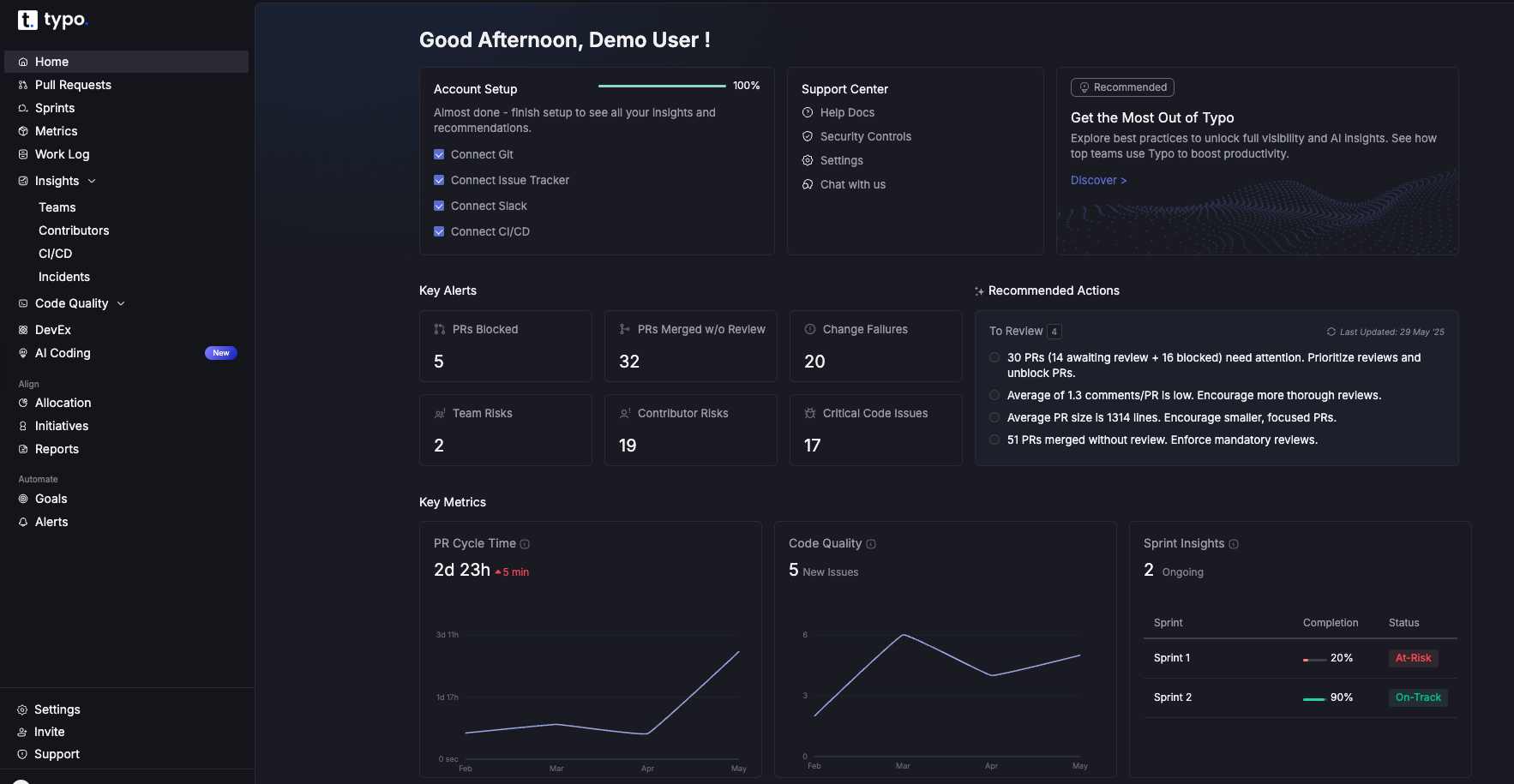
Typo is an intelligent engineering management platform. It is used for gaining visibility, removing blockers, and maximizing developer effectiveness. Through SDLC metrics, you can ensure alignment with business goals and prevent developer burnout. This tool can be integrated with the tech stack to deliver real-time insights. Typo also helps teams track progress and manage tasks throughout development projects. Git, Slack, Calenders, and CI/CD to name a few.
Typo Key Features:
GitHub is a popular git repository hosting service for code sharing. It offers robust source code management and supports a wide range of version control tools, making it essential for collaborative software development. GitHub is the leading platform for version control and source code management. It is a cloud-based tool that allows you to configure, control and maintain code bases with your team. GitHub helps teams track code changes and manage collaborative development efficiently. It also offers features such as bug tracking, feature request, and task management. Github’s supported platforms include Windows, Linux, MacOS, Android, and IOS.
GitHub Key Features:
Bitbucket is the largest version repository hosting service owned by Atlassian. It provides unlimited private code repositories for Git. Besides this, it also offers issue tracking, continuous delivery, and wikis. Bitbucket features seamless git integration, enabling streamlined development workflows and efficient source code management. This allows teams to track code changes and connect with version control systems to enhance productivity. The supported platforms for Bitbucket include Linux, AWS, Microsoft, and Azure.
Bitbucket key Features:
Jira is an issue-tracking product that tracks defects and manages bugs and agile projects. Jira is widely used by agile teams to manage software development projects and development projects of all sizes. It has three main concepts: Project, issue, and workflow. Jira is primarily used for backlog management and creating flexible workflows. Available on Windows, Linux, Amazon Web Services, and Microsoft Azure, Jira can be integrated with various engineering tools. A few of them include Zephyr, GitHub, and Zendesk.
Jira Key Features:
Linear is an issue-tracking tool for high-performing teams. It is used for streamlining software projects, tasks, and bug tracking. The majority of repeated work is automated already which makes the SDLC activities faster. It has more than 2200 integrations available such as Slack, Gitlab, and Marker.io. Linear also offers real-time git integration, making it ideal for teams focused on streamlined development workflows. The supported platforms for linear are MacOS intel, MacOS silicon, and Windows.
Linear Key Features:

ClickUp is a leading issue-tracking and productivity tool. It is highly customizable that lets you streamline issue-tracking and bug-reporting processes. It has powerful integrations with applications such as Gitlab, Figma, and Google Drive. ClickUp also supports integration with multiple tools, allowing teams to streamline workflows and manage tasks efficiently. ClickUp is available on Windows and Android.
Slack is a popular communication tool for engineering leaders and developers. It provides real-time visibility into project discussions and growth. Slack can also be integrated with monitoring tools to deliver real-time alerts and performance metrics, helping teams track system uptime and respond quickly to issues. This tool is available for many platforms such as Web, Windows, MacOS, Android, IOS, and Linux. Slack has an extensive app directory that lets you integrate engineering software and custom apps.
Slack Key Features:

Microsoft Teams streamlines communication and collaboration in a single platform. It assists in keeping up to date with development, testing, and deployment activities. Available for Web, IOS, Android, Windows, and MacOS, MS Teams includes built-in apps and integrations. Microsoft Teams is also well-suited for large enterprise environments that require secure, scalable collaboration.
Microsoft Teams Key Features:
Discord facilitates real-time discussions and communication. It is available on various platforms which include Windows, MacOS, Linux, Android, and IOS. It has an advanced video and voice call feature to collaborate for SDLC activities.
Discord Key Features:
Jenkins is one of the popular CI/CD tools for developers. It is a Java-based tool that produces results in minutes and provides real-time testing and reporting. By automating repetitive and critical development tasks, Jenkins helps reduce human error, thereby improving efficiency and reliability. Jenkins is widely regarded as the gold standard for continuous integration and continuous delivery (CI/CD). Jenkins is available for MacOS, Windows, and Linux platforms. It also offers an extensive plug-ins library to integrate with other development tools. Github, Gitlab, and Pipeline to name a few.
Jenkins Key Features:
Azure DevOps by Microsoft is a comprehensive CI/CD platform. It ensures that the entire software development delivery is done in a single place. From automating, building, and testing code, Azure DevOps brings together developers, product managers, and other team members. This tool has cloud-hosted pipelines available for MacOS, Windows, and Linux. Besides this, it has an integration of over 1000 apps built by the Azure community.
Azure DevOps Key Features:
AWS Codepipeline is an ideal CI/CD tool for AWS users. It helps in automating your build, release, and pipeline CI/CD processes. AWS Codepipeline also offers fast and reliable application and infrastructure updates. It enables teams to increase deployment frequency, allowing for faster feedback loops and greater operational agility. With easy steps, you can set up Codepipeline in your AWS account in a few minutes. This tool can also be integrated with third-party servers. It includes GitHub or your custom plugin.
AWS Codepipeline Key Features:
SonarQube is a popular static code analysis tool. It is used for continuous code inspection of code security and quality. SonarQube helps teams build secure software by identifying vulnerabilities early in the development process. The quality gate in this tool blocks any code that doesn’t reach a certain quality. It stops the code from going into production. It integrates with various code repositories such as GitHub, Bitbucket, and GitLab. SonarQube’s supported platforms are MacOS, Windows, and Linux.
SonarQube Key Features:
Codefactor.io is a code analysis and review tool that helps you to get an overview of the code base. It also supports analysis across complex software systems to maintain operational efficiency. It also allows you to get a glance at a whole project, recent commits, and problematic files. The powerful integrations of CodeFactor.io are GitHub and Bitbucket.
CodeFactor.io Key Features:
Selenium is a powerful tool for web-testing automation. It is implemented by organizations of different industries to support an array of initiatives including DevOps, Agile model, and Continuous delivery. Selenium, Cypress, and Playwright are open-source frameworks for automating web browser and end-to-end testing. Selenium is one of the best test automation tools that can be automated across various Os. It includes Windows, Mac, and Linux as well as browsers such as Chrome, Firefox, IE, Microsoft Edge, Opera, and Safari.
Selenium also supports testing for mobile apps across various devices and platforms, enabling automation, debugging, and performance tracking for mobile applications.
Selenium Key Features:
LambdaTest is one of the well-known test automation tools that provides cross-platform compatibility. It can be used with simulated devices on the cloud or locally deployed emulators. This tool can be integrated with a variety of frameworks and software tools. It includes Selenium, Cypress, Playwright, Puppeteer, Taiko, Appium, Espresso and XCUITest.
LambdaTest Key Features:
Cypress is an open source automation tool for front-end developers that operates with a programming language – JavaScript framework. It is one of the popular test automation tools that focuses on end-to-end testing. It is built upon a new architecture, hence, it can directly operate within a browser in the same run-loop as your application.
Cypress Key Features:
It is one of the automated code review tools for static analysis. Supporting more than 40+ programming languages, Codacy also integrates with various popular tools and CI/CD workflows.
Codacy Key Features:
One of the code review tools that is built on a SaaS model. It helps in analyzing code from a security standpoint.
Veracode Key Features:
GitHub Co-pilot is an AI pair programmer that uses open AI codex for writing code quickly. It also assists developers in debugging code across multiple programming languages, making it a versatile tool for both writing and troubleshooting code. The programmer is trained in natural language and publicly available source code that makes it suitable for programming and human languages. The aim is to speed up the development process and increase developers’ productivity. It draws context from the code and suggests whole lines or complete functions. GitHub works the most efficiently with few programming languages. These include Typescript, Javascript, Ruby, Python, GO, C#, and C++. It can be integrated with popular editors. It includes Neovim, JetBrains IDEs, Visual Studio, and Visual Studio Code. However, you need to install visual studio code for using GitHub on this platform.
GitHub Co-pilot Key Features:

Determining the optimal SDLC tools represents a transformative step that reshapes how development teams approach software creation and delivery. The right tools don't merely streamline processes—they fundamentally enhance collaboration dynamics, elevate code quality standards, and significantly reduce manual overhead for development teams. When analyzing SDLC tools, it's essential to examine how effectively they integrate with your current workflows, version control ecosystems, and project management frameworks. Seek out solutions that embrace multiple operating systems and programming languages, while offering advanced capabilities such as agile project management, continuous integration (CI), and comprehensive static code analysis.
Contemporary software development demands tools that facilitate seamless continuous integration and continuous delivery (CI/CD) pipelines, automated testing frameworks, and sophisticated software composition analysis. These capabilities serve as catalysts for reducing technical debt, amplifying test coverage, and ensuring your software adheres to rigorous security and quality benchmarks. Collaboration platforms such as Slack and Microsoft Teams prove invaluable for maintaining alignment among development teams, stakeholders, and customers throughout the entire development lifecycle, creating a unified ecosystem that drives project success.
These tools can assist you well while you work on SDLC activities.
In this article, we have highlighted some of the well-known tools for your team. You can research more about them to know what fits best for your team.


Implement engineering metrics, gather SDLC insights & set continuous improvement goals in your dev teams.
Try Live Demo
We're on a mission to build engaged, productive tech teams. Try it out for free!


Follow us on: